After, it is up to your to test the restore, especially if that a specific
mountpoint I guess you will have to have it in place before restoring the
file there. But at least you have the files. ;-)
On Monday, 8 September 2025 at 19:06:33 UTC+2 Markus Dubois wrote:

> thanks, i´ll read and implement this accordingly
>
> Bruno Friedmann (bruno-at-bareos) schrieb am Montag, 8. September 2025 um
> 09:50:12 UTC+2:
>
>>
>> Hello Markus,
>>
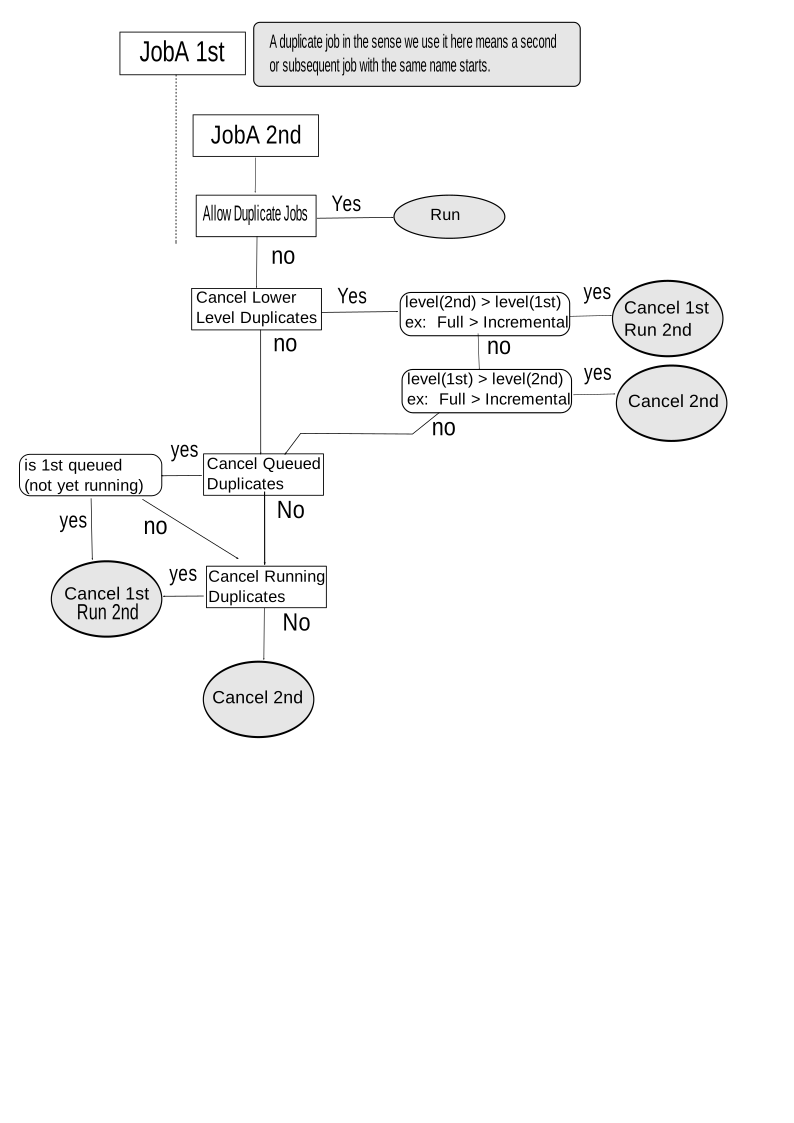
>> From what I can see in your configuration, it look like you missed to
>> setup one off the cancel instruction
>> see https://docs.bareos.org/master/_images/duplicate-real.svg
>>
>> I personally have my jobs setup with
>>
>>   Allow Duplicate Jobs = no
>>   Cancel Lower Level Duplicates = yes
>>   Cancel Queued Duplicates = yes
>>
>> Cancel Running Duplicates = no ( not written as it is the default )
>>
>> and didn't seen what you experiment (it doesn't mean it can't exist) but
>> we would have to find then the why.
>>
>>
>> On Friday, 5 September 2025 at 19:17:40 UTC+2 Markus Dubois wrote:
>>
>>> no, also adding the Max Run Time = 48h didn´t help. again it´s 19:00 and
>>> the incremental job gets upgraded to full and overtakes everything and the
>>> running full stops without error.
>>> this worked for years. the only thing i did was the allignment of the
>>> pools, so that everything goes into AI-Consolidated (see above), so that
>>> virtual fulls are working.
>>> Now physical fulls have those issues....
>>>
>>> Markus Dubois schrieb am Donnerstag, 4. September 2025 um 20:43:05 UTC+2:
>>>
>>>> ..since recently i have the issue that a long running full backup (15
>>>> TB) runs ....
>>>>
>>>> ...until the daily schedule starts the expected incremental job.
>>>> earlier in the time when everything was working, the incremental job
>>>> wanted to start a full, as it doesn´t find one, but got blocked by the "no
>>>> duplicates" directive.
>>>>
>>>> this no longer works now.
>>>>
>>>> I have the situation, that the full job got silently killed and the new
>>>> earlier incremental, "now wanna be full" job takes over.
>>>> This is unfortunate as until now i had no "Max Run" time configured,
>>>> what should mean "forever". Now i´ve set 48h and look tonight if the full
>>>> runs trough.
>>>>
>>>> Here is my job config and my jobdefs
>>>>
>>>> Job {
>>>>   Name = "AIbackup-omvserver"
>>>>   Client = "omvserver"
>>>>   FileSet = omvserver
>>>>   Type = Backup
>>>>   Level = Incremental
>>>>   Schedule = "AISchedule"
>>>>   Storage = FileCons
>>>>   Priority = 50
>>>>   Messages = Standard
>>>>   Pool = AI-Incremental
>>>>   Max Run Time = 48h
>>>>   Spool Attributes = yes
>>>>   Maximum Concurrent Jobs = 1
>>>>   Full Backup Pool = AI-Consolidated
>>>>   Incremental Backup Pool = AI-Incremental
>>>>   Accurate = yes
>>>>   Allow Mixed Priority = no
>>>>   Allow Duplicate Jobs = no
>>>>   Always Incremental = yes
>>>>   Always Incremental Job Retention = 7 days
>>>>   Always Incremental Keep Number = 7
>>>>   Always Incremental Max Full Age = 11 days
>>>>   Max Virtual Full Interval = 14 days
>>>>   Run Script {
>>>>     Console = ".bvfs_update jobid=%i"
>>>>     RunsWhen = After
>>>>     RunsOnClient = No
>>>>   }
>>>> Run Script {
>>>>     Command = "/var/lib/bareos/scripts/jobcheck.sh"
>>>>     RunsWhen = Before
>>>>     RunsOnClient = No
>>>>     Fail job on error = No
>>>>   }
>>>>   Run Script {
>>>>     Command = "rm -f /var/lib/bareos/scripts/job.running"
>>>>     RunsWhen = After
>>>>     RunsOnClient = No
>>>>     Fail job on error = No
>>>>   }
>>>> }
>>>>
>>>> JobDefs {
>>>>   Name = "DefaultJob"
>>>>   Type = Backup
>>>>   Level = Incremental
>>>>   Client = nasbackup
>>>>   FileSet = "Catalog"                     # selftest fileset
>>>>                  (#13)
>>>>   Schedule = "WeeklyCycle"
>>>>   Storage = File
>>>>   Messages = Standard
>>>>   Pool = AI-Incremental-Catalog
>>>>   Priority = 10
>>>>   Write Bootstrap = "/var/lib/bareos/%c.bsr"
>>>>   Run Script {
>>>>     Console = ".bvfs_update jobid=%i"
>>>>     RunsWhen = After
>>>>     RunsOnClient = No
>>>>   }
>>>>   Full Backup Pool = AI-Consolidated-Catalog                  # write
>>>> Full Backups into "Full" Pool         (#05)
>>>> }
>>>>
>>>

--
You received this message because you are subscribed to the Google Groups
"bareos-users" group.
To unsubscribe from this group and stop receiving emails from it, send an email
to [email protected].
To view this discussion visit
https://groups.google.com/d/msgid/bareos-users/f67c01ba-b380-4f75-83f5-d01715d2303cn%40googlegroups.com.