On Mon, Feb 6, 2012 at 5:37 PM, John Chambers <[email protected]> wrote:
>
> Hi Olemis,
>
:)

>
> On 6 February 2012 22:02, Olemis Lang <[email protected]> wrote:
>
[...]
>
> >
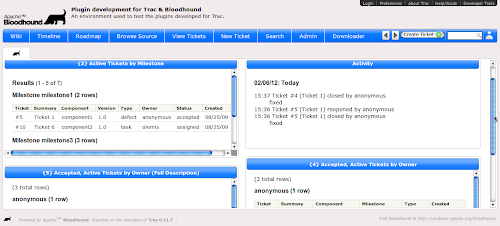
> > Today I've managed to make some decent progress regarding the
> > dashboard . Please review this album [1]_ for further details ;) .
> >
> > Tomorrow I'll be able to be more verbose and explain «the whole thing»
> > ... but in the meantime there you have it .
> > ;)
> >


... well let's start by explaining the whole thing ;)
The architecture of the dashboard relies on the following key elements :

1- widgets (IWidgetProvider) : which are small pieces of
    UI display content provided by Trac components (... or maybe
    other sources ...)
    * Widgets are the intermediate step between WikiMacros
      (the former may be rendered anywhere whereas the later
      are limited to «fields» supporting WikiFormatting) and
      gadgets (which may be hosted somewhere else, need an
      underlaying container relying on an API not coupled to
      the Trac system)
    * they may be parameterized ; e.g. at present there are two
      widgets , activity widget displaying timeline events and
      tickets report widget displaying report results . In the later
      case one such parameter is report ID . So in order to make
      this look like in the mockups the only thing that's needed
      is to include in default Bloodhound installation one such
      report outputting ticket data like shown in there and
      configure report ID so as to render the widget
      (piece of cake ... so don't feel bad if those reports ain't
      render your data the way you want , you are just one
      SQL report away ;)
    * Widget contents are rendered inside a box making
      it look like iGoogle . Appearance is controlled by
      by jQuery UI theme [1]_ . Of course this might
      change , it's just something for you to see ;)
    * The first milestone may be to implement widgets for
       different parts of core Trac system (roadmap view ,
       search results , repository graph ...)
2- layouts (no extension point interface at the moment) : which
    allow for customizing how widgets will be arranged (e.g.
    one column , two columns ... ;)
    * At present I'm using YUI grids CSS to get this done
      (considering the fact that I'm more familiar with it and wanted
      to get things working ASAP ;) . Nonetheless it's not
      mandatory to use them . The idea is that it will be possible to
      use any similar lib you want once pluggable layout providers will
      come to life as they'll determine what Genshi template will
      be used to render the dashboard
3- the glue layer between , mainly consisting of a mechanism to
    specify where to locate each widget according to the layout
    in use , and the parameters needed in each case .
    * This will provide enough flexibility in dashboard design .
    * At present this does not exist at all so I still look forward
      for great ideas to get this done . In the case of two
      columns dashboard [2]_ in screenshots , this looks like a simple

{{{
#!py

        widgets_spec = [
                {
                    'c' : TicketReportWidget(self.env),
                    'args' : ['TicketReport', ctx, {'args' : {'id' : 3}}]
                },
                {
                    'c' : TimelineWidget(self.env),
                    'args' : ['Timeline', ctx, {'args' : {'max' : 10}}]
                },
                {
                    'c' : TicketReportWidget(self.env),
                    'args' : ['TicketReport', ctx, {'args' : {'id' : 5}}]
                },
                {
                    'c' : TicketReportWidget(self.env),
                    'args' : ['TicketReport', ctx, {'args' : {'id' : 4}}]
                },
            ]

}}}

4- ... I forgot ... I'm too old , not enough coffee, ...
    :$


> > Feedback is welcome ...
> >
>
> Those screenshots look really good. Nice work.
>

thnx
:)

>
> I know how hard it can be to match a designers vision.


... well , so far I was just experimenting and figuring out how the
underlying architecture should look like . Another important goal was
to be able to show you all something as soon as possible ;) . Now that
there's something out there to play with , I think we can focus on

1- Figure out how to let the code see the daylight ;)
    so that more people will be able to do things in
    Apache svn repos ;)
2- Improve what we already have
3- Develop what's missing in there (see above ;)
4- Improve and adapt the graphical design of dashboard and theme ...
5- ... etc, etc, etc ...

... so at this point , no worries if this doesn't look like the mockups yet .
Designers your dreams will become a reality as soon as possible .
Further suggestions will be welcome as well
;)

> I was one of the
> developers behind implementing uberSVN <http://www.ubersvn.com/> mainly on
> the web front end.


keep up the good work !
:)

>
> Also I am hoping to find more time to get to grips with how the trac front
> end is implemented with an eye on integrating it into uberSVN at some point.


cool !

> So I know where to come for the heads up on that work ;)
>

I look forward to this ... hoping it will happen soon .
;)

.. [1] Bloodhound jQuery UI custom theme
        (http://goo.gl/pbHhV)

.. [2] Sample two-column layout in Bloodhound dashboard

(https://lh5.googleusercontent.com/-lF3P-RPrvQo/TzBRLApcmqI/AAAAAAAAAbY/YjmMplAEJCs/w500-h226-k/BH_dashboard_6.png)

--
Regards,

Olemis

Facebook => http://www.facebook.com/olemis
Twitter => http://www.twitter.com/olemislc (@olemislc)
Blog ES => http://simelo-es.blogspot.com
Blog EN => http://simelo-en.blogspot.com
Quora => http://www.quora.com/olemis
Youtube => http://youtube.com/user/greatsoftw

Featured article : Identificando números primos con expresión regular en Perl
http://feedproxy.google.com/~r/simelo-news/~3/BHr859OSndo/identificando-numeros-primos-con.html
Tweet: yo no puedo creer q haya pasado inadvertido el 1/2/12 12:12 ...
@elainediaz2003 no dijo na' ... OMG ! ... much more coming soon ;) #fb
Follow @olemislc Reply Retweet   12:59 Feb-01
  Get this email app!
Get a signature like this. CLICK HERE.