Hi Steve,

I completely agree with the time sync requirement and NTP addressing that -
good catch.
The commands around service assurance agent features have changed a number
of times, when I first played with it, you used RTR commands...  The IOS
version I was using in my configs was
c3725-adventerprisek9-mz.124-15.T14.bin - I'm guessing its not quite new
enough since it wont take the specific command syntax you used but I guess
the humble question mark would help to identify the changes when the config
parser cries that it doesn't understand what you want it to do :)

Cheers,
Adam

On Sat, Oct 30, 2010 at 1:42 AM, Di Bias, Steve <[email protected]>wrote:

>  From a real world perspective your clocks need to be synchronized when
> monitoring jitter, so my solution would have included NTP and IP SLA. Even
> if your timestamps are off by only a few seconds your results will be
> skewed. Other than that Adam’s solution looks good. Also the command syntax
> and options I see on (C3725-ADVIPSERVICESK9-M), Version 12.4(25b) differ
> from what I see in Adams config.
>
>
>
> *R2*
>
> * *
>
> clock timezone PST -8
>
> clock set 08:30:00 29 Oct 2010
>
> ntp master 3
>
>
>
> interface FastEthernet0/0
>
>  ip address 10.186.12.2 255.255.255.0
>
>
>
> ip sla monitor 10
>
>  type jitter dest-ipaddr 10.186.12.1 dest-port 16384 source-ipaddr
> 10.186.12.2 codec g729a
>
> ip sla monitor schedule 10 life forever start-time now
>
>
>
> R2(config)#do sh clock
>
> *08:30:14.735 PST Fri Oct 29 2010*
>
> * *
>
> R2(config)#do sh ntp stat | in Clo
>
> *Clock is synchronized, stratum 3, reference is 127.127.7.1*
>
>
>
> *R1*
>
>
>
> interface FastEthernet0/0
>
>  ip address 10.186.12.2 255.255.255.0
>
>
>
> R1(config)#ip sla mon responder
>
>
>
> R1(config)#do sh ntp stat | in Clock
>
> *Clock is synchronized, stratum 4, reference is 10.186.12.2*
>
>
>
> R1(config)#do sh ntp ass
>
>       address         ref clock     st  when  poll reach  delay  offset
> disp
>
> **~10.186.12.2      127.127.7.1       3    47    64   37     1.9    3.38
> 875.3*
>
>
>
>
>
> both clocks
>
>
>
> R1(config)#do sh clock
>
> 16:44:16.337 UTC Fri Oct 29 2010
>
>
>
> R2(config)#do sh clock
>
> 08:44:16.383 PST Fri Oct 29 2010
>
>
>
> R2(config)#do sh ip sla mon stat
>
> Round trip time (RTT)   Index 10
>
>         Latest RTT: 2 ms
>
> Latest operation start time: 08:45:44.923 PST Fri Oct 29 2010
>
> Latest operation return code: OK
>
> RTT Values
>
>         Number Of RTT: 1000
>
>         RTT Min/Avg/Max: 1/2/3 ms
>
> Latency one-way time milliseconds
>
>         Number of one-way Samples: 0
>
>         Source to Destination one way Min/Avg/Max: 0/0/0 ms
>
>         Destination to Source one way Min/Avg/Max: 0/0/0 ms
>
> Jitter time milliseconds
>
>         Number of SD Jitter Samples: 999
>
>         Number of DS Jitter Samples: 999
>
>         Source to Destination Jitter Min/Avg/Max: 0/1/1 ms
>
>         Destination to Source Jitter Min/Avg/Max: 0/1/2 ms
>
> Packet Loss Values
>
>         Loss Source to Destination: 0           Loss Destination to Source:
> 0
>
>         Out Of Sequence: 0      Tail Drop: 0    Packet Late Arrival: 0
>
> Voice Score Values
>
>         Calculated Planning Impairment Factor (ICPIF): 11
>
> MOS score: 4.06
>
> Number of successes: 8
>
> Number of failures: 3
>
> Operation time to live: Forever
>
>
>
>
>
> Thank you,
>
>
>
> Steve Di Bias
>
> Network Engineer - Information Systems
>
> *Valley Health System – Las Vegas*
>
> *Office* - 702- 369-7594
>
> *Cell* - 702-241-1801
>
> *[email protected]* <[email protected]>
>
>
>  ------------------------------
>
> *From:* [email protected] [mailto:
> [email protected]] *On Behalf Of *Jason Maynard
> *Sent:* Friday, October 29, 2010 5:09 AM
> *To:* 'Adam Booth'
>
> *Cc:* [email protected]
> *Subject:* Re: [OSL | CCIE_RS] Question 160
>
>
>
> Hey Adam,
>
>
>
> Looks good
>
>
>
> I wanted to keep it vague to show that all that really matters is what is
> in front of  you and in this case it is “Monitor” and “Jitter” between
> devices. I struggled in the past with not having all (what I believe is all)
> the requirements but learned that all I needed to do was meet the
> requirement. Some things that were left up to you were type, codec, ports,
> etc.
>
> I believe “ip sla” is only on legacy IOS’s and the newer IOS’s use “ip sla
> monitor” – Please correct me if I am wrong
>
>
>
> I would like to how others put their solutions together
>
>
>
>
>
> Thanks Adam!
>
>
>
>
>
> *From:* Adam Booth [mailto:[email protected]]
> *Sent:* October-29-10 12:34 AM
> *To:* Jason Maynard
> *Cc:* [email protected]
> *Subject:* Re: [OSL | CCIE_RS] Question 160
>
>
>
> Hi Jason,
>
>
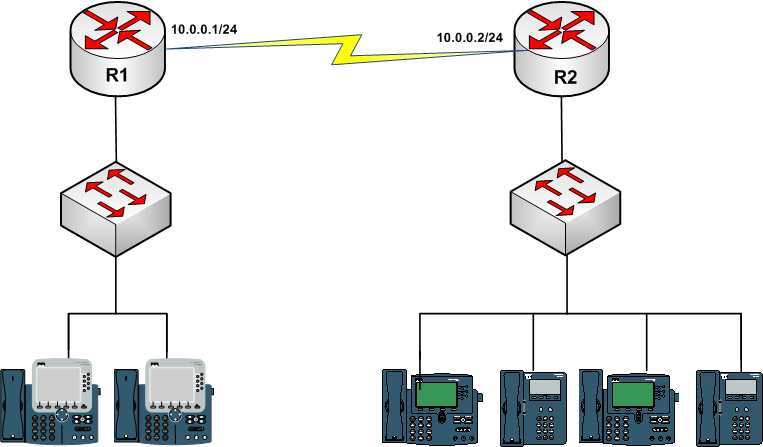
> There's a number of jitter measurement options available using ip sla, I
> took the assumption that since your picture had IP phones, that udp jitter
> simulating a voip call may be appropriate.
>
> Below are my proposed configs.
>
>
> hostname R1
> !
> interface FastEthernet0/0
>  ip address 10.0.0.1 255.255.255.0
>  no shutdown
> !
> ip sla 10
>  udp-jitter 10.0.0.2 16384 codec g729a
> ip sla schedule 10 life forever start-time now
>
>
>
> hostname R2
> !
> interface FastEthernet0/0
>  ip address 10.0.0.2 255.255.255.0
>  no shutdown
> !
> ip sla responder
>
>
>
> R1#sh ip sla stati 10
>
> Round Trip Time (RTT) for       Index 10
>         Latest RTT: 22 milliseconds
> Latest operation start time: *00:14:19.003 UTC Fri Mar 1 2002
> Latest operation return code: OK
> RTT Values:
>         Number Of RTT: 1000             RTT Min/Avg/Max: 1/22/493
> milliseconds
> Latency one-way time:
>         Number of Latency one-way Samples: 0
>         Source to Destination Latency one way Min/Avg/Max: 0/0/0
> milliseconds
>         Destination to Source Latency one way Min/Avg/Max: 0/0/0
> milliseconds
> Jitter Time:
>         Number of SD Jitter Samples: 999
>         Number of DS Jitter Samples: 999
>         Source to Destination Jitter Min/Avg/Max: 0/17/67 milliseconds
>         Destination to Source Jitter Min/Avg/Max: 0/7/496 milliseconds
> Packet Loss Values:
>         Loss Source to Destination: 0           Loss Destination to Source:
> 0
>         Out Of Sequence: 0      Tail Drop: 0
>         Packet Late Arrival: 0  Packet Skipped: 0
> Voice Score Values:
>         Calculated Planning Impairment Factor (ICPIF): 4209067962
> MOS score: 4.50
> Number of successes: 1
> Number of failures: 0
> Operation time to live: Forever
>
> It is possible to reflect the configuration for R1 and R2 but since we get
> both Source to Destination and Destination to Source jitter this way, it's
> probably not required.
>
> Cheers,
> Adam
>
>  On Fri, Oct 29, 2010 at 1:30 PM, Jason Maynard <[email protected]>
> wrote:
>
> Here is another question to test your skills.
>
> What would you configure to monitor jitter? You must provide an example
> using R1 and R2.
>
> *Error! Filename not
> specified.*<http://4.bp.blogspot.com/_RcSjgG49QBc/TMo8YRb73lI/AAAAAAAAAEY/SD-bnXKSdXM/s1600/Phone.png>
>
> *Error! Filename not specified.*
>
> *Error! Filename not specified.*
>
>
>
>
> _______________________________________________
>
> For more information regarding industry leading CCIE Lab training, please
> visit www.ipexpert.com
>
>
>
>
>
> UHS Confidentiality Notice: This e-mail message, including any attachments,
> is for the sole use of the intended recipient(s) and may contain
> confidential and privileged information. Any unauthorized review, use,
> disclosure or distribution of this information is prohibited, and may be
> punishable by law. If this was sent to you in error, please notify the
> sender by reply e-mail and destroy all copies of the original message.
_______________________________________________
For more information regarding industry leading CCIE Lab training, please visit
www.ipexpert.com