This is an automated email from the ASF dual-hosted git repository.

ako pushed a commit to branch new-web
in repository https://gitbox.apache.org/repos/asf/age-website.git
The following commit(s) were added to refs/heads/new-web by this push:
new 61be728d Update blog (#324)
61be728d is described below
commit 61be728d7557596ee76d0bb345b961cb976c9c4f
Author: dpdjvhxm <[email protected]>
AuthorDate: Tue May 28 00:48:33 2024 +0900
Update blog (#324)
* Test
* Update gatsby-config.js
* Changes search result text
* Fix gatsby-config.js and title
* Change meta description
* Fix sitemap.xml for broken links
* Update landing page: Key Update and image
* Create Blog
“2024-04-21-how-to-integrate-langchain-with-apache-age-for-graph-database-applications”
* Update Blog
“2024-04-21-how-to-integrate-langchain-with-apache-age-for-graph-database-applications”
* Update Blog
“2024-04-21-how-to-integrate-langchain-with-apache-age-for-graph-database-applications”
* Update blog, cms
* Update blog
* Fix spelling error
* Activate "blog"
* Update download page, modified blog
* modified footer, download
* Update landing image and blog scss
* modified: src/components/styles/Blog-post.scss
* modified: src/pages/download/index.md
* modified: src/templates/blog-post.js
* Create Blog
“2024-04-23-beyond-chatgpt-how-to-maximize-the-use-of-chatgpt-with-interactive-graph-models”
* Create Blog
“2024-04-23-combating-cyber-attack-with-apache-ages-link-analysis”
* Create Blog
“2024-04-23-from-data-to-connections-leveraging-hyperconnectivity-in-e-commerce-data-part-1”
* Create Blog
“2024-04-23-learn-machine-learning-with-graph-in-hyperconnected-data-part-2”
* Create Blog “2024-04-23-graph-database-in-postgresql-apache-age”
* Create Blog “2024-04-23-comparison-of-apache-age-postgraphile-and-hasura”
* modified: static/admin/config.yml
* modified: src/components/styles/Blog-post.scss
modified: src/components/styles/BlogRollTemplate.module.scss
modified: src/templates/blog-post.js
* Update Blog “blog_240401”
* Match file name format
* deleted: src/pages/blog/blog_240401.md
* Change button color
* modified: static/sitemap.xml
* modified blog
* modified: src/pages/404.js
modified: src/pages/index.md
* Create Blog
“2024-04-25-discovering-the-inner-workings-of-postgresqls-data-allocation”
* Create Blog
“2024-04-25-seamless-data-migration-migrating-apache-age-data-between-different-versions-of-postgresql”
* Create Blog “2024-04-25-how-to-deploy-apache-age-docker-image-on-aws”
* modified: static/admin/config.yml
* modified: src/pages/blog/
modified:
src/pages/blog/2024-04-25-how-to-deploy-apache-age-docker-image-on-aws.md
modified:
src/pages/blog/2024-04-25-seamless-data-migration-migrating-apache-age-data-between-different-versions-of-postgresql.md
* Create Blog “2024-05-01-what-is-a-graph-database”
* modified: src/templates/blog-post.js
* modified: src/pages/blog/
* modified: src/pages/blog/
* Remove sign®
* modified ™
* Create Blog “2024-05-21-a-dockerhub-guide”
* Create Blog “2024-05-21-a-beginners-guide-to-downloading-docker”
* Create Blog “2024-05-21-basic-understanding-what-is-a-container”
* Create Blog
“2024-05-21-navigating-the-maze-of-data-with-apache-age-and-langchain”
* Create Blog “2024-05-21-how-to-use-the-official-apache-age-docker-image”
* modified blogs
* Update Blog “2024-05-21-a-dockerhub-guide”
* modified BlogRoll
* modified BlogRollTemplate
* new file: static/ads.txt
---
src/components/BlogRoll.js | 59 ++----
src/components/styles/BlogRollTemplate.module.scss | 87 ++++----
...nner-workings-of-postgresqls-data-allocation.md | 2 +-
...5-21-a-beginners-guide-to-downloading-docker.md | 151 ++++++++++++++
src/pages/blog/2024-05-21-a-dockerhub-guide.md | 47 +++++
...5-21-basic-understanding-what-is-a-container.md | 70 +++++++
...-to-use-the-official-apache-age-docker-image.md | 219 +++++++++++++++++++++
...e-maze-of-data-with-apache-age-and-langchain.md | 149 ++++++++++++++
static/ads.txt | 0
9 files changed, 687 insertions(+), 97 deletions(-)
diff --git a/src/components/BlogRoll.js b/src/components/BlogRoll.js
index 887544c5..a69a1664 100644
--- a/src/components/BlogRoll.js
+++ b/src/components/BlogRoll.js
@@ -10,52 +10,21 @@ class BlogRollTemplate extends React.Component {
const { edges: posts } = data.allMarkdownRemark
return (
- <div className="columns is-multiline">
+ <div className={styles.mainContent}>
{posts &&
posts.map(({ node: post }) => (
- <div className={styles.articles} key={post.id}>
- <article
- className={`blog-list-item tile is-child box notification
${post.frontmatter.featuredpost ? 'is-featured' : ''
- }`}
- >
+ <div className={styles.article} key={post.id}>
+ <article className={styles.blogListItem}>
<header>
- <p className="post-meta">
- <Link
- className="title has-text-primary is-size-4"
- to={post.fields.slug}
- >
- {post.frontmatter.title}
- </Link>
- <span> • </span> <br/>
- <span className="subtitle is-size-5 is-block">
- {post.frontmatter.date}
- </span>
- </p>
- {post.frontmatter.featuredimage ? (
- <div className="featured-thumbnail">
- <PreviewCompatibleImage
- imageInfo={{
- image: post.frontmatter.featuredimage,
- alt: `featured image thumbnail for post
${post.frontmatter.title}`,
- width:
- post.frontmatter.featuredimage.childImageSharp
- .gatsbyImageData.width,
- height:
- post.frontmatter.featuredimage.childImageSharp
- .gatsbyImageData.height,
- }}
- />
- </div>
- ) : null}
- </header>
- <p>
- {post.excerpt}
- <br />
- <br />
- <Link className="button" to={post.fields.slug}>
- Keep Reading →
+ <Link className={styles.title} to={post.fields.slug}>
+ {post.frontmatter.title}
</Link>
- </p>
+ <p className={styles.date}>{post.frontmatter.date}</p>
+ </header>
+ <p>{post.excerpt}</p>
+ <Link className={styles.keepReading} to={post.fields.slug}>
+ Keep Reading →
+ </Link>
</article>
</div>
))}
@@ -64,7 +33,7 @@ class BlogRollTemplate extends React.Component {
}
}
-BlogRoll.propTypes = {
+BlogRollTemplate.propTypes = {
data: PropTypes.shape({
allMarkdownRemark: PropTypes.shape({
edges: PropTypes.array,
@@ -72,7 +41,6 @@ BlogRoll.propTypes = {
}),
}
-
export default function BlogRoll() {
return (
<StaticQuery
@@ -101,7 +69,6 @@ export default function BlogRoll() {
quality: 100
layout: CONSTRAINED
)
-
}
}
}
@@ -112,5 +79,5 @@ export default function BlogRoll() {
`}
render={(data, count) => <BlogRollTemplate data={data} count={count} />}
/>
- );
+ )
}
diff --git a/src/components/styles/BlogRollTemplate.module.scss
b/src/components/styles/BlogRollTemplate.module.scss
index b4844888..81fc9b8f 100644
--- a/src/components/styles/BlogRollTemplate.module.scss
+++ b/src/components/styles/BlogRollTemplate.module.scss
@@ -1,54 +1,41 @@
-.articles {
- article {
- display: flex;
- flex-direction: row;
- background-color: rgb(255, 255, 255);
- border-radius: 16px;
- margin-top: 8px;
- margin-bottom: 8px;
- header {
- display: flex;
-
- max-width: 500px;
- min-width: 500px;
- }
- padding-left: 10%;
- padding-right: 10%;
- }
-}
-
-.articles {
- margin-bottom: 8px;
- padding-bottom: 8px;
- border-bottom: 1px solid #ccc; // 구분선 색상과 두께 조정
+.mainContent {
+ padding: 2rem;
+ max-width: 1920px;
+ margin: 0 auto;
+ padding-left: 10%; // 왼쪽에 공백을 추가합니다.
+ padding-right: 10%; // 오른쪽에 공백을 추가합니다.
+ }
+
+ .article {
+ margin-bottom: 2rem;
+ }
+
+ .blogListItem {
+ border-bottom: 1px solid #eaeaea;
+ padding-bottom: 1rem;
+ }
- &:last-child {
- border-bottom: none; // 마지막 요소에는 구분선 없음
- }
+ .title {
+ font-size: 2rem;
+ color: #333;
+ text-decoration: none;
+ font-weight: bold;
}
-
-
-.post-meta {
- position: absolute; // 이미지를 절대 위치로 설정합니다.
- left: 50%; // 부모 컨테이너의 가운데로 설정합니다.
- top: 50%; // 부모 컨테이너의 가운데로 설정합니다.
- transform: translate(-50%, -50%); // 정확히 중앙에 오도록 조정합니다.
- z-index: 10; // 다른 요소들 위에 오도록 z-index 값을 설정합니다.
-
- // 필요한 경우 width와 height도 고정할 수 있습니다.
- width: 100px; // 고정된 너비를 원할 경우
- height: 100px; // 고정된 높이를 원할 경우
-}
-.featured-thumbnail {
- position: absolute; // 이미지를 절대 위치로 설정합니다.
- left: 50%; // 부모 컨테이너의 가운데로 설정합니다.
- top: 50%; // 부모 컨테이너의 가운데로 설정합니다.
- transform: translate(-50%, -50%); // 정확히 중앙에 오도록 조정합니다.
- z-index: 10; // 다른 요소들 위에 오도록 z-index 값을 설정합니다.
-
- // 필요한 경우 width와 height도 고정할 수 있습니다.
- width: 100px; // 고정된 너비를 원할 경우
- height: 100px; // 고정된 높이를 원할 경우
-}
+ .date {
+ font-size: 1rem;
+ color: #666;
+ }
+
+ .featuredThumbnail {
+ margin-top: 1rem;
+ margin-bottom: 1rem;
+ }
+
+ .keepReading {
+ display: inline-block;
+ margin-top: 1rem;
+ color: #007acc;
+ text-decoration: none;
+ }
\ No newline at end of file
diff --git
a/src/pages/blog/2024-04-25-discovering-the-inner-workings-of-postgresqls-data-allocation.md
b/src/pages/blog/2024-04-25-discovering-the-inner-workings-of-postgresqls-data-allocation.md
index 81dd705f..c0b553c1 100644
---
a/src/pages/blog/2024-04-25-discovering-the-inner-workings-of-postgresqls-data-allocation.md
+++
b/src/pages/blog/2024-04-25-discovering-the-inner-workings-of-postgresqls-data-allocation.md
@@ -10,7 +10,7 @@ description: PostgreSQL is a true gem among open-source
relational database
allocation process to reveal its inner workings and discover how it ensures
optimal performance and reliability.
featuredpost: true
-featuredimage: /img/logo.png
+featuredimage:
---
<!--StartFragment-->
diff --git
a/src/pages/blog/2024-05-21-a-beginners-guide-to-downloading-docker.md
b/src/pages/blog/2024-05-21-a-beginners-guide-to-downloading-docker.md
new file mode 100644
index 00000000..67983d15
--- /dev/null
+++ b/src/pages/blog/2024-05-21-a-beginners-guide-to-downloading-docker.md
@@ -0,0 +1,151 @@
+---
+templateKey: blog-post
+title: A Beginner's Guide to Downloading Docker
+date: 2024-05-21T01:56:54.293Z
+description: A Beginner's Guide to Downloading Docker
+featuredpost: true
+featuredimage:
+---
+<!--StartFragment-->
+
+Docker has become an essential technology for modern software development and
deployment. It enables developers to bundle programs and dependencies into
containers, resulting in a uniform environment across several computers. In
this blog article, we will walk you through the process of downloading Docker
step by step.
+
+
+
+System Requirements:
+
+
+
+1. WSL 2 Backend
+
+* WSL version 1.1.3.0 or later.
+* Windows 11 64-bit: Home or Pro version 21H2 or higher, or Enterprise or
Education version 21H2 or higher.
+* Windows 10 64-bit:
+
+1. We recommend Home or Pro 22H2 (build 19045) or higher, or Enterprise or
Education 22H2 (build 19045) or higher.
+2. Minimum required is Home or Pro 21H2 (build 19044) or higher, or Enterprise
or Education 21H2 (build 19044) or higher.
+
+* Turn on the WSL 2 feature on Windows. For detailed instructions, refer to
the [Microsoft
documentation](https://learn.microsoft.com/en-us/windows/wsl/install).
+* The following hardware prerequisites are required to successfully run WSL 2
on Windows 10 or Windows 11:
+
+1. 64-bit processor with [Second Level Address Translation
(SLAT)](https://en.wikipedia.org/wiki/Second_Level_Address_Translation)
+2. 4GB system RAM
+3. Enable hardware virtualization in BIOS. For more information, see
[Virtualization](https://docs.docker.com/desktop/troubleshoot/topics/#virtualization).
+
+Containers and images built using Docker Desktop are shared among all user
accounts on the computers where it is installed. This is because all Windows
accounts utilize the same virtual machine to create and operate containers. It
is important to note that the Docker Desktop WSL 2 backend does not allow you
to exchange containers or images between user accounts.
+
+## Install Docker Desktop on Windows
+
+1. Install from Command Line:
+
+After downloading Docker Desktop Installer.exe, run the following command in a
terminal to install Docker Desktop:
+
+
+
+| |
+| --- |
+| |
+
+
+
+If you’re using PowerShell you should run it as:
+
+
+
+| |
+| --- |
+| |
+
+
+
+If using the Windows Command Prompt:
+
+
+
+| |
+| --- |
+| |
+
+
+
+
+
+By default, Docker Desktop is installed at C:\Program Files\Docker\Docker.
+
+
+
+The install command accepts the following flags:
+
+
+
+* \--quiet: Suppresses information output when running the installer
+* \--accept-license: Accepts the Docker Subscription Service Agreement now,
rather than requiring it to be accepted when the application is first run
+* \--no-windows-containers: Disables the Windows containers integration
+* \--allowed-org=<org name>: Requires the user to sign in and be part of the
specified Docker Hub organization when running the application
+* \--backend=<backend name>: Selects the default backend to use for Docker
Desktop, hyper-v, windows or wsl-2 (default)
+* \--installation-dir=<path>: Changes the default installation location
(C:\Program Files\Docker\Docker)
+* \--admin-settings: Automatically creates an admin-settings.json file which
is used by admins to control certain Docker Desktop settings on client machines
within their organization. For more information, see Settings Management.
+
+1. It must be used together with the --allowed-org=<org name> flag.
+2. For example:
+
+| |
+| --- |
+| |
+
+* \--proxy-http-mode=<mode>: Sets the HTTP Proxy mode, system (default) or
manual
+* \--override-proxy-http=<URL>: Sets the URL of the HTTP proxy that must be
used for outgoing HTTP requests, requires --proxy-http-mode to be manual
+* \--override-proxy-https=<URL>: Sets the URL of the HTTP proxy that must be
used for outgoing HTTPS requests, requires --proxy-http-mode to be manual
+* \--override-proxy-exclude=<hosts/domains>: Bypasses proxy settings for the
hosts and domains. Uses a comma-separated list.
+* \--hyper-v-default-data-root=<path>: Specifies the default location for the
Hyper-V VM disk.
+* \--windows-containers-default-data-root=<path>: Specifies the default
location for the Windows containers.
+* \--wsl-default-data-root=<path>: Specifies the default location for the WSL
distribution disk.
+* \--always-run-service: Lets users switch to Windows containers without
needing admin rights.
+
+
+
+If your admin account is different to your user account, you must add the user
to the docker-users group:
+
+
+
+| |
+| --- |
+| |
+
+
+
+Start Docker Desktop
+
+
+
+Docker Desktop does not start automatically after installation. To start
Docker Desktop:
+
+
+
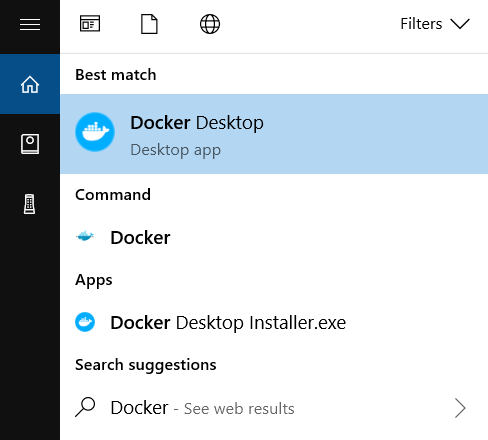
+1. Search for Docker, and select Docker Desktop in the search results.
+
+
+
+
+
+2. The Docker menu displays the Docker Subscription Service Agreement.\
+ Here’s a summary of the key points:
+
+* Docker Desktop is free for small businesses (fewer than 250 employees AND
less than $10 million in annual revenue), personal use, education, and
non-commercial open source projects.
+* Otherwise, it requires a paid subscription for professional use.
+* Paid subscriptions are also required for government entities.
+* The Docker Pro, Team, and Business subscriptions include commercial use of
Docker Desktop.
+
+3. Select Accept to continue. Docker Desktop starts after you accept the terms.
+
+
+
+Note that Docker Desktop won't run if you do not agree to the terms. You can
choose to accept the terms at a later date by opening Docker Desktop.
+
+
+
+Note that Docker Desktop won't run if you do not agree to the terms. You can
choose to accept the terms at a later date by opening Docker Desktop.
+
+**For more information, see [Docker Desktop Subscription Service
Agreement](https://www.docker.com/legal/docker-subscription-service-agreement/).
We recommend that you also read the
[FAQs](https://www.docker.com/pricing/faq).**
+
+<!--EndFragment-->
\ No newline at end of file
diff --git a/src/pages/blog/2024-05-21-a-dockerhub-guide.md
b/src/pages/blog/2024-05-21-a-dockerhub-guide.md
new file mode 100644
index 00000000..d80e9e5e
--- /dev/null
+++ b/src/pages/blog/2024-05-21-a-dockerhub-guide.md
@@ -0,0 +1,47 @@
+---
+templateKey: blog-post
+title: A DockerHub Guide
+date: 2024-05-21T01:55:07.192Z
+description: A DockerHub Guide
+featuredpost: false
+featuredimage: /img/banner-landing.jpg
+---
+<!--StartFragment-->
+
+Docker is one of the most well-known containerization technologies. DockerHub,
a treasure mine of container images and repositories, is crucial to Docker's
ecosystem. In this book, we'll take a tour via DockerHub, discovering its
capabilities, advantages, and best practices along the way.
+
+What is DockerHub?
+
+
+
+DockerHub is a cloud-based repository service offered by Docker that enables
users to store and distribute container images. It acts as a central hub for
Docker users, allowing them to easily collaborate, share, and manage containers.
+
+Key Features:
+
+1. DockerHub's **automated build** functionality allows users to automatically
create container images whenever modifications are made to a linked source code
repository such as GitHub or Bitbucket.
+2. DockerHub offers **versioning** for container images, allowing users to
save several versions of their images and revert to earlier versions as
required.
+3. DockerHub makes it easier for team members to **collaborate** by offering
tools such as organization accounts, team management, and private repository
access restrictions.
+4. DockerHub supports both **public and private repositories**, allowing users
to choose whether to share their images with the world or keep them private for
internal usage.
+5. Users may configure **webhooks and triggers** to automate a variety of
actions, such as starting a new build whenever a new image is added to a
repository or informing external services of image modifications.
+
+Benefits:
+
+1. DockerHub facilitates the process of creating, distributing, and deploying
containerized apps, simplifying the development workflow.
+2. DockerHub interacts smoothly with major development tools and platforms,
such as GitHub, Jenkins, and Kubernetes, improving the entire development and
deployment experience.
+3. DockerHub, as a primary hub for Docker users worldwide, promotes community
cooperation and knowledge exchange through its extensive library of public
images and repositories.
+4. DockerHub is designed on a strong infrastructure that ensures stability and
scalability, especially during peak traffic periods.
+5. DockerHub has security capabilities such as image scanning and
vulnerability detection to assist users identify and mitigate security problems
in container images. Additionally, DockerHub allows customers to establish
access restrictions and meet legal requirements for critical workloads.
+
+Best Practices for DockerHub Usage:
+
+1. Whenever feasible, **use official images** given by reliable sources on
DockerHub to ensure dependability and security.
+2. Keep your container **images up to date** by getting the most recent
versions from DockerHub and rebuilding as required.
+3. In private repositories, use **access controls and permissions** to limit
who may view, pull, and push photos.
+4. Use DockerHub's **automated build** capability to streamline the image
creation process and assure consistency across environments.
+5. Use DockerHub's image scanning features to **detect vulnerabilities** and
take immediate action to address any security problems.
+
+Conclusion
+
+DockerHub is a key component of Docker's ecosystem, enabling developers and
companies to efficiently use containerization. Users may utilize DockerHub's
capabilities to optimize their development workflow, communicate with others,
and confidently deploy containerized apps. As containerization gains traction,
DockerHub is a beacon of innovation and cooperation in the ever-changing world
of DevOps and cloud-native technologies.
+
+<!--EndFragment-->
\ No newline at end of file
diff --git
a/src/pages/blog/2024-05-21-basic-understanding-what-is-a-container.md
b/src/pages/blog/2024-05-21-basic-understanding-what-is-a-container.md
new file mode 100644
index 00000000..069b9c3e
--- /dev/null
+++ b/src/pages/blog/2024-05-21-basic-understanding-what-is-a-container.md
@@ -0,0 +1,70 @@
+---
+templateKey: blog-post
+title: "Basic Understanding: What is a Container?"
+date: 2024-05-21T01:58:05.801Z
+description: "Basic Understanding: What is a Container?"
+featuredpost: true
+featuredimage:
+tags:
+ - Docker
+---
+<!--StartFragment-->
+
+Containers have emerged as a game changer in modern software development and
deployment. Among the numerous containerization systems, Docker stands out as a
pioneer by providing a comprehensive environment for developing, delivering,
and executing containers. But what exactly is a Docker container, and why has
it become so important in the world of software development? Let's go into the
complexities of Docker containers and their relevance.
+
+### Understanding Containers:
+
+A Docker container is essentially a lightweight, independent, executable
package that contains everything required to run a piece of software, such as
code, runtime, system tools, libraries, and settings. Unlike traditional
virtual machines (VMs), which simulate whole hardware environments, containers
encapsulate only the program and its dependencies, allowing for fast and
consistent deployment across several computing environments.
+
+### Key Components of Docker Containers:
+
+1. Docker Image: The Docker image is the foundation of a container, acting as
a template for constructing containers. An image is simply a read-only template
containing a filesystem snapshot and configuration information. Images are
commonly created using Dockerfiles, which outline the methods required to
construct the image layer by layer.
+
+
+
+2. Containerization Engine: Docker uses a containerization engine to build,
manage, and operate containers based on Docker images. This engine makes use of
kernel capabilities like namespaces and control groups (cgroups) to separate
containers from one another and the underlying host system, providing security
and resource separation.
+
+
+
+3. Container Registry: Docker Hub, the official public registry for Docker
images, contains a large collection of pre-built images for various software
components and platforms. Organizations can also create private registries to
securely store and share proprietary photos.
+
+### Advantages of Docker Containers:
+
+1. Portability: Docker containers encapsulate programs and their dependencies
in standardized units, allowing for smooth deployment across environments
ranging from development to production. This portability reduces the "it works
on my machine" issue and improves the software delivery workflow.
+
+
+
+2. Isolation: Containers offer process-level isolation, allowing many programs
to execute independently on the same host without interruption. Each container
has its own filesystem, network stack, and process space, so changes or
failures in one do not impact the others.
+3. Containers share the host system's kernel, resulting in lower overhead and
quicker startup times. Containers' efficiency makes them perfect for
microservices designs and scalable deployments.
+
+
+
+4. Scalability: Docker's orchestration technologies, such as Docker Swarm and
Kubernetes, make it easier to deploy, scale, and manage containerized
applications across multiple computers. This scalability helps enterprises to
react to changing workloads while providing high-availability services.
+
+### Use Cases for Docker Containers:
+
+1. Docker containers simplify the deployment process by packaging apps and
their dependencies into portable entities that can be deployed consistently
across several environments.
+
+
+
+2. Containers are ideal for developing and deploying microservices-based
systems, as each service runs in its own container, allowing for autonomous
development, scaling, and deployment.
+
+
+
+3. Docker containers are essential in CI/CD pipelines because they provide a
consistent environment for creating, testing, and deploying software, which
speeds up the software delivery lifecycle.
+
+
+
+4. Containers support DevOps concepts by easing cooperation between
development and operations teams, resulting in faster delivery of software
updates and enhancements.
+
+
+
+Conclusion
+
+
+
+Docker containers have transformed software development, shipping, and
deployment by providing a lightweight, portable, and effective solution. Docker
containers enhance contemporary software development processes by encapsulating
apps and their dependencies into self-contained entities. As more enterprises
adopt containerization technologies, Docker continues at the vanguard, driving
innovation and altering the software environment.
+
+
+
+<!--EndFragment-->
\ No newline at end of file
diff --git
a/src/pages/blog/2024-05-21-how-to-use-the-official-apache-age-docker-image.md
b/src/pages/blog/2024-05-21-how-to-use-the-official-apache-age-docker-image.md
new file mode 100644
index 00000000..5e2516e7
--- /dev/null
+++
b/src/pages/blog/2024-05-21-how-to-use-the-official-apache-age-docker-image.md
@@ -0,0 +1,219 @@
+---
+templateKey: blog-post
+title: How to use the official Apache AGE docker image
+date: 2024-05-21T02:02:13.071Z
+description: How to use the official Apache AGE docker image
+featuredpost: true
+featuredimage:
+---
+<!--StartFragment-->
+
+## Prerequisites
+
+
+
+For this guide I'll be using Windows 11 with Arch Linux installed on WSL2, and
Docker integrated. Docker Desktop needs to be installed on Windows.
+
+This may work on anything that runs Docker, though.
+
+
+
+- - -
+
+
+
+## Getting the image
+
+
+
+Make sure Docker daemon is running by starting Docker Desktop.
+
+
+
+If you issue \`docker ps\` and it doesn't throw an error, you may be good to
go.
+
+
+
+Go to the official [Apache AGE Docker Hub
page](https://hub.docker.com/r/apache/age) and copy the command:
+
+
+
+##### docker pull apache/age
+
+
+
+Run it on WSL terminal and it should appear in the list of docker images:
+
+
+
+##### docker image ls
+
+##### REPOSITORY TAG IMAGE ID CREATED SIZE
+
+##### apache/age latest dc3b65a4c6fc 44 hours ago 1.34GB
+
+
+
+- - -
+
+
+
+## Running the container
+
+
+
+Now that you have the image, you need to run a container of it, but it needs
very specific variables as per user documentation. From WSL terminal paste:
+
+
+
+##### docker run \
+
+##### \--name age \
+
+##### \-p 5455:5432 \
+
+##### \-e POSTGRES_USER=postgresUser \
+
+##### \-e POSTGRES_PASSWORD=postgresPW \
+
+##### \-e POSTGRES_DB=postgresDB \
+
+##### \-d \
+
+##### apache/age
+
+
+
+Let me break down the command:
+
+
+
+1. \`docker run\`: This is the basic command to start a new Docker container.
+
+
+
+2. \`--name age\`: Assigns the name \`age\` to the container. This name can be
used to reference the container in other Docker commands.
+
+
+
+3. \`-p 5455:5432\`: Maps port 5432 inside the Docker container to port 5455
on the host machine (WSL). This is useful for connecting to the PostgreSQL
service running inside the container from the host system.
+
+
+
+4. \`-e POSTGRES_USER=postgresUser\`: Sets an environment variable
\`POSTGRES_USER\` inside the container, assigning it the value
\`postgresUser\`. This is the username used to connect to the PostgreSQL
database.
+
+
+
+5. \`-e POSTGRES_PASSWORD=postgresPW\`: Sets an environment variable
\`POSTGRES_PASSWORD\` inside the container, assigning it the value
\`postgresPW\`. This is the password used to connect to the PostgreSQL database.
+
+
+
+6. \`-e POSTGRES_DB=postgresDB\`: Sets an environment variable \`POSTGRES_DB\`
inside the container, assigning it the value \`postgresDB\`. This is the name
of the database to which connections will be made by default.
+
+
+
+7. \`-d\`: Runs the container in detached mode. This means that the container
will run in the background, and you won't see its output in the terminal.
+
+
+
+8. \`apache/age\`: This is the name of the Docker image to be used for the
container. It refers to a specific image that has Apache AGE installed and
configured.
+
+
+
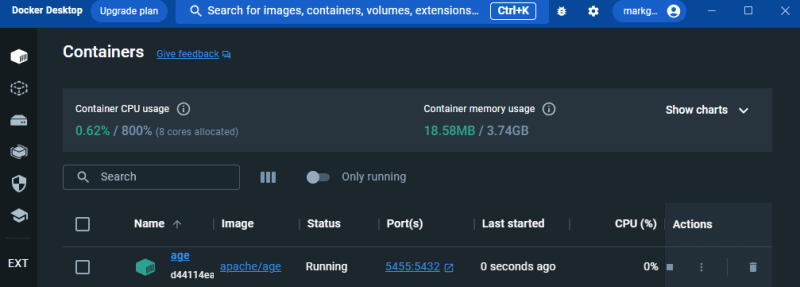
+With that there will be a running container on background:
+
+
+
+
+
+
+
+- - -
+
+
+
+## Using Apache AGE from container
+
+
+
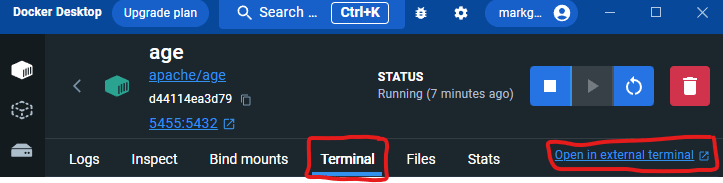
+Now on Docker Desktop, click on age, the recently created container.
+
+
+
+
+
+
+
+Now click "Terminal" and "Open in external terminal"
+
+
+
+
+
+
+
+It will open your default terminal logged in to root.
+
+
+
+Now run the command:
+
+
+
+##### psql -h 0.0.0.0 -p 5432 -d postgresDB -U postgresUser
+
+
+
+Immediately you will be inside psql, logged in to "postgresUser" in the
"postgresDB" database, which were created upon the prior docker run command.
+
+
+
+##### \# psql -h 0.0.0.0 -p 5432 -d postgresDB -U postgresUser
+
+##### psql (14.8 (Debian 14.8-1.pgdg120+1))
+
+##### Type "help" for help.
+
+##### postgresDB=#
+
+
+
+Apache AGE comes already loaded, so you can start using it right away:
+
+
+
+##### postgresDB=# SET search_path TO ag_catalog;
+
+##### SET
+
+##### postgresDB=# SELECT * FROM ag_graph;
+
+##### graphid | name | namespace
+
+##### \---------+------+-----------
+
+##### 16950 | test | test
+
+##### (1 row)
+
+##### postgresDB=# SELECT * FROM ag_label;
+
+##### name | graph | id | kind | relation |
seq_name
+
+#####
\------------------+-------+----+------+-----------------------+-------------------------
+
+##### _ag_label_vertex | 16950 | 1 | v | test._ag_label_vertex |
_ag_label_vertex_id_seq
+
+##### _ag_label_edge | 16950 | 2 | e | test._ag_label_edge |
_ag_label_edge_id_seq
+
+##### (2 rows)
+
+##### postgresDB=#
+
+
+
+And that's a wrap! Have fun!
+
+
+
+<!--EndFragment-->
\ No newline at end of file
diff --git
a/src/pages/blog/2024-05-21-navigating-the-maze-of-data-with-apache-age-and-langchain.md
b/src/pages/blog/2024-05-21-navigating-the-maze-of-data-with-apache-age-and-langchain.md
new file mode 100644
index 00000000..647ba797
--- /dev/null
+++
b/src/pages/blog/2024-05-21-navigating-the-maze-of-data-with-apache-age-and-langchain.md
@@ -0,0 +1,149 @@
+---
+templateKey: blog-post
+title: Navigating the Maze of Data with Apache AGE and LangChain
+date: 2024-05-21T01:59:40.664Z
+description: Navigating the Maze of Data with Apache AGE and LangChain
+featuredpost: true
+featuredimage:
+---
+<!--StartFragment-->
+
+#### Introduction
+
+Imagine a world where data isn't just numbers and text but a dynamic landscape
of interconnected information. This is the world of graph databases, where data
relationships are not just lines on a diagram but pathways to deeper insights
and understanding. Apache AGE, a powerful PostgreSQL extension, brings this
capability directly into the SQL environment, enhancing the traditional
database with the magic of graphs. Alongside, there's LangChain—a wizard’s
spell that turns plain English i [...]
+
+
+
+In this article, we hope to inspire you on creating a RPG game using Apache
AGE as your database tool!
+
+
+
+#### The Power of Apache AGE
+
+Apache AGE is like a secret passage that opens up from the familiar world of
PostgreSQL, leading into the labyrinthine realms of graph databases. This tool
is not merely an add-on; it’s a portal to a place where data points are nodes
and relationships are tangible edges that can be explored and manipulated.
Apache AGE lets your database hold the dual power of handling both tabular and
graph-based data, a boon for anyone looking to harness the full spectrum of
their data’s potential.
+
+
+
+#### Setting Up Your Graphical Realm
+
+Embarking on your graph database adventure starts with setting up your
environment. Let’s conjure up our database realm using Docker—a magical
cauldron where all the necessary components mix seamlessly:
+
+
+
+docker run \
+
+\--name mystical-age \
+
+\-p 5432:5432 \
+
+\-e POSTGRES_USER=wizard \
+
+\-e POSTGRES_PASSWORD=alchemy \
+
+\-e POSTGRES_DB=enchantedDB \
+
+\-d \
+
+ apache/age
+
+
+
+This sets up your PostgreSQL with AGE.
+
+
+
+#### LangChain: The Spellbook of Queries
+
+LangChain acts as your personal spellbook, translating your queries spoken in
the tongue of humans into the arcane scripts of Cypher. Imagine you are not
merely coding but conjuring queries that bring forth data in answers and
insights:
+
+
+
+from langchain.chains import GraphCypherQAChain
+
+from langchain_community.graphs.age_graph import AGEGraph
+
+from langchain_openai import ChatOpenAI
+
+
+
+conf = {
+
+ "database": "enchantedDB",
+
+ "user": "wizard",
+
+ "password": "alchemy",
+
+ "host": "localhost",
+
+ "port": 5432,
+
+}
+
+
+
+graph = AGEGraph(graph_name="mystical_realm", conf=conf)
+
+
+
+#### A Creative Twist: Enchanted Forest Database
+
+Let's populate our graph database with an enchanted forest theme. Our database
will not just store data; it will tell tales of mythical creatures and
legendary heroes:
+
+
+
+MERGE (f:Forest {name:"Whispering Woods"})
+
+WITH f
+
+UNWIND \["Elf", "Dwarf", "Fairy", "Dragon"] AS creature
+
+MERGE (c:Creature {type:creature})
+
+MERGE (c)-\[:LIVES_IN]->(f)
+
+
+
+Now, to explore who inhabits the Whispering Woods, you would simply ask
LangChain in plain English:
+
+
+
+chain = GraphCypherQAChain.from_llm(
+
+ ChatOpenAI(temperature=0), graph=graph, verbose=True
+
+)
+
+result = chain.invoke("Who lives in the Whispering Woods?")
+
+
+
+#### Advanced Enchantments and Magical Customizations
+
+LangChain allows for intricate magical customizations such as limiting the
number of mythical beings returned in a query, or revealing the steps in the
spellcasting process:
+
+
+
+chain = GraphCypherQAChain.from_llm(
+
+ ChatOpenAI(temperature=0), graph=graph, verbose=True, top_k=2
+
+)
+
+result = chain.invoke("Name two creatures in the Whispering Woods.")
+
+
+
+#### Conclusion
+
+Integrating Apache AGE with LangChain doesn’t just manage data—it transforms
it into a living, breathing story where every connection tells a tale. This
toolset not only demystifies the complexities of graph databases but also
invites you to a realm where data comes alive.
+
+
+
+#### Call to Action
+
+Step into the mystical world of graph databases. Experiment with the enchanted
setups, create your data stories, and share your magical findings with the
community. Keep exploring, for every query is a doorway to new revelations in
the kingdom of data!
+
+
+
+<!--EndFragment-->
\ No newline at end of file
diff --git a/static/ads.txt b/static/ads.txt
new file mode 100644
index 00000000..e69de29b
