This is an automated email from the ASF dual-hosted git repository.

ako pushed a commit to branch new-web
in repository https://gitbox.apache.org/repos/asf/age-website.git
The following commit(s) were added to refs/heads/new-web by this push:
new 0518ad8e Update landing page and blog page (#325)
0518ad8e is described below
commit 0518ad8e5d748c8a26860d2787025ce1ea17a249
Author: dpdjvhxm <[email protected]>
AuthorDate: Thu Jun 13 05:29:15 2024 +0900
Update landing page and blog page (#325)
* Test
* Update gatsby-config.js
* Changes search result text
* Fix gatsby-config.js and title
* Change meta description
* Fix sitemap.xml for broken links
* Update landing page: Key Update and image
* Create Blog
“2024-04-21-how-to-integrate-langchain-with-apache-age-for-graph-database-applications”
* Update Blog
“2024-04-21-how-to-integrate-langchain-with-apache-age-for-graph-database-applications”
* Update Blog
“2024-04-21-how-to-integrate-langchain-with-apache-age-for-graph-database-applications”
* Update blog, cms
* Update blog
* Fix spelling error
* Activate "blog"
* Update download page, modified blog
* modified footer, download
* Update landing image and blog scss
* modified: src/components/styles/Blog-post.scss
* modified: src/pages/download/index.md
* modified: src/templates/blog-post.js
* Create Blog
“2024-04-23-beyond-chatgpt-how-to-maximize-the-use-of-chatgpt-with-interactive-graph-models”
* Create Blog
“2024-04-23-combating-cyber-attack-with-apache-ages-link-analysis”
* Create Blog
“2024-04-23-from-data-to-connections-leveraging-hyperconnectivity-in-e-commerce-data-part-1”
* Create Blog
“2024-04-23-learn-machine-learning-with-graph-in-hyperconnected-data-part-2”
* Create Blog “2024-04-23-graph-database-in-postgresql-apache-age”
* Create Blog “2024-04-23-comparison-of-apache-age-postgraphile-and-hasura”
* modified: static/admin/config.yml
* modified: src/components/styles/Blog-post.scss
modified: src/components/styles/BlogRollTemplate.module.scss
modified: src/templates/blog-post.js
* Update Blog “blog_240401”
* Match file name format
* deleted: src/pages/blog/blog_240401.md
* Change button color
* modified: static/sitemap.xml
* modified blog
* modified: src/pages/404.js
modified: src/pages/index.md
* Create Blog
“2024-04-25-discovering-the-inner-workings-of-postgresqls-data-allocation”
* Create Blog
“2024-04-25-seamless-data-migration-migrating-apache-age-data-between-different-versions-of-postgresql”
* Create Blog “2024-04-25-how-to-deploy-apache-age-docker-image-on-aws”
* modified: static/admin/config.yml
* modified: src/pages/blog/
modified:
src/pages/blog/2024-04-25-how-to-deploy-apache-age-docker-image-on-aws.md
modified:
src/pages/blog/2024-04-25-seamless-data-migration-migrating-apache-age-data-between-different-versions-of-postgresql.md
* Create Blog “2024-05-01-what-is-a-graph-database”
* modified: src/templates/blog-post.js
* modified: src/pages/blog/
* modified: src/pages/blog/
* Remove sign®
* modified ™
* Create Blog “2024-05-21-a-dockerhub-guide”
* Create Blog “2024-05-21-a-beginners-guide-to-downloading-docker”
* Create Blog “2024-05-21-basic-understanding-what-is-a-container”
* Create Blog
“2024-05-21-navigating-the-maze-of-data-with-apache-age-and-langchain”
* Create Blog “2024-05-21-how-to-use-the-official-apache-age-docker-image”
* modified blogs
* Update Blog “2024-05-21-a-dockerhub-guide”
* modified BlogRoll
* modified BlogRollTemplate
* new file: static/ads.txt
* Create Blog
“2024-06-12-integrating-apache-age-docker-image-and-pgadmin-4-a-step-by-step-guide”
* Create Blog
“2024-06-12-video-the-easiest-way-to-install-apache-age-docker”
* Add file
* modified and renamed
* modified and renamed
* Create Blog “2024-06-12-video-beginners-guide”
* Create Blog “2024-06-12-video-future-landscape-of-graph-db”
* Update Blog “2024-06-12-video-future-landscape-of-graph-db”
* Create Blog “2024-06-12-video-future-landscape-of-graph-db-1”
* new file and modified
* modified
* renamed
* modified: src/templates/index-page.js
* modified: src/pages/blog/2024-06-12
* renamed
---
...ker-image-and-pgadmin-4-a-step-by-step-guide.md | 202 +++++++++++++++++++++
src/pages/blog/2024-06-12-video-beginners-guide.md | 37 ++++
.../blog/2024-06-12-video-community-support.md | 37 ++++
...024-06-12-video-future-landscape-of-graph-db.md | 39 ++++
...the-easiest-way-to-install-apache-age-docker.md | 19 ++
src/templates/index-page.js | 119 +-----------
static/img/Beginners Guide.mp4 | Bin 0 -> 28491689 bytes
static/img/Community Support.mp4 | Bin 0 -> 15039320 bytes
static/img/Future Landscape of Graph DB.mp4 | Bin 0 -> 34070158 bytes
...he Easiest Way to Install Apache AGE Docker.mp4 | Bin 0 -> 9525452 bytes
10 files changed, 337 insertions(+), 116 deletions(-)
diff --git
a/src/pages/blog/2024-06-12-integrating-apache-age-docker-image-and-pgadmin-4-a-step-by-step-guide.md
b/src/pages/blog/2024-06-12-integrating-apache-age-docker-image-and-pgadmin-4-a-step-by-step-guide.md
new file mode 100644
index 00000000..d038b0fc
--- /dev/null
+++
b/src/pages/blog/2024-06-12-integrating-apache-age-docker-image-and-pgadmin-4-a-step-by-step-guide.md
@@ -0,0 +1,202 @@
+---
+templateKey: blog-post
+title: "Integrating Apache AGE Docker Image and PGAdmin 4: A Step-by-Step
Guide"
+date: 2024-06-12T01:18:09.946Z
+description: "Integrating Apache AGE Docker Image and PGAdmin 4: A
Step-by-Step Guide"
+featuredpost: true
+featuredimage: /img/logo.png
+---
+<!--StartFragment-->
+
+## Introduction
+
+
+
+Welcome to our step-by-step guide on integrating Apache AGE Docker Image with
PGAdmin 4! Whether you're a seasoned database administrator or a curious
beginner, this tutorial will walk you through the process with ease. Get ready
to unlock the power of graph databases and streamline your database management
with PGAdmin 4. Let's dive in!
+
+
+
+## Prerequisites
+
+
+
+Before we begin, ensure you have the following setup:
+
+\- Operating System: Arch Linux running on WSL2, on top of Windows 11.
+
+\- Docker: Installed and running.
+
+\- PGAdmin4: Installed and ready to launch (I have it installed on Windows).
+
+
+
+## Starting Apache AGE Docker Container
+
+
+
+First, let's get the Apache AGE Docker image up and running. Follow these
steps:
+
+
+
+1. Pull the Apache AGE Docker image:
+
+Visit the Docker Hub page for Apache AGE
[here](https://hub.docker.com/r/apache/age) and follow the instructions. Use
the following command to pull the image:
+
+
+
+docker pull apache/age
+
+
+
+2. Run the Docker container:
+
+Execute the following command to start the container with the necessary
environment variables:
+
+
+
+docker run \
+
+\--name age \
+
+\-p 5455:5432 \
+
+\-e POSTGRES_USER=postgresUser \
+
+\-e POSTGRES_PASSWORD=postgresPW \
+
+\-e POSTGRES_DB=postgresDB \
+
+\-d \
+
+ apache/age
+
+
+
+These settings are crucial for the PGAdmin4 setup, so take note!
+
+
+
+3. Starting an existing container:
+
+If you’ve run this container before, start it again with:
+
+
+
+docker start <age_container_name>
+
+
+
+If you're unsure about the container name, list all previously run containers
with:
+
+
+
+docker ps -a
+
+
+
+Look for the container name under the "NAMES" column associated with the
"apache/age" image—it's probably named "age."
+
+
+
+## Setting Up PGAdmin4
+
+
+
+Now, let's configure PGAdmin4 to connect to our Apache AGE Docker container:
+
+
+
+1. Install PGAdmin4:
+
+
+
+Download and install PGAdmin4 from the [official
website](https://www.pgadmin.org/download/).
+
+
+
+2. Launch PGAdmin4:
+
+
+
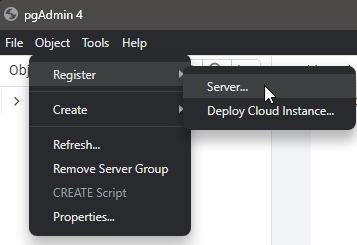
+Open PGAdmin4 and navigate to Object > Register > Server.
+
+
+
+
+
+
+
+3. Name your server:
+
+
+
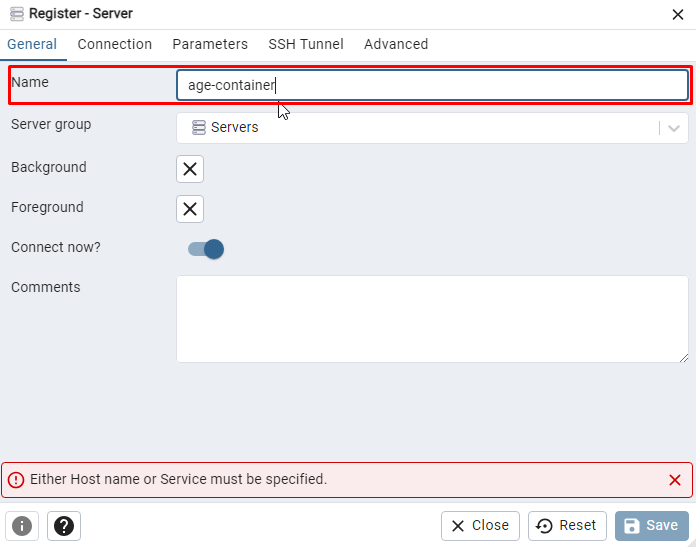
+Enter a name for your server. This can be anything you like.
+
+
+
+
+
+
+
+
+
+4. Configure the connection:
+
+
+
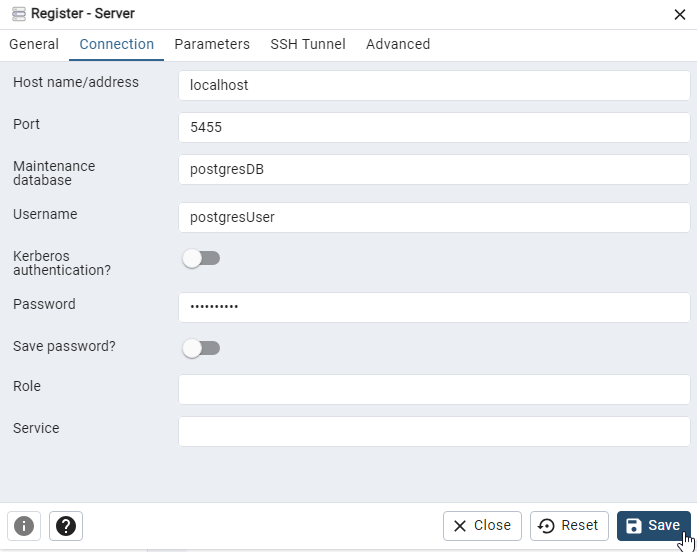
+In the "Connection" tab, fill in the fields as follows:
+
+
+
+* Host name/address: localhost
+* Port: 5455
+* Maintenance database: postgresDB
+* Username: postgresUser
+* Password: postgresPW
+
+
+
+
+
+
+
+
+
+5. Save and connect:
+
+Click "Save" to establish the connection.
+
+
+
+## Checking Schemas and Tables
+
+
+
+With the connection established, let's explore the schemas and tables:
+
+
+
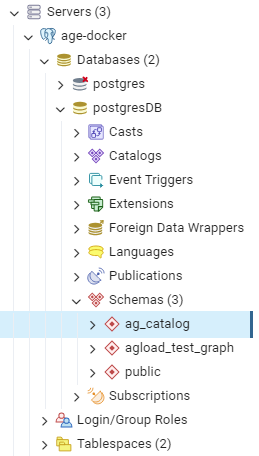
+* Apache AGE organizes graphs into schemas.
+* The ag_catalog schema is pre-made and includes many useful functions to
support your graph database needs.
+
+
+
+Navigate to the "Schemas" section in PGAdmin4 to explore these resources.
+
+
+
+
+
+
+
+## Conclusion
+
+
+
+Congratulations! You have successfully integrated Apache AGE Docker image with
PGAdmin 4. You can now take full advantage of graph databases and manage them
seamlessly with PGAdmin 4. We hope you found this guide helpful.
+
+
+
+
+
+<!--EndFragment-->
\ No newline at end of file
diff --git a/src/pages/blog/2024-06-12-video-beginners-guide.md
b/src/pages/blog/2024-06-12-video-beginners-guide.md
new file mode 100644
index 00000000..84e8eba0
--- /dev/null
+++ b/src/pages/blog/2024-06-12-video-beginners-guide.md
@@ -0,0 +1,37 @@
+---
+templateKey: blog-post
+title: "[ Video ] Beginners Guide"
+date: 2024-06-12T01:49:00.192Z
+description:
+featuredpost: true
+featuredimage:
+---
+<!--StartFragment-->
+
+<div style="display: flex; justify-content: center; align-items: center; ">
+ <video width="960" height="540" controls autoplay>
+ <source src="../../../static/img/Beginners Guide.mp4" type="video/mp4">
+ Your browser does not support the video tag.
+ </video>
+</div>
+
+## A Beginner's Guide
+
+A Beginner's Guide Embarking on your Apache Edge journey is remarkably
accessible, even for those
+new to graph databases. Numerous resources and tutorials are available to
guide you through the initial
+steps, from installation to basic querying. Here is a starting point to get
you up and running. Begin by
+installing the Apache Edge extension on your PostgreSQL instance. The official
Apache Edge
+documentation provides clear, step-by-step instructions for various operating
systems, ensuring a
+smooth installation process. Once installed, familiarize yourself with the
basic syntax of open cypher the
+query language used with apache Age. A practical first step is to model a
simple graph data set consider
+using a familiar domain like a social network or a movie database. Define your
nodes and edges, choose
+relevant properties, and populate your graph with some initial data.
+This exercise will solidify your understanding of how graph data is structured
within Apache AGE. With
+your sample graph ready, delve into Open Cypher to explore its querying
capabilities. Start with basic
+queries to retrieve nodes and edges based on their properties. Then, gradually
introduce more complex
+patterns, such as finding all friends of a specific user or identifying movies
with a certain genre and
+rating. As you become more comfortable, Explore advanced features like graph
algorithms and
+pathfinding. Apache Age supports a rich set of algorithms, allowing you to
uncover hidden patterns,
+compute shortest paths,
+
+<!--EndFragment-->
\ No newline at end of file
diff --git a/src/pages/blog/2024-06-12-video-community-support.md
b/src/pages/blog/2024-06-12-video-community-support.md
new file mode 100644
index 00000000..cfe0e3ae
--- /dev/null
+++ b/src/pages/blog/2024-06-12-video-community-support.md
@@ -0,0 +1,37 @@
+---
+templateKey: blog-post
+title: "[ Video ] Community Support"
+date: 2024-06-12T01:49:43.224Z
+description:
+featuredpost: true
+featuredimage:
+---
+<!--StartFragment-->
+
+<div style="display: flex; justify-content: center; align-items: center; ">
+ <video width="960" height="540" controls autoplay>
+ <source src="../../../static/img/Community Support.mp4" type="video/mp4">
+ Your browser does not support the video tag.
+ </video>
+</div>
+
+## Community Support and Learning Resources
+
+Community Support and Learning Resources The Apache Age community thrives on
collaboration and
+knowledge sharing. Abundant resources are available to support both newcomers
and experienced
+users alike, fostering a welcoming environment for learning and exploration.
The official Apache Age
+website serves as a central hub for documentation, tutorials, and community
forums. Here, you will find
+comprehensive guides covering installation, data modeling, querying, and
advanced features. These
+resources are regularly updated with the latest information and best
practices, ensuring you have access
+to the most up-to-date knowledge. Active mailing lists and online forums
provide platforms for engaging
+with fellow AGE users and developers. These channels are invaluable for
seeking assistance, sharing
+insights, and participating in discussions on various aspects of Apache AGE,
from basic usage to complex
+problem solving. For those who prefer hands-on learning, numerous online
tutorials and code examples
+demonstrate practical use cases of ApacheAge.
+These resources often cover specific scenarios, such as building a
recommendation engine or analyzing
+social network data, providing practical insights and inspiration for your own
projects. The vibrant
+ApacheAge community is a testament to the power and potential of graph
databases within the
+PostgreSQL ecosystem. By tapping into this network of support and knowledge,
you can accelerate your
+learning, overcome challenges, and unlock the full potential of Apache Age for
your graph data needs.
+
+<!--EndFragment-->
\ No newline at end of file
diff --git a/src/pages/blog/2024-06-12-video-future-landscape-of-graph-db.md
b/src/pages/blog/2024-06-12-video-future-landscape-of-graph-db.md
new file mode 100644
index 00000000..63d6af75
--- /dev/null
+++ b/src/pages/blog/2024-06-12-video-future-landscape-of-graph-db.md
@@ -0,0 +1,39 @@
+---
+templateKey: blog-post
+title: "[ Video ] Future Landscape of Graph DB"
+date: 2024-06-12T01:50:47.826Z
+description:
+featuredpost: true
+featuredimage:
+---
+<!--StartFragment-->
+
+<div style="display: flex; justify-content: center; align-items: center; ">
+ <video width="960" height="540" controls autoplay>
+ <source src="../../../static/img/Future Landscape of Graph DB.mp4"
type="video/mp4">
+ Your browser does not support the video tag.
+ </video>
+</div>
+
+## The future landscape of graph databases
+
+The future landscape of graph databases with PostgreSQL. The convergence of
graph databases and
+PostgreSQL through Apache age marks an exciting chapter in the evolution of
data management. This
+powerful combination offers a glimpse into a future where graph capabilities
are seamlessly integrated
+into the fabric of traditional relational databases, empowering organizations
to unlock deeper insights
+
+from their data. As the volume and complexity of data continue to grow, the
ability to understand and
+leverage relationships will become increasingly critical. Graph databases,
with their inherent strength in
+representing and querying connections, are uniquely positioned to address this
challenge. And with
+Apache Age bridging the gap between graph databases and the familiar world of
PostgreSQL, the barrier
+to entry for organizations seeking to harness the power of graphs is lower
than ever before.
+We can anticipate a future where graph capabilities become an integral part of
the PostgreSQL
+ecosystem, further enriching its already impressive feature set. As adoption
grows, we can expect to see
+even more sophisticated tools and integrations emerge, simplifying the process
of building, deploying,
+and managing graph-powered applications within PostgreSQL. The integration of
graph databases with
+PostgreSQL represents not just a technological advancement, but a fundamental
shift in how we think
+about and interact with data. This shift empowers us to move beyond
traditional, table-based models
+and embrace the fluidity of interconnected information, ultimately leading to
a deeper understanding of
+our increasingly interconnected world.
+
+<!--EndFragment-->
\ No newline at end of file
diff --git
a/src/pages/blog/2024-06-12-video-the-easiest-way-to-install-apache-age-docker.md
b/src/pages/blog/2024-06-12-video-the-easiest-way-to-install-apache-age-docker.md
new file mode 100644
index 00000000..b1d42b77
--- /dev/null
+++
b/src/pages/blog/2024-06-12-video-the-easiest-way-to-install-apache-age-docker.md
@@ -0,0 +1,19 @@
+---
+templateKey: blog-post
+title: "[ Video ] The Easiest Way to Install Apache AGE Docker"
+date: 2024-06-12T01:21:34.681Z
+description:
+featuredpost: true
+featuredimage:
+---
+<!--StartFragment-->
+
+<div style="display: flex; justify-content: center; align-items: center; ">
+ <video width="960" height="540" controls autoplay>
+ <source src="../../../static/img/The Easiest Way to Install Apache AGE
Docker.mp4" type="video/mp4">
+ Your browser does not support the video tag.
+ </video>
+</div>
+
+
+<!--EndFragment-->
\ No newline at end of file
diff --git a/src/templates/index-page.js b/src/templates/index-page.js
index 4e73f6d4..138e7078 100644
--- a/src/templates/index-page.js
+++ b/src/templates/index-page.js
@@ -62,16 +62,13 @@ export const IndexPageTemplate = ({
Through Apache AGE, PostgreSQL users will gain access to graph
query modeling within the existing relational database.
<br></br><br></br>
Users can read and write graph data in nodes and edges. They
can also use various algorithms such as variable length and edge traversal when
analyzing data.
-
</div>
</div>
- <div className={styles.verticalLine}>
- </div>
+ <div className={styles.verticalLine}></div>
<div className={styles.cardRight}>
<div className={styles.cardContent}>
<img src="/img/AGE-Architecture.webp" alt="img"></img>
<br></br>
-
</div>
</div>
</div>
@@ -80,24 +77,6 @@ export const IndexPageTemplate = ({
<div><br></br></div>
<div><br></br></div>
<div><br></br></div>
-
-
- {/* 메인화면: 유튜브 영상
- <section className={styles.videos}>
- <div className={styles.content}>
- <h2>Installation Guide</h2>
- <div className={styles.Youtube}>
- <iframe
- src="https://www.youtube.com/embed/0-qMwpDh0CA";
- title="YouTube video player"
- frameBorder="0"
- allow="accelerometer; autoplay; clipboard-write;
encrypted-media; gyroscope; picture-in-picture"
- allowFullScreen
- ></iframe>
- </div>
- </div>
- </section>
- */ }
<section>
<div className={styles.card1}>
@@ -141,8 +120,8 @@ export const IndexPageTemplate = ({
<div className={styles.card1}>
<div className={styles.content}>
<h3><b>This week's article by community</b></h3><hr></hr>
-
<h2>Graph Database in PostgreSQL: Apache AGE</h2>
+ <div className={styles.cardContent}>
<p>
Graph database have gained popularity in recent years
due to their ability to handle complex relationships between data. Unlike
traditional relational database, which store data in tables, graph database
represent data as nodes, edges, and properties. Nodes represent entities, edges
represent the relationships between those entities, and properties represent
the attributes of both.
</p>
@@ -159,108 +138,16 @@ export const IndexPageTemplate = ({
Overall, graph database offer a new way of thinking
about how to store and query complex relationships between data. With Apache
AGE, users can easily transform their PostgreSQL database into a graph database
and take advantage of the benefits that come with this type of database.
</p>
</div>
- </div>
- </section>
-
- <div><br></br></div>
- <div><br></br></div>
-
- <section>
- <div className={styles.card1}>
- <div className={styles.content}>
- <h3><b>Last week's article by community</b></h3><hr></hr>
- <iframe src="./img/blog1.html" style={{ border: 'none' }}
width="100%" height="600" title="Embedded Page"></iframe>
</div>
</div>
</section>
<div><br></br></div>
<div><br></br></div>
- <div><br></br></div>
- <div><br></br></div>
-
- <section>
- <div className={styles.card1}>
-
- <div className={styles.content}>
- <h2>Comparison of Apache AGE, PostGraphile, and
Hasura</h2><br></br><br></br>
- <p>
- <h3><b>◾ Apache AGE: Graph Database for PostgreSQL</b></h3>
- Apache AGE extends PostgreSQL, transforming it into a graph
database.
- This enables handling complex data relationships and graph
structures, supplemented by the power of Cypher queries for graph-specific
operations.<br></br><br></br>
-
- <ul><b>Key Features:</b></ul>
- <li>Graph & SQL Queries</li>
- <li>Integration deeply with existing PostgreSQL features,
- making it a robust and scalable solution for graph data
management without the need for external graph databases.</li>
- <li>Ideal for applications that require complex data
relationship analysis,such as social networks, recommendation systems, and
knowledge graphs.</li>
- <br></br><hr></hr><br></br>
-
- <h3><b>◾ PostGraphile: GraphQL API from PostgreSQL
Schema</b></h3>
- PostGraphile is a tool for building a GraphQL API on top of an
existing PostgreSQL schema.<br></br>
- It's designed for efficiency in web development, allowing
real-time data access and manipulation through GraphQL
interface.<br></br><br></br>
-
- <ul><b>Key Features:</b></ul>
- <li>Automates the creation of GraphQL APIs from existing
PostgreSQL.</li>
- <li>Offers subscriptions for real-time data updates.</li>
- <li>Best suited for projects requiring quick development of
web or mobile backends with real-time data needs, but without complex graph
data management requirements.</li><br></br><hr></hr><br></br>
-
- <h3><b>◾ Hasura: Real-Time GraphQL Engine for
PostgreSQL</b></h3>
- Hasura is a GraphQL server engine that dynamically generates
real-time GraphQL APIs from a PostgreSQL database.<br></br>
- It emphasizes performance and developer productivity, with an
easy setup process and tools for managing access and queries.<br></br><br></br>
-
- <ul><b>Key Features:</b></ul>
- <li>Provides a user-friendly interface for setting up and
managing GraphQL endpoints.</li>
- <li>Optimized for performance, supporting high-volume
traffic.</li>
- <li>Ideal for developers needing a fast, scalable GraphQL
layer over their PostgreSQL databases.</li>
- <br></br><hr></hr><br></br>
-
- <h3><b>◾ Conclusion</b></h3>
- Apache AGE is ideal for sophisticated graph data tasks within
PostgreSQL.<br></br>
- PostGraphile and Hasura excel in quick GraphQL API deployment
for example for web and mobile, complementing AGE's rich graph
features.<br></br>
- </p>
-
- </div>
- </div>
- </section>
-
- <div><br></br></div>
- <div><br></br></div>
- <div><br></br></div>
- <div><br></br></div>
-
- </div>
- </section>
- {/* <section style={{ backgroundPosition: 'center', backgroundSize:
'contain', backgroundRepeat: 'no-repeat' }} hidden > */}
- {/* <div className={styles.content}>
- <h2>Message From AGE Team</h2>
- <div className={styles.Youtube}>
- <iframe
- src="https://www.youtube.com/embed/0-qMwpDh0CA";
- title="YouTube video player"
- frameBorder="0"
- allow="accelerometer; autoplay; clipboard-write;
encrypted-media; gyroscope; picture-in-picture"
- allowFullScreen
- ></iframe>
- </div>
- </div> */}
- {/* </section> */}
-
-
- {/* 메인화면: 디스코드
- <section style={{ backgroundPosition: 'center', backgroundSize:
'contain', backgroundRepeat: 'no-repeat' }}>
- <div className={styles.content}>
- <h2>Join AGE Discord</h2>
- <a href="https://discord.com/invite/NMsBs9X8Ss"; target="_blank">
- <div className={styles.inviteDiscord}>
- <img src={ageLogo} alt="Discord Invite Link" />
- </div>
- </a>
- <h3>Got any questions about the project? Join us in Discord and
let's chat!</h3>
</div>
</section>
- */}
+
<section hidden></section>
<section>
diff --git a/static/img/Beginners Guide.mp4 b/static/img/Beginners Guide.mp4
new file mode 100644
index 00000000..8704314e
Binary files /dev/null and b/static/img/Beginners Guide.mp4 differ
diff --git a/static/img/Community Support.mp4 b/static/img/Community Support.mp4
new file mode 100644
index 00000000..e74998cd
Binary files /dev/null and b/static/img/Community Support.mp4 differ
diff --git a/static/img/Future Landscape of Graph DB.mp4 b/static/img/Future
Landscape of Graph DB.mp4
new file mode 100644
index 00000000..b0fa030d
Binary files /dev/null and b/static/img/Future Landscape of Graph DB.mp4 differ
diff --git a/static/img/The Easiest Way to Install Apache AGE Docker.mp4
b/static/img/The Easiest Way to Install Apache AGE Docker.mp4
new file mode 100644
index 00000000..052c412f
Binary files /dev/null and b/static/img/The Easiest Way to Install Apache AGE
Docker.mp4 differ
