This is an automated email from the ASF dual-hosted git repository.

jscheffl pushed a commit to branch main
in repository https://gitbox.apache.org/repos/asf/airflow.git
The following commit(s) were added to refs/heads/main by this push:
     new 3696cecd3f5 Make term Dag consistent in docs v2 (#55099)
3696cecd3f5 is described below

commit 3696cecd3f5d73b9b27d57603c16df3a78bdf3fc
Author: Jens Scheffler <[email protected]>
AuthorDate: Sat Aug 30 19:09:36 2025 +0200

    Make term Dag consistent in docs v2 (#55099)
---
 airflow-ctl/docs/cli-and-env-variables-ref.rst     |  2 +-
 airflow-ctl/docs/howto/index.rst                   |  8 +--
 chart/docs/adding-connections-and-variables.rst    |  4 +-
 chart/docs/airflow-configuration.rst               |  2 +-
 chart/docs/manage-dag-files.rst                    | 62 +++++++++++-----------
 chart/docs/production-guide.rst                    |  2 +-
 chart/docs/quick-start.rst                         |  6 +--
 chart/docs/using-additional-containers.rst         |  6 +--
 contributing-docs/03_contributors_quick_start.rst  |  2 +-
 contributing-docs/05_pull_requests.rst             |  2 +-
 contributing-docs/09_testing.rst                   |  4 +-
 contributing-docs/12_provider_distributions.rst    |  4 +-
 .../13_airflow_dependencies_and_extras.rst         |  2 +-
 contributing-docs/16_adding_api_endpoints.rst      |  6 +--
 .../20_debugging_airflow_components.rst            | 10 ++--
 .../contributors_quick_start_pycharm.rst           |  8 +--
 .../contributors_quick_start_vscode.rst            |  8 +--
 contributing-docs/testing/dag_testing.rst          | 10 ++--
 contributing-docs/testing/docker_compose_tests.rst |  6 +--
 contributing-docs/testing/python_client_tests.rst  |  2 +-
 contributing-docs/testing/system_tests.rst         | 14 ++---
 dev/breeze/doc/03_developer_tasks.rst              |  2 +-
 dev/breeze/doc/10_advanced_breeze_topics.rst       |  6 +--
 .../shared/template-examples/taskflow-kwargs.rst   |  2 +-
 .../src/docs/shared/template-examples/taskflow.rst |  2 +-
 .../src/sphinx_exts/includes/dag-definition.rst    |  4 +-
 docker-stack-docs/build.rst                        |  2 +-
 docker-stack-docs/entrypoint.rst                   |  2 +-
 .../core-extensions/notifications.rst              |  2 +-
 29 files changed, 96 insertions(+), 96 deletions(-)

diff --git a/airflow-ctl/docs/cli-and-env-variables-ref.rst
b/airflow-ctl/docs/cli-and-env-variables-ref.rst
index a662dcdd728..aebe2c56579 100644
--- a/airflow-ctl/docs/cli-and-env-variables-ref.rst
+++ b/airflow-ctl/docs/cli-and-env-variables-ref.rst
@@ -22,7 +22,7 @@ CLI
 '''

 airflowctl has a very rich command line interface that allows for
-many types of operation on a DAG, starting services, and supporting
+many types of operation on a Dag, starting services, and supporting
 development and testing.

 .. note::
diff --git a/airflow-ctl/docs/howto/index.rst b/airflow-ctl/docs/howto/index.rst
index da2088632b5..602c0174e6e 100644
--- a/airflow-ctl/docs/howto/index.rst
+++ b/airflow-ctl/docs/howto/index.rst
@@ -130,19 +130,19 @@ These visual references show the full command syntax,
options, and parameters fo
   :width: 60%
   :alt: airflowctl Connections Command

-**DAGs**
+**Dags**
 ''''''''
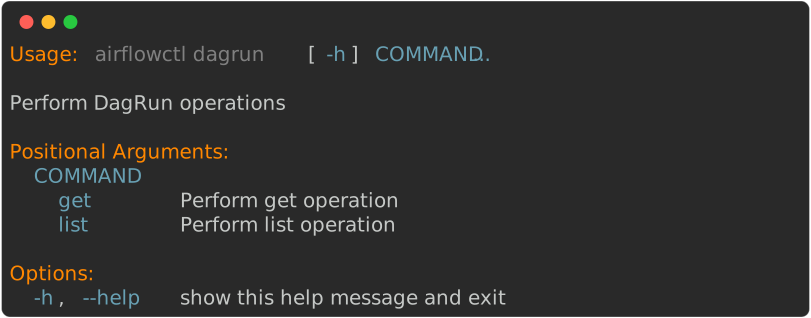
 .. image:: ../images/output_dag.svg
   :target:
https://raw.githubusercontent.com/apache/airflow/main/airflow-ctl/docs/images/output_dag.svg
   :width: 60%
-  :alt: airflowctl DAG Command
+  :alt: airflowctl Dag Command

-**DAG Runs**
+**Dag Runs**
 ''''''''''''
 .. image:: ../images/output_dagrun.svg
   :target:
https://raw.githubusercontent.com/apache/airflow/main/airflow-ctl/docs/images/output_dagrun.svg
   :width: 60%
-  :alt: airflowctl DAG Run Command
+  :alt: airflowctl Dag Run Command

 **Jobs**
 ''''''''
diff --git a/chart/docs/adding-connections-and-variables.rst
b/chart/docs/adding-connections-and-variables.rst
index f3c6e98b459..05f78a28e77 100644
--- a/chart/docs/adding-connections-and-variables.rst
+++ b/chart/docs/adding-connections-and-variables.rst
@@ -52,8 +52,8 @@ to override values under these sections of the
``values.yaml`` file.

 Variables
 ---------
-Airflow supports Variables which enable users to craft dynamic dags. You can
set Variables in Airflow in three ways - UI,
-command line, and within your DAG file. See
:doc:`apache-airflow:howto/variable` for more.
+Airflow supports Variables which enable users to craft dynamic Dags. You can
set Variables in Airflow in three ways - UI,
+command line, and within your Dag file. See
:doc:`apache-airflow:howto/variable` for more.

 With the Helm chart, you can also inject environment variables into Airflow.
So in the example ``override.yaml`` file,
 we can override values of interest in the ``env`` section of the
``values.yaml`` file.
diff --git a/chart/docs/airflow-configuration.rst
b/chart/docs/airflow-configuration.rst
index 65c7cb83e3f..742bd1fe252 100644
--- a/chart/docs/airflow-configuration.rst
+++ b/chart/docs/airflow-configuration.rst
@@ -36,6 +36,6 @@ configuration prior to installing and deploying the service.

 .. note::

-  The recommended way to load example dags using the official Docker image and
chart is to configure the ``AIRFLOW__CORE__LOAD_EXAMPLES`` environment variable
+  The recommended way to load example Dags using the official Docker image and
chart is to configure the ``AIRFLOW__CORE__LOAD_EXAMPLES`` environment variable
   in ``extraEnv`` (see :doc:`Parameters reference <parameters-ref>`). The
official Docker image has ``AIRFLOW__CORE__LOAD_EXAMPLES=False``
   set within the image, so you need to override it with an environment
variable when deploying the chart in order for the examples to be present.
diff --git a/chart/docs/manage-dag-files.rst b/chart/docs/manage-dag-files.rst
index dfbd20a8f3d..9d02f05b171 100644
--- a/chart/docs/manage-dag-files.rst
+++ b/chart/docs/manage-dag-files.rst
@@ -1,4 +1,4 @@
- .. Licensed to the Apache Software Foundation (ASF) under one
+.. Licensed to the Apache Software Foundation (ASF) under one
     or more contributor license agreements.  See the NOTICE file
     distributed with this work for additional information
     regarding copyright ownership.  The ASF licenses this file
@@ -16,17 +16,17 @@
     under the License.


-Manage dag files
+Manage Dag files
 ================

-When you create new or modify existing DAG files, it is necessary to deploy
them into the environment. This section will describe some basic techniques you
can use.
+When you create new or modify existing Dag files, it is necessary to deploy
them into the environment. This section will describe some basic techniques you
can use.

-Bake dags in docker image
+Bake Dags in docker image
 -------------------------

-With this approach, you include your dag files and related code in the Airflow
image.
+With this approach, you include your Dag files and related code in the Airflow
image.

-This method requires redeploying the services in the helm chart with the new
docker image in order to deploy the new DAG code. This can work well
particularly if DAG code is not expected to change frequently.
+This method requires redeploying the services in the helm chart with the new
docker image in order to deploy the new Dag code. This can work well
particularly if Dag code is not expected to change frequently.

 .. code-block:: bash

@@ -40,7 +40,7 @@ This method requires redeploying the services in the helm
chart with the new doc
 .. note::

    In Airflow images prior to version 2.0.2, there was a bug that required you
to use
-   a bit longer Dockerfile, to make sure the image remains
OpenShift-compatible (i.e DAG
+   a bit longer Dockerfile, to make sure the image remains
OpenShift-compatible (i.e Dag
    has root group similarly as other files). In 2.0.2 this has been fixed.

 .. code-block:: bash
@@ -101,12 +101,12 @@ If you are deploying an image from a private repository,
you need to create a se
 Using git-sync
 --------------

-Mounting dags using git-sync sidecar with persistence enabled
+Mounting Dags using git-sync sidecar with persistence enabled
 .............................................................

 This option will use a Persistent Volume Claim with an access mode of
``ReadWriteMany``.
-The scheduler pod will sync dags from a git repository onto the PVC every
configured number of
-seconds. The other pods will read the synced dags. Not all volume plugins have
support for
+The scheduler pod will sync Dags from a git repository onto the PVC every
configured number of
+seconds. The other pods will read the synced Dags. Not all volume plugins have
support for
 ``ReadWriteMany`` access mode.
 Refer `Persistent Volume Access Modes
<https://kubernetes.io/docs/concepts/storage/persistent-volumes/#access-modes>`__
 for details.
@@ -121,12 +121,12 @@ for details.
       # Please refer to values.yaml for details


-Mounting dags using git-sync sidecar without persistence
+Mounting Dags using git-sync sidecar without persistence
 ........................................................

 This option will use an always running Git-Sync sidecar on every scheduler,
webserver (if ``airflowVersion < 2.0.0``)
 and worker pods.
-The Git-Sync sidecar containers will sync dags from a git repository every
configured number of
+The Git-Sync sidecar containers will sync Dags from a git repository every
configured number of
 seconds. If you are using the ``KubernetesExecutor``, Git-sync will run as an
init container on your worker pods.

 .. code-block:: bash
@@ -135,18 +135,18 @@ seconds. If you are using the ``KubernetesExecutor``,
Git-sync will run as an in
       --set dags.persistence.enabled=false \
       --set dags.gitSync.enabled=true
       # you can also override the other gitSync values
-      # by setting the  dags.gitSync.* values
+      # by setting the dags.gitSync.* values
       # Refer values.yaml for details

-When using ``apache-airflow >= 2.0.0``, :ref:`DAG Serialization
<apache-airflow:dag-serialization>` is enabled by default,
-hence Webserver does not need access to DAG files, so ``git-sync`` sidecar is
not run on Webserver.
+When using ``apache-airflow >= 2.0.0``, :ref:`Dag Serialization
<apache-airflow:dag-serialization>` is enabled by default,
+hence Webserver does not need access to Dag files, so ``git-sync`` sidecar is
not run on Webserver.

 Notes for combining git-sync and persistence
 ............................................

-While using both git-sync and persistence for dags is possible, it is
generally not recommended unless the
+While using both git-sync and persistence for Dags is possible, it is
generally not recommended unless the
 deployment manager carefully considered the trade-offs it brings. There are
cases when git-sync without
-persistence has other trade-offs (for example delays in synchronization of
DAGS vs. rate-limiting of Git
+persistence has other trade-offs (for example delays in synchronization of
Dags vs. rate-limiting of Git
 servers) that can often be mitigated (for example by sending signals to
git-sync containers via web-hooks
 when new commits are pushed to the repository) but there might be cases where
you still might want to choose
 git-sync and Persistence together, but as a Deployment Manager you should be
aware of some consequences it has.
@@ -154,9 +154,9 @@ git-sync and Persistence together, but as a Deployment
Manager you should be awa
 git-sync solution is primarily designed to be used for local, POSIX-compliant
volumes to checkout Git
 repositories into. Part of the process of synchronization of commits from
git-sync involves checking out
 new version of files in a freshly created folder and swapping symbolic links
to the new folder, after the
-checkout is complete. This is done to ensure that the whole dags folder is
consistent at all times. The way
-git-sync works with symbolic-link swaps, makes sure that Parsing the dags
always work on a consistent
-(single-commit-based) set of files in the whole DAG folder.
+checkout is complete. This is done to ensure that the whole Dags folder is
consistent at all times. The way
+git-sync works with symbolic-link swaps, makes sure that Parsing the Dags
always work on a consistent
+(single-commit-based) set of files in the whole Dag folder.

 This approach, however might have undesirable side effects when the folder
that git-sync works on is not
 a local volume, but is a persistent volume (so effectively a networked,
distributed volume). Depending on
@@ -165,7 +165,7 @@ consequences. There are a lot of persistence solutions
available for various K8S
 them has different characteristics, so you need to carefully test and monitor
your filesystem to make sure
 those undesired side effects do not affect you. Those effects might change
over time or depend on parameters
 like how often the files are being scanned by the Dag File Processor, the
number and complexity of your
-dags, how remote and how distributed your persistent volumes are, how many
IOPS you allocate for some of
+Dags, how remote and how distributed your persistent volumes are, how many
IOPS you allocate for some of
 the filesystem (usually highly paid feature of such filesystems is how many
IOPS you can get) and many other
 factors.

@@ -176,15 +176,15 @@ to pretty sudden and unexpected demand increase. Most of
the persistence solutio
 smaller/shorter burst of traffic, but when they outgrow certain thresholds,
you need to upgrade the
 networking to a much more capable and expensive options. This is difficult to
control and impossible to
 mitigate, so you might be suddenly faced with situation to pay a lot more for
IOPS/persistence option to
-keep your dags sufficiently synchronized to avoid inconsistencies and delays
in synchronization.
+keep your Dags sufficiently synchronized to avoid inconsistencies and delays
in synchronization.

 The side-effects that you might observe:

 * burst of networking/communication at the moment when new commit is checked
out (because of the quick
   succession of deleting old files, creating new files, symbolic link swapping.
-* temporary lack of consistency between files in DAG folders while DAGS are
being synced (because of delays
+* temporary lack of consistency between files in Dag folders while Dags are
being synced (because of delays
   in distributing changes to individual files for various nodes in the cluster)
-* visible drops of performance of the persistence solution when your DAG
number grows, drops that might
+* visible drops of performance of the persistence solution when your Dag
number grows, drops that might
   amplify the side effects described above.
 * some of persistence solutions might lack filesystem functionality that
git-sync needs to perform the sync
   (for example changing permissions or creating symbolic links). While those
can often be mitigated it is
@@ -198,7 +198,7 @@ Synchronizing multiple Git repositories with git-sync
 .....................................................

 Airflow git-sync integration in the Helm Chart, does not allow to configure
multiple repositories to be
-synchronized at the same time. The DAG folder must come from single git
repository. However it is possible
+synchronized at the same time. The Dag folder must come from single git
repository. However it is possible
 to use `submodules <https://git-scm.com/book/en/v2/Git-Tools-Submodules>`_ to
create an "umbrella" repository
 that you can use to bring a number of git repositories checked out together
(with ``--submodules recursive``
 option). There are success stories of Airflow users using such approach with
100s of repositories put
@@ -206,17 +206,17 @@ together as submodules via such "umbrella" repo approach.
When you choose this s
 you need to work out the way how to link the submodules, when to update the
umbrella repo when "submodule"
 repository change and work out versioning approach and automate it. This might
be as simple as always
 using latest versions of all the submodule repositories, or as complex as
managing versioning of shared
-libraries, dags and code across multiple teams and doing that following your
release process.
+libraries, Dags and code across multiple teams and doing that following your
release process.

 An example of such complex approach can found in this
-`Manage dags at scale <https://s.apache.org/airflow-manage-dags-at-scale>`_
presentation from the Airflow
+`Manage Dags at scale <https://s.apache.org/airflow-manage-dags-at-scale>`_
presentation from the Airflow
 Summit.


-Mounting dags from an externally populated PVC
+Mounting Dags from an externally populated PVC
 ----------------------------------------------

-In this approach, Airflow will read the dags from a PVC which has
``ReadOnlyMany`` or ``ReadWriteMany`` access mode. You will have to ensure that
the PVC is populated/updated with the required dags (this won't be handled by
the chart). You pass in the name of the volume claim to the chart:
+In this approach, Airflow will read the Dags from a PVC which has
``ReadOnlyMany`` or ``ReadWriteMany`` access mode. You will have to ensure that
the PVC is populated/updated with the required Dags (this won't be handled by
the chart). You pass in the name of the volume claim to the chart:

 .. code-block:: bash

@@ -225,7 +225,7 @@ In this approach, Airflow will read the dags from a PVC
which has ``ReadOnlyMany
       --set dags.persistence.existingClaim=my-volume-claim \
       --set dags.gitSync.enabled=false

-Mounting dags from a private GitHub repo using Git-Sync sidecar
+Mounting Dags from a private GitHub repo using Git-Sync sidecar
 ---------------------------------------------------------------
 Create a private repo on GitHub if you have not created one already.

@@ -270,7 +270,7 @@ Finally, from the context of your Airflow Helm chart
directory, you can install

     helm upgrade --install airflow apache-airflow/airflow -f
override-values.yaml

-If you have done everything correctly, Git-Sync will pick up the changes you
make to the dags
+If you have done everything correctly, Git-Sync will pick up the changes you
make to the Dags
 in your private GitHub repo.

 You should take this a step further and set ``dags.gitSync.knownHosts`` so you
are not susceptible to man-in-the-middle
diff --git a/chart/docs/production-guide.rst b/chart/docs/production-guide.rst
index 1dc53c2cfcf..ff19171d4aa 100644
--- a/chart/docs/production-guide.rst
+++ b/chart/docs/production-guide.rst
@@ -262,7 +262,7 @@ Typical scenarios where you would like to use your custom
image:
 See `Building the image
<https://airflow.apache.org/docs/docker-stack/build.html>`_ for more
 details on how you can extend and customize the Airflow image.

-Managing DAG Files
+Managing Dag Files
 ------------------

 See :doc:`manage-dag-files`.
diff --git a/chart/docs/quick-start.rst b/chart/docs/quick-start.rst
index 9045bd9a466..91969591a6f 100644
--- a/chart/docs/quick-start.rst
+++ b/chart/docs/quick-start.rst
@@ -59,7 +59,7 @@ Install the chart
   export RELEASE_NAME=example-release
   helm install $RELEASE_NAME apache-airflow/airflow --namespace $NAMESPACE

-Use the following code to install the chart with Example dags:
+Use the following code to install the chart with Example Dags:

 .. code-block:: bash

@@ -88,7 +88,7 @@ Extending Airflow Image
 -----------------------

 The Apache Airflow community, releases Docker Images which are ``reference
images`` for Apache Airflow.
-However, when you try it out you want to add your own dags, custom
dependencies,
+However, when you try it out you want to add your own Dags, custom
dependencies,
 packages, or even custom providers.

 .. note::
@@ -100,7 +100,7 @@ packages, or even custom providers.

 The best way to achieve it, is to build your own, custom image.

-Adding dags to your image
+Adding Dags to your image
 .........................

 1. Create a project
diff --git a/chart/docs/using-additional-containers.rst
b/chart/docs/using-additional-containers.rst
index 71bccea0409..cfdba2d3d1d 100644
--- a/chart/docs/using-additional-containers.rst
+++ b/chart/docs/using-additional-containers.rst
@@ -22,9 +22,9 @@ Sidecar Containers
 ------------------

 If you want to deploy your own sidecar container, you can add it through the
``extraContainers`` parameter.
-You can define different containers for the scheduler, webserver, worker,
triggerer, DAG processor, flower, create user Job and migrate database Job Pods.
+You can define different containers for the scheduler, webserver, worker,
triggerer, Dag processor, flower, create user Job and migrate database Job Pods.

-For example, sidecars that sync dags from object storage.
+For example, sidecars that sync Dags from object storage.

 .. code-block:: yaml

@@ -49,7 +49,7 @@ Init Containers
 ---------------

 You can also deploy extra init containers through the ``extraInitContainers``
parameter.
-You can define different containers for the scheduler, webserver, worker,
triggerer, DAG processor, create user Job and migrate database Job pods.
+You can define different containers for the scheduler, webserver, worker,
triggerer, Dag processor, create user Job and migrate database Job pods.

 For example, an init container that just says hello:

diff --git a/contributing-docs/03_contributors_quick_start.rst
b/contributing-docs/03_contributors_quick_start.rst
index b019ff5f951..3929a589b17 100644
--- a/contributing-docs/03_contributors_quick_start.rst
+++ b/contributing-docs/03_contributors_quick_start.rst
@@ -511,7 +511,7 @@ Using Breeze
 1. Starting the Breeze environment using ``breeze start-airflow`` starts the
Breeze environment with last configuration run(
    In this case Python version and backend are picked up from last execution
``breeze --python 3.10 --backend postgres``)
    It also automatically starts the API server (FastAPI api and UI),
triggerer, dag processor and scheduler. It drops you in tmux with triggerer to
the right, and
-   Scheduler, API server (FastAPI api and UI), DAG processor from left to
right at the bottom. Use ``[Ctrl + B] and Arrow keys`` to navigate.
+   Scheduler, API server (FastAPI api and UI), Dag processor from left to
right at the bottom. Use ``[Ctrl + B] and Arrow keys`` to navigate.

 .. code-block:: bash

diff --git a/contributing-docs/05_pull_requests.rst
b/contributing-docs/05_pull_requests.rst
index 2bad72563f3..9d50aca692d 100644
--- a/contributing-docs/05_pull_requests.rst
+++ b/contributing-docs/05_pull_requests.rst
@@ -246,7 +246,7 @@ Airflow Operators might have some fields added to the list
of ``template_fields`
 set in the constructor (``__init__`` method) of the operator and usually their
values should
 come from the ``__init__`` method arguments. The reason for that is that the
templated fields
 are evaluated at the time of the operator execution and when you pass
arguments to the operator
-in the DAG, the fields that are set on the class just before the ``execute``
method is called
+in the Dag, the fields that are set on the class just before the ``execute``
method is called
 are processed through templating engine and the fields values are set to the
result of applying the
 templating engine to the fields (in case the field is a structure such as dict
or list, the templating
 engine is applied to all the values of the structure).
diff --git a/contributing-docs/09_testing.rst b/contributing-docs/09_testing.rst
index 0d322471765..6b6de6f5bcf 100644
--- a/contributing-docs/09_testing.rst
+++ b/contributing-docs/09_testing.rst
@@ -42,7 +42,7 @@ includes:
   rendered correctly for various configuration parameters.

 * `System tests <testing/system_tests.rst>`__ are automatic tests that use
external systems like
-  Google Cloud and AWS. These tests are intended for an end-to-end DAG
execution.
+  Google Cloud and AWS. These tests are intended for an end-to-end Dag
execution.

 * `Task SDK integration tests <testing/task_sdk_integration_tests.rst>`__ are
specialized tests that verify
   the integration between the Apache Airflow Task SDK package and a running
Airflow instance.
@@ -55,7 +55,7 @@ You can also run other kinds of tests when you are developing
Airflow packages:
 * `Python client tests <testing/python_client_tests.rst>`__ are tests we run
to check if the Python API
   client works correctly.

-* `DAG testing <testing/dag_testing.rst>`__ is a document that describes how
to test DAGs in a local environment
+* `Dag testing <testing/dag_testing.rst>`__ is a document that describes how
to test Dags in a local environment
   with ``dag.test()``.

 ------
diff --git a/contributing-docs/12_provider_distributions.rst
b/contributing-docs/12_provider_distributions.rst
index 78ab6facec9..dcd9f072b28 100644
--- a/contributing-docs/12_provider_distributions.rst
+++ b/contributing-docs/12_provider_distributions.rst
@@ -235,7 +235,7 @@ The rules are as follows:
        * PROVIDER
     * system
       * PROVIDER
-          * example_dags -> example DAGs are stored here (used for
documentation and System Tests)
+          * example_dags -> example Dags are stored here (used for
documentation and System Tests)

 * Module names do not contain word "hooks", "operators" etc. The right type
comes from
   the python package. For example 'hooks.datastore' module contains DataStore
hook and
@@ -293,7 +293,7 @@ Well documented provider contains those:
 You can see for example ``google`` provider which has very comprehensive
documentation:

 * `Documentation <../../providers/google/docs>`_
-* `System tests/Example DAGs <../providers/google/tests/system/google/>`_
+* `System tests/Example Dags <../providers/google/tests/system/google/>`_

 Part of the documentation are example dags (placed in the ``tests/system``
folder). The reason why
 they are in ``tests/system`` is because we are using the example dags for
various purposes:
diff --git a/contributing-docs/13_airflow_dependencies_and_extras.rst
b/contributing-docs/13_airflow_dependencies_and_extras.rst
index 2e1b72c6f65..0b47ef675c4 100644
--- a/contributing-docs/13_airflow_dependencies_and_extras.rst
+++ b/contributing-docs/13_airflow_dependencies_and_extras.rst
@@ -29,7 +29,7 @@ For applications, pinning the dependencies makes it more
stable to install in th
 be open to allow several different libraries with the same requirements to be
installed at the same time.

 The problem is that Apache Airflow is a bit of both - application to install
and library to be used when
-you are developing your own operators and DAGs.
+you are developing your own operators and Dags.

 This - seemingly unsolvable - puzzle is solved by having pinned constraints
files.

diff --git a/contributing-docs/16_adding_api_endpoints.rst
b/contributing-docs/16_adding_api_endpoints.rst
index 74655cca4c2..85ccf1f94e7 100644
--- a/contributing-docs/16_adding_api_endpoints.rst
+++ b/contributing-docs/16_adding_api_endpoints.rst
@@ -54,7 +54,7 @@ Example:
       paused: bool | None = None,
       order_by: str = "dag_id",
       session: SessionDep,
-  ) -> DAGCollectionResponse:
+  ) -> DagCollectionResponse:
       pass


@@ -88,8 +88,8 @@ In some cases, you may need to define additional models for
new data structures.

 .. code-block:: python

-    class DAGModelResponse(BaseModel):
-        """DAG serializer for responses."""
+    class DagModelResponse(BaseModel):
+        """Dag serializer for responses."""

         dag_id: str
         dag_display_name: str
diff --git a/contributing-docs/20_debugging_airflow_components.rst
b/contributing-docs/20_debugging_airflow_components.rst
index c6502f787fb..b24b9834287 100644
--- a/contributing-docs/20_debugging_airflow_components.rst
+++ b/contributing-docs/20_debugging_airflow_components.rst
@@ -46,10 +46,10 @@ To start Airflow with debugging enabled, use the
``--debug`` flag to specify whi
 Available Components for Debugging
 ----------------------------------

-* **scheduler** - The Airflow scheduler that monitors DAGs and triggers task
instances
+* **scheduler** - The Airflow scheduler that monitors Dags and triggers task
instances
 * **triggerer** - The triggerer service that handles deferred tasks and
triggers
 * **api-server** - The Airflow REST API server
-* **dag-processor** - The DAG processor service (when using standalone DAG
processor)
+* **dag-processor** - The Dag processor service (when using standalone Dag
processor)
 * **edge-worker** - The edge worker service (when using EdgeExecutor)
 * **celery-worker** - Celery worker processes (when using CeleryExecutor)

@@ -113,7 +113,7 @@ Setting up VSCode for Remote Debugging
    when you start Airflow with debugging enabled:

    * **Scheduler**: 50231
-   * **DAG Processor**: 50232
+   * **Dag Processor**: 50232
    * **Triggerer**: 50233
    * **API Server**: 50234
    * **Celery Worker**: 50235
@@ -147,10 +147,10 @@ Debugging Workflow

    Perform an action that will trigger the code path with your breakpoint:

-   - For scheduler: Trigger a DAG or wait for scheduled execution
+   - For scheduler: Trigger a Dag or wait for scheduled execution
    - For API server: Make an API call
    - For triggerer: Create a deferred task
-   - For DAG processor: Parse a DAG file
+   - For Dag processor: Parse a Dag file

 5. **Debug Session**

diff --git
a/contributing-docs/quick-start-ide/contributors_quick_start_pycharm.rst
b/contributing-docs/quick-start-ide/contributors_quick_start_pycharm.rst
index c09b8121d5d..82f74d04674 100644
--- a/contributing-docs/quick-start-ide/contributors_quick_start_pycharm.rst
+++ b/contributing-docs/quick-start-ide/contributors_quick_start_pycharm.rst
@@ -152,7 +152,7 @@ It requires "airflow-env" virtual environment configured
locally.
 - Now set ``sql_alchemy_conn =
mysql+pymysql://root:@127.0.0.1:23306/airflow?charset=utf8mb4`` in file
   ``~/airflow/airflow.cfg`` on local machine.

-2. Debugging an example DAG
+2. Debugging an example Dag

 - Add Interpreter to PyCharm pointing interpreter path to
``~/.pyenv/versions/airflow-env/bin/python``, which is virtual
   environment ``airflow-env`` created with pyenv earlier. For adding an
Interpreter go to ``File -> Setting -> Project:
@@ -166,12 +166,12 @@ It requires "airflow-env" virtual environment configured
locally.
     </div>

 - In PyCharm IDE open Airflow project, directory ``/files/dags`` of local
machine is by default mounted to docker
-  machine when breeze Airflow is started. So any DAG file present in this
directory will be picked automatically by
+  machine when breeze Airflow is started. So any Dag file present in this
directory will be picked automatically by
   scheduler running in docker machine and same can be seen on
``http://127.0.0.1:28080``.

-- Copy any example DAG present in the ``/airflow/example_dags`` directory to
``/files/dags/``.
+- Copy any example Dag present in the ``/airflow/example_dags`` directory to
``/files/dags/``.

-- Add a ``__main__`` block at the end of your DAG file to make it runnable:
+- Add a ``__main__`` block at the end of your Dag file to make it runnable:

   .. code-block:: python

diff --git
a/contributing-docs/quick-start-ide/contributors_quick_start_vscode.rst
b/contributing-docs/quick-start-ide/contributors_quick_start_vscode.rst
index 8891cb84463..e95fe7b7225 100644
--- a/contributing-docs/quick-start-ide/contributors_quick_start_vscode.rst
+++ b/contributing-docs/quick-start-ide/contributors_quick_start_vscode.rst
@@ -93,15 +93,15 @@ Setting up debugging
 - Now set ``sql_alchemy_conn =
mysql+pymysql://root:@127.0.0.1:23306/airflow?charset=utf8mb4`` in file
   ``~/airflow/airflow.cfg`` on local machine.

-1. Debugging an example DAG
+1. Debugging an example Dag

 - In Visual Studio Code open Airflow project, directory ``/files/dags`` of
local machine is by default mounted to docker
-  machine when breeze Airflow is started. So any DAG file present in this
directory will be picked automatically by
+  machine when breeze Airflow is started. So any Dag file present in this
directory will be picked automatically by
   scheduler running in docker machine and same can be seen on
``http://127.0.0.1:28080``.

-- Copy any example DAG present in the ``/airflow/example_dags`` directory to
``/files/dags/``.
+- Copy any example Dag present in the ``/airflow/example_dags`` directory to
``/files/dags/``.

-- Add a ``__main__`` block at the end of your DAG file to make it runnable. It
will run a ``back_fill`` job:
+- Add a ``__main__`` block at the end of your Dag file to make it runnable. It
will run a ``back_fill`` job:

   .. code-block:: python

diff --git a/contributing-docs/testing/dag_testing.rst
b/contributing-docs/testing/dag_testing.rst
index 327679449c6..ca75e506dbf 100644
--- a/contributing-docs/testing/dag_testing.rst
+++ b/contributing-docs/testing/dag_testing.rst
@@ -16,15 +16,15 @@
     specific language governing permissions and limitations
     under the License.

-DAG Testing
+Dag Testing
 ===========

-To ease and speed up the process of developing DAGs, you can use
+To ease and speed up the process of developing Dags, you can use
 py:meth:`~airflow.models.dag.DAG.test`, which will run a dag in a single
process.

 To set up the IDE:

-1. Add ``main`` block at the end of your DAG file to make it runnable.
+1. Add ``main`` block at the end of your Dag file to make it runnable.

 .. code-block:: python

@@ -32,7 +32,7 @@ To set up the IDE:
       dag.test()


-2. Run and debug the DAG file.
+2. Run and debug the Dag file.


 You can also run the dag in the same manner with the Airflow CLI command
``airflow dags test``:
@@ -46,7 +46,7 @@ By default ``/files/dags`` folder is mounted from your local
``<AIRFLOW_SOURCES>
 the directory used by Airflow scheduler and webserver to scan dags for. You
can place your dags there
 to test them.

-The DAGs can be run in the main version of Airflow but they also work
+The Dags can be run in the main version of Airflow but they also work
 with older versions.

 -----
diff --git a/contributing-docs/testing/docker_compose_tests.rst
b/contributing-docs/testing/docker_compose_tests.rst
index 0a8bc1e5a1f..68ee83895e6 100644
--- a/contributing-docs/testing/docker_compose_tests.rst
+++ b/contributing-docs/testing/docker_compose_tests.rst
@@ -34,8 +34,8 @@ The way the tests work:

 1. They first build the Airflow production image
 2. Then they take the Docker Compose file of ours and use the image to start it
-3. Then they perform some simple DAG trigger tests which checks whether
Airflow is up and can process
-   an example DAG
+3. Then they perform some simple Dag trigger tests which checks whether
Airflow is up and can process
+   an example Dag

 This is done in a local environment, not in the Breeze CI image. It uses
``COMPOSE_PROJECT_NAME`` set to
 ``quick-start`` to avoid conflicts with other docker compose deployments you
might have.
@@ -95,7 +95,7 @@ but make sure to use the docker-compose file from the sources
in
 ``docs/apache-airflow/stable/howto/docker-compose/`` folder.

 Then, the usual ``docker compose`` and ``docker`` commands can be used to
debug such running instances.
-The test performs a simple API call to trigger a DAG and wait for it, but you
can follow our
+The test performs a simple API call to trigger a Dag and wait for it, but you
can follow our
 documentation to connect to such running docker compose instances and test it
manually.

 -----
diff --git a/contributing-docs/testing/python_client_tests.rst
b/contributing-docs/testing/python_client_tests.rst
index 9731fc3dd36..2b4851dd0c8 100644
--- a/contributing-docs/testing/python_client_tests.rst
+++ b/contributing-docs/testing/python_client_tests.rst
@@ -30,7 +30,7 @@ The way the tests work:
 1. The Airflow Python API client package is first built into a wheel file and
placed in the dist folder.
 2. The ``breeze testing python-api-client-tests`` command is used to initiate
the tests.
 3. This command installs the package from the dist folder.
-4. Example DAGs are then parsed and executed to validate the Python API client.
+4. Example Dags are then parsed and executed to validate the Python API client.
 5. The webserver is started with the credentials admin/admin, and tests are
run against the webserver.

 If you have python client repository not cloned, you can clone it by running
the following command:
diff --git a/contributing-docs/testing/system_tests.rst
b/contributing-docs/testing/system_tests.rst
index 298eac36c4c..a1e8b44a0e7 100644
--- a/contributing-docs/testing/system_tests.rst
+++ b/contributing-docs/testing/system_tests.rst
@@ -18,8 +18,8 @@
 Airflow System Tests
 ====================

-System tests verify the correctness of Airflow Operators by running them in
DAGs and allowing to communicate with
-external services. A system test tries to look as close to a regular DAG as
possible, and it generally checks the
+System tests verify the correctness of Airflow Operators by running them in
Dags and allowing to communicate with
+external services. A system test tries to look as close to a regular Dag as
possible, and it generally checks the
 "happy path" (a scenario featuring no errors) ensuring that the Operator works
as expected.

 System tests need to communicate with external services/systems that are
available
@@ -35,7 +35,7 @@ The purpose of these tests is to:
 - assure high quality of providers and their integration with Airflow core,
 - avoid regression in providers when doing changes to the Airflow,
 - autogenerate documentation for Operators from code,
-- provide runnable example DAGs with use cases for different Operators,
+- provide runnable example Dags with use cases for different Operators,
 - serve both as examples and test files.
 - the excerpts from these system tests are used to generate documentation

@@ -57,17 +57,17 @@ set it before running test command.
 Running the System Tests
 ------------------------

-There are multiple ways of running system tests. Each system test is a
self-contained DAG, so it can be run as any
-other DAG. Some tests may require access to external services, enabled APIs or
specific permissions. Make sure to
+There are multiple ways of running system tests. Each system test is a
self-contained Dag, so it can be run as any
+other Dag. Some tests may require access to external services, enabled APIs or
specific permissions. Make sure to
 prepare your  environment correctly, depending on the system tests you want to
run - some may require additional
 configuration which should be documented by the relevant providers in their
subdirectory
 ``tests/system/<provider_name>/README.md``.

-Running as Airflow DAGs
+Running as Airflow Dags
 .......................

 If you have a working Airflow environment with a scheduler and a webserver,
you can import system test files into
-your Airflow instance as DAGs and they will be automatically triggered. If the
setup of the environment is correct
+your Airflow instance as Dags and they will be automatically triggered. If the
setup of the environment is correct
 (depending on the type of tests you want to run), they should be executed
without any issues. The instructions on
 how to set up the environment is documented in each provider's system tests
directory. Make sure that all resource
 required by the tests are also imported.
diff --git a/dev/breeze/doc/03_developer_tasks.rst
b/dev/breeze/doc/03_developer_tasks.rst
index c7d0c006037..fd87c68215b 100644
--- a/dev/breeze/doc/03_developer_tasks.rst
+++ b/dev/breeze/doc/03_developer_tasks.rst
@@ -171,7 +171,7 @@ Remote Debugging in IDE
 One of the possibilities (albeit only easy if you have a paid version of
IntelliJ IDEs for example) with
 Breeze is an option to run remote debugging in your IDE graphical interface.

-When you run tests, airflow, example DAGs, even if you run them using unit
tests, they are run in a separate
+When you run tests, airflow, example Dags, even if you run them using unit
tests, they are run in a separate
 container. This makes it a little harder to use with IDE built-in debuggers.
 Fortunately, IntelliJ/PyCharm provides an effective remote debugging feature
(but only in paid versions).
 See additional details on
diff --git a/dev/breeze/doc/10_advanced_breeze_topics.rst
b/dev/breeze/doc/10_advanced_breeze_topics.rst
index abee7e0acdf..62d32f06d66 100644
--- a/dev/breeze/doc/10_advanced_breeze_topics.rst
+++ b/dev/breeze/doc/10_advanced_breeze_topics.rst
@@ -76,7 +76,7 @@ When you are in the CI container, the following directories
are used:
       unittest.cfg - unit test configuration generated when entering the
environment;
       webserver_config.py - webserver configuration generated when running
Airflow in the container.
   /files - files mounted from "files" folder in your sources. You can edit
them in the host as well
-      dags - this is the folder where Airflow DAGs are read from
+      dags - this is the folder where Airflow Dags are read from
       airflow-breeze-config - this is where you can keep your own
customization configuration of breeze

 Note that when running in your local environment, the ``/root/airflow/logs``
folder is actually mounted
@@ -95,7 +95,7 @@ When you are in the production container, the following
directories are used:
       unittest.cfg - unit test configuration generated when entering the
environment;
       webserver_config.py - webserver configuration generated when running
Airflow in the container.
   /files - files mounted from "files" folder in your sources. You can edit
them in the host as well
-      dags - this is the folder where Airflow DAGs are read from
+      dags - this is the folder where Airflow Dags are read from

 Note that when running in your local environment, the ``/root/airflow/logs``
folder is actually mounted
 from your ``logs`` directory in the Airflow sources, so all logs created in
the container are automatically
@@ -118,7 +118,7 @@ configure and run Docker. They will not be removed between
Docker runs.

 By default ``/files/dags`` folder is mounted from your local
``<AIRFLOW_ROOT_PATH>/files/dags`` and this is
 the directory used by Airflow scheduler and api-server to scan dags for. You
can use it to test your dags
-from local sources in Airflow. If you wish to add local DAGs that can be run
by Breeze.
+from local sources in Airflow. If you wish to add local Dags that can be run
by Breeze.

 The ``/files/airflow-breeze-config`` folder contains configuration files that
might be used to
 customize your breeze instance. Those files will be kept across checking out a
code from different
diff --git a/devel-common/src/docs/shared/template-examples/taskflow-kwargs.rst
b/devel-common/src/docs/shared/template-examples/taskflow-kwargs.rst
index ed92b991ff3..c8dd9e23ee5 100644
--- a/devel-common/src/docs/shared/template-examples/taskflow-kwargs.rst
+++ b/devel-common/src/docs/shared/template-examples/taskflow-kwargs.rst
@@ -28,4 +28,4 @@
         print(f"Duration: {ti.duration}")  # Duration: 0.972019

         dr: DagRun = kwargs["dag_run"]
-        print(f"DAG Run queued at: {dr.queued_at}")  # 2023-08-10
00:00:01+02:20
+        print(f"Dag Run queued at: {dr.queued_at}")  # 2023-08-10
00:00:01+02:20
diff --git a/devel-common/src/docs/shared/template-examples/taskflow.rst
b/devel-common/src/docs/shared/template-examples/taskflow.rst
index ee5251ba256..2caecaa4b11 100644
--- a/devel-common/src/docs/shared/template-examples/taskflow.rst
+++ b/devel-common/src/docs/shared/template-examples/taskflow.rst
@@ -25,4 +25,4 @@
     def print_ti_info(task_instance: TaskInstance, dag_run: DagRun):
         print(f"Run ID: {task_instance.run_id}")  # Run ID:
scheduled__2023-08-09T00:00:00+00:00
         print(f"Duration: {task_instance.duration}")  # Duration: 0.972019
-        print(f"DAG Run queued at: {dag_run.queued_at}")  # 2023-08-10
00:00:01+02:20
+        print(f"Dag Run queued at: {dag_run.queued_at}")  # 2023-08-10
00:00:01+02:20
diff --git a/devel-common/src/sphinx_exts/includes/dag-definition.rst
b/devel-common/src/sphinx_exts/includes/dag-definition.rst
index 3314ef161f4..f3643e19afc 100644
--- a/devel-common/src/sphinx_exts/includes/dag-definition.rst
+++ b/devel-common/src/sphinx_exts/includes/dag-definition.rst
@@ -16,7 +16,7 @@
     under the License.

 .. dag-definition-start
-A DAG is a model that encapsulates everything needed to execute a workflow.
Some DAG attributes include the following:
+A Dag is a model that encapsulates everything needed to execute a workflow.
Some Dag attributes include the following:

 * **Schedule**: When the workflow should run.
 * **Tasks**: :doc:`tasks </core-concepts/tasks>` are discrete units of work
that are run on workers.
@@ -28,5 +28,5 @@ A DAG is a model that encapsulates everything needed to
execute a workflow. Some
 .. dag-etymology-start
 .. note::

-    The term "DAG" comes from the mathematical concept "directed acyclic
graph", but the meaning in Airflow has evolved well beyond just the literal
data structure associated with the mathematical DAG concept.
+    The term "DAG" comes from the mathematical concept "directed acyclic
graph", but the meaning in Airflow has evolved well beyond just the literal
data structure associated with the mathematical DAG concept. Therefore it was
decided to use the term Dag in Airflow.
 .. dag-etymology-end
diff --git a/docker-stack-docs/build.rst b/docker-stack-docs/build.rst
index 21915e7b53f..c0c3260a0e2 100644
--- a/docker-stack-docs/build.rst
+++ b/docker-stack-docs/build.rst
@@ -366,7 +366,7 @@ You should be aware, about a few things
   The dags in production image are in ``/opt/airflow/dags`` folder.

 * You can build your image without any need for Airflow sources. It is enough
that you place the
-  ``Dockerfile`` and any files that are referred to (such as DAG files) in a
separate directory and run
+  ``Dockerfile`` and any files that are referred to (such as Dag files) in a
separate directory and run
   a command ``docker build . --pull --tag my-image:my-tag`` (where
``my-image`` is the name you want to name it
   and ``my-tag`` is the tag you want to tag the image with.

diff --git a/docker-stack-docs/entrypoint.rst b/docker-stack-docs/entrypoint.rst
index 6e018dcd321..bcfde3e7053 100644
--- a/docker-stack-docs/entrypoint.rst
+++ b/docker-stack-docs/entrypoint.rst
@@ -169,7 +169,7 @@ If there are any other arguments - they are simply passed
to the "airflow" comma
           backfill          Manage backfills
           config            View configuration
           connections       Manage connections
-          dags              Manage DAGs
+          dags              Manage Dags
           db                Database operations
           jobs              Manage jobs
           pools             Manage pools
diff --git a/providers-summary-docs/core-extensions/notifications.rst
b/providers-summary-docs/core-extensions/notifications.rst
index f16916c55bb..248b67f9ab1 100644
--- a/providers-summary-docs/core-extensions/notifications.rst
+++ b/providers-summary-docs/core-extensions/notifications.rst
@@ -19,7 +19,7 @@ Notifications
 -------------
 This is a summary of all Apache Airflow Community provided implementations of
notifications.

-Notifications allow you to send messages to external systems when a task
instance/DAG run changes state.
+Notifications allow you to send messages to external systems when a task
instance/Dag run changes state.

 Notifications are explained in :doc:`apache-airflow:howto/notifications` and
here you can also see all the
 notifications provided by the community-managed providers: