This is an automated email from the ASF dual-hosted git repository.

wuzhiguo pushed a commit to branch main
in repository https://gitbox.apache.org/repos/asf/bigtop-manager.git
The following commit(s) were added to refs/heads/main by this push:
new a1dcaac9 BIGTOP-4405: Add initial documents (#203)
a1dcaac9 is described below
commit a1dcaac9a32e323c407f387958e0c2fe0a8af8cd
Author: Zhiguo Wu <[email protected]>
AuthorDate: Tue Apr 15 18:48:33 2025 +0800
BIGTOP-4405: Add initial documents (#203)
* doc contribution zh
* doc contribution en
* architecture zh
* reformat
* update img
* architecture en
* concepts
* update contribution and concepts
* cluster/service zh
* cluster/service en
* readme for docs dir
* update readme
* update readme
* update readme
* update readme
* update cluster
* repo url length
* package url
* update doc
* update doc
* add docs
* update doc
* update doc
---------
Co-authored-by: siriume <[email protected]>
---
.asf.yaml | 2 +-
.licenserc.yaml | 1 +
DM-README.md | 70 ----------
MYSQL-README.md | 95 -------------
README.md | 87 +++++-------
README.zh.md | 56 --------
.../src/main/resources/ddl/MySQL-DDL-CREATE.sql | 2 +-
.../main/resources/ddl/PostgreSQL-DDL-CREATE.sql | 2 +-
.../infra/1.0.0/services/grafana/metainfo.xml | 4 +-
.../stacks/infra/1.0.0/services/mysql/metainfo.xml | 4 +-
docs/README.md | 11 ++
docs/README.zh.md | 11 ++
docs/en/architecture.md | 68 ++++++++++
docs/en/cluster.md | 54 ++++++++
docs/en/concepts.md | 109 +++++++++++++++
docs/en/contribution.md | 122 +++++++++++++++++
docs/en/deploy.md | 81 +++++++++++
docs/en/prepare.md | 147 ++++++++++++++++++++
docs/en/service.md | 42 ++++++
docs/zh/architecture.md | 68 ++++++++++
docs/zh/cluster.md | 52 +++++++
docs/zh/concepts.md | 109 +++++++++++++++
docs/zh/contribution.md | 126 +++++++++++++++++
docs/zh/deploy.md | 81 +++++++++++
docs/zh/prepare.md | 149 +++++++++++++++++++++
docs/zh/service.md | 40 ++++++
26 files changed, 1312 insertions(+), 281 deletions(-)
diff --git a/.asf.yaml b/.asf.yaml
index 522e240b..1091baa3 100644
--- a/.asf.yaml
+++ b/.asf.yaml
@@ -17,7 +17,7 @@
#
github:
- description: "Bigtop Manager provides a modern, low-threshold web
application to simplify the deployment and management of components for Bigtop,
similar to Apache Ambari and Cloudera Manager."
+ description: "Bigtop Manager is a modern, AI-driven web application designed
to simplify the complexity of bigdata cluster management."
homepage: https://bigtop.apache.org
labels:
- java
diff --git a/.licenserc.yaml b/.licenserc.yaml
index ac6b1eb4..f298fffa 100644
--- a/.licenserc.yaml
+++ b/.licenserc.yaml
@@ -40,6 +40,7 @@ header:
- 'NOTICE'
- 'pnpm-lock.yaml'
- '**/*.txt'
+ - '**/*.md'
comment: on-failure
diff --git a/DM-README.md b/DM-README.md
deleted file mode 100644
index 065e6629..00000000
--- a/DM-README.md
+++ /dev/null
@@ -1,70 +0,0 @@
-<!---
- Licensed to the Apache Software Foundation (ASF) under one or more
- contributor license agreements. See the NOTICE file distributed with
- this work for additional information regarding copyright ownership.
- The ASF licenses this file to You under the Apache License, Version 2.0
- (the "License"); you may not use this file except in compliance with
- the License. You may obtain a copy of the License at
-
- http://www.apache.org/licenses/LICENSE-2.0
-
- Unless required by applicable law or agreed to in writing, software
- distributed under the License is distributed on an "AS IS" BASIS,
- WITHOUT WARRANTIES OR CONDITIONS OF ANY KIND, either express or implied.
- See the License for the specific language governing permissions and
- limitations under the License.
---->
-
-# 达梦数据库支持
-
-## 1、下载相关jar包
-- byte-buddy-1.14.5.jar
-- DmDialect-for-hibernate6.1.jar
-- DmJdbcDriver18-8.1.2.192.jar
-- hibernate-commons-annotations-6.0.6.Final.jar
-- hibernate-core-6.2.5.Final.jar
-- jakarta.inject-api-2.0.1.jar
-- jakarta.transaction-api-2.0.1.jar
-
-## 2、修改application.yml
-```yaml
-bigtop:
- manager:
- orm:
- # hibernate/eclipselink(default=eclipselink)
- type: hibernate
-
-spring:
- datasource:
- driver-class-name: dm.jdbc.driver.DmDriver
- username: SYSDBA
- password: SYSDBA
- url:
jdbc:dm://localhost:5236?schema=bigtop_manager&compatibleMode=mysql&ignoreCase=true&characterEncoding=PG_UTF8
-
- jpa:
- show-sql: true
- hibernate:
- ddl-auto: none
- properties:
- hibernate:
- show_sql: true
- format_sql: true
- dialect: org.hibernate.dialect.DmDialect
-
-```
-
-## 4、初始化DDL
-```bash
-bigtop-manager-server/src/main/resources/ddl/DaMeng-DDL-CREATE.sql
-```
-
-
-## 4、启动程序
-```bash
-./bin/start.sh
-```
-
-
-## 参考
-- [驱动下载](https://eco.dameng.com/download/)
-- [从 MySQL 移植到
DM](https://eco.dameng.com/document/dm/zh-cn/start/mysql_dm.html#3.4.1%20%E6%BA%90%E7%AB%AF%20MySQL%20%E5%87%86%E5%A4%87)
\ No newline at end of file
diff --git a/MYSQL-README.md b/MYSQL-README.md
deleted file mode 100644
index 37371192..00000000
--- a/MYSQL-README.md
+++ /dev/null
@@ -1,95 +0,0 @@
-<!---
- Licensed to the Apache Software Foundation (ASF) under one or more
- contributor license agreements. See the NOTICE file distributed with
- this work for additional information regarding copyright ownership.
- The ASF licenses this file to You under the Apache License, Version 2.0
- (the "License"); you may not use this file except in compliance with
- the License. You may obtain a copy of the License at
-
- http://www.apache.org/licenses/LICENSE-2.0
-
- Unless required by applicable law or agreed to in writing, software
- distributed under the License is distributed on an "AS IS" BASIS,
- WITHOUT WARRANTIES OR CONDITIONS OF ANY KIND, either express or implied.
- See the License for the specific language governing permissions and
- limitations under the License.
---->
-
-# mysql数据库支持
-
-## 1、下载相关jar包
-- mysql-connector-java-6.0.6.jar
-- mysql-connector-java-8.0.33.jar --mysql8
-
-
-## 2、修改application.yml
-```yaml
-bigtop:
- manager:
- orm:
- # hibernate/eclipselink(default=eclipselink)
- type: eclipselink
-
-spring:
- application:
- name: bigtop-manager-server
- datasource:
- # driver-class-name: com.mysql.jdbc.Driver(mysql8以下类名)
- driver-class-name: com.mysql.cj.jdbc.Driver
- password: root
- type: com.zaxxer.hikari.HikariDataSource
- url: jdbc:mysql://localhost:3306/bigtop_manager
- username: root
- hikari:
- auto-commit: true
- connection-test-query: select 1
- connection-timeout: 30000
- idle-timeout: 600000
- initialization-fail-timeout: 1
- leak-detection-threshold: 0
- maximum-pool-size: 50
- minimum-idle: 5
- pool-name: BigtopManagerHikariCP
- validation-timeout: 3000
-
- jackson:
- default-property-inclusion: non-null
-
- jpa:
- show-sql: true
- properties:
- eclipselink:
- ddl-generation: create-or-extend-tables
- weaving: false
- persistence-context:
- persist-on-commit: false
- cache:
- shared:
- default: false
- logging:
- connection: false
- logger: org.eclipse.persistence.logging.slf4j.SLF4JLogger
- parameters: true
- session: false
- thread: false
- timestamp: false
- level:
- connection: FINE
- sql: FINEST
- jpa: FINER
-```
-
-## 4、初始化DDL
-```bash
-bigtop-manager-server/src/main/resources/ddl/MySQL-DDL-CREATE.sql
-```
-
-
-## 4、启动程序
-```bash
-./bin/start.sh
-```
-
-
-## 参考
-- [驱动下载](https://dev.mysql.com/downloads/connector/j/)
\ No newline at end of file
diff --git a/README.md b/README.md
index 7410f7ad..5ff03978 100644
--- a/README.md
+++ b/README.md
@@ -1,53 +1,34 @@
-<!---
- Licensed to the Apache Software Foundation (ASF) under one or more
- contributor license agreements. See the NOTICE file distributed with
- this work for additional information regarding copyright ownership.
- The ASF licenses this file to You under the Apache License, Version 2.0
- (the "License"); you may not use this file except in compliance with
- the License. You may obtain a copy of the License at
-
- http://www.apache.org/licenses/LICENSE-2.0
-
- Unless required by applicable law or agreed to in writing, software
- distributed under the License is distributed on an "AS IS" BASIS,
- WITHOUT WARRANTIES OR CONDITIONS OF ANY KIND, either express or implied.
- See the License for the specific language governing permissions and
- limitations under the License.
---->
-
-
-# Bigtop-Manager
-
-Bigtop-Manager is a platform for managing Bigtop components. Inspired by
Apache Ambari.
-
-## Prerequisites
-
-JDK: Requires JDK 17 or 21
-Metadata DB: Mariadb or Mysql(8 or above)
-
-### API-DOCS
-[swagger-ui](http://localhost:8080/swagger-ui/index.html)
-
-### Compile
-```bash
-mvn clean package -DskipTests
-```
-
-### Developer
-1. Create Database which named "bigtop_manager", Configure DB connect name &
password, default both are 'root'
-2. Run SQL DDL Script at
`bigtop-manager-server/src/main/resources/ddl/MySQL-DDL-CREATE.sql`
-3. Insert Test SQL Data at `dev-support/example/bigtop_manager/user.sql`
-4. Start bigtop-manager-server
`bigtop-manager-server/src/main/java/org/apache/bigtop/manager/server/ServerApplication.java`
-5. Start bigtop-manager-agent `similar with run bm-server`
-6. Start bigtop-manager-ui `configure nodejs environmment, default folder is
bigtop-manager-ui/node, then run with package.json`
-7. Visit `http://localhost:5173/`, default login user & password are `"admin"`
-
-### How to test a Service
-> 1. Login
-> 2. Create cluster ->Register host
-> 3. Installation Services
-> 4. Start Service
-> 5. Stop Service
-
-### API Testing
-- request `http://localhost:8080/swagger-ui/index.html` to check swagger API
Doc
+<div align="center">
+<h1>Apache Bigtop Manager</h1>
+
+[](https://github.com/apache/bigtop-manager/forks)
+[](https://github.com/apache/bigtop-manager/stargazers)
+
+
+[](https://github.com/apache/bigtop-manager)
+[](https://github.com/apache/bigtop-manager/commits/main)
+[](https://github.com/apache/bigtop-manager/graphs/contributors)
+[](https://github.com/apache/bigtop-manager/LICENSE)
+
+<b>✨ A new generation of bigdata cluster management platform ✨</b>
+</div>
+
+## Introduction
+Bigtop Manager is a modern, AI-driven web application designed to simplify the
complexity of bigdata cluster management.
+
+Provides an easy deployment solution not only for Apache Bigtop components,
but also other community version bigdata components.
+
+## Documents
+See [Documents](./docs).
+
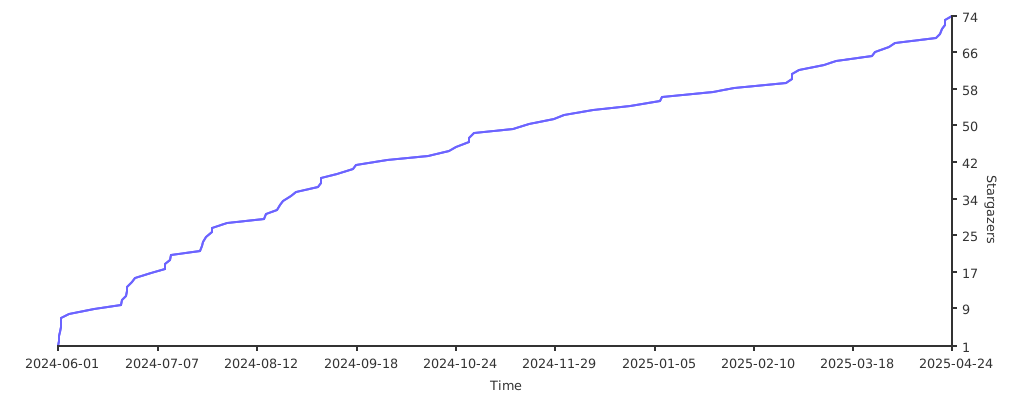
+## Stargazers
+
+
+## Code of Conduct
+Participate in this project in accordance with the Contributor Covenant [Code
of Conduct](https://www.apache.org/foundation/policies/conduct).
+
+## Contributors
+We appreciate all developers for their contributions. See the [List Of
Contributors](https://github.com/apache/bigtop-manager/graphs/contributors).
+
+## License
+[Apache 2.0 License](LICENSE)
diff --git a/README.zh.md b/README.zh.md
deleted file mode 100644
index 64836452..00000000
--- a/README.zh.md
+++ /dev/null
@@ -1,56 +0,0 @@
-<!---
- Licensed to the Apache Software Foundation (ASF) under one or more
- contributor license agreements. See the NOTICE file distributed with
- this work for additional information regarding copyright ownership.
- The ASF licenses this file to You under the Apache License, Version 2.0
- (the "License"); you may not use this file except in compliance with
- the License. You may obtain a copy of the License at
-
- http://www.apache.org/licenses/LICENSE-2.0
-
- Unless required by applicable law or agreed to in writing, software
- distributed under the License is distributed on an "AS IS" BASIS,
- WITHOUT WARRANTIES OR CONDITIONS OF ANY KIND, either express or implied.
- See the License for the specific language governing permissions and
- limitations under the License.
---->
-
-# Bigtop-Manager
-
-Bigtop-Manager 是一个用于管理 Bigtop 组件的平台。灵感来自 Apache Ambari。
-
-## 先决条件
-
-JDK:需要 JDK 17 或 21
-Metadata DB:Mariadb 或 Mysql
-
-### API-文档
-
-Swagger 用户界面
-
-### 编译
-
-```
-mvn clean package -DskipTests
-```
-
-### 开发 人员
-
-1. 创建数据库"bigtop_manager",配置数据库连接用户名和密码,默认均为“root”
-2. 运行SQL DDL 脚本
`bigtop-manager-server/src/main/resources/ddl/MySQL-DDL-CREATE.sql`
-3. 插入测试数据,数据脚本位于`dev-support/example/bigtop_manager/user.sql`
-4. 启动 bigtop-manager-server
`bigtop-manager-server/src/main/java/org/apache/bigtop/manager/server/ServerApplication.java`
-5. 启动 bigtop-manager-agent `类似于启动bm-server`
-6. 启动 bigtop-manager-ui `配置 nodejs 环境, 默认nodejs位于bigtop-manager-ui/node,
运行package.json`
-7. 访问 `http://localhost:5173/`, 默认登录名和密码为 `"admin"`
-
-### 如何测试服务
-
-> 1. 登录
-> 2. 创建群集 ->注册主机
-> 3. 安装服务
-> 4. 启动服务
-> 5. 停止服务
-
-### API 测试
-- 访问 `http://localhost:8080/swagger-ui/index.html` 查看swagger API 文档
diff --git a/bigtop-manager-server/src/main/resources/ddl/MySQL-DDL-CREATE.sql
b/bigtop-manager-server/src/main/resources/ddl/MySQL-DDL-CREATE.sql
index 28a75131..605ae8c9 100644
--- a/bigtop-manager-server/src/main/resources/ddl/MySQL-DDL-CREATE.sql
+++ b/bigtop-manager-server/src/main/resources/ddl/MySQL-DDL-CREATE.sql
@@ -126,7 +126,7 @@ CREATE TABLE `repo`
`id` BIGINT(20) UNSIGNED NOT NULL AUTO_INCREMENT,
`name` VARCHAR(32) DEFAULT NULL,
`arch` VARCHAR(32) DEFAULT NULL,
- `base_url` VARCHAR(64) DEFAULT NULL,
+ `base_url` VARCHAR(256) DEFAULT NULL,
`type` INT DEFAULT NULL COMMENT '1-services, 2-tools',
`create_time` DATETIME DEFAULT CURRENT_TIMESTAMP,
`update_time` DATETIME DEFAULT CURRENT_TIMESTAMP ON UPDATE
CURRENT_TIMESTAMP,
diff --git
a/bigtop-manager-server/src/main/resources/ddl/PostgreSQL-DDL-CREATE.sql
b/bigtop-manager-server/src/main/resources/ddl/PostgreSQL-DDL-CREATE.sql
index 900f7101..d73c3b84 100644
--- a/bigtop-manager-server/src/main/resources/ddl/PostgreSQL-DDL-CREATE.sql
+++ b/bigtop-manager-server/src/main/resources/ddl/PostgreSQL-DDL-CREATE.sql
@@ -120,7 +120,7 @@ CREATE TABLE repo
id BIGINT CHECK (id > 0) NOT NULL GENERATED ALWAYS AS
IDENTITY,
name VARCHAR(32) DEFAULT NULL,
arch VARCHAR(32) DEFAULT NULL,
- base_url VARCHAR(64) DEFAULT NULL,
+ base_url VARCHAR(256) DEFAULT NULL,
type INTEGER DEFAULT NULL,
create_time TIMESTAMP(0) DEFAULT CURRENT_TIMESTAMP,
update_time TIMESTAMP(0) DEFAULT CURRENT_TIMESTAMP,
diff --git
a/bigtop-manager-server/src/main/resources/stacks/infra/1.0.0/services/grafana/metainfo.xml
b/bigtop-manager-server/src/main/resources/stacks/infra/1.0.0/services/grafana/metainfo.xml
index 87dda446..ee540d94 100644
---
a/bigtop-manager-server/src/main/resources/stacks/infra/1.0.0/services/grafana/metainfo.xml
+++
b/bigtop-manager-server/src/main/resources/stacks/infra/1.0.0/services/grafana/metainfo.xml
@@ -54,7 +54,7 @@
</architectures>
<packages>
<package>
- <url>https://dl.grafana.com/oss/release/</url>
+ <url>https://dl.grafana.com/oss/release</url>
<name>grafana-11.4.0.linux-amd64.tar.gz</name>
<checksum>SHA-256:3550c73f4455435642976e82cc89aa354f076a75b766a408781107f4f5d4744c</checksum>
</package>
@@ -66,7 +66,7 @@
</architectures>
<packages>
<package>
- <url>https://dl.grafana.com/oss/release/</url>
+ <url>https://dl.grafana.com/oss/release</url>
<name>grafana-11.4.0.linux-arm64.tar.gz</name>
<checksum>SHA-256:c978b46a61d92883119131641c03b8a1323a284e74ab9a20e7e48207dc1a11e1</checksum>
</package>
diff --git
a/bigtop-manager-server/src/main/resources/stacks/infra/1.0.0/services/mysql/metainfo.xml
b/bigtop-manager-server/src/main/resources/stacks/infra/1.0.0/services/mysql/metainfo.xml
index 00c8e479..b3a38ae2 100644
---
a/bigtop-manager-server/src/main/resources/stacks/infra/1.0.0/services/mysql/metainfo.xml
+++
b/bigtop-manager-server/src/main/resources/stacks/infra/1.0.0/services/mysql/metainfo.xml
@@ -53,7 +53,7 @@
</architectures>
<packages>
<package>
-
<url>https://dev.mysql.com/get/Downloads/MySQL-8.0/</url>
+
<url>https://dev.mysql.com/get/Downloads/MySQL-8.0</url>
<name>mysql-8.0.40-linux-glibc2.28-x86_64.tar.xz</name>
<checksum>MD5:dcf2702f953d1969be44083f4f063f18</checksum>
</package>
@@ -65,7 +65,7 @@
</architectures>
<packages>
<package>
-
<url>https://dev.mysql.com/get/Downloads/MySQL-8.0/</url>
+
<url>https://dev.mysql.com/get/Downloads/MySQL-8.0</url>
<name>mysql-8.0.40-linux-glibc2.28-aarch64.tar.xz</name>
<checksum>MD5:a79f41ce62784a1a0e081c76116008de</checksum>
</package>
diff --git a/docs/README.md b/docs/README.md
new file mode 100644
index 00000000..23de665c
--- /dev/null
+++ b/docs/README.md
@@ -0,0 +1,11 @@
+# Documents
+[Chinese Edition](README.zh.md)
+
+We provide the following documents for you to understand this project:
+* [Prepare](./en/prepare.md): Prepare environment.
+* [Deploy](./en/deploy.md): Deploy the project.
+* [Architecture](./en/architecture.md): The architecture of the project.
+* [Concepts](./en/concepts.md): The concepts used in this project.
+* [Cluster](./en/cluster.md): How to create a cluster.
+* [Service](./en/service.md): How to add a service.
+* [Contribution](./en/contribution.md): How to contribute to the project.
diff --git a/docs/README.zh.md b/docs/README.zh.md
new file mode 100644
index 00000000..9ed26d22
--- /dev/null
+++ b/docs/README.zh.md
@@ -0,0 +1,11 @@
+# 文档
+[英文文档](README.md)
+
+我们为您提供以下文档,以帮助您了解该项目:
+* [环境准备](./zh/prepare.md): 如何为项目部署做环境准备。
+* [部署](./zh/deploy.md): 如何部署项目。
+* [架构](./zh/architecture.md): 项目的架构。
+* [概念](./zh/concepts.md): 项目中使用的概念。
+* [集群](./zh/cluster.md): 如何创建一个集群。
+* [服务](./zh/service.md): 如何添加一个服务。
+* [贡献](./zh/contribution.md): 如何为项目做出贡献。
diff --git a/docs/en/architecture.md b/docs/en/architecture.md
new file mode 100644
index 00000000..bf6d93a5
--- /dev/null
+++ b/docs/en/architecture.md
@@ -0,0 +1,68 @@
+# Architecture and Design
+
+## Hierarchical Architecture System
+
+### Interface Layer
+* **Functional Modules**:
+ * **REST API**: Provide HTTP interfaces that comply with the OpenAPI 3.0
specification.
+ * **Web UI**: An interactive management interface based on Vue 3.
+* **Interaction Protocol**: All interface requests are transmitted via HTTP.
+
+### Core Layer
+| Module | Responsibility Description
|
+|--------|-------------------------------------------------------------------------------------------------|
+| Server | Cluster metadata management, Job scheduling, and global state
maintenance |
+| Agent | Host-level service lifecycle management
(deployment/start-stop/configuration) |
+| LLM | Generate intelligent operation and maintenance suggestions based on
natural language processing |
+| Stack | Define component stacks
|
+| gRPC | Implement a two-way communication protocol between the Server and
the Agent |
+| Job | A task execution unit that records operation status and logs
|
+
+### Component Layer
+* **Supported Components**: Include but not limited to ZooKeeper/Hadoop/Kafka,
etc.
+* **Extension Mechanism**: Define installation scripts and configuration
templates for new components through the Stack module.
+
+## Cluster Topology Rules
+
+### Deployment Constraints
+* **Service Instances**:
+ * The Server runs in a single-instance mode on the Host.
+ * At most one Agent instance can be deployed on each Host.
+* **Resource Allocation**:
+ * Each Host can only join one cluster.
+ * The Agent is responsible for managing all components within the Host.
+* **Communication Path**:
+```mermaid
+graph TD
+ Server-->|Management|Cluster-A
+ Server-->|Management|Cluster-B
+ Cluster-A-->|Agent|Host-1
+ Cluster-A-->|Agent|Host-2
+ Cluster-B-->|Agent|Host-3
+```
+
+## Job Processing Flow
+
+### Instruction Execution Phase
+* **Request Reception**:
+ * Users initiate operation requests (such as starting Kafka) through the
REST API or Web UI.
+ * After the Server verifies the permissions, it creates the corresponding
Job record.
+* **Job Scheduling**:
+```mermaid
+graph LR
+ A[Job Enqueue] --> B(Job Queue)
+ B --> C{Scheduling Strategy}
+ C -->|FIFO| D[Split Task]
+ D --> E[Distribute to Agent via gRPC]
+```
+* **Script Execution**:
+ * The Agent loads the corresponding script in the Stack.
+ * Execution logs are written to the local log file in real time.
+
+### State Management Mechanism
+| State Type | Trigger Condition | Handling
Strategy |
+|-------------------|----------------------------------------|-------------------------------|
+| PENDING | Task created but not scheduled | Wait for
invocation |
+| RUNNING | Task has been issued to the Agent | Monitor the
timeout threshold |
+| SUCCESSFUL/FAILED | The Agent returns the execution result | Update
component status |
+| CANCELED | The preceding task fails | Cancel
subsequent tasks |
\ No newline at end of file
diff --git a/docs/en/cluster.md b/docs/en/cluster.md
new file mode 100644
index 00000000..a16e0950
--- /dev/null
+++ b/docs/en/cluster.md
@@ -0,0 +1,54 @@
+
+# Cluster
+
+## Create a Cluster
+This section describes how to create a cluster.
+
+### Basic Information
+When creating a cluster, users need to fill in the following information:
+- **Name**: The unique identifier of the cluster, a key information for the
code to recognize the cluster.
+- **DisplayName**: The display name of the cluster, shown on the page for
users to distinguish.
+- **Description**: A detailed description of the cluster.
+- **Root Directory**: The address where cluster services are installed.
Corresponding service directories will be created here. For example, if this is
`/opt`, ZooKeeper will be installed under `/opt/services/zookeeper`.
+- **User Group**: The user group for cluster services. A separate username
will be created for each service. If this is `hadoop`, the file permissions for
ZooKeeper will be `zookeeper:hadoop`.
+
+
+
+### Stack
+The stack page is a display page that mainly shows which optional services are
available for subsequent installation.
+
+
+
+Expect for our official repository, users can also set their own repository
which can configured here
+
+We also provide other ways for you download dependencies:
+* BaiduNetdisk: https://pan.baidu.com/s/162FXYsaRuwFQjrOlMuDRjg?pwd=hufb
+
+
+
+### Hosts
+#### Add a Host
+When adding a host, the following information needs to be filled in:
+- **Username**: The user on the host.
+- **Authentication Method**: Authentication method (password/key/no
authentication).
+- **Hostname**: Hostname, supporting batch addition such as `host-0[1-2]`.
+- **Agent Path**: The path where the Agent is installed. If this is `/opt`,
the Agent directory will be `/opt/bigtop-manager-agent`.
+- **SSH Port**: The port used by the host's SSHD.
+- **GRPC Port**: The port where the Agent's gRPC service is exposed as desired
by the user.
+- **Description**: Host description.
+
+
+
+#### Install Dependencies
+After entering the host information and before proceeding to the next step,
users need to install dependencies, i.e., install the agent application on the
corresponding host.
+
+
+
+Users can only proceed to the next step if all hosts are installed
successfully. Otherwise, they need to fix the errors or remove the hosts where
installation failed.
+
+
+
+### Create
+Finally, wait for the cluster to be created successfully. If it fails, resolve
the issues and retry.
+
+
\ No newline at end of file
diff --git a/docs/en/concepts.md b/docs/en/concepts.md
new file mode 100644
index 00000000..c1ea16c3
--- /dev/null
+++ b/docs/en/concepts.md
@@ -0,0 +1,109 @@
+# Concepts
+
+## Cluster
+### Definition
+A cluster is a logical unit composed of a group of physical or virtual hosts,
used to host the distributed runtime environment for big data components. Each
cluster has independent configuration space and resource isolation boundaries.
+
+### Key Features
+* **Multi Cluster**: A single Server instance can manage multiple clusters
simultaneously (e.g., production clusters, test clusters, etc.).
+* **Host Binding**: Each Host can only belong to one cluster.
+
+### Stack
+### Stack
+#### Definition
+A predefined standardized service collection that includes installation
scripts, configuration templates, and dependency relationship descriptions.
+
+#### Stack List
+| Stack | Description
|
+|------------|---------------------------------------------------------------------------|
+| **Infra** | Services shared by all clusters, such as the monitoring system
Prometheus |
+| **Bigtop** | Services provided by Apache Bigtop, such as Hadoop/Hive/Spark,
etc. |
+| **Extra** | Community-provided or custom services, such as SeaTunnel
|
+
+### Service
+#### Definition
+A service unit running on a cluster, representing specific big data services
(such as Hadoop/Hive/Spark, etc.).
+
+#### Management
+##### Configuration Management
+* **Snapshots**: Supports configuration snapshot creation and management.
+* **Templates**: Uses Freemarker syntax to dynamically render configuration
files.
+
+##### Status Monitoring
+* **Heartbeat**: The Agent reports service health status every 30 seconds.
+
+### Component
+#### Definition
+A runtime instance within a service, corresponding to specific processes or
functional modules. Component-level operations (start/stop, etc.) are executed
by the Agent.
+
+#### Component Examples
+```mermaid
+graph TB
+Hadoop-->NameNode
+Hadoop-->DataNode
+Hadoop-->ResourceManager
+Kafka-->KB[Kafka Broker]
+Solr-->SI[Solr Instance]
+SeaTunnel-->SM[SeaTunnel Master]
+SeaTunnel-->SW[SeaTunnel Worker]
+SeaTunnel-->SL[SeaTunnel Client]
+```
+
+## Job
+### Job
+#### Definition
+The smallest schedulable unit initiated by users, representing a complete
operation and maintenance target. For example:
+`Start Hadoop service`, `Update Spark configuration and restart`, etc.
+
+#### Features
+* **Atomicity**: The execution result of a Job has only two states: success or
failure.
+* **Scope**: Acts on a single cluster.
+* **Lifecycle**: Forms a complete operation trajectory from creation to final
state change.
+
+### Stage
+#### Definition
+A logical execution unit decomposed from a Job (Job), corresponding to
independent operation steps of service components. For example:
+The `Start Hadoop` Job → `Start NameNode` Stage, `Start DataNode` Stage, etc.
+
+#### Division Principles
+* **Dependency**: Components with startup order constraints must be split into
independent Stages (e.g., NameNode needs to start before DataNode).
+* **Isolation**: Operations of different component categories must be executed
in isolation.
+* **Parallelism**: Allows parallel execution of Tasks within the same Stage.
+
+### Task
+#### Definition
+An execution instance of a Stage (Stage) on a specific host, representing the
smallest granularity of operation instructions. For example:
+The `Start NameNode` Stage → `Start NameNode on host-01` Task, `Start NameNode
on host-02` Task.
+
+### Job Scheduling Process
+#### Job Generates Stages and Tasks
+After users submit operation requests via the REST API:
+* The Server parses the request and validates its legitimacy.
+* Generates a Stage DAG based on component dependency relationships.
+* Generates a set of host-level Tasks for each Stage.
+* Persists Job/Stage/Task metadata to the database (status initialized to
`PENDING`).
+
+#### Stage Scheduling Phase
+The scheduler executes Stages in DAG order:
+* Checks the status of preceding Stages (triggered only when all preceding
Stages succeed).
+* Extracts the set of Tasks in the Stage.
+* Batches Tasks to the corresponding hosts for execution by the Agent.
+
+#### Task Execution Phase
+Processing flow after the Agent receives a Task:
+* **Resource Pre-Check**: Verifies the installation status and dependencies of
the target component.
+* **Script Execution**: Invokes the predefined component operation script in
the Stack.
+* **Status Feedback**: Writes task logs in real time and updates the Task
status to the Server.
+
+Execution Guarantee Mechanisms:
+* **Timeout**: A single Task execution timeout (default 30 minutes) is
automatically marked as failed.
+* **Retry**: Network exception failures can be automatically retried (up to 3
times).
+* **Idempotent**: Re-executing a successful Task will not cause side effects.
+
+#### State Management Mechanism
+| State Type | Trigger Condition | Handling
Strategy |
+|-------------------|--------------------------------------------|---------------------------|
+| PENDING | Task created but not scheduled | Wait for
invocation |
+| RUNNING | Task in execution | Monitor
timeout threshold |
+| SUCCESSFUL/FAILED | Task execution result | Update
component status |
+| CANCELED | Task canceled (only exists for Stage/Task) | Cancel
subsequent tasks |
\ No newline at end of file
diff --git a/docs/en/contribution.md b/docs/en/contribution.md
new file mode 100644
index 00000000..1b626b09
--- /dev/null
+++ b/docs/en/contribution.md
@@ -0,0 +1,122 @@
+# Development Environment Setup
+
+## Prerequisites
+
+### Frontend
+* Vue: 3.4.x
+* Vite: 5.x
+* NodeJS: v18.x
+* Pnpm: v8.x
+* Component Library: Ant Design Vue 4.x
+
+### Backend
+* Git: Any version
+* JDK: JDK17 or higher
+* Database: Postgres(16+) or MySQL(8+)
+* Maven: It is recommended to use version 3.8 or higher
+* Development Tool: Intellij IDEA
+
+## Setup
+
+### Get the Code
+First, you need to pull the Bigtop Manager source code from Github using the
following command:
+
+`git clone [email protected]:apache/bigtop-manager.git`
+
+### Compile
+After getting the code, some dependencies require you to compile the project
first before you can use them; otherwise, an error will occur. Please run the
following command:
+
+`./mvnw clean install -DskipTests`
+
+### Initialize
+First, you need to initialize your database. The database files are in the
`bigtop-manager-server/src/main/resources/ddl/` directory. Please use the
corresponding scripts to initialize your database. Currently, only `Postgres`
and `MySQL` are supported.
+
+And modify your database information in the
`bigtop-manager-server/src/main/resources/application.yml` file.
+
+### Development
+After compiling the project, you can start development.
+
+For Java projects, you can directly use the `Debug` feature of Intellij IDEA.
+
+For Vue projects, please run the following commands:
+
+```
+cd bigtop-manager-ui
+pnpm dev
+```
+
+Then access `localhost:5173` in your browser. Next, enjoy your development
journey!
+
+### Development Mode
+To reduce the complexity of development environment dependencies for big data
components, we support development mode:
+
+#### Environment Decoupling Design
+Traditional deployment requires developers to set up a complete Linux service
cluster, with the following pain points:
+* High environmental configuration complexity raises the development threshold
+* Non-component issues (such as scheduling problems, etc.) easily hinder
development
+
+#### Lightweight Debugging Mechanism
+Activate developer mode via the `DEV_MODE=true` environment variable to
achieve:
+* **Mock component operations**: The Agent automatically intercepts component
calls and returns a preset success status
+* **Cross-platform support**: Fully compatible with Windows/MacOS/Linux
development environments (IntelliJ IDEA recommended)
+
+#### Quick Activation
+Users can enable it through the following method:
+
+
+# Modules and Functions
+| Module | Introduction
|
+|---------------------------|----------------------------------------------------------------------------------------------------------------------------|
+| **bigtop-manager-agent** | It will be installed on each host to manage the
services on each host. |
+| **bigtop-manager-ai** | It contains some code related to the AI
assistant.
|
+| **bigtop-manager-bom** | It defines all the dependencies and their
versions in the project.
|
+| **bigtop-manager-common** | It contains some common utility classes.
|
+| **bigtop-manager-dao** | It interacts with the database.
|
+| **bigtop-manager-dist** | The packaged content will be placed in this
module, including the tar packages of `Server` and `Agent`. |
+| **bigtop-manager-grpc** | The Server application and the Agent application
interact through gRPC. This module contains all gRPC service definitions. |
+| **bigtop-manager-server** | It is the main code of the management end.
|
+| **bigtop-manager-stack** | It contains the components and their operation
scripts in each component stack. |
+| **bigtop-manager-ui** | It is the front - end code.
|
+
+# Contribution Process
+
+## Code Style
+We need to ensure that our code format meets the requirements.
+
+Java:
+```
+./mvnw clean spotless:apply
+```
+
+Vue:
+```
+cd bigtop-manager-ui
+pnpm prettier
+```
+
+## Unit Tests
+Before submitting your code, please ensure that all unit tests pass.
+
+Java:
+```
+./mvnw clean test -Dskip.pnpm -Dskip.installnodepnpm -Dskip.pnpm.test
+```
+
+Vue:
+```
+./mvnw -pl bigtop-manager-ui test
+```
+
+## Create an Issue
+1. First, go to the [Bigtop](https://issues.apache.org/jira/projects/BIGTOP)
project in Apache Jira.
+2. Create an Issue.
+3. Ensure that the Summary of the Issue is described in English. If possible,
write the details in the Description, which also needs to be in English.
+4. If you are submitting an issue for Bigtop Manager, click the Components
option, select bigtop-manager, and also select the corresponding version for
the Fix Version. Bigtop Manager starts with bm-, for example, bm-1.0.0 means
this issue will be fixed in Bigtop Manager 1.0.0. The Affects Version is
optional, and the rules are the same as above.
+
+## Submit Code
+1. Get the Issue number. You can get the number from the Jira page or the URL.
For example, if the current URL is:
[https://issues.apache.org/jira/browse/BIGTOP-4162](https://issues.apache.org/jira/browse/BIGTOP-4162),
then the number is BIGTOP-4162.
+2. Create a local branch. It is recommended that one Issue corresponds to one
branch, for example, `git checkout -b bigtop-4162`.
+3. Submit your code to this branch and push the branch to your forked
repository on Github.
+4. Create a Pull Request. The naming rule for the Title is `ISSUE number:
Description`, for example, `BIGTOP-4162: Add health check for components`. If
the PR is complex, it is recommended to write a Description for both the Issue
and the PR to explain the specific purpose.
+5. Ensure that all Github CIs pass. If one fails, the PR will not be reviewed.
+6. After the CIs pass normally, wait for the Maintainer to review your PR. If
there are comments, please handle them in time. After the review passes, it can
be merged.
\ No newline at end of file
diff --git a/docs/en/deploy.md b/docs/en/deploy.md
new file mode 100644
index 00000000..c267f058
--- /dev/null
+++ b/docs/en/deploy.md
@@ -0,0 +1,81 @@
+# Installation
+## Package Deployment
+```bash
+# Extract the installation package (note correct extraction parameters)
+tar zxvf apache-bigtop-manager-1.0.0-SNAPSHOT-server.tar.gz -C /opt
+
+# Enter deployment directory
+cd /opt/bigtop-manager-server
+```
+
+## Configuration
+```bash
+# Enter deployment directory
+cd /opt/bigtop-manager-server
+
+# Modify configuration file (replace all placeholders)
+sed -e "s|org.postgresql.Driver|com.mysql.cj.jdbc.Driver|g" \
+ -e "s|jdbc:postgresql://localhost:5432|jdbc:mysql://YOUR_MYSQL_IP:3306|g" \
+ -e "s|username: postgres|username: YOUR_USER_NAME|g" \
+ -e "s|password: postgres|password: YOUR_PASSWORD|g" \
+ -i.bak conf/application.yml # Automatically generate backup file
+```
+
+### Optional Service Port Configuration
+```yaml
+# Add to the end of conf/application.yml
+server:
+ port: 8080 # Modify to desired port, default is 8080
+```
+
+## Create MySQL User
+```sql
+-- Create database (execute the second line first if password policy needs
adjustment)
+CREATE DATABASE bigtop_manager;
+-- SET GLOBAL validate_password_policy = LOW; -- Temporarily lower password
policy for testing environments
+
+-- Create user (replace YOUR_USER_NAME/YOUR_IP/YOUR_PASSWORD)
+CREATE USER 'YOUR_USER_NAME'@'YOUR_IP' IDENTIFIED BY 'YOUR_PASSWORD';
+
+-- Grant privileges (recommend narrowing privileges based on requirements)
+GRANT ALL PRIVILEGES ON bigtop_manager.* TO 'YOUR_USER_NAME'@'YOUR_IP';
+FLUSH PRIVILEGES;
+```
+
+## Initialize Database
+```bash
+# Enter deployment directory
+cd /opt/bigtop-manager-server
+
+# Execute DDL script (note password parameter format)
+mysql -h YOUR_MYSQL_IP -P 3306 -u YOUR_USER_NAME -pYOUR_PASSWORD <
ddl/MySQL-DDL-CREATE.sql
+```
+
+## Download MySQL Driver
+```bash
+# Enter deployment directory
+cd /opt/bigtop-manager-server
+
+# Official repository
+wget
https://repo1.maven.org/maven2/com/mysql/mysql-connector-j/8.0.33/mysql-connector-j-8.0.33.jar
-O libs/mysql-connector-j-8.0.33.jar
+
+# For users in Mainland China (recommended Aliyun mirror)
+wget
https://maven.aliyun.com/repository/central/com/mysql/mysql-connector-j/8.0.33/mysql-connector-j-8.0.33.jar
-O libs/mysql-connector-j-8.0.33.jar
+```
+
+## Start Service
+```bash
+# Enter deployment directory
+cd /opt/bigtop-manager-server
+
+# Start service
+./bin/start.sh
+
+# Or run in background
+nohup bin/start.sh > /dev/null 2>&1 &
+```
+
+## 7. Admin Page
+* Url: `http://YOUR_IP:8080/`
+* Username: `admin`
+* Password: `admin`
\ No newline at end of file
diff --git a/docs/en/prepare.md b/docs/en/prepare.md
new file mode 100644
index 00000000..90d0e602
--- /dev/null
+++ b/docs/en/prepare.md
@@ -0,0 +1,147 @@
+# Prepare
+## Operating System
+### Requirements
+Supported Architectures
+* `x86_64`
+* `aarch64`
+
+Verified Distributions
+* `Rocky Linux 8.10`
+* `Anolis OS 8.10`
+* `openEuler 24.03`
+
+Filesystems
+* `ext4`
+* `xfs`
+
+## JDK
+Requires `JDK ≥ 17` (e.g., `JDK17` or `JDK21`). LTS releases are recommended.
+
+## Database
+Supported Databases:
+* `MySQL`
+* `PostgreSQL`
+
+Recommended versions:
+* `MySQL` 8.0+
+* `PostgreSQL` 16.4+
+
+## Build
+```bash
+git clone https://github.com/apache/bigtop-manager.git
+cd bigtop-manager
+mvn clean package -DskipTests
+```
+
+## System
+### Firewall
+If port connectivity issues occur, temporarily disable the firewall to confirm
whether it is blocking traffic. Re-enable specific ports for bigtop-manager
components if needed.
+
+```bash
+sudo systemctl stop firewalld.service
+sudo systemctl disable firewalld.service
+```
+
+### Time Sync
+Ensure clock synchronization across all cluster nodes to prevent metadata
inconsistencies.
+
+#### NTP
+```bash
+sudo systemctl start ntpd.service
+sudo systemctl enable ntpd.service
+```
+
+#### Chrony
+```bash
+sudo systemctl start chronyd.service
+sudo systemctl enable chronyd.service
+```
+
+## Hosts
+### Set Hostname
+```bash
+hostnamectl set-hostname your-host-name
+
+# Update /etc/hosts
+echo "10.10.0.101 bm1" | sudo tee -a /etc/hosts
+echo "10.10.0.102 bm2" | sudo tee -a /etc/hosts
+echo "10.10.0.103 bm3" | sudo tee -a /etc/hosts
+```
+
+## System Tuning
+### Resource Limits
+```bash
+cat >> /etc/security/limits.conf << EOF
+* soft fsize unlimited
+* hard fsize unlimited
+* soft cpu unlimited
+* hard cpu unlimited
+* soft as unlimited
+* hard as unlimited
+* soft nofile 1048576
+* hard nofile 1048576
+* soft nproc unlimited
+* hard nproc unlimited
+EOF
+```
+
+Verify
+```bash
+ulimit -a
+```
+
+### Memory Optimization
+#### Disable Transparent Huge Pages (THP)
+```bash
+echo 'never' > /sys/kernel/mm/transparent_hugepage/enabled
+echo 'never' > /sys/kernel/mm/transparent_hugepage/defrag
+```
+
+#### Adjust Swappiness
+```bash
+sysctl vm.swappiness=1
+swapoff -a
+```
+
+#### Verification
+```bash
+cat /sys/kernel/mm/transparent_hugepage/enabled
+cat /sys/kernel/mm/transparent_hugepage/defrag
+
+free -h | grep Swap
+sysctl vm.swappiness
+```
+
+#### Persistence Configuration
+```bash
+# THP
+cat >> /etc/rc.d/rc.local << EOF
+if test -f /sys/kernel/mm/transparent_hugepage/enabled; then
+ echo never > /sys/kernel/mm/transparent_hugepage/enabled
+fi
+if test -f /sys/kernel/mm/transparent_hugepage/defrag; then
+ echo never > /sys/kernel/mm/transparent_hugepage/defrag
+fi
+EOF
+chmod +x /etc/rc.d/rc.local
+
+# Swappiness
+echo 'vm.swappiness=1' | sudo tee -a /etc/sysctl.conf
+```
+
+## SSH
+### Generate SSH Keys
+```bash
+# Generate keys (run once on the server node)
+ssh-keygen -N '' -t rsa -b 2048 -f /etc/ssh/ssh_host_rsa_key
+ssh-keygen -N '' -t ecdsa -b 256 -f /etc/ssh/ssh_host_ecdsa_key
+ssh-keygen -N '' -t ed25519 -b 256 -f /etc/ssh/ssh_host_ed25519_key
+```
+
+### Distribute Public Keys (Optional)
+```bash
+# Replace YOU_KEY.pub with your actual public key
+for node in bm{1..3}; do
+ ssh-copy-id -i ~/.ssh/YOU_KEY.pub $node
+done
+```
\ No newline at end of file
diff --git a/docs/en/service.md b/docs/en/service.md
new file mode 100644
index 00000000..9cd07d49
--- /dev/null
+++ b/docs/en/service.md
@@ -0,0 +1,42 @@
+
+# Service
+
+## Add a Service
+This section describes how to add a service.
+
+First, it should be clear that the installation entry for Infra Stack services
is different from that of Bigtop/Extra Stack services. Infra Stack services are
installed via the **Infrastructure** entry:
+
+
+
+While Bigtop/Extra Stack services are installed via the **Cluster** entry:
+
+
+
+The services displayed differ by entry. Below, we use the ZooKeeper service in
the Bigtop Stack as an example for explanation.
+
+### Select Services
+On this page, users can select the service we want to install. Each service
has a **License** icon in the upper right corner:
+* **Green**: Indicates the license is compatible with the Apache License.
+* **Red**: Indicates license incompatibility. For such services, installation
will default to downloading from the official website, user-configured
repository will be inactive. Currently incompatible services include MySQL and
Grafana in the Infra Stack.
+
+
+
+### Assign Components
+Users need to assign components to hosts, switch components via the left
sidebar:
+
+
+
+### Configure Service
+Users can modify service configurations here:
+
+
+
+### Service Overview
+Users can verify if the assigned components and configurations are correct. If
not, return to the previous step to make changes:
+
+
+
+### Install
+Finally, users only need to wait for the service to be added successfully. If
it fails, resolve the issues and retry:
+
+
\ No newline at end of file
diff --git a/docs/zh/architecture.md b/docs/zh/architecture.md
new file mode 100644
index 00000000..13a636dd
--- /dev/null
+++ b/docs/zh/architecture.md
@@ -0,0 +1,68 @@
+# 架构与设计
+
+## 分层架构体系
+
+### 接口层(Interface Layer)
+* **功能模块**:
+ * **REST API**:提供符合 OpenAPI 3.0 规范的HTTP接口
+ * **Web UI**:基于 Vue 3 的交互式管理界面
+* **交互协议**:所有接口请求均通过 HTTP 传输
+
+### 核心层(Core Layer)
+| 模块 | 职责描述 |
+|--------|----------------------------|
+| Server | 集群元数据管理、Job调度、全局状态维护 |
+| Agent | 主机级服务生命周期管理(部署/启停/配置) |
+| LLM | 基于自然语言处理的智能运维建议生成 |
+| Stack | 组件栈定义 |
+| gRPC | 实现 Server 与 Agent 间的双向通信协议 |
+| Job | 任务执行单元,记录操作状态与日志 |
+
+### 组件层(Component Layer)
+* **支持组件**:包括但不限于: ZooKeeper/Hadoop/Kafka 等
+* **扩展机制**:通过 Stack 模块定义新组件的安装脚本与配置模板
+
+## 集群拓扑规则
+
+### 部署约束
+* **服务实例**:
+ * Server 以单实例模式运行于 Host
+ * 每个 Host 最多部署一个 Agent 实例
+* **资源分配**:
+ * 每个 Host 仅可加入一个集群
+ * Agent 负责管理 Host 内的所有组件
+* **通信路径**:
+```mermaid
+graph TD
+ Server-->|Management|Cluster-A
+ Server-->|Management|Cluster-B
+ Cluster-A-->|Agent|Host-1
+ Cluster-A-->|Agent|Host-2
+ Cluster-B-->|Agent|Host-3
+```
+
+## 任务处理流程
+
+### 指令执行阶段
+* **请求接收**:
+ * 用户通过 REST API 或 Web UI 发起操作请求(如启动 Kafka)
+ * Server 验证权限后创建对应Job记录
+* **任务调度**:
+```mermaid
+graph LR
+ A[Job Enqueue] --> B(Job Queue)
+ B --> C{Scheduling Strategy}
+ C -->|FIFO| D[Split Task]
+ D --> E[Distribute to Agent via gRPC]
+```
+* **脚本执行**:
+ * Agent 加载 Stack 中对应的脚本
+ * 执行日志实时写入本地 Log 文件
+
+### 状态管理机制
+| 状态类型 | 触发条件 | 处理策略 |
+|-------------------|----------------|--------|
+| PENDING | Task 创建未调度 | 等待调用 |
+| RUNNING | Task 已下发 Agent | 监听超时阈值 |
+| SUCCESSFUL/FAILED | Agent 返回执行结果 | 更新组件状态 |
+| CANCELED | 前置任务失败 | 取消后续任务 |
\ No newline at end of file
diff --git a/docs/zh/cluster.md b/docs/zh/cluster.md
new file mode 100644
index 00000000..d54b550b
--- /dev/null
+++ b/docs/zh/cluster.md
@@ -0,0 +1,52 @@
+# 集群
+## 创建集群
+本节我们来描述如何创建集群
+
+### 基本信息
+创建集群时用户需要填写如下信息
+* Name:集群唯一标识,是代码识别集群的关键信息
+* DisplayName:集群显示名,展示在页面上供用户区分
+* Description:集群描述,描述集群详细信息
+* Root Directory:集群服务安装的地址,对应的服务目录会创建至该处,若此处为 `/opt` 则 ZooKeeper 会被安装在
`/opt/services/zookeeper` 下
+* User Group:集群服务的用户组,每个服务会分别创建一个用户名,如此处为 `hadoop`,则 ZooKeeper 文件对应的权限则为
`zookeeper:hadoop`
+
+
+
+### 组件栈
+组件栈页面为展示页面,主要显示后续安装服务时有哪些可选服务
+
+
+
+除了官方 Repository 外,用户也可以搭建自己的 Repository 并在此处进行配置
+
+我们也提供了其他方式供您下载相应的依赖:
+* 百度云:https://pan.baidu.com/s/162FXYsaRuwFQjrOlMuDRjg?pwd=hufb
+
+
+
+### 主机
+#### 新增主机
+新增主机时需要填写如下信息
+* Username:该主机上的用户
+* Authentication Method:认证方式,密码/密钥/无认证
+* Hostname:主机名,支持批量添加如 `host-0[1-2]`
+* Agent Path:Agent 安装的路径,若此处为 `/opt`,则 Agent 目录则为 `/opt/bigtop-manager-agent`
+* SSH Port:主机 SSHD 所使用的端口
+* GRPC Port:用户希望 Agent 的 gRPC 服务暴露的端口
+* Description:主机描述
+
+
+
+#### 安装依赖
+主机信息输入完成后,在进入下一步之前,用户需要安装依赖,即在对应的主机上安装 Agent 应用
+
+
+
+且只有所有主机均安装成功时用户才可进入下一步,否则需要修复错误或者移除安装失败的主机
+
+
+
+### 创建集群
+最后等待集群创建成功即可,若失败则解决问题后重试
+
+
\ No newline at end of file
diff --git a/docs/zh/concepts.md b/docs/zh/concepts.md
new file mode 100644
index 00000000..5945489e
--- /dev/null
+++ b/docs/zh/concepts.md
@@ -0,0 +1,109 @@
+# 核心概念
+
+## 集群
+### 定义
+集群是由一组物理或虚拟主机组成的逻辑单元,用于承载大数据组件的分布式运行环境。每个集群具备独立的配置空间和资源隔离边界
+
+### 关键特性
+* **多集群管理**:单个 Server 实例可同时管理多个集群(如生产集群、测试集群等)
+* **主机绑定规则**:每个 Host 仅能归属一个集群
+
+## 组件栈
+### 组件栈(Stack)
+#### 定义
+预定义的标准化服务集合,包含安装脚本、配置模板及依赖关系描述
+
+#### 组件栈列表
+| 组件栈 | 描述 |
+|------------|-------------------------------------------|
+| **Infra** | 所有集群共享的服务,比如监控系统 Prometheus |
+| **Bigtop** | Apache Bigtop 提供的服务,如 Hadoop/Hive/Spark 等 |
+| **Extra** | 社区提供或自定义服务,如 SeaTunnel |
+
+### 服务(Service)
+#### 定义
+运行在集群上的服务单元,代表具体的大数据服务(如 Hadoop/Hive/Spark 等)
+
+#### 管理维度
+##### 配置管理
+* **快照机制**:支持配置快照拍摄及管理
+* **模板引擎**:使用 Freemarker 语法动态渲染配置文件
+
+#### 状态监控
+* **心跳机制**:Agent 每 30 秒上报服务健康状态
+
+### 组件(Component)
+#### 定义
+服务内部的运行实例,对应具体进程或功能模块。组件级别的操作(启动/停止等)由 Agent 执行。
+
+#### 组件示例
+```mermaid
+graph TB
+Hadoop-->NameNode
+Hadoop-->DataNode
+Hadoop-->ResourceManager
+Kafka-->KB[Kafka Broker]
+Solr-->SI[Solr Instance]
+SeaTunnel-->SM[SeaTunnel Master]
+SeaTunnel-->SW[SeaTunnel Worker]
+SeaTunnel-->SL[SeaTunnel Client]
+```
+
+## 作业
+### 作业(Job)
+#### 定义
+用户发起的最小可调度单元,代表一个完整的运维操作目标。例如:
+`启动 Hadoop 服务`、`更新 Spark 配置并重启` 等
+
+#### 特性
+* **原子性**:Job 执行结果仅有成功/失败两种状态
+* **操作域**:作用于单个集群
+* **生命周期**:从创建到状态终态变更形成完整操作轨迹
+
+### 阶段(Stage)
+#### 定义
+作业(Job)分解后的逻辑执行单元,对应服务组件的独立操作步骤。例如:
+`启动 Hadoop` Job → `启动 NameNode` Stage、`启动 DataNode` Stage 等
+
+#### 划分原则
+* **服务依赖**:存在启动顺序约束的组件需拆分为独立 Stage(如 NameNode 需早于 DataNode 启动)
+* **资源隔离**:不同组件类别的操作需隔离执行
+* **并行度控制**:允许同一 Stage 内 Task 并行执行
+
+### 任务(Task)
+#### 定义
+阶段(Stage)在具体主机上的执行实例,代表最小粒度的操作指令。例如:
+`启动 NameNode` Stage → `启动 host-01 上的 NameNode` Task、`启动 host-02 上的 NameNode`
Task
+
+### 作业调度流程
+#### Job 生成 Stages 及 Tasks
+用户通过 REST API 提交操作请求后:
+* Server 解析请求并校验请求合法性
+* 根据组件依赖关系生成 Stage DAG
+* 为每个 Stage 生成主机级别的 Task 集合
+* 持久化 Job/Stage/Task 元数据至数据库(状态初始化为 `PENDING`)
+
+#### Stage 调度阶段
+调度器按 DAG 顺序执行 Stage:
+* 检查前置 Stage 状态(仅当前置 Stage 全部成功时触发)
+* 提取 Stage 中的 Task 集合
+* 将 Task 批量推送至对应主机上交由 Agent 执行
+
+#### Task 执行阶段
+Agent 接收 Task 后的处理流程:
+* **资源预检**:验证目标组件安装状态与依赖项
+* **脚本执行**:调用 Stack 中预定义的组件操作脚本
+* **状态回传**:实时写入任务日志并更新 Task 状态至 Server
+
+执行保障机制:
+* **超时熔断**:单个 Task 执行超时(默认 30 分钟)自动标记失败
+* **重试策略**:网络异常类失败可自动重试(最大 3 次)
+* **幂等设计**:重复执行已成功 Task 不会引发副作用
+
+#### 状态管理机制
+| 状态类型 | 触发条件 | 处理策略 |
+|-------------------|----------------------------|--------|
+| PENDING | 任务创建未调度 | 等待调用 |
+| RUNNING | 任务执行中 | 监听超时阈值 |
+| SUCCESSFUL/FAILED | 任务执行结果 | 更新组件状态 |
+| CANCELED | 该任务被取消(仅 Stage/Task 存在该状态) | 取消后续任务 |
\ No newline at end of file
diff --git a/docs/zh/contribution.md b/docs/zh/contribution.md
new file mode 100644
index 00000000..248edefd
--- /dev/null
+++ b/docs/zh/contribution.md
@@ -0,0 +1,126 @@
+# 开发环境搭建
+## 前置条件
+### 前端
+* Vue: 3.4.x
+* Vite: 5.x
+* NodeJS: v18.x
+* Pnpm: v8.x
+* 组件库: Ant Design Vue 4.x
+
+### 后端
+* Git: 任意版本
+* JDK: JDK17 或以上
+* Database: Postgres(16+) 或 MySQL(8+)
+* Maven: 推荐使用3.8以上版本
+* 开发工具: Intellij IDEA
+
+## 设置
+### 获取代码
+首先,您需要通过以下命令从 Github 中拉取 Bigtop Manager 源码:
+
+`git clone [email protected]:apache/bigtop-manager.git`
+
+### 编译
+获取代码后,部分依赖需要先编译项目才能使用,否则会报错,请运行以下命令:
+
+`./mvnw clean install -DskipTests`
+
+### 初始化
+首先您需要初始化您的数据库,数据库文件在 `bigtop-manager-server/src/main/resources/ddl/`
目录下,请使用对应的脚本来初始化您的数据库,目前仅支持 `Postgres` 以及 `MySQL`
+
+并且在 `bigtop-manager-server/src/main/resources/application.yml` 文件中修改您的数据库信息
+
+### 开发
+在编译完项目后您就可以开始开发了
+
+针对 Java 项目,直接使用 Intellij IDEA 的 `Debug` 能力即可
+
+针对 Vue 项目,请运行如下命令:
+
+```
+cd bigtop-manager-ui
+pnpm dev
+```
+
+然后使用浏览器访问 `localhost:5173` 即可,接下来就请尽情享受您的开发之旅吧!
+
+### 开发模式
+为降低大数据组件开发环境依赖复杂度,我们支持了开发模式:
+
+#### 环境解耦设计
+传统部署要求开发者搭建完整 Linux 服务集群,存在以下痛点:
+* 环境配置复杂度高,提升了开发门槛
+* 非组件问题(如调度问题等)易导致开发受阻
+
+#### 轻量化调试机制
+通过`DEV_MODE=true`环境变量激活开发模式,实现:
+* **Mock 组件操作**:Agent 自动拦截组件调用,返回预设成功状态
+* **跨平台支持**:完整兼容 Windows/MacOS/Linux 开发环境(推荐 IntelliJ IDEA)
+
+#### 快速启用
+用户通过以下方式即可启用:
+
+
+# 模块及功能
+| 模块 | 介绍
|
+|---------------------------|-------------------------------------------------|
+| **bigtop-manager-agent** | 会被安装到每台主机上,对每台主机上的服务进行管理 |
+| **bigtop-manager-ai** | 包含一些 AI 助手相关的代码 |
+| **bigtop-manager-bom** | 定义了项目中所有依赖及其版本 |
+| **bigtop-manager-common** | 一些公共工具类 |
+| **bigtop-manager-dao** | 与数据库进行交互 |
+| **bigtop-manager-dist** | 打包后的内容会放在该模块下,包括 `Server` 和 `Agent` 的 tar 包 |
+| **bigtop-manager-grpc** | Server 应用与 Agent 应用通过 gRPC 交互,该模块包含所有 gRPC 服务定义 |
+| **bigtop-manager-server** | 管理端的主要代码 |
+| **bigtop-manager-stack** | 包含各个组件栈中的组件及其操作脚本 |
+| **bigtop-manager-ui** | 前端代码 |
+
+# 贡献流程
+## 代码规范
+我们需要保证我们的代码格式符合要求
+
+Java:
+```
+./mvnw clean spotless:apply
+```
+
+Vue:
+```
+cd bigtop-manager-ui
+pnpm prettier
+```
+
+## 单元测试
+在提交代码前,请确保所有单测均通过
+
+Java:
+```
+./mvnw clean test -Dskip.pnpm -Dskip.installnodepnpm -Dskip.pnpm.test
+```
+
+Vue:
+```
+./mvnw -pl bigtop-manager-ui test
+```
+
+## 创建 Issue
+1、首先进入 Apache Jira 中的 [Bigtop](https://issues.apache.org/jira/projects/BIGTOP)
项目
+
+2、创建 Issue
+
+3、确保 Issue 的 Summary 是英文描述,如果可以的话请将细节写到 Description 下,也需要使用英文
+
+4、如果是给 Bigtop Manager 提交项目,点击 Components 选项,选中 bigtop-manager,并且 Fix Version
也需要选择对应的版本,Bigtop Manager 以 bm- 开头,如 bm-1.0.0 代表这个 issue 将在 Bigtop Manager
1.0.0 版本修复。Affects Version 可选,规则同上
+
+## 提交代码
+1、获取 Issue 编号,编号可从 Jira 页面或者 URL 中获取,如当前的 URL 为:
[https://issues.apache.org/jira/browse/BIGTOP-4162](https://issues.apache.org/jira/browse/BIGTOP-4162),则编号为
BIGTOP-4162
+
+2、创建本地分支,建议一个 Issue 对应一个分支,如 `git checkout -b bigtop-4162`
+
+3、提交代码至该分支中,并且将分支推到你的 Github 上的 Fork 的仓库中
+
+4、创建 Pull Request,其中 Title 的命名规则为 `ISSUE编号: 描述`,如 `BIGTOP-4162: Add health
check for components`,若 PR 较复杂,建议 Issue 和 PR 都编写 Description 来解释具体用途
+
+5、确保 Github CI 均通过,若有一个失败则 PR 将不会被 Review
+
+6、CI 正常后等待 Maintainer Review 你的 PR,若有 Comment 请及时处理,Review 通过后即可被合并
\ No newline at end of file
diff --git a/docs/zh/deploy.md b/docs/zh/deploy.md
new file mode 100644
index 00000000..44b76c32
--- /dev/null
+++ b/docs/zh/deploy.md
@@ -0,0 +1,81 @@
+# 安装与启动
+## 安装包部署
+```bash
+# 解压安装包(注意正确解压参数)
+tar zxvf apache-bigtop-manager-1.0.0-SNAPSHOT-server.tar.gz -C /opt
+
+# 进入部署目录
+cd /opt/bigtop-manager-server
+```
+
+## 配置文件修改
+```bash
+# 进入部署目录
+cd /opt/bigtop-manager-server
+
+# 修改配置文件(替换所有占位符)
+sed -e "s|org.postgresql.Driver|com.mysql.cj.jdbc.Driver|g" \
+ -e "s|jdbc:postgresql://localhost:5432|jdbc:mysql://YOUR_MYSQL_IP:3306|g" \
+ -e "s|username: postgres|username: YOUR_USER_NAME|g" \
+ -e "s|password: postgres|password: YOUR_PASSWORD|g" \
+ -i.bak conf/application.yml # 自动生成备份文件
+```
+
+### 服务端口配置(可选)
+```yaml
+# conf/application.yml 末尾添加
+server:
+ port: 8080 # 修改为实际需要的端口,默认为8080
+```
+
+## 创建MySQL用户及授权
+```sql
+-- 创建数据库(若需降低密码策略可先执行第二行)
+CREATE DATABASE bigtop_manager;
+-- SET GLOBAL validate_password_policy = LOW; -- 测试环境可临时降低密码策略
+
+-- 创建用户(替换YOUR_USER_NAME/YOUR_IP/YOUR_PASSWORD)
+CREATE USER 'YOUR_USER_NAME'@'YOUR_IP' IDENTIFIED BY 'YOUR_PASSWORD';
+
+-- 授权(建议根据实际需求缩小权限范围)
+GRANT ALL PRIVILEGES ON bigtop_manager.* TO 'YOUR_USER_NAME'@'YOUR_IP';
+FLUSH PRIVILEGES;
+```
+
+## 数据库初始化
+```bash
+# 进入部署目录
+cd /opt/bigtop-manager-server
+
+# 执行DDL脚本(注意密码参数格式)
+mysql -h YOUR_MYSQL_IP -P 3306 -u YOUR_USER_NAME -pYOUR_PASSWORD <
ddl/MySQL-DDL-CREATE.sql
+```
+
+## 下载MySQL驱动
+```bash
+# 进入部署目录
+cd /opt/bigtop-manager-server
+
+# 或官方源
+wget
https://repo1.maven.org/maven2/com/mysql/mysql-connector-j/8.0.33/mysql-connector-j-8.0.33.jar
-O libs/mysql-connector-j-8.0.33.jar
+
+# 如果你在中国大陆(推荐阿里云镜像)
+wget
https://maven.aliyun.com/repository/central/com/mysql/mysql-connector-j/8.0.33/mysql-connector-j-8.0.33.jar
-O libs/mysql-connector-j-8.0.33.jar
+```
+
+## 启动服务
+```bash
+# 进入部署目录
+cd /opt/bigtop-manager-server
+
+# 启动服务
+./bin/start.sh
+
+# 或者在后台启动服务
+nohup bin/start.sh > /dev/null 2>&1 &
+```
+
+## 访问管理页面
+* 地址:`http://YOUR_IP:8080/`
+* 用户名:`admin`
+* 密码:`admin`
\ No newline at end of file
diff --git a/docs/zh/prepare.md b/docs/zh/prepare.md
new file mode 100644
index 00000000..d9780f8c
--- /dev/null
+++ b/docs/zh/prepare.md
@@ -0,0 +1,149 @@
+# 环境准备
+## 操作系统准备
+### 系统要求
+支持架构
+* `x86_64`
+* `aarch64`
+
+已验证发行版
+* `Rocky Linux 8.10`
+* `Anolis OS 8.10`
+* `openEuler 24.03`
+
+文件系统
+* `ext4`
+* `xfs`
+
+## JDK 版本
+`JDK` 版本需要`≥ 17`,例如 `JDK17` 或者 `JDK21`,建议使用LTS版本。
+
+## 数据库选型
+支持的数据库
+* `MySQL`
+* `PostgreSQL`
+
+推荐版本
+* `MySQL` 8.0+
+* `PostgreSQL` 16.4+
+
+## 项目构建
+```bash
+git clone https://github.com/apache/bigtop-manager.git
+cd bigtop-manager
+mvn clean package -DskipTests
+```
+
+## 系统安全配置
+### 检测和关闭系统防火墙
+如果发现端口不通,可以试着关闭防火墙,确认是否是本机防火墙造成。如果是防火墙造成,可以根据配置的 bigtop-manager 各组件端口打开相应的端口通信。
+
+```bash
+sudo systemctl stop firewalld.service
+sudo systemctl disable firewalld.service
+```
+
+### 配置时间同步服务
+所有集群机器要进行时钟同步,避免因为时钟问题引发的元数据不一致导致服务出现异常。
+
+#### NTP
+```bash
+sudo systemctl start ntpd.service
+sudo systemctl enable ntpd.service
+```
+
+#### Chrony
+```bash
+sudo systemctl start chronyd.service
+sudo systemctl enable chronyd.service
+```
+
+## Hosts 配置
+```bash
+# 设置主机名
+hostnamectl set-hostname your-host-name
+
+# 统一集群 Hosts
+echo "10.10.0.101 bm1" | sudo tee -a /etc/hosts
+echo "10.10.0.102 bm2" | sudo tee -a /etc/hosts
+echo "10.10.0.103 bm3" | sudo tee -a /etc/hosts
+```
+
+## 系统参数调优
+### 资源限制配置
+```bash
+cat >> /etc/security/limits.conf << EOF
+* soft fsize unlimited
+* hard fsize unlimited
+* soft cpu unlimited
+* hard cpu unlimited
+* soft as unlimited
+* hard as unlimited
+* soft nofile 1048576
+* hard nofile 1048576
+* soft nproc unlimited
+* hard nproc unlimited
+EOF
+```
+
+验证
+```base
+ulimit -a
+```
+
+### 内存参数优化
+#### 禁用透明大页
+```bash
+echo 'never' > /sys/kernel/mm/transparent_hugepage/enabled
+echo 'never' > /sys/kernel/mm/transparent_hugepage/defrag
+```
+
+#### 调整swappiness
+```bash
+sysctl vm.swappiness=1
+swapoff -a
+```
+
+#### 验证参数
+```bash
+cat /sys/kernel/mm/transparent_hugepage/enabled
+cat /sys/kernel/mm/transparent_hugepage/defrag
+
+free -h | grep Swap
+sysctl vm.swappiness
+```
+
+#### 配置持久化
+```bash
+# 关闭透明大页
+cat >> /etc/rc.d/rc.local << EOF
+if test -f /sys/kernel/mm/transparent_hugepage/enabled; then
+ echo never > /sys/kernel/mm/transparent_hugepage/enabled
+fi
+if test -f /sys/kernel/mm/transparent_hugepage/defrag; then
+ echo never > /sys/kernel/mm/transparent_hugepage/defrag
+fi
+EOF
+chmod +x /etc/rc.d/rc.local
+
+# 设置 swappiness
+echo 'vm.swappiness=1' | sudo tee -a /etc/sysctl.conf
+```
+
+## SSH 配置
+### 生成密钥
+生成ssh秘钥后分发秘钥,也可以在安装后在管理界面配置账密连接。
+
+```bash
+# 生成密钥(在主节点上运行一次)
+ssh-keygen -N '' -t rsa -b 2048 -f /etc/ssh/ssh_host_rsa_key
+ssh-keygen -N '' -t ecdsa -b 256 -f /etc/ssh/ssh_host_ecdsa_key
+ssh-keygen -N '' -t ed25519 -b 256 -f /etc/ssh/ssh_host_ed25519_key
+```
+
+### 分发密钥(可选)
+```bash
+# 替换YOU_KEY.pub为你上方生成的
+for node in bm{1..3}; do
+ ssh-copy-id -i ~/.ssh/YOU_KEY.pub $node
+done
+```
\ No newline at end of file
diff --git a/docs/zh/service.md b/docs/zh/service.md
new file mode 100644
index 00000000..d352e45f
--- /dev/null
+++ b/docs/zh/service.md
@@ -0,0 +1,40 @@
+# 服务
+## 新增服务
+本节我们来描述如何新增服务
+
+首先需要明确的是,Infra Stack 服务和 Bigtop/Extra Stack 服务的安装入口不同,Infra Stack 服务的安装入口在
Infrastructure 中
+
+
+
+而 Bigtop/Extra Stack 服务的安装入口在集群中
+
+
+
+不同的入口你看到的服务也会不同,后面我将以 Bigtop Stack 中的 ZooKeeper 服务为例来讲解
+
+### 选择服务
+在这个页面中,用户可以选择自己想要安装的服务,其中每个服务的右上角有 License 标识
+* **绿色**:表明该 License 与 Apache License 兼容
+* **红色**:表明该 License 与 Apache License 不兼容,对应服务在安装时默认通过官方服务器下载,用户配置的 Repository
无效,目前不兼容的服务有 Infra Stack 中的 MySQL 与 Grafana。
+
+
+
+### 分配组件
+用户需要对组件进行主机分配,左侧切换组件
+
+
+
+### 配置服务
+用户可在此处对服务配置进行更改
+
+
+
+### 服务总览
+用户可确定对应的组件与配置是否正确,若不正确则退到前一步进行更改
+
+
+
+### 安装服务
+最后用户只需等待服务添加完成即可,若失败则解决问题后重试
+
+
\ No newline at end of file


