This is an automated email from the ASF dual-hosted git repository.

github-bot pushed a commit to branch asf-site
in repository https://gitbox.apache.org/repos/asf/incubator-hugegraph-doc.git
The following commit(s) were added to refs/heads/asf-site by this push:
new a348be3e docs(hg-ai): fix img link (#378)
79fc86357ddc2a2b1c0c2085faf3425af59c76d4
a348be3e is described below
commit a348be3eeffe8fab318860d9f03c9853b72be027
Author: imbajin <[email protected]>
AuthorDate: Wed Nov 6 12:55:50 2024 +0000
docs(hg-ai): fix img link (#378) 79fc86357ddc2a2b1c0c2085faf3425af59c76d4
---
cn/docs/_print/index.html | 4 ++--
cn/docs/images/gradio-kg.png | Bin 246455 -> 3931356 bytes
cn/docs/index.xml | 4 ++--
cn/docs/quickstart/_print/index.html | 4 ++--
cn/docs/quickstart/hugegraph-ai/index.html | 10 +++++-----
cn/docs/quickstart/index.xml | 4 ++--
cn/sitemap.xml | 2 +-
docs/_print/index.html | 4 ++--
docs/index.xml | 4 ++--
docs/quickstart/_print/index.html | 4 ++--
docs/quickstart/hugegraph-ai/index.html | 10 +++++-----
docs/quickstart/index.xml | 4 ++--
en/sitemap.xml | 2 +-
sitemap.xml | 2 +-
14 files changed, 29 insertions(+), 29 deletions(-)
diff --git a/cn/docs/_print/index.html b/cn/docs/_print/index.html
index d1c2a5f8..b4040fd5 100644
--- a/cn/docs/_print/index.html
+++ b/cn/docs/_print/index.html
@@ -869,7 +869,7 @@ HugeGraph Toolchain
版本:toolchain-1.0.0</p></blockquote><p><code>spark-load
您可以在页面上修改内容,触发相应功能后会自动保存到配置文件中。你也可以直接修改文件而无需重启应用程序;只需刷新页面即可加载最新的更改。
(可选)要重新生成配置文件,您可以将 <code>config.generate</code> 与 <code>-u</code> 或
<code>--update</code> 一起使用。<div class=highlight><pre tabindex=0
style=background-color:#f8f8f8;-moz-tab-size:4;-o-tab-size:4;tab-size:4><code
class=language-bash data-lang=bash><span style=display:flex><span>python3 -m
hugegraph_llm.config.generate --update
</span></span></code></pre></div></li><li>(<strong>可选</strong>)您可以使用 <a
href=https://hugegraph.apache.org/docs/quickstart/hugegraph-hubble/#21-use-docker-convenient-for-testdev>hugegraph-hubble</a>
来访问图形数据,可以通过 <a
href=https://hub.docker.com/r/hugegraph/hubble>Docker/Docker-Compose</a>
运行它以获得指导。 (Hubble
是一个图形分析仪表板,包括数据加载/模式管理/图形遍历/显示)。</li><li>(<strong>可选</strong>)离线下载 NLTK 停用词<div
class=highlight><pre tabindex=0
style=background-color:#f8f8f8;-moz-tab-size:4;-o-tab-size:4;tab-size:4><co
[...]
-</span></span></code></pre></div></li></ol><h2 id=4-示例>4 示例</h2><h3
id=41-通过-llm-在-hugegraph-中构建知识图谱>4.1 通过 LLM 在 HugeGraph 中构建知识图谱</h3><h4
id=411-通过-gradio-交互式界面构建知识图谱>4.1.1 通过 gradio
交互式界面构建知识图谱</h4><p><strong>参数描述:</strong></p><ul><li>Docs:<ul><li>text: 从纯文本建立
rag 索引</li><li>file: 上传文件:<u>TXT</u> 或
<u>.docx</u>(可同时选择多个文件)</li></ul></li><li><a
href=https://hugegraph.apache.org/docs/clients/restful-api/schema/>Schema</a>:(接受<strong>2种类型</strong>)<ul><li>用户定义模式(
JSON 格式,遵循<a href=https:/ [...]
+</span></span></code></pre></div></li></ol><h2 id=4-示例>4 示例</h2><h3
id=41-通过-llm-在-hugegraph-中构建知识图谱>4.1 通过 LLM 在 HugeGraph 中构建知识图谱</h3><h4
id=411-通过-gradio-交互式界面构建知识图谱>4.1.1 通过 gradio
交互式界面构建知识图谱</h4><p><strong>参数描述:</strong></p><ul><li>Docs:<ul><li>text: 从纯文本建立
rag 索引</li><li>file: 上传文件:<u>TXT</u> 或
<u>.docx</u>(可同时选择多个文件)</li></ul></li><li><a
href=https://hugegraph.apache.org/docs/clients/restful-api/schema/>Schema</a>:(接受<strong>2种类型</strong>)<ul><li>用户定义模式(
JSON 格式,遵循<a href=https:/ [...]
初始化 <code>LLMs</code>实例,获取 <code>LLM</code>,然后创建一个任务实例 <code>KgBuilder</code>
用于图的构建。<code>KgBuilder</code>
定义了多个运算符,用户可以根据需要自由组合它们。(提示:<code>print_result()</code>
可以在控制台中打印出每一步的结果,而不会影响整个执行逻辑)<div class=highlight><pre tabindex=0
style=background-color:#f8f8f8;-moz-tab-size:4;-o-tab-size:4;tab-size:4><code
class=language-python data-lang=python><span style=display:flex><span> <span
style=color:#204a87;font-weight:700>from</span> <span
style=color:#000>hugegraph_llm.models.llms.init_llm</ [...]
</span></span><span style=display:flex><span> <span
style=color:#204a87;font-weight:700>from</span> <span
style=color:#000>hugegraph_llm.operators.kg_construction_task</span> <span
style=color:#204a87;font-weight:700>import</span> <span
style=color:#000>KgBuilder</span>
</span></span><span style=display:flex><span>
@@ -883,7 +883,7 @@ HugeGraph Toolchain
版本:toolchain-1.0.0</p></blockquote><p><code>spark-load
</span></span><span style=display:flex><span> <span
style=color:#ce5c00;font-weight:700>.</span><span
style=color:#000>commit_to_hugegraph</span><span
style=color:#000;font-weight:700>()</span>
</span></span><span style=display:flex><span> <span
style=color:#ce5c00;font-weight:700>.</span><span
style=color:#000>run</span><span style=color:#000;font-weight:700>()</span>
</span></span><span style=display:flex><span> <span
style=color:#000;font-weight:700>)</span>
-</span></span></code></pre></div><img
src=https://hugegraph.apache.org/docs/images/kg-uml.png
alt=gradio-config></li><li><strong>导入架构</strong>: <code>import_schema</code>
方法用于从源导入架构。源可以是 HugeGraph 实例、用户定义的模式或提取结果。可以链接 <code>print_result</code>
方法来打印结果。<div class=highlight><pre tabindex=0
style=background-color:#f8f8f8;-moz-tab-size:4;-o-tab-size:4;tab-size:4><code
class=language-python data-lang=python><span style=display:flex><span><span
style=color:#8f5902;font-style:italic># Import sc [...]
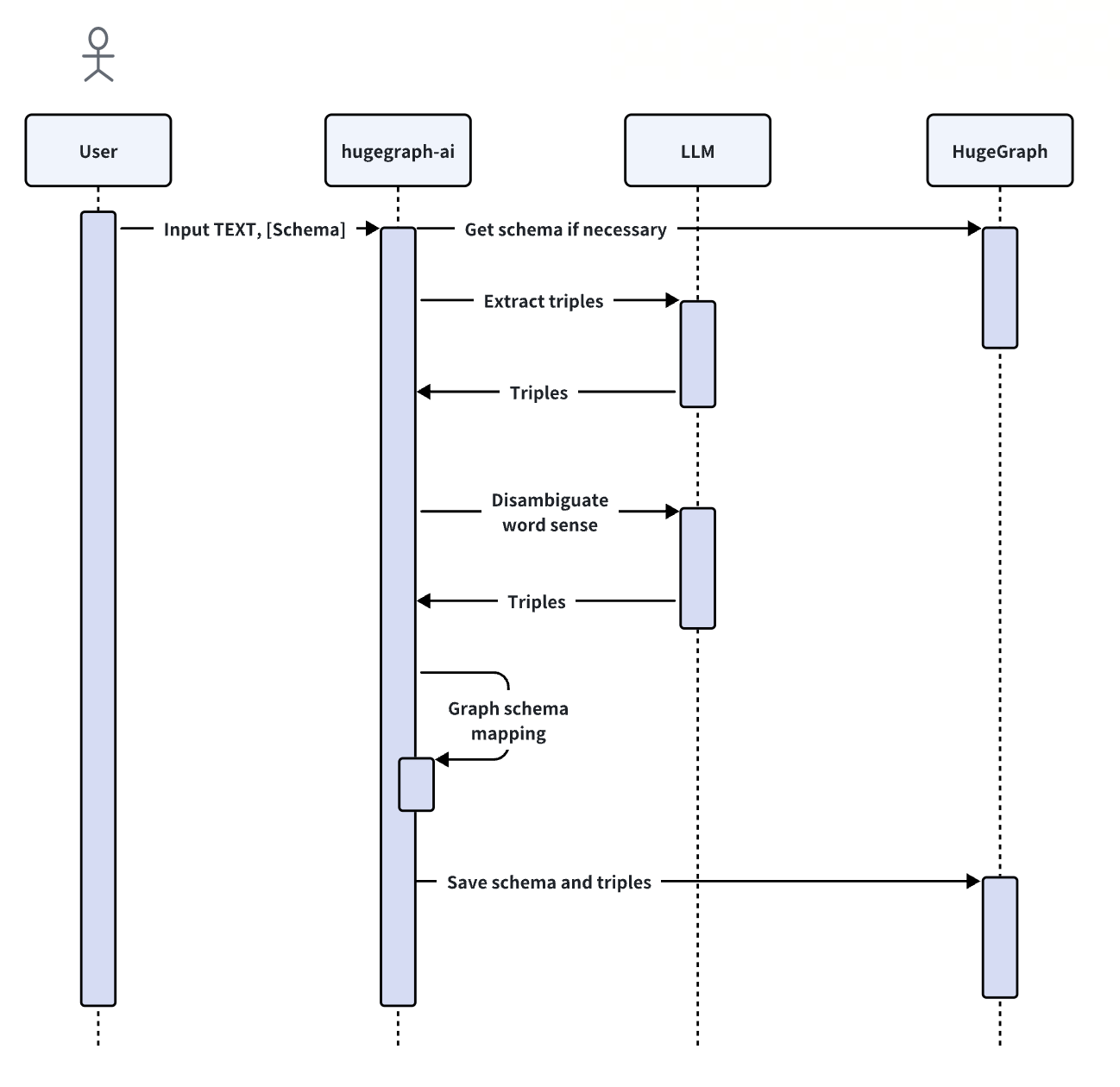
+</span></span></code></pre></div><img src=/docs/images/kg-uml.png
alt=gradio-config></li><li><strong>导入架构</strong>: <code>import_schema</code>
方法用于从源导入架构。源可以是 HugeGraph 实例、用户定义的模式或提取结果。可以链接 <code>print_result</code>
方法来打印结果。<div class=highlight><pre tabindex=0
style=background-color:#f8f8f8;-moz-tab-size:4;-o-tab-size:4;tab-size:4><code
class=language-python data-lang=python><span style=display:flex><span><span
style=color:#8f5902;font-style:italic># Import schema from a HugeGraph instan
[...]
</span></span><span style=display:flex><span><span
style=color:#000>builder</span><span
style=color:#ce5c00;font-weight:700>.</span><span
style=color:#000>import_schema</span><span
style=color:#000;font-weight:700>(</span><span
style=color:#000>from_hugegraph</span><span
style=color:#ce5c00;font-weight:700>=</span><span
style=color:#4e9a06>"xxx"</span><span
style=color:#000;font-weight:700>)</span><span
style=color:#ce5c00;font-weight:700>.</span><span style=color:#000>print_resu
[...]
</span></span><span style=display:flex><span><span
style=color:#8f5902;font-style:italic># Import schema from an extraction
result</span>
</span></span><span style=display:flex><span><span
style=color:#000>builder</span><span
style=color:#ce5c00;font-weight:700>.</span><span
style=color:#000>import_schema</span><span
style=color:#000;font-weight:700>(</span><span
style=color:#000>from_extraction</span><span
style=color:#ce5c00;font-weight:700>=</span><span
style=color:#4e9a06>"xxx"</span><span
style=color:#000;font-weight:700>)</span><span
style=color:#ce5c00;font-weight:700>.</span><span style=color:#000>print_res
[...]
diff --git a/cn/docs/images/gradio-kg.png b/cn/docs/images/gradio-kg.png
index 9e80b28d..825c1933 100644
Binary files a/cn/docs/images/gradio-kg.png and b/cn/docs/images/gradio-kg.png
differ
diff --git a/cn/docs/index.xml b/cn/docs/index.xml
index 59b257af..9d9af8e8 100644
--- a/cn/docs/index.xml
+++ b/cn/docs/index.xml
@@ -8670,7 +8670,7 @@ LICENSE 是 Apache 2.0, 且对应的项目中包含了 NOTICE, 则还需要更
<li>Graph extract head: 用户自定义的图提取提示</li>
<li>如果已经存在图数据,你应该点击 &ldquo;<strong>Rebuild vid
Index</strong>&rdquo; 来更新索引</li>
</ul>
-<p><img
src="https://github.com/apache/incubator-hugegraph-doc/blob/master/content/cn/docs/images/gradio-kg.png?raw=true";
alt="gradio 配置"></p>
+<p><img src="/docs/images/gradio-kg.png" alt="gradio-config"></p>
<h5 id="412-通过代码构建知识图谱">4.1.2 通过代码构建知识图谱</h5>
<p><code>KgBuilder</code> 类用于构建知识图谱。下面是使用过程:</p>
<ol>
@@ -8689,7 +8689,7 @@ LICENSE 是 Apache 2.0, 且对应的项目中包含了 NOTICE, 则还需要更
</span></span><span style="display:flex;"><span> <span
style="color:#ce5c00;font-weight:bold">.</span><span
style="color:#000">commit_to_hugegraph</span><span
style="color:#000;font-weight:bold">()</span>
</span></span><span style="display:flex;"><span> <span
style="color:#ce5c00;font-weight:bold">.</span><span
style="color:#000">run</span><span
style="color:#000;font-weight:bold">()</span>
</span></span><span style="display:flex;"><span> <span
style="color:#000;font-weight:bold">)</span>
-</span></span></code></pre></div><img
src="https://hugegraph.apache.org/docs/images/kg-uml.png";
alt="gradio-config"></li>
+</span></span></code></pre></div><img
src="/docs/images/kg-uml.png" alt="gradio-config"></li>
<li><strong>导入架构</strong>: <code>import_schema</code>
方法用于从源导入架构。源可以是 HugeGraph 实例、用户定义的模式或提取结果。可以链接 <code>print_result</code>
方法来打印结果。
<div class="highlight"><pre tabindex="0"
style="background-color:#f8f8f8;-moz-tab-size:4;-o-tab-size:4;tab-size:4;"><code
class="language-python" data-lang="python"><span
style="display:flex;"><span><span
style="color:#8f5902;font-style:italic"># Import schema from a HugeGraph
instance</span>
</span></span><span style="display:flex;"><span><span
style="color:#000">builder</span><span
style="color:#ce5c00;font-weight:bold">.</span><span
style="color:#000">import_schema</span><span
style="color:#000;font-weight:bold">(</span><span
style="color:#000">from_hugegraph</span><span
style="color:#ce5c00;font-weight:bold">=</span><span
style="color:#4e9a06">&#34;xxx&#34;</span><span
style="color:#000;font-weight:bold">)&l [...]
diff --git a/cn/docs/quickstart/_print/index.html
b/cn/docs/quickstart/_print/index.html
index 85f61ce0..a6d16b95 100644
--- a/cn/docs/quickstart/_print/index.html
+++ b/cn/docs/quickstart/_print/index.html
@@ -858,7 +858,7 @@ HugeGraph Toolchain
版本:toolchain-1.0.0</p></blockquote><p><code>spark-load
您可以在页面上修改内容,触发相应功能后会自动保存到配置文件中。你也可以直接修改文件而无需重启应用程序;只需刷新页面即可加载最新的更改。
(可选)要重新生成配置文件,您可以将 <code>config.generate</code> 与 <code>-u</code> 或
<code>--update</code> 一起使用。<div class=highlight><pre tabindex=0
style=background-color:#f8f8f8;-moz-tab-size:4;-o-tab-size:4;tab-size:4><code
class=language-bash data-lang=bash><span style=display:flex><span>python3 -m
hugegraph_llm.config.generate --update
</span></span></code></pre></div></li><li>(<strong>可选</strong>)您可以使用 <a
href=https://hugegraph.apache.org/docs/quickstart/hugegraph-hubble/#21-use-docker-convenient-for-testdev>hugegraph-hubble</a>
来访问图形数据,可以通过 <a
href=https://hub.docker.com/r/hugegraph/hubble>Docker/Docker-Compose</a>
运行它以获得指导。 (Hubble
是一个图形分析仪表板,包括数据加载/模式管理/图形遍历/显示)。</li><li>(<strong>可选</strong>)离线下载 NLTK 停用词<div
class=highlight><pre tabindex=0
style=background-color:#f8f8f8;-moz-tab-size:4;-o-tab-size:4;tab-size:4><co
[...]
-</span></span></code></pre></div></li></ol><h2 id=4-示例>4 示例</h2><h3
id=41-通过-llm-在-hugegraph-中构建知识图谱>4.1 通过 LLM 在 HugeGraph 中构建知识图谱</h3><h4
id=411-通过-gradio-交互式界面构建知识图谱>4.1.1 通过 gradio
交互式界面构建知识图谱</h4><p><strong>参数描述:</strong></p><ul><li>Docs:<ul><li>text: 从纯文本建立
rag 索引</li><li>file: 上传文件:<u>TXT</u> 或
<u>.docx</u>(可同时选择多个文件)</li></ul></li><li><a
href=https://hugegraph.apache.org/docs/clients/restful-api/schema/>Schema</a>:(接受<strong>2种类型</strong>)<ul><li>用户定义模式(
JSON 格式,遵循<a href=https:/ [...]
+</span></span></code></pre></div></li></ol><h2 id=4-示例>4 示例</h2><h3
id=41-通过-llm-在-hugegraph-中构建知识图谱>4.1 通过 LLM 在 HugeGraph 中构建知识图谱</h3><h4
id=411-通过-gradio-交互式界面构建知识图谱>4.1.1 通过 gradio
交互式界面构建知识图谱</h4><p><strong>参数描述:</strong></p><ul><li>Docs:<ul><li>text: 从纯文本建立
rag 索引</li><li>file: 上传文件:<u>TXT</u> 或
<u>.docx</u>(可同时选择多个文件)</li></ul></li><li><a
href=https://hugegraph.apache.org/docs/clients/restful-api/schema/>Schema</a>:(接受<strong>2种类型</strong>)<ul><li>用户定义模式(
JSON 格式,遵循<a href=https:/ [...]
初始化 <code>LLMs</code>实例,获取 <code>LLM</code>,然后创建一个任务实例 <code>KgBuilder</code>
用于图的构建。<code>KgBuilder</code>
定义了多个运算符,用户可以根据需要自由组合它们。(提示:<code>print_result()</code>
可以在控制台中打印出每一步的结果,而不会影响整个执行逻辑)<div class=highlight><pre tabindex=0
style=background-color:#f8f8f8;-moz-tab-size:4;-o-tab-size:4;tab-size:4><code
class=language-python data-lang=python><span style=display:flex><span> <span
style=color:#204a87;font-weight:700>from</span> <span
style=color:#000>hugegraph_llm.models.llms.init_llm</ [...]
</span></span><span style=display:flex><span> <span
style=color:#204a87;font-weight:700>from</span> <span
style=color:#000>hugegraph_llm.operators.kg_construction_task</span> <span
style=color:#204a87;font-weight:700>import</span> <span
style=color:#000>KgBuilder</span>
</span></span><span style=display:flex><span>
@@ -872,7 +872,7 @@ HugeGraph Toolchain
版本:toolchain-1.0.0</p></blockquote><p><code>spark-load
</span></span><span style=display:flex><span> <span
style=color:#ce5c00;font-weight:700>.</span><span
style=color:#000>commit_to_hugegraph</span><span
style=color:#000;font-weight:700>()</span>
</span></span><span style=display:flex><span> <span
style=color:#ce5c00;font-weight:700>.</span><span
style=color:#000>run</span><span style=color:#000;font-weight:700>()</span>
</span></span><span style=display:flex><span> <span
style=color:#000;font-weight:700>)</span>
-</span></span></code></pre></div><img
src=https://hugegraph.apache.org/docs/images/kg-uml.png
alt=gradio-config></li><li><strong>导入架构</strong>: <code>import_schema</code>
方法用于从源导入架构。源可以是 HugeGraph 实例、用户定义的模式或提取结果。可以链接 <code>print_result</code>
方法来打印结果。<div class=highlight><pre tabindex=0
style=background-color:#f8f8f8;-moz-tab-size:4;-o-tab-size:4;tab-size:4><code
class=language-python data-lang=python><span style=display:flex><span><span
style=color:#8f5902;font-style:italic># Import sc [...]
+</span></span></code></pre></div><img src=/docs/images/kg-uml.png
alt=gradio-config></li><li><strong>导入架构</strong>: <code>import_schema</code>
方法用于从源导入架构。源可以是 HugeGraph 实例、用户定义的模式或提取结果。可以链接 <code>print_result</code>
方法来打印结果。<div class=highlight><pre tabindex=0
style=background-color:#f8f8f8;-moz-tab-size:4;-o-tab-size:4;tab-size:4><code
class=language-python data-lang=python><span style=display:flex><span><span
style=color:#8f5902;font-style:italic># Import schema from a HugeGraph instan
[...]
</span></span><span style=display:flex><span><span
style=color:#000>builder</span><span
style=color:#ce5c00;font-weight:700>.</span><span
style=color:#000>import_schema</span><span
style=color:#000;font-weight:700>(</span><span
style=color:#000>from_hugegraph</span><span
style=color:#ce5c00;font-weight:700>=</span><span
style=color:#4e9a06>"xxx"</span><span
style=color:#000;font-weight:700>)</span><span
style=color:#ce5c00;font-weight:700>.</span><span style=color:#000>print_resu
[...]
</span></span><span style=display:flex><span><span
style=color:#8f5902;font-style:italic># Import schema from an extraction
result</span>
</span></span><span style=display:flex><span><span
style=color:#000>builder</span><span
style=color:#ce5c00;font-weight:700>.</span><span
style=color:#000>import_schema</span><span
style=color:#000;font-weight:700>(</span><span
style=color:#000>from_extraction</span><span
style=color:#ce5c00;font-weight:700>=</span><span
style=color:#4e9a06>"xxx"</span><span
style=color:#000;font-weight:700>)</span><span
style=color:#ce5c00;font-weight:700>.</span><span style=color:#000>print_res
[...]
diff --git a/cn/docs/quickstart/hugegraph-ai/index.html
b/cn/docs/quickstart/hugegraph-ai/index.html
index f1f464dd..2bac3ee1 100644
--- a/cn/docs/quickstart/hugegraph-ai/index.html
+++ b/cn/docs/quickstart/hugegraph-ai/index.html
@@ -5,9 +5,9 @@ hugegraph-ai 旨在探索 HugeGraph 与人工智能(AI)的融合,包括与
python 3.9+ (better …"><meta property="og:title" content="HugeGraph-AI Quick
Start"><meta property="og:description" content="1 HugeGraph-AI 概述 hugegraph-ai
旨在探索 HugeGraph 与人工智能(AI)的融合,包括与大模型结合的应用,与图机器学习组件的集成等,为开发者在项目中利用 HugeGraph 的 AI
能力提供全面支持。
2 环境要求 python 3.9+ (better to use 3.10) hugegraph-server 1.3+ 3 准备工作
启动HugeGraph数据库,可以通过 Docker/Binary Package 运行它。
-请参阅详细文档以获取更多指导 克隆项目 git clone
https://github.com/apache/incubator-hugegraph-ai.git 安装 hugegraph-python-client
和 hugegraph_llm cd ./incubator-hugegraph-ai # better to use virtualenv (source
venv/bin/activate) pip install ./hugegraph-python-client pip install -r
./hugegraph-llm/requirements.txt 进入项目目录 cd ./hugegraph-llm/src 启动 Graph RAG 的
gradio 交互 demo,可以使用以下命令运行,启动后打开 http://127.0.0.1:8001 python3 -m
hugegraph_llm.demo.rag_demo.app 默认主机为 0.0.0.0 ,端口为 8001 。您可以通过传递命令行参数 --host 和
--port 来更 [...]
+请参阅详细文档以获取更多指导 克隆项目 git clone
https://github.com/apache/incubator-hugegraph-ai.git 安装 hugegraph-python-client
和 hugegraph_llm cd ./incubator-hugegraph-ai # better to use virtualenv (source
venv/bin/activate) pip install ./hugegraph-python-client pip install -r
./hugegraph-llm/requirements.txt 进入项目目录 cd ./hugegraph-llm/src 启动 Graph RAG 的
gradio 交互 demo,可以使用以下命令运行,启动后打开 http://127.0.0.1:8001 python3 -m
hugegraph_llm.demo.rag_demo.app 默认主机为 0.0.0.0 ,端口为 8001 。您可以通过传递命令行参数 --host 和
--port 来更 [...]
2 环境要求 python 3.9+ (better to use 3.10) hugegraph-server 1.3+ 3 准备工作
启动HugeGraph数据库,可以通过 Docker/Binary Package 运行它。
-请参阅详细文档以获取更多指导 克隆项目 git clone
https://github.com/apache/incubator-hugegraph-ai.git 安装 hugegraph-python-client
和 hugegraph_llm cd ./incubator-hugegraph-ai # better to use virtualenv (source
venv/bin/activate) pip install ./hugegraph-python-client pip install -r
./hugegraph-llm/requirements.txt 进入项目目录 cd ./hugegraph-llm/src 启动 Graph RAG 的
gradio 交互 demo,可以使用以下命令运行,启动后打开 http://127.0.0.1:8001 python3 -m
hugegraph_llm.demo.rag_demo.app 默认主机为 0.0.0.0 ,端口为 8001 。您可以通过传递命令行参数 --host 和
--port 来更 [...]
+请参阅详细文档以获取更多指导 克隆项目 git clone
https://github.com/apache/incubator-hugegraph-ai.git 安装 hugegraph-python-client
和 hugegraph_llm cd ./incubator-hugegraph-ai # better to use virtualenv (source
venv/bin/activate) pip install ./hugegraph-python-client pip install -r
./hugegraph-llm/requirements.txt 进入项目目录 cd ./hugegraph-llm/src 启动 Graph RAG 的
gradio 交互 demo,可以使用以下命令运行,启动后打开 http://127.0.0.1:8001 python3 -m
hugegraph_llm.demo.rag_demo.app 默认主机为 0.0.0.0 ,端口为 8001 。您可以通过传递命令行参数 --host 和
--port 来更 [...]
2 环境要求 python 3.9+ (better to use 3.10) hugegraph-server 1.3+ 3 准备工作
启动HugeGraph数据库,可以通过 Docker/Binary Package 运行它。
请参阅详细文档以获取更多指导 克隆项目 git clone
https://github.com/apache/incubator-hugegraph-ai.git 安装 hugegraph-python-client
和 hugegraph_llm cd ./incubator-hugegraph-ai # better to use virtualenv (source
venv/bin/activate) pip install ./hugegraph-python-client pip install -r
./hugegraph-llm/requirements.txt 进入项目目录 cd ./hugegraph-llm/src 启动 Graph RAG 的
gradio 交互 demo,可以使用以下命令运行,启动后打开 http://127.0.0.1:8001 python3 -m
hugegraph_llm.demo.rag_demo.app 默认主机为 0.0.0.0 ,端口为 8001 。您可以通过传递命令行参数 --host 和
--port 来更 [...]
<link rel=stylesheet href=/css/prism.css><script
type=application/javascript>var
doNotTrack=!1;doNotTrack||(window.ga=window.ga||function(){(ga.q=ga.q||[]).push(arguments)},ga.l=+new
Date,ga("create","UA-00000000-0","auto"),ga("send","pageview"))</script><script
async src=https://www.google-analytics.com/analytics.js></script></head><body
class=td-page><header><nav class="js-navbar-scroll navbar navbar-expand
navbar-dark flex-column flex-md-row td-navbar"><a class=navbar-brand href=/cn/>
[...]
@@ -28,7 +28,7 @@ python 3.9+ (better …"><meta property="og:title"
content="HugeGraph-AI Quick
您可以在页面上修改内容,触发相应功能后会自动保存到配置文件中。你也可以直接修改文件而无需重启应用程序;只需刷新页面即可加载最新的更改。
(可选)要重新生成配置文件,您可以将 <code>config.generate</code> 与 <code>-u</code> 或
<code>--update</code> 一起使用。<div class=highlight><pre tabindex=0
style=background-color:#f8f8f8;-moz-tab-size:4;-o-tab-size:4;tab-size:4><code
class=language-bash data-lang=bash><span style=display:flex><span>python3 -m
hugegraph_llm.config.generate --update
</span></span></code></pre></div></li><li>(<strong>可选</strong>)您可以使用 <a
href=https://hugegraph.apache.org/docs/quickstart/hugegraph-hubble/#21-use-docker-convenient-for-testdev>hugegraph-hubble</a>
来访问图形数据,可以通过 <a
href=https://hub.docker.com/r/hugegraph/hubble>Docker/Docker-Compose</a>
运行它以获得指导。 (Hubble
是一个图形分析仪表板,包括数据加载/模式管理/图形遍历/显示)。</li><li>(<strong>可选</strong>)离线下载 NLTK 停用词<div
class=highlight><pre tabindex=0
style=background-color:#f8f8f8;-moz-tab-size:4;-o-tab-size:4;tab-size:4><co
[...]
-</span></span></code></pre></div></li></ol><h2 id=4-示例>4 示例</h2><h3
id=41-通过-llm-在-hugegraph-中构建知识图谱>4.1 通过 LLM 在 HugeGraph 中构建知识图谱</h3><h4
id=411-通过-gradio-交互式界面构建知识图谱>4.1.1 通过 gradio
交互式界面构建知识图谱</h4><p><strong>参数描述:</strong></p><ul><li>Docs:<ul><li>text: 从纯文本建立
rag 索引</li><li>file: 上传文件:<u>TXT</u> 或
<u>.docx</u>(可同时选择多个文件)</li></ul></li><li><a
href=https://hugegraph.apache.org/docs/clients/restful-api/schema/>Schema</a>:(接受<strong>2种类型</strong>)<ul><li>用户定义模式(
JSON 格式,遵循<a href=https:/ [...]
+</span></span></code></pre></div></li></ol><h2 id=4-示例>4 示例</h2><h3
id=41-通过-llm-在-hugegraph-中构建知识图谱>4.1 通过 LLM 在 HugeGraph 中构建知识图谱</h3><h4
id=411-通过-gradio-交互式界面构建知识图谱>4.1.1 通过 gradio
交互式界面构建知识图谱</h4><p><strong>参数描述:</strong></p><ul><li>Docs:<ul><li>text: 从纯文本建立
rag 索引</li><li>file: 上传文件:<u>TXT</u> 或
<u>.docx</u>(可同时选择多个文件)</li></ul></li><li><a
href=https://hugegraph.apache.org/docs/clients/restful-api/schema/>Schema</a>:(接受<strong>2种类型</strong>)<ul><li>用户定义模式(
JSON 格式,遵循<a href=https:/ [...]
初始化 <code>LLMs</code>实例,获取 <code>LLM</code>,然后创建一个任务实例 <code>KgBuilder</code>
用于图的构建。<code>KgBuilder</code>
定义了多个运算符,用户可以根据需要自由组合它们。(提示:<code>print_result()</code>
可以在控制台中打印出每一步的结果,而不会影响整个执行逻辑)<div class=highlight><pre tabindex=0
style=background-color:#f8f8f8;-moz-tab-size:4;-o-tab-size:4;tab-size:4><code
class=language-python data-lang=python><span style=display:flex><span> <span
style=color:#204a87;font-weight:700>from</span> <span
style=color:#000>hugegraph_llm.models.llms.init_llm</ [...]
</span></span><span style=display:flex><span> <span
style=color:#204a87;font-weight:700>from</span> <span
style=color:#000>hugegraph_llm.operators.kg_construction_task</span> <span
style=color:#204a87;font-weight:700>import</span> <span
style=color:#000>KgBuilder</span>
</span></span><span style=display:flex><span>
@@ -42,7 +42,7 @@ python 3.9+ (better …"><meta property="og:title"
content="HugeGraph-AI Quick
</span></span><span style=display:flex><span> <span
style=color:#ce5c00;font-weight:700>.</span><span
style=color:#000>commit_to_hugegraph</span><span
style=color:#000;font-weight:700>()</span>
</span></span><span style=display:flex><span> <span
style=color:#ce5c00;font-weight:700>.</span><span
style=color:#000>run</span><span style=color:#000;font-weight:700>()</span>
</span></span><span style=display:flex><span> <span
style=color:#000;font-weight:700>)</span>
-</span></span></code></pre></div><img
src=https://hugegraph.apache.org/docs/images/kg-uml.png
alt=gradio-config></li><li><strong>导入架构</strong>: <code>import_schema</code>
方法用于从源导入架构。源可以是 HugeGraph 实例、用户定义的模式或提取结果。可以链接 <code>print_result</code>
方法来打印结果。<div class=highlight><pre tabindex=0
style=background-color:#f8f8f8;-moz-tab-size:4;-o-tab-size:4;tab-size:4><code
class=language-python data-lang=python><span style=display:flex><span><span
style=color:#8f5902;font-style:italic># Import sc [...]
+</span></span></code></pre></div><img src=/docs/images/kg-uml.png
alt=gradio-config></li><li><strong>导入架构</strong>: <code>import_schema</code>
方法用于从源导入架构。源可以是 HugeGraph 实例、用户定义的模式或提取结果。可以链接 <code>print_result</code>
方法来打印结果。<div class=highlight><pre tabindex=0
style=background-color:#f8f8f8;-moz-tab-size:4;-o-tab-size:4;tab-size:4><code
class=language-python data-lang=python><span style=display:flex><span><span
style=color:#8f5902;font-style:italic># Import schema from a HugeGraph instan
[...]
</span></span><span style=display:flex><span><span
style=color:#000>builder</span><span
style=color:#ce5c00;font-weight:700>.</span><span
style=color:#000>import_schema</span><span
style=color:#000;font-weight:700>(</span><span
style=color:#000>from_hugegraph</span><span
style=color:#ce5c00;font-weight:700>=</span><span
style=color:#4e9a06>"xxx"</span><span
style=color:#000;font-weight:700>)</span><span
style=color:#ce5c00;font-weight:700>.</span><span style=color:#000>print_resu
[...]
</span></span><span style=display:flex><span><span
style=color:#8f5902;font-style:italic># Import schema from an extraction
result</span>
</span></span><span style=display:flex><span><span
style=color:#000>builder</span><span
style=color:#ce5c00;font-weight:700>.</span><span
style=color:#000>import_schema</span><span
style=color:#000;font-weight:700>(</span><span
style=color:#000>from_extraction</span><span
style=color:#ce5c00;font-weight:700>=</span><span
style=color:#4e9a06>"xxx"</span><span
style=color:#000;font-weight:700>)</span><span
style=color:#ce5c00;font-weight:700>.</span><span style=color:#000>print_res
[...]
@@ -69,7 +69,7 @@ python 3.9+ (better …"><meta property="og:title"
content="HugeGraph-AI Quick
</span></span></code></pre></div></li><li><strong>重新排序搜索结果</strong>:根据问题与结果之间的相似性对搜索结果进行重新排序。<div
class=highlight><pre tabindex=0
style=background-color:#f8f8f8;-moz-tab-size:4;-o-tab-size:4;tab-size:4><code
class=language-python data-lang=python><span style=display:flex><span><span
style=color:#000>graph_rag</span><span
style=color:#ce5c00;font-weight:700>.</span><span
style=color:#000>merge_dedup_rerank</span><span
style=color:#000;font-weight:700>()</span><span style=color:#ce5c00;fon [...]
</span></span></code></pre></div></li><li><strong>合成答案</strong>:总结结果并组织语言来回答问题。<div
class=highlight><pre tabindex=0
style=background-color:#f8f8f8;-moz-tab-size:4;-o-tab-size:4;tab-size:4><code
class=language-python data-lang=python><span style=display:flex><span><span
style=color:#000>graph_rag</span><span
style=color:#ce5c00;font-weight:700>.</span><span
style=color:#000>synthesize_answer</span><span
style=color:#000;font-weight:700>(</span><span
style=color:#000>vector_only_answer</sp [...]
</span></span></code></pre></div></li><li><strong>运行</strong>:<code>run</code>
方法用于执行上述操作。<div class=highlight><pre tabindex=0
style=background-color:#f8f8f8;-moz-tab-size:4;-o-tab-size:4;tab-size:4><code
class=language-python data-lang=python><span style=display:flex><span><span
style=color:#000>graph_rag</span><span
style=color:#ce5c00;font-weight:700>.</span><span
style=color:#000>run</span><span style=color:#000;font-weight:700>(</span><span
style=color:#000>verbose</span><span style [...]
-</span></span></code></pre></div></li></ol><style>.feedback--answer{display:inline-block}.feedback--answer-no{margin-left:1em}.feedback--response{display:none;margin-top:1em}.feedback--response__visible{display:block}</style><script>const
yesButton=document.querySelector(".feedback--answer-yes"),noButton=document.querySelector(".feedback--answer-no"),yesResponse=document.querySelector(".feedback--response-yes"),noResponse=document.querySelector(".feedback--response-no"),disableButtons=()
[...]
+</span></span></code></pre></div></li></ol><style>.feedback--answer{display:inline-block}.feedback--answer-no{margin-left:1em}.feedback--response{display:none;margin-top:1em}.feedback--response__visible{display:block}</style><script>const
yesButton=document.querySelector(".feedback--answer-yes"),noButton=document.querySelector(".feedback--answer-no"),yesResponse=document.querySelector(".feedback--response-yes"),noResponse=document.querySelector(".feedback--response-no"),disableButtons=()
[...]
<script
src=https://cdn.jsdelivr.net/npm/[email protected]/dist/js/bootstrap.min.js
integrity="sha512-UR25UO94eTnCVwjbXozyeVd6ZqpaAE9naiEUBK/A+QDbfSTQFhPGj5lOR6d8tsgbBk84Ggb5A3EkjsOgPRPcKA=="
crossorigin=anonymous></script>
<script src=/js/tabpane-persist.js></script>
<script
src=/js/main.min.aa9f4c5dae6a98b2c46277f4c56f1673a2b000d1756ce4ffae93784cab25e6d5.js
integrity="sha256-qp9MXa5qmLLEYnf0xW8Wc6KwANF1bOT/rpN4TKsl5tU="
crossorigin=anonymous></script>
diff --git a/cn/docs/quickstart/index.xml b/cn/docs/quickstart/index.xml
index cdf64413..4631401f 100644
--- a/cn/docs/quickstart/index.xml
+++ b/cn/docs/quickstart/index.xml
@@ -2119,7 +2119,7 @@ HugeGraph Toolchain 版本:toolchain-1.0.0</p>
<li>Graph extract head: 用户自定义的图提取提示</li>
<li>如果已经存在图数据,你应该点击 &ldquo;<strong>Rebuild vid
Index</strong>&rdquo; 来更新索引</li>
</ul>
-<p><img
src="https://github.com/apache/incubator-hugegraph-doc/blob/master/content/cn/docs/images/gradio-kg.png?raw=true";
alt="gradio 配置"></p>
+<p><img src="/docs/images/gradio-kg.png" alt="gradio-config"></p>
<h5 id="412-通过代码构建知识图谱">4.1.2 通过代码构建知识图谱</h5>
<p><code>KgBuilder</code> 类用于构建知识图谱。下面是使用过程:</p>
<ol>
@@ -2138,7 +2138,7 @@ HugeGraph Toolchain 版本:toolchain-1.0.0</p>
</span></span><span style="display:flex;"><span> <span
style="color:#ce5c00;font-weight:bold">.</span><span
style="color:#000">commit_to_hugegraph</span><span
style="color:#000;font-weight:bold">()</span>
</span></span><span style="display:flex;"><span> <span
style="color:#ce5c00;font-weight:bold">.</span><span
style="color:#000">run</span><span
style="color:#000;font-weight:bold">()</span>
</span></span><span style="display:flex;"><span> <span
style="color:#000;font-weight:bold">)</span>
-</span></span></code></pre></div><img
src="https://hugegraph.apache.org/docs/images/kg-uml.png";
alt="gradio-config"></li>
+</span></span></code></pre></div><img
src="/docs/images/kg-uml.png" alt="gradio-config"></li>
<li><strong>导入架构</strong>: <code>import_schema</code>
方法用于从源导入架构。源可以是 HugeGraph 实例、用户定义的模式或提取结果。可以链接 <code>print_result</code>
方法来打印结果。
<div class="highlight"><pre tabindex="0"
style="background-color:#f8f8f8;-moz-tab-size:4;-o-tab-size:4;tab-size:4;"><code
class="language-python" data-lang="python"><span
style="display:flex;"><span><span
style="color:#8f5902;font-style:italic"># Import schema from a HugeGraph
instance</span>
</span></span><span style="display:flex;"><span><span
style="color:#000">builder</span><span
style="color:#ce5c00;font-weight:bold">.</span><span
style="color:#000">import_schema</span><span
style="color:#000;font-weight:bold">(</span><span
style="color:#000">from_hugegraph</span><span
style="color:#ce5c00;font-weight:bold">=</span><span
style="color:#4e9a06">&#34;xxx&#34;</span><span
style="color:#000;font-weight:bold">)&l [...]
diff --git a/cn/sitemap.xml b/cn/sitemap.xml
index 00584f22..9a100802 100644
--- a/cn/sitemap.xml
+++ b/cn/sitemap.xml
@@ -1 +1 @@
-<?xml version="1.0" encoding="utf-8" standalone="yes"?><urlset
xmlns="http://www.sitemaps.org/schemas/sitemap/0.9";
xmlns:xhtml="http://www.w3.org/1999/xhtml";><url><loc>/cn/docs/language/hugegraph-gremlin/</loc><lastmod>2023-01-01T16:16:43+08:00</lastmod><xhtml:link
rel="alternate" hreflang="en"
href="/docs/language/hugegraph-gremlin/"/><xhtml:link rel="alternate"
hreflang="cn"
href="/cn/docs/language/hugegraph-gremlin/"/></url><url><loc>/cn/docs/performance/hugegraph-benchmark-0.5.6/</lo
[...]
\ No newline at end of file
+<?xml version="1.0" encoding="utf-8" standalone="yes"?><urlset
xmlns="http://www.sitemaps.org/schemas/sitemap/0.9";
xmlns:xhtml="http://www.w3.org/1999/xhtml";><url><loc>/cn/docs/language/hugegraph-gremlin/</loc><lastmod>2023-01-01T16:16:43+08:00</lastmod><xhtml:link
rel="alternate" hreflang="en"
href="/docs/language/hugegraph-gremlin/"/><xhtml:link rel="alternate"
hreflang="cn"
href="/cn/docs/language/hugegraph-gremlin/"/></url><url><loc>/cn/docs/performance/hugegraph-benchmark-0.5.6/</lo
[...]
\ No newline at end of file
diff --git a/docs/_print/index.html b/docs/_print/index.html
index 1a0c16ce..89890f7a 100644
--- a/docs/_print/index.html
+++ b/docs/_print/index.html
@@ -1183,7 +1183,7 @@ to visit the graph data, could run it via <a
href=https://hub.docker.com/r/hugeg
for guidance. (Hubble is a graph-analysis dashboard include data
loading/schema management/graph
traverser/display).</p></li><li><p>(<strong>Optional</strong>) offline download
NLTK stopwords</p><div class=highlight><pre tabindex=0
style=background-color:#f8f8f8;-moz-tab-size:4;-o-tab-size:4;tab-size:4><code
class=language-bash data-lang=bash><span style=display:flex><span>python
./hugegraph_llm/operators/common_op/nltk_helper.py
</span></span></code></pre></div></li></ol><h2 id=4-examples>4
Examples</h2><h3 id=41-build-a-knowledge-graph-in-hugegraph-through-llm>4.1
Build a knowledge graph in HugeGraph through LLM</h3><h4
id=411-build-a-knowledge-graph-through-the-gradio-interactive-interface>4.1.1
Build a knowledge graph through the gradio interactive
interface</h4><p><strong>Parameter
description:</strong></p><ul><li>Docs:<ul><li>text: Build rag index from plain
text</li><li>file: Upload file(s) which should be [...]
to modify it)</li><li>Specify the name of the HugeGraph graph instance, it
will automatically get the schema from it (like
-<strong>“hugegraph”</strong>)</li></ul></li><li>Graph extract
head: The user-defined prompt of graph extracting</li><li>If already exist the
graph data, you should click “<strong>Rebuild vid Index</strong>”
to update the index</li></ul><p><img
src="https://github.com/apache/incubator-hugegraph-doc/blob/master/content/cn/docs/images/gradio-kg.png?raw=true";
alt=gradio-config></p><h4 id=412-build-a-knowledge-graph-through-code>4.1.2
Build a knowledge graph through co [...]
+<strong>“hugegraph”</strong>)</li></ul></li><li>Graph extract
head: The user-defined prompt of graph extracting</li><li>If already exist the
graph data, you should click “<strong>Rebuild vid Index</strong>”
to update the index</li></ul><p><img src=/docs/images/gradio-kg.png
alt=gradio-config></p><h4 id=412-build-a-knowledge-graph-through-code>4.1.2
Build a knowledge graph through code</h4><p>The <code>KgBuilder</code> class is
used to construct a knowledge graph. [...]
This can be obtained from the <code>LLMs</code> class.<br>Initialize the LLMs
instance, get the LLM, and then create a task instance <code>KgBuilder</code>
for graph construction. <code>KgBuilder</code> defines multiple operators, and
users can freely combine them according to their needs. (tip:
<code>print_result()</code> can print the result of each step in the console,
without affecting the overall execution logic)<div class=highlight><pre
tabindex=0 style=background-color:#f8f8f8;-mo [...]
</span></span><span style=display:flex><span><span
style=color:#204a87;font-weight:700>from</span> <span
style=color:#000>hugegraph_llm.operators.kg_construction_task</span> <span
style=color:#204a87;font-weight:700>import</span> <span
style=color:#000>KgBuilder</span>
</span></span><span style=display:flex><span>
@@ -1197,7 +1197,7 @@ This can be obtained from the <code>LLMs</code>
class.<br>Initialize the LLMs in
</span></span><span style=display:flex><span> <span
style=color:#ce5c00;font-weight:700>.</span><span
style=color:#000>commit_to_hugegraph</span><span
style=color:#000;font-weight:700>()</span>
</span></span><span style=display:flex><span> <span
style=color:#ce5c00;font-weight:700>.</span><span
style=color:#000>run</span><span style=color:#000;font-weight:700>()</span>
</span></span><span style=display:flex><span><span
style=color:#000;font-weight:700>)</span>
-</span></span></code></pre></div><img
src=https://hugegraph.apache.org/docs/images/kg-uml.png
alt=gradio-config></li><li><strong>Import Schema</strong>: The
<code>import_schema</code> method is used to import a schema from a source. The
source can be a HugeGraph instance, a user-defined schema or an extraction
result. The method <code>print_result</code> can be chained to print the
result.<div class=highlight><pre tabindex=0
style=background-color:#f8f8f8;-moz-tab-size:4;-o-tab-size:4;ta [...]
+</span></span></code></pre></div><img src=/docs/images/kg-uml.png
alt=gradio-config></li><li><strong>Import Schema</strong>: The
<code>import_schema</code> method is used to import a schema from a source. The
source can be a HugeGraph instance, a user-defined schema or an extraction
result. The method <code>print_result</code> can be chained to print the
result.<div class=highlight><pre tabindex=0
style=background-color:#f8f8f8;-moz-tab-size:4;-o-tab-size:4;tab-size:4><code
class=languag [...]
</span></span><span style=display:flex><span><span
style=color:#000>builder</span><span
style=color:#ce5c00;font-weight:700>.</span><span
style=color:#000>import_schema</span><span
style=color:#000;font-weight:700>(</span><span
style=color:#000>from_hugegraph</span><span
style=color:#ce5c00;font-weight:700>=</span><span
style=color:#4e9a06>"xxx"</span><span
style=color:#000;font-weight:700>)</span><span
style=color:#ce5c00;font-weight:700>.</span><span style=color:#000>print_resu
[...]
</span></span><span style=display:flex><span><span
style=color:#8f5902;font-style:italic># Import schema from an extraction
result</span>
</span></span><span style=display:flex><span><span
style=color:#000>builder</span><span
style=color:#ce5c00;font-weight:700>.</span><span
style=color:#000>import_schema</span><span
style=color:#000;font-weight:700>(</span><span
style=color:#000>from_extraction</span><span
style=color:#ce5c00;font-weight:700>=</span><span
style=color:#4e9a06>"xxx"</span><span
style=color:#000;font-weight:700>)</span><span
style=color:#ce5c00;font-weight:700>.</span><span style=color:#000>print_res
[...]
diff --git a/docs/index.xml b/docs/index.xml
index 1ee5e656..35c5bde8 100644
--- a/docs/index.xml
+++ b/docs/index.xml
@@ -8890,7 +8890,7 @@ to modify it)</li>
<li>Graph extract head: The user-defined prompt of graph extracting</li>
<li>If already exist the graph data, you should click
&ldquo;<strong>Rebuild vid Index</strong>&rdquo; to update the
index</li>
</ul>
-<p><img
src="https://github.com/apache/incubator-hugegraph-doc/blob/master/content/cn/docs/images/gradio-kg.png?raw=true";
alt="gradio-config"></p>
+<p><img src="/docs/images/gradio-kg.png" alt="gradio-config"></p>
<h4 id="412-build-a-knowledge-graph-through-code">4.1.2 Build a knowledge
graph through code</h4>
<p>The <code>KgBuilder</code> class is used to construct a knowledge
graph. Here is a brief usage guide:</p>
<ol>
@@ -8910,7 +8910,7 @@ Initialize the LLMs instance, get the LLM, and then
create a task instance <c
</span></span><span style="display:flex;"><span> <span
style="color:#ce5c00;font-weight:bold">.</span><span
style="color:#000">commit_to_hugegraph</span><span
style="color:#000;font-weight:bold">()</span>
</span></span><span style="display:flex;"><span> <span
style="color:#ce5c00;font-weight:bold">.</span><span
style="color:#000">run</span><span
style="color:#000;font-weight:bold">()</span>
</span></span><span style="display:flex;"><span><span
style="color:#000;font-weight:bold">)</span>
-</span></span></code></pre></div><img
src="https://hugegraph.apache.org/docs/images/kg-uml.png";
alt="gradio-config"></li>
+</span></span></code></pre></div><img
src="/docs/images/kg-uml.png" alt="gradio-config"></li>
<li><strong>Import Schema</strong>: The
<code>import_schema</code> method is used to import a schema from a
source. The source can be a HugeGraph instance, a user-defined schema or an
extraction result. The method <code>print_result</code> can be chained to
print the result.
<div class="highlight"><pre tabindex="0"
style="background-color:#f8f8f8;-moz-tab-size:4;-o-tab-size:4;tab-size:4;"><code
class="language-python" data-lang="python"><span
style="display:flex;"><span><span
style="color:#8f5902;font-style:italic"># Import schema from a HugeGraph
instance</span>
</span></span><span style="display:flex;"><span><span
style="color:#000">builder</span><span
style="color:#ce5c00;font-weight:bold">.</span><span
style="color:#000">import_schema</span><span
style="color:#000;font-weight:bold">(</span><span
style="color:#000">from_hugegraph</span><span
style="color:#ce5c00;font-weight:bold">=</span><span
style="color:#4e9a06">&#34;xxx&#34;</span><span
style="color:#000;font-weight:bold">)&l [...]
diff --git a/docs/quickstart/_print/index.html
b/docs/quickstart/_print/index.html
index 253236b0..63dfe841 100644
--- a/docs/quickstart/_print/index.html
+++ b/docs/quickstart/_print/index.html
@@ -1175,7 +1175,7 @@ to visit the graph data, could run it via <a
href=https://hub.docker.com/r/hugeg
for guidance. (Hubble is a graph-analysis dashboard include data
loading/schema management/graph
traverser/display).</p></li><li><p>(<strong>Optional</strong>) offline download
NLTK stopwords</p><div class=highlight><pre tabindex=0
style=background-color:#f8f8f8;-moz-tab-size:4;-o-tab-size:4;tab-size:4><code
class=language-bash data-lang=bash><span style=display:flex><span>python
./hugegraph_llm/operators/common_op/nltk_helper.py
</span></span></code></pre></div></li></ol><h2 id=4-examples>4
Examples</h2><h3 id=41-build-a-knowledge-graph-in-hugegraph-through-llm>4.1
Build a knowledge graph in HugeGraph through LLM</h3><h4
id=411-build-a-knowledge-graph-through-the-gradio-interactive-interface>4.1.1
Build a knowledge graph through the gradio interactive
interface</h4><p><strong>Parameter
description:</strong></p><ul><li>Docs:<ul><li>text: Build rag index from plain
text</li><li>file: Upload file(s) which should be [...]
to modify it)</li><li>Specify the name of the HugeGraph graph instance, it
will automatically get the schema from it (like
-<strong>“hugegraph”</strong>)</li></ul></li><li>Graph extract
head: The user-defined prompt of graph extracting</li><li>If already exist the
graph data, you should click “<strong>Rebuild vid Index</strong>”
to update the index</li></ul><p><img
src="https://github.com/apache/incubator-hugegraph-doc/blob/master/content/cn/docs/images/gradio-kg.png?raw=true";
alt=gradio-config></p><h4 id=412-build-a-knowledge-graph-through-code>4.1.2
Build a knowledge graph through co [...]
+<strong>“hugegraph”</strong>)</li></ul></li><li>Graph extract
head: The user-defined prompt of graph extracting</li><li>If already exist the
graph data, you should click “<strong>Rebuild vid Index</strong>”
to update the index</li></ul><p><img src=/docs/images/gradio-kg.png
alt=gradio-config></p><h4 id=412-build-a-knowledge-graph-through-code>4.1.2
Build a knowledge graph through code</h4><p>The <code>KgBuilder</code> class is
used to construct a knowledge graph. [...]
This can be obtained from the <code>LLMs</code> class.<br>Initialize the LLMs
instance, get the LLM, and then create a task instance <code>KgBuilder</code>
for graph construction. <code>KgBuilder</code> defines multiple operators, and
users can freely combine them according to their needs. (tip:
<code>print_result()</code> can print the result of each step in the console,
without affecting the overall execution logic)<div class=highlight><pre
tabindex=0 style=background-color:#f8f8f8;-mo [...]
</span></span><span style=display:flex><span><span
style=color:#204a87;font-weight:700>from</span> <span
style=color:#000>hugegraph_llm.operators.kg_construction_task</span> <span
style=color:#204a87;font-weight:700>import</span> <span
style=color:#000>KgBuilder</span>
</span></span><span style=display:flex><span>
@@ -1189,7 +1189,7 @@ This can be obtained from the <code>LLMs</code>
class.<br>Initialize the LLMs in
</span></span><span style=display:flex><span> <span
style=color:#ce5c00;font-weight:700>.</span><span
style=color:#000>commit_to_hugegraph</span><span
style=color:#000;font-weight:700>()</span>
</span></span><span style=display:flex><span> <span
style=color:#ce5c00;font-weight:700>.</span><span
style=color:#000>run</span><span style=color:#000;font-weight:700>()</span>
</span></span><span style=display:flex><span><span
style=color:#000;font-weight:700>)</span>
-</span></span></code></pre></div><img
src=https://hugegraph.apache.org/docs/images/kg-uml.png
alt=gradio-config></li><li><strong>Import Schema</strong>: The
<code>import_schema</code> method is used to import a schema from a source. The
source can be a HugeGraph instance, a user-defined schema or an extraction
result. The method <code>print_result</code> can be chained to print the
result.<div class=highlight><pre tabindex=0
style=background-color:#f8f8f8;-moz-tab-size:4;-o-tab-size:4;ta [...]
+</span></span></code></pre></div><img src=/docs/images/kg-uml.png
alt=gradio-config></li><li><strong>Import Schema</strong>: The
<code>import_schema</code> method is used to import a schema from a source. The
source can be a HugeGraph instance, a user-defined schema or an extraction
result. The method <code>print_result</code> can be chained to print the
result.<div class=highlight><pre tabindex=0
style=background-color:#f8f8f8;-moz-tab-size:4;-o-tab-size:4;tab-size:4><code
class=languag [...]
</span></span><span style=display:flex><span><span
style=color:#000>builder</span><span
style=color:#ce5c00;font-weight:700>.</span><span
style=color:#000>import_schema</span><span
style=color:#000;font-weight:700>(</span><span
style=color:#000>from_hugegraph</span><span
style=color:#ce5c00;font-weight:700>=</span><span
style=color:#4e9a06>"xxx"</span><span
style=color:#000;font-weight:700>)</span><span
style=color:#ce5c00;font-weight:700>.</span><span style=color:#000>print_resu
[...]
</span></span><span style=display:flex><span><span
style=color:#8f5902;font-style:italic># Import schema from an extraction
result</span>
</span></span><span style=display:flex><span><span
style=color:#000>builder</span><span
style=color:#ce5c00;font-weight:700>.</span><span
style=color:#000>import_schema</span><span
style=color:#000;font-weight:700>(</span><span
style=color:#000>from_extraction</span><span
style=color:#ce5c00;font-weight:700>=</span><span
style=color:#4e9a06>"xxx"</span><span
style=color:#000;font-weight:700>)</span><span
style=color:#ce5c00;font-weight:700>.</span><span style=color:#000>print_res
[...]
diff --git a/docs/quickstart/hugegraph-ai/index.html
b/docs/quickstart/hugegraph-ai/index.html
index 924147ae..c848a9f4 100644
--- a/docs/quickstart/hugegraph-ai/index.html
+++ b/docs/quickstart/hugegraph-ai/index.html
@@ -2,10 +2,10 @@
hugegraph-ai aims to explore the integration of HugeGraph and artificial
intelligence (AI), including applications combined …"><meta property="og:title"
content="HugeGraph-AI Quick Start"><meta property="og:description" content="1
HugeGraph-AI Overview hugegraph-ai aims to explore the integration of HugeGraph
and artificial intelligence (AI), including applications combined with large
models, integration with graph machine learning components, etc., to provide
comprehensive support for d [...]
2 Environment Requirements python 3.9+ hugegraph-server 1.2+ 3 Preparation
Start the HugeGraph database, you can run it via Docker/Binary Package.
Refer to detailed doc for more guidance
-Clone this project"><meta property="og:type" content="article"><meta
property="og:url" content="/docs/quickstart/hugegraph-ai/"><meta
property="article:section" content="docs"><meta
property="article:modified_time" content="2024-11-06T16:50:18+08:00"><meta
property="og:site_name" content="HugeGraph"><meta itemprop=name
content="HugeGraph-AI Quick Start"><meta itemprop=description content="1
HugeGraph-AI Overview hugegraph-ai aims to explore the integration of HugeGraph
and artificial int [...]
+Clone this project"><meta property="og:type" content="article"><meta
property="og:url" content="/docs/quickstart/hugegraph-ai/"><meta
property="article:section" content="docs"><meta
property="article:modified_time" content="2024-11-06T20:55:18+08:00"><meta
property="og:site_name" content="HugeGraph"><meta itemprop=name
content="HugeGraph-AI Quick Start"><meta itemprop=description content="1
HugeGraph-AI Overview hugegraph-ai aims to explore the integration of HugeGraph
and artificial int [...]
2 Environment Requirements python 3.9+ hugegraph-server 1.2+ 3 Preparation
Start the HugeGraph database, you can run it via Docker/Binary Package.
Refer to detailed doc for more guidance
-Clone this project"><meta itemprop=dateModified
content="2024-11-06T16:50:18+08:00"><meta itemprop=wordCount
content="882"><meta itemprop=keywords content><meta name=twitter:card
content="summary"><meta name=twitter:title content="HugeGraph-AI Quick
Start"><meta name=twitter:description content="1 HugeGraph-AI Overview
hugegraph-ai aims to explore the integration of HugeGraph and artificial
intelligence (AI), including applications combined with large models,
integration with graph machi [...]
+Clone this project"><meta itemprop=dateModified
content="2024-11-06T20:55:18+08:00"><meta itemprop=wordCount
content="882"><meta itemprop=keywords content><meta name=twitter:card
content="summary"><meta name=twitter:title content="HugeGraph-AI Quick
Start"><meta name=twitter:description content="1 HugeGraph-AI Overview
hugegraph-ai aims to explore the integration of HugeGraph and artificial
intelligence (AI), including applications combined with large models,
integration with graph machi [...]
2 Environment Requirements python 3.9+ hugegraph-server 1.2+ 3 Preparation
Start the HugeGraph database, you can run it via Docker/Binary Package.
Refer to detailed doc for more guidance
Clone this project"><link rel=preload
href=/scss/main.min.14ea575cb35d93d46ff8681b2334f40fd46243c100c5c39f5a841b931fae2d40.css
as=style><link
href=/scss/main.min.14ea575cb35d93d46ff8681b2334f40fd46243c100c5c39f5a841b931fae2d40.css
rel=stylesheet integrity><script
src=https://code.jquery.com/jquery-3.5.1.min.js
integrity="sha256-9/aliU8dGd2tb6OSsuzixeV4y/faTqgFtohetphbbj0="
crossorigin=anonymous></script>
@@ -30,7 +30,7 @@ to visit the graph data, could run it via <a
href=https://hub.docker.com/r/hugeg
for guidance. (Hubble is a graph-analysis dashboard include data
loading/schema management/graph
traverser/display).</p></li><li><p>(<strong>Optional</strong>) offline download
NLTK stopwords</p><div class=highlight><pre tabindex=0
style=background-color:#f8f8f8;-moz-tab-size:4;-o-tab-size:4;tab-size:4><code
class=language-bash data-lang=bash><span style=display:flex><span>python
./hugegraph_llm/operators/common_op/nltk_helper.py
</span></span></code></pre></div></li></ol><h2 id=4-examples>4
Examples</h2><h3 id=41-build-a-knowledge-graph-in-hugegraph-through-llm>4.1
Build a knowledge graph in HugeGraph through LLM</h3><h4
id=411-build-a-knowledge-graph-through-the-gradio-interactive-interface>4.1.1
Build a knowledge graph through the gradio interactive
interface</h4><p><strong>Parameter
description:</strong></p><ul><li>Docs:<ul><li>text: Build rag index from plain
text</li><li>file: Upload file(s) which should be [...]
to modify it)</li><li>Specify the name of the HugeGraph graph instance, it
will automatically get the schema from it (like
-<strong>“hugegraph”</strong>)</li></ul></li><li>Graph extract
head: The user-defined prompt of graph extracting</li><li>If already exist the
graph data, you should click “<strong>Rebuild vid Index</strong>”
to update the index</li></ul><p><img
src="https://github.com/apache/incubator-hugegraph-doc/blob/master/content/cn/docs/images/gradio-kg.png?raw=true";
alt=gradio-config></p><h4 id=412-build-a-knowledge-graph-through-code>4.1.2
Build a knowledge graph through co [...]
+<strong>“hugegraph”</strong>)</li></ul></li><li>Graph extract
head: The user-defined prompt of graph extracting</li><li>If already exist the
graph data, you should click “<strong>Rebuild vid Index</strong>”
to update the index</li></ul><p><img src=/docs/images/gradio-kg.png
alt=gradio-config></p><h4 id=412-build-a-knowledge-graph-through-code>4.1.2
Build a knowledge graph through code</h4><p>The <code>KgBuilder</code> class is
used to construct a knowledge graph. [...]
This can be obtained from the <code>LLMs</code> class.<br>Initialize the LLMs
instance, get the LLM, and then create a task instance <code>KgBuilder</code>
for graph construction. <code>KgBuilder</code> defines multiple operators, and
users can freely combine them according to their needs. (tip:
<code>print_result()</code> can print the result of each step in the console,
without affecting the overall execution logic)<div class=highlight><pre
tabindex=0 style=background-color:#f8f8f8;-mo [...]
</span></span><span style=display:flex><span><span
style=color:#204a87;font-weight:700>from</span> <span
style=color:#000>hugegraph_llm.operators.kg_construction_task</span> <span
style=color:#204a87;font-weight:700>import</span> <span
style=color:#000>KgBuilder</span>
</span></span><span style=display:flex><span>
@@ -44,7 +44,7 @@ This can be obtained from the <code>LLMs</code>
class.<br>Initialize the LLMs in
</span></span><span style=display:flex><span> <span
style=color:#ce5c00;font-weight:700>.</span><span
style=color:#000>commit_to_hugegraph</span><span
style=color:#000;font-weight:700>()</span>
</span></span><span style=display:flex><span> <span
style=color:#ce5c00;font-weight:700>.</span><span
style=color:#000>run</span><span style=color:#000;font-weight:700>()</span>
</span></span><span style=display:flex><span><span
style=color:#000;font-weight:700>)</span>
-</span></span></code></pre></div><img
src=https://hugegraph.apache.org/docs/images/kg-uml.png
alt=gradio-config></li><li><strong>Import Schema</strong>: The
<code>import_schema</code> method is used to import a schema from a source. The
source can be a HugeGraph instance, a user-defined schema or an extraction
result. The method <code>print_result</code> can be chained to print the
result.<div class=highlight><pre tabindex=0
style=background-color:#f8f8f8;-moz-tab-size:4;-o-tab-size:4;ta [...]
+</span></span></code></pre></div><img src=/docs/images/kg-uml.png
alt=gradio-config></li><li><strong>Import Schema</strong>: The
<code>import_schema</code> method is used to import a schema from a source. The
source can be a HugeGraph instance, a user-defined schema or an extraction
result. The method <code>print_result</code> can be chained to print the
result.<div class=highlight><pre tabindex=0
style=background-color:#f8f8f8;-moz-tab-size:4;-o-tab-size:4;tab-size:4><code
class=languag [...]
</span></span><span style=display:flex><span><span
style=color:#000>builder</span><span
style=color:#ce5c00;font-weight:700>.</span><span
style=color:#000>import_schema</span><span
style=color:#000;font-weight:700>(</span><span
style=color:#000>from_hugegraph</span><span
style=color:#ce5c00;font-weight:700>=</span><span
style=color:#4e9a06>"xxx"</span><span
style=color:#000;font-weight:700>)</span><span
style=color:#ce5c00;font-weight:700>.</span><span style=color:#000>print_resu
[...]
</span></span><span style=display:flex><span><span
style=color:#8f5902;font-style:italic># Import schema from an extraction
result</span>
</span></span><span style=display:flex><span><span
style=color:#000>builder</span><span
style=color:#ce5c00;font-weight:700>.</span><span
style=color:#000>import_schema</span><span
style=color:#000;font-weight:700>(</span><span
style=color:#000>from_extraction</span><span
style=color:#ce5c00;font-weight:700>=</span><span
style=color:#4e9a06>"xxx"</span><span
style=color:#000;font-weight:700>)</span><span
style=color:#ce5c00;font-weight:700>.</span><span style=color:#000>print_res
[...]
@@ -72,7 +72,7 @@ Here is a brief usage guide:</p><ol><li><strong>Extract
Keyword</strong>: Extrac
</span></span></code></pre></div></li><li><strong>Rerank Searched
Result</strong>: Rerank the searched results based on the similarity between
the question and the results.<div class=highlight><pre tabindex=0
style=background-color:#f8f8f8;-moz-tab-size:4;-o-tab-size:4;tab-size:4><code
class=language-python data-lang=python><span style=display:flex><span><span
style=color:#000>graph_rag</span><span
style=color:#ce5c00;font-weight:700>.</span><span
style=color:#000>merge_dedup_rerank</spa [...]
</span></span></code></pre></div></li><li><strong>Synthesize Answer</strong>:
Summarize the results and organize the language to answer the question.<div
class=highlight><pre tabindex=0
style=background-color:#f8f8f8;-moz-tab-size:4;-o-tab-size:4;tab-size:4><code
class=language-python data-lang=python><span style=display:flex><span><span
style=color:#000>graph_rag</span><span
style=color:#ce5c00;font-weight:700>.</span><span
style=color:#000>synthesize_answer</span><span style=color:#000 [...]
</span></span></code></pre></div></li><li><strong>Run</strong>: The
<code>run</code> method is used to execute the above operations.<div
class=highlight><pre tabindex=0
style=background-color:#f8f8f8;-moz-tab-size:4;-o-tab-size:4;tab-size:4><code
class=language-python data-lang=python><span style=display:flex><span><span
style=color:#000>graph_rag</span><span
style=color:#ce5c00;font-weight:700>.</span><span
style=color:#000>run</span><span style=color:#000;font-weight:700>(</span><span
[...]
-</span></span></code></pre></div></li></ol><style>.feedback--answer{display:inline-block}.feedback--answer-no{margin-left:1em}.feedback--response{display:none;margin-top:1em}.feedback--response__visible{display:block}</style><script>const
yesButton=document.querySelector(".feedback--answer-yes"),noButton=document.querySelector(".feedback--answer-no"),yesResponse=document.querySelector(".feedback--response-yes"),noResponse=document.querySelector(".feedback--response-no"),disableButtons=()
[...]
+</span></span></code></pre></div></li></ol><style>.feedback--answer{display:inline-block}.feedback--answer-no{margin-left:1em}.feedback--response{display:none;margin-top:1em}.feedback--response__visible{display:block}</style><script>const
yesButton=document.querySelector(".feedback--answer-yes"),noButton=document.querySelector(".feedback--answer-no"),yesResponse=document.querySelector(".feedback--response-yes"),noResponse=document.querySelector(".feedback--response-no"),disableButtons=()
[...]
<script
src=https://cdn.jsdelivr.net/npm/[email protected]/dist/js/bootstrap.min.js
integrity="sha512-UR25UO94eTnCVwjbXozyeVd6ZqpaAE9naiEUBK/A+QDbfSTQFhPGj5lOR6d8tsgbBk84Ggb5A3EkjsOgPRPcKA=="
crossorigin=anonymous></script>
<script src=/js/tabpane-persist.js></script>
<script
src=/js/main.min.aa9f4c5dae6a98b2c46277f4c56f1673a2b000d1756ce4ffae93784cab25e6d5.js
integrity="sha256-qp9MXa5qmLLEYnf0xW8Wc6KwANF1bOT/rpN4TKsl5tU="
crossorigin=anonymous></script>
diff --git a/docs/quickstart/index.xml b/docs/quickstart/index.xml
index 756126ab..752dc99a 100644
--- a/docs/quickstart/index.xml
+++ b/docs/quickstart/index.xml
@@ -2507,7 +2507,7 @@ to modify it)</li>
<li>Graph extract head: The user-defined prompt of graph extracting</li>
<li>If already exist the graph data, you should click
&ldquo;<strong>Rebuild vid Index</strong>&rdquo; to update the
index</li>
</ul>
-<p><img
src="https://github.com/apache/incubator-hugegraph-doc/blob/master/content/cn/docs/images/gradio-kg.png?raw=true";
alt="gradio-config"></p>
+<p><img src="/docs/images/gradio-kg.png" alt="gradio-config"></p>
<h4 id="412-build-a-knowledge-graph-through-code">4.1.2 Build a knowledge
graph through code</h4>
<p>The <code>KgBuilder</code> class is used to construct a knowledge
graph. Here is a brief usage guide:</p>
<ol>
@@ -2527,7 +2527,7 @@ Initialize the LLMs instance, get the LLM, and then
create a task instance <c
</span></span><span style="display:flex;"><span> <span
style="color:#ce5c00;font-weight:bold">.</span><span
style="color:#000">commit_to_hugegraph</span><span
style="color:#000;font-weight:bold">()</span>
</span></span><span style="display:flex;"><span> <span
style="color:#ce5c00;font-weight:bold">.</span><span
style="color:#000">run</span><span
style="color:#000;font-weight:bold">()</span>
</span></span><span style="display:flex;"><span><span
style="color:#000;font-weight:bold">)</span>
-</span></span></code></pre></div><img
src="https://hugegraph.apache.org/docs/images/kg-uml.png";
alt="gradio-config"></li>
+</span></span></code></pre></div><img
src="/docs/images/kg-uml.png" alt="gradio-config"></li>
<li><strong>Import Schema</strong>: The
<code>import_schema</code> method is used to import a schema from a
source. The source can be a HugeGraph instance, a user-defined schema or an
extraction result. The method <code>print_result</code> can be chained to
print the result.
<div class="highlight"><pre tabindex="0"
style="background-color:#f8f8f8;-moz-tab-size:4;-o-tab-size:4;tab-size:4;"><code
class="language-python" data-lang="python"><span
style="display:flex;"><span><span
style="color:#8f5902;font-style:italic"># Import schema from a HugeGraph
instance</span>
</span></span><span style="display:flex;"><span><span
style="color:#000">builder</span><span
style="color:#ce5c00;font-weight:bold">.</span><span
style="color:#000">import_schema</span><span
style="color:#000;font-weight:bold">(</span><span
style="color:#000">from_hugegraph</span><span
style="color:#ce5c00;font-weight:bold">=</span><span
style="color:#4e9a06">&#34;xxx&#34;</span><span
style="color:#000;font-weight:bold">)&l [...]
diff --git a/en/sitemap.xml b/en/sitemap.xml
index 38cb8a72..00edfeb2 100644
--- a/en/sitemap.xml
+++ b/en/sitemap.xml
@@ -1 +1 @@
-<?xml version="1.0" encoding="utf-8" standalone="yes"?><urlset
xmlns="http://www.sitemaps.org/schemas/sitemap/0.9";
xmlns:xhtml="http://www.w3.org/1999/xhtml";><url><loc>/docs/guides/architectural/</loc><lastmod>2023-06-25T21:06:07+08:00</lastmod><xhtml:link
rel="alternate" hreflang="cn"
href="/cn/docs/guides/architectural/"/><xhtml:link rel="alternate"
hreflang="en"
href="/docs/guides/architectural/"/></url><url><loc>/docs/config/config-guide/</loc><lastmod>2024-11-01T16:27:00+08:00</last
[...]
\ No newline at end of file
+<?xml version="1.0" encoding="utf-8" standalone="yes"?><urlset
xmlns="http://www.sitemaps.org/schemas/sitemap/0.9";
xmlns:xhtml="http://www.w3.org/1999/xhtml";><url><loc>/docs/guides/architectural/</loc><lastmod>2023-06-25T21:06:07+08:00</lastmod><xhtml:link
rel="alternate" hreflang="cn"
href="/cn/docs/guides/architectural/"/><xhtml:link rel="alternate"
hreflang="en"
href="/docs/guides/architectural/"/></url><url><loc>/docs/config/config-guide/</loc><lastmod>2024-11-01T16:27:00+08:00</last
[...]
\ No newline at end of file
diff --git a/sitemap.xml b/sitemap.xml
index 2fe2253f..3d9feb73 100644
--- a/sitemap.xml
+++ b/sitemap.xml
@@ -1 +1 @@
-<?xml version="1.0" encoding="utf-8" standalone="yes"?><sitemapindex
xmlns="http://www.sitemaps.org/schemas/sitemap/0.9";><sitemap><loc>/en/sitemap.xml</loc><lastmod>2024-11-06T16:50:18+08:00</lastmod></sitemap><sitemap><loc>/cn/sitemap.xml</loc><lastmod>2024-11-06T16:50:18+08:00</lastmod></sitemap></sitemapindex>
\ No newline at end of file
+<?xml version="1.0" encoding="utf-8" standalone="yes"?><sitemapindex
xmlns="http://www.sitemaps.org/schemas/sitemap/0.9";><sitemap><loc>/en/sitemap.xml</loc><lastmod>2024-11-06T20:55:18+08:00</lastmod></sitemap><sitemap><loc>/cn/sitemap.xml</loc><lastmod>2024-11-06T20:55:18+08:00</lastmod></sitemap></sitemapindex>
\ No newline at end of file