This is an automated email from the ASF dual-hosted git repository.

caogaofei pushed a commit to branch main
in repository https://gitbox.apache.org/repos/asf/iotdb-docs.git
The following commit(s) were added to refs/heads/main by this push:
new 73eec18 Add thingsboard document (#349)
73eec18 is described below
commit 73eec1812f053795a90261afeffd17bff878cf75
Author: majialin <[email protected]>
AuthorDate: Wed Sep 18 16:27:28 2024 +0800
Add thingsboard document (#349)
---
src/.vuepress/sidebar_timecho/V1.3.x/en.ts | 17 ++--
src/.vuepress/sidebar_timecho/V1.3.x/zh.ts | 17 ++--
.../Ecosystem-Integration/Thingsboard_timecho.md | 100 +++++++++++++++++++++
.../Ecosystem-Integration/Thingsboard_timecho.md | 100 +++++++++++++++++++++
.../Ecosystem-Integration/Thingsboard_timecho.md | 99 ++++++++++++++++++++
.../Ecosystem-Integration/Thingsboard_timehcho.md | 99 ++++++++++++++++++++
6 files changed, 416 insertions(+), 16 deletions(-)
diff --git a/src/.vuepress/sidebar_timecho/V1.3.x/en.ts
b/src/.vuepress/sidebar_timecho/V1.3.x/en.ts
index 84932da..d08bdac 100644
--- a/src/.vuepress/sidebar_timecho/V1.3.x/en.ts
+++ b/src/.vuepress/sidebar_timecho/V1.3.x/en.ts
@@ -143,18 +143,19 @@ export const enSidebar = {
prefix: 'Ecosystem-Integration/',
// children: 'structure',
children: [
- { text: 'Grafana Plugin', link: 'Grafana-Plugin' },
- { text: 'Grafana(IoTDB)', link: 'Grafana-Connector' },
- { text: 'Apache Zeppelin', link: 'Zeppelin-IoTDB' },
- { text: 'Apache Spark(TsFile)', link: 'Spark-TsFile' },
- { text: 'Apache Spark(IoTDB)', link: 'Spark-IoTDB' },
- { text: 'Apache Hive(TsFile)', link: 'Hive-TsFile' },
{ text: 'Apache Flink(IoTDB)', link: 'Flink-IoTDB' },
- // { text: 'Apache Flink(SQL)', link: 'Flink-SQL-IoTDB' },
{ text: 'Apache Flink(TsFile)', link: 'Flink-TsFile' },
- { text: 'Ignition', link: 'Ignition-IoTDB-plugin_timecho' },
+ { text: 'Apache Hive(TsFile)', link: 'Hive-TsFile' },
{ text: 'Apache NiFi', link: 'NiFi-IoTDB' },
+ { text: 'Apache Spark(TsFile)', link: 'Spark-TsFile' },
+ { text: 'Apache Spark(IoTDB)', link: 'Spark-IoTDB' },
+ { text: 'Apache Zeppelin', link: 'Zeppelin-IoTDB' },
{ text: 'DBeaver', link: 'DBeaver' },
+ { text: 'Ignition', link: 'Ignition-IoTDB-plugin_timecho' },
+ { text: 'Grafana(IoTDB)', link: 'Grafana-Connector' },
+ { text: 'Grafana Plugin', link: 'Grafana-Plugin' },
+ { text: 'ThingsBoard', link: 'Thingsboard_timecho' },
+ // { text: 'Apache Flink(SQL)', link: 'Flink-SQL-IoTDB' },
{ text: 'DataEase', link: 'DataEase' },
],
},
diff --git a/src/.vuepress/sidebar_timecho/V1.3.x/zh.ts
b/src/.vuepress/sidebar_timecho/V1.3.x/zh.ts
index 1c52eb8..b210ca8 100644
--- a/src/.vuepress/sidebar_timecho/V1.3.x/zh.ts
+++ b/src/.vuepress/sidebar_timecho/V1.3.x/zh.ts
@@ -143,18 +143,19 @@ export const zhSidebar = {
prefix: 'Ecosystem-Integration/',
// children: 'structure',
children: [
- { text: 'Grafana插件', link: 'Grafana-Plugin' },
- { text: 'Grafana(IoTDB)', link: 'Grafana-Connector' },
- { text: 'Apache Zeppelin', link: 'Zeppelin-IoTDB' },
- { text: 'Apache Spark(TsFile)', link: 'Spark-TsFile' },
- { text: 'Apache Spark(IoTDB)', link: 'Spark-IoTDB' },
- { text: 'Apache Hive(TsFile)', link: 'Hive-TsFile' },
{ text: 'Apache Flink(IoTDB)', link: 'Flink-IoTDB' },
- // { text: 'Apache Flink(SQL)'', link: 'Flink-SQL-IoTDB' },
{ text: 'Apache Flink(TsFile)', link: 'Flink-TsFile' },
- { text: 'Ignition', link: 'Ignition-IoTDB-plugin_timecho' },
+ { text: 'Apache Hive(TsFile)', link: 'Hive-TsFile' },
{ text: 'Apache NiFi', link: 'NiFi-IoTDB' },
+ { text: 'Apache Spark(TsFile)', link: 'Spark-TsFile' },
+ { text: 'Apache Spark(IoTDB)', link: 'Spark-IoTDB' },
+ { text: 'Apache Zeppelin', link: 'Zeppelin-IoTDB' },
{ text: 'DBeaver', link: 'DBeaver' },
+ { text: 'Ignition', link: 'Ignition-IoTDB-plugin_timecho' },
+ { text: 'Grafana(IoTDB)', link: 'Grafana-Connector' },
+ { text: 'Grafana插件', link: 'Grafana-Plugin' },
+ { text: 'ThingsBoard', link: 'Thingsboard_timecho' },
+ // { text: 'Apache Flink(SQL)'', link: 'Flink-SQL-IoTDB' },
{ text: 'DataEase', link: 'DataEase' },
],
},
diff --git a/src/UserGuide/Master/Ecosystem-Integration/Thingsboard_timecho.md
b/src/UserGuide/Master/Ecosystem-Integration/Thingsboard_timecho.md
new file mode 100644
index 0000000..76748ab
--- /dev/null
+++ b/src/UserGuide/Master/Ecosystem-Integration/Thingsboard_timecho.md
@@ -0,0 +1,100 @@
+<!--
+
+ Licensed to the Apache Software Foundation (ASF) under one
+ or more contributor license agreements. See the NOTICE file
+ distributed with this work for additional information
+ regarding copyright ownership. The ASF licenses this file
+ to you under the Apache License, Version 2.0 (the
+ "License"); you may not use this file except in compliance
+ with the License. You may obtain a copy of the License at
+
+ http://www.apache.org/licenses/LICENSE-2.0
+
+ Unless required by applicable law or agreed to in writing,
+ software distributed under the License is distributed on an
+ "AS IS" BASIS, WITHOUT WARRANTIES OR CONDITIONS OF ANY
+ KIND, either express or implied. See the License for the
+ specific language governing permissions and limitations
+ under the License.
+
+-->
+# ThingsBoard
+
+## Product Overview
+
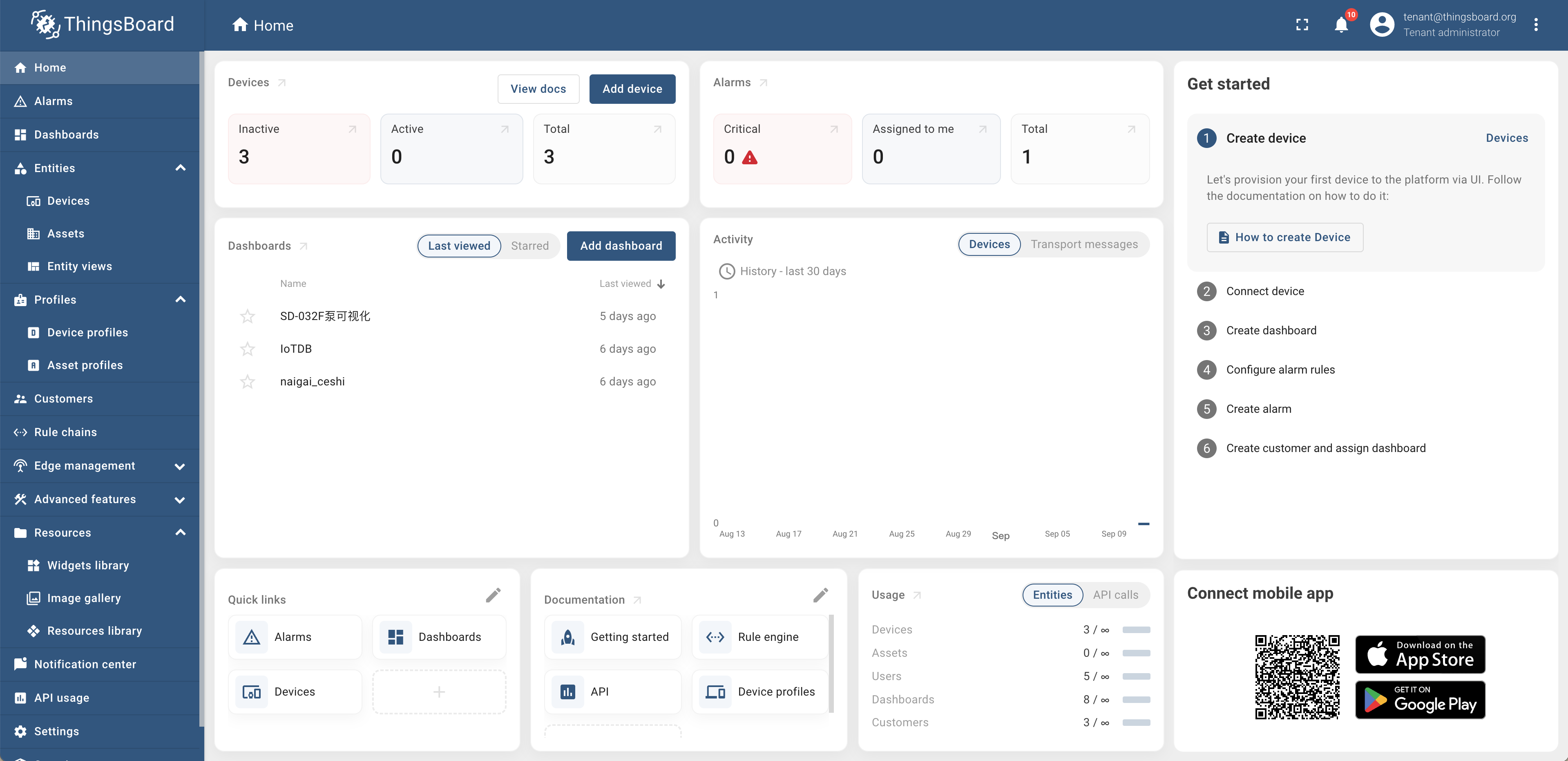
+1. Introduction to ThingsBoard
+
+ ThingsBoard is an open-source IoT platform that enables rapid development,
management, and expansion of IoT projects. For more detailed information,
please refer to [ThingsBoard Official
Website](https://thingsboard.io/docs/getting-started-guides/what-is-thingsboard/https://thingsboard.io/docs/getting-started-guides/what-is-thingsboard/).
+
+ 
+
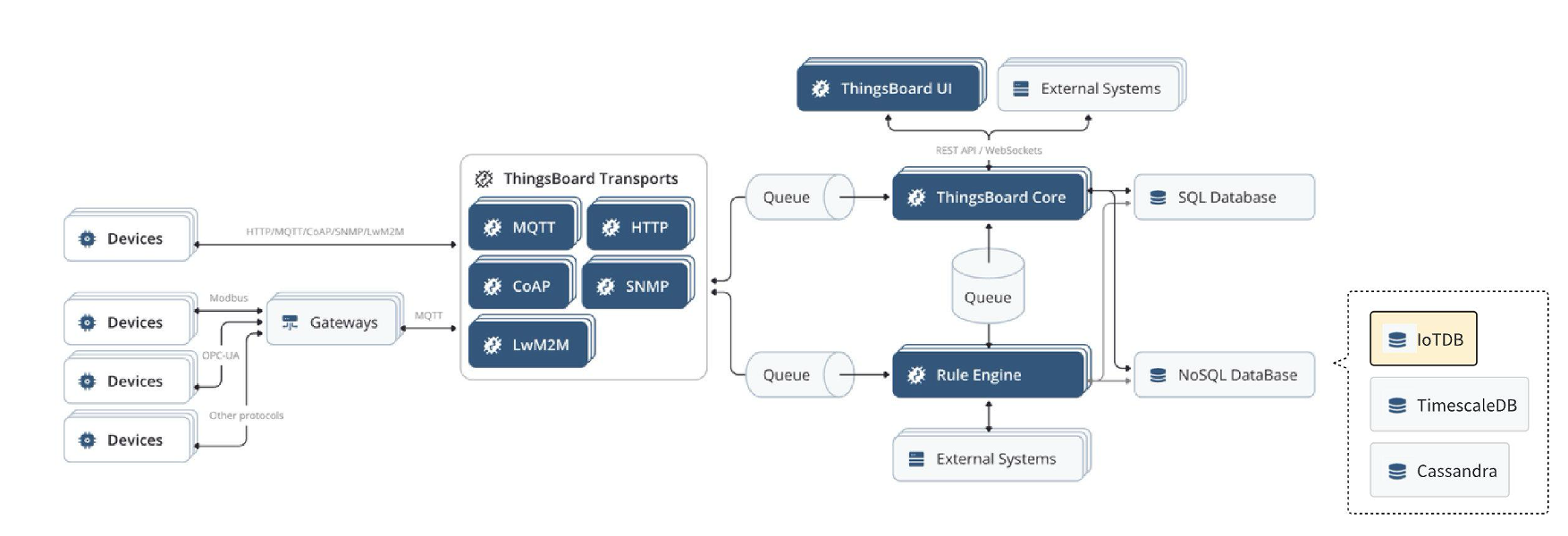
+2. Introduction to ThingsBoard-IoTDB
+
+ ThingsBoard IoTDB provides the ability to store data from ThingsBoard to
IoTDB, and also supports reading data information from the `root.thingsboard`
database in ThingsBoard. The detailed architecture diagram is shown in yellow
in the following figure.
+
+### Relationship Diagram
+
+ 
+
+## Installation Requirements
+
+| **Preparation Content** | **Version Requirements**
|
+| :---------------------------------------- |
:----------------------------------------------------------- |
+| JDK | Requirement to have installed
version 17 or above. Please refer to the specific download for details [Oracle
Official Website](https://www.oracle.com/java/technologies/downloads/) |
+| IoTDB | Require installation of V1.3.0
and above. Please refer to the specific installation process [Deployment
guidance](https://www.timecho.com/docs/UserGuide/latest/Deployment-and-Maintenance/IoTDB-Package_timecho.html)
|
+| ThingsBoard<br /> (IoTDB adapted version) | Please contact the business
department to obtain the installation package. For specific installation steps,
please refer to the following text |
+
+## Installation Steps
+
+Please refer to the specific installation steps [ThingsBoard Official
Website](https://thingsboard.io/docs/user-guide/install/ubuntu/)。wherein:
+
+- [ThingsBoard Official
Website](https://thingsboard.io/docs/user-guide/install/ubuntu/)【 Step 2:
ThingsBoard Service Installation 】 Use the installation package obtained from
the business above to install (using the official ThingsBoard installation
package cannot use IoTDB)
+- [ThingsBoard Official
Website](https://thingsboard.io/docs/user-guide/install/ubuntu/) 【Step 3:
Configure ThingsBoard Database - ThingsBoard Configuration】 In this step, you
need to add environment variables according to the following content
+
+```Shell
+# ThingsBoard original configuration
+export SPRING_DATASOURCE_URL=jdbc:postgresql://localhost:5432/thingsboard
+export SPRING_DATASOURCE_USERNAME=postgres
+export SPRING_DATASOURCE_PASSWORD=PUT_YOUR_POSTGRESQL_PASSWORD_HERE ##Change
password to pg
+
+# To use IoTDB, the following variables need to be modified
+export DATABASE_TS_TYPE=iotdb ## Originally configured as SQL, change the
variable value to iotdb
+
+
+# To use IoTDB, the following variables need to be added
+export DATABASE_TS_LATEST_TYPE=iotdb
+export IoTDB_HOST=127.0.0.1 ## The IP address where iotdb is located
+export IoTDB_PORT:6667 ## The port number for iotdb is 6667 by default
+export IoTDB_USER:root ## The username for iotdb,defaults as root
+export IoTDB_PASSWORD:root ## The password for iotdb,default as root
+export IoTDB_CONNECTION_TIMEOUT:5000 ## IoTDB timeout setting
+export IoTDB_FETCH_SIZE:1024 ## The number of data pulled in a single
request is recommended to be set to 1024
+export IoTDB_MAX_SIZE:200 ## The maximum number of sessions in the
session pool is recommended to be set to>=concurrent requests
+export IoTDB_DATABASE:root.thingsboard ## Thingsboard data is written to the
database stored in IoTDB, supporting customization
+```
+
+## Instructions
+
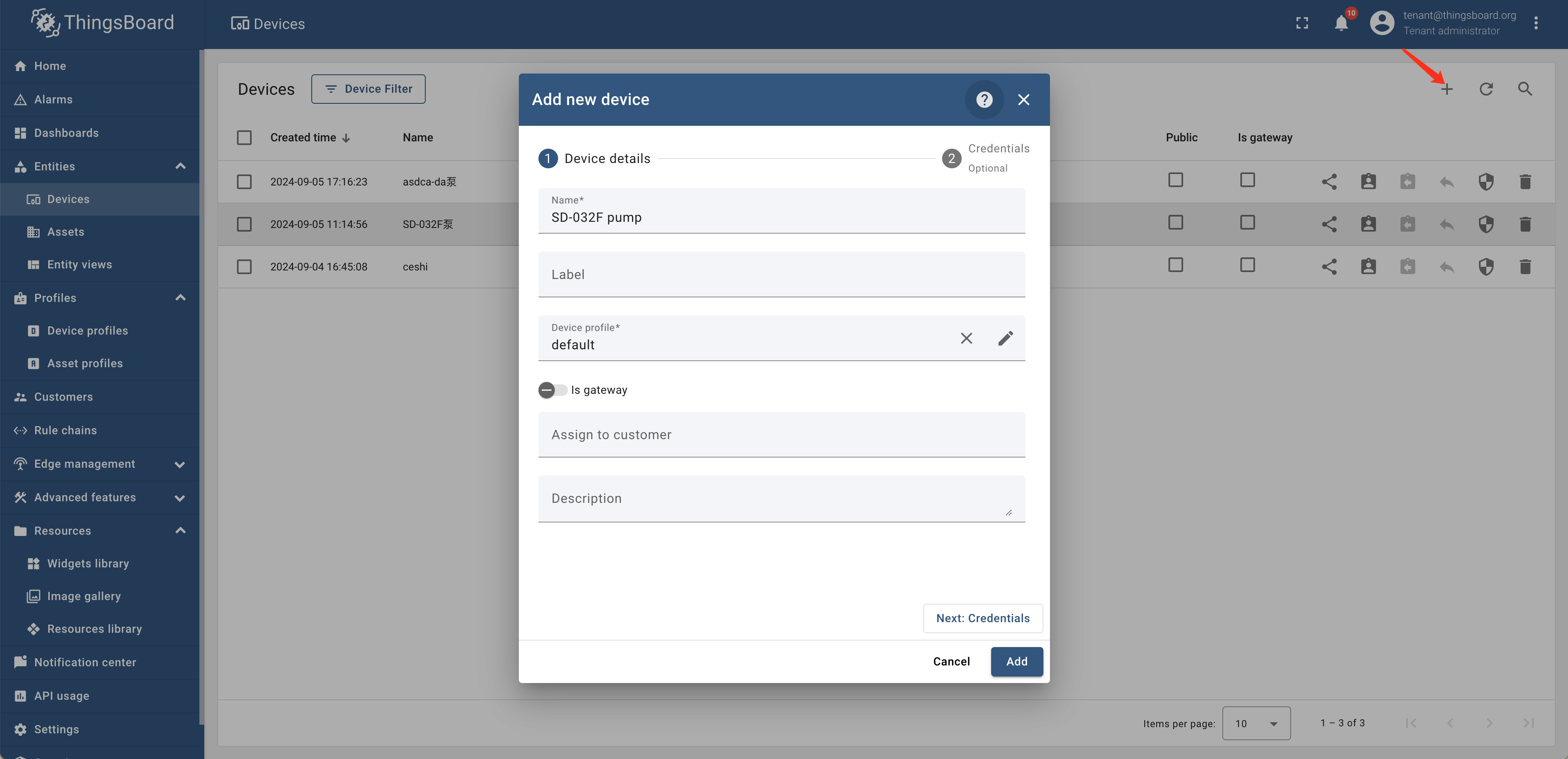
+1. Create devices and connect data:Create devices in the entity device of
Thingsboard and send data to the specified devices on ThingsBoard through an
industrial gateway
+
+ 
+
+2. Set rule chain:Set alarm rules for "SD-032F pump" in the rule chain library
and set the rule chain as the root chain
+
+ <div style="display: flex;justify-content: space-between;">
+ <img src="https://alioss.timecho.com/docs/img/thingsboard-en3.png"; alt=" "
style="width: 50%;"/>
+ <img src="https://alioss.timecho.com/docs/img/thingsborad-en4.png"; alt=" "
style="width: 50%;"/>
+ </div>
+
+
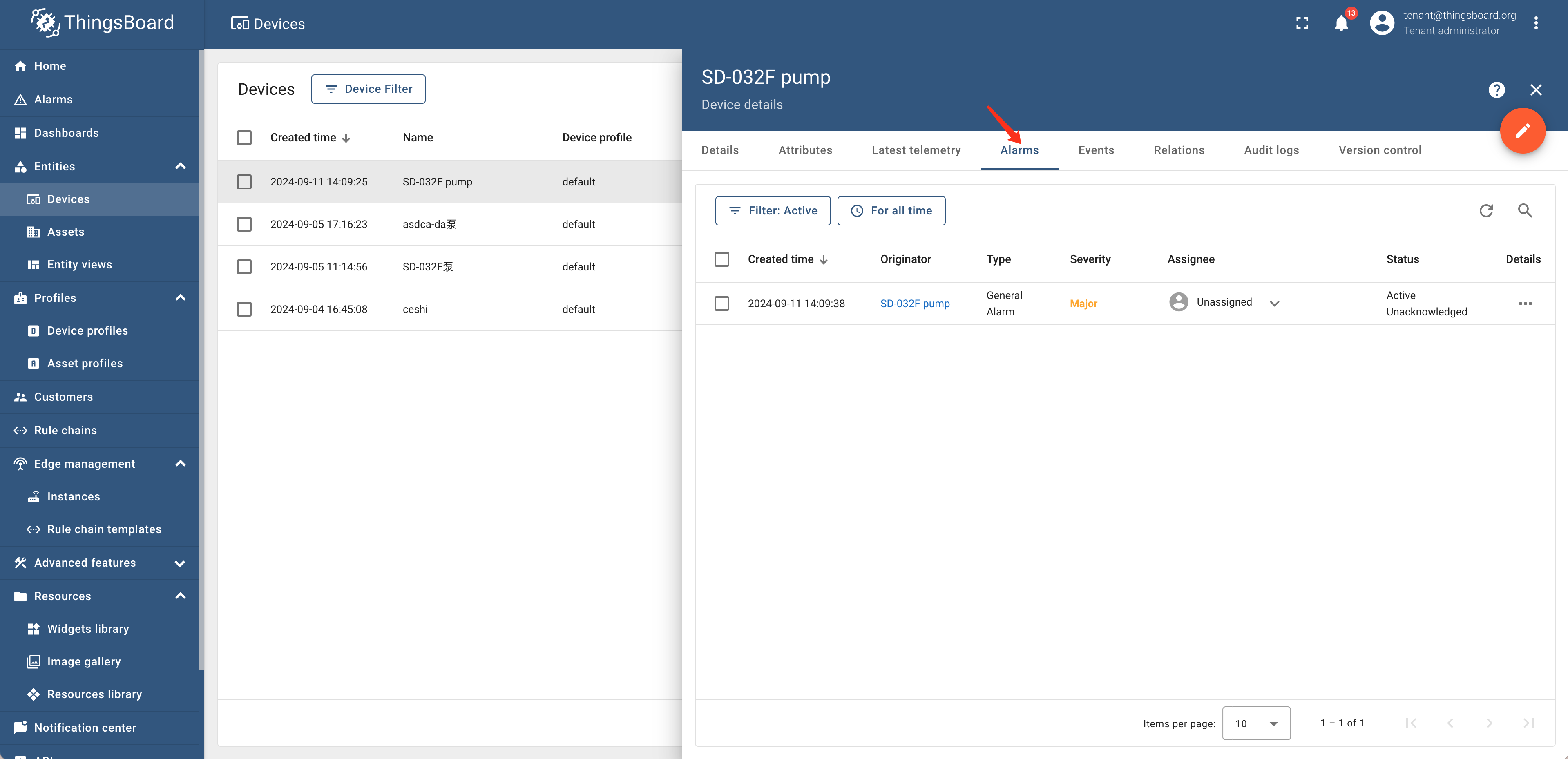
+3. View alarm records:The generated alarm records have been viewed by clicking
on "Device Alarm"
+
+ 
+
+4. Data Visualization:Visualize settings through "New Dashboard - Bind Devices
- Associate Parameters" in the "Dashboard"
+
+ <div style="display: flex;justify-content: space-between;">
+ <img src="https://alioss.timecho.com/docs/img/thingsboard-en6.png"; alt=" "
style="width: 50%;"/>
+ <img src="https://alioss.timecho.com/docs/img/thingsboard-en7.png"; alt=" "
style="width: 50%;"/>
+ </div>
+
diff --git a/src/UserGuide/latest/Ecosystem-Integration/Thingsboard_timecho.md
b/src/UserGuide/latest/Ecosystem-Integration/Thingsboard_timecho.md
new file mode 100644
index 0000000..d69bde0
--- /dev/null
+++ b/src/UserGuide/latest/Ecosystem-Integration/Thingsboard_timecho.md
@@ -0,0 +1,100 @@
+<!--
+
+ Licensed to the Apache Software Foundation (ASF) under one
+ or more contributor license agreements. See the NOTICE file
+ distributed with this work for additional information
+ regarding copyright ownership. The ASF licenses this file
+ to you under the Apache License, Version 2.0 (the
+ "License"); you may not use this file except in compliance
+ with the License. You may obtain a copy of the License at
+
+ http://www.apache.org/licenses/LICENSE-2.0
+
+ Unless required by applicable law or agreed to in writing,
+ software distributed under the License is distributed on an
+ "AS IS" BASIS, WITHOUT WARRANTIES OR CONDITIONS OF ANY
+ KIND, either express or implied. See the License for the
+ specific language governing permissions and limitations
+ under the License.
+
+-->
+# ThingsBoard
+
+## Product Overview
+
+1. Introduction to ThingsBoard
+
+ ThingsBoard is an open-source IoT platform that enables rapid development,
management, and expansion of IoT projects. For more detailed information,
please refer to [ThingsBoard Official
Website](https://thingsboard.io/docs/getting-started-guides/what-is-thingsboard/https://thingsboard.io/docs/getting-started-guides/what-is-thingsboard/)。
+
+ 
+
+2. Introduction to ThingsBoard-IoTDB
+
+ ThingsBoard IoTDB provides the ability to store data from ThingsBoard to
IoTDB, and also supports reading data information from the `root.thingsboard`
database in ThingsBoard. The detailed architecture diagram is shown in yellow
in the following figure.
+
+### Relationship Diagram
+
+ 
+
+## Installation Requirements
+
+| **Preparation Content** | **Version Requirements**
|
+| :---------------------------------------- |
:----------------------------------------------------------- |
+| JDK | Requirement to have installed
version 17 or above. Please refer to the specific download for details [Oracle
Official Website](https://www.oracle.com/java/technologies/downloads/) |
+| IoTDB | Require installation of V1.3.0
and above. Please refer to the specific installation process [Deployment
guidance](https://www.timecho.com/docs/UserGuide/latest/Deployment-and-Maintenance/IoTDB-Package_timecho.html)
|
+| ThingsBoard<br /> (IoTDB adapted version) | Please contact the business
department to obtain the installation package. For specific installation steps,
please refer to the following text |
+
+## Installation Steps
+
+Please refer to the specific installation steps [ThingsBoard Official
Website](https://thingsboard.io/docs/user-guide/install/ubuntu/)。wherein:
+
+- [ThingsBoard Official
Website](https://thingsboard.io/docs/user-guide/install/ubuntu/)【 Step 2:
ThingsBoard Service Installation 】 Use the installation package obtained from
the business above to install (using the official ThingsBoard installation
package cannot use IoTDB)
+- [ThingsBoard Official
Website](https://thingsboard.io/docs/user-guide/install/ubuntu/) 【Step 3:
Configure ThingsBoard Database - ThingsBoard Configuration】 In this step, you
need to add environment variables according to the following content
+
+```shell
+# ThingsBoard original configuration
+export SPRING_DATASOURCE_URL=jdbc:postgresql://localhost:5432/thingsboard
+export SPRING_DATASOURCE_USERNAME=postgres
+export SPRING_DATASOURCE_PASSWORD=PUT_YOUR_POSTGRESQL_PASSWORD_HERE ##Change
password to pg
+
+# To use IoTDB, the following variables need to be modified
+export DATABASE_TS_TYPE=iotdb ## Originally configured as SQL, change the
variable value to iotdb
+
+
+# To use IoTDB, the following variables need to be added
+export DATABASE_TS_LATEST_TYPE=iotdb
+export IoTDB_HOST=127.0.0.1 ## The IP address where iotdb is located
+export IoTDB_PORT:6667 ## The port number for iotdb is 6667 by default
+export IoTDB_USER:root ## The username for iotdb,defaults as root
+export IoTDB_PASSWORD:root ## The password for iotdb,default as root
+export IoTDB_CONNECTION_TIMEOUT:5000 ## IoTDB timeout setting
+export IoTDB_FETCH_SIZE:1024 ## The number of data pulled in a single
request is recommended to be set to 1024
+export IoTDB_MAX_SIZE:200 ## The maximum number of sessions in the
session pool is recommended to be set to>=concurrent requests
+export IoTDB_DATABASE:root.thingsboard ## Thingsboard data is written to the
database stored in IoTDB, supporting customization
+```
+
+## Instructions
+
+1. Create devices and connect data:Create devices in the entity device of
Thingsboard and send data to the specified devices on ThingsBoard through an
industrial gateway
+
+ 
+
+2. Set rule chain:Set alarm rules for "SD-032F pump" in the rule chain library
and set the rule chain as the root chain
+
+ <div style="display: flex;justify-content: space-between;">
+ <img src="https://alioss.timecho.com/docs/img/thingsboard-en3.png"; alt=" "
style="width: 50%;"/>
+ <img src="https://alioss.timecho.com/docs/img/thingsborad-en4.png"; alt=" "
style="width: 50%;"/>
+ </div>
+
+
+3. View alarm records:The generated alarm records have been viewed by clicking
on "Device Alarm"
+
+ 
+
+4. Data Visualization:Visualize settings through "New Dashboard - Bind Devices
- Associate Parameters" in the "Dashboard"
+
+ <div style="display: flex;justify-content: space-between;">
+ <img src="https://alioss.timecho.com/docs/img/thingsboard-en6.png"; alt="
" style="width: 50%;"/>
+ <img src="https://alioss.timecho.com/docs/img/thingsboard-en7.png"; alt="
" style="width: 50%;"/>
+ </div>
+
diff --git
a/src/zh/UserGuide/Master/Ecosystem-Integration/Thingsboard_timecho.md
b/src/zh/UserGuide/Master/Ecosystem-Integration/Thingsboard_timecho.md
new file mode 100644
index 0000000..672b6e3
--- /dev/null
+++ b/src/zh/UserGuide/Master/Ecosystem-Integration/Thingsboard_timecho.md
@@ -0,0 +1,99 @@
+<!--
+
+ Licensed to the Apache Software Foundation (ASF) under one
+ or more contributor license agreements. See the NOTICE file
+ distributed with this work for additional information
+ regarding copyright ownership. The ASF licenses this file
+ to you under the Apache License, Version 2.0 (the
+ "License"); you may not use this file except in compliance
+ with the License. You may obtain a copy of the License at
+
+ http://www.apache.org/licenses/LICENSE-2.0
+
+ Unless required by applicable law or agreed to in writing,
+ software distributed under the License is distributed on an
+ "AS IS" BASIS, WITHOUT WARRANTIES OR CONDITIONS OF ANY
+ KIND, either express or implied. See the License for the
+ specific language governing permissions and limitations
+ under the License.
+
+-->
+# ThingsBoard
+
+## 产品概述
+
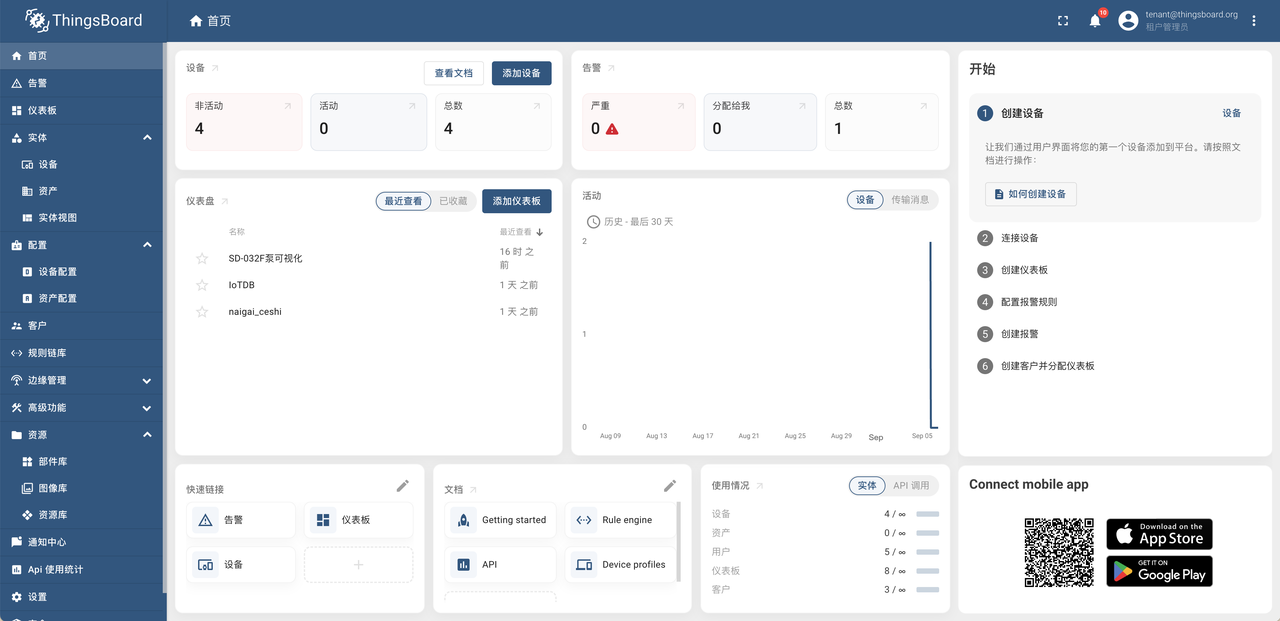
+1. ThingsBoard 简介
+
+ ThingsBoard 是一个开源物联网平台,可实现物联网项目的快速开发、管理和扩展。更多介绍详情请参考[ ThingsBoard
官网](https://thingsboard.io/docs/getting-started-guides/what-is-thingsboard/https://thingsboard.io/docs/getting-started-guides/what-is-thingsboard/)。
+
+ 
+
+2. ThingsBoard-IoTDB 简介
+
+ ThingsBoard-IoTDB 提供了将 ThingsBoard 中的数据存储到 IoTDB 的能力,也支持在 ThingsBoard 中读取
root.thingsboard 数据库下的数据信息。详细架构图如下图黄色标识所示。
+
+### 关系示意图
+
+
+
+## 安装要求
+
+| 准备内容 | 版本要求
|
+| :-------------------------- |
:----------------------------------------------------------- |
+| JDK | 要求已安装 17 及以上版本,具体下载请查看 [Oracle
官网](https://www.oracle.com/java/technologies/downloads/) |
+| IoTDB | 要求已安装 V1.3.0 及以上版本,具体安装过程请参考[
部署指导](https://www.timecho.com/docs/zh/UserGuide/latest/Deployment-and-Maintenance/IoTDB-Package_timecho.html)
|
+| ThingsBoard(IoTDB 适配版) | 安装包请联系商务获取,具体安装步骤参见下文 |
+
+## 安装步骤
+
+具体安装步骤请参考 [ThingsBoard
官网](https://thingsboard.io/docs/user-guide/install/ubuntu/)。其中:
+
+- [ThingsBoard 官网](https://thingsboard.io/docs/user-guide/install/ubuntu/)中【步骤
2 ThingsBoard 服务安装】使用上方从商务获取的安装包进行安装(使用 ThingsBoard 官方安装包无法使用 iotdb)
+- [ThingsBoard 官网](https://thingsboard.io/docs/user-guide/install/ubuntu/)中【步骤
3 配置 ThingsBoard 数据库-ThingsBoard 配置】步骤中需要按照下方内容添加环境变量
+
+```Bash
+# ThingsBoard 原有配置
+export SPRING_DATASOURCE_URL=jdbc:postgresql://localhost:5432/thingsboard
+export SPRING_DATASOURCE_USERNAME=postgres
+export SPRING_DATASOURCE_PASSWORD=PUT_YOUR_POSTGRESQL_PASSWORD_HERE ##修改为pg的密码
+
+# 使用IoTDB需修改以下变量
+export DATABASE_TS_TYPE=iotdb ## 原配置为sql,将变量值改为iotdb
+
+
+# 使用IoTDB需增加以下变量
+export DATABASE_TS_LATEST_TYPE=iotdb
+export IoTDB_HOST=127.0.0.1 ## iotdb所在的ip地址
+export IoTDB_PORT:6667 ## iotdb的端口号,默认为6667
+export IoTDB_USER:root ## iotdb的用户名,默认为root
+export IoTDB_PASSWORD:root ## iotdb的密码,默认为root
+export IoTDB_CONNECTION_TIMEOUT:5000 ## iotdb超时时间设置
+export IoTDB_FETCH_SIZE:1024 ## 单次请求所拉取的数据条数,推荐设置为1024
+export IoTDB_MAX_SIZE:200 ##sessionpool内的最大数量,推荐设置为>=并发请求数
+export IoTDB_DATABASE:root.thingsboard ##thingsboard数据写入iotdb所存储的数据库,支持自定义
+```
+
+## 使用说明
+
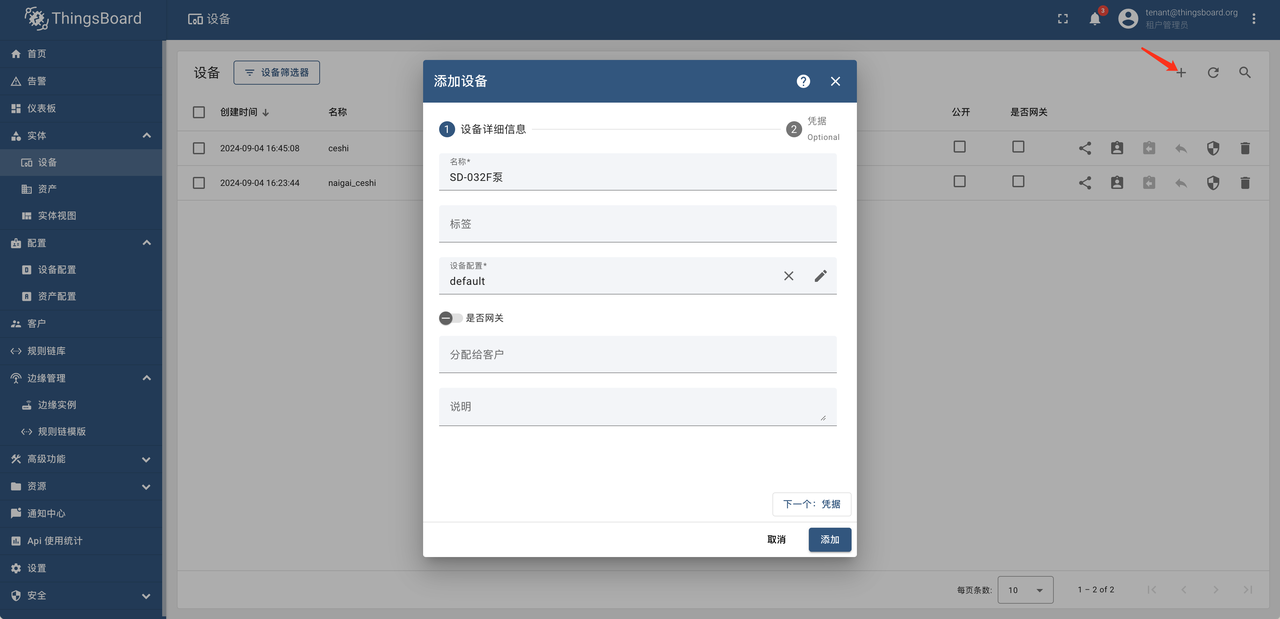
+1. 创建设备并接入数据:在 Thingsboard 的实体-设备中创建设备并通过工业网关将数据发送到 ThingsBoard 指定设备中
+
+
+
+2. 设置规则链:在规则链库中对于“SD-032F 泵”设置告警规则并将该规则链设置为根链
+
+ <div style="display: flex;justify-content: space-between;">
+ <img src="https://alioss.timecho.com/docs/img/ThingsBoard-4.PNG"; alt=" "
style="width: 50%;"/>
+ <img src="https://alioss.timecho.com/docs/img/ThingsBoard-5.PNG"; alt=" "
style="width: 50%;"/>
+ </div>
+
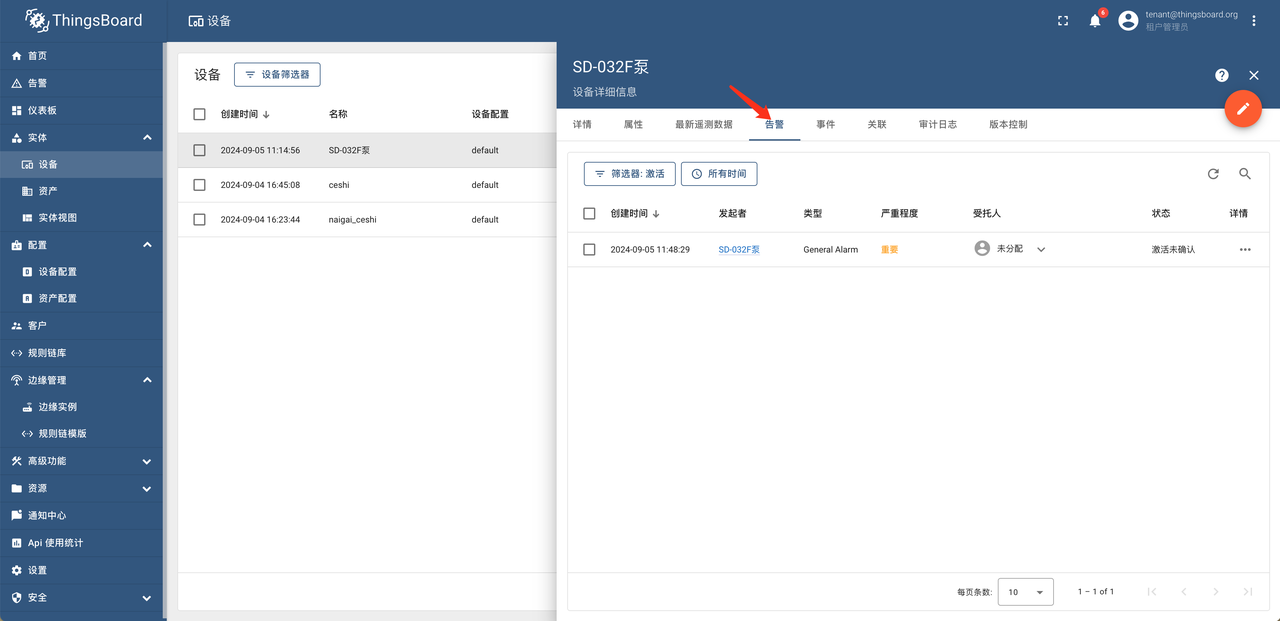
+3. 查看告警记录:对于产生的告警记录已经通过点击“设备-告警”来进行查看
+
+
+
+4. 数据可视化:在“仪表板”中通过“新建仪表板-绑定设备-关联参数”进行可视化设置
+
+ <div style="display: flex;justify-content: space-between;">
+ <img src="https://alioss.timecho.com/docs/img/ThingsBoard-7.png"; alt=" "
style="width: 50%;"/>
+ <img src="https://alioss.timecho.com/docs/img/Thingsboard-10.png"; alt=" "
style="width: 50%;"/>
+ </div>
+
diff --git
a/src/zh/UserGuide/latest/Ecosystem-Integration/Thingsboard_timehcho.md
b/src/zh/UserGuide/latest/Ecosystem-Integration/Thingsboard_timehcho.md
new file mode 100644
index 0000000..672b6e3
--- /dev/null
+++ b/src/zh/UserGuide/latest/Ecosystem-Integration/Thingsboard_timehcho.md
@@ -0,0 +1,99 @@
+<!--
+
+ Licensed to the Apache Software Foundation (ASF) under one
+ or more contributor license agreements. See the NOTICE file
+ distributed with this work for additional information
+ regarding copyright ownership. The ASF licenses this file
+ to you under the Apache License, Version 2.0 (the
+ "License"); you may not use this file except in compliance
+ with the License. You may obtain a copy of the License at
+
+ http://www.apache.org/licenses/LICENSE-2.0
+
+ Unless required by applicable law or agreed to in writing,
+ software distributed under the License is distributed on an
+ "AS IS" BASIS, WITHOUT WARRANTIES OR CONDITIONS OF ANY
+ KIND, either express or implied. See the License for the
+ specific language governing permissions and limitations
+ under the License.
+
+-->
+# ThingsBoard
+
+## 产品概述
+
+1. ThingsBoard 简介
+
+ ThingsBoard 是一个开源物联网平台,可实现物联网项目的快速开发、管理和扩展。更多介绍详情请参考[ ThingsBoard
官网](https://thingsboard.io/docs/getting-started-guides/what-is-thingsboard/https://thingsboard.io/docs/getting-started-guides/what-is-thingsboard/)。
+
+ 
+
+2. ThingsBoard-IoTDB 简介
+
+ ThingsBoard-IoTDB 提供了将 ThingsBoard 中的数据存储到 IoTDB 的能力,也支持在 ThingsBoard 中读取
root.thingsboard 数据库下的数据信息。详细架构图如下图黄色标识所示。
+
+### 关系示意图
+
+
+
+## 安装要求
+
+| 准备内容 | 版本要求
|
+| :-------------------------- |
:----------------------------------------------------------- |
+| JDK | 要求已安装 17 及以上版本,具体下载请查看 [Oracle
官网](https://www.oracle.com/java/technologies/downloads/) |
+| IoTDB | 要求已安装 V1.3.0 及以上版本,具体安装过程请参考[
部署指导](https://www.timecho.com/docs/zh/UserGuide/latest/Deployment-and-Maintenance/IoTDB-Package_timecho.html)
|
+| ThingsBoard(IoTDB 适配版) | 安装包请联系商务获取,具体安装步骤参见下文 |
+
+## 安装步骤
+
+具体安装步骤请参考 [ThingsBoard
官网](https://thingsboard.io/docs/user-guide/install/ubuntu/)。其中:
+
+- [ThingsBoard 官网](https://thingsboard.io/docs/user-guide/install/ubuntu/)中【步骤
2 ThingsBoard 服务安装】使用上方从商务获取的安装包进行安装(使用 ThingsBoard 官方安装包无法使用 iotdb)
+- [ThingsBoard 官网](https://thingsboard.io/docs/user-guide/install/ubuntu/)中【步骤
3 配置 ThingsBoard 数据库-ThingsBoard 配置】步骤中需要按照下方内容添加环境变量
+
+```Bash
+# ThingsBoard 原有配置
+export SPRING_DATASOURCE_URL=jdbc:postgresql://localhost:5432/thingsboard
+export SPRING_DATASOURCE_USERNAME=postgres
+export SPRING_DATASOURCE_PASSWORD=PUT_YOUR_POSTGRESQL_PASSWORD_HERE ##修改为pg的密码
+
+# 使用IoTDB需修改以下变量
+export DATABASE_TS_TYPE=iotdb ## 原配置为sql,将变量值改为iotdb
+
+
+# 使用IoTDB需增加以下变量
+export DATABASE_TS_LATEST_TYPE=iotdb
+export IoTDB_HOST=127.0.0.1 ## iotdb所在的ip地址
+export IoTDB_PORT:6667 ## iotdb的端口号,默认为6667
+export IoTDB_USER:root ## iotdb的用户名,默认为root
+export IoTDB_PASSWORD:root ## iotdb的密码,默认为root
+export IoTDB_CONNECTION_TIMEOUT:5000 ## iotdb超时时间设置
+export IoTDB_FETCH_SIZE:1024 ## 单次请求所拉取的数据条数,推荐设置为1024
+export IoTDB_MAX_SIZE:200 ##sessionpool内的最大数量,推荐设置为>=并发请求数
+export IoTDB_DATABASE:root.thingsboard ##thingsboard数据写入iotdb所存储的数据库,支持自定义
+```
+
+## 使用说明
+
+1. 创建设备并接入数据:在 Thingsboard 的实体-设备中创建设备并通过工业网关将数据发送到 ThingsBoard 指定设备中
+
+
+
+2. 设置规则链:在规则链库中对于“SD-032F 泵”设置告警规则并将该规则链设置为根链
+
+ <div style="display: flex;justify-content: space-between;">
+ <img src="https://alioss.timecho.com/docs/img/ThingsBoard-4.PNG"; alt=" "
style="width: 50%;"/>
+ <img src="https://alioss.timecho.com/docs/img/ThingsBoard-5.PNG"; alt=" "
style="width: 50%;"/>
+ </div>
+
+3. 查看告警记录:对于产生的告警记录已经通过点击“设备-告警”来进行查看
+
+
+
+4. 数据可视化:在“仪表板”中通过“新建仪表板-绑定设备-关联参数”进行可视化设置
+
+ <div style="display: flex;justify-content: space-between;">
+ <img src="https://alioss.timecho.com/docs/img/ThingsBoard-7.png"; alt=" "
style="width: 50%;"/>
+ <img src="https://alioss.timecho.com/docs/img/Thingsboard-10.png"; alt=" "
style="width: 50%;"/>
+ </div>
+















