This is an automated email from the ASF dual-hosted git repository.

jiangtian pushed a commit to branch develop
in repository https://gitbox.apache.org/repos/asf/tsfile.git
The following commit(s) were added to refs/heads/develop by this push:
new 09d291a2f Supplement 2.0.0 version UserGuide and modify Download (#365)
09d291a2f is described below
commit 09d291a2f7687a55a16ba80d09d521897336fdda
Author: 肖林捷 <[email protected]>
AuthorDate: Fri Feb 7 16:27:39 2025 +0800
Supplement 2.0.0 version UserGuide and modify Download (#365)
* Modify and add 2.0.0 version document
* add pictures linking
* add pictures linking
* Modify the document content, split the zh and en into two directories,
and only keep one readme for “download.”
* Modify the document content
* Modify the content of 1.1.0 to the latest folder, and the content of 2.x
to the develop folder, and change the latest version to 2.1.0
* Change version 2.1.0 to 2.0.1
---
docs/src/Download/README.md | 6 +-
.../src/UserGuide/develop/QuickStart/Data-Model.md | 49 +++--
.../develop/QuickStart/Interface-Definitions.md | 240 +++++++++++++++++++++
.../QuickStart/Navigating_Time_Series_Data.md | 64 ------
.../src/UserGuide/develop/QuickStart/QuickStart.md | 152 +++++++++----
docs/src/stage/QuickStart.md | 4 +-
docs/src/zh/Download/README.md | 20 +-
.../zh/UserGuide/develop/QuickStart/Data-Model.md | 52 ++---
.../develop/QuickStart/Interface-Definitions.md | 221 +++++++++++++++++++
.../QuickStart/Navigating_Time_Series_Data.md | 67 ------
.../zh/UserGuide/develop/QuickStart/QuickStart.md | 163 +++++++++-----
docs/src/zh/stage/QuickStart.md | 4 +-
12 files changed, 743 insertions(+), 299 deletions(-)
diff --git a/docs/src/Download/README.md b/docs/src/Download/README.md
index 2a536fa2f..8a9ed562d 100644
--- a/docs/src/Download/README.md
+++ b/docs/src/Download/README.md
@@ -31,7 +31,7 @@ Legacy version are available here:
https://archive.apache.org/dist/tsfile/
# Download
Our GitHub page: https://github.com/apache/tsfile
-The latest version of TsFile is 2.0.0.
+The latest version of TsFile is 2.0.1.
Downloading it from the [Maven central
repository](https://search.maven.org/search?q=g:org.apache.tsfile)
@@ -41,8 +41,8 @@ Add the following dependency section to your pom.xml:
<dependency>
<groupId>org.apache.tsfile</groupId>
<artifactId>tsfile</artifactId>
- <version>2.0.0</version>
+ <version>2.0.1</version>
</dependency>
```
-The release note of 2.0.0 can be found in the Archives of the Apache Software
Foundation: https://github.com/apache/tsfile/releases/tag/v2.0.0
+The release note of 2.0.1 can be found in the Archives of the Apache Software
Foundation: https://github.com/apache/tsfile/releases/tag/v2.0.1
diff --git a/docs/src/UserGuide/develop/QuickStart/Data-Model.md
b/docs/src/UserGuide/develop/QuickStart/Data-Model.md
index 66d4ce843..2b5a17232 100644
--- a/docs/src/UserGuide/develop/QuickStart/Data-Model.md
+++ b/docs/src/UserGuide/develop/QuickStart/Data-Model.md
@@ -22,44 +22,47 @@
## Basic Concepts
-To manage industrial IoT timing data, the measurement point data model of
TsFile includes the following information
+To manage industrial IoT time series data, the data model of TsFile includes
the following concepts
-- DeviceId(String):Device Name
-- MeasurementSchema:Measurement points
- - measurementId(String):Measurement Point Name
- - tsDataType(TSDataType):Data Type
+- Tag: The description of an IoT device of one dimension in the form of a
string key-value pair. For example, "category=XT451" describes the category of
a wind turbine is "XT451" and "year=2021" says it is built in the year 2021.
+- Field: A variable that is being measured by a device. Like fan speed,
voltage, temperature, wind speed, and so on. Unlike a Tagthat is currently
fixed to STRING data type, Fields are supported by various data types.
+- Timestamp and Timeseries: Each value of a FIELD measured by a device is
associated with a unique timestamp. The sequence of the timestamps and values
of a FIELD is a Timeseries.
+- Schema: A set of Tags that can uniquely identify a kind of device, and the
set of Fields that are measured by these devices. E.g., a wind turbine can be
uniquely located by "Province," "City," "WindField," and "SerialNumber," so the
TAG set of SCHEMA "wind_turbine" can be "Province," "City," "WindField," and
"SerialNumber." While its the FIELD set contains "FanSpeed," "Voltage,"
"Temperature," "WindSpeed," and so on.
+- DeviceId: The unique identifier of an IoT device, which consists of the
schema name and all tag values. For example, for the Schema "wind_turbine"
above, a DeviceId can be ("wind_turbine", "Beijing", "Beijing", "Field_1135",
"T1523678").
-For the above detailed introduction, please refer to:[Entering Time Series
Data](https://tsfile.apache.org/UserGuide/latest/QuickStart/Navigating_Time_Series_Data.html)
-
-## Example
-
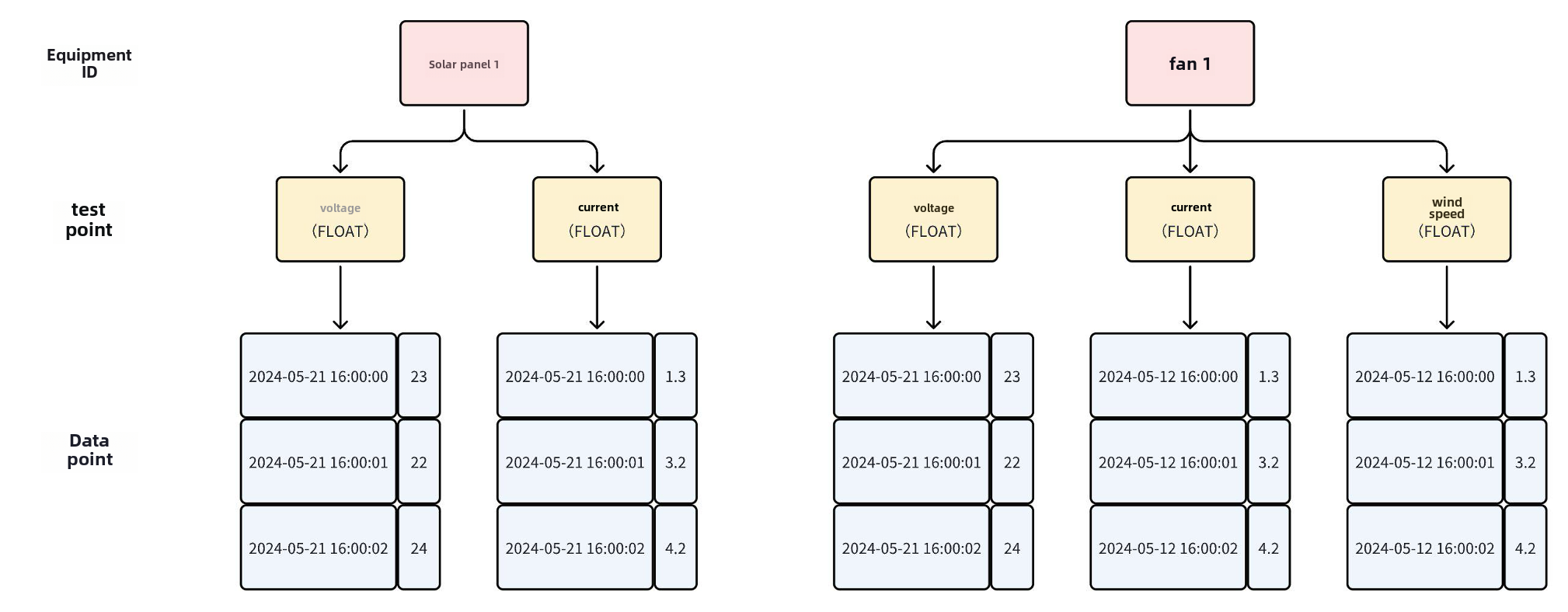
-
-
-In the above example, the metadata (Scheme) of TsFile contains 2 devices and 5
time series, and is established as a table structure as shown in the following
figure:
<table>
<tr>
- <th rowspan="1">Device ID</th>
- <th rowspan="1">Measurement points</th>
+ <th rowspan="1">concept</th>
+ <th rowspan="1">definition</th>
</tr>
<tr>
- <th rowspan="2">Solar panel 1</th>
- <th>Voltage(FLOAT)</th>
+ <th rowspan="1">table</th>
+ <th>A collection of devices with the same pattern.The storage table
defined during modeling consists of three parts: identification column, time
column, and physical quantity column.</th>
</tr>
<tr>
- <th>Current(FLOAT)</th>
+ <th rowspan="1">TAG</th>
+ <th>The unique identifier of a device, which can contain 0 to multiple
tag columns in a table. The composite value formed by combining the values of
the tag columns in the column order when the table was created is called the
identifier, and tags with the same composite value are called the same
identifier.The data type of the tag column can currently only be String, which
can be left unspecified and defaults to StringThe values of the identification
column can all be emptyWhen writin [...]
</tr>
<tr>
- <th rowspan="4">Fan1</th>
+ <th rowspan="1">Time</th>
+ <th>A table must have a time column, and data with the same identifier
value is sorted by time by default.The values in the time column cannot be
empty and must be in sequence.</th>
</tr>
<tr>
- <th>Voltage(FLOAT)</th>
- </tr>
- <tr>
- <th>Current(FLOAT)</th>
+ <th rowspan="1">FIELD</th>
+ <th>The field column defines the measurement point names and data types
for time-series data.</th>
</tr>
<tr>
- <th>Wind Speed(FLOAT)</th>
+ <th rowspan="1">row</th>
+ <th>A row of data in the table</th>
</tr>
</table>
+
+## Example
+
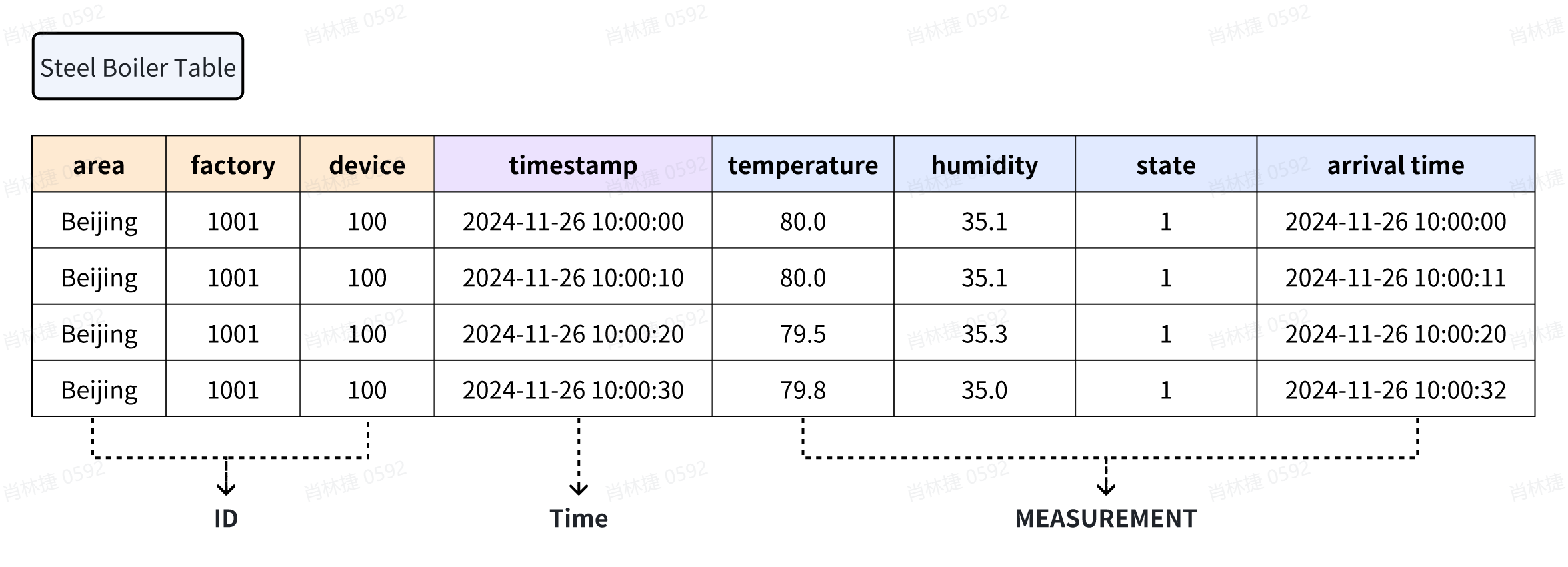
+A schema describes is a collection of devices with the same pattern. As shown
in the figure below, it models the management of factory equipment, and the
physical variable collection of each device has certain commonalities (such as
collecting temperature and humidity physical quantities, collecting physical
quantities of the same device on the same frequency, etc.), so it can be
managed on a device-by-device basis.
+
+At this point, a physical device can be uniquely identified through 3 Tags
[Region] - [Factory] - [Equipment] (orange column in the figure below, also
known as device identification information). The Fields collected by the device
are [Temperature], [Humidity], [Status], and [Arrival Time] (blue column in the
figure below).
+
+
\ No newline at end of file
diff --git a/docs/src/UserGuide/develop/QuickStart/Interface-Definitions.md
b/docs/src/UserGuide/develop/QuickStart/Interface-Definitions.md
new file mode 100644
index 000000000..8c08262c7
--- /dev/null
+++ b/docs/src/UserGuide/develop/QuickStart/Interface-Definitions.md
@@ -0,0 +1,240 @@
+<!--
+
+ Licensed to the Apache Software Foundation (ASF) under one
+ or more contributor license agreements. See the NOTICE file
+ distributed with this work for additional information
+ regarding copyright ownership. The ASF licenses this file
+ to you under the Apache License, Version 2.0 (the
+ "License"); you may not use this file except in compliance
+ with the License. You may obtain a copy of the License at
+
+ http://www.apache.org/licenses/LICENSE-2.0
+
+ Unless required by applicable law or agreed to in writing,
+ software distributed under the License is distributed on an
+ "AS IS" BASIS, WITHOUT WARRANTIES OR CONDITIONS OF ANY
+ KIND, either express or implied. See the License for the
+ specific language governing permissions and limitations
+ under the License.
+
+-->
+# Interface Definitions
+
+## Write Interface
+
+### ITsFileWriter
+
+Used to write data to tsfile
+
+```Java
+interface ITsFileWriter extends AutoCloseable {
+ // Write data
+ void write(Tablet tablet);
+
+ // Close Write
+ void close();
+}
+```
+
+### TsFileWriterBuilder
+
+Used to construct ITsFileWriter
+
+```Java
+class TsFileWriterBuilder {
+ // Build ITsFileWriter object
+ public ITsFileWriter build();
+
+ // target file
+ public TsFileWriterBuilder file(File file);
+
+ // Used to construct table structures
+ public TsFileWriterBuilder tableSchema(TableSchema schema);
+
+ // Used to limit the memory size of objects
+ public TsFileWriterBuilder memoryThreshold(long memoryThreshold);
+}
+```
+
+### TableSchema
+
+Describe the data structure of the table schema
+
+```Java
+class TableSchema {
+ // Constructor function
+ public TableSchema(String tableName, List<ColumnSchema> columnSchemaList);
+}
+
+class ColumnSchema {
+ // Constructor function
+ public ColumnSchema(String columnName, TSDataType dataType, ColumnCategory
columnCategory);
+
+ // Get column names
+ public String getColumnName();
+
+ // Get the data type of the column
+ public TSDataType getDataType();
+
+ // Get column category
+ public Tablet.ColumnCategory getColumnCategory();
+}
+
+class ColumnSchemaBuilder {
+ // Build ColumnSchema object
+ public ColumnSchema build();
+
+ // Column Name
+ public ColumnSchemaBuilder name(String columnName);
+
+ // The data type of the column
+ public ColumnSchemaBuilder dataType(TSDataType columnType);
+
+ // Column category
+ public ColumnSchemaBuilder category(ColumnCategory columnCategory);
+
+ // Supported types
+ enum TSDataType {
+ BOOLEAN,
+ INT32,
+ INT64,
+ FLOAT,
+ DOUBLE,
+ TIMESTAMP,
+ TEXT,
+ DATE,
+ BLOB,
+ STRING;
+ }
+
+ // Supported column categories
+ enum ColumnCategory {
+ TAG,
+ FIELD
+ }
+}
+```
+
+### Tablet
+
+Write column memory structure
+
+```Java
+class Tablet {
+ // Constructor function
+ public Tablet(List<String> columnNameList, List<TSDataType> dataTypeList);
+ public Tablet(List<String> columnNameList, List<TSDataType> dataTypeList,
int maxRowNum);
+
+ // Interface for adding timestamps
+ void addTimestamp(int rowIndex, long timestamp);
+
+ // Interface for adding values
+ // Add values based on column names
+ void addValue(int rowIndex, String columnName, int val);
+ void addValue(int rowIndex, String columnName, long val);
+ void addValue(int rowIndex, String columnName, float val);
+ void addValue(int rowIndex, String columnName, double val);
+ void addValue(int rowIndex, String columnName, boolean val);
+ void addValue(int rowIndex, String columnName, String val);
+ void addValue(int rowIndex, String columnName, byte[] val);
+ void addValue(int rowIndex, String columnName, LocalDate val);
+ // Add values based on index position
+ void addValue(int rowIndex, int columnIndex, int val);
+ void addValue(int rowIndex, int columnIndex, long val);
+ void addValue(int rowIndex, int columnIndex, float val);
+ void addValue(int rowIndex, int columnIndex, double val);
+ void addValue(int rowIndex, int columnIndex, boolean val);
+ void addValue(int rowIndex, int columnIndex, String val);
+ void addValue(int rowIndex, int columnIndex, byte[] val);
+ void addValue(int rowIndex, int columnIndex, LocalDate val);
+}
+```
+
+## Read Interface
+
+### ITsFileReader
+
+Used to query data in tsfile
+
+```Java
+interface ITsFileReader extends AutoCloseable {
+ // Used to execute queries and return results
+ ResultSet query(String tableName, List<String> columnNames, long startTime,
long endTime);
+
+ // Return the schema of the table named tableName in tsfile
+ Optional<TableSchema> getTableSchemas(String tableName);
+
+ // Retrieve schema information for all tables in the tsfile
+ List<TableSchema> getAllTableSchema();
+
+ // Close query
+ void close();
+}
+```
+
+### TsFileReaderBuilder
+
+Used to construct ITsFileWriter
+
+```Java
+class TsFileReaderBuilder {
+ // Build ITsFileReader object
+ public ITsFileReader build();
+
+ // target file
+ public TsFileReaderBuilder file(File file);
+}
+```
+
+### ResultSet
+
+The result set of the query
+
+```Java
+interface ResultSet extends AutoCloseable {
+ // Move the cursor to the next row and return whether there is still data
+ boolean next();
+
+ // Get the value of the current row and a certain column
+ int getInt(String columnName);
+ int getInt(int columnIndex);
+ long getLong(String columnName);
+ long getLong(int columnIndex);
+ float getFloat(String columnName);
+ float getFloat(int columnIndex);
+ double getDouble(String columnName);
+ double getDouble(int columnIndex);
+ boolean getBoolean(String columnName);
+ boolean getBoolean(int columnIndex);
+ String getString(String columnName);
+ String getString(int columnIndex);
+ LocalDate getDate(String columnName);
+ LocalDate getDate(int columnIndex);
+ byte[] getBinary(String columnName);
+ byte[] getBinary(int columnIndex);
+
+ // Determine whether a column is NULL in the current row
+ boolean isNull(String columnName);
+ boolean isNull(int columnIndex);
+
+ // Close the current structure set
+ void close();
+
+ // Obtain the header of the result set
+ ResultSetMetadata getMetadata();
+}
+```
+
+### ResultSetMetadata
+
+Used to obtain metadata for the result set
+
+```Java
+interface ResultSetMetadata {
+ // Obtain the column name of the Nth column in the result set
+ String getColumnName(int columnIndex);
+
+ // Obtain the data type of the Nth column in the result set
+ TSDataType getColumnType(int columnIndex);
+}
+```
diff --git
a/docs/src/UserGuide/develop/QuickStart/Navigating_Time_Series_Data.md
b/docs/src/UserGuide/develop/QuickStart/Navigating_Time_Series_Data.md
deleted file mode 100644
index 20aaef327..000000000
--- a/docs/src/UserGuide/develop/QuickStart/Navigating_Time_Series_Data.md
+++ /dev/null
@@ -1,64 +0,0 @@
-<!--
-
- Licensed to the Apache Software Foundation (ASF) under one
- or more contributor license agreements. See the NOTICE file
- distributed with this work for additional information
- regarding copyright ownership. The ASF licenses this file
- to you under the Apache License, Version 2.0 (the
- "License"); you may not use this file except in compliance
- with the License. You may obtain a copy of the License at
-
- http://www.apache.org/licenses/LICENSE-2.0
-
- Unless required by applicable law or agreed to in writing,
- software distributed under the License is distributed on an
- "AS IS" BASIS, WITHOUT WARRANTIES OR CONDITIONS OF ANY
- KIND, either express or implied. See the License for the
- specific language governing permissions and limitations
- under the License.
-
--->
-# Entering Time Series Data
-
-## What Is Time Series Data?
-
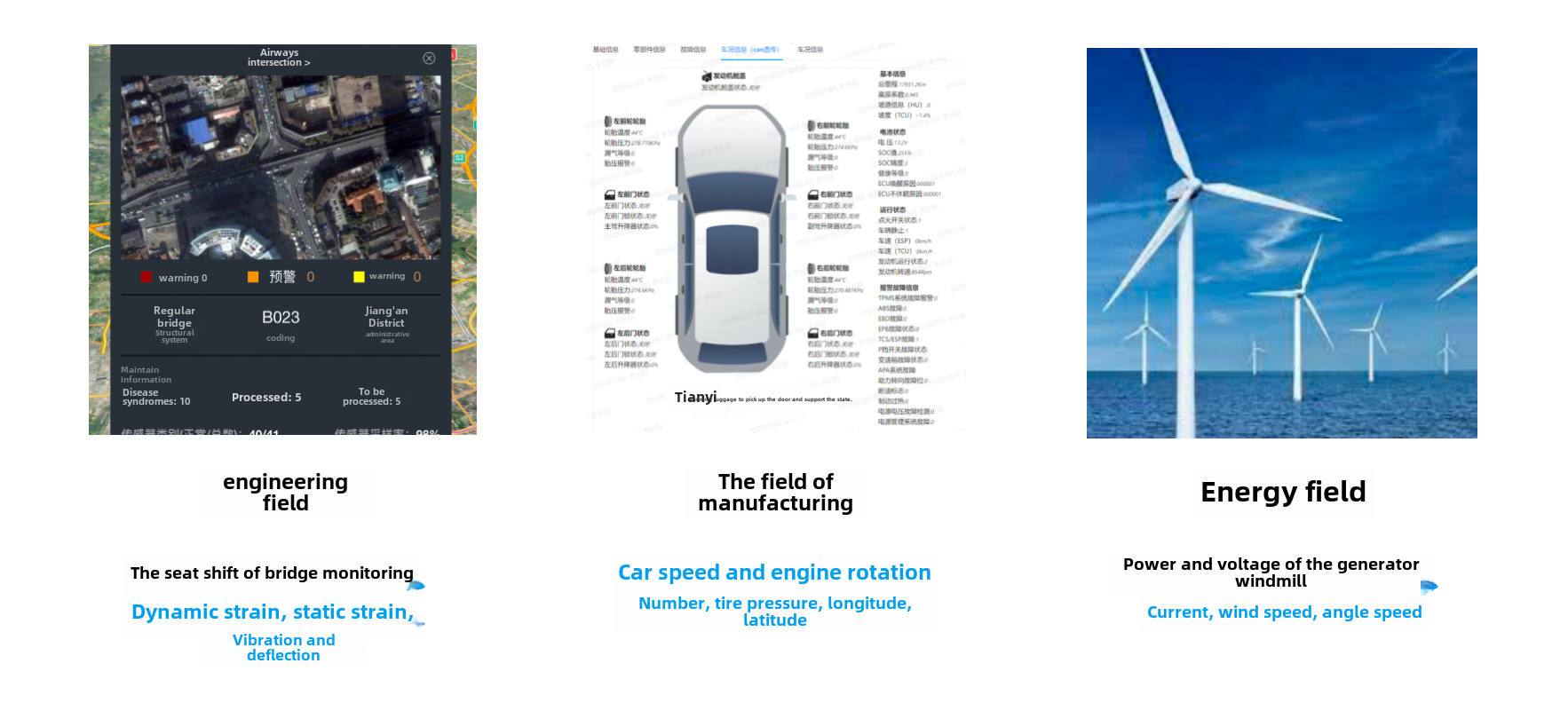
-In today's era of the Internet of Things, various scenarios such as the
Internet of Things and industrial scenarios are undergoing digital
transformation. People collect various states of devices by installing sensors
on them. If the motor collects voltage and current, the blade speed, angular
velocity, and power generation of the fan; Vehicle collection of latitude and
longitude, speed, and fuel consumption; The vibration frequency, deflection,
displacement, etc. of the bridge. The data [...]
-
-
-
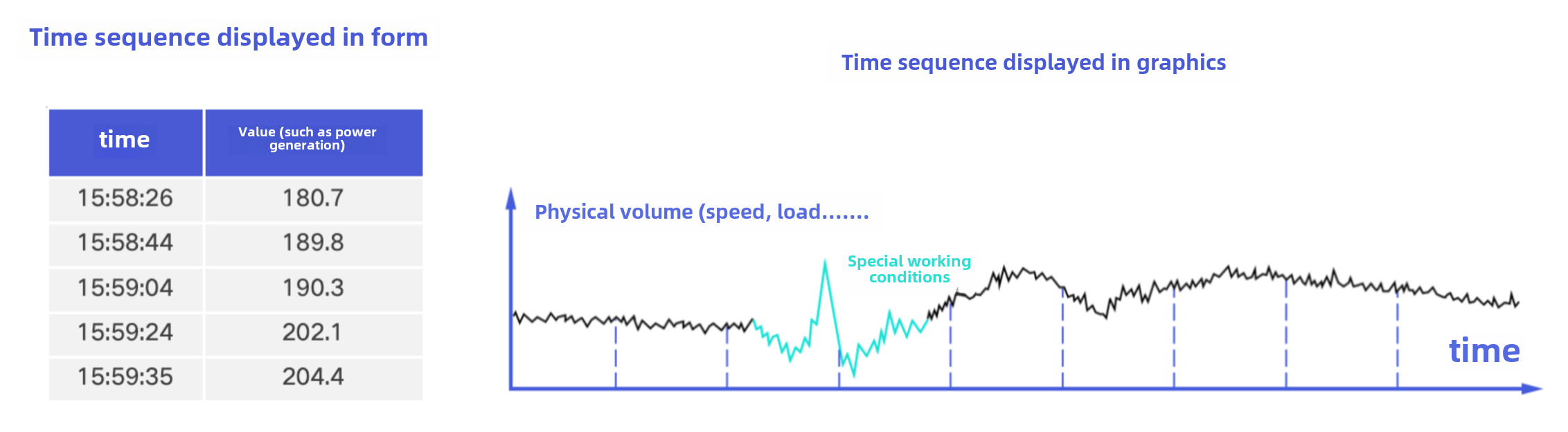
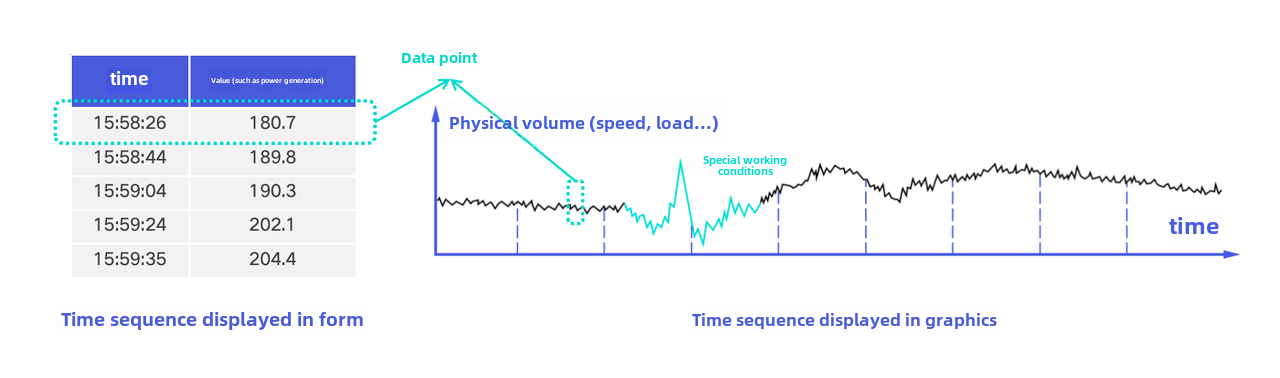
-Generally speaking, we refer to each collection point as a measurement point
(also known as a physical quantity, time series, timeline, signal quantity,
indicator, measurement value, etc.). Each measurement point continuously
collects new data information over time, forming a time series. In the form of
a table, each time series is a table formed by two columns: time and value; In
a graphical way, each time series is a trend chart formed over time, which can
also be vividly referred to a [...]
-
-
-
-The massive time series data generated by sensors is the foundation of digital
transformation in various industries, so our modeling of time series data
mainly focuses on equipment and sensors.
-
-## Key Concepts of Time Series Data
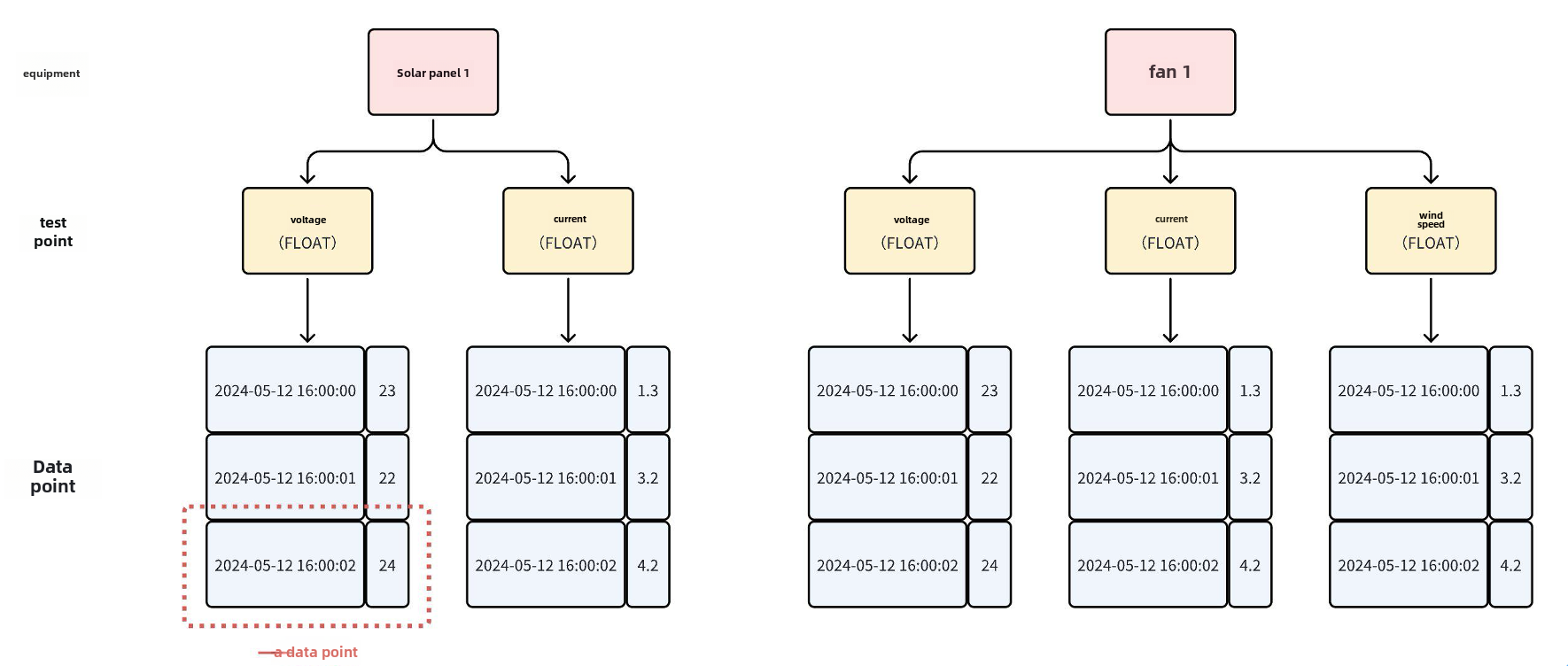
-The main concepts involved in time-series data can be divided from bottom to
top: data points, measurement points, and equipment.
-
-
-
-### Data Point
-
-- Definition: Consists of a timestamp and a value, where the timestamp is of
type long and the value can be of various types such as BOOLEAN, FLOAT, INT32,
etc.
-- Example: A row of a time series in the form of a table in the above figure,
or a point of a time series in the form of a graph, is a data point.
-
-
-
-### Measurement Points
-
-- Definition: It is a time series formed by multiple data points arranged in
increments according to timestamps. Usually, a measuring point represents a
collection point and can regularly collect physical quantities of the
environment it is located in.
-- Also known as: physical quantity, time series, timeline, semaphore,
indicator, measurement value, etc
-- Example:
- - Electricity scenario: current, voltage
- - Energy scenario: wind speed, rotational speed
- - Vehicle networking scenarios: fuel consumption, vehicle speed, longitude,
dimensions
- - Factory scenario: temperature, humidity
-
-### Device
-
-- Definition: Corresponding to a physical device in an actual scene, usually a
collection of measurement points, identified by one to multiple labels
-- Example:
- - Vehicle networking scenario: Vehicles identified by vehicle identification
code (VIN)
- - Factory scenario: robotic arm, unique ID identification generated by IoT
platform
- - Energy scenario: Wind turbines, identified by region, station, line,
model, instance, etc
- - Monitoring scenario: CPU, identified by machine room, rack, Hostname,
device type, etc
\ No newline at end of file
diff --git a/docs/src/UserGuide/develop/QuickStart/QuickStart.md
b/docs/src/UserGuide/develop/QuickStart/QuickStart.md
index 89573ca77..e0aca68ba 100644
--- a/docs/src/UserGuide/develop/QuickStart/QuickStart.md
+++ b/docs/src/UserGuide/develop/QuickStart/QuickStart.md
@@ -20,105 +20,165 @@
-->
# Quick Start
-## Sample Data
+## Dependencies
-
+- JDK >=1.8
+- Maven >=3.6
## Installation Method
-Add the following content to the `dependencies` in `pom.xml`
+Clone the source code from git:
+
+```shell
+git clone https://github.com/apache/tsfile.git
+```
+Run Maven to compile in the TsFile root directory:
+
+```shell
+mvn clean install -P with-java -DskipTests
+```
+
+Using TsFile API with Maven:
```shell
<dependency>
<groupId>org.apache.tsfile</groupId>
<artifactId>tsfile</artifactId>
- <version>1.1.0</version>
+ <version>2.0.1</version>
</dependency>
```
## Writing Process
-### Construct TsFileWriter
-
-```shell
-File f = new File("test.tsfile");
-TsFileWriter tsFileWriter = new TsFileWriter(f);
-```
-
-### Registration Time Series
+### Construct ITsFileWriter
```shell
-List<MeasurementSchema> schema1 = new ArrayList<>();
-schema1.add(new MeasurementSchema("voltage", TSDataType.FLOAT));
-schema1.add(new MeasurementSchema("current", TSDataType.FLOAT));
-tsFileWriter.registerTimeseries(new Path("Solar_panel_1"), schema1);
-
-List<MeasurementSchema> schema2 = new ArrayList<>();
-schema2.add(new MeasurementSchema("voltage", TSDataType.FLOAT));
-schema2.add(new MeasurementSchema("current", TSDataType.FLOAT));
-schema2.add(new MeasurementSchema("wind_speed", TSDataType.FLOAT));
-tsFileWriter.registerTimeseries(new Path("Fan_1"), schema2);
+String path = "test.tsfile";
+File f = FSFactoryProducer.getFSFactory().getFile(path);
+
+String tableName = "table1";
+
+TableSchema tableSchema =
+ new TableSchema(
+ tableName,
+ Arrays.asList(
+ new ColumnSchemaBuilder()
+ .name("id1")
+ .dataType(TSDataType.STRING)
+ .category(Tablet.ColumnCategory.TAG)
+ .build(),
+ new ColumnSchemaBuilder()
+ .name("id2")
+ .dataType(TSDataType.STRING)
+ .category(Tablet.ColumnCategory.TAG)
+ .build(),
+ new ColumnSchemaBuilder()
+ .name("s1")
+ .dataType(TSDataType.INT32)
+ .category(Tablet.ColumnCategory.FIELD)
+ .build(),
+ new ColumnSchemaBuilder()
+ .name("s2").
+ dataType(TSDataType.BOOLEAN)
+ .build()));
+
+long memoryThreshold = 10 * 1024 * 1024;
+
+ITsFileWriter writer =
+ new TsFileWriterBuilder()
+ .file(f)
+ .tableSchema(tableSchema)
+ .memoryThreshold(memoryThreshold)
+ .build();
```
### Write Data
```shell
-TSRecord tsRecord = new TSRecord(1, "Solar_panel_1");
-tsRecord.addTuple(DataPoint.getDataPoint(TSDataType.FLOAT, "voltage", 1.1f));
-tsRecord.addTuple(DataPoint.getDataPoint(TSDataType.FLOAT, "current", 2.2f));
-tsFileWriter.write(tsRecord);
+Tablet tablet =
+ new Tablet(
+ Arrays.asList("id1", "id2", "s1", "s2"),
+ Arrays.asList(
+ TSDataType.STRING, TSDataType.STRING,
TSDataType.INT32, TSDataType.BOOLEAN));
+
+for (int row = 0; row < 5; row++) {
+ long timestamp = row;
+ tablet.addTimestamp(row, timestamp);
+ tablet.addValue(row, "id1", "id1_filed_1");
+ tablet.addValue(row, "id2", "id2_filed_1");
+ tablet.addValue(row, "s1", row);
+ tablet.addValue(row, "s2", true);
+}
+
+writer.write(tablet);
```
### Close File
```shell
-tsFileWriter.close();
+writer.close();
```
### Sample Code
-<https://github.com/apache/tsfile/blob/develop/java/examples/src/main/java/org/apache/tsfile/TsFileWriteWithTSRecord.java>
+The sample code of using these interfaces is in
<https://github.com/apache/tsfile/blob/develop/java/examples/src/main/java/org/apache/tsfile/v4/WriteTabletWithITsFileWriter.java>
## Query Process
-### Construct TsFileReader
+### Construct ITsFileReader
```shell
-TsFileSequenceReader reader = new TsFileSequenceReader(path);
-TsFileReader tsFileReader = new TsFileReader(reader);
+String path = "test.tsfile";
+File f = FSFactoryProducer.getFSFactory().getFile(path);
+
+ITsFileReader reader =
+ new TsFileReaderBuilder()
+ .file(f)
+ .build();
```
### Construct Query Request
```shell
-ArrayList<Path> paths = new ArrayList<>();
-paths.add(new Path("Solar_panel_1", "voltage",true));
-paths.add(new Path("Solar_panel_1", "current",true));
-
-IExpression timeFilter =
- BinaryExpression.and(
- new GlobalTimeExpression(TimeFilterApi.gtEq(4L)),
- new GlobalTimeExpression(TimeFilterApi.ltEq(10L)));
-
-QueryExpression queryExpression = QueryExpression.create(paths, timeFilter);
+ResultSet resultSet = reader.query(tableName, Arrays.asList("id1", "id2",
"s1", "s2"), 2, 8)
```
### Query Data
```shell
-QueryDataSet queryDataSet = tsFileReader.query(queryExpression);
-while (queryDataSet.hasNext()) {
- queryDataSet.next();
+ResultSetMetadata metadata = resultSet.getMetadata();
+System.out.println(metadata);
+
+StringJoiner sj = new StringJoiner(" ");
+for (int column = 1; column <= 5; column++) {
+ sj.add(metadata.getColumnName(column) + "(" +
metadata.getColumnType(column) + ") ");
+}
+System.out.println(sj.toString());
+
+while (resultSet.next()) {
+ Long timeField = resultSet.getLong("Time");
+ String id1Field = resultSet.isNull("id1") ? null :
resultSet.getString("id1");
+ String id2Field = resultSet.isNull("id2") ? null :
resultSet.getString("id2");
+ Integer s1Field = resultSet.isNull("s1") ? null : resultSet.getInt(4);
+ Boolean s2Field = resultSet.isNull("s2") ? null : resultSet.getBoolean(5);
+ sj = new StringJoiner(" ");
+ System.out.println(
+ sj.add(timeField + "")
+ .add(id1Field)
+ .add(id2Field)
+ .add(s1Field + "")
+ .add(s2Field + "")
+ .toString());
}
```
### Close File
```shell
-tsFileReader.close();
+reader.close();
```
### Sample Code
-<https://github.com/apache/tsfile/blob/develop/java/examples/src/main/java/org/apache/tsfile/TsFileRead.java>
+The sample code of using these interfaces is in
<https://github.com/apache/tsfile/blob/develop/java/examples/src/main/java/org/apache/tsfile/v4/ITsFileReaderAndITsFileWriter.java>
diff --git a/docs/src/stage/QuickStart.md b/docs/src/stage/QuickStart.md
index 790852103..549362270 100644
--- a/docs/src/stage/QuickStart.md
+++ b/docs/src/stage/QuickStart.md
@@ -60,7 +60,7 @@ Then, all the jars are in folder named `target/`. Import
`target/tsfile-2.1.0.ja
<dependency>
<groupId>org.apache.tsfile</groupId>
<artifactId>tsfile</artifactId>
- <version>2.1.0</version>
+ <version>2.0.1</version>
</dependency>
```
@@ -94,7 +94,7 @@ Then, all the jars are in folder named `target/`. Import
`target/tsfile-2.1.0.ja
<dependency>
<groupId>org.apache.tsfile</groupId>
<artifactId>tsfile</artifactId>
- <version>2.1.0</version>
+ <version>2.0.1</version>
</dependency>
```
diff --git a/docs/src/zh/Download/README.md b/docs/src/zh/Download/README.md
index ae2d5922a..37b6f83e4 100644
--- a/docs/src/zh/Download/README.md
+++ b/docs/src/zh/Download/README.md
@@ -19,21 +19,10 @@
-->
-# 发行版本
-
-| 版本 | 依赖引用
| 源代码
| SHA512
| ASC
|
版本特性 |
-| ----- |
--------------------------------------------------------------------------- |
---------------------------------------------------------------------------------------------------
|
----------------------------------------------------------------------------------------------------------
|
----------------------------------------------------------------------------------------------------
| ---------------------------------------------------------------- |
-| 2.0.0 |
[pom](https://central.sonatype.com/artifact/org.apache.tsfile/tsfile/2.0.0) |
[源代码](https://www.apache.org/dyn/closer.cgi/tsfile/2.0.0/apache-tsfile-2.0.0-source-release.zip)
|
[sha512](https://www.apache.org/dyn/closer.cgi/tsfile/2.0.0/apache-tsfile-2.0.0-source-release.zip.sha512)
|
[asc](https://www.apache.org/dyn/closer.cgi/tsfile/2.0.0/apache-tsfile-2.0.0-source-release.zip.asc)
| [Releases](https://github.com/apache/tsfile/releases/tag/v2.0.0) |
-| 1.1.0 |
[pom](https://central.sonatype.com/artifact/org.apache.tsfile/tsfile/1.1.0) |
[源代码](https://www.apache.org/dyn/closer.cgi/tsfile/1.1.0/apache-tsfile-1.1.0-source-release.zip)
|
[sha512](https://www.apache.org/dyn/closer.cgi/tsfile/1.1.0/apache-tsfile-1.1.0-source-release.zip.sha512)
|
[asc](https://www.apache.org/dyn/closer.cgi/tsfile/1.1.0/apache-tsfile-1.1.0-source-release.zip.asc)
| [Releases](https://github.com/apache/tsfile/releases/tag/v1.1.0) |
-| 1.0.0 |
[pom](https://central.sonatype.com/artifact/org.apache.tsfile/tsfile/1.0.0) |
[源代码](https://www.apache.org/dyn/closer.cgi/tsfile/1.0.0/apache-tsfile-1.0.0-source-release.zip)
|
[sha512](https://www.apache.org/dyn/closer.cgi/tsfile/1.0.0/apache-tsfile-1.0.0-source-release.zip.sha512)
|
[asc](https://www.apache.org/dyn/closer.cgi/tsfile/1.0.0/apache-tsfile-1.0.0-source-release.zip.asc)
| [Releases](https://github.com/apache/tsfile/releases/tag/v1.0.0) |
-
-完整历史版本: https://archive.apache.org/dist/tsfile/
-
-# 最新版本
-
+# 下载
GitHub 仓库地址:https://github.com/apache/tsfile
-最新版本是2.0.0。
+最新版本是2.0.1。
点击 Maven 仓库地址下载:[Maven central
repository](https://search.maven.org/search?q=g:org.apache.tsfile)
@@ -43,9 +32,8 @@ GitHub 仓库地址:https://github.com/apache/tsfile
<dependency>
<groupId>org.apache.tsfile</groupId>
<artifactId>tsfile</artifactId>
- <version>2.0.0</version>
+ <version>2.0.1</version>
</dependency>
```
-该版本的特性可点击查看: https://github.com/apache/tsfile/releases/tag/v2.0.0
-
+该版本的特性可点击查看: https://github.com/apache/tsfile/releases/tag/v2.0.1
diff --git a/docs/src/zh/UserGuide/develop/QuickStart/Data-Model.md
b/docs/src/zh/UserGuide/develop/QuickStart/Data-Model.md
index 5b8543992..f6a8bc142 100644
--- a/docs/src/zh/UserGuide/develop/QuickStart/Data-Model.md
+++ b/docs/src/zh/UserGuide/develop/QuickStart/Data-Model.md
@@ -18,48 +18,50 @@
under the License.
-->
-# TsFile 数据模型
+# 数据模型
-## 基本概念
+## 基础概念
为管理工业物联网时序数据,TsFile 的测点数据模型包含如下信息
-- DeviceId(String):设备名
-- MeasurementSchema:测点
- - measurementId(String):测点名
- - tsDataType(TSDataType):数据类型
-
-有关上述详细介绍,参见:[走进时序数据](https://tsfile.apache.org/zh/UserGuide/latest/QuickStart/Navigating_Time_Series_Data.html)
-
-## 示例
-
-
-
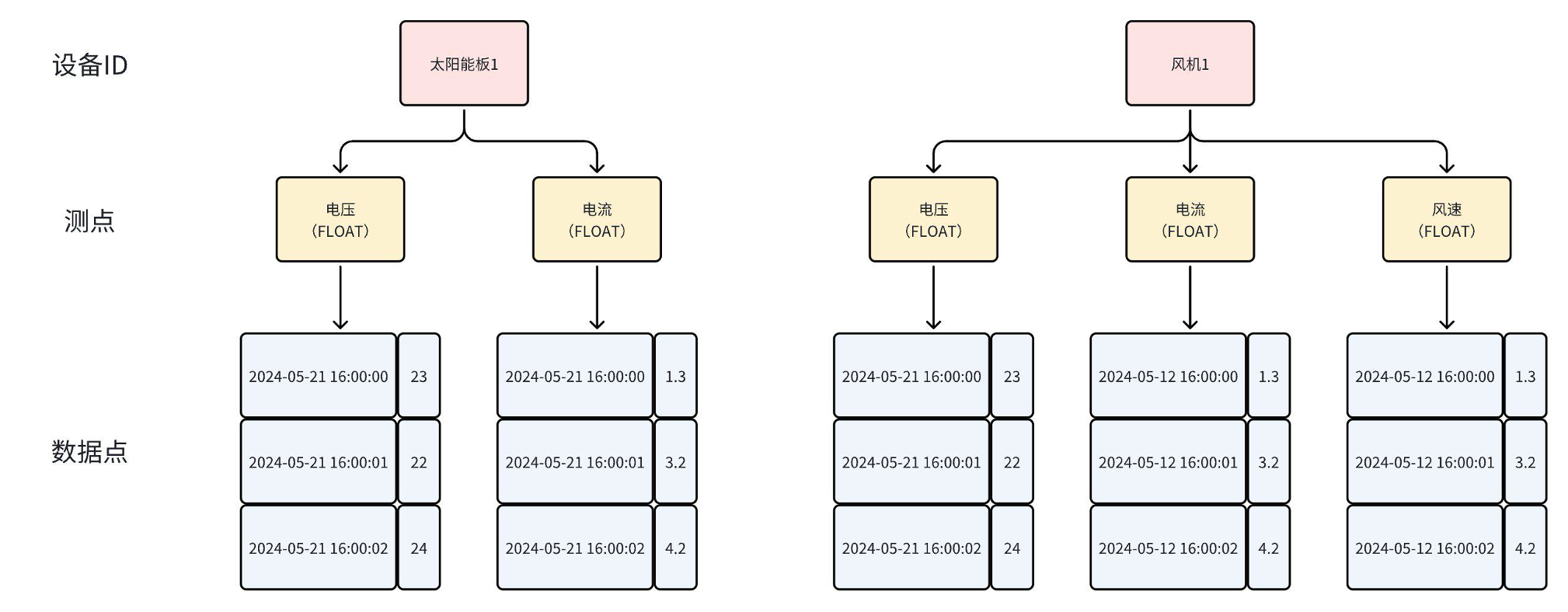
-在上述示例中,TsFile 的元数据(Schema)共包含 2 个设备,5条时间序列,建立为表结构如下图:
+-
标签列:以字符串键值对形式对一维物联网设备的描述。例如,“category=XT451”表示风力涡轮机的类别为“XT451”,“year=2021”表示其建造于2021年。
+- 测点列:设备正在测量的变量。与风扇速度、电压、温度、风速等类似。与目前固定为STRING数据类型的标记不同,字段受各种数据类型的支持。
+- 时间戳和时间序列:设备测量的FIELD的每个值都与一个唯一的时间戳相关联。FIELD的时间戳和值的序列是一个时间序列。
+-
元数据:一组可以唯一标识一种设备的标签,以及由这些设备测量的字段集。例如,风力涡轮机可以通过“省”、“市”、“风场”和“序列号”进行唯一定位,因此方案“wind_turbine”的TAG集可以是“省”,“市”,“风场“和“序列编号”。而其FIELD集包含“风扇速度”、“电压”、“温度”、“风速”等。
+-
设备号:物联网设备的唯一标识符,由模式名称和所有标签值组成。例如,对于上述模式“wind_turbine”,DeviceId可以是(“wind_urbine”、“Beijing”、“Beijing_1135”、“T1523678”)。
<table>
<tr>
- <th rowspan="1">设备ID</th>
- <th rowspan="1">测点</th>
+ <th rowspan="1">概念</th>
+ <th rowspan="1">定义</th>
</tr>
<tr>
- <th rowspan="2">太阳能板1</th>
- <th>电压(FLOAT)</th>
+ <th rowspan="1">表</th>
+ <th>一类具有相同模式的设备的集合。建模时定义的存储表由标识列、时间列和物理量列三部分组成。</th>
</tr>
<tr>
- <th>电流(FLOAT)</th>
+ <th rowspan="1">标识列</th>
+
<th>设备唯一标识,一个表内可包含0至多个标识列,标识列的值按建表时的列顺序组合形成的复合值称为标识,复合值相同的标识为同一标识。标识列的数据类型目前只能为String,可以不指定,默认为String标识列的值可以全为空写入时必须指定所有标识列(未指定的标识列默认使用
null 填充)</th>
</tr>
<tr>
- <th rowspan="4">风机1</th>
+ <th rowspan="1">时间戳</th>
+ <th>一个表必须有一列时间列,相同标识取值的数据默认按时间排序。时间列的值不能为空,必须顺序的。</th>
</tr>
<tr>
- <th>电压(FLOAT)</th>
- </tr>
- <tr>
- <th>电流(FLOAT)</th>
+ <th rowspan="1">测点列</th>
+ <th>测点列定义了时序数据的测点名称、数据类型。</th>
</tr>
<tr>
- <th>风速(FLOAT)</th>
+ <th rowspan="1">行</th>
+ <th>表中的一行数据</th>
</tr>
</table>
+
+## 示例
+
+元数据描述的是具有相同模式的设备的集合。如下图所示,它模拟了工厂设备的管理,每个设备的物理量采集都具备一定共性(如都采集温度和湿度物理量、同一设备的物理量同频采集等),因此可以逐个设备进行管理。
+
+此时,物理设备可以通过3个标签[区域]-[工厂]-[设备](下图中的橙色列,也称为设备标识信息)进行唯一标识。设备收集的字段为[温度]、[湿度]、[状态]和[到达时间](下图中的蓝色列)。
+
+
\ No newline at end of file
diff --git a/docs/src/zh/UserGuide/develop/QuickStart/Interface-Definitions.md
b/docs/src/zh/UserGuide/develop/QuickStart/Interface-Definitions.md
new file mode 100644
index 000000000..09227a9de
--- /dev/null
+++ b/docs/src/zh/UserGuide/develop/QuickStart/Interface-Definitions.md
@@ -0,0 +1,221 @@
+<!--
+
+ Licensed to the Apache Software Foundation (ASF) under one
+ or more contributor license agreements. See the NOTICE file
+ distributed with this work for additional information
+ regarding copyright ownership. The ASF licenses this file
+ to you under the Apache License, Version 2.0 (the
+ "License"); you may not use this file except in compliance
+ with the License. You may obtain a copy of the License at
+
+ http://www.apache.org/licenses/LICENSE-2.0
+
+ Unless required by applicable law or agreed to in writing,
+ software distributed under the License is distributed on an
+ "AS IS" BASIS, WITHOUT WARRANTIES OR CONDITIONS OF ANY
+ KIND, either express or implied. See the License for the
+ specific language governing permissions and limitations
+ under the License.
+
+-->
+# 接口定义
+
+## 写入接口
+
+### ITsFileWriter
+
+用于写入数据至 tsfile
+
+```Java
+interface ITsFileWriter extends AutoCloseable {
+ // 写入数据
+ void write(Tablet tablet);
+ // 关闭写入
+ void close();
+}
+```
+
+### TsFileWriterBuilder
+
+用于构造 ITsFileWriter
+
+```Java
+class TsFileWriterBuilder {
+ // 构建 ITsFileWriter 对象
+ public ITsFileWriter build();
+ // 目标文件
+ public TsFileWriterBuilder file(File file);
+ // 用于构造表结构
+ public TsFileWriterBuilder tableSchema(TableSchema schema);
+ // 用于限制对象的内存大小
+ public TsFileWriterBuilder memoryThreshold(long memoryThreshold);
+}
+```
+
+### TableSchema
+
+描述表 schema 的数据结构
+
+```Java
+class TableSchema {
+ // 构造函数
+ public TableSchema(String tableName, List<ColumnSchema> columnSchemaList);
+}
+
+class ColumnSchema {
+ // 构造函数
+ public ColumnSchema(String columnName, TSDataType dataType, ColumnCategory
columnCategory);
+ // 获取列名
+ public String getColumnName();
+ // 获取列的数据类型
+ public TSDataType getDataType();
+ // 获取列的类别
+ public Tablet.ColumnCategory getColumnCategory();
+}
+
+class ColumnSchemaBuilder {
+ // 构建 ColumnSchema 对象
+ public ColumnSchema build();
+ // 列名
+ public ColumnSchemaBuilder name(String columnName);
+ // 列的数据类型
+ public ColumnSchemaBuilder dataType(TSDataType columnType);
+ // 列类别
+ public ColumnSchemaBuilder category(ColumnCategory columnCategory);
+ // 支持的数据类型
+ enum TSDataType {
+ BOOLEAN,
+ INT32,
+ INT64,
+ FLOAT,
+ DOUBLE,
+ TIMESTAMP,
+ TEXT,
+ DATE,
+ BLOB,
+ STRING;
+ }
+ // 支持的列类别
+ enum ColumnCategory {
+ TAG,
+ FIELD
+ }
+}
+```
+
+### Tablet
+
+写入的列式内存结构
+
+```Java
+class Tablet {
+ // 构造函数
+ public Tablet(List<String> columnNameList, List<TSDataType> dataTypeList);
+ public Tablet(List<String> columnNameList, List<TSDataType> dataTypeList,
int maxRowNum);
+ // 添加时间戳的接口
+ void addTimestamp(int rowIndex, long timestamp);
+ // 添加值的接口
+ // 根据列名添加值
+ void addValue(int rowIndex, String columnName, int val);
+ void addValue(int rowIndex, String columnName, long val);
+ void addValue(int rowIndex, String columnName, float val);
+ void addValue(int rowIndex, String columnName, double val);
+ void addValue(int rowIndex, String columnName, boolean val);
+ void addValue(int rowIndex, String columnName, String val);
+ void addValue(int rowIndex, String columnName, byte[] val);
+ void addValue(int rowIndex, String columnName, LocalDate val);
+ // 根据索引位置添加值
+ void addValue(int rowIndex, int columnIndex, int val);
+ void addValue(int rowIndex, int columnIndex, long val);
+ void addValue(int rowIndex, int columnIndex, float val);
+ void addValue(int rowIndex, int columnIndex, double val);
+ void addValue(int rowIndex, int columnIndex, boolean val);
+ void addValue(int rowIndex, int columnIndex, String val);
+ void addValue(int rowIndex, int columnIndex, byte[] val);
+ void addValue(int rowIndex, int columnIndex, LocalDate val);
+}
+```
+
+## 查询接口
+
+### ITsFileReader
+
+用于查询 tsfile 中的数据
+
+```Java
+interface ITsFileReader extends AutoCloseable {
+ // 用于执行查询并返回结果
+ ResultSet query(String tableName, List<String> columnNames, long startTime,
long endTime);
+ // 返回tsfile中名为tableName的表的架构
+ Optional<TableSchema> getTableSchemas(String tableName);
+ // 检索ts文件中所有表的架构信息
+ List<TableSchema> getAllTableSchema();
+ // 关闭查询
+ void close();
+}
+```
+
+### TsFileReaderBuilder
+
+用于构建 ITsFileWriter
+
+```Java
+class TsFileReaderBuilder {
+ // 构建 ITsFileReader 对象
+ public ITsFileReader build();
+ // 目标文件
+ public TsFileReaderBuilder file(File file);
+}
+```
+
+### ResultSet
+
+用于构建 ITsFileWriter
+
+```Java
+interface ResultSet extends AutoCloseable {
+ // 将光标移动到下一行并返回是否还有数据
+ boolean next();
+
+ // 获取当前行和某一列的值
+ int getInt(String columnName);
+ int getInt(int columnIndex);
+ long getLong(String columnName);
+ long getLong(int columnIndex);
+ float getFloat(String columnName);
+ float getFloat(int columnIndex);
+ double getDouble(String columnName);
+ double getDouble(int columnIndex);
+ boolean getBoolean(String columnName);
+ boolean getBoolean(int columnIndex);
+ String getString(String columnName);
+ String getString(int columnIndex);
+ LocalDate getDate(String columnName);
+ LocalDate getDate(int columnIndex);
+ byte[] getBinary(String columnName);
+ byte[] getBinary(int columnIndex);
+
+ // 确定当前行中的列是否为NULL
+ boolean isNull(String columnName);
+ boolean isNull(int columnIndex);
+
+ // 关闭当前结构集
+ void close();
+
+ // 获取结果集的表头
+ ResultSetMetadata getMetadata();
+}
+```
+
+### ResultSetMetadata
+
+用于获取结果集的元数据
+
+```Java
+interface ResultSetMetadata {
+ // 获取结果集第N列的列名
+ String getColumnName(int columnIndex);
+ // 获取结果集第N列的数据类型
+ TSDataType getColumnType(int columnIndex);
+}
+```
diff --git
a/docs/src/zh/UserGuide/develop/QuickStart/Navigating_Time_Series_Data.md
b/docs/src/zh/UserGuide/develop/QuickStart/Navigating_Time_Series_Data.md
deleted file mode 100644
index 96e9fdf9a..000000000
--- a/docs/src/zh/UserGuide/develop/QuickStart/Navigating_Time_Series_Data.md
+++ /dev/null
@@ -1,67 +0,0 @@
-<!--
-
- Licensed to the Apache Software Foundation (ASF) under one
- or more contributor license agreements. See the NOTICE file
- distributed with this work for additional information
- regarding copyright ownership. The ASF licenses this file
- to you under the Apache License, Version 2.0 (the
- "License"); you may not use this file except in compliance
- with the License. You may obtain a copy of the License at
-
- http://www.apache.org/licenses/LICENSE-2.0
-
- Unless required by applicable law or agreed to in writing,
- software distributed under the License is distributed on an
- "AS IS" BASIS, WITHOUT WARRANTIES OR CONDITIONS OF ANY
- KIND, either express or implied. See the License for the
- specific language governing permissions and limitations
- under the License.
-
--->
-# 走进时序数据
-
-## 什么叫时序数据?
-
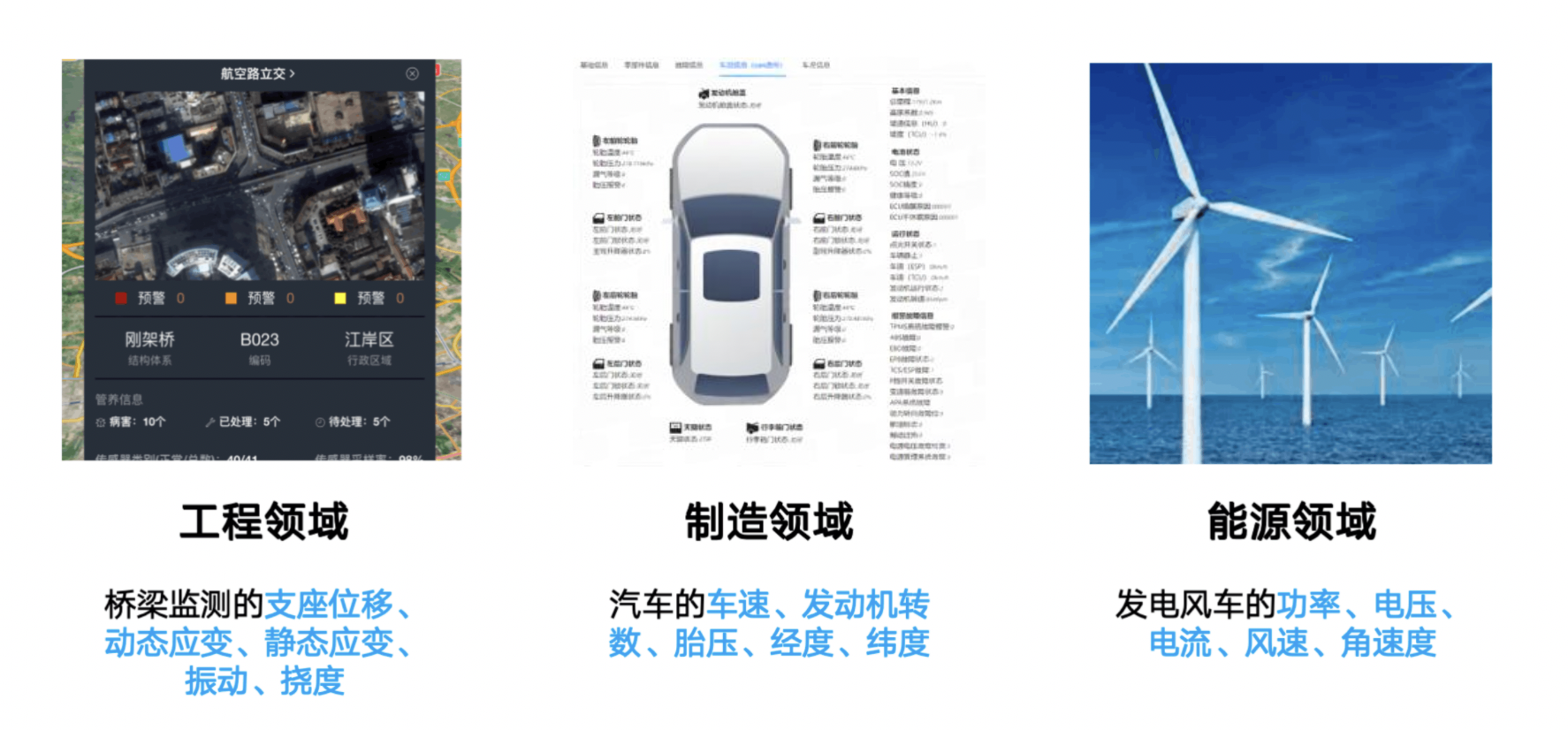
-万物互联的今天,物联网场景、工业场景等各类场景都在进行数字化转型,人们通过在各类设备上安装传感器对设备的各类状态进行采集。如电机采集电压、电流,风机的叶片转速、角速度、发电功率;车辆采集经纬度、速度、油耗;桥梁的振动频率、挠度、位移量等。传感器的数据采集,已经渗透在各个行业中。
-
-
-
-
-
-通常来说,我们把每个采集点位叫做一个**测点(
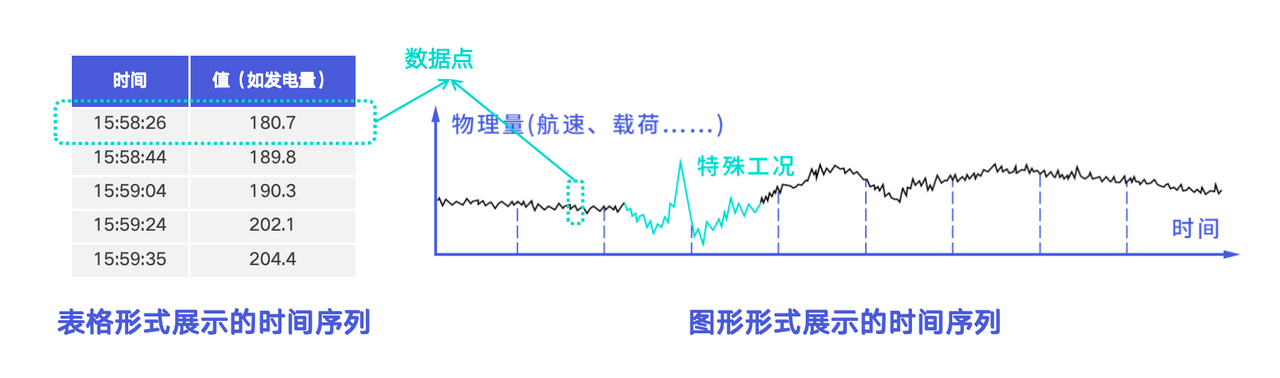
也叫物理量、时间序列、时间线、信号量、指标、测量值等)**,每个测点都在随时间的推移不断收集到新的数据信息,从而构成了一条**时间序列**。用表格的方式,每个时间序列就是一个由时间、值两列形成的表格;用图形化的方式,每个时间序列就是一个随时间推移形成的走势图,也可以形象的称之为设备的“心电图”。
-
-
-
-传感器产生的海量时序数据是各行各业数字化转型的基础,因此我们对时序数据的模型梳理主要围绕设备、传感器展开。
-
-## 时序数据中的关键概念有哪些?
-
-时序数据中主要涉及的概念由下至上可分为:数据点、测点、设备。
-
-
-
-### 数据点
-
-- 定义:由一个时间戳和一个数值组成,其中时间戳为 long 类型,数值可以为 BOOLEAN、FLOAT、INT32 等各种类型。
-- 示例:如上图中表格形式的时间序列的一行,或图形形式的时间序列的一个点,就是一个数据点。
-
-
-
-### 测点
-
-- 定义:是多个数据点按时间戳递增排列形成的一个时间序列。通常一个测点代表一个采集点位,能够定期采集所在环境的物理量。
-- 又名:物理量、时间序列、时间线、信号量、指标、测量值等
-- 示例:
- - 电力场景:电流、电压
- - 能源场景:风速、转速
- - 车联网场景:油量、车速、经度、维度
- - 工厂场景:温度、湿度
-
-### 设备
-
-- 定义:对应一个实际场景中的物理设备,通常是一组测点的集合,由一到多个标签定位标识
-- 示例
- - 车联网场景:车辆,由车辆识别代码 VIN 标识
- - 工厂场景:机械臂,由物联网平台生成的唯一 ID 标识
- - 能源场景:风机,由区域、场站、线路、机型、实例等标识
- - 监控场景:CPU,由机房、机架、Hostname、设备类型等标识
\ No newline at end of file
diff --git a/docs/src/zh/UserGuide/develop/QuickStart/QuickStart.md
b/docs/src/zh/UserGuide/develop/QuickStart/QuickStart.md
index 2d04d6da2..d249749bf 100644
--- a/docs/src/zh/UserGuide/develop/QuickStart/QuickStart.md
+++ b/docs/src/zh/UserGuide/develop/QuickStart/QuickStart.md
@@ -18,106 +18,167 @@
under the License.
-->
-# TsFile 快速上手
+# 快速上手
-## 数据示例
+## 依赖
-
+- JDK >=1.8
+- Maven >=3.6
-## 安装方式
+## 安装
-在 `pom.xml` 的 `dependencies`中添加以下内容
+从git克隆源代码:
```shell
-<dependency>
- <groupId>org.apache.tsfile</groupId>
- <artifactId>tsfile</artifactId>
- <version>1.1.0</version>
-</dependency>
+git clone https://github.com/apache/tsfile.git
```
+在 TsFile 根目录下执行 maven 编译:
-## 写入流程
+```shell
+mvn clean install -P with-java -DskipTests
+```
-### 构造 TsFileWriter
+在 Maven 中引用 TsFile API:
```shell
-File f = new File("test.tsfile");
-TsFileWriter tsFileWriter = new TsFileWriter(f);
+<dependency>
+ <groupId>org.apache.tsfile</groupId>
+ <artifactId>tsfile</artifactId>
+ <version>2.0.1</version>
+</dependency>
```
-### 注册时间序列
+## 写入示例
+
+### 构造 ITsFileWriter
```shell
-List<MeasurementSchema> schema1 = new ArrayList<>();
-schema1.add(new MeasurementSchema("电压", TSDataType.FLOAT));
-schema1.add(new MeasurementSchema("电流", TSDataType.FLOAT));
-tsFileWriter.registerTimeseries(new Path("太阳能板1"), schema1);
-
-List<MeasurementSchema> schema2 = new ArrayList<>();
-schema2.add(new MeasurementSchema("电压", TSDataType.FLOAT));
-schema2.add(new MeasurementSchema("电流", TSDataType.FLOAT));
-schema2.add(new MeasurementSchema("风速", TSDataType.FLOAT));
-tsFileWriter.registerTimeseries(new Path("风机1"), schema2);
+String path = "test.tsfile";
+File f = FSFactoryProducer.getFSFactory().getFile(path);
+
+String tableName = "table1";
+
+TableSchema tableSchema =
+ new TableSchema(
+ tableName,
+ Arrays.asList(
+ new ColumnSchemaBuilder()
+ .name("id1")
+ .dataType(TSDataType.STRING)
+ .category(Tablet.ColumnCategory.TAG)
+ .build(),
+ new ColumnSchemaBuilder()
+ .name("id2")
+ .dataType(TSDataType.STRING)
+ .category(Tablet.ColumnCategory.TAG)
+ .build(),
+ new ColumnSchemaBuilder()
+ .name("s1")
+ .dataType(TSDataType.INT32)
+ .category(Tablet.ColumnCategory.FIELD)
+ .build(),
+ new ColumnSchemaBuilder()
+ .name("s2").
+ dataType(TSDataType.BOOLEAN)
+ .build()));
+
+long memoryThreshold = 10 * 1024 * 1024;
+
+ITsFileWriter writer =
+ new TsFileWriterBuilder()
+ .file(f)
+ .tableSchema(tableSchema)
+ .memoryThreshold(memoryThreshold)
+ .build();
```
### 写入数据
```shell
-TSRecord tsRecord = new TSRecord(1, "太阳能板1");
-tsRecord.addTuple(DataPoint.getDataPoint(TSDataType.FLOAT, "电压", 1.1f));
-tsRecord.addTuple(DataPoint.getDataPoint(TSDataType.FLOAT, "电流", 2.2f));
-tsFileWriter.write(tsRecord);
+Tablet tablet =
+ new Tablet(
+ Arrays.asList("id1", "id2", "s1", "s2"),
+ Arrays.asList(
+ TSDataType.STRING, TSDataType.STRING,
TSDataType.INT32, TSDataType.BOOLEAN));
+
+for (int row = 0; row < 5; row++) {
+ long timestamp = row;
+ tablet.addTimestamp(row, timestamp);
+ tablet.addValue(row, "id1", "id1_filed_1");
+ tablet.addValue(row, "id2", "id2_filed_1");
+ tablet.addValue(row, "s1", row);
+ tablet.addValue(row, "s2", true);
+}
+
+writer.write(tablet);
```
### 关闭文件
```shell
-tsFileWriter.close();
+writer.close();
```
### 示例代码
-<https://github.com/apache/tsfile/blob/develop/java/examples/src/main/java/org/apache/tsfile/TsFileWriteWithTSRecord.java>
+使用这些接口的示例代码位于:<https://github.com/apache/tsfile/blob/develop/java/examples/src/main/java/org/apache/tsfile/v4/WriteTabletWithITsFileWriter.java>
-## 查询流程
+## 查询示例
-### 构造 TsFileReader
+### 构造 ITsFileReader
```shell
-TsFileSequenceReader reader = new TsFileSequenceReader(path);
-TsFileReader tsFileReader = new TsFileReader(reader);
+String path = "test.tsfile";
+File f = FSFactoryProducer.getFSFactory().getFile(path);
+
+ITsFileReader reader =
+ new TsFileReaderBuilder()
+ .file(f)
+ .build();
```
-### 构造查询请求
+### 构建查询请求
```shell
-ArrayList<Path> paths = new ArrayList<>();
-paths.add(new Path("太阳能板1", "电压",true));
-paths.add(new Path("太阳能板1", "电流",true));
-
-IExpression timeFilter =
- BinaryExpression.and(
- new GlobalTimeExpression(TimeFilterApi.gtEq(4L)),
- new GlobalTimeExpression(TimeFilterApi.ltEq(10L)));
-
-QueryExpression queryExpression = QueryExpression.create(paths, timeFilter);
+ResultSet resultSet = reader.query(tableName, Arrays.asList("id1", "id2",
"s1", "s2"), 2, 8)
```
### 查询数据
```shell
-QueryDataSet queryDataSet = tsFileReader.query(queryExpression);
-while (queryDataSet.hasNext()) {
- queryDataSet.next();
+ResultSetMetadata metadata = resultSet.getMetadata();
+System.out.println(metadata);
+
+StringJoiner sj = new StringJoiner(" ");
+for (int column = 1; column <= 5; column++) {
+ sj.add(metadata.getColumnName(column) + "(" +
metadata.getColumnType(column) + ") ");
+}
+System.out.println(sj.toString());
+
+while (resultSet.next()) {
+ Long timeField = resultSet.getLong("Time");
+ String id1Field = resultSet.isNull("id1") ? null :
resultSet.getString("id1");
+ String id2Field = resultSet.isNull("id2") ? null :
resultSet.getString("id2");
+ Integer s1Field = resultSet.isNull("s1") ? null : resultSet.getInt(4);
+ Boolean s2Field = resultSet.isNull("s2") ? null : resultSet.getBoolean(5);
+ sj = new StringJoiner(" ");
+ System.out.println(
+ sj.add(timeField + "")
+ .add(id1Field)
+ .add(id2Field)
+ .add(s1Field + "")
+ .add(s2Field + "")
+ .toString());
}
```
### 关闭文件
```shell
-tsFileReader.close();
+reader.close();
```
### 示例代码
-<https://github.com/apache/tsfile/blob/develop/java/examples/src/main/java/org/apache/tsfile/TsFileRead.java>
+使用这些接口的示例代码位于:<https://github.com/apache/tsfile/blob/develop/java/examples/src/main/java/org/apache/tsfile/v4/ITsFileReaderAndITsFileWriter.java>
+
diff --git a/docs/src/zh/stage/QuickStart.md b/docs/src/zh/stage/QuickStart.md
index b7c6e7275..fbe34ac93 100644
--- a/docs/src/zh/stage/QuickStart.md
+++ b/docs/src/zh/stage/QuickStart.md
@@ -56,7 +56,7 @@ mvn clean install -Dmaven.test.skip=true
<dependency>
<groupId>org.apache.tsfile</groupId>
<artifactId>tsfile</artifactId>
- <version>2.1.0</version>
+ <version>2.0.1</version>
</dependency>
```
@@ -90,7 +90,7 @@ mvn clean install -Dmaven.test.skip=true
<dependency>
<groupId>org.apache.tsfile</groupId>
<artifactId>tsfile</artifactId>
- <version>2.1.0</version>
+ <version>2.0.1</version>
</dependency>
```














![https://alioss.timecho.com/docs/img/[email protected]](https://alioss.timecho.com/docs/img/wx20240628-173...@2x.png)