svn co svn://coreboot.org/coreboot/trunk coreboot

http://www.coreboot.org/Build_HOWTO
Mvh Anders

----- Reply message -----
Fra: "Oliver Schinagl" <[email protected]>
Dato: tor., maj 20, 2010 22:30
Emne: [coreboot] Indtast Bcc  Wyse S10 and coreboot
Til: <[email protected]>

On 05/20/2010 09:48 PM, Anders Jenbo wrote:
> Heres a few lines to test erase and restore every thing.
>
> sudo flashrom -r S10.rom
> sudo rm ignoreme.txt
> sudo flashrom -E -V>  flashrom-erase-SST49LF016C.txt
> sudo flashrom -w S10.rom
>
> But i think there might actually be more to testing erase, then just
> erasing via the normal flashrom.
>
> Take a full picture of the board and note posible revision numbers.
>
> Try compiling the S50 code and flash the content to your bios. It seams
> that there is no com port so you will need a USB debug device if you
> want to debug the boot process.
>
Oh yeah, I forgot to ask; 'compile' how? Is there a good wiki page?
> If it doesn't work then all you have to do is boot up another S10, pull
> out it's bios (while the system is on), plug in the bad bios, and flash
> your S10.rom image to it, and then place one of them in the other board.
>
> if your rom looks like this
> http://www.flashrom.org/images/thumb/8/85/Plcc32_in_socket.jpg/180px-Plcc32_in_socket.jpg
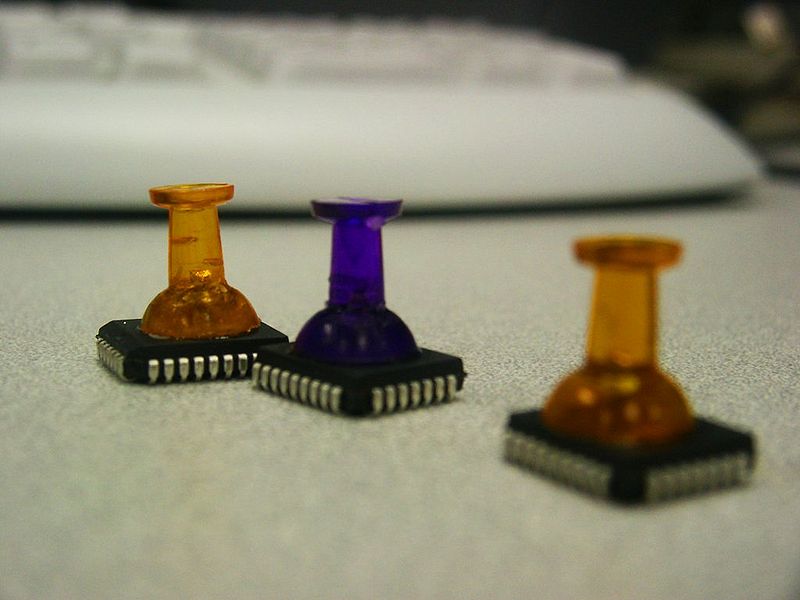
> then it is recomented to glue push pins on top of them, to pull them out
> with out issues, using super glue. Like this
> http://www.flashrom.org/images/thumb/b/b8/Pushpin_roms_2.jpg/800px-Pushpin_roms_2.jpg
> It is still posible to break off the push pin if you can't fit it in the
> small computer when you are done.
>
>
> -Anders
>
>
> tor, 20 05 2010 kl. 20:20 +0200, skrev Oliver Schinagl:
>
>> Right,
>>
>> I saw on the wiki that the S50 was tested etc, so it should be "supported".
>>
>> The bios is socketed! I can take some foto's next week for the wiki if
>> desired!
>>
>> I have attached several documents from the several commands. These
>> commands where run on an Ubuntu 10.04 from a USB stick. It took about 10
>> minutes to start, but runs reasonable well  :)
>>
>> Flashrom.txt lists flashrom -V; on a sidenote, since I have several of
>> these terminals, and I can 'hotswap' I could test the erase thing? How
>> would this work and how would I recover if it goes bad. I'm willing to
>> try if you give me detailed instructions :)
>>
>> Superiotool didn't report anything interesting; there is no superio chip :)
>>
>> I also attached lspci -vvvxxx and dmesg aswell as cpuinfo
>>
>> To recap; I think it's an AMD Geode GX2 or LX, with an CS5536 'companion
>> chip'.
>>
>> The audiochip isn't anything special; it's an ACL655 and the network is
>> powerd by an RTL8100CL.
>>
>>
>> What I'm hoping, is using someting like bayou to boot either whatever is
>> stored on the local 'hdd' or boot an PXE image. USB would be handy too I
>> suppose :)
>>
>> Thanks for your time again;
>>
>> Oliver
>>
>>
>> On 05/20/2010 07:27 PM, [email protected] wrote:
>>
>>> Can the BIOS be swapped (is it socketed), do you have a spare (or one
>>> you fan borrow from motherboard) .
>>> Is the board using a supported or documented SuperIO (use superiotool,
>>> the manual, the we or your eyes to see what chip you have).
>>> Is the southbridg supported.
>>> Is the northbridg supported.
>>>
>>> Mvh Anders
>>>
>>> ----- Reply message -----
>>> Fra: "Oliver Schinagl"<[email protected]>
>>> Dato: tor., maj 20, 2010 18:28
>>> Emne: [coreboot] Wyse S10 and coreboot
>>> Til:<[email protected]>
>>>
>>> Hello all,
>>>
>>> I am very interested in starting to play with coreboot and use it on
>>> some of my systems. I have been interested in coreboot and following it
>>> for a few years now.
>>>
>>> I'll skip the chit chat and get straight to it. I got my hands on a few
>>> Wyse S10 thinclients, and they work quite well, booting via PXE or USB.
>>> Recently, I found some cheap Disk on Module 44pin 'ssd' and wanted to
>>> try them out in the S10.
>>>
>>> Unforuntatly, I'm getting an error when trying to run someting from it;
>>> that the IDE port has been disabled.
>>>
>>> Since getting a bios upgrade (which might not fix it) is a very tedious
>>> task; i decided to look at coreboot.
>>>
>>> My question is, I suppose quite simple; Where do I start?
>>>
>>> Thanks,
>>>
>>> Oliver
>>>
>>> --
>>> coreboot mailing list: [email protected]
>>> http://www.coreboot.org/mailman/listinfo/coreboot
>>>
>>>
>>>
>> --
>> coreboot mailing list: [email protected]
>> http://www.coreboot.org/mailman/listinfo/coreboot
>>
>
>


--
coreboot mailing list: [email protected]
http://www.coreboot.org/mailman/listinfo/coreboot
--
coreboot mailing list: [email protected]
http://www.coreboot.org/mailman/listinfo/coreboot