tenthe commented on code in PR #160:
URL:
https://github.com/apache/streampipes-website/pull/160#discussion_r1540543061
########## website-v2/blog/2024-03-27-anomaly-detection-with-python-functions.md: ########## @@ -0,0 +1,269 @@ +--- +title: Anomaly Detection with StreamPipes Functions in Python and ONNX +author: Tim Bossenmaier +authorURL: "https://github.com/bossenti"; +authorImageURL: "/img/bossenmaier.png" +--- + + +Apache StreamPipes saves the day when it comes to connecting to data sources in the IIoT world. Want to do more with +your IIoT data than just analyze it in a dashboard? If so, this blog post is for you! We'll show you how to extract +historical data from StreamPipes, use it to train a machine learning model, bring the model back to StreamPipes using +ONNX, and apply the model to live data. +<center> +<img class="blog-image" style={{maxWidth:'75%'}} src="/img/blog/2024-03-26/prediction-analysis.png" alt="anomaly-detection"/><br/> +</center> + +<!--truncate--> + +## Motivation + +With this blogpost we want to illustrate how one can easily extract historical IIoT data collected with StreamPipes, +train a machine learning model on this data and bringing the model back to StreamPipes with the interoperability +standard [ONNX](https://onnx.ai) to make inference in live data. + +A very common use case in the area of IIoT is the detection of anomalies, so we want to tackle this challenge in this +article as well. We will use data generated by +the [Machine Data Simulator](https://streampipes.apache.org/docs/pe/org.apache.streampipes.connect.iiot.adapters.simulator.machine/) +adapter. More specifically, we will focus on the `flowrate` data, which consists of various sensor values coming from a +water pipe system. Our goal is keep an eye on the parameter `volume_flow`, which represents the current volume flow in +cubic meters/second. For this parameter, we want to detect anomalies that could indicate problems such as leaks, +blockages, etc. + +To get the concerned data, we simply need to create an instance of the machine data simulator and persist the data in +the data lake: + +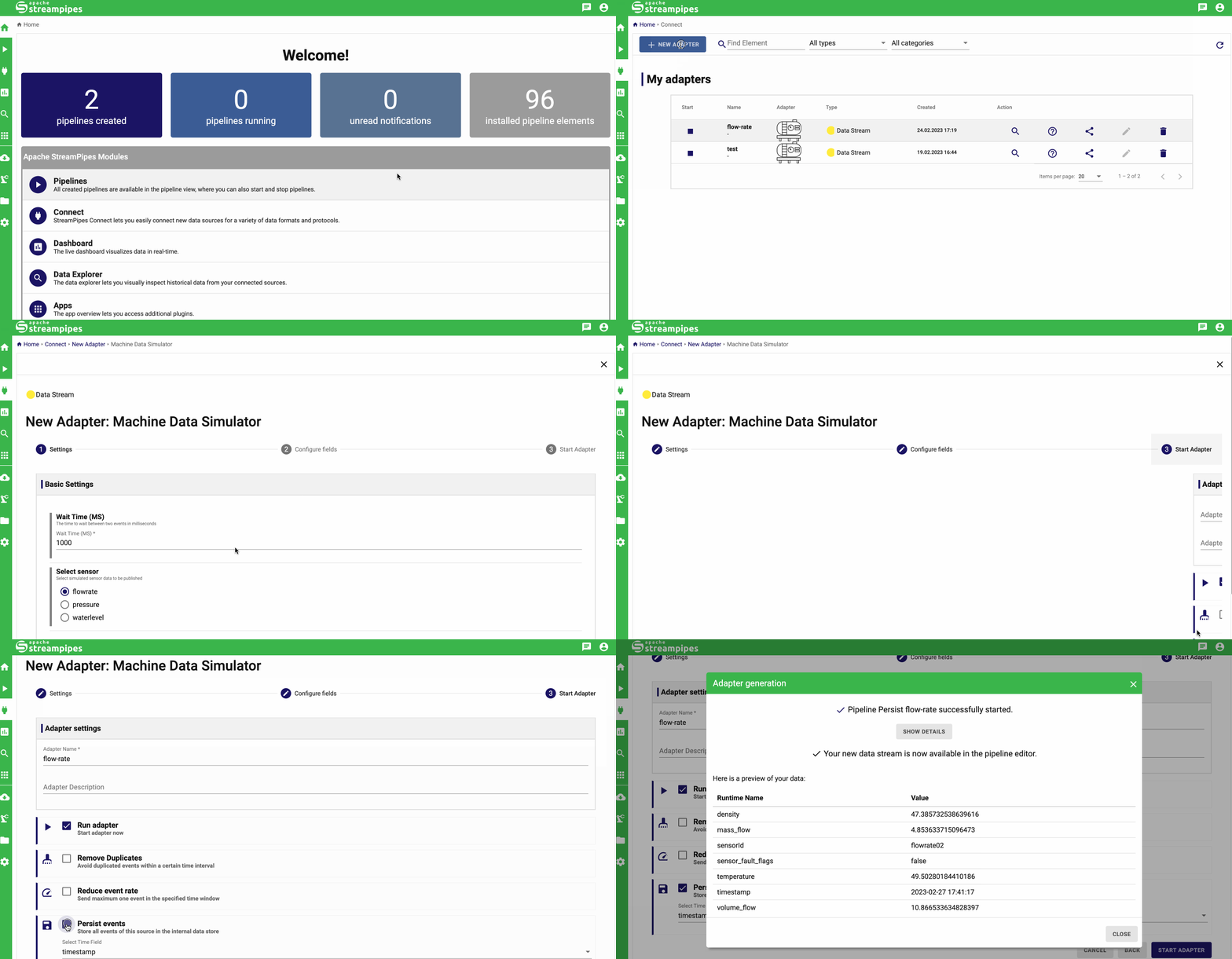 + +## Set Up & Prepare Python Client + +As a prerequisite, we need to install the StreamPipes Python client and all other dependencies, + +```bash +pip install git+https://github.com/apache/streampipes.git#subdirectory=streampipes-client-python +pip install scikit-learn==1.4.0 skl2onnx==1.16.0 onnxruntime==1.17.1 +``` + +The next step is to configure and initialize an instance of the client. + +```python +import os +from streampipes.client import StreamPipesClient +from streampipes.client.config import StreamPipesClientConfig +from streampipes.client.credential_provider import StreamPipesApiKeyCredentials + +os.environ["BROKER-HOST"] = "localhost" +os.environ["KAFKA-PORT"] = "9094" # When using Kafka as message broker + +config = StreamPipesClientConfig( + credential_provider=StreamPipesApiKeyCredentials( + username="[email protected]", + api_key="TOKEN", + ), + host_address="localhost", + https_disabled=True, + port=80 +) + +client = StreamPipesClient(client_config=config) +``` + +In case you have never worked with the Python client before and have problems to get started, +please have a look at +our [tutorial](https://streampipes.apache.org/docs/docs/python/latest/tutorials/1-introduction-to-streampipes-python-client/). + Review Comment: I would replace lines 75-77 with my suggestion or at least reword the content slightly, as the section is difficult to understand. ########## website-v2/blog/2024-03-27-anomaly-detection-with-python-functions.md: ########## @@ -0,0 +1,269 @@ +--- +title: Anomaly Detection with StreamPipes Functions in Python and ONNX +author: Tim Bossenmaier +authorURL: "https://github.com/bossenti"; +authorImageURL: "/img/bossenmaier.png" +--- + + +Apache StreamPipes saves the day when it comes to connecting to data sources in the IIoT world. Want to do more with +your IIoT data than just analyze it in a dashboard? If so, this blog post is for you! We'll show you how to extract +historical data from StreamPipes, use it to train a machine learning model, bring the model back to StreamPipes using +ONNX, and apply the model to live data. +<center> +<img class="blog-image" style={{maxWidth:'75%'}} src="/img/blog/2024-03-26/prediction-analysis.png" alt="anomaly-detection"/><br/> +</center> + +<!--truncate--> + +## Motivation + +With this blogpost we want to illustrate how one can easily extract historical IIoT data collected with StreamPipes, +train a machine learning model on this data and bringing the model back to StreamPipes with the interoperability +standard [ONNX](https://onnx.ai) to make inference in live data. + +A very common use case in the area of IIoT is the detection of anomalies, so we want to tackle this challenge in this +article as well. We will use data generated by +the [Machine Data Simulator](https://streampipes.apache.org/docs/pe/org.apache.streampipes.connect.iiot.adapters.simulator.machine/) +adapter. More specifically, we will focus on the `flowrate` data, which consists of various sensor values coming from a +water pipe system. Our goal is keep an eye on the parameter `volume_flow`, which represents the current volume flow in Review Comment: ```suggestion water pipe system. Our goal is to keep an eye on the parameter `volume_flow`, which represents the current volume flow in ``` ########## website-v2/blog/2024-03-27-anomaly-detection-with-python-functions.md: ########## @@ -0,0 +1,269 @@ +--- +title: Anomaly Detection with StreamPipes Functions in Python and ONNX +author: Tim Bossenmaier +authorURL: "https://github.com/bossenti"; +authorImageURL: "/img/bossenmaier.png" +--- + + +Apache StreamPipes saves the day when it comes to connecting to data sources in the IIoT world. Want to do more with +your IIoT data than just analyze it in a dashboard? If so, this blog post is for you! We'll show you how to extract +historical data from StreamPipes, use it to train a machine learning model, bring the model back to StreamPipes using +ONNX, and apply the model to live data. +<center> +<img class="blog-image" style={{maxWidth:'75%'}} src="/img/blog/2024-03-26/prediction-analysis.png" alt="anomaly-detection"/><br/> +</center> + +<!--truncate--> + +## Motivation + +With this blogpost we want to illustrate how one can easily extract historical IIoT data collected with StreamPipes, +train a machine learning model on this data and bringing the model back to StreamPipes with the interoperability +standard [ONNX](https://onnx.ai) to make inference in live data. + +A very common use case in the area of IIoT is the detection of anomalies, so we want to tackle this challenge in this +article as well. We will use data generated by +the [Machine Data Simulator](https://streampipes.apache.org/docs/pe/org.apache.streampipes.connect.iiot.adapters.simulator.machine/) +adapter. More specifically, we will focus on the `flowrate` data, which consists of various sensor values coming from a +water pipe system. Our goal is keep an eye on the parameter `volume_flow`, which represents the current volume flow in +cubic meters/second. For this parameter, we want to detect anomalies that could indicate problems such as leaks, +blockages, etc. + +To get the concerned data, we simply need to create an instance of the machine data simulator and persist the data in +the data lake: + + + +## Set Up & Prepare Python Client + +As a prerequisite, we need to install the StreamPipes Python client and all other dependencies, + +```bash +pip install git+https://github.com/apache/streampipes.git#subdirectory=streampipes-client-python +pip install scikit-learn==1.4.0 skl2onnx==1.16.0 onnxruntime==1.17.1 +``` + +The next step is to configure and initialize an instance of the client. + +```python +import os +from streampipes.client import StreamPipesClient +from streampipes.client.config import StreamPipesClientConfig +from streampipes.client.credential_provider import StreamPipesApiKeyCredentials + +os.environ["BROKER-HOST"] = "localhost" +os.environ["KAFKA-PORT"] = "9094" # When using Kafka as message broker + +config = StreamPipesClientConfig( + credential_provider=StreamPipesApiKeyCredentials( + username="[email protected]", + api_key="TOKEN", + ), + host_address="localhost", + https_disabled=True, + port=80 +) + +client = StreamPipesClient(client_config=config) +``` + +In case you have never worked with the Python client before and have problems to get started, +please have a look at +our [tutorial](https://streampipes.apache.org/docs/docs/python/latest/tutorials/1-introduction-to-streampipes-python-client/). + Review Comment: ```suggestion If you already have an ONNX model and are only interested in applying it with StreamPipes on a data stream, you can skip the following section ``` -- This is an automated message from the Apache Git Service. To respond to the message, please log on to GitHub and use the URL above to go to the specific comment. To unsubscribe, e-mail: [email protected] For queries about this service, please contact Infrastructure at: [email protected]

