Hanks10100 closed pull request #206: Add richtext doc
URL: https://github.com/apache/incubator-weex-site/pull/206
This is a PR merged from a forked repository.
As GitHub hides the original diff on merge, it is displayed below for
the sake of provenance:
As this is a foreign pull request (from a fork), the diff is supplied
below (as it won't show otherwise due to GitHub magic):
diff --git a/source/cn/guide/extend-ios.md b/source/cn/guide/extend-ios.md
index c947e6768..70bf4389c 100644
--- a/source/cn/guide/extend-ios.md
+++ b/source/cn/guide/extend-ios.md
@@ -8,22 +8,22 @@ version: 2.1
<!-- toc -->
-> **注意**:**Weex 所有暴露给 JS 的内置 module 或 component API 都是安全和可控的, 它们不会去访问系统的私有
API ,也不会去做任何 runtime 上的 hack 更不会去改变应用原有的功能定位。**
+> **注意**:**Weex 所有暴露给 JS 的内置 module 或 component API 都是安全和可控的,它们不会去访问系统的私有 API
,也不会去做任何 runtime 上的 hack 更不会去改变应用原有的功能定位。**
>
-> **如果需要扩展自定义的 module 或者 component ,一定注意不要将 OC 的 runtime 暴露给 JS , 不要将一些诸如
`dlopen()`, `dlsym()`,
`respondsToSelector:`,`performSelector:`,`method_exchangeImplementations()`
的动态和不可控的方法暴露给JS, 也不要将系统的私有API暴露给JS**
+> **如果需要扩展自定义的 module 或者 component ,一定注意不要将 OC 的 runtime 暴露给 JS , 不要将一些诸如
`dlopen()`, `dlsym()`,
`respondsToSelector:`,`performSelector:`,`method_exchangeImplementations()`
的动态和不可控的方法暴露给JS,也不要将系统的私有API暴露给JS**
Weex SDK 只提供渲染,提供了一些默认的组件和能力,如果你需要一些特性但 Weex 并未提供,可以通过扩展自定义的一些插件来实现,通过 WeexSDK
加载。这些插件包括 [component](../wiki/component-introduction.html),
[module](../wiki/module-introduction.html) 和
[handler](../wiki/handler-introduction.html)。
> 本文都以 Objective-C 为例子书写,如果需要 swift 请参考 [使用 swift 扩展
> Weex](./extend-module-using-swift.html)
## 自定义 module
-自定义 module, 需要让自己的 class 遵循 `WXModuleProtocol` 这个protocol, 通过
`WX_EXPORT_METHOD` 这个宏暴露出需要透出到 `JavaScript` 调用的方法,注册 module , 就可以完成一个简单 module
的自定义。
+自定义 module, 需要让自己的 class 遵循 `WXModuleProtocol` 这个protocol, 通过
`WX_EXPORT_METHOD` 这个宏暴露出需要透出到 `JavaScript` 调用的方法,注册 module,就可以完成一个简单 module
的自定义。
- module 自定义初阶
下面完成一个 `module`, 该 `module` 暴露一个打印输入参数的方法
- 1. 新建一个 基类为 NSObject 的 class `WXCustomEventModule`, 让该类遵循 `WXModuleProtocol`
的协议
+ 1. 新建一个 基类为 NSObject 的 class `WXCustomEventModule`,让该类遵循 `WXModuleProtocol`
的协议
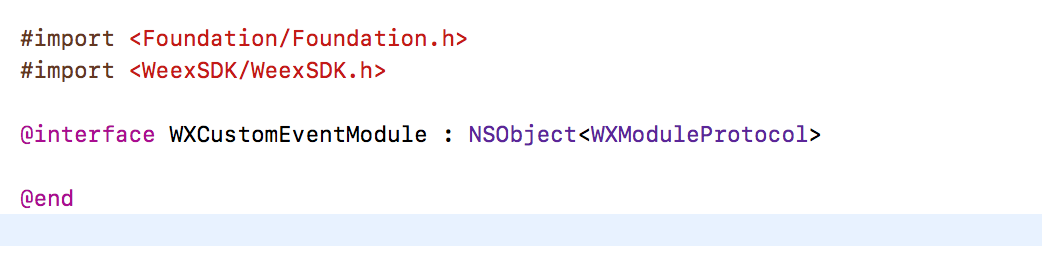
2. 添加打印的方法,通过 `WX_EXPORT_METHOD` 暴露该方法
@@ -53,7 +53,7 @@ Weex SDK 只提供渲染,提供了一些默认的组件和能力,如果你
## Component 扩展
-可能 WeexSDK 内置提供的组件并不能满足你的开发需求,比如需要期望使用地图这样一个复杂的组件,可以通过自定义一个组件,注册到 WeexSDK
engine 中, 可以很方便的使用起来。
+可能 WeexSDK 内置提供的组件并不能满足你的开发需求,比如需要期望使用地图这样一个复杂的组件,可以通过自定义一个组件,注册到 WeexSDK
engine 中,可以很方便的使用起来。
### component 基础生命周期
@@ -63,8 +63,8 @@ Weex SDK 只提供渲染,提供了一些默认的组件和能力,如果你
- 覆盖 `WXComponent` 中的生命周期方法
- `loadView`
- 一个 component 默认对应于一个 view,如果未覆盖 `loadView` 提供自定义 `view`, 会使用 `WXComponent`
基类中的 `WXView`, `WXView` 是继承自 UIView 的一个派生 view。
- 要实现地图功能,我们需要对应的地图 view, 比如系统的 `MKMapView`
+ 一个 component 默认对应于一个 view,如果未覆盖 `loadView` 提供自定义 `view`,会使用 `WXComponent`
基类中的 `WXView`,`WXView` 是继承自 UIView 的一个派生 view。
+ 要实现地图功能,我们需要对应的地图 view,比如系统的 `MKMapView`。
```
- (UIView *)loadView {
@@ -72,7 +72,7 @@ Weex SDK 只提供渲染,提供了一些默认的组件和能力,如果你
}
```
- `viewDidLoad`
- 对组件 view 需要做一些配置,比如设置 delegate, 可以在 `viewDidLoad` 生命周期做,如果当前 view 没有添加
subview 的话,不要设置 view 的 frame,WeexSDK 会根据 style 设置。
+ 对组件 view 需要做一些配置,比如设置 delegate,可以在 `viewDidLoad` 生命周期做,如果当前 view 没有添加
subview 的话,不要设置 view 的 frame,WeexSDK 会根据 style 设置。
```
- (void)viewDidLoad {
@@ -115,7 +115,7 @@ Weex SDK 只提供渲染,提供了一些默认的组件和能力,如果你
}
</script>
```
- 给当前组件添加 `BOOL` 成员 mapLoaded,记录当前事件是否被添加,当地图加载完成时候,我们可以根据这个判断是否应该发送事件。
+ 给当前组件添加 `BOOL` 成员 mapLoaded,记录当前事件是否被添加,当地图加载完成时候,我们可以根据这个判断是否应该发送事件。
- 覆盖组件生命周期方法添加和移除事件
@@ -198,7 +198,6 @@ Weex SDK 只提供渲染,提供了一些默认的组件和能力,如果你
```
-
### 更多 component 生命周期
native 的 component 是由 Weex 管理的,Weex 创建,布局,渲染,销毁。Weex 的 component 生命周期都是可以 hook
的,你可以在这些生命周期中去做自己的事情。
@@ -262,9 +261,47 @@ WeexSDK 0.9.5 之后支持了在 js 中直接调用 component 的方法,自定
</script>
```
+### 获取组件的 CSS 样式信息
+
+- 在 0.19 版本之前,Weex 使用 Yoga 排版引擎,可以通过访问 WXComponent 的 cssNode 属性获取。例如:
+ ```
+ self.cssNode->style.flex = 1.0;
+ float height = self.cssNode->style.dimensions[CSS_HEIGHT]);
+ ```
+
+- 从 0.19 版本开始,Weex 使用自已的排版引擎,是 C++ 代码。获取 CSS 属性可以从 WXComponent 的 styles
字典(NSDictionary)里获取,也可以访问 WXComponent 的 flexCssNode 属性,其类型为 C++ 类
WeexCore::WXCoreLayoutNode。注意,需要源文件为 .mm 类型。
+
+- 从 0.20 版本开始,iOS 接入 WeexCore,排版引擎也沉入 WeexCore层,并且 CSS 相关属性不再上传给 WXComponent
对象,WXComponent 对象的 styles 字典里只有非 CSS 样式。我们的目的是上层 UI
组件只需要关心排版引擎生成的最终坐标即可,不需要关心前端标记的 CSS 属性。如果仍然需要获取 CSS 样式,可以在 .mm 文件中直接访问
flexCssNode,或通过 WXComponent+Layout.h 文件中提供的扩展方法。
+
+ ```
+ /* 通过 key 获取 CSS 样式,可以在 ObjC 文件中调用。这个方法在 Component 线程调用是最安全的,
+ 比如通过WXPerformBlockOnComponentThread调用。不过 WXComponent 的 init 方法总是在 Component
线程执行的,
+ 所以在 init 方法里完成 CSS 样式获取,可以直接调用。
+
+ 当前支持的 Key 如下:
+ width, height, min-width, min-height, max-width, max-height,
+ margin-(left/right/top/bottom)
+ padding-(left/right/top/bottom)
+ border-(left/right/top/bottom)-width
+ left, right, top, bottom
+ flex-grow
+ */
+- (float)getCssStyleValueForKey:(NSString *)key;
+
+// 其它方法,功能如其名,也需要在 Component 线程调用
+- (WXCoreFlexDirection)getCssStyleFlexDirection;
+- (WXCoreFlexWrap)getCssStyleFlexWrap;
+- (WXCoreJustifyContent)getCssStyleJustifyContent;
+- (WXCoreAlignItems)getCssStyleAlignItems;
+- (WXCoreAlignSelf)getCssStyleAlignSelf;
+- (WXCorePositionType)getCssStylePositionType;
+- (NSString*)convertLayoutValueToStyleValue:(NSString*)valueName;
+- (CGFloat)safeContainerStyleWidth;
+ ```
+
## 自定义 handler
- weexSDK 目前没有提供图片下载的能力,在`WXImgLoaderProtocol` 定义了一些获取图片的接口, image 组件正是通过
`WXImgLoaderProtocol` 获得并展示图片,开发者可以实现该 protocol 中的接口方法,这样 `image` 标签才能正常展示图片。
+ weexSDK 目前没有提供图片下载的能力,在`WXImgLoaderProtocol` 定义了一些获取图片的接口,image 组件正是通过
`WXImgLoaderProtocol` 获得并展示图片,开发者可以实现该 protocol 中的接口方法,这样 `image` 标签才能正常展示图片。
开发者也可以定义自己的 `protocol` 和对应的实现来使用 `handler` 机制
diff --git a/source/cn/references/components/richtext.md
b/source/cn/references/components/richtext.md
new file mode 100644
index 000000000..fe9c4a69f
--- /dev/null
+++ b/source/cn/references/components/richtext.md
@@ -0,0 +1,84 @@
+---
+title: <richtext>
+type: references
+group: 内置组件
+order: 8.28
+version: 2.1
+---
+
+## 概况
+富文本组件可以内嵌 `<span>` `<a>` `<image> `。同时它也支持 `<span>` `<a>` `<image> ` 的嵌套。
+
+## 语法
+只有 `<span>`, `<a>` and `<image>` 可以包含在 `<richtext>` 标签里。`<span>` and `<a>`
会被显示为 `display:inline`,而 `<image>` 会被显示为 `display:inline-block`。
+
+`<richtext>` 的子节点分两种类型。
+* `<span>` and `<a>` 可以再包含孩子节点。
+* `<image>` 不能再包含孩子节点。
+
+富文本组件内部树形结构不能超过255层,超过的层会被忽略。
+
+## 使用注意
+
+* `<a>` 标签在 iOS 上恒定为 `color:blue` 蓝色样式,它孩子节点也会被应用为该样式,见下面样例。Android 上无此限制。
+* `<image>` 标签必须指定 `width` 和 `height`.
+* 在图片下载完成前,`<image>` 会保持空白状态,目前不支持显示占位图。
+* 富文本组件自身不能嵌套。
+
+## 属性
+
+富文本组件只支持以下属性
+
+### image
+* src
+* **pseudo-ref** (string) <span
class="api-version">v0.15+</span>,开发者指定的索引,会被传给回调方法 **onitemclick** 。
+
+### a
+* href
+
+### span
+`<span>` 不支持任何属性,文本需要包在 `<span>` 里面,例如 `<span>Hello World</span>`。
+
+## 样式
+
+富文本和它下面的 `<span>`, `<a>`, `<image>` 只支持有限的样式。
+
+* `<span>`, `<a>` 和 `<richtext>`
+ * 可以被继承
+ * color
+ * font-family
+ * font-size
+ * font-style
+ * font-weight
+ * line-height
+ * 不可被继承
+ * background-color
+* `<span>`
+ * 可以被继承
+ * text-decoration: none | underline | line-through, 默认值是 none
+* `<richtext>`
+ * 不可被继承
+ * lines: 最大行数,必须为正数。
+* `<image>`
+ * 不可被继承
+ * width
+ * height
+
+## 事件
+
+### onitemclick
+
+触发时机
+* `img` 被点击
+* 没有任何父节点是 `a`
+
+如果第二个条件不满足,Weex 会尝试打开 `a` 标签指定的链接。
+
+`img` 的 **pseudo-ref** 会作为参数传回来。
+
+### 通用事件
+富文本组件支持 Weex [通用事件](https://weex-project.io/cn/wiki/common-events.html)
+
+## 示例
+
+[richtext 示例](http://dotwe.org/vue/f60fa4323e8248c91ed88d53af2ce9fc)
\ No newline at end of file
diff --git a/source/guide/extend-ios.md b/source/guide/extend-ios.md
index 90176b20d..e60e8b509 100644
--- a/source/guide/extend-ios.md
+++ b/source/guide/extend-ios.md
@@ -257,6 +257,50 @@ after your registration for your own custom component, now
you can call it in yo
</script>
```
+### Fetch CSS styles of a WXComponent
+
+- Before v0.19, Weex used Yoga layout engine. You can access css styles via
cssNode of WXCompoent. Such as
+ ```
+ self.cssNode->style.flex = 1.0;
+ float height = self.cssNode->style.dimensions[CSS_HEIGHT]);
+ ```
+
+- From v0.19, Weex replaced layout engine which is C++ codes. You can get css
styles from styles dictionary of a WXComponent. You can also access flexCssNode
property which is of type WeexCore::WXCoreLayoutNode, but must in .mm files.
+
+- From v0.20, WeexCore is imported to iOS, and css styles is never uploaded to
WXComponent. The styles dictionary only contains non-css styles. We think that
upper UI components should only care about final layout results generated by
layout engine. If you still want to access css styles, you may use flexCssNode
in .mm files or by extension methods provided in WXComponent+Layout.h.
+
+ ```
+/**
+ * @abstract Get css style value for key. The key should be of CSS standard
form.
+ * This method is for convenience use in C/ObjC environment. And if you want
to
+ * retrieve all style values or in C++, you could use flexCssNode directly.
+ *
+ * Thread usage:
+ * This method should be invoked in component thread by
WXPerformBlockOnComponentThread.
+ * Note that all initWithRef methods of WXComponent and its subclasses
are performed in
+ * component thread by default. Therefore you can call this method
directly in initWithRef.
+ *
+ * Supported keys:
+ * width, height, min-width, min-height, max-width, max-height,
+ * margin-(left/right/top/bottom)
+ * padding-(left/right/top/bottom)
+ * border-(left/right/top/bottom)-width
+ * left, right, top, bottom
+ * flex-grow
+ */
+- (float)getCssStyleValueForKey:(NSString *)key;
+
+// Other methods which should also be used in component thread.
+- (WXCoreFlexDirection)getCssStyleFlexDirection;
+- (WXCoreFlexWrap)getCssStyleFlexWrap;
+- (WXCoreJustifyContent)getCssStyleJustifyContent;
+- (WXCoreAlignItems)getCssStyleAlignItems;
+- (WXCoreAlignSelf)getCssStyleAlignSelf;
+- (WXCorePositionType)getCssStylePositionType;
+- (NSString*)convertLayoutValueToStyleValue:(NSString*)valueName;
+- (CGFloat)safeContainerStyleWidth;
+ ```
+
### custom your handlers
We don't provide functionality for downloading image but defines a blueprint
of methods in `WXImgLoaderProtocol` for loading image, and image component get
image content from these methods. You must implement methods in
`WXImgLoaderProtocol` except the `optional` methods to display image from
specified url.
diff --git a/source/references/components/richtext.md
b/source/references/components/richtext.md
new file mode 100644
index 000000000..5b67f8895
--- /dev/null
+++ b/source/references/components/richtext.md
@@ -0,0 +1,82 @@
+---
+title: <richtext>
+type: references
+group: Build-in Components
+order: 8.28
+version: 2.1
+---
+
+## Summary
+Richtext is used to achieve inline `<span>` or `<a>` combined with
inline-block `<image> `. It also supports nested `<span>`, `<image>` and `<a>`
with style inheritance and override. Thus, richtext can be considered as a more
general `<text>` with more powerful usage.
+
+## Syntax
+Only `<span>`, `<a>` and `<image>` are valid children of `<richtext>`.
`<span>` and `<a>` are considered as `display:inline`, while `<image>` is
considered as `display:inline-block`, which are default values and cannot be
changed.
+
+Children of `<richtext>` can be classified as two types of node, **internal**
and **external**.
+* Internal node can have children nodes.
+* External node is not allowed to have any children.
+* `<span>` and `<a>` are internal nodes, while `<image>` is external node.
+
+Richtext can be seen as a tree, and the max height of the tree is 255. Any
style on a node of which the height is greater than 255 has no effect.
+
+## Note
+* `<a>` on iOS will have a `color:blue` style, and children of `<a>` can not
override this style. This only happens on iOS. There is no default style and
override restriction for `<a>` on Android.
+* `<image>` in richtext must have `width` and `height` styles.
+* The content area of `<image>` will remain blank until the corresponding
image is downloaded and there is no way to display a placeholder image.
+* Richtext cannot be nested.
+
+## Attributes
+Only the following attributes are supported for richtext.
+
+### image
+* src
+* **pseudo-ref** (string), a ref assigned by developers and passed to the
callback function of **onitemclick**
+
+### a
+* href
+
+### span
+`<span>` does not support any attribute. A text must be set as the content of
`<span>`, e.g. `<span>Hello World</span>`.
+
+## Styles
+Only limited css styles listed below are supported by richtext.
+
+* `<span>`, `<a>` and `<richtext>` itself
+ * styles can be inherited
+ * color
+ * font-family
+ * font-size
+ * font-style
+ * font-weight
+ * line-height
+ * styles cannot be inherited
+ * background-color
+* `<span>`
+ * styles cannot be inherited
+ * text-decoration: none | underline | line-through, the default value
is none
+* `<richtext>`
+ * styles cannot be inherited
+ * lines: the max line of richtext. Must be a **positive integer**.
+* `<image>`
+ * styles cannot be inherited
+ * width
+ * height
+
+## Events
+
+### onitemclick
+
+This event will be fired when
+* An `img` in richtext is clicked
+* None of parents is an `a` tag
+
+If the second condition is not satisfied, Weex will try to open the hyperlink
of `a` tag instead.
+
+**pseudo-ref** of img will be passed to the callback function of onitemclick.
+
+### Common events
+Weex [common events](https://weex-project.io/references/common-event.html) are
supported by richtext node itself.
+
+## Example
+
+[richtext 示例](http://dotwe.org/vue/f60fa4323e8248c91ed88d53af2ce9fc)
\ No newline at end of file
----------------------------------------------------------------
This is an automated message from the Apache Git Service.
To respond to the message, please log on GitHub and use the
URL above to go to the specific comment.
For queries about this service, please contact Infrastructure at:
[email protected]
With regards,
Apache Git Services

