Dear sirs
Sorry for the cross posting to the user mail list, but I found that it was
the wrong list, so, I reposted here since it is more related to developers.


I'm working on an application called: AgreeDisclaimer, which is somehow
similar to the existent application "disclaimer" from "Mikel Olasagasti
Uranga".


This are the differences of my app:

1) I'm rewriting it from scratch in order to learn about the ownCloud App
development

2) In the original App, you can only link a PDF file, which is hardcoded in
the source. I want to add the possibility of a popping up a dialog with the
disclaimer's text

3) I want the whole thing to be multilingual. The current App doesn't use
the translation service. I even want to offer different PDF files according
to the user current language. In case that there isn't a PDF file for the
user's language, the file for the default language will be used.


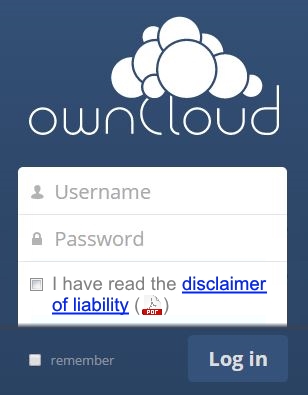
Here a fake screenshot of how I would like to have my App (please excuse me
for the image quality):

 <http://technosoftgratis.okidoki.com.co/images/temp/agreedisclaimer.jpg>
http://technosoftgratis.okidoki.com.co/images/temp/agreedisclaimer.jpg


So the idea there is that the ownCloud Administrator can decide either to
show a text link to the disclaimer, a link to a PDF file, or both. The user
won't be able to proceed if he doesn't click on the checkbox. Quite similar
to the current app, but I want more flexibility.


In order to put the "Accept disclaimer" checkbox on the login page, I
created a preLogin hook, which is working. Now I will explain my problem
step by step.


On the agreedisclaimer/appinfo/app.php, I have this code:


<?php

namespace OCA\AgreeDisclaimer\AppInfo;


//This is a constant defined on my Application class, which simply has:

'agreedisclaimer'

$appId = Application::APP_ID;

if ( \OCP\App::isEnabled($appId) ) {

               $app = new Application();

               if ( !\OCP\User::isLoggedIn() ) {

                              $templateResponse = $app->getDisclaimerForm();

                              return $templateResponse->render();

               }

}


Please note that the original App doesn't use a template response. Instead
of that, the style sheets and the javascript were added directly to the
"app.php" file. I wanted to separate this and do everything on a template.


Then I returned the template response object from my
agreedisclaimer/appinfo/application.php class as follows <?php namespace
OCA\AgreeDisclaimer\AppInfo;


use OCP\AppFramework\App;

use \OCA\MyApp\Hooks\UserHooks;

use \OCP\AppFramework\Http\TemplateResponse;


class Application extends App {

               const APP_ID = 'agreedisclaimer';


               /* Other class methods come here ... */


               public function getDisclaimerForm() {

                               $appId = self::APP_ID;

                               $data = [

                                       'appId' => $appId,

                               ];

                              //I even tried dropping the last parameter:
'blank', but no changes

                               $templateResponse = new
TemplateResponse($appId, 'login', $data, 'blank');

                               return $templateResponse;

               }


Obviously I have there other code to register the translation service, the
preLogin hook, and the admin settings form, but since it looks pretty
standard and it is working, I'm not putting it here. So, now to the
definition of my template, agreesdisclaimer/templates/login.php:

<?php

$appId = $_['appId'];


//All this variables can be stored via the admin settings form //Right now
this are the settings:  agreedisclaimerShowTextLink,
agreedisclaimerShowPDFLink, //and agreedisclaimerDefaultLang. I prefixed
everything with my App's name in order to //avoid conflicts with other Apps
$appConfig = \OC::$server->getAppConfig();


$showTextLinkProp = $appId . 'ShowTextLink'; $showTextLink =
$appConfig->getValue($appId, $showTextLinkProp, 'true');


$showPDFLinkProp = $appId . 'ShowPDFLink'; $showPDFLink =
$appConfig->getValue($appId, $showPDFLinkProp, 'true');


$defaultLangProp = $appId . 'DefaultLang'; $defaultLang =
$appConfig->getValue($appId, $defaultLangProp, 'en');


script($appId, 'login');

style($appId, 'style');

?>


<input type="hidden" value="<?php p($showTextLink); ?>"

               name="<?php p($showTextLinkProp); ?>"

               id="<?php p($showTextLinkProp); ?>">


<input type="hidden" value="<?php p($showPDFLink); ?>"

               name="<?php p($showPDFLinkProp); ?>"

               id="<?php p($showTextPDFProp); ?>">


<input type="hidden" value="<?php p($defaultLang); ?>"

               name="<?php p($defaultLangProp); ?>"

               id="<?php p($defaultLangProp); ?>">


Then there is my javascript: agreedisclaimer/js/login.js, which at the
moment does nothing else than showing the property values:

$(document).ready(function(){

               'use strict';

               var appId = 'agreedisclaimer';


               var showTextLinkProp = appId + 'ShowTextLink';

               var showTextLink = $('#' + showTextLinkProp).val();


               var showPDFLinkProp = appId + 'ShowPDFLink';

               var showPDFLink = $('#' + showPDFLinkProp).val();


               var defaultLangProp = appId + 'DefaultLang';

               var defaultLang = $('#' + defaultLangProp).val();


               alert(showTextLink);

               alert(showPDFLink);

               alert(defaultLang);

});


The problem here is that "undefined" will be shown. I also noticed that all
the html I put on agreesdisclaimer/templates/login.php is being ignored. The
hidden inputs won't appear on the final html page source.


I know that the App settings are being stored since I reused a piece of code
from the imprint App, which is a hack to do it with http headers. I put this
on my login.php template:

\OCP\Util::addHeader('meta', array($showTextLinkProp => $showTextLink ));
\OCP\Util::addHeader('meta', array($showPDFLinkProp => $showPDFLink ));
\OCP\Util::addHeader('meta', array($defaultLangProp => $defaultLang ));


Then this in the login.js script:

var showTextLink = $('head meta[' + showTextLinkProp +
']').attr(showTextLinkProp); var showPDFLink = $('head meta[' +
showPDFLinkProp + ']').attr(showPDFLinkProp); var defaultLang  = $('head
meta[' + defaultLangProp + ']').attr(defaultLangProp);


This works, each time I change the properties on the admin settings, then
logoff, its values will be shown. The thing here is that I don't like that
hack and I really need to put other html code in the login page, but It
won't be rendered. In the original disclaimer App, the author modified the
login page, by injecting the html code with jquery on the javascript file. I
thing better would be to separate the presentation from the logic by using a
template for the html code and a javascript for the jquery calls.


So, is there any way of getting this work?


Best regards

Josef
_______________________________________________
Devel mailing list
[email protected]
http://mailman.owncloud.org/mailman/listinfo/devel