Hi everybody,
Glenn granted me CVS write access. I promise I'll try not to mess things up ;)
Right now, I'm sure I won't, for I can't get to access the CVS thing, which is pretty new to me.
Glenn advised to use tortoiseCVS. I intsalled it, followed its brief startup guide, entered these parameters :
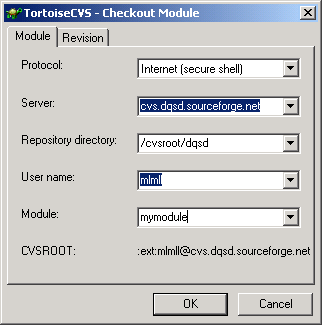
but it halts with a blank command-line window whose title is "e:\program files\TortoiseCVS\ssh.exe".
Glenn granted me CVS write access. I promise I'll try not to mess things up ;)
Right now, I'm sure I won't, for I can't get to access the CVS thing, which is pretty new to me.
Glenn advised to use tortoiseCVS. I intsalled it, followed its brief startup guide, entered these parameters :
but it halts with a blank command-line window whose title is "e:\program files\TortoiseCVS\ssh.exe".
So I tried the sourceforge way "SourceForge.net:
CVS client installation: WinCVS with PuTTY on 32-bit Microsoft Windows
platforms" described at http://sourceforge.net/docman/display_doc.php?docid=766&group_id=1 :
I scrupulously follow this, passed the test, but I'm lost as of what to do in
WinCVS.
Very frustrating. Anyone can help, please
?
TIA
MLL
