branch: elpa/annotate
commit 7bec2c723eb5d7d755bc52a313505db9ef34507b
Author: cage <cage@invalid>
Commit: cage <cage@invalid>
    - made cosmetic fix to README, also corrected a wrong phrase.
---
 README.org | 234 ++++++++++++++++++++-----------------------------------------
 1 file changed, 75 insertions(+), 159 deletions(-)

diff --git a/README.org b/README.org
index b5150caa43..814ba3eba4 100644
--- a/README.org
+++ b/README.org
@@ -10,48 +10,39 @@

 * introduction

-This  package provides  a minor  mode ~annotate-mode~,  which can  add
-annotations   to   arbitrary   files  without   changing   the   files
-themselves. This is very useful for code reviews. When ~annotate-mode~
-is active, ~C-c C-a~ will create, edit, or delete annotations.
-
+This package provides a minor mode ~annotate-mode~, which can add annotations
to arbitrary files without changing the files themselves. This is very useful
for code reviews. When ~annotate-mode~ is active, ~C-c C-a~ will create, edit,
or delete annotations.
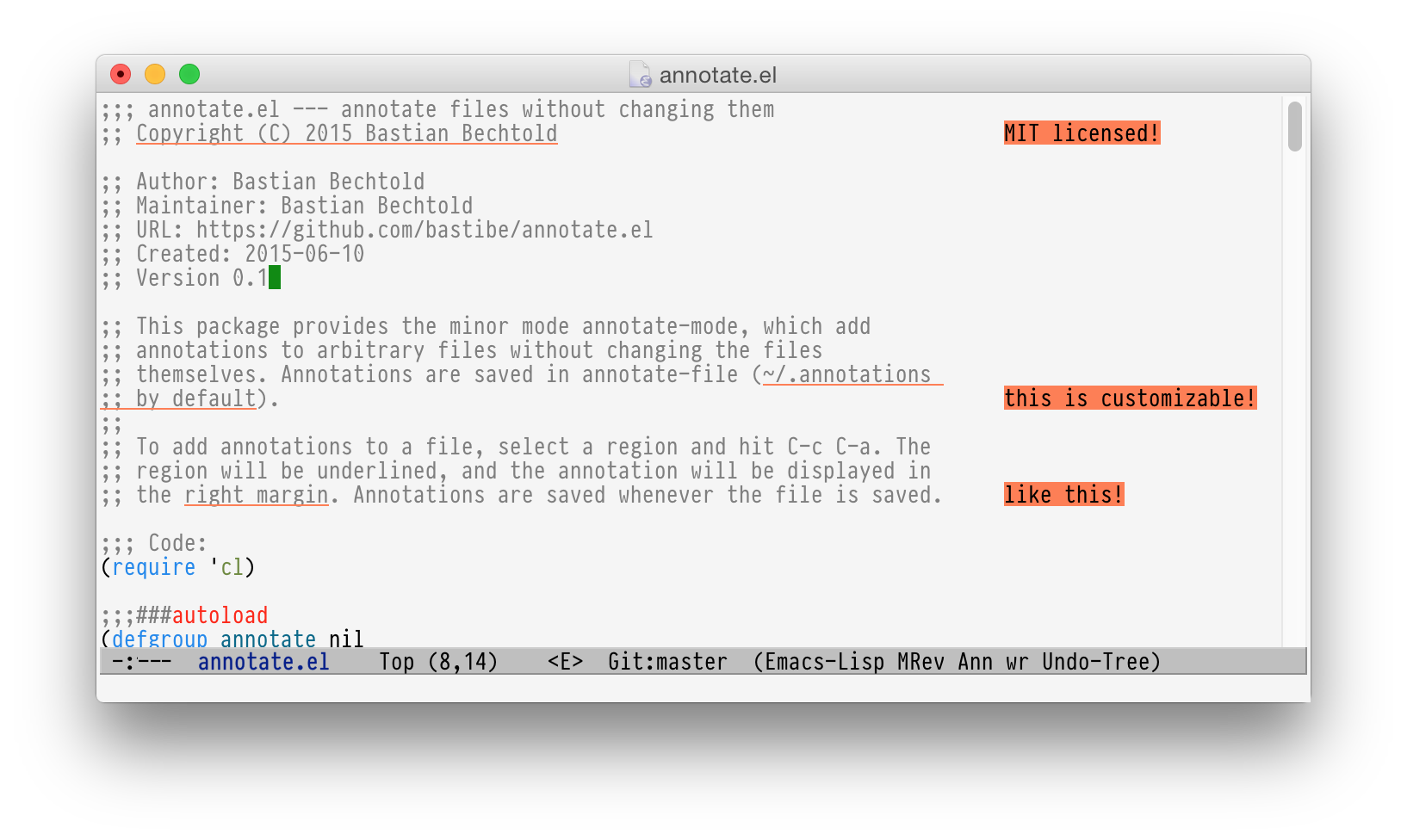
 [[https://raw.githubusercontent.com/bastibe/annotate.el/master/example.png]]

 * Usage

 ** Quick start

-With an  active region, ~C-c  C-a~ creates  a new annotation  for that
-region. With no active region, ~C-c C-a~ will create an annotation for
-the word  under point. If point  is on an annotated  region, ~C-c C-a~
-will edit that  annotation instead of creating a new  one. Typing ~C-c
-C-d~ or clearing the annotation deletes them.
+With an active region, ~C-c C-a~ creates a new annotation for that region.
With no active region, ~C-c C-a~ will create an annotation for the word under
point. If point is on an annotated region, ~C-c C-a~ will edit that annotation
instead of creating a new one. Typing ~C-c C-d~ or clearing the annotation
deletes them.

-Use ~C-c ]~ to jump to the next  annotation and ~C-c [~ to jump to the
-previous annotation.
+Use ~C-c ]~ to jump to the next annotation and ~C-c [~ to jump to the previous
annotation.

 ** Metadata

-The  current  database  for  annotations  is  contained  in  the  file
+The current database for annotations is contained in the file
 indicated by the variable ~annotate-file~ (=~/.emacs.d/annotations= by
-default) but  each user can change  this value in a  dynamic way using
-the  command ~annotate-switch-db~.   This  command will  take care  to
-refresh/redraw   all   annotations   in    the   buffers   that   uses
+default) but each user can change this value in a dynamic way using
+the command ~annotate-switch-db~. This command will take care to
+refresh/redraw all annotations in the buffers that uses
 ~annotate-mode~.

-The database holds the hash of each  annotated file so it can print a
+The database holds the hash of each annotated file so it can print a
 warning if the file has been modified outside Emacs (for example).

-Warning     can     be     suppressed     setting     the     variable
+Warning can be suppressed setting the variable
 ~annotate-warn-if-hash-mismatch~ to nil.

-Please note that switching database,  in this context, means rebinding
-the  aforementioned variable  (~annotate-file~).  This  means than  no
+Please note that switching database, in this context, means rebinding
+the aforementioned variable (~annotate-file~). This means than no
 more than a single database can be active for each Emacs session.

-If an  empty annotation database  (in memory) is saved  the database
-file  is deleted  instead, if  ~annotate-database-confirm-deletion~ is
-non  nil (the  default) a  confirmation action  is asked  to the  user
+If an empty annotation database (in memory) is saved the database
+file is deleted instead, if ~annotate-database-confirm-deletion~ is
+non nil (the default) a confirmation action is asked to the user
 before actually remove the file from the file system.

 **** related customizable variable
@@ -61,21 +52,16 @@ before actually remove the file from the file system.

 *** Non centralized database

-To use multiple database in the same Emacs session ~annotate-file~ should be
made
-[[https://www.gnu.org/software/emacs/manual/html_node/elisp/Buffer_002dLocal-Variables.html][buffer-local]],
+To use multiple database in the same Emacs session ~annotate-file~ should be
made
[[https://www.gnu.org/software/emacs/manual/html_node/elisp/Buffer_002dLocal-Variables.html][buffer-local]],
+
 see:
+
 [[https://github.com/bastibe/annotate.el/issues/68][this thread]] and, in
particular

[[https://github.com/bastibe/annotate.el/issues/68#issuecomment-728218022][this
message]].

-Finally, if the customizable variable ~annotate-file-buffer-local~ is
-non-nil (default ~nil~), for each annotated file an annotation
-database is saved under the same directory that contains the annotated
-file.
+Finally, if the customizable variable ~annotate-file-buffer-local~ is non-nil
(default ~nil~), for each annotated file an annotation database is saved under
the same directory that contains the annotated file.

-The name of the annotation database is built concatenating the name of
-the annotated file without the optional extension and the string value
-bound to the customizable variable
-~annotate-buffer-local-database-extension~ (default: ~notes~), example follows:
+The name of the annotation database is built concatenating the name of the
annotated file without the optional extension and the string value bound to the
customizable variable ~annotate-buffer-local-database-extension~ (default:
~notes~), example follows:

 | annotated file   | annotations file     |
 |------------------+----------------------|
@@ -90,42 +76,24 @@ Important note: if ~/home/user/foo.notes~ exists, *will be
overwritten*.

 *** Uninstalling

-Users of
-[[https://github.com/emacscollective/no-littering][no-littering]]
-can take advantage of its packages generated files management.
+Users of [[https://github.com/emacscollective/no-littering][no-littering]] can
take advantage of its packages generated files management.

 ** keybindings

-*** ~C-c  C-a~ (function annotate-annotate)
-    Creates a new annotation for that region.
+*** ~C-c C-a~ (function annotate-annotate)
+Creates a new annotation for that region.

-    With no active region, ~C-c C-a~ will create an annotation for the
-    word under point. If point is on an annotated region, ~C-c C-a~
-    will edit that annotation instead of creating a new one. Clearing
-    the annotation deletes them.
+With no active region, ~C-c C-a~ will create an annotation for the word under
point. If point is on an annotated region, ~C-c C-a~ will edit that annotation
instead of creating a new one. Clearing the annotation deletes them.

-    If ~annotate-annotation-confirm-deletion~ is non nil (the default
-    is *nil*) a confirmation action is asked, using ~y-or-n-p~, to the
-    user before actually remove the annotation.
+If ~annotate-annotation-confirm-deletion~ is non nil (the default is *nil*) a
confirmation action is asked, using ~y-or-n-p~, to the user before actually
remove the annotation.

-    If point is the newline character and the customizable variable
-    ~annotate-endline-annotate-whole-line~ is not nil (default is non
-    nil) the whole line is annotated (or the next if the line is
-    empty).
+If point is the newline character and the customizable variable
~annotate-endline-annotate-whole-line~ is not nil (default is non nil) the
whole line is annotated (or the next if the line is empty).

-    If the line contains a single annotation that cover all the line
-    annotating the newline Will ask to edit the annotation. If
-    ~annotate-endline-annotate-whole-line~ is nil annotating a newline
-    will signal an error.
+If the line contains a single annotation that cover all the line, annotating
the newline will ask to edit the annotation. If
~annotate-endline-annotate-whole-line~ is nil annotating a newline will signal
an error.

-    With a numeric prefix the annotations will be displayed with the
-    faces indicated in ~annotate-endline-annotate-whole-line~ and
-    ~annotate-annotation-text-faces~, respectively. The numeric
-    prefix is used as index in the lists bound to the aforementioned
-    variables.
+With a numeric prefix the annotations will be displayed with the faces
indicated in ~annotate-endline-annotate-whole-line~ and
~annotate-annotation-text-faces~, respectively. The numeric prefix is used as
index in the lists bound to the aforementioned variables.

-    The first theme can be addressed by the prefix ~1~, the second by
-    the prefix ~2~ and so on.
+The first theme can be addressed by the prefix ~1~, the second by the prefix
~2~ and so on.

 **** related customizable variable
      - ~annotate-annotation-column~;
@@ -136,49 +104,39 @@ can take advantage of its packages generated files
management.
      - ~annotate-annotation-text-faces~.

 *** ~C-c C-d~
-    Delete an annotation under point, if such annotation exists.
+Delete an annotation under point, if such annotation exists.

-    If ~annotate-annotation-confirm-deletion~ is  non nil (the default
-    is *nil*) a confirmation action is asked, using ~y-or-n-p~, to the
-    user before actually remove the annotation.
+If ~annotate-annotation-confirm-deletion~ is non nil (the default is *nil*) a
confirmation action is asked, using ~y-or-n-p~, to the user before actually
remove the annotation.

 **** related customizable variable
      - ~annotate-annotation-confirm-deletion~.

 *** ~C-c ]~ (function annotate-goto-next-annotation)
-    Jump to the next  annotation.
+Jump to the next  annotation.

 *** ~C-c [~ (function annotate-goto-previous-annotation)
-    Jump to the previous annotation.
+Jump to the previous annotation.

 *** ~C-c C-s~ (function annotate-show-annotation-summary)
-    Show summary window.
+Show summary window.

-    A window with a list of annotated files together with their
-    annotations is shown. If ~annotate-summary-ask-query~ is non nil
-    (default is ~t~) then a prompt is shown where the user can insert
-    a query to filter the annotation database, see "Query Language"
-    below.
+A window with a list of annotated files together with their annotations is
shown. If ~annotate-summary-ask-query~ is non nil (default is ~t~) then a
prompt is shown where the user can insert a query to filter the annotation
database, see "Query Language"
+below.

-    The summary window allow editing and removing of annotation using
-    the provided buttons.
+The summary window allow editing and removing of annotation using the provided
buttons.

-    The annotation text can be pressed to and will open the annotated
-    file, placing the cursor at the point where the corresponding
-    annotated text appears.
+The annotation text can be pressed to and will open the annotated file,
placing the cursor at the point where the corresponding annotated text appears.

 **** related customizable variable
      - ~annotate-summary-ask-query~.

 * Exporting

-Annotations can be exported ~annotate-export-annotations~ as commented
-unified diffs, like this:
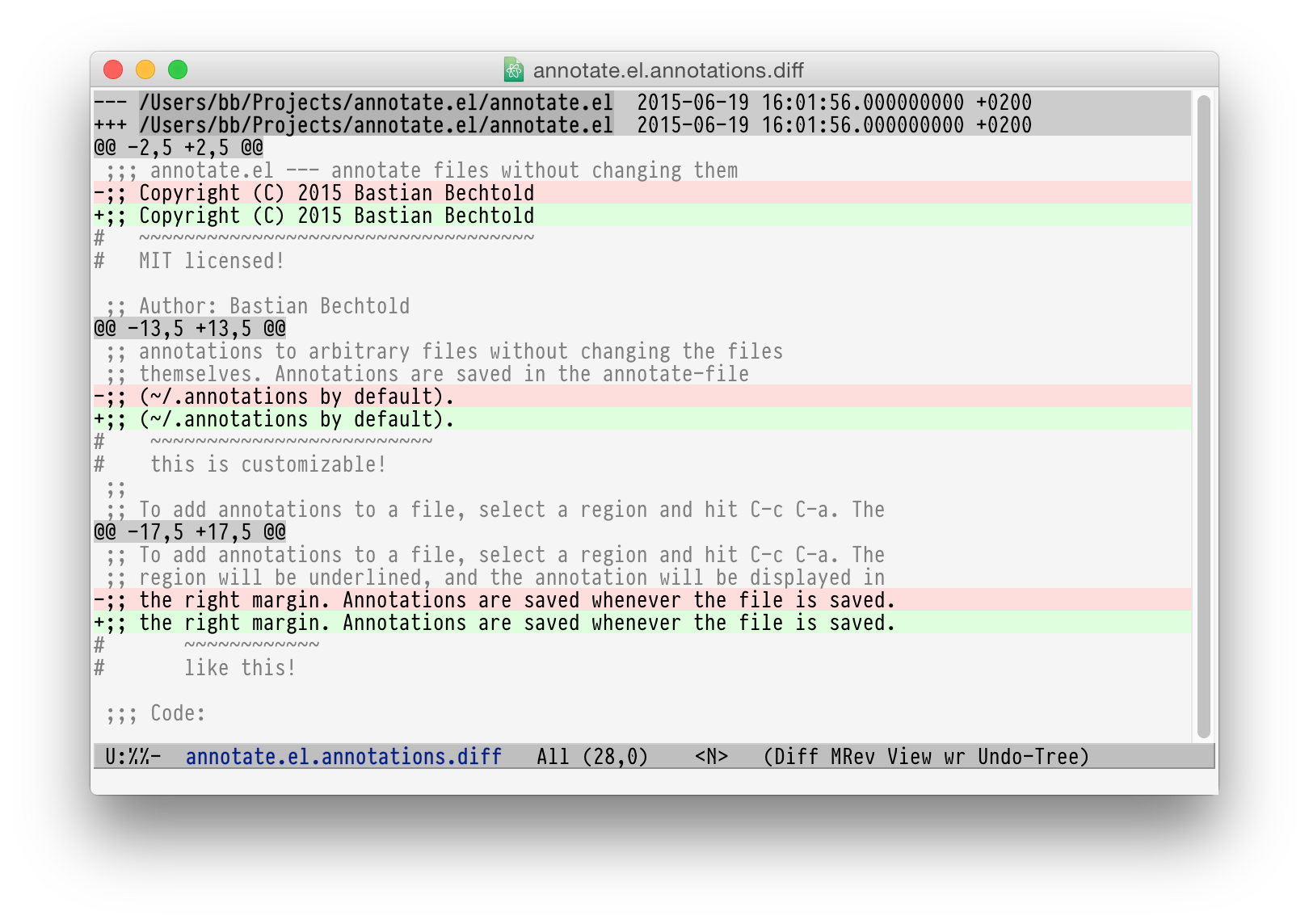
+Annotations can be exported ~annotate-export-annotations~ as commented unified
diffs, like this:


[[https://raw.githubusercontent.com/bastibe/annotate.el/master/diff-example.png]]

-Alternatively, they can be integrated ~annotate-integrate-annotations~
-as comments into the current buffer, like this:
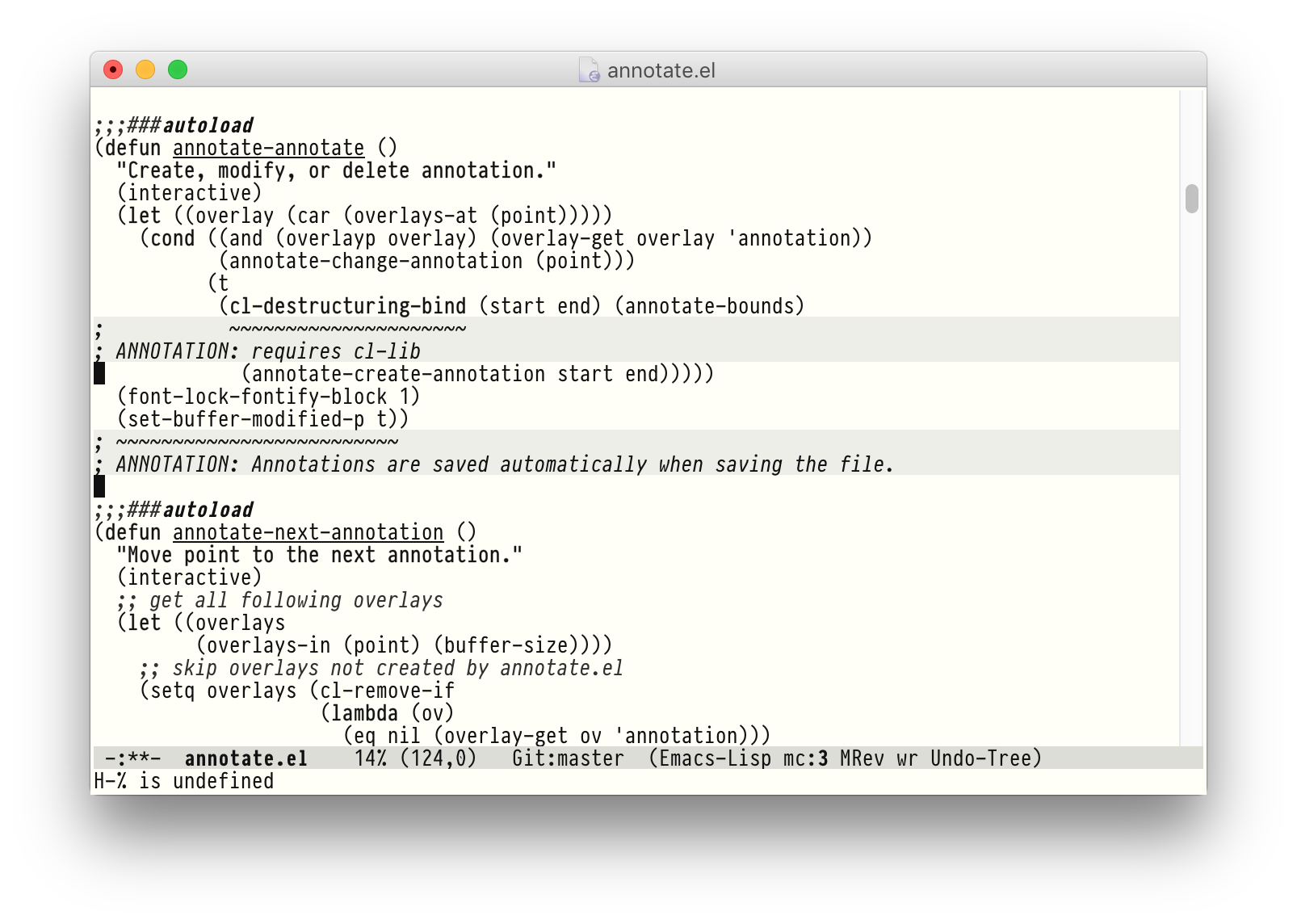
+Alternatively, they can be integrated ~annotate-integrate-annotations~ as
comments into the current buffer, like this:


[[https://raw.githubusercontent.com/bastibe/annotate.el/master/integrate-example.png]]

@@ -191,12 +149,9 @@ as comments into the current buffer, like this:

 * Importing

-An  annotation  database  file  can  be  imported  using  the  command
-~annotate-import-annotations~.
+An annotation database file can be imported using the command
~annotate-import-annotations~.

-When importing, overlapping annotations will be merged in a single
-annotation with the new annotated text that maximizes the portion of
-text annotated, e.g.
+When importing, overlapping annotations will be merged in a single annotation
with the new annotated text that maximizes the portion of text annotated, e.g.

 #+BEGIN_SRC
 The quick brown fox ← text
@@ -205,46 +160,28 @@ The quick brown fox ← text
  +++++++++++++      ← merged annotation
 #+END_SRC

-The text of the merged annotation is the concatenated text of the two
-annotations.
+The text of the merged annotation is the concatenated text of the two
annotations.

-Note that importing a database will modify permanently the file bound
-to the variable ~annotate-file~. If unsure of the results, backup
-that file before importing.
+Note that importing a database will modify permanently the file bound to the
variable ~annotate-file~. If unsure of the results, backup that file before
importing.

 **** related customizable variable
      - ~annotate-database-confirm-import~.

 * Alternative visualization of annotations

-For typographically difficult scenarios (or just because you prefer
-it), such as variable-width fonts or overlay-heavy modes, the default
-visualization system that renders the annotation into the buffer could
-not properly works.
+For typographically difficult scenarios (or just because you prefer it), such
as variable-width fonts or overlay-heavy modes, the default visualization
system that renders the annotation into the buffer could not properly works.

-In this case the users can switch to a "pop-up" style annotation
-setting to a non-nil value the variable ~annotate-use-echo-area~.
+In this case the users can switch to a "pop-up" style annotation setting to a
non-nil value the variable ~annotate-use-echo-area~.

-When such variable's value is not null, moving the mouse pointer over
-the annotated text will temporary show the annotation.
+When such variable's value is not null, moving the mouse pointer over the
annotated text will temporary show the annotation.

-The actual visuals of this "pop-up" can be different depending of your
-system's setup (see
-[[https://github.com/bastibe/annotate.el/pull/81][this pull request]]
-for a couple of examples.
+The actual visuals of this "pop-up" can be different depending of your
system's setup (see [[https://github.com/bastibe/annotate.el/pull/81][this pull
request]] for a couple of examples.

-Moreover if ~annotate-use-echo-area~ and
~annotate-print-annotation-under-cursor~
-value *both* non null, placing the cursor over an annotated text region will
print
-the annotation's text in the minibuffer prefixed by the value of customizable
variable
-~annotate-print-annotation-under-cursor-prefix~, after a delay (in seconds)
-defined by the variable ~annotate-print-annotation-under-cursor-delay~.
+Moreover if ~annotate-use-echo-area~ and
~annotate-print-annotation-under-cursor~ value *both* non null, placing the
cursor over an annotated text region will print the annotation's text in the
minibuffer prefixed by the value of customizable variable
~annotate-print-annotation-under-cursor-prefix~, after a delay (in seconds)
defined by the variable ~annotate-print-annotation-under-cursor-delay~.

-Another alternative way to show annotations is provided by the command:
-~annotate-summary-of-file-from-current-pos~.
+Another alternative way to show annotations is provided by the command:
~annotate-summary-of-file-from-current-pos~.

-Calling this command will show a summary window that prints all the
-annotations related to annotated text that appears (in the active
-buffer) beyond the current cursor position.
+Calling this command will show a summary window that prints all the
annotations related to annotated text that appears (in the active buffer)
beyond the current cursor position.

 **** related customizable variable
      - ~annotate-use-echo-area~
@@ -257,40 +194,28 @@ buffer) beyond the current cursor position.

 ** annotate-switch-db

-   This command will ask the user for a new annotation database files,
-   load it and refresh all the annotations contained in each buffer where
-   annotate minor mode is active.
+This command will ask the user for a new annotation database files, load it
and refresh all the annotations contained in each buffer where annotate minor
mode is active.

-   See the docstring for more information and
-   [[https://github.com/bastibe/annotate.el/issues/68][this thread]]
-   for a possible workflow where this command could be useful.
+See the docstring for more information and
[[https://github.com/bastibe/annotate.el/issues/68][this thread]] for a
possible workflow where this command could be useful.

 ** annotate-toggle-annotation-text
-   Shows or hides annotation's text under cursor.
+Shows or hides annotation's text under cursor.

 ** annotate-toggle-all-annotations-text
-   Shows or hides the annotation's text in the whole buffer.
+Shows or hides the annotation's text in the whole buffer.

 * More documentation

- Please check ~M-x customize-group RET annotate~ as there is
- extensive documentation for each customizable variable.
+Please check ~M-x customize-group RET annotate~ as there is extensive
documentation for each customizable variable.

 * BUGS

 ** Known bugs

-   - Annotations in org-mode source blocks will be underlined, but the
-     annotations don't show up. This is likely a fundamental
-     incompatibility with the way source blocks are highlighted and the
-     way annotations are displayed.
+   - Annotations in org-mode source blocks will be underlined, but the
annotations don't show up. This is likely a fundamental incompatibility with
the way source blocks are highlighted and the way annotations are displayed.

-   - Because   of  a   limitation  in   the  Emacs   display  routines
-     ~scroll-down-line~ could get stuck on a annotated line. So no fix
-     can  be  provided by  the  authors  of ~annotate.el~,  a  possible
-     workaround is to call the command with a numeric prefix equals to
-     one plus the number of  annotation text lines below the annotated
-     text.
+   - Because of a limitation in the Emacs display routines ~scroll-down-line~
could get stuck on a annotated line. So no fix can be provided by the authors
of ~annotate.el~, a possible
+workaround is to call the command with a numeric prefix equals to one plus the
number of annotation text lines below the annotated text.

      For example:

@@ -309,8 +234,7 @@ buffer) beyond the current cursor position.

      Needs no prefix.

-   - Deleting the first  character of an annotated text  will remove the
-     annotation (this turned out to be useful, though).
+   - Deleting the first character of an annotated text will remove the
annotation (this turned out to be useful, though).

 ** Report bugs

@@ -319,18 +243,16 @@ buffer) beyond the current cursor position.

 * Query Language

-  The summary window can shows  results filtered by criteria specified
-  with a very simple query language, the basis syntax for that language
-  is shown below:
+The summary window can shows results filtered by criteria specified with a
very simple query language, the basis syntax for that language is shown below:

 #+BEGIN_SRC text
  [file-mask] [(and | or) [not] regex-note [(and | or) [not] regexp-note ...]]
 #+END_SRC

-where
+where:

   - file-mask :: is a regular expression that should match the path of file
-    the annotation refers to;
+the annotation refers to;
   - and, or, not :: you guess? Classics logical operators;
   - regex-note :: the text of annotation must match this regular expression.

@@ -340,49 +262,43 @@ where
   lisp$ and TODO
 #+END_SRC

-   matches the text ~TODO~ in all lisp files
+matches the text ~TODO~ in all lisp files

-Parenthesis can be used for the expression related to the text of
-annotation, like this:
+Parenthesis can be used for the expression related to the text of annotation,
like this:

 #+BEGIN_SRC text
  lisp$ and (TODO or important)
 #+END_SRC

-   the same as above but checks also for string `important'
+the same as above but checks also for string `important'

 #+BEGIN_SRC text
  /home/foo/
 #+END_SRC
-   matches all the annotation that refers to file in the directory
-   ~/home/foo~
+
+matches all the annotation that refers to file in the directory ~/home/foo~

 #+BEGIN_SRC text
  /home/foo/ and not minor
 #+END_SRC

-   matches all the annotation that refers to file in the directory
-   ~/home/foo~ and that not contains the text ~minor~.
+matches all the annotation that refers to file in the directory ~/home/foo~
and that not contains the text ~minor~.

 #+BEGIN_SRC text
  .* and "not"
 #+END_SRC
- the quotation mark (") can be used to escape strings.

-As a shortcut, an empty query will match everything (just press
-~return~ at prompt).
+the quotation mark (") can be used to escape strings.
+
+As a shortcut, an empty query will match everything (just press ~return~ at
prompt).

 * FAQ
-  Sometimes the package does not respect the customizable variable's value of
-  ~annotate-annotation-position-policy~, is this a bug?

-  No  it is  not, when  a line  which is  using a  non default  font is
-  annotated  the software  force  the ~:new-line~  policy,  that is  the
-  annotation will be  displayed on a new line regardless  of the value
-  of the variable mentioned in the question.
+Sometimes the package does not respect the customizable variable's value of
~annotate-annotation-position-policy~, is this a bug?
+
+No it is not, when a line which is using a non default font is annotated the
software force the ~:new-line~ policy, that is the annotation will be displayed
on a new line regardless of the value of the variable mentioned in the question.

-  This is necessary  to prevent the annotation to be  pushed beyond the
-  window limits if an huge font is used by the annotated text.
+This is necessary to prevent the annotation to be pushed beyond the window
limits if an huge font is used by the annotated text.

 * LICENSE