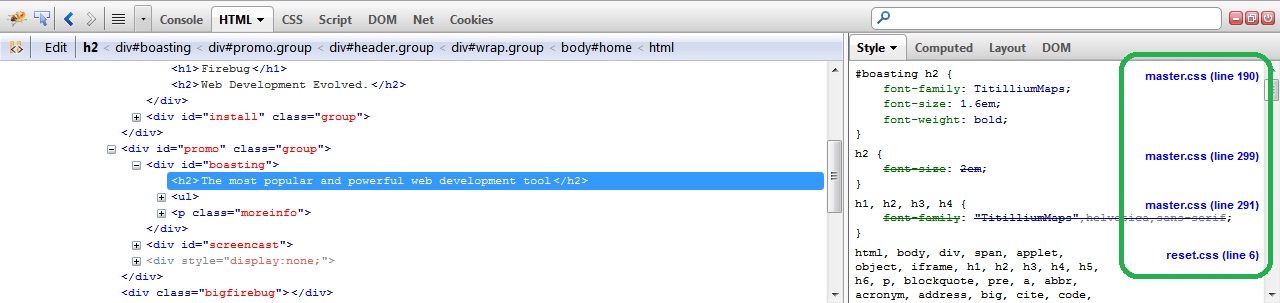
HEY! Smack me up side the head. Every site that I visited before posting
was one of mine (because I knew they worked before) and every one of them I
had recently turned on "Allow Composite Files" in the CMS settings. So
Firebug was accurately showing the filename of the composite file being
generated by the CMS.
Turned off "Allow Composite Files" and Firebug shows the individual
filenames.

Simple error on my part now that I figured it out but man, was that
frustrating!

Hope this helps anyone else who may have the same issue. Keep Composite
Files out of the equation until your site is completed.

David


On Friday, October 12, 2012 4:23:23 AM UTC-4, Sebastian Zartner wrote:
>
> It does this for every site I visit.
>>
> Really? What do you see when you visit https://www.getfirebug.com/ and
> inspect the slogan "The most popular and powerful web development tool"?
>
> I see this using FF 16.0.1 + FB 1.10.4 on Win7:
>
>
> <https://lh3.googleusercontent.com/-YP2irTRrIPw/UHfS87S06lI/AAAAAAAAAEQ/rkZ12Tbfxo0/s1600/sourceLinksStyleSidePanel.jpg>
> If it's not looking like so for you, please create a new Firefox profile
> and just install Firebug
> there<https://getfirebug.com/wiki/index.php/Install_Firebug_into_a_clean_profile>.
>
> Does that fix the problem?
>
> Sebastian
>

--
You received this message because you are subscribed to the Google
Groups "Firebug" group.
To post to this group, send email to [email protected]
To unsubscribe from this group, send email to
[email protected]
For more options, visit this group at
https://groups.google.com/forum/#!forum/firebug