>
> In the setup I was using (Mac Firefox 22 with Theme Font & Size Changer,
> plus the previous version of Firebug), the problem absolutely did involve
> the interaction of those two extensions. I wasn't just guessing: I spent a
> lot of time testing, disabling different groups of extensions, and
> relaunched repeatedly to ensure I was right -- before I posted in this
> forum.
>
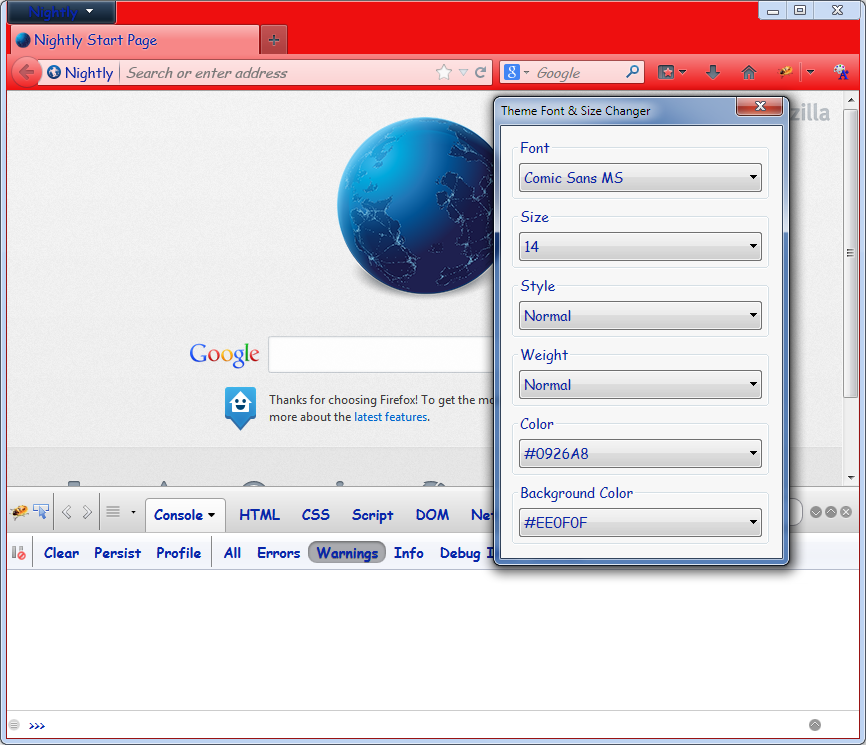
I see. I don't have a Mac, so I based my statement on the post in issue
6642<http://code.google.com/p/fbug/issues/detail?id=6642>as well as on a quick
test I made by replacing the default Firebug skin by
the one used on Mac, which looks like this:
<https://lh3.googleusercontent.com/-sFjrz1j-PC8/UigjWCPexvI/AAAAAAAAAJc/tpgGlt7jUnQ/s1600/firebugWithThemeFontAndSizeChanger.png> > I've now updated Mac Firefox to version 23.0.1, which allowed me to update > Firebug to the current version as well, and the problem seems to be > basically resolved. > Good! > However, the way Firebug shows me that one of those buttons is "pressed" > is so subtle (a slight darkening/shadow), especially on my crummy auxiliary > monitor where I normally keep the Firebug window, that it's hard to see > whether it was pressed or not. > For me it's clearly visible. See the screenshot above. Could you provide a screenshot of what you see? There's also something strange: in the previous setup, if I disabled Theme > Font & Size Changer, Firebug sometimes showed the pressed state with the > darkening/shadow effect, or sometimes by turning the label white -- for the > same buttons! > The previous setup obviously had an old version of Firebug, which didn't include the style fixes of the issue described above. Sebastian On Wed, Sep 4, 2013 at 6:02 AM, Sebastian Zartner <[email protected]<javascript:> > > wrote: > >> This problem doesn't seem to be related to Theme Font & Size Changer. >> Please download Firebug >> 1.12.1<https://addons.mozilla.org/firefox/addon/firebug/>, >> which should have fixed >> styling<http://code.google.com/p/fbug/issues/detail?id=6642> >> . >> Does that work for you? >> >> Sebastian >> >> >> On Wednesday, September 4, 2013 1:20:38 AM UTC+2, Jonas wrote: >>> >>> Among the extensions I use in Mac Firefox are both Firebug and something >>> called Theme Font & Size Changer. The latter extension is only slightly >>> configurable. The problem is that it interferes with the proper display of >>> the Firebug Console buttons (or maybe they're "tabs") -- I mean the ones >>> that say Clear / Persist / Profile / All / Errors / Warnings / Info / Debug >>> Info. >>> >>> The buttons still show up and work, but I can no longer tell whether one >>> is enabled or not -- the "off" and "on" states look identical. Normally >>> when one is "on", it turns white -- not what I would have chosen, but good >>> enough to show what state it's in. >>> >>> Does anybody know of a CSS selector I could use in userChrome.css that >>> would specifically target the "on" state of those Firebug buttons so that I >>> could create an override for Theme Font & Size Changer? No guarantee it >>> would work, but if I tag it "!important" it might. Thanks much. >>> >> -- >> You received this message because you are subscribed to the Google Groups >> "Firebug" group. >> To unsubscribe from this group and stop receiving emails from it, send an >> email to [email protected] <javascript:>. >> To post to this group, send email to [email protected]<javascript:> >> . >> Visit this group at http://groups.google.com/group/firebug. >> To view this discussion on the web visit >> https://groups.google.com/d/msgid/firebug/70e7311e-40a3-46a6-b281-fb2000aff2cf%40googlegroups.com >> . >> >> For more options, visit https://groups.google.com/groups/opt_out. >> > > -- You received this message because you are subscribed to the Google Groups "Firebug" group. To unsubscribe from this group and stop receiving emails from it, send an email to [email protected]. To post to this group, send email to [email protected]. Visit this group at http://groups.google.com/group/firebug. To view this discussion on the web visit https://groups.google.com/d/msgid/firebug/41f0301e-d280-47f9-bee6-e9867ae22e40%40googlegroups.com. For more options, visit https://groups.google.com/groups/opt_out.