We finally got a proper test case
<https://groups.google.com/d/msg/firebug/EDHH1M_tTbY/Jt_1KwS98HkJ>, so I
created issue 7621 <https://code.google.com/p/fbug/issues/detail?id=7621>
to track it down.
Sebastian

On Tuesday, August 5, 2014 8:48:32 AM UTC+2, Sebastian Zartner wrote:
>
> On Tuesday, August 5, 2014 1:00:14 AM UTC+2, Mfffffffffffff wrote:
>>
>> New profiles don't help.  FireBug has become 98% useless for me including
>> after a new profile followed by a complete remove-reinstall.
>>
> Just to be clear, you created a new Firefox profile and only installed
> Firebug on it as described in the following link, right?
> https://getfirebug.com/wiki/index.php/Install_Firebug_into_a_clean_profile
>
> Reinstalling Firebug seldomly fixes issues as the preferences are
> preserved.
>
> I suspect this has something to do with a conflict with Mozilla's built-in
>> imitation FireBug that they call "Tools".
>>
> How do you come to that conclusion?
>
>
>> Tools doesn't catch js errors except sometimes.
>>
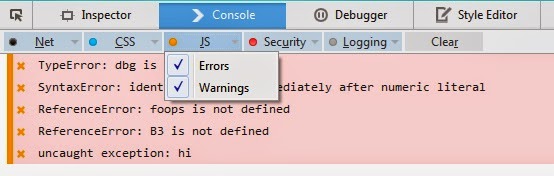
> They do, you just need to set the proper filter options:
>
>
> <https://lh4.googleusercontent.com/-OByBKDPkT4Y/U-B7yH_TpRI/AAAAAAAAAZs/5klPX7szuVc/s1600/devToolsConsoleFilters2.jpg>
> If you have a specific case where you believe it behaves incorrectly,
> please report that in Bugzilla
> <https://bugzilla.mozilla.org/enter_bug.cgi?product=Firefox>.
>
> FireBug causes FireFox to freeze for up to 30 seconds at a time.  I get no
>> response from Mozilla on this.  A little google work shows that this is not
>> exactly a rare problem - but everyone is experiencing it if they've got FF
>> 30+.
>>
> I assume you get the *Unresponsive script* dialog with trace.js:55 as the
> culprit like the initial reporter. Is that correct? Do you have a test
> case, so this can be reproduced?
>
> Sebastian
>
>
>>
>> On Thursday, July 31, 2014 5:29:08 AM UTC-7, Sebastian Zartner wrote:
>>>
>>> No, the new profile works completely independent from your normal
>>> profile. So the passwords and bookmarks are still stored in the old
>>> profile. Here's a more detailed description about how profiles work in
>>> Firefox:
>>>
>>>
>>> https://support.mozilla.org/en-US/kb/profile-manager-create-and-remove-firefox-profiles
>>>
>>> Sebastian
>>>
>>> On Thursday, July 31, 2014 9:44:41 AM UTC+2, Sigal Zahavi wrote:
>>>>
>>>> Hello Sebastian,
>>>>
>>>> If I will create a new profile, will it remove all my passwords and
>>>> bookmarks?
>>>>
>>>> Thanks
>>>>
>>>> On Thursday, July 31, 2014 9:14:37 AM UTC+2, Sebastian Zartner wrote:
>>>>>
>>>>> On Tuesday, July 29, 2014 11:30:09 AM UTC+2, Sigal Zahavi wrote:
>>>>>>
>>>>>> I am having the same problems.
>>>>>>
>>>>>> Running a project on my local machine, Windows 7, in the last week,
>>>>>> suddenly getting this error all over the place.
>>>>>>
>>>>>> Using Firefox 30.0 and firebug 2.0.2.
>>>>>>
>>>>>> Script keeps hanging and giving this message:
>>>>>> chrome://firebug/content/lib/trace.js:55
>>>>>>
>>>>>> I don't know how to downgrade firebug, where will you get a previous
>>>>>> version?
>>>>>>
>>>>> All versions are available at addons.mozilla.org
>>>>> <https://addons.mozilla.org/firefox/addon/firebug/versions/>.
>>>>>
>>>>>
>>>>>> I uninstalled it and installed again, didn't help.
>>>>>>
>>>>> Reinstalling seldomly fixes issues. Do you still experience the
>>>>> problem when running Firebug on a fresh Firefox profile
>>>>> <https://getfirebug.com/wiki/index.php/Install_Firebug_into_a_clean_profile>
>>>>> ?
>>>>>
>>>>> On Monday, July 28, 2014 5:12:13 PM UTC+2, Hendrick Musche wrote:
>>>>>>>
>>>>>>>
>>>>>>>
>>>>>>> Am Montag, 21. Juli 2014 20:36:41 UTC+2 schrieb Ben Record:
>>>>>>>>
>>>>>>>> Sorry, they're only available on an internal network. I realize
>>>>>>>> this makes it impossible to reproduce... I was just wondering if
>>>>>>>> anyone
>>>>>>>> else was experiencing this.
>>>>>>>>
>>>>>>>>
>>>>>>> I am, since the last update of Firefox (31.0). With some internal
>>>>>>> projects with MooTools code, we all get blocking errors as mentioned
>>>>>>> above,
>>>>>>> especially using mootools.min. But even with google.com, the whole
>>>>>>> browser blocks for 1-2 seconds before rendering the page.
>>>>>>>
>>>>>> Being blocked for 1 or 2 seconds is not the same as getting the
>>>>> "Unresponsive script" dialog shown in the other posts. Do you also see
>>>>> that
>>>>> dialog? If not, your problem may be solved as soon as issue 7560
>>>>> <https://code.google.com/p/fbug/issues/detail?id=7560> is fixed.
>>>>>
>>>>> Sebastian
>>>>>
>>>>

--
You received this message because you are subscribed to the Google Groups
"Firebug" group.
To unsubscribe from this group and stop receiving emails from it, send an email
to [email protected].
To post to this group, send email to [email protected].
Visit this group at http://groups.google.com/group/firebug.
To view this discussion on the web visit
https://groups.google.com/d/msgid/firebug/dbedfcfe-8027-4805-a818-2960b9e2fa96%40googlegroups.com.
For more options, visit https://groups.google.com/d/optout.