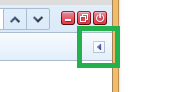
I guess you mean the *Style* side panel
<https://getfirebug.com/wiki/index.php/Style_Side_Panel>. In that case just
click the side panel toggle button to get it back:
<https://lh5.googleusercontent.com/-FpoTKChd7hc/VIjFzZAvxbI/AAAAAAAAAdE/m9nU_PJ2Uiw/s1600/sidePanelToggleButton.png>
Sebastian


On Wednesday, December 10, 2014 4:42:49 PM UTC+1, Roy Stannard wrote:
>
>
> Hi,
> This is a really simple question. How do you get the html and css panels
> up together in firebug. I've used fb for a while now and I've never before
> come across this problem but there's always a first time and today I lost
> the css panel on the right when the html tab is active. I guess there is a
> simple and obvious solution, but I haven't found it, so any help would be
> much appreciated.
>

--
You received this message because you are subscribed to the Google Groups
"Firebug" group.
To unsubscribe from this group and stop receiving emails from it, send an email
to [email protected].
To post to this group, send email to [email protected].
Visit this group at http://groups.google.com/group/firebug.
To view this discussion on the web visit
https://groups.google.com/d/msgid/firebug/0e06876a-6f73-4db7-9efa-993af51f36f9%40googlegroups.com.
For more options, visit https://groups.google.com/d/optout.