On Sun, 2008-10-05 at 15:38 +0200, gerard robin wrote:
> On dimanche 05 octobre 2008, Alexis Bory - xiii wrote:
> > gerard robin wrote:
> > >  I don't get any warning , only that ugly result, which makes  the
> > >  hotspot invisible, z buffer ? may be.
> > >  http://pagesperso-orange.fr/GRTux/tux/Hotspot_w_osg.jpg
> > >
> > >  Versus the PLib version
> > >  http://pagesperso-orange.fr/GRTux/tux/Hotspot_w_plib.jpg
> > Hi Gérard,
> >
> > I don't have any of the above problems with the f-14b and OSG.
> > See: http://croo.murgl.org/fgfs/F-14B/hotspots.jpg
> >
> > May be PLIB modeled hotspots don't work "out of the box"
> > when switching from PLIB to OSG, but franckly that's a minor
> > problem (and, yes I know, a bit more home work). Moving the
> > hotspot grids  a few millimeters  above the panel surface
> > will do the trick. This is not an OSG related problem.
> >
> > The only thing I can note is that pick animation gives white
> > outlining of the objects (see both security caps on top of the
> > screenshot) while the old hotspots are yellow coloured. That's
> > all.
> >
> > Alexis
> >
> Hello xiii,
>
> Is it hospots  which are defined on the panel  ? => only one hospot array
> definition
>
> Or like i have,  hospots  which are define on the instrument ? =>  each
> instrument is a module which keep is own hotspot definition
I don't see white highlighting, but I do see the z-buffer issue with
old-style panel hotspots.

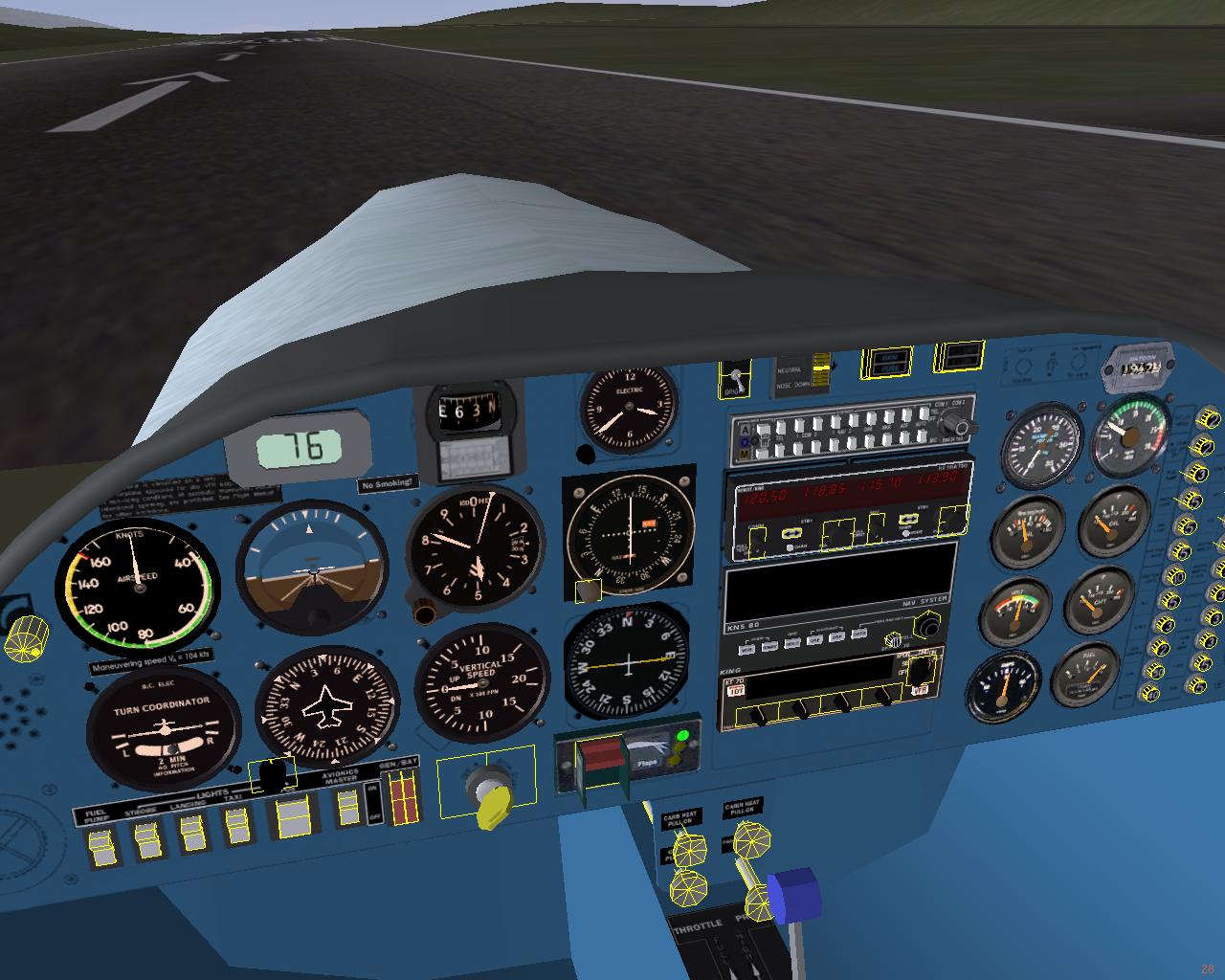
Take a look at converting over from panels to OSG hotspots.  Maintenance
is easier, clickable instruments are portable, and if you move an
instrument or switch, the hotspot automatically moves with it, including
moving the switch with an animation.  For example, a to move a gear
handle you always click the handle, not some vaguely defined rectangle
in the general area of the handle.

http://www.jentronics.com/fgfs/temp/hotspots.jpg

All the hotspots in the DA20 model are OSG, I borrowed some of the
instrumentation from elsewhere so there is a mix of styles for turnable
knobs.  My personal preference here is the mouse wheel, that is how the
instrument brightness knob (left side by ASI) works. The OBI and heading
indicator use the old style "squares" hotspots.

Especially note the carb-heat, cabin-heat, choke and parking brake knobs
on the pedestal console.  With a plib-style hotspot scheme you almost
have to turn on the highlighting to tell where to click.  With the OSG
style, you just click the knob and it toggles.  And the spot to click
moves in and out with the knob mesh.

jentRon


-------------------------------------------------------------------------
This SF.Net email is sponsored by the Moblin Your Move Developer's challenge
Build the coolest Linux based applications with Moblin SDK & win great prizes
Grand prize is a trip for two to an Open Source event anywhere in the world
http://moblin-contest.org/redirect.php?banner_id=100&url=/
_______________________________________________
Flightgear-devel mailing list
[email protected]
https://lists.sourceforge.net/lists/listinfo/flightgear-devel