FernandoP:
--------------------------------------------------------------------------------
I've searched the Forum, but I don't see any reference to my problem.
I guess I'll be the last person on earth who still uses Rapidq to compile pseudo
Basic programs.
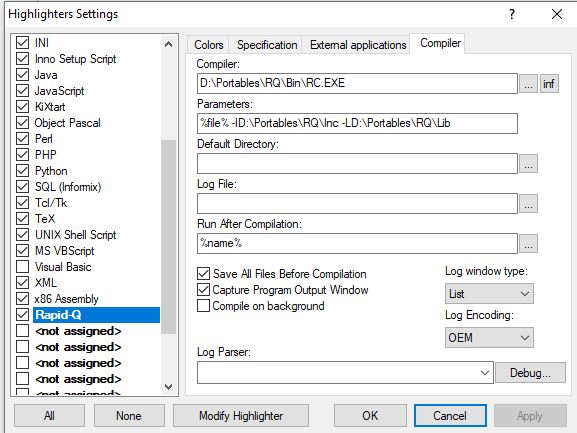
I use this configuration for the compiler:
https://www.myrapidq.it/public/Rapidq.jpg
Everything works perfectly, but after compiling TWO instances of the executable
open. If I uncheck the "Capture Program Output Window" box, only one opens, but
I lose the compilation information (and errors).
If I leave the "Run After Compilation" option blank, the executable does not
open after compiling it.
Am I doing something wrong or could it be a PsPad bug? Years ago, with previous
versions it didn't happen to me. Thank you.
Windows 10 Home 22H2 and PsPad 5.5.1 (790) 64 bit
--------------------------------------------------------------------------------


Hi,
I unfortunately can't speak of possible specificities with Rapidq, but you might
try the 32bit version of PSPad - it should be generally more stable.

Furthermore, you can possibly check the quotes around the paths, e.g. "%File%"
etc.
(Another possible issue might be an asynchronous compilation "in the background"
but this seems to be unchecked in your configuration. Also, an encoding mismatch
would probably cause other, more visible problems...)

Can you verify, that the respective compiler command works as expected outside
of PSPad, i.e. directly in the cmd console, with redirecting the output to a
file etc.?

hth,
   vbr

--
<https://forum.pspad.com/read.php?2,78531,78533>
PSPad freeware editor https://www.pspad.com