>I have an RGB image (as set by Image-Mode) which is currently black &
>shades of grey.
>I want to alter this, in its entirety, so it is blue & shades of blue
>(a specific colour of blue).
>
>I have tried to vary Hue-Saturation and to colorify (manual says
>colorify should work on RGB) but although the tools come up on screen,
>when I adjust the colours in the dialog box my image does not change
>(I have preview turned on).
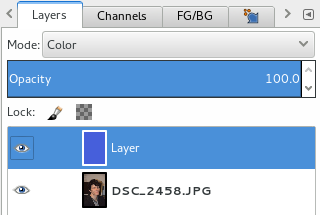
The maybe easiest way to do this is to create a new layer atop the Background
layer.  Fill it entirely with the color of your choice. Then set the lays more
to "Color".

Attachments:
*
http://www.gimpusers.com/system/attachments/109/original/Bildschirmfoto_von_%C2%BB2014-04-08_13_58_50%C2%AB.png

--
devvv (via www.gimpusers.com/forums)
_______________________________________________
gimp-user-list mailing list
List address:    [email protected]
List membership: https://mail.gnome.org/mailman/listinfo/gimp-user-list
List archives:   https://mail.gnome.org/archives/gimp-user-list