>It is the alpha channel which interferes.
>
Apologies, as usual not paying enough attention to what you want as an outcome.
You could try this plugin StraightCrop. Comes from the now defunct
gimp-plugin-registry site. Tried in Kubuntu 16.04 Gimp 2.10.8 flatpak so should
work on your 18.04 installation.

The plugin attached, unzip and put in your Gimp user profile
~/.config/GIMP/2.10/plug-ins

The permissions should already be set but check for executable anyway.

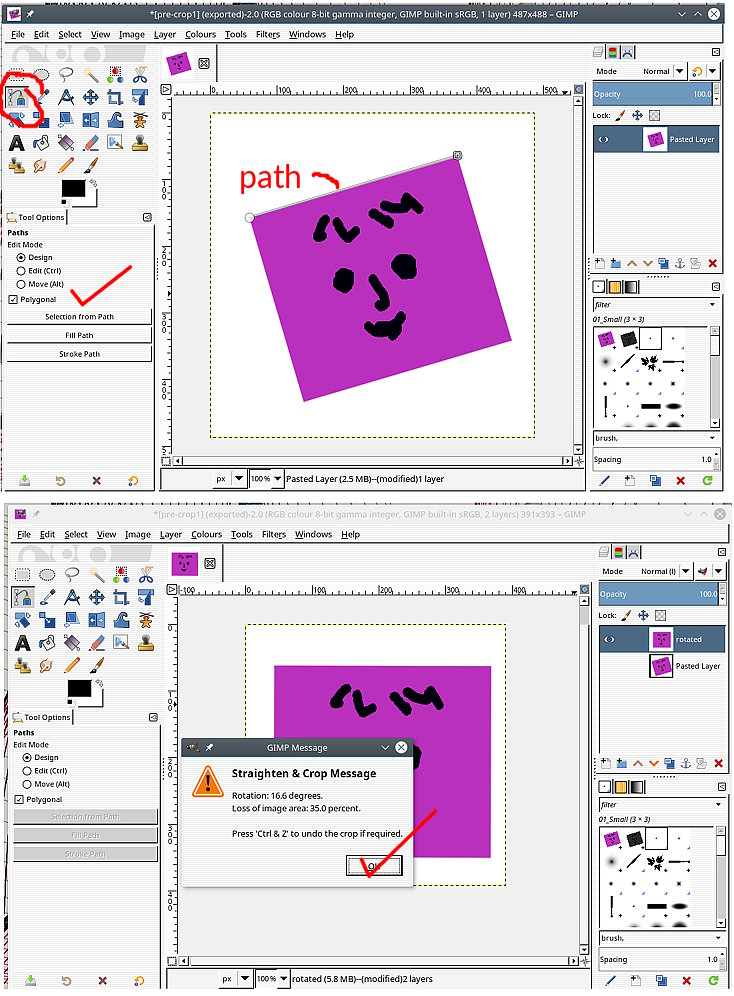
In action, make a straight path then menu Image -> Transform -> Straighten &
Crop

rich: www.gimp-forum.net

Attachments:
* http://www.gimpusers.com/system/attachments/1062/original/03-crop.jpg
*
http://www.gimpusers.com/system/attachments/1063/original/StraightenCrop_0.py.zip

--
rich404 (via www.gimpusers.com/forums)
_______________________________________________
gimp-user-list mailing list
List address:    [email protected]
List membership: https://mail.gnome.org/mailman/listinfo/gimp-user-list
List archives:   https://mail.gnome.org/archives/gimp-user-list