Can gnome Zeitgeist 'deep scan' documents? IE, searching for a word within
them, or metadata attached to them by their creations programs (like author
name)?
-Dante

On 20 Dec 2009 22:38, <[email protected]> wrote:

Send gnome-shell-list mailing list submissions to
       [email protected]

To subscribe or unsubscribe via the World Wide Web, visit
       http://mail.gnome.org/mailman/listinfo/gnome-shell-list
or, via email, send a message with subject or body 'help' to
       [email protected]

You can reach the person managing the list at
       [email protected]

When replying, please edit your Subject line so it is more specific
than "Re: Contents of gnome-shell-list digest..."


Today's Topics:

  1. Re: Gnome-Shell and Zeitgeist... (Natan Yellin)
  2. Re: Programs that need root privileges (Gustavo Noronha Silva)
  3. Re: All GNOME Shell Developers. (Adam Gignac)


----------------------------------------------------------------------

Message: 1
Date: Sun, 20 Dec 2009 19:32:03 +0200
From: Natan Yellin <[email protected]>
To: Sriram Ramkrishna <[email protected]>
Cc: gnome-shell-list <[email protected]>
Subject: Re: Gnome-Shell and Zeitgeist...
Message-ID:
       <[email protected]>
Content-Type: text/plain; charset="iso-8859-1"

Hi Sri,

On Fri, Dec 18, 2009 at 12:30 AM, Sriram Ramkrishna <[email protected]
>wrote:

>
>
> On Tue, Dec 15, 2009 at 12:12 PM, Ryan Peters <[email protected]
>wrote:
>>
>>  In all honesty, I prefer AWN 0.4 to Docky. Faster, lightweight, doesn't
>> use Mono (main reason why it's so fast and lightweight ;) ) and it
already
>> has a large community of users/developers. Check it out here.<
http://www.webupd8.org/2009/10/avant-window-navigator-awn-04-available.html>I'm
using it on Ubuntu 9.10 and even though I'm using trunk builds it's very
>> stable.
>>
>>
> Using 'language' as a reason not to accept something is sort of silly.
>  Consider that gnome-shell is written in javascript. :-)
>
> We should only be interested in the engine.  What you use for your bottom
> panel is probably a user choice.
>
> I haven't had a chance to play with Zeitgist.  I'd like spend some time
> looking at it to see how it fits in with everything.  I haven't seen a
> compelling use case yet other than recent documents.
>
Zeitgeist provides a lot more than recently used documents. For example, we
also support contextual relevancy queries. (We look at when documents are
used in order to determine which documents are likely to be used with one
another.)


> It seems that it's more useful in nautilus than gnome-shell or a possible
> gnome-shell extension?
>
Doesn't GNOME Shell show recently used documents in the overlay?

Natan
-------------- next part --------------
An HTML attachment was scrubbed...
URL: <
http://mail.gnome.org/archives/gnome-shell-list/attachments/20091220/87dcb226/attachment.html
>

------------------------------

Message: 2
Date: Sun, 20 Dec 2009 20:20:27 +0100
From: Gustavo Noronha Silva <[email protected]>
To: [email protected]
Subject: Re: Programs that need root privileges
Message-ID: <[email protected]>
Content-Type: text/plain; charset="UTF-8"

On Sat, 2009-12-19 at 17:30 +0100, Domen Vrankar wrote:
> I was wondering if there were any plans regarding the behaviour of
> programs that need root privileges ( RootSudo or how root privileges
> window is called in Ubuntu) like for e.g. synaptic package manager?

Synaptic should be rewritten to use PolicyKit, and only use root powers
when doing stuff that really needs it - which makes hacks like gksu
unnecessary =).

See you,

--
Gustavo Noronha Silva <[email protected]>
GNOME Project


------------------------------

Message: 3
Date: Sun, 20 Dec 2009 17:37:56 -0500
From: Adam Gignac <[email protected]>
To: Mathew Howard <[email protected]>
Cc: [email protected]
Subject: Re: All GNOME Shell Developers.
Message-ID: <[email protected]>
Content-Type: text/plain; charset="utf-8"

On Sun, 2009-12-20 at 00:15 -0600, Mathew Howard wrote:

> Yes, I see your point. I agree that we need a way to only show windows
> on the current workspace, although I'm not sure what the best way to
> implement it would be.
>
> I think the developers have said they have other plans for the window
> name in the panel, but I could see a hot corner working.
>
> Sam Illingworth wrote:
>
> > The overlay fails as a window switcher as soon as you have a lot of
> > windows and/or a lot of workspaces, because every window becomes
> > tiny so you can't see what's in it.  We're wasting space both on the
> > rest of the overlay and on other workspaces when all we want to do
> > is switch between windows on the current workspace.
> >
> >
> > How about a hot corner that brings up a window list for the current
> > workspace (it could be the same style as the alt tab)? Or, my
> > preferred option, clicking the name of the current window in the
> > panel could bring up this list. But if you have multiple desktop you
> > definitely need a way of just seeing things on the current one - the
> > whole point of separating things out onto other workspaces is so
> > they don't distract from the task at hand, the windows for which are
> > on the current workspace.
> >
> >
> >
> >
> >
> >
> > On 19 Dec 2009, at 10:44 PM, Mathew Howard <[email protected]>
> > wrote:
> >
> >
> > > I don't see how Gnome-Shell fails on any of these. Firefox's
> > > download window is simple to find in the overview, besides you can
> > > always get to it from Firefox's menu - or put a button for it on
> > > the tool bar if you like. GIMP works fine - the only windows that
> > > show up in the overview are the actual image windows and the other
> > > windows automatically come to the foreground when you select one.
> > > On MPlayer you do have to go to the overview twice to get both the
> > > controls and the video, but I see little difference from any other
> > > system where you have to select both windows separately anyway.
> > >
> > > Dant? Ashton wrote:
> > >
> > > > I do have a few other examples where the current GNOME-Shell
> > > > would fail;
> > > >
> > > > FIrefox and it's separate download window.
> > > >
> > > > GIMP and it's multiple windows.
> > > >
> > > > MPlayer
> > > >
> > > > A Dock is impractical here, as all of them are currently
> > > > incapable of
> > > > showing me what's in the window. Unless we either have the
> > > > classic way
> > > > of managing windows, someone gets them to be all grouped
> > > > toghter, or
> > > > distributions start replacing GIMP with GIMPShop and Firefox
> > > > with an
> > > > embedded download window...
> > > > There needs to be some level of window management in an
> > > > activites
> > > > window, and not just in the overlay.
> > > > On 19/12/09 04:20, Corrie Strydom wrote:
> > > > > I like the gnome-shell, and yes its very easy to get used to.
> > > > One
> > > > > idea/problem, could someone make it possibe to change in what
> > > > corner
> > > > > you want the "zoom" to be? I have this annoying habit of
> > > > pushing the
> > > > > pointer top-left everytime I'm typing something. I'd like my
> > > > zoom to
> > > > > be bottom left.
> > > > >
> > > > >
> > > > > On 19/12/2009, Sriram Ramkrishna<[email protected]> wrote:
> > > > >
> > > > >> It only took about 1 day for me. It was very natural for me.
> > > > Taking one
> > > > >> person's impressions and then saying the whole idea sucks
> > > > makes a lousy
> > > > >> argument against the gnome-shell concept.
> > > > >>
> > > > >> sri
> > > > >>
> > > > >> On Fri, Dec 18, 2009 at 1:33 PM, ????? ?????????
> > > > >> <[email protected]>wrote:
> > > > >>
> > > > >>
> > > > >>> Few weeks to get comfortable? Man, are you crazy?
> > > > >>> It's too long and only proves the gnome-shell idea sucks.
> > > > >>>
> > > > >>> 2009/12/19 Bob Hazard<[email protected]>
> > > > >>>
> > > > >>> It's actually more useful to someone with only one workspace
> > > > because
> > > > >>>
> > > > >>>> they tend to have even more overlapping windows.
> > > > >>>>
> > > > >>>> It only needs one click to switch windows anyway. The top
> > > > left corner
> > > > >>>> is a big target you can do a very approximate gesture to
> > > > trigger the
> > > > >>>> zoom without clicking.
> > > > >>>>
> > > > >>>> After a while it becomes second nature and I was surprised
> > > > that it
> > > > >>>> feels very old fashioned to go back to a flat desktop.
> > > > >>>>
> > > > >>>> Try Docky if you find the transition uncomfortable but it
> > > > only takes a
> > > > >>>> few weeks.
> > > > >>>>
> > > > >>>> 2009/12/18 Dant? Ashton<[email protected]>:
> > > > >>>>
> > > > >>>>> Hey all.
> > > > >>>>>
> > > > >>>>> I've been watching GNOME Shell for a while, but there is
> > > > one problem
> > > > >>>>>
> > > > >>>> that I
> > > > >>>>
> > > > >>>>> really can't see being resolved.
> > > > >>>>>
> > > > >>>>> How useful is this to someone who uses one desktop? Just
> > > > one?
> > > > >>>>> Never-mind
> > > > >>>>>
> > > > >>>> the
> > > > >>>>
> > > > >>>>> other one, or three, or four...
> > > > >>>>>
> > > > >>>>> Why should I, the user, have to perform three extra clicks
> > > > just to do
> > > > >>>>>
> > > > >>>> what
> > > > >>>>
> > > > >>>>> it takes me one to do now?
> > > > >>>>>
> > > > >>>>> There has been less video/photo material to consume then I
> > > > could safely
> > > > >>>>>
> > > > >>>> make
> > > > >>>>
> > > > >>>>> a judgement on, and if the 'one desktop' problem has been
> > > > addressed and
> > > > >>>>> solved, I apologize for taking up your time.
> > > > >>>>>
> > > > >>>>>
> > > > >>>>> _______________________________________________
> > > > >>>>> gnome-shell-list mailing list
> > > > >>>>> [email protected]
> > > > >>>>> http://mail.gnome.org/mailman/listinfo/gnome-shell-list
> > > > >>>>>
> > > > >>>>>
> > > > >>>> _______________________________________________
> > > > >>>> gnome-shell-list mailing list
> > > > >>>> [email protected]
> > > > >>>> http://mail.gnome.org/mailman/listinfo/gnome-shell-list
> > > > >>>>
> > > > >>>>
> > > > >>>
> > > > >>>
> > > > >>> --
> > > > >>> ? ?????????, ????? ?????????.
> > > > >>>
> > > > >>> _______________________________________________
> > > > >>> gnome-shell-list mailing list
> > > > >>> [email protected]
> > > > >>> http://mail.gnome.org/mailman/listinfo/gnome-shell-list
> > > > >>>
> > > > >>>
> > > > >>>
> > > > >>
> > > > >
> > > >
> > > > _______________________________________________
> > > > gnome-shell-list mailing list
> > > > [email protected]
> > > > http://mail.gnome.org/mailman/listinfo/gnome-shell-list
> > > _______________________________________________
> > > gnome-shell-list mailing list
> > > [email protected]
> > > http://mail.gnome.org/mailman/listinfo/gnome-shell-list
> > >
> >
> > _______________________________________________
> > gnome-shell-list mailing list
> > [email protected]
> > http://mail.gnome.org/mailman/listinfo/gnome-shell-list
>
>


What I've got right now (outside of Gnome-Shell) is the top-left corner
set up as a hotcorner for the Compiz Expo plugin to sort-of simulate the
Gnome-Shell workspace switching. The bottom corner is a hotcorner for
the Scale plugin, which tiles the windows on the current workspace. It's
working pretty good for me, but I reckon just a hotcorner by itself
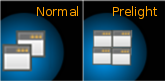
would be kind of startling. What about a small icon in the corner? Maybe
just a small pic of a couple windows, when you mouseover it they move
into a grid, and click to tile the windows for real? I've attached a
quick mockup of what I mean.
-------------- next part --------------
An HTML attachment was scrubbed...
URL: <
http://mail.gnome.org/archives/gnome-shell-list/attachments/20091220/77d86128/attachment.html
>
-------------- next part --------------
A non-text attachment was scrubbed...
Name: screenshot1.png
Type: image/png
Size: 8986 bytes
Desc: not available
URL: <
http://mail.gnome.org/archives/gnome-shell-list/attachments/20091220/77d86128/attachment.png
>

------------------------------

_______________________________________________
gnome-shell-list mailing list
[email protected]
http://mail.gnome.org/mailman/listinfo/gnome-shell-list


End of gnome-shell-list Digest, Vol 14, Issue 40
************************************************
_______________________________________________
gnome-shell-list mailing list
[email protected]
http://mail.gnome.org/mailman/listinfo/gnome-shell-list