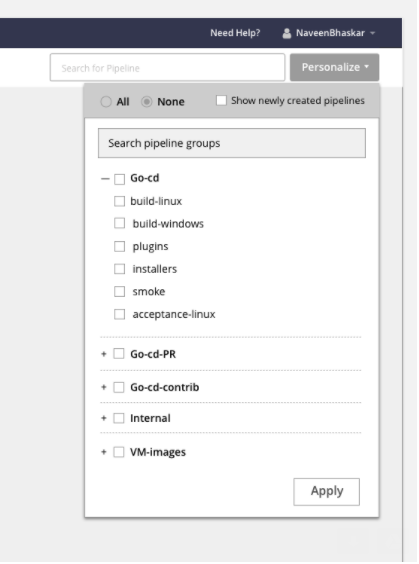
I think Naveen does have some ideas around multiple named personalised
views. I don't remember if it is already shared in a GitHub issue or on
this mailing list.
On Tue, Sep 26, 2017 at 2:15 AM, Darren Rowley <[email protected]> wrote:

> Hey Naveen,
>
> Thanks for posting this. Current implementation is almost unusable if you
> have  a lot of pipelines (i.e. 100s) due to endless scroll and you can't
> make the personalise window bigger. Your prototype with the search for
> pipeline groups will help a lot. Also like the filter. However a couple
> more suggestions:
>
> 1. Would be nice if Pipeline groups themselves could be made "first class"
> citizens i.e. they appear in the top level search and you can create a http
> hyperlink (some kind of http anchor), straight too them.
> 2. Would be great if you could swap in and out of your personalised view.
> i.e. go to "All" and be able to come back to the list you have
> personalised. Right now if you context switch to look at another teams
> pipelines you will have to setup personalised view again. Multiple
> personalised views would be nice but that's probably over complicates the
> design.
>
> Thanks
> D.
>
>
> On Monday, September 25, 2017 at 8:49:33 PM UTC+13, Naveen Bhaskar wrote:
>>
>> issue: Not easy to select pipelines if there are lot of pipelines and
>> pipeline groups.
>>
>>
>> *suggestions :*
>>
>>
>>    1. Have a search option for choosing a pipeline
>>    2. expand-collapse pipeline groups
>>
>>
>>
>> <https://user-images.githubusercontent.com/1627961/30320519-82b7fb82-97d0-11e7-957c-f9f7a72744d4.png>
>>
>> personalize
>>
>> There are projects which has lot of pipeline groups and expand -collapse
>> all of them and select would be difficult, and there would be a scroll too.
>> In a typical scenario, user would open the dropdown, user has to do lot
>> of clicks to expand-collapse, select pipelines etc, a search option there
>> would help user to reach the pipeline group very fast as compared to the
>> other method.we have tested this and user liked this option.
>>
>> search
>>
>> we also need to define how the search works, currently it will search
>> only on pipeline names, is there any other parameter make sense ?
>>
>> Filters
>>
>>
>> *option1: all filters are visible. easy for the user to click*
>>
>>
>>
>> <https://user-images.githubusercontent.com/1627961/30320626-d20318e8-97d0-11e7-973d-d9ff928d9244.png>
>>
>> Most of the users want to see the pipelines which are failed. scrolling
>> though all pipeline groups need time and lot of interaction. A filter on
>> the top solves this issue.
>>
>>
>> *option2 : filters are hidden under a dropdown. but this is clean and
>> saves space.*
>>
>>
>>
>> <https://user-images.githubusercontent.com/1627961/30320660-eec0075c-97d0-11e7-96b6-25d6bd106e3d.png>
>>
>>
>> https://thoughtworks.invisionapp.com/share/XPDI7QHCM
>> here is the new prototype for personalize with multiple views. Please
>> checkout the link to know more about the interaction for personalize and
>> multile views
>>
>>
>> -----------------------------------
>> Naveen Bhaskar
>> Experience Design
>> Thoughtworks Products
>>
>>
>>
>>
>>
>>
>>
>>
>> --
> You received this message because you are subscribed to the Google Groups
> "go-cd" group.
> To unsubscribe from this group and stop receiving emails from it, send an
> email to [email protected].
> For more options, visit https://groups.google.com/d/optout.
>

--
You received this message because you are subscribed to the Google Groups
"go-cd" group.
To unsubscribe from this group and stop receiving emails from it, send an email
to [email protected].
For more options, visit https://groups.google.com/d/optout.