* Jeshua Lacock <[email protected]> [2017-08-22 12:16:56 -0600]:
Greetings,

I am attempting to merge data in a couple different projections into a
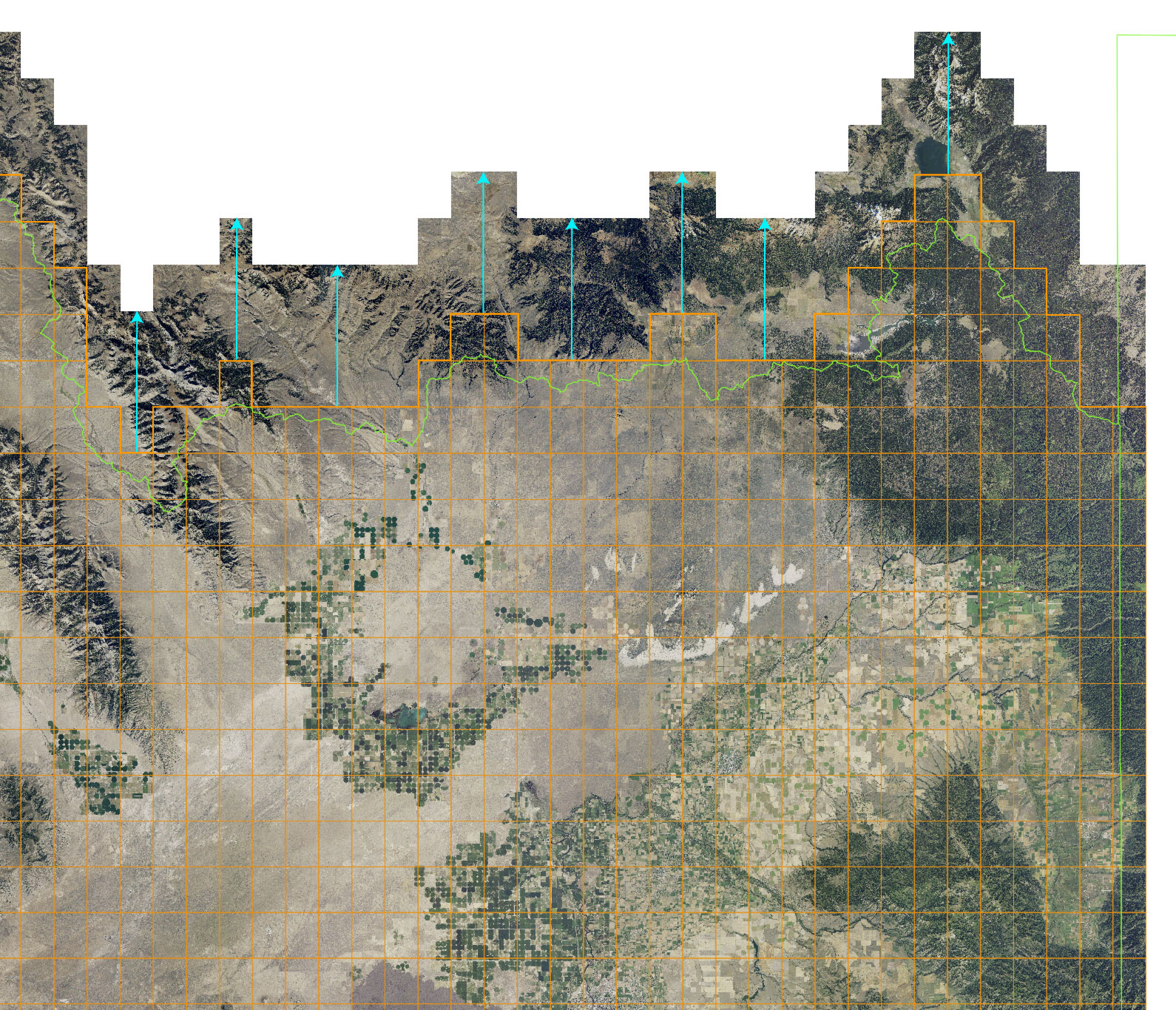
single projection. But as you can see in the following image, the
vector data does not align with the raster tiles. The horizontal
positions match, but they don’t match vertically.

http://3DTOPO.com/misalignedData.jpg
Hello Jeshua,

the vector map seems to be a regular grid. If you want it to fit
exactly, can't you recreate it?  Using `v.mkgrid` and cut it based on the
raster map(s) of interest?

Nikos
I’ve never ran into this issue before using GRASS after merging countless
projections together.

All of the data shown in the image is in “epsg: 3857” projection, here is the
contents of its PROJ_INFO file:

name: WGS 84 / Pseudo-Mercator
datum: wgs84
ellps: wgs84
proj: merc
lat_ts: 0.0
lon_0: 0.0
x_0: 0.0
y_0: 0
k: 1.0
wktext: defined
no_defs: defined
towgs84: 0.000,0.000,0.000

I will refer to this location as the Comp Location.

If I import a raster tile as a new location, it has this as a resulting
PROJ_INFO file:

name: WGS 84 / Pseudo-Mercator
datum: wgs84
ellps: wgs84
proj: merc
lat_ts: 0.0
lon_0: 0.0
x_0: 0.0
y_0: 0
k: 1.0
nadgrids: @null
wktext: defined
no_defs: defined


The only difference that I can tell is that the raster tile location has a
"nadgrids: @null” line which I had to delete to import the raster tiles into
the first location with r.proj, the Comp Location has a towgs84 transformation (but
is 0,0,0), and no PROJ_EPSG file exists in the Comp Location. Alternatively I can
import the raster tiles directly into the Comp Location using r.in.gdal since the
projections match (I don’t get any mismatched projection warnings). In both cases,
the raster tiles are located in the same position.


The PROJ_INFO file from the locations that the vector orange grid and green
bounds was imported from is as follows:

name: GCS_North_American_1983
datum: nad83
ellps: grs80
proj: ll
no_defs: defined


I had imported the orange grid and green bounds from two different locations so
I could try to determine what data was in the wrong position (raster tiles or
vector) but, but the both the vector layers imported are in the same lonlat
projection, so I guess is wasn’t a really good test, thus I am not entirely
sure which data is in the correct location.

Any suggestions would be greatly appreciated.


Thanks,

Jeshua Lacock
Founder/Engineer
<3DTOPO.com>
GlassPrinted.com

_______________________________________________
grass-user mailing list
[email protected]
https://lists.osgeo.org/mailman/listinfo/grass-user
--
Nikos Alexandris | Remote Sensing & Geomatics
GPG Key Fingerprint 6F9D4506F3CA28380974D31A9053534B693C4FB3
 signature.asc
Description: PGP signature
_______________________________________________
grass-user mailing list
[email protected]
https://lists.osgeo.org/mailman/listinfo/grass-user