so, i checked at home with the latest version, still got the same (or
similar) error message.... not sure what's happening.
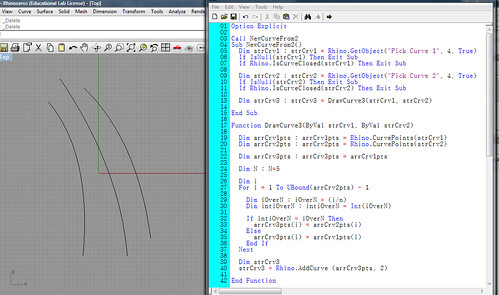
if it helps, i've gotten the basics down in rhinoscript.... the
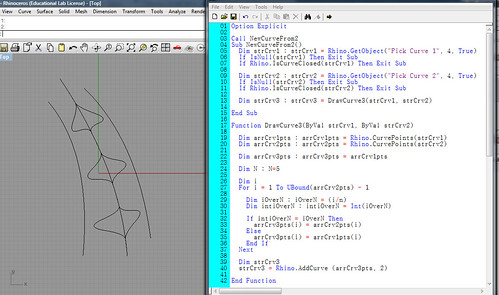
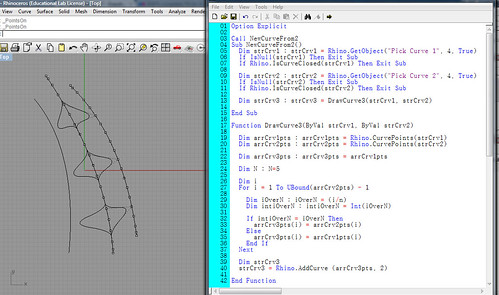
following code takes 2 input curves and draws a new curve with most of
the control points of the first curve, but substituting every Nth
control point of the second curve... in these images i've run the code
twice, between the curve in the middle and the curve to either side.

http://farm4.static.flickr.com/3410/3294712236_720e84878c.jpg
http://farm4.static.flickr.com/3411/3293886053_b8423d67e6.jpg
http://farm4.static.flickr.com/3625/3293889687_2f5093f344.jpg

this is exactly what i'd like to do in GH, but iteratively so i could
take any surface --> generate isocurves --> draw new curves based on
control pt substitution as shown above --> loft, extrude, etc....

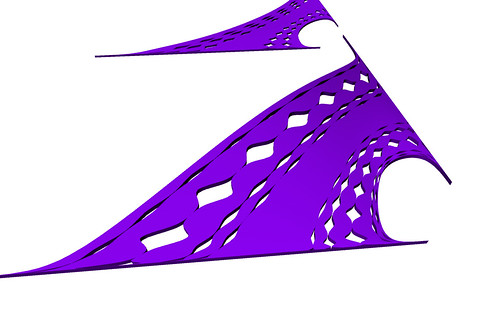
so in the end, i'd have something like this, but with the ability to
control it parametrically in GH:

http://farm4.static.flickr.com/3642/3293138265_ce3edd4f84.jpg

here's the rhinoscript.... (works great for two curves!)

<code>
Option Explicit

Call NewCurveFrom2
Sub NewCurveFrom2()
        Dim strCrv1 : strCrv1 = Rhino.GetObject("Pick Curve 1", 4, True)
        If IsNull(strCrv1) Then Exit Sub
        If Rhino.IsCurveClosed(strCrv1) Then Exit Sub

        Dim strCrv2 : strCrv2 = Rhino.GetObject("Pick Curve 2", 4, True)
        If IsNull(strCrv2) Then Exit Sub
        If Rhino.IsCurveClosed(strCrv2) Then Exit Sub

        Dim strCrv3 : strCrv3 = DrawCurve3(strCrv1, strCrv2)

End Sub

Function DrawCurve3(ByVal strCrv1, ByVal strCrv2)

        Dim arrCrv1pts : arrCrv1pts = Rhino.CurvePoints(strCrv1)
        Dim arrCrv2pts : arrCrv2pts = Rhino.CurvePoints(strCrv2)

        Dim arrCrv3pts : arrCrv3pts = arrCrv1pts

        Dim N : N=5

        Dim i
        For i = 1 To UBound(arrCrv2pts) - 1

                Dim iOverN : iOverN = (i/n)
                Dim intiOverN : intiOverN = Int(iOverN)

                If intiOverN = iOverN Then
                        arrCrv3pts(i) = arrCrv2pts(i)
                Else
                        arrCrv3pts(i) = arrCrv1pts(i)
                End If
        Next

        Dim strCrv3
        strCrv3 = Rhino.AddCurve (arrCrv3pts, 2)

End Function
</code>

thanks in advance for any help anyone can provide..... i just wish i
knew how to do this in VB.....

-evan


On Feb 19, 11:03 pm, evanc <[email protected]> wrote:
> Thanks for the help... but I'm getting errors from the VB component -
>
> "Public member 'Count' on type 'On3dPoint' not found."
>
> any ideas? I'm totally new to VB script... until today I had assumed
> it was the same as rhinoscript. but apparently not...
>
> i'm on a school computer that won't allow me to install the latest GH,
> so i'm using 0.5.0093, don't know if that's the issue, but I'll try
> again at home with v99...
>
> On Feb 19, 3:00 pm, David Rutten <[email protected]> wrote:
>
> > Hi Evan,
>
> > If you want to do this through a script, I suggest the following:
>
> > - Create a VB Script component and give it 3 inputs. A (no object
> > hint, or maybe On3dPoint), B (same as A) and N (hint = Integer)
> > - Rename the output to V (you cannot have an input and an output with
> > the same name)
> > - Inside the script component, you'll see the following script layout:
>
> >   Sub RunScript(ByVal A As List(Of On3dPoint), ByVal B As List(Of
> > On3dPoint), ByVal N As Integer)
> >     ''' <your code>
>
> >     ''' </your code>
> >   End Sub
>
> > - In between the <your code> tags, write the following:
>
> >     Dim pts As New List(Of On3dPoint)
>
> >     For i As Integer = 0 To A.Count - 1
> >       If ((i Mod N) = 0) Then
> >         pts.Add(A(i))
> >       Else
> >         pts.Add(B(i))
> >       End If
> >     Next
> >     V = pts
>
> > This is an example of how to build a new list from elements of two
> > input lists.
>
> > I'll also add some special components that will make this kind of data
> > management a lot easier. But those obviously won't be available until
> > the next release.
>
> > --
> > David Rutten
> > [email protected]
> > Robert McNeel & Associates
>
> > On Feb 19, 8:15 pm, evanc <[email protected]> wrote:
>
> > > So, I'm trying to populate a surface with apertures based on the
> > > surface UV curves.
>
> > > here's a quick "manual"
> > > example:http://farm4.static.flickr.com/3497/3292633785_d327ccf8e1.jpg
>
> > > So, what i've done is extracted 3 isocurves from the surface, turned
> > > on the control points and drawn new curves through the points.... in
> > > this case, 3 point on the middle curve, 1 on the next curve over, 3 on
> > > the middle curve... etc etc.
>
> > > so i've got a grasshopper def started, it takes two curves, lofts
> > > between them, and arrays a grid of UV points on this surface.
>
> > > the first thing i need to do is separate those points into just the V
> > > curves.... which i've done by splitting the list (over and over
> > > again.... a loop funtion would be nice, but i'm not sure how to do
> > > this). It's not clean, but it works and i now have a data stream for
> > > every V curve of the surface...
>
> > > so, like in the image above, i have three curves, and i want to draw 2
> > > new curves based on their control points...
>
> > > existing curves:
> > > curve1point1            curve2point1            curve3point1
> > > curve1point2            curve2point2            curve3point2
> > > curve1point3            curve2point3            curve3point3
> > > curve1point4            curve2point4            curve3point4
> > > curve1point5            curve2point5            curve3point5
> > > curve1point6            curve2point6            curve3point6
> > > curve1point7            curve2point7            curve3point7
> > > curve1point8            curve2point8            curve3point8
> > > curve1point9            curve2point9            curve3point9
> > > curve1point10           curve2point10           curve3point10
> > > curve1point11           curve2point11           curve3point11
> > > curve1point12           curve2point12           curve3point12
> > > curve1point13           curve2point13           curve3point13
> > > curve1point14           curve2point14           curve3point14
>
> > > and i want the new curves to be drawn like this:
> > > curve2point1            curve2point1
> > > curve2point2            curve2point2
> > > curve2point3            curve2point3
> > > curve1point4            curve3point4
> > > curve2point5            curve2point5
> > > curve2point6            curve2point6
> > > curve2point7            curve2point7
> > > curve1point8            curve3point8
> > > curve2point9            curve2point9
> > > curve2point10           curve2point10
> > > curve2point11           curve2point11
> > > curve1point12           curve3point12
> > > curve2point13           curve2point13
> > > curve2point14           curve2point14
>
> > > so it should be pretty easy i think, but i might need a script module
> > > and i dont know how to do that.... it's simply a matter of replacing
> > > every Nth item in one array with every Nth item in another array....
>
> > > what's the best way to handle this?