On Fri, Aug 28, 2015 at 7:28 AM, Alfredo Pons <[email protected]> wrote:
> I want colour only 2 rows of alls rows of a Gtk::Treeview in gtkmm3,
> but I not find good examples in internet about this.
I think you will have to either (1) add each column with a custom
cellrenderer or (2) use normal cellrenderers but use
Gtk::TreeViewColumn::set_cell_data_func().

If the background color of the row can be derived from the state of
the object a cellrenderer is drawing, you can use (1). Otherwise use
(2).

Example for (1):
I have a project that has a custom cellrenderer for a single column. A
lot of the code around it is needlessly complex, so try to only look
at the cellrenderer bits if you can!
https://github.com/talisein/mal-gtk/blob/master/src/gui/fancy_label.cpp
lines 103-138 shows defining a custom CellRendererText that changes
the background color based on the value of the text (ignore the
render_vfunc, you don't want rounded edges).
https://github.com/talisein/mal-gtk/blob/master/src/gui/anime_list_view.cpp
lines 244-255 show how to add the cellrenderer to the ListView (very
simple).
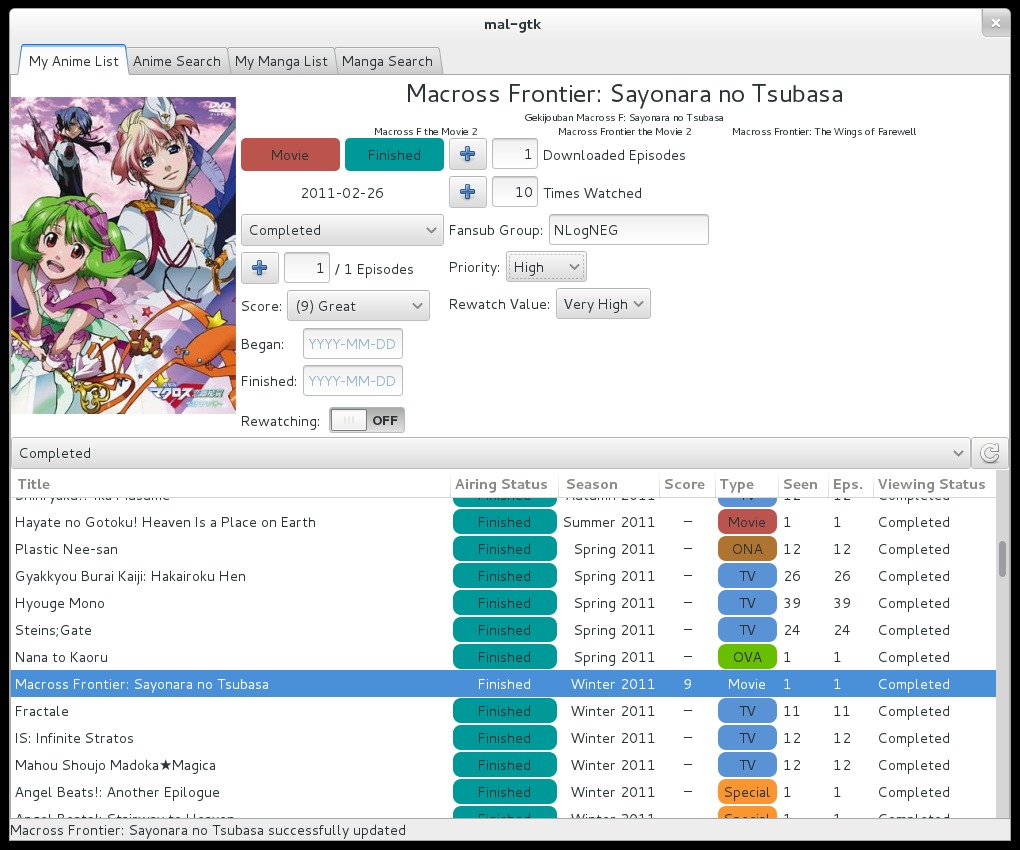
A screenshot of the result (type column)
https://raw.githubusercontent.com/talisein/mal-gtk/master/images/animelist.jpg

Instructions for (2):
You can use Gtk::TreeViewColumn::set_cell_data_func(). Basically in
your GtkTreeCellDataFunc, use the GtkTreeIter* to figure out what
color the row should have, and set the background_rgba property on the
passed GtkCellRenderer appropriately. I think you will also have to
set the normal property (e.g. set the 'text' property for a
CellRendererText).
_______________________________________________
gtkmm-list mailing list
[email protected]
https://mail.gnome.org/mailman/listinfo/gtkmm-list