<http://api.tweetmeme.com/share?url=http%3A%2F%2Fwbcom.info%2F2010%2F03%2F26%2Fblogger-template-designer%2F>


Blogger has recently introduced "Blogger Template Designer" feature for
Blogspot users and give more benefits to the end users as far as designing of
blog is concerned. I personally have tried this fascinating feature and i am
very very happy while using it. it is using a very handy process called wizard,
you need to do is just select some options and apply and save it and your
blog’s design template will be no more remains the same as old one. you will
get the same feeling as i have feel, so why not check this feature in Blogger
Draft. Those who have less knowledge about CSS and HTML can also create their
own personalized template for blogspot blogs. The feature “Template Designer”
is now on Blogger Draft and soon it will be placed on Main Blogger area.
To try this Blogger Template Designer first open this Link:
http://draft.blogger.com/
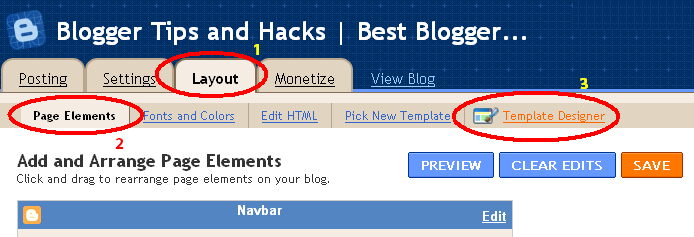
Now Click on Layout and there you will see Template Designer feature.
 Blogger Template Designer
<http://3.bp.blogspot.com/_1fqu8LzmPN8/S5vKJmghXGI/AAAAAAAAFS4/V3sqyO8RyDc/s800/Blogger%20Template%20Designer.PNG>

There are Four Main features. Template, Background, Layout and Advance.
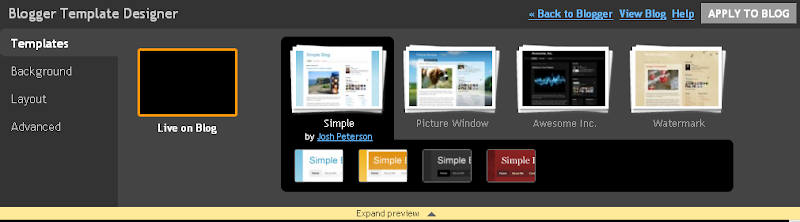
Template: In this section you can select different style of templates provided
by popular template designers.
 Blogger Template
<http://3.bp.blogspot.com/_1fqu8LzmPN8/S5vKJ1W-nmI/AAAAAAAAFS8/yrjoP1Qp3OI/s800/Template.PNG>

Background: If you want to chage background color you can do that from
background properties. Plenty of colors and customization are available to add
in your blog in this section.
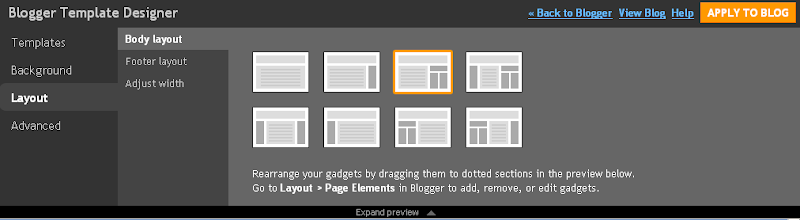
Layout: This is one of the most useful feature for bloggers. you can easily
change the Layout of your blogspot blog to Two Column, Three Column and make
customize template. you can also customize your blog headers and footer section
withing layout. you can Move the position of all widgets to left, right top or
down (which was not possible before without having XML knowledge).
 Blogger Template Layout
<http://4.bp.blogspot.com/_1fqu8LzmPN8/S5vKJRWzdzI/AAAAAAAAFSw/FXiKyoG15qo/s800/Layout.PNG>

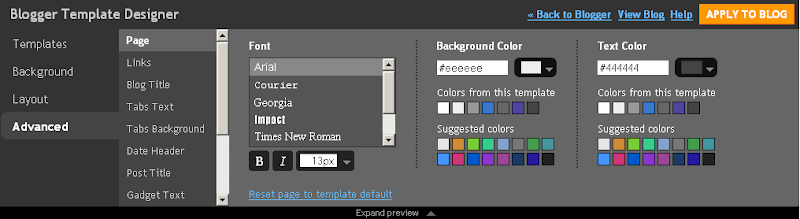
Advance: Using this option you can change color for Page Text, Background, Blog
Title, Tabs Text, Date Header, Post, and Links color. There is anotherfeature
under Advance option called CSS. You can add any CSS code in side the box to
add new stuffs to your blogspot blog.
 Advanced Templates
<http://3.bp.blogspot.com/_1fqu8LzmPN8/S5vKJa3RX2I/AAAAAAAAFS0/PEfSO6u0tgs/s800/Advanced.PNG>

So just go ahead and try this very nice feature of blogger  :)
<http://wbcom.info/wp-includes/images/smilies/icon_smile.gif>

Note: Before making any changes to your blog design and template don’t forget
to take full backup of your template.

So are you pleased with this move from blogger? Share your experience with me.

Related posts:

1.      64
<http://wbcom.info/2010/02/08/64-ways-to-promote-your-website-and-increase-traffic/>
  Ways to Promote your Website and Increase Traffic! Here are some methods to
increase traffic to your...
2.      Blogger
<http://wbcom.info/2010/03/26/blogger-template-produces-invalid-xhtml/>
template produces invalid XHTML Google and Blogger do not seem very inclined
in...
3.      Wordpress <http://wbcom.info/2010/01/14/wordpress-tutorialshacks/>
Tutorials/Hacks Wordpress Tutorials/Hacks 1.WordPress Theme Hacks (Source: Web
Designer Wall)...


View <http://wbcom.info/2010/03/26/blogger-template-designer/>  article...

--
You received this message because you are subscribed to the Google Groups
"Gugukluhayat" group.
To post to this group, send email to [email protected].
To unsubscribe from this group, send email to
[email protected].
For more options, visit this group at
http://groups.google.com/group/gugukluhayat?hl=en.