<http://api.tweetmeme.com/share?url=http%3A%2F%2Fwbcom.info%2F2010%2F03%2F26%2Fhow-to-change-subject-of-feedburner-email-feed%2F>
How to change subject of feedburner email feed?
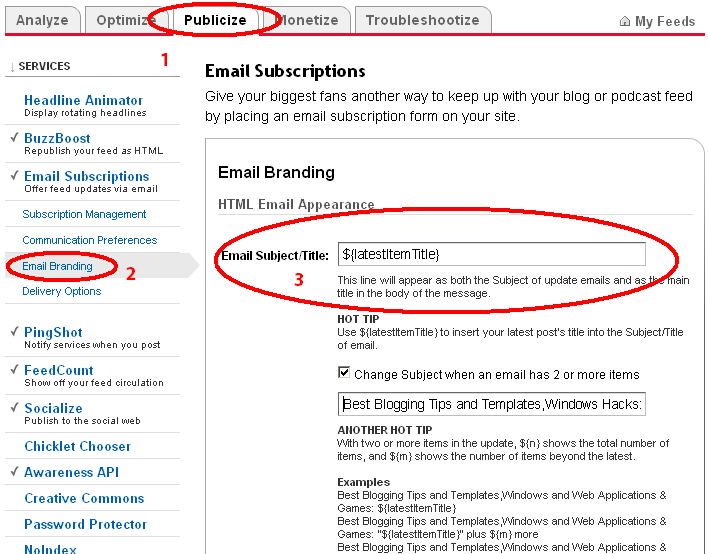
1. Log in to http://feedburner.google.com/.
2. Select your feed for which you need to change the settings and Click on
Publicize tab.
3. Click on Email Branding.
 Change Email Subject line to post title
<http://2.bp.blogspot.com/_1fqu8LzmPN8/S6rNPCV9RUI/AAAAAAAAFVE/VDf0y-tlf2U/s800/Change+Email+Subject+line+to+Post+Title.PNG>

4. Change Email Subject/Title to ${latestItemTitle}.This will set name of post
as subject in email.
5. If you have posted more than one post in a day then check the box saying
Change subject when an email has 2 or more items.
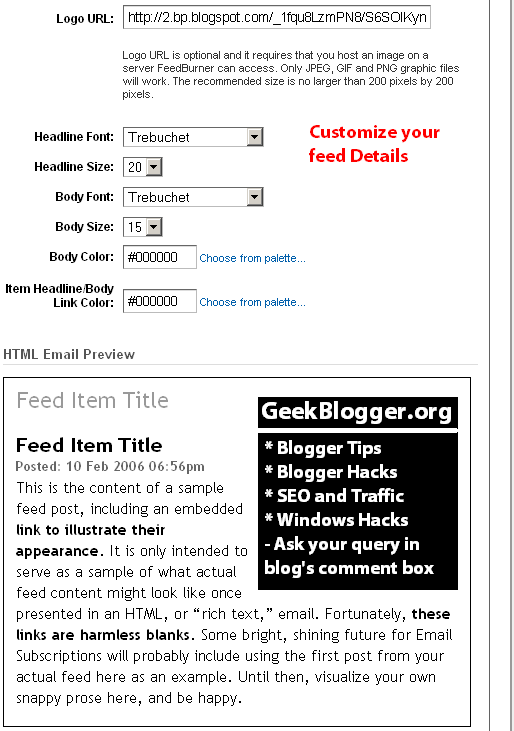
6. Now if you want to send your blog logo to subscribers through mail, prepare
a 200*200 Logo and put Logo URL in the text box. you can change HTML and
customize your feed details accordingly.
 Customize Feed Details
<http://3.bp.blogspot.com/_1fqu8LzmPN8/S6rNOttkULI/AAAAAAAAFU8/lTO3z_5SWRA/s800/Customize+feed+details.PNG>
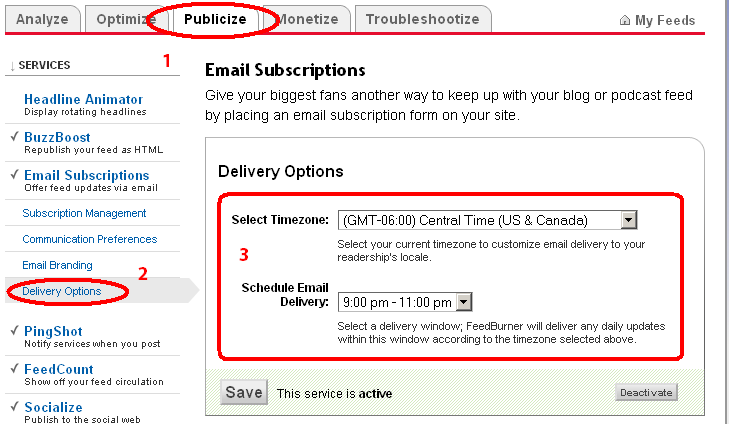
 7. Now if you need to change the time frame for sending the mail to the
subscribers. just navigate to the Publicize > Delivery Options.
 Mail Delivery Options
<http://4.bp.blogspot.com/_1fqu8LzmPN8/S6rNOXb2CMI/AAAAAAAAFU0/Su1edHGJ0rg/s800/Delivery+Options.PNG>
 8. Change the timezone and schedule email delivery and done.

Related posts:

1.      Create
<http://wbcom.info/2010/01/24/create-and-use-an-email-template-in-outlook/>
and Use an Email Template in Outlook The email you have composed looks a lot
like...
2.      Blogger Template
<http://wbcom.info/2010/03/26/blogger-template-designer/>  Designer Blogger has
recently introduced "Blogger Template Designer" feature for...
3.      64
<http://wbcom.info/2010/02/08/64-ways-to-promote-your-website-and-increase-traffic/>
  Ways to Promote your Website and Increase Traffic! Here are some methods to
increase traffic to your...


View
<http://wbcom.info/2010/03/26/how-to-change-subject-of-feedburner-email-feed/>
article...

--
You received this message because you are subscribed to the Google Groups
"Gugukluhayat" group.
To post to this group, send email to [email protected].
To unsubscribe from this group, send email to
[email protected].
For more options, visit this group at
http://groups.google.com/group/gugukluhayat?hl=en.