liquidcms opened a new issue #205:
URL: https://github.com/apache/cordova-plugin-geolocation/issues/205
# Bug Report Not entirely sure if this is a question(s) or a bug report. I often get coords at least 20m from the true location. Wondering how this is possible as well as why my Google Maps app on the same device is rarely off more than a few feet. ## Problem Please see the image of a few test runs: 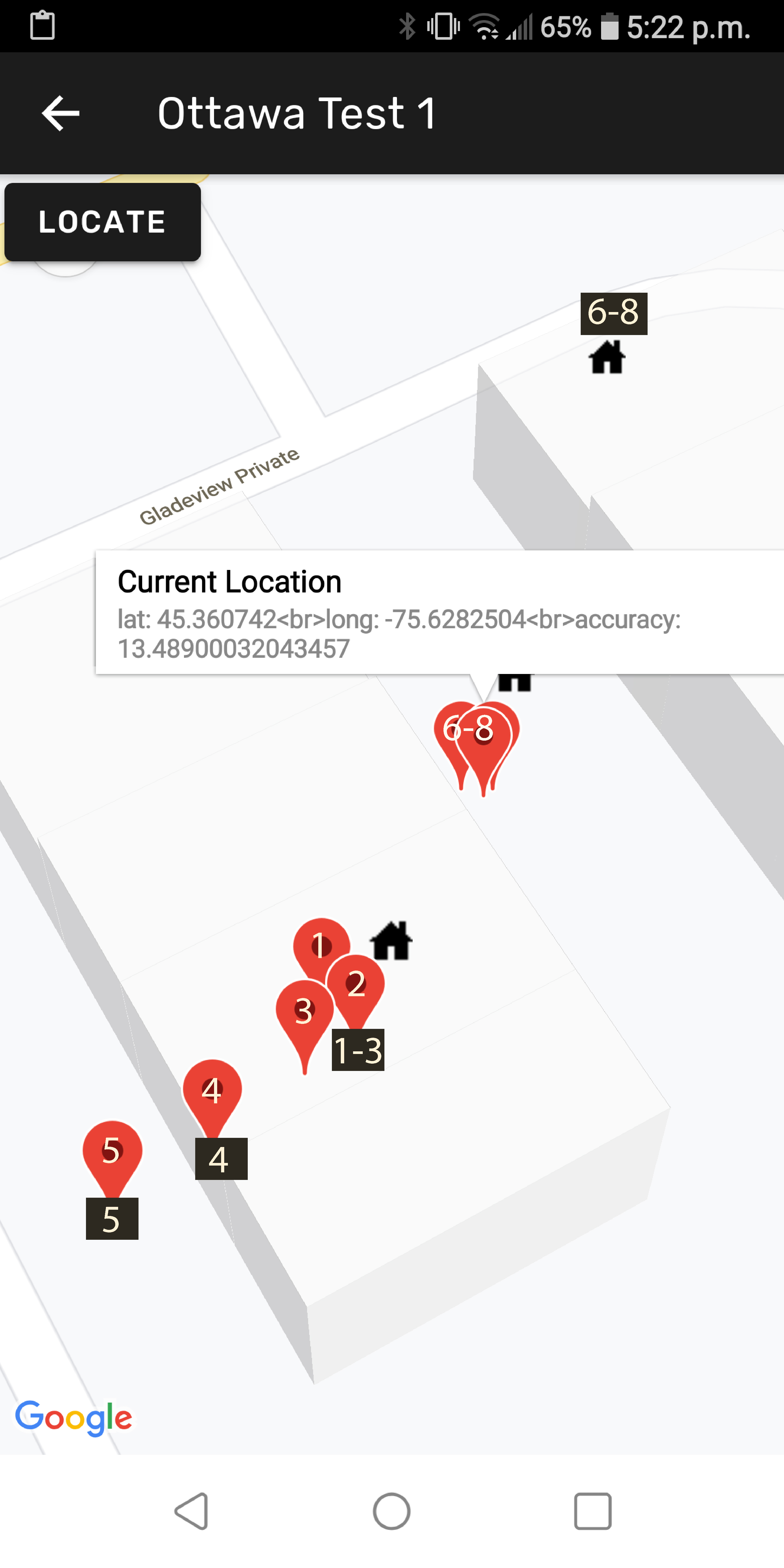 The red markers are created from coords obtained from this plugin. The numbers in the black boxes correspond to the real location when the associated red marker was created. You can see the markers 1 to 5 are all extremely close, even though the accuracy value from the plugin stated anywhere between 10 and 20m. Markers 6 to 8 however are at least 20m off from the correct location. The plugin returned accuracy for these is anywhere from 13m to 20m. Position 6 to 8 are all on an open city street with significant view of the sky. I have repeated measurements at this location on numerous days and always get values returned close to where shown above (off by over 20m). enableHighAccuracy is set to TRUE. As mentioned above, my Google Maps app shows my location to always be within 3m of my actual location. ### What is expected to happen? I think results should always be within 3m of the correct location. ### What does actually happen? At some locations on the same street, results are very close (even though accuracy states 10+m). But, at other locations on the same street, results are off by as much as 20m or more and do not come close to matching Google Maps results on same device. ## Information ### Command or Code I think the only code of interest would be whether or not i have set High Accuracy correctly. Taken from numerous posts, I use this: ``` this.location.getCurrentPosition({enableHighAccuracy: true}).then((resp) => { var lat = resp.coords.latitude; var lng = resp.coords.longitude; var latLng = {lat: lat, lng: lng}; var accuracy = resp.coords.accuracy; this.loading.dismiss(); this.common.log(JSON.stringify(location, null ,2)); // Move the map camera to the location with animation this.map.animateCamera({ target: latLng, //zoom: 17, tilt: 30 }); // add a marker let marker = this.map.addMarkerSync({ title: 'Current Location', snippet: 'lat: ' + lat + this.LF + 'long: ' + lng + this.LF + "accuracy: " + accuracy, position: latLng, //animation: GoogleMapsAnimation.BOUNCE }); // show the infoWindow marker.showInfoWindow(); // If clicked it, display the alert marker.on(GoogleMapsEvent.MARKER_CLICK).subscribe(() => { this.showToast('clicked!'); }); } ``` ### Environment, Platform, Device App is build with Ionic 5 (although unlikely that could matter here). Device used in tests is an LG G6 - but again, Google Maps results on this device are very accurate. Android ver: 9 ### Version information Ionic: Ionic CLI : 6.10.1 (C:\Users\Peter\AppData\Roaming\npm\node_modules\@ionic\cli) Ionic Framework : @ionic/angular 5.1.1 @angular-devkit/build-angular : 0.901.6 @angular-devkit/schematics : 9.1.6 @angular/cli : 9.1.6 @ionic/angular-toolkit : 2.2.0 Capacitor: Capacitor CLI : 2.1.0 @capacitor/core : 2.1.0 Cordova: Cordova CLI : 9.0.0 ([email protected]) Cordova Platforms : android 8.1.0, browser 6.0.0 Cordova Plugins : cordova-plugin-ionic-keyboard 2.2.0, cordova-plugin-ionic-webview 4.2.1, (and 9 other plugins) Utility: cordova-res : not installed native-run (update available: 1.0.0) : 0.2.8 System: Android SDK Tools : 26.1.1 (C:\android-sdk) NodeJS : v12.18.2 (C:\Program Files\nodejs\node.exe) npm : 6.14.5 OS : Windows 7 ## Checklist <!-- Please check the boxes by putting an x in the [ ] like so: [x] --> - [X] I searched for existing GitHub issues - [X] I updated all Cordova tooling to most recent version - [X] I included all the necessary information above ---------------------------------------------------------------- This is an automated message from the Apache Git Service. To respond to the message, please log on to GitHub and use the URL above to go to the specific comment. For queries about this service, please contact Infrastructure at: [email protected] --------------------------------------------------------------------- To unsubscribe, e-mail: [email protected] For additional commands, e-mail: [email protected]

