2009/2/5 Manfred Jung <[email protected]>:
> Hi all
>
> Kexi might be my answer to getting rid of a certain micro$oft program.
> but im new to Kexi and have to unleran some of the old habits. i suppose.
>
> I tried fiddling around with combo boxes looked at the documentation
> (hanbook), found nothing (I might be looking in the wrong places). I
> also searched the mailing-list. I looked a the Sample database and there
> is a combo box working. But i could not find where the como-box gets
> told where to fetch the data to display in the drop down section.
Hi,
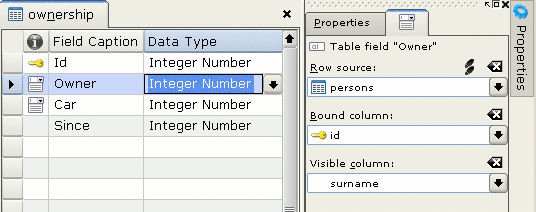
- in the table designer, lookup column tab on the right hand; in the table
data mode you'll see comboboxes

So in the table designer, just select table in the lookup column tab
on the right hand and a bound column within this table (the same
pane). In the example database, click on the 2nd tab to see how this
has been set up.

- in the form designer - once you have lookup columns in your table's
project, you can
put combo boxes onto your form (use similar lookup field tab)

see the 2nd tab here
http://www.kexi-project.org/pics/1.1.1/lookup_column_design.png

> Further I don't see where the combo-box is told which is the bound
> column. etc.
>
> Is there some documentation on the various controls Kexi uses?
>
> One more thing. Does Kexi have something that M$ Access calls a subform?

it's not available yet

> Any help or pointer to the right documentation is most appreciated.

It's here: http://docs.kde.org/kde3/en/koffice/kexi/index.html
In particular 'http://docs.kde.org/kde3/en/koffice/kexi/designing-forms.html'
(Most important terms) is, well... important.


--
regards / pozdrawiam, Jaroslaw Staniek
_______________________________________________
Kexi mailing list
[email protected]
https://mail.kde.org/mailman/listinfo/kexi