On Friday 15 Aug 2003 12:09 pm, Gavin Hamill wrote:
> > Wow!
> >
> > It works. I've got a picture - with sound. :-)
>
> These issues are now firmly userspace, though, since the DVB card just
> spools out the raw MPEG stream as broadcast - so whilst you have new issues
> to solve, you know your Nova-T is working fine :)
>
> Good luck!
Thanks for everybodys help.

Just a summary of what I did for anyone else who may be trying to get the PCI
version of the Nova-T card working with Mandrake 9.1.

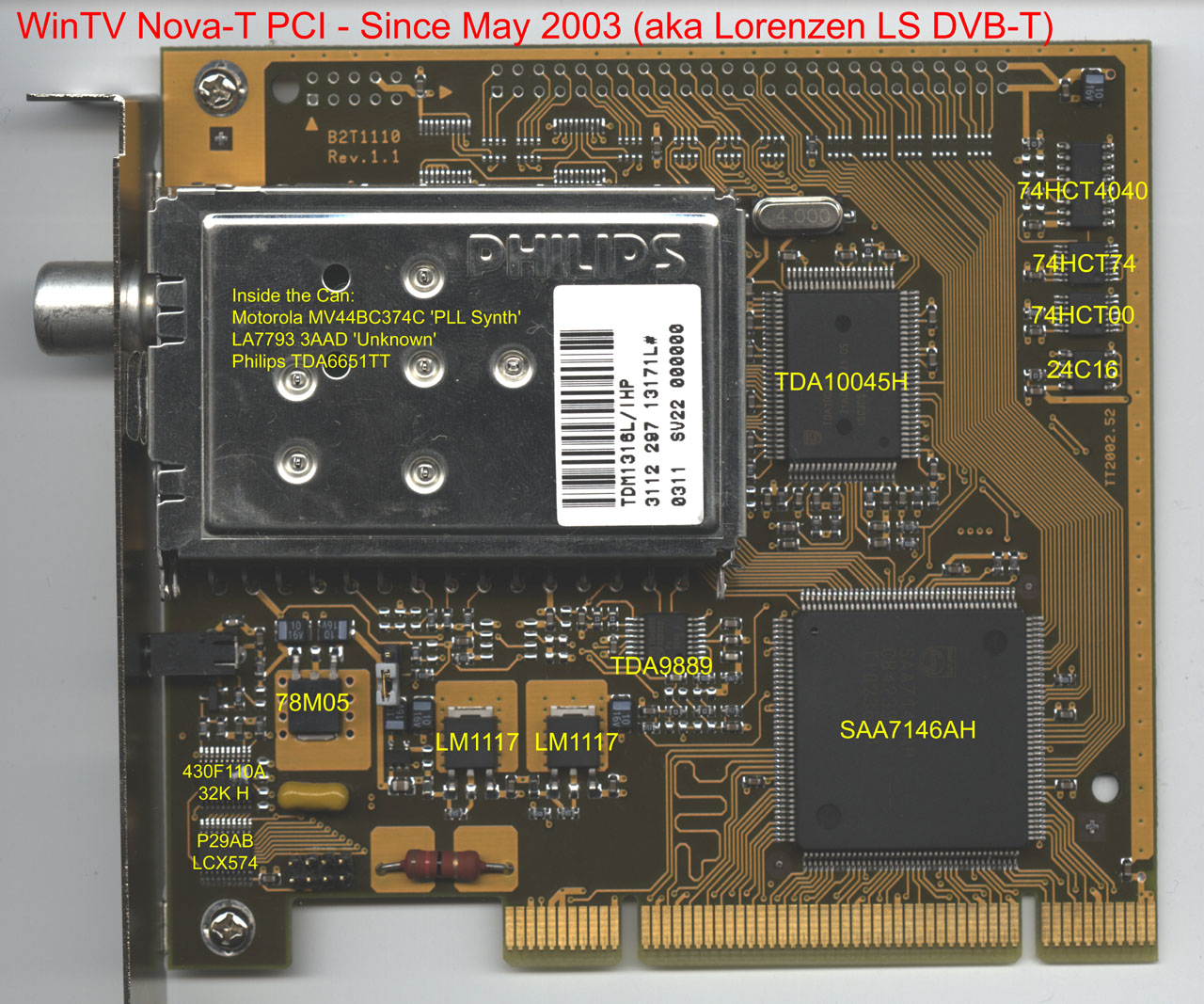
[ Note that as far as I understand, this will work with cards purchased since
May - as these cards are now the same as the budget Lorenzen cards.
http://secret.cream.org/wintv-newtuner.jpg ]

I grabbed the latest dvb drivers from linuxtv.org:

http://linuxtv.org/cgi-bin/cvsweb.cgi/

cvs -d :pserver:[EMAIL PROTECTED]:/cvs/linuxtv login
cvs -d :pserver:[EMAIL PROTECTED]:/cvs/linuxtv co DVB
cd DVB
make

cd DVB/drivers/

then comment out all but 'CARDS = av7110' in the 'Configs' section of
DVB/drivers/Makefile and modify DVB/drivers/frontend/Makefile so that
tda1004x is initialised with debug enabled

62c62
<       $(foreach frontend, $(obj-m), insmod $(frontend) tda1004x_debug=1; )
---
>       $(foreach frontend, $(obj-m), insmod $(frontend);)

[ Note, at the time of writing, debug must be enabled for the tda1004x
frontent for the card to work properly - anyone have any ideas why this is?]

then

make insmod

[ Note, I have devfs running and this seems to work as is. None-the-less,
copied the supplied devfs.conf to /etc/devfsd/ and removed the mandrake
references to dvb in the /etc/devfs.conf file ]

You can compile and use DVB/apps/scan as per the instructions.

I added the following to my initial.h to support the Redruth transmitter in
the UK.

        /**
         *  Redruth, Cornwall, (BBC1, ...)
         */
        {
                .type = FE_OFDM,
                .param = {
                        .frequency = 618000000,
                        .inversion = INVERSION_OFF,
                        { ofdm:
                                {
                                        .bandwidth = BANDWIDTH_8_MHZ,
                                        .code_rate_HP = FEC_3_4,
                                        .code_rate_LP = FEC_NONE,
                                        .constellation = QAM_16,
                                        .transmission_mode = TRANSMISSION_MODE_2K,
                                        .guard_interval = GUARD_INTERVAL_1_32,
                                        .hierarchy_information = HIERARCHY_NONE
                                }
                        }
                }
        },

Details for transmitters in your area can be found here (note you should use
INVERSION_OFF not INVERSION_AUTO):

http://www.itc.org.uk/uk_television_sector/reception_advice/digital_trans_guide/
http://www.dtg.org.uk/publications/books/r_book3.pdf
http://www.dtg.org.uk/retailer/index.html

Running the scan application should help you to create a channels.conf file
which should be copied to ~/.tzap/channels.conf

You can then compile and run the tzap application in DVB/apps/szap:

./tzap -r "BBC ONE"

leave this running and if your are getting a signal:

in another console type:

cat /dev/dvb/adapter0/dvr0 > output

leave it running for a few seconds then press ctrl-c.

If you've got some data, then the drivers should be set-up ok.

To get a picture, I grabbed the latest cvs version of the dvbtools:

http://sourceforge.net/projects/dvbtools

and run dvbstream, for example:

./dvbstream -f 618000 -ps -o 600 601 | mplayer -nocache -

gets BBC ONE on the Redruth Transmitter - obviously your frequency and pids
will be different from mine.

Now I'm off to play with MythTV and VDR. :-)

http://www.mythtv.org
http://www.cadsoft.de/vdr/

--
Adrian Look


--
Info:
To unsubscribe send a mail to [EMAIL PROTECTED] with "unsubscribe linux-dvb" as
subject.