Hello everybody,

for improving the images of a compact camera, I am thinking about
adjusting the colors based on a reference:
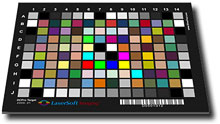
The idea is to take two pictures of a sample target (for example like
the one at http://www.silverfast.com/img/DC-Target.jpg), one with the
compact camera [src], and the other with a DSLR which acts as the
reference [ref].
Now the task is to find a procedure (and the appropriate parameters)
that transform the compact camera image into something that comes as
close as possible to the DSLR image (see also
http://en.wikipedia.org/wiki/Color_mapping).
Ideally, it should then be possible to process all other compact camera
images with the same procedure. Of course, the DSLR has advantages in
dynamic range, more accurate white balancing, etc., so the results will
be far from perfect. Still I hope to get a quite noticeable leap forward...
Now I would like to know

- whether there is anybody out there who already has experience with
this or a similar approach and who can give me some recommendations

- which procedure is advisable for doing the image processing. Up to
now, I have thought about the following:
[Probably for any of these alternatives it would be beneficial to first
scale, crop and chop the [src] and [ref] image, so that each color field
of the target corresponds to only one pixel in each of the images]

1) Creating a lookup table that transforms the [src] into the [ref]
image. If I understood everything correctly, this requires a 3D lookup
which is what the paragraph at
http://www.imagemagick.org/Usage/color_mods/#hald_replacement is
referring to. So I guess this is not trivial...

2) Using -recolor matrices: For each [src]/[ref] pair of image pixels it
should be possible to calculate the multiplication matrix that
transforms the RGB values of the [src] color into the [ref] color. In
the end this gives a couple of transformation matrices that can be
averaged to one single matrix. This matrix could then be applied to all
images with the -recolor operation.

3) Brute force method with -recolor: The values of the -recolor matrix
are varied while applying the -recolor operation to the [src] image to
create tons of output. All these output images are then compared to the
[ref] image to find the one that fits best. Unfortunately this is a
9-dimensional problem, but maybe there is a smart way to gradually vary
only one subset of the matrix at a time to approach the [ref] image step
by step. I guess this would be much easier to program compared to
appoach 2), but maybe give a comparable result.

4) Brute force method with -sigmoidal-contrast: According to a couple of
postings to this list
(http://studio.imagemagick.org/pipermail/magick-users/2007-February/019119.html)

I guess it should be possible to achieve the required color/brightness
shift with something like
convert -colorspace Lab -channel GB -sigmoidal-contrast 4x50% [src] [ref]
...and additionally maybe a -gamma operation on the L channel(?).
Again, the parameters for -sigmoidal-contrast and -gamma could be varied
until the output matches the [ref] image best.
Since there are fewer parameters involved than with -recolor, I guess
that it is more unlikely to match the [ref] image equally well...
On the other hand, -sigmoidal-contrast and -gamma probably have the
benefit not to clip color channels, which is likely to happen when one
of the parameters of the -recolor matrix is greater than 1.

5) There is probably another really elegant approach which I did not yet
think of...

Thanks for any input and best regards

Jan


_______________________________________________
Magick-users mailing list
[email protected]
http://studio.imagemagick.org/mailman/listinfo/magick-users