As you described, it took me to the header section.

However, as part of the macro, I had the view switch to "Show Raw Message",
which would then select all the email (header & body).
I was able to perform the CMD-A -> CMD-C and get the entire content copied to
the clipboard.

That, within MailMate, was about as far as I could take it without doing
anything special.

**HOWEVER**

I am a user of **Keyboard Maestro** as well (and LOVE it!).

The outcome I was looking for was this:
**Hit a Macro Key (CMD-S), select the e-mail body (headers optional), and have
Apple Intelligence perform a summary of the selection.**

I have completed this and it works just fine. No need for anything API Key
related or needing to maintain a Bundle :)

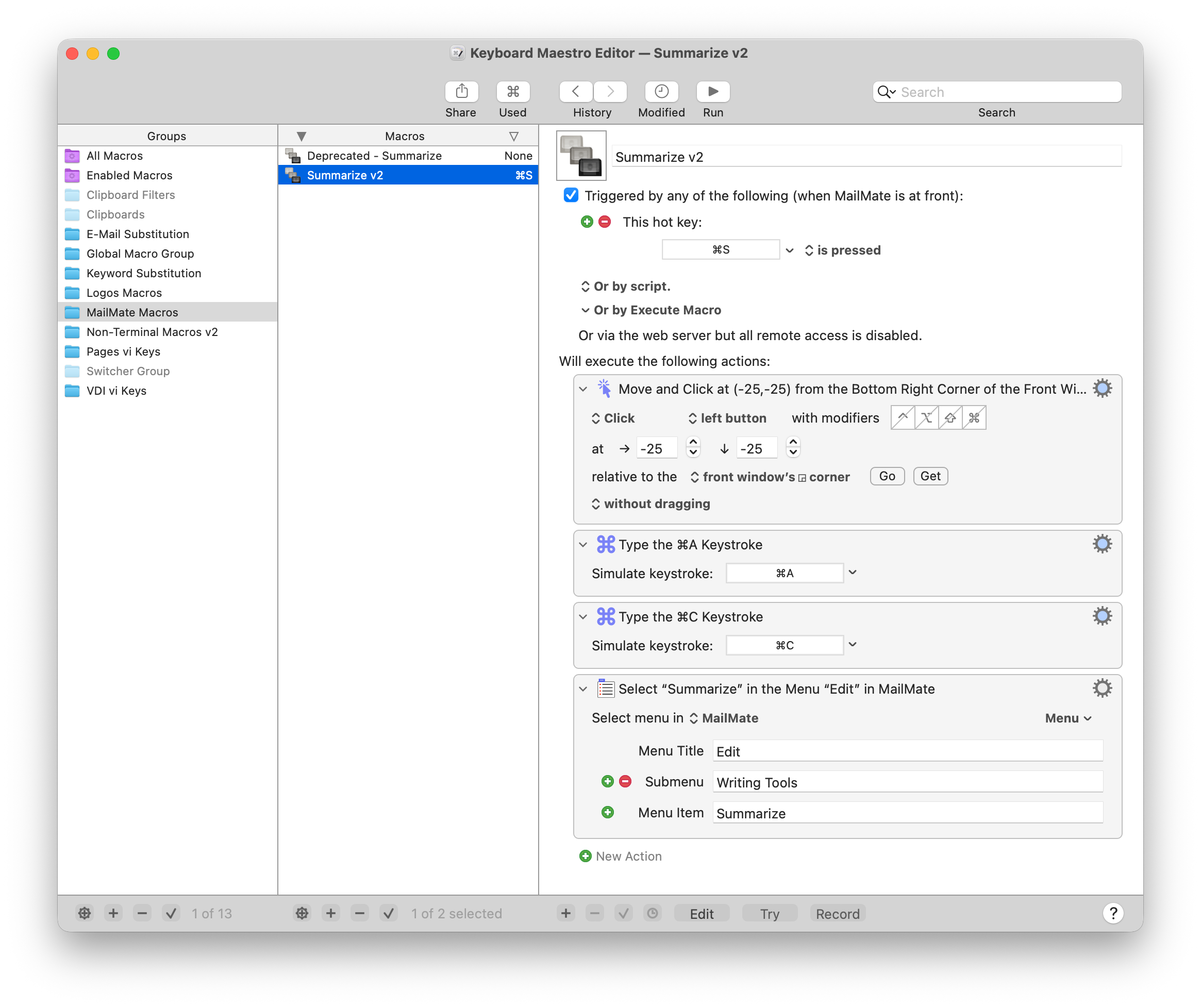
I have attached screen shot of the macro as well a copy of the macro itself.

I simply "cheated" with Keyboard Maestro: One of the "features" is the ability
to perform a "Mouse Click" and provide a relative position - So... I did...

The macro does this:
  - I hit CMD-S (Keyboard Maestro kicks in); Keyboard Maestro is configured to
know that I am "in" *MAilMate*
  - Keyboard Maestro then performs
    - A "Mouse Click" in the bottom right corner of the mail preview screen
    - CMD-A
    - CMD-C
    - From the *MailMate* menu, selects "Edit -> Writing Tools -> Summarize"

Viola - the Apple Intelligence summary pops up and all is right with the
world...

So, while I couldn't get there using MailMate alone, I could get there using
MailMate and Keyboard Maestro :)

[Keyboard Maestro Summarize Macro
png](https://user.fm/files/v2-52e413fc94646d43f0299a990c6c4c1d/Keyboard%20Maestro%20-%20Summarize%20v2%20Macro.png)
[Keyboard Maestro Summarize
Macro](https://user.fm/files/v2-7068a2acff0f02a07733d5b288d64be9/Summarize%20v2.kmmacrosØ)

Jim

On 18 Jan 2026, at 13:21, John Cooper wrote:

> Fredrik Jonsson wrote (at 1:29 AM on Sunday, January 18, 2026):
>
>> Check out "Custom keybindings"
>> <https://manual.mailmate-app.com/custom_key_bindings>
>>
>> And  "Key Binding Selectors"
>> <https://manual.mailmate-app.com/key_binding_selectors>
>>
>> There you find "makeFirstResponder" that allow you to set focus to any
>> layout part.
>>
>> You likely want "messageView" in this case.
>
> Does this work, though?
>
> I have "M" set as you specify, and it puts focus on the message headers, not
> the message body. I haven't found a way to put focus in the message body.
> _______________________________________________
> mailmate mailing list
> Unsubscribe: https://lists.freron.com/listinfo/mailmate
 signature.asc
Description: OpenPGP digital signature
_______________________________________________
mailmate mailing list
Unsubscribe: https://lists.freron.com/listinfo/mailmate