Hi Prentiss;

I'm sorry to hear you are having some issues with Mailplane.  If you do a
restart of Mailplane, this should enable a silent update we released that
corrected some Google related errors.
Do you have the same problem after restarting?
Please let me know if it's still not functioning and I will look into it
for you.

Thanks a lot;

*Jessica*
Customer Support Ninja
http://mailplaneapp.com/

On Wed, Sep 26, 2012 at 8:05 AM, Prentiss Riddle
<[email protected]>wrote:

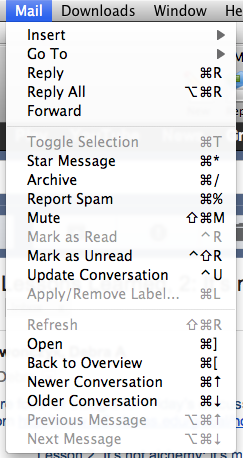
> Suddenly I find that "Apply/Remove Label" is greyed out in the Mail
> pulldown, and the (command-L) shortcut no longer works. Screenshot below.
>
> The behavior is the same whether I am viewing an individual conversation
> or have ticked one or more conversations in my inbox.
>
> I've confirmed that keyboard shortcuts are enabled in my Gmail settings
> (following the tip at
> http://mailplaneapp.com/issues/entry/toolbar_buttons_menu_items_dont_work/).
>
> Clicking the label icon does work normally.
>
> I'm running Mailplane 2.5.8 (#1690) on Mac OS X 10.6.8.
>
> Ideas?
>
> Prentiss Riddle
>
>
> <https://lh3.googleusercontent.com/-PfBru_xRmDc/UGMY279IQQI/AAAAAAAAAFE/_RITl8hdhyI/s1600/command-L.png>
>
>  --
> You received this message because you are subscribed to the Google Groups
> "mailplaneapp" group.
> To view this discussion on the web visit
> https://groups.google.com/d/msg/mailplaneapp/-/p2n3R13i2aQJ.
> To post to this group, send email to [email protected].
> To unsubscribe from this group, send email to
> [email protected].
> For more options, visit this group at
> http://groups.google.com/group/mailplaneapp?hl=en.
>

--
You received this message because you are subscribed to the Google Groups
"mailplaneapp" group.
To post to this group, send email to [email protected].
To unsubscribe from this group, send email to
[email protected].
For more options, visit this group at
http://groups.google.com/group/mailplaneapp?hl=en.