Friday, February 23, 2007, 2:02:49 PM,
"fachru_zanetti" <[EMAIL PROTECTED]> wrote:
> Niyh saya kasih screen shootnya...!!!
> http://img12.imagevenue.com/img.php?image=13530_error1_122_56lo.JPG
> http://img156.imagevenue.com/img.php?image=13535_error2_122_167lo.JPG
> http://img18.imagevenue.com/img.php?image=13539_error3_122_185lo.JPG
> http://img101.imagevenue.com/img.php?image=13546_Task1_122_98lo.JPG
> http://img22.imagevenue.com/img.php?image=13547_task2_122_119lo.JPG
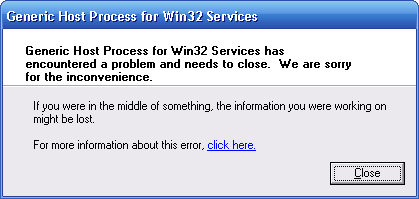
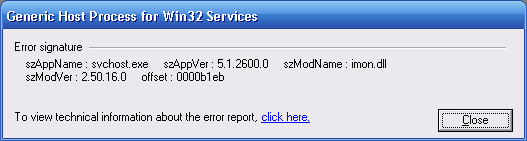
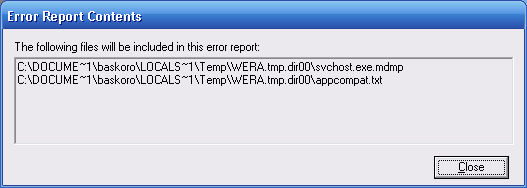
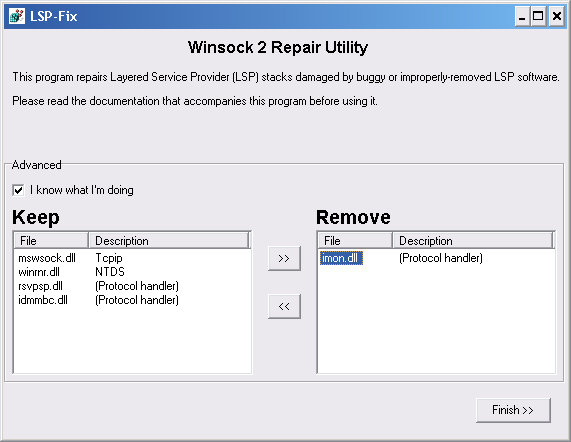
> yg saya bingung disitu di task manager vsmon.exe menggunakan banyak > sekali memori. padahal saya belum mengaktifkan zone alarm. dan Zone > Alarm saya setting agar tidak run ketika start up siiip, makasih. skrinsutnya kumplit. kekna fans BB17 neh, pake imagevenue.com juga ;) btw, kasusnya kok mirip ma PCku dulu ya.. OprekPC.com Forum Index -> Software -> Ini Sasser Apa bukan? http://www.oprekpc.com/forum/viewtopic.php?t=6280 perhatiin error punyaku: http://i66.photobucket.com/albums/h252/oprekpc/balthaZor/error1.png http://i66.photobucket.com/albums/h252/oprekpc/balthaZor/error2.png http://i66.photobucket.com/albums/h252/oprekpc/balthaZor/error3.png yang ngebedain: 1. di error2.png, udah ketauan penyebabnya. sedangkan punyamu unknown "13535_error2_122_167lo.JPG" 2. gejalanya juga beda. di gw muncul timer shutdown & gak bisa melakukan cut/copy apapun. karena gejala beda, solusinya juga bisa beda. tapi seenggaknya ada benang merah. kita telusuri dulu apa itu svchost.exe Saturday, October 7, 2006, 6:21:10 PM, "imcw" <[EMAIL PROTECTED]> wrote: > coba buka link ini : > http://support.microsoft.com/kb/314056 > http://www.neuber.com/taskmanager/process/svchost.exe.html > http://ask-leo.com/what_is_svchost_and_why_is_there_more_than_one_copy_running.html > http://www.computerhaven.info/svchost.htm "Svchost.exe" (Generic Host Process for Win32 Services) is an integral part of Windows OS. It cannot be stopped or restarted manually. It manages 32-bit DLLs and other services. At startup, Svchost.exe checks the services portion of the registry to construct a list of services that it needs to load. In normal conditions multiple instances of Svchost.exe run at the same time. Each Svchost.exe session can contain a grouping of services, so that separate services can be run depending on how and where Svchost.exe is started. This allows for better control and debugging. Note: The svchost.exe file is located in the folder .\Windows\System32. In other cases, svchost.exe is a virus, spyware, trojan or worm! jadi, Svchost.exe error oleh service/DLL lain yang menggunakan Svchost.exe. umumnya disebabkan oleh: 1. malware 2. antivirus 3. firewall bbrp solusi: 1. Pastikan itu bukan malware. scan dgn AV & AntiSpyware selain program yang udah terinstall di PC. IMHO cara terbaik di miniPE update terbaru. 2. Tes dgn cara cabut & pasang koneksi LAN/internet. apakah errornya hanya muncul pada satu kondisi (connect aja atau DC aja)? kalo iya, kemungkinan besar yg bermasalah adl AV/firewall. 3. Di gambar 13546_Task1_122_98lo.JPG, tidak ada proses yang mencurigakan. tapi di sebaliknya.. di 13547_task2_122_119lo.JPG, NOD32.exe kok ngeload CPU cukup tinggi sampe 57%. Coba Anda tes dgn disable/unload dan quit AMON & IMON NOD32. bila perlu uncek semua startup dan service NOD32 di msconfig, lalu restart. Bagi pakar NOD32, mungkin bisa ikut ngasih masukan/solusi. 4. Skr masalah vsmon.exe milik firewall ZA. solusinya spt udah yg diposting mbah Nero: Friday, February 23, 2007, 9:40:21 PM, "Nero Sumargono" <[EMAIL PROTECTED]> wrote: > Hello fachru_zanetti,my answer is > http://www.tek-tips.com/viewthread.cfm?qid=960579&page=1 > VSMON is a program that can eat up to 100% of the CPU time (on > occasion), and can be VERY annoying to the user. > Thankfully, there is a simple way to stop it doing that. > 1. Open CONTROL PANEL > 2.Open ADMINISTRATIVE TOOLS > 3. Open SERVICES > 4. Find the TRUEVECTOR INTERNET MONITOR > 5. Right click on it and select PROPERTIES > 6. In the STARTUP TYPE drop down select MANUAL. > Restart your computer. > Thats all there is to it. > The next time you access the internet, you MAY find that your > blocked, but dont worry. Just start up your Zone Labs firewall program and > them shut the > program down. This will reset all connection protocols and allow > you to access the internet without using Zone Labs. Ada solusi lain, tp kekna gak cocok utk masalah yg lu hadapi. namun tidak ada salahnya dicoba sbg alternatif terakhir. 1. Cek pake LSP-Fix siapa tau ada lelembut yg menginjeksi LSP/WinSock. http://www.cexx.org/lspfix.htm http://www.cexx.org/lspfix.zip kalo waktu di-run ada DLL di bagian remove, contoh: http://i66.photobucket.com/albums/h252/oprekpc/balthaZor/lspfix1.png langsung aja: centang "I know what I'm doing" trus klik [Finish]. contoh reportnya ntar spt ini: http://i66.photobucket.com/albums/h252/oprekpc/balthaZor/lspfix2.png 2. Terakhir, bagi yg ngalamin svchost.exe ngeload CPU ~99%. http://ask-leo.com/svchost_and_svchostexe_crashs_cpu_maximization_viruses_exploits_and_more.html sekali lagi, siapa tau bisa sbg alternatif. yaitu dgn melakukan: Rebulding the WMI/WBEM Repository OprekPC.com Forum Index -> Windows -> Troubleshooting Load CPU ~99% Abnormal http://www.oprekpc.com/forum/viewtopic.php?t=7565 kupipes yg ada didlm baris # ini ke Notepad, save jadi file .BAT, lalu jalankan. ################################################################ net stop winmgmt c: cd %systemroot%\system32\wbem rd /S /Q repository regsvr32 /s %systemroot%\system32\scecli.dll regsvr32 /s %systemroot%\system32\userenv.dll mofcomp cimwin32.mof mofcomp cimwin32.mfl mofcomp rsop.mof mofcomp rsop.mfl for /f %%s in ('dir /b /s *.dll') do regsvr32 /s %%s for /f %%s in ('dir /b *.mof') do mofcomp %%s for /f %%s in ('dir /b *.mfl') do mofcomp %%s echo DONE reboot pause ################################################################ ~cmiiw~ sori kalo kepanjangan, ditunggu feedback/reportnya.. ;) -- cheers ;)) balthazor[at]oprekpc.com http://www.oprekpc.com/forum/login.php Send instant messages to your online friends http://asia.messenger.yahoo.com