Send Notepad-plus-plus mailing list submissions to
        [email protected]
To subscribe or unsubscribe via the World Wide Web, visit
        https://lists.sourceforge.net/lists/listinfo/notepad-plus-plus
or, via email, send a message with subject or body 'help' to
        [EMAIL PROTECTED]

You can reach the person managing the list at
        [EMAIL PROTECTED]

When replying, please edit your Subject line so it is more specific
than "Re: Contents of Notepad-plus-plus digest..."


Today's Topics:

   1. [notepad-plus - Open Discussion] RE: Pain, Agony, a Minor
      Typo, ... (SourceForge.net)
   2. [notepad-plus - Help] copy to clip all text       matching regex
      pattern (SourceForge.net)
   3. [notepad-plus - Help] RE: copy to clip all text   matching
      regex pattern (SourceForge.net)
   4. [notepad-plus - Translation] RE: Spanish  translation (for
      v3.8) is updated (SourceForge.net)
   5. [notepad-plus - Help] RE: copy to clip all text   matching
      regex pattern (SourceForge.net)
   6. [notepad-plus - Help] RE: copy to clip all text   matching
      regex pattern (SourceForge.net)
   7. [notepad-plus - Help] Tools to find and copy      regex matches in
      files (SourceForge.net)
   8. [notepad-plus - Help] Tools to find and copy      regex matches in
      files (SourceForge.net)
   9. [notepad-plus - Translation] New change for       translation
      (SourceForge.net)
  10. [notepad-plus - Translation] RE: Spanish  translation (for
      v3.8) is updated (SourceForge.net)
  11. [notepad-plus - Help] RE: OS Unexpected ShutOff   led to
      content loss (SourceForge.net)


----------------------------------------------------------------------

Message: 1
Date: Sat, 19 Apr 2008 12:13:51 -0700
From: "SourceForge.net" <[EMAIL PROTECTED]>
Subject: [Notepad-plus-plus] [notepad-plus - Open Discussion] RE:
        Pain, Agony,    a Minor Typo, ...
To: [EMAIL PROTECTED]
Message-ID: <[EMAIL PROTECTED]>
Content-Type: text/plain; charset="UTF-8"


Read and respond to this message at:
https://sourceforge.net/forum/message.php?msg_id=4915474
By: fool4uanyway

>> "
Chances are good that very few people would even >noticed<.

I have always been very conscious of spelling and grammar.
[Do you mean to say you are no longer?]

Well, apparently the joke is on >my< this morning.

All I know >of< this subject I have heard from the media.

I have done no independent research so I consider my knowledge to >me< minimal.

These threads about Tibet and Beijing are an English teacher's >worse<
nightmare.
" <<


______________________________________________________________________
You are receiving this email because you elected to monitor this forum.
To stop monitoring this forum, login to SourceForge.net and visit:
https://sourceforge.net/forum/unmonitor.php?forum_id=331753


------------------------------

Message: 2
Date: Sat, 19 Apr 2008 15:08:54 -0700
From: "SourceForge.net" <[EMAIL PROTECTED]>
Subject: [Notepad-plus-plus] [notepad-plus - Help] copy to clip all
        text    matching regex pattern
To: [EMAIL PROTECTED]
Message-ID: <[EMAIL PROTECTED]>
Content-Type: text/plain; charset="UTF-8"


Read and respond to this message at:
https://sourceforge.net/forum/message.php?msg_id=4915630
By: nobody

I want to find all the text matching a given regular expression pattern and
then copy that text to the clipboard.  I can't figure out how to do it.  I'm
NOT trying to copy all the lines that the matches reside in.  I want to copy
the matched text only.

______________________________________________________________________
You are receiving this email because you elected to monitor this forum.
To stop monitoring this forum, login to SourceForge.net and visit:
https://sourceforge.net/forum/unmonitor.php?forum_id=331754


------------------------------

Message: 3
Date: Sat, 19 Apr 2008 15:20:12 -0700
From: "SourceForge.net" <[EMAIL PROTECTED]>
Subject: [Notepad-plus-plus] [notepad-plus - Help] RE: copy to clip
        all text        matching regex pattern
To: [EMAIL PROTECTED]
Message-ID: <[EMAIL PROTECTED]>
Content-Type: text/plain; charset="UTF-8"


Read and respond to this message at:
https://sourceforge.net/forum/message.php?msg_id=4915637
By: fool4uanyway

Perhaps you can think of a way to combine both methods, that is to use the one
to finally get the other done?

Did you already find out how to copy all the complete lines?


______________________________________________________________________
You are receiving this email because you elected to monitor this forum.
To stop monitoring this forum, login to SourceForge.net and visit:
https://sourceforge.net/forum/unmonitor.php?forum_id=331754


------------------------------

Message: 4
Date: Sat, 19 Apr 2008 15:25:32 -0700
From: "SourceForge.net" <[EMAIL PROTECTED]>
Subject: [Notepad-plus-plus] [notepad-plus - Translation] RE: Spanish
        translation (for v3.8) is updated
To: [EMAIL PROTECTED]
Message-ID: <[EMAIL PROTECTED]>
Content-Type: text/plain; charset="UTF-8"


Read and respond to this message at:
https://sourceforge.net/forum/message.php?msg_id=4915638
By: nobody

In the Spanish version, the shortcut Alt-A is used for both Light Explorer and
the File menu. Where should I report this ?bug?

Thank you for developing this useful application.

Ricardo - Argentina.

______________________________________________________________________
You are receiving this email because you elected to monitor this forum.
To stop monitoring this forum, login to SourceForge.net and visit:
https://sourceforge.net/forum/unmonitor.php?forum_id=558104


------------------------------

Message: 5
Date: Sat, 19 Apr 2008 15:46:43 -0700
From: "SourceForge.net" <[EMAIL PROTECTED]>
Subject: [Notepad-plus-plus] [notepad-plus - Help] RE: copy to clip
        all text        matching regex pattern
To: [EMAIL PROTECTED]
Message-ID: <[EMAIL PROTECTED]>
Content-Type: text/plain; charset="UTF-8"


Read and respond to this message at:
https://sourceforge.net/forum/message.php?msg_id=4915652
By: fool4uanyway

Let me sohw you.

If you didn't know this already, read the following thread and referred
messages:

"How to: copy lines by regex using TextFX Viz"
http://sourceforge.net/forum/forum.php?thread_id=1964719&forum_id=331754

This tells you how to get all lines (not or) containing some regular
expression.
Copy these lines to a new document to work on them only from there.

Since you seem to (have) be(en) able to find all these lines by some regex,
can you figure a way to now only keep the matches???

1. If there is only one match on each of the lines, you can remove anything
else on them.

In the Find/Replace dialog, enter in the Find field:
^.*([RegexToFindMatches]).*$

In the Replace field, enter:
\1

[RegexToFindMatches] : put the same regex here that you used to find the
matches,
without the square brackets.

^___ = Beginning-of-line anchor
.*__ = find any string of 0 or more characters (before the actual
to-be-matched-regex)
(..) = the to-be-matched-regex is grouped to be able to use it in the Replace
field
.*__ = find any string of 0 or more characters (after the actual
to-be-matched-regex)
$___ = End-of-line anchor (not strictly necessary)

So, you can simply replace each line by _only_ the regex match that made you
filter this one out in the first place.

2. If there can be more than one match on any line, then you can cut there lines
first.

In the Find/Replace dialog, enter in the Find field:
([RegexToFindMatches])

In the Replace field, enter:
\r\n\1\r\n

(..) = put parentheses around the regex that you used to find the matches

\r__ = CR (Carriage Return)
\n__ = LF (Line Feed)

\r\n is a Windows linebreak. One will be added before and one after the match.
So this will separate each single match on a line from anything before and
anything
after it.

Use the advanced Find/Replace dialog (CTRL+R) for this, since the normal Replace
dialog (CTRL+H) will keep the cursor position right before the regex on the
new line. So it separate the same match over and over again if you click
Replace.
I think I may be glad that I didn't try Replace All...

By the way, I consider this a _bug_ in the CTRL+H regex replacing engine.

Each match will be on a separate line now.
Now you can use the method described above (again) to filter _only_ the lines
with matches, leaving you with only the matches, each on its own line.

Of course you can use method 2 right from the start to first put each match
on a separate line and then use the filtering method only once. It might be
best to first copy the complete original document to a new one that may
be scratched.


______________________________________________________________________
You are receiving this email because you elected to monitor this forum.
To stop monitoring this forum, login to SourceForge.net and visit:
https://sourceforge.net/forum/unmonitor.php?forum_id=331754


------------------------------

Message: 6
Date: Sat, 19 Apr 2008 16:07:20 -0700
From: "SourceForge.net" <[EMAIL PROTECTED]>
Subject: [Notepad-plus-plus] [notepad-plus - Help] RE: copy to clip
        all text        matching regex pattern
To: [EMAIL PROTECTED]
Message-ID: <[EMAIL PROTECTED]>
Content-Type: text/plain; charset="UTF-8"


Read and respond to this message at:
https://sourceforge.net/forum/message.php?msg_id=4915668
By: fool4uanyway

> Use the advanced Find/Replace dialog (CTRL+R) for this, since the normal
> Replace
dialog
> (CTRL+H) will keep the cursor position right before the regex on the new line.
So it
> separate the same match over and over again if you click Replace. I think
I may be glad
> that I didn't try Replace All...

This goes for method 1 as well. I didn't check that before.

I just ran a simple test with the regex "space[^ ]+".
There is a problem here, since this would also consider the word space at the
end of a line as a match. Regardless of whether linebreaks are shown, this match
will _always_ include the Carriage Return CR character, which eventually will
remain as an empty line in the final list of filtered matches. In my case
"space[^
]*" would work, but this regex does not require the word(part) space to be
followed
by at least 1 other non-space character.

Also, TextFX left the first line of the document visible, while it did _not_
contain the regex.

One other thing about TextFX, it doesn't handle (simply ignore) the grouping
parentheses. When added, "(space)", it didn't find any matches at all.


______________________________________________________________________
You are receiving this email because you elected to monitor this forum.
To stop monitoring this forum, login to SourceForge.net and visit:
https://sourceforge.net/forum/unmonitor.php?forum_id=331754


------------------------------

Message: 7
Date: Sat, 19 Apr 2008 16:49:41 -0700
From: "SourceForge.net" <[EMAIL PROTECTED]>
Subject: [Notepad-plus-plus] [notepad-plus - Help] Tools to find and
        copy    regex matches in files
To: [EMAIL PROTECTED]
Message-ID: <[EMAIL PROTECTED]>
Content-Type: text/plain; charset="UTF-8"


Read and respond to this message at:
https://sourceforge.net/forum/message.php?msg_id=4915704
By: fool4uanyway

By the way, you can do all of this at once... though not in Notepad++.

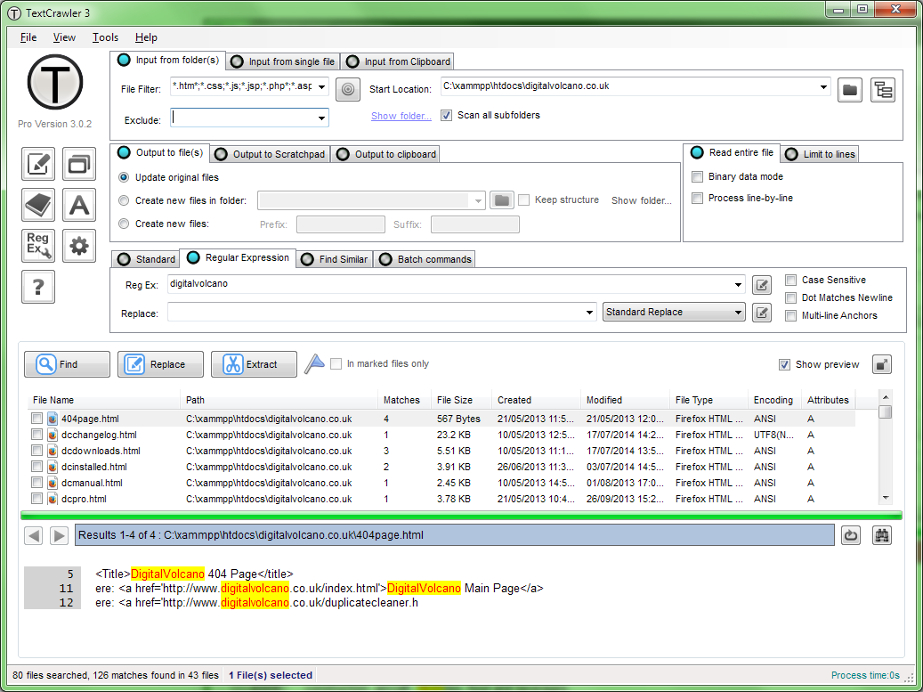
There are two tools I use to find (non- and) regex matches in files: TextCrawler
and Agent Ransack.

TextCrawler can be used to directly extract all (non- and) regex matches at
once.
You can also replace matches in files, or simply search for them.

Agent Ransack can be used to find files by pattern or regular expression.
It can also search inside files for (non- and) regex matches.
Agent Ransack can be used to extract all _lines_ containing matches at once.

Both tools are freeware!
The descriptions below are copied from the websites referred to.


TextCrawler 1.0.6
http://www.digitalvolcano.co.uk/textcrawler.html

A fantastic tool for anyone who works with text files. This program enables
you to instantly find and replace words and phrases across multiple files and
folders. It utilises a powerful Regular Expression engine to enable you to
create
sophisticated searches.

Some Features...

Find and Replace across files
Fast searching, even on large files.
Simple to use interface
Flexible search parameters
Text Extractor - rip text into a new file
Search and replace using Regular Expressions. Create sophisticated searches.
Regular Expression test tool
Regular Expression library - Save your searches.
Create backup files
Highlighted search results
Export Results

Here's a screenshot:
http://www.digitalvolcano.co.uk/tc1.jpg


Agent Ransack
http://www.mythicsoft.com/agentransack

Agent Ransack is a free tool for finding files and information on your hard
drive fast and efficiently. When searching the contents of files Agent Ransack
displays the text found so you can quickly browse the results without having
to separately open each file!

Agent Ransack provides compelling advantages over similar search tools:

Regular expressions that allow complex rule based searches.
Immediate contents results view.
Various wizards to walk the user through the searching process.

Agent Ransack is provided FREE of charge for the benefit of the Windows
community.

Here are some screenshots:
http://www.mythicsoft.com/agentransack/Page.aspx?page=screenshots


______________________________________________________________________
You are receiving this email because you elected to monitor this forum.
To stop monitoring this forum, login to SourceForge.net and visit:
https://sourceforge.net/forum/unmonitor.php?forum_id=331754


------------------------------

Message: 8
Date: Sat, 19 Apr 2008 17:14:25 -0700
From: "SourceForge.net" <[EMAIL PROTECTED]>
Subject: [Notepad-plus-plus] [notepad-plus - Help] Tools to find and
        copy    regex matches in files
To: [EMAIL PROTECTED]
Message-ID: <[EMAIL PROTECTED]>
Content-Type: text/plain; charset="UTF-8"


Read and respond to this message at:
https://sourceforge.net/forum/message.php?msg_id=4915720
By: fool4uanyway

There are two tools I use to find (non- and) regex matches in files: Agent
Ransack
and TextCrawler.

Agent Ransack can be used to find files by pattern or regular expression.
It can also search inside files for (non- and) regex matches.
Agent Ransack can be used to extract all _lines_ containing matches.

TextCrawler can be used to directly extract all (non- and) regex _matches_ at
once.
You can also replace matches in files, or simply search for (the files
conatining)
them.

See the original message for a short description and list of features of both
tools and links to their websites:

"Tools to find and copy regex matches in files" (New)
By: Fool4UAnyway (fool4uanyway) - 2008-04-20 01:49
http://sourceforge.net/forum/message.php?msg_id=4915704

in the thread

"copy to clip all text matching regex pattern"
http://sourceforge.net/forum/forum.php?thread_id=1964719&forum_id=331754

dealing with the question how to extract only all matches instead of complete
lines.


______________________________________________________________________
You are receiving this email because you elected to monitor this forum.
To stop monitoring this forum, login to SourceForge.net and visit:
https://sourceforge.net/forum/unmonitor.php?forum_id=331754


------------------------------

Message: 9
Date: Sat, 19 Apr 2008 17:21:25 -0700
From: "SourceForge.net" <[EMAIL PROTECTED]>
Subject: [Notepad-plus-plus] [notepad-plus - Translation] New change
        for     translation
To: [EMAIL PROTECTED]
Message-ID: <[EMAIL PROTECTED]>
Content-Type: text/plain; charset="UTF-8"


Read and respond to this message at:
https://sourceforge.net/forum/message.php?msg_id=4915724
By: donho

>From Notepad++ v4.8.2, it's not necessary to include the shorcut in
nativeLang.xml.
So please remove all the shortcuts (including the invisible TAB) from the menu
section for the next updating.

Thank you,
Don


______________________________________________________________________
You are receiving this email because you elected to monitor this forum.
To stop monitoring this forum, login to SourceForge.net and visit:
https://sourceforge.net/forum/unmonitor.php?forum_id=558104


------------------------------

Message: 10
Date: Sat, 19 Apr 2008 17:22:03 -0700
From: "SourceForge.net" <[EMAIL PROTECTED]>
Subject: [Notepad-plus-plus] [notepad-plus - Translation] RE: Spanish
        translation (for v3.8) is updated
To: [EMAIL PROTECTED]
Message-ID: <[EMAIL PROTECTED]>
Content-Type: text/plain; charset="UTF-8"


Read and respond to this message at:
https://sourceforge.net/forum/message.php?msg_id=4915725
By: donho

Please see : https://sourceforge.net/forum/message.php?msg_id=4915724

Don

______________________________________________________________________
You are receiving this email because you elected to monitor this forum.
To stop monitoring this forum, login to SourceForge.net and visit:
https://sourceforge.net/forum/unmonitor.php?forum_id=558104


------------------------------

Message: 11
Date: Sat, 19 Apr 2008 21:54:12 -0700
From: "SourceForge.net" <[EMAIL PROTECTED]>
Subject: [Notepad-plus-plus] [notepad-plus - Help] RE: OS Unexpected
        ShutOff led to content loss
To: [EMAIL PROTECTED]
Message-ID: <[EMAIL PROTECTED]>
Content-Type: text/plain; charset="UTF-8"


Read and respond to this message at:
https://sourceforge.net/forum/message.php?msg_id=4915873
By: nobody

FYI. The backup is set to NONE.
I am fine if what I had lost is those after my last save.
However, I have lost much more than that.

If the automatic backup feature still works after the setting of "NONE", I'll
say I was being trapped instead of being helped.

______________________________________________________________________
You are receiving this email because you elected to monitor this forum.
To stop monitoring this forum, login to SourceForge.net and visit:
https://sourceforge.net/forum/unmonitor.php?forum_id=331754


------------------------------

-------------------------------------------------------------------------
This SF.net email is sponsored by the 2008 JavaOne(SM) Conference
Don't miss this year's exciting event. There's still time to save $100.
Use priority code J8TL2D2.
http://ad.doubleclick.net/clk;198757673;13503038;p?http://java.sun.com/javaone

------------------------------

_______________________________________________
Notepad-plus-plus mailing list
[email protected]
https://lists.sourceforge.net/lists/listinfo/notepad-plus-plus


End of Notepad-plus-plus Digest, Vol 23, Issue 57
*************************************************