Send Notepad-plus-plus mailing list submissions to
        [email protected]
To subscribe or unsubscribe via the World Wide Web, visit
        https://lists.sourceforge.net/lists/listinfo/notepad-plus-plus
or, via email, send a message with subject or body 'help' to
        [email protected]

You can reach the person managing the list at
        [email protected]

When replying, please edit your Subject line so it is more specific
than "Re: Contents of Notepad-plus-plus digest..."


Today's Topics:

   1. [notepad-plus - Open Discussion] RE: U3 version   of Notepad++
      (SourceForge.net)
   2. [notepad-plus - Help] Generic User Define keywords + Block
      toggle (SourceForge.net)
   3. [notepad-plus - Open Discussion] RE: Auto updates still don't
      work (SourceForge.net)
   4. [notepad-plus - Help] Not sure how to get help    on Notepad++
      (SourceForge.net)
   5. [notepad-plus - Help] RE: Not sure how to get     help on
      Notepad++ (SourceForge.net)
   6. [notepad-plus - Help] RE: Notepad++ wont update (SourceForge.net)
   7. [notepad-plus - Help] RE: Not sure how to get     help on
      Notepad++ (SourceForge.net)
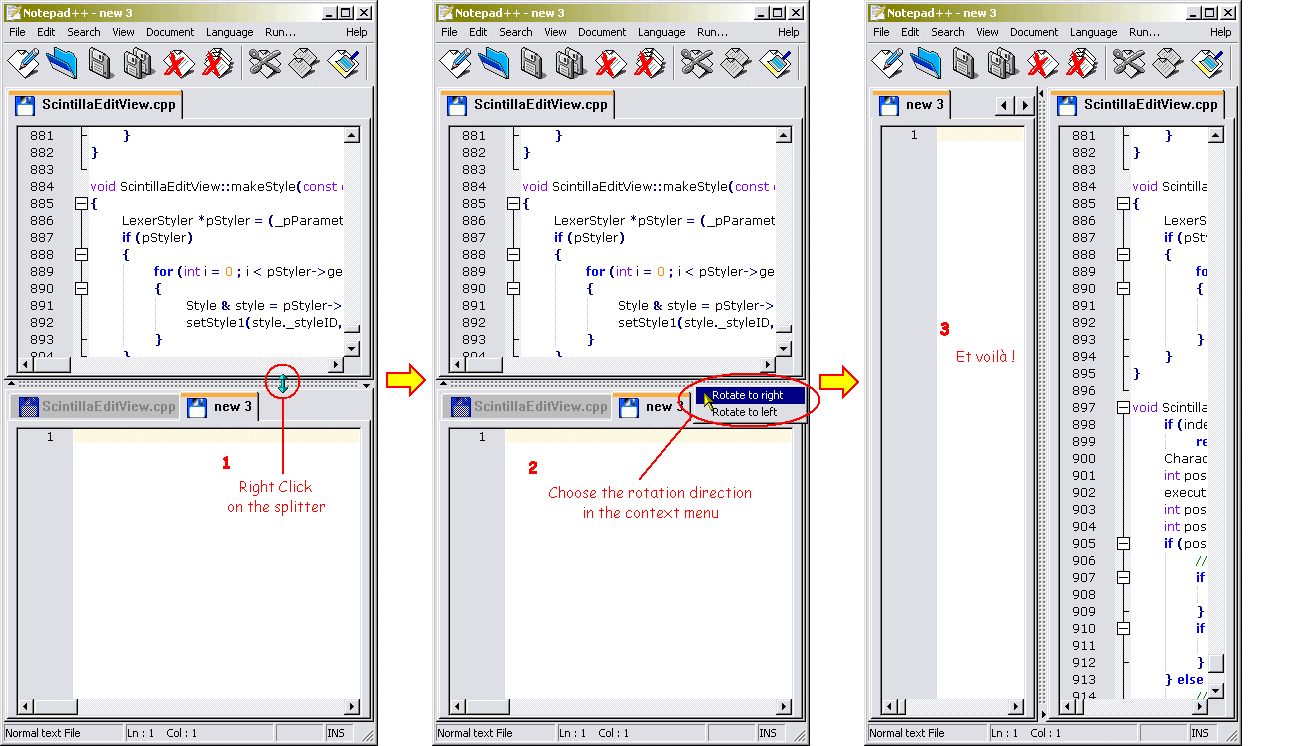
   8. [notepad-plus - Open Discussion] Horizontal       Split Screen
      (SourceForge.net)
   9. [notepad-plus - Help] Auto indenting wrapped      lines
      (SourceForge.net)
  10. [notepad-plus - Open Discussion] wiegand format (SourceForge.net)
  11. [notepad-plus - Help] RE: Using the Language      Tool
      (SourceForge.net)
  12. [notepad-plus - Open Discussion] RE: Horizontal   Split Screen
      (SourceForge.net)


----------------------------------------------------------------------

Message: 1
Date: Mon, 05 Jan 2009 21:40:49 +0000
From: "SourceForge.net" <[email protected]>
Subject: [Notepad-plus-plus] [notepad-plus - Open Discussion] RE: U3
        version of Notepad++
To: [email protected]
Message-ID: <[email protected]>
Content-Type: text/plain; charset="UTF-8"


Read and respond to this message at:
https://sourceforge.net/forum/message.php?msg_id=6005971
By: deikun

Bob Uncle wrote:

> However, one thing that the PA people
> do is to shrink the files as well to
> reduce the footprint on the USB sticks

I don't like the not native portable apps. Portableapp's Applications aren't
native portable. They use an external launcher (so two processes at run-time,
the real app and the external launcher and sometimes problems with Win file
associations) and written in an interpreted language (so more inefficient than
a compiled one).

______________________________________________________________________
You are receiving this email because you elected to monitor this forum.
To stop monitoring this forum, login to SourceForge.net and visit:
https://sourceforge.net/forum/unmonitor.php?forum_id=331753


------------------------------

Message: 2
Date: Tue, 06 Jan 2009 00:01:41 +0000
From: "SourceForge.net" <[email protected]>
Subject: [Notepad-plus-plus] [notepad-plus - Help] Generic User Define
        keywords + Block toggle
To: [email protected]
Message-ID: <[email protected]>
Content-Type: text/plain; charset="UTF-8"


Read and respond to this message at:
https://sourceforge.net/forum/message.php?msg_id=6007978
By: zesp

Hi there,

I have 2 questions :

1. In "Settings / Styler Configurator... / User Define keywords", how can I
add generic keywords, for example all words starting by "myFunctions_" (adding
'*' or '.*' at the end of the word does not work) ?

2. In C++/Java, is it possible to comment and uncomment a part of code using
"//" without using "Block toggle command" (right click) which comments
uncommented
lines but uncomments commented lines!
In the following example:
  > // variables
  > double a, b, c ;
  > // operation
  > a = b + c ;
using "Block toggle command" will result in
  > variables
  > // double a, b, c ;
  > operation
  > // a = b + c ;
whereas I'd like to get
  > // // variables
  > // double a, b, c ;
  > // // operation
  > // a = b + c ;
while commenting and
  > // variables
  > double a, b, c ;
  > // operation
  > a = b + c ;
while uncommenting

Thanks in advance,
Z

______________________________________________________________________
You are receiving this email because you elected to monitor this forum.
To stop monitoring this forum, login to SourceForge.net and visit:
https://sourceforge.net/forum/unmonitor.php?forum_id=331754


------------------------------

Message: 3
Date: Tue, 06 Jan 2009 00:39:52 +0000
From: "SourceForge.net" <[email protected]>
Subject: [Notepad-plus-plus] [notepad-plus - Open Discussion] RE: Auto
        updates still don't work
To: [email protected]
Message-ID: <[email protected]>
Content-Type: text/plain; charset="UTF-8"


Read and respond to this message at:
https://sourceforge.net/forum/message.php?msg_id=6008305
By: mrcs4

I missed the last 3 or 4 updates because I didn't know manual updates under
the "?" menu item wasn't working.  (More precisely, it told me no updates
available.)
I don't know if this has anything to do with it, but when I looked at the files
in the C:\Program Files\Notepad++\updater directory and plugged in the
URL http://notepad-plus.sourceforge.net/commun/update/getDownLoadUrl.php to
my address bar (Opera 9.63) it indicated v.5.0.3, which is the one I am using.
And when I clicked on GUP.exe it started to download that version.

______________________________________________________________________
You are receiving this email because you elected to monitor this forum.
To stop monitoring this forum, login to SourceForge.net and visit:
https://sourceforge.net/forum/unmonitor.php?forum_id=331753


------------------------------

Message: 4
Date: Tue, 06 Jan 2009 01:05:03 +0000
From: "SourceForge.net" <[email protected]>
Subject: [Notepad-plus-plus] [notepad-plus - Help] Not sure how to get
        help    on Notepad++
To: [email protected]
Message-ID: <[email protected]>
Content-Type: text/plain; charset="UTF-8"


Read and respond to this message at:
https://sourceforge.net/forum/message.php?msg_id=6008499
By: list_lfa

First off, Notepad++ is great ! I use it every day.

Silly question; how do I read the help documents on Notepad++?

When I have question about Microsoft Word or Firefox, for example, I can
normally
go to the Help menu and find a way to search for an answer.  I must be blind
though, I can't quickly find a way to the help documentation on Notepad++.

Thanks :)

______________________________________________________________________
You are receiving this email because you elected to monitor this forum.
To stop monitoring this forum, login to SourceForge.net and visit:
https://sourceforge.net/forum/unmonitor.php?forum_id=331754


------------------------------

Message: 5
Date: Tue, 06 Jan 2009 02:04:19 +0000
From: "SourceForge.net" <[email protected]>
Subject: [Notepad-plus-plus] [notepad-plus - Help] RE: Not sure how to
        get     help on Notepad++
To: [email protected]
Message-ID: <[email protected]>
Content-Type: text/plain; charset="UTF-8"


Read and respond to this message at:
https://sourceforge.net/forum/message.php?msg_id=6008895
By: jaloola

Click on the ? Button on the top toolbar. (It's last)

Then click Online Help!

Hope this helps!

Allen Zhu
[email protected]

______________________________________________________________________
You are receiving this email because you elected to monitor this forum.
To stop monitoring this forum, login to SourceForge.net and visit:
https://sourceforge.net/forum/unmonitor.php?forum_id=331754


------------------------------

Message: 6
Date: Tue, 06 Jan 2009 02:05:16 +0000
From: "SourceForge.net" <[email protected]>
Subject: [Notepad-plus-plus] [notepad-plus - Help] RE: Notepad++ wont
        update
To: [email protected]
Message-ID: <[email protected]>
Content-Type: text/plain; charset="UTF-8"


Read and respond to this message at:
https://sourceforge.net/forum/message.php?msg_id=6008901
By: jaloola

Hmm...

Then it means that the Notepad++ Updater is offering the wrong version...

Don should update it...

While you're at it, update manually!

Allen Zhu
[email protected]

______________________________________________________________________
You are receiving this email because you elected to monitor this forum.
To stop monitoring this forum, login to SourceForge.net and visit:
https://sourceforge.net/forum/unmonitor.php?forum_id=331754


------------------------------

Message: 7
Date: Tue, 06 Jan 2009 02:04:34 +0000
From: "SourceForge.net" <[email protected]>
Subject: [Notepad-plus-plus] [notepad-plus - Help] RE: Not sure how to
        get     help on Notepad++
To: [email protected]
Message-ID: <[email protected]>
Content-Type: text/plain; charset="UTF-8"


Read and respond to this message at:
https://sourceforge.net/forum/message.php?msg_id=6008897
By: jaloola

Plus, you can also look at the Notepad+ Website...

______________________________________________________________________
You are receiving this email because you elected to monitor this forum.
To stop monitoring this forum, login to SourceForge.net and visit:
https://sourceforge.net/forum/unmonitor.php?forum_id=331754


------------------------------

Message: 8
Date: Tue, 06 Jan 2009 06:57:14 +0000
From: "SourceForge.net" <[email protected]>
Subject: [Notepad-plus-plus] [notepad-plus - Open Discussion]
        Horizontal      Split Screen
To: [email protected]
Message-ID: <[email protected]>
Content-Type: text/plain; charset="UTF-8"


Read and respond to this message at:
https://sourceforge.net/forum/message.php?msg_id=6010831
By: doggan

Is there a way to get horizontal split screen in Notepad++? Cloning in another
view creates a vertical split screen. Searched around but couldn't find any
info on this. Thanks.

______________________________________________________________________
You are receiving this email because you elected to monitor this forum.
To stop monitoring this forum, login to SourceForge.net and visit:
https://sourceforge.net/forum/unmonitor.php?forum_id=331753


------------------------------

Message: 9
Date: Tue, 06 Jan 2009 07:33:47 +0000
From: "SourceForge.net" <[email protected]>
Subject: [Notepad-plus-plus] [notepad-plus - Help] Auto indenting
        wrapped lines
To: [email protected]
Message-ID: <[email protected]>
Content-Type: text/plain; charset="UTF-8"


Read and respond to this message at:
https://sourceforge.net/forum/message.php?msg_id=6011073
By: squis

When writing long lines of text that wrap, I'd like the next line to be indented
as much as the first line was. Say I start writing the text 2 tabs in. When
the text wraps, the next line will start at the very left of the document,
breaking
something that could have been a nice block of text.

Now I don't want any additional tabs to be inserted automatically, I'd just
like wrapping lines to be displayed that way. Is there any way to turn on this
feature in Notepad++, or are there any plugins that will do the trick?

Thanks!

______________________________________________________________________
You are receiving this email because you elected to monitor this forum.
To stop monitoring this forum, login to SourceForge.net and visit:
https://sourceforge.net/forum/unmonitor.php?forum_id=331754


------------------------------

Message: 10
Date: Tue, 06 Jan 2009 09:39:05 +0000
From: "SourceForge.net" <[email protected]>
Subject: [Notepad-plus-plus] [notepad-plus - Open Discussion] wiegand
        format
To: [email protected]
Message-ID: <[email protected]>
Content-Type: text/plain; charset="UTF-8"


Read and respond to this message at:
https://sourceforge.net/forum/message.php?msg_id=6011976
By: prabin

plz help to write the code to interface the 8051 microcontroller through
interrupt
pins........i need to use the wiegand format to access the data............

thank you

______________________________________________________________________
You are receiving this email because you elected to monitor this forum.
To stop monitoring this forum, login to SourceForge.net and visit:
https://sourceforge.net/forum/unmonitor.php?forum_id=331753


------------------------------

Message: 11
Date: Tue, 06 Jan 2009 10:05:34 +0000
From: "SourceForge.net" <[email protected]>
Subject: [Notepad-plus-plus] [notepad-plus - Help] RE: Using the
        Language        Tool
To: [email protected]
Message-ID: <[email protected]>
Content-Type: text/plain; charset="UTF-8"


Read and respond to this message at:
https://sourceforge.net/forum/message.php?msg_id=6012176
By: fartinguncle

:-)  Actually, it was my mistake.  I created the page and then thought of a
better name for it, but there doesn't seem to be a way of moving/renaming it.
Ah well!

- Mark

______________________________________________________________________
You are receiving this email because you elected to monitor this forum.
To stop monitoring this forum, login to SourceForge.net and visit:
https://sourceforge.net/forum/unmonitor.php?forum_id=331754


------------------------------

Message: 12
Date: Tue, 06 Jan 2009 12:40:37 +0000
From: "SourceForge.net" <[email protected]>
Subject: [Notepad-plus-plus] [notepad-plus - Open Discussion] RE:
        Horizontal      Split Screen
To: [email protected]
Message-ID: <[email protected]>
Content-Type: text/plain; charset="UTF-8"


Read and respond to this message at:
https://sourceforge.net/forum/message.php?msg_id=6013281
By: cocinerox

http://notepad-plus.sourceforge.net/commun/screenshots/scrsh_rotate.gif

______________________________________________________________________
You are receiving this email because you elected to monitor this forum.
To stop monitoring this forum, login to SourceForge.net and visit:
https://sourceforge.net/forum/unmonitor.php?forum_id=331753


------------------------------

------------------------------------------------------------------------------
Check out the new SourceForge.net Marketplace.
It is the best place to buy or sell services for
just about anything Open Source.
http://p.sf.net/sfu/Xq1LFB

------------------------------

_______________________________________________
Notepad-plus-plus mailing list
[email protected]
https://lists.sourceforge.net/lists/listinfo/notepad-plus-plus


End of Notepad-plus-plus Digest, Vol 32, Issue 9
************************************************