keith-ratcliffe opened a new issue, #3170:
URL: https://github.com/apache/accumulo/issues/3170
**Describe the bug**
In prior versions of Accumulo, the user could copy and paste a
newline-separated list of commands into the shell and have them be executed in
sequence. In 2.1, this seems to be no longer possible. When the user attempts
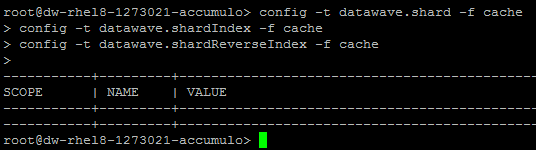
to execute the pasted commands, it seems that nothing is actually executed. A
workaround is to place the commands in a file and to have the shell execute the
file, but since the copy/paste scenario is a common use case for us, it seemed
worth reporting here.
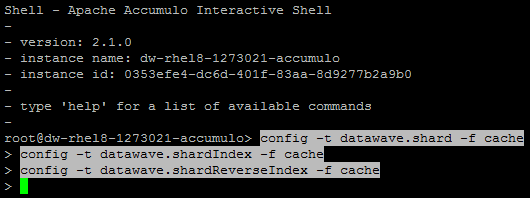
A secondary observation is that, when any text is pasted into the shell, the
text is automatically highlighted (background and foreground colors inverted),
as if the user had click+drag-selected the text with the mouse.
**Versions (OS, Maven, Java, and others, as appropriate):**
- Affected version(s) of this project: 2.1.0
- OS: CentOS 7.5, RHEL 8
**To Reproduce**
1. Copy/paste valid newline-separated commands into the shell
2. Observe that the command text is automatically highlighted
3. Hit <enter>
4. Observe that none of the commands are executed
**Expected behavior**
The list of commands are executed in order, as with the 1.x shell
**Screenshots**
Commands copied/pasted...
After hitting ENTER...
--
This is an automated message from the Apache Git Service.
To respond to the message, please log on to GitHub and use the
URL above to go to the specific comment.
To unsubscribe, e-mail: [email protected]
For queries about this service, please contact Infrastructure at:
[email protected]


