kayx23 commented on code in PR #10702:
URL: https://github.com/apache/apisix/pull/10702#discussion_r1436013136
########## docs/zh/latest/terminology/plugin-metadata.md: ########## @@ -0,0 +1,75 @@ +--- +title: Plugin Metadata +keywords: + - API 网关 + - Apache APISIX + - 插件元数据配置 + - Plugin Metadata +description: APISIX 的插件元数据 +--- + +<!-- +# +# Licensed to the Apache Software Foundation (ASF) under one or more +# contributor license agreements. See the NOTICE file distributed with +# this work for additional information regarding copyright ownership. +# The ASF licenses this file to You under the Apache License, Version 2.0 +# (the "License"); you may not use this file except in compliance with +# the License. You may obtain a copy of the License at +# +# http://www.apache.org/licenses/LICENSE-2.0 +# +# Unless required by applicable law or agreed to in writing, software +# distributed under the License is distributed on an "AS IS" BASIS, +# WITHOUT WARRANTIES OR CONDITIONS OF ANY KIND, either express or implied. +# See the License for the specific language governing permissions and +# limitations under the License. +# +--> + +## 摘要 + +在本文档中,您将了解到 APISIX 中,插件元数据的基本概念和您可能使用到的场景。 + +浏览文档末尾的相关资源,获取与此相关的更多信息。 + +## 描述 + +在 APISIX 中,配置通用的元数据属性,可以作用于包含该元数据插件的所有路由及服务中。例如为`rocketmq-logger`指定了 `log_format`,则所有绑定 rocketmq-logger 的路由或服务都将使用该日志格式。 + +下图说明了插件元数据的概念,使用两个不同路由上的 [syslog](https://apisix.apache.org/zh/docs/apisix/plugins/syslog/) 插件的实例,以及为 [syslog](https://apisix.apache.org/zh/docs/apisix/plugins/syslog/) 插件设置全局`log_format`的插件元数据对象: + +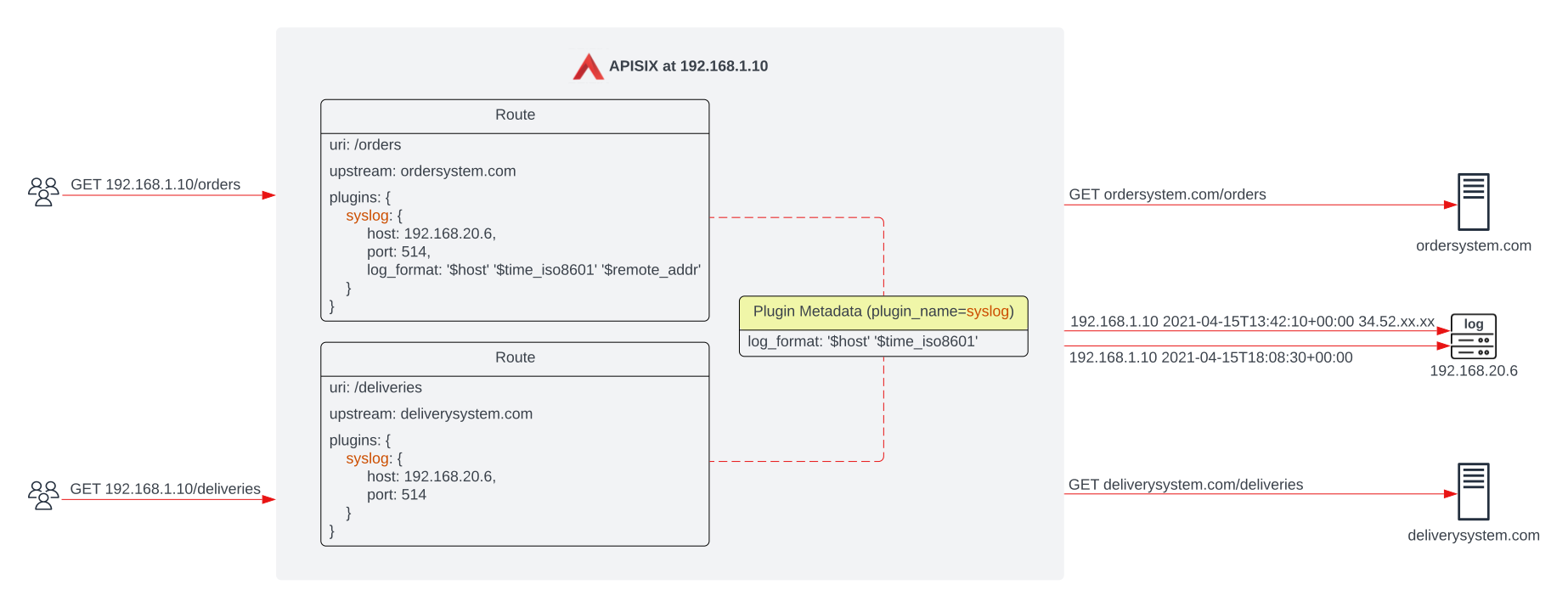 + +如果没有另外指定,插件元数据对象上的`log_format`应将相同的日志格式统一应用于两个`syslog`插件。但是,由于`/orders`路由上的`syslog`插件具有不同的`log_format`,因此访问该路由的请求将按照路由中插件指定的`log_format`生成日志。 + +在插件级别设置的元数据属性更加精细,并且比`全局`元数据对象具有更高的优先级。 + +插件元数据对象只能用于具有元数据属性的插件。有关哪些插件具有元数据属性的更多详细信息,请查看插件配置属性及相关信息。 + +## 配置示例 + +以下示例展示了如何通过 Admin API 配置插件元数据: + +```shell +curl http://127.0.0.1:9180/apisix/admin/plugin_metadata/http-logger \ +-H 'X-API-KEY: edd1c9f034335f136f87ad84b625c8f1' -X PUT -d ' +{ + "log_format": { + "host": "$host", + "@timestamp": "$time_iso8601", + "client_ip": "$remote_addr" + } +}' +``` + +配置完成后,你将在日志系统中看到如下类似日志: + +```shell Review Comment: ```suggestion ```json ``` ########## docs/zh/latest/terminology/plugin-metadata.md: ########## @@ -0,0 +1,75 @@ +--- +title: Plugin Metadata +keywords: + - API 网关 + - Apache APISIX + - 插件元数据配置 + - Plugin Metadata +description: APISIX 的插件元数据 +--- + +<!-- +# +# Licensed to the Apache Software Foundation (ASF) under one or more +# contributor license agreements. See the NOTICE file distributed with +# this work for additional information regarding copyright ownership. +# The ASF licenses this file to You under the Apache License, Version 2.0 +# (the "License"); you may not use this file except in compliance with +# the License. You may obtain a copy of the License at +# +# http://www.apache.org/licenses/LICENSE-2.0 +# +# Unless required by applicable law or agreed to in writing, software +# distributed under the License is distributed on an "AS IS" BASIS, +# WITHOUT WARRANTIES OR CONDITIONS OF ANY KIND, either express or implied. +# See the License for the specific language governing permissions and +# limitations under the License. +# +--> + +## 摘要 + +在本文档中,您将了解到 APISIX 中,插件元数据的基本概念和您可能使用到的场景。 + +浏览文档末尾的相关资源,获取与此相关的更多信息。 + +## 描述 + +在 APISIX 中,配置通用的元数据属性,可以作用于包含该元数据插件的所有路由及服务中。例如为`rocketmq-logger`指定了 `log_format`,则所有绑定 rocketmq-logger 的路由或服务都将使用该日志格式。 + +下图说明了插件元数据的概念,使用两个不同路由上的 [syslog](https://apisix.apache.org/zh/docs/apisix/plugins/syslog/) 插件的实例,以及为 [syslog](https://apisix.apache.org/zh/docs/apisix/plugins/syslog/) 插件设置全局`log_format`的插件元数据对象: + + + +如果没有另外指定,插件元数据对象上的`log_format`应将相同的日志格式统一应用于两个`syslog`插件。但是,由于`/orders`路由上的`syslog`插件具有不同的`log_format`,因此访问该路由的请求将按照路由中插件指定的`log_format`生成日志。 + +在插件级别设置的元数据属性更加精细,并且比`全局`元数据对象具有更高的优先级。 + +插件元数据对象只能用于具有元数据属性的插件。有关哪些插件具有元数据属性的更多详细信息,请查看插件配置属性及相关信息。 + +## 配置示例 + +以下示例展示了如何通过 Admin API 配置插件元数据: + +```shell +curl http://127.0.0.1:9180/apisix/admin/plugin_metadata/http-logger \ +-H 'X-API-KEY: edd1c9f034335f136f87ad84b625c8f1' -X PUT -d ' +{ + "log_format": { + "host": "$host", + "@timestamp": "$time_iso8601", + "client_ip": "$remote_addr" + } +}' +``` + +配置完成后,你将在日志系统中看到如下类似日志: + +```shell +{"host":"localhost","@timestamp":"2020-09-23T19:05:05-04:00","client_ip":"127.0.0.1","route_id":"1"} +{"host":"localhost","@timestamp":"2020-09-23T19:05:05-04:00","client_ip":"127.0.0.1","route_id":"1"} +``` + +## 附加资源 + +核心概念 - [Plugins](https://apisix.apache.org/docs/apisix/terminology/plugin/) Review Comment: ```suggestion 核心概念 - [插件](https://apisix.apache.org/zh/docs/apisix/terminology/plugin) ``` ########## docs/en/latest/terminology/plugin-metadata.md: ########## @@ -0,0 +1,74 @@ +--- +title: Plugin Metadata +keywords: + - API Gateway + - Apache APISIX + - Plugin Metadata +description: Plugin Metadata in Apache APISIX. +--- + +<!-- +# +# Licensed to the Apache Software Foundation (ASF) under one or more +# contributor license agreements. See the NOTICE file distributed with +# this work for additional information regarding copyright ownership. +# The ASF licenses this file to You under the Apache License, Version 2.0 +# (the "License"); you may not use this file except in compliance with +# the License. You may obtain a copy of the License at +# +# http://www.apache.org/licenses/LICENSE-2.0 +# +# Unless required by applicable law or agreed to in writing, software +# distributed under the License is distributed on an "AS IS" BASIS, +# WITHOUT WARRANTIES OR CONDITIONS OF ANY KIND, either express or implied. +# See the License for the specific language governing permissions and +# limitations under the License. +# +--> + +## Description + +In this document, you will learn the basic concept of plugin metadata in APISIX and why you may need them. + +Explore additional resources at the end of the document for more information on related topics. + +## Overview + +In APISIX, a plugin metadata object is used to configure the common metadata field(s) of all plugin instances sharing the same plugin name. It is useful when a plugin is enabled across multiple objects and requires a universal update to their metadata fields. + +The following diagram illustrates the concept of plugin metadata using two instances of [syslog](https://apisix.apache.org/docs/apisix/plugins/syslog/) plugins on two different routes, as well as a plugin metadata object setting a [global](https://apisix.apache.org/docs/apisix/plugins/syslog/) `log_format` for the syslog plugin: + + + +Without otherwise specified, the `log_format` on plugin metadata object should apply the same log format uniformly to both `syslog` plugins. However, since the `syslog` plugin on the `/orders` route has a different `log_format`, requests visiting this route will generate logs in the `log_format` specified by the plugin in route. + +Metadata properties set at the plugin level is more granular and has a higher priority over the "global" metadata object. + +Plugin metadata objects should only be used for plugins that have metadata fields. Check the specific plugin documentation to know more. + +## Example usage + +The example below shows how you can configure through the Admin API: + +```shell +curl http://127.0.0.1:9180/apisix/admin/plugin_metadata/http-logger \ +-H 'X-API-KEY: edd1c9f034335f136f87ad84b625c8f1' -X PUT -d ' +{ + "log_format": { + "host": "$host", + "@timestamp": "$time_iso8601", + "client_ip": "$remote_addr" + } +}' +``` + +With this configuration, your logs would be formatted as shown below: + +```shell Review Comment: ```suggestion ```json ``` ########## docs/zh/latest/terminology/plugin-metadata.md: ########## @@ -0,0 +1,75 @@ +--- +title: Plugin Metadata +keywords: + - API 网关 + - Apache APISIX + - 插件元数据配置 + - Plugin Metadata +description: APISIX 的插件元数据 +--- + +<!-- +# +# Licensed to the Apache Software Foundation (ASF) under one or more +# contributor license agreements. See the NOTICE file distributed with +# this work for additional information regarding copyright ownership. +# The ASF licenses this file to You under the Apache License, Version 2.0 +# (the "License"); you may not use this file except in compliance with +# the License. You may obtain a copy of the License at +# +# http://www.apache.org/licenses/LICENSE-2.0 +# +# Unless required by applicable law or agreed to in writing, software +# distributed under the License is distributed on an "AS IS" BASIS, +# WITHOUT WARRANTIES OR CONDITIONS OF ANY KIND, either express or implied. +# See the License for the specific language governing permissions and +# limitations under the License. +# +--> + +## 摘要 + +在本文档中,您将了解到 APISIX 中,插件元数据的基本概念和您可能使用到的场景。 + +浏览文档末尾的相关资源,获取与此相关的更多信息。 + +## 描述 + +在 APISIX 中,配置通用的元数据属性,可以作用于包含该元数据插件的所有路由及服务中。例如为`rocketmq-logger`指定了 `log_format`,则所有绑定 rocketmq-logger 的路由或服务都将使用该日志格式。 + +下图说明了插件元数据的概念,使用两个不同路由上的 [syslog](https://apisix.apache.org/zh/docs/apisix/plugins/syslog/) 插件的实例,以及为 [syslog](https://apisix.apache.org/zh/docs/apisix/plugins/syslog/) 插件设置全局`log_format`的插件元数据对象: + + + +如果没有另外指定,插件元数据对象上的`log_format`应将相同的日志格式统一应用于两个`syslog`插件。但是,由于`/orders`路由上的`syslog`插件具有不同的`log_format`,因此访问该路由的请求将按照路由中插件指定的`log_format`生成日志。 + +在插件级别设置的元数据属性更加精细,并且比`全局`元数据对象具有更高的优先级。 + +插件元数据对象只能用于具有元数据属性的插件。有关哪些插件具有元数据属性的更多详细信息,请查看插件配置属性及相关信息。 + +## 配置示例 + +以下示例展示了如何通过 Admin API 配置插件元数据: + +```shell +curl http://127.0.0.1:9180/apisix/admin/plugin_metadata/http-logger \ +-H 'X-API-KEY: edd1c9f034335f136f87ad84b625c8f1' -X PUT -d ' +{ + "log_format": { + "host": "$host", + "@timestamp": "$time_iso8601", + "client_ip": "$remote_addr" + } +}' +``` + +配置完成后,你将在日志系统中看到如下类似日志: + +```shell +{"host":"localhost","@timestamp":"2020-09-23T19:05:05-04:00","client_ip":"127.0.0.1","route_id":"1"} +{"host":"localhost","@timestamp":"2020-09-23T19:05:05-04:00","client_ip":"127.0.0.1","route_id":"1"} +``` + +## 附加资源 Review Comment: ```suggestion ## 相关资源 ``` -- This is an automated message from the Apache Git Service. To respond to the message, please log on to GitHub and use the URL above to go to the specific comment. To unsubscribe, e-mail: [email protected] For queries about this service, please contact Infrastructure at: [email protected]

