This is an automated email from the ASF dual-hosted git repository.

wenming pushed a commit to branch master
in repository https://gitbox.apache.org/repos/asf/apisix.git
The following commit(s) were added to refs/heads/master by this push:
new ca4de16b7 docs: improve `basic-auth` docs and update docs for
anonymous consumer (#11859)
ca4de16b7 is described below
commit ca4de16b7cd605b1956e173ff69424aa2be2fc87
Author: Traky Deng <[email protected]>
AuthorDate: Tue Apr 8 10:20:26 2025 +0800
docs: improve `basic-auth` docs and update docs for anonymous consumer
(#11859)
---
docs/en/latest/plugins/basic-auth.md | 476 ++++++++++++++++++++++++++++++-----
docs/zh/latest/plugins/basic-auth.md | 472 +++++++++++++++++++++++++++++-----
2 files changed, 830 insertions(+), 118 deletions(-)
diff --git a/docs/en/latest/plugins/basic-auth.md
b/docs/en/latest/plugins/basic-auth.md
index a25df3a21..37e38593c 100644
--- a/docs/en/latest/plugins/basic-auth.md
+++ b/docs/en/latest/plugins/basic-auth.md
@@ -6,7 +6,7 @@ keywords:
- Plugin
- Basic Auth
- basic-auth
-description: This document contains information about the Apache APISIX
basic-auth Plugin.
+description: The basic-auth Plugin adds basic access authentication for
Consumers to authenticate themselves before being able to access Upstream
resources.
---
<!--
@@ -28,20 +28,24 @@ description: This document contains information about the
Apache APISIX basic-au
#
-->
+<head>
+ <link rel="canonical" href="https://docs.api7.ai/hub/basic-auth"; />
+</head>
+
## Description
-The `basic-auth` Plugin is used to add [basic access
authentication](https://en.wikipedia.org/wiki/Basic_access_authentication) to a
Route or a Service.
+The `basic-auth` Plugin adds [basic access
authentication](https://en.wikipedia.org/wiki/Basic_access_authentication) for
[Consumers](../terminology/consumer.md) to authenticate themselves before being
able to access Upstream resources.
-This works well with a [Consumer](../terminology/consumer.md). Consumers of
the API can then add their key to the header to authenticate their requests.
+When a Consumer is successfully authenticated, APISIX adds additional headers,
such as `X-Consumer-Username`, `X-Credential-Indentifier`, and other Consumer
custom headers if configured, to the request, before proxying it to the
Upstream service. The Upstream service will be able to differentiate between
consumers and implement additional logics as needed. If any of these values is
not available, the corresponding header will not be added.
## Attributes
-For Consumer:
+For Consumer/Credentials:
| Name | Type | Required | Description
|
|----------|--------|----------|------------------------------------------------------------------------------------------------------------------------|
-| username | string | True | Unique username for a Consumer. If multiple
Consumers use the same `username`, a request matching exception is raised. |
-| password | string | True | Password of the user. This field supports
saving the value in Secret Manager using the [APISIX
Secret](../terminology/secret.md) resource. |
+| username | string | True | Unique basic auth username for a consumer. |
+| password | string | True | Basic auth password for the consumer. |
NOTE: `encrypt_fields = {"password"}` is also defined in the schema, which
means that the field will be stored encrypted in etcd. See [encrypted storage
fields](../plugin-develop.md#encrypted-storage-fields).
@@ -49,13 +53,15 @@ For Route:
| Name | Type | Required | Default | Description
|
|------------------|---------|----------|---------|------------------------------------------------------------------------|
-| hide_credentials | boolean | False | false | Set to true will not pass
the authorization request headers to the Upstream. |
+| hide_credentials | boolean | False | false | If true, do not pass the
authorization request header to Upstream services. |
+| anonymous_consumer | boolean | False | false | Anonymous Consumer name.
If configured, allow anonymous users to bypass the authentication. |
-## Enable Plugin
+## Examples
-To enable the Plugin, you have to create a Consumer object with the
authentication configuration:
+The examples below demonstrate how you can work with the `basic-auth` Plugin
for different scenarios.
:::note
+
You can fetch the `admin_key` from `config.yaml` and save to an environment
variable with the following command:
```bash
@@ -64,91 +70,445 @@ admin_key=$(yq '.deployment.admin.admin_key[0].key'
conf/config.yaml | sed 's/"/
:::
+### Implement Basic Authentication on Route
+
+The following example demonstrates how to implement basic authentication on a
Route.
+
+Create a Consumer `johndoe`:
+
```shell
-curl http://127.0.0.1:9180/apisix/admin/consumers -H "X-API-KEY: $admin_key"
-X PUT -d '
-{
- "username": "foo",
+curl "http://127.0.0.1:9180/apisix/admin/consumers"; -X PUT \
+ -H "X-API-KEY: ${admin_key}" \
+ -d '{
+ "username": "johndoe"
+ }'
+```
+
+Create `basic-auth` Credential for the consumer:
+
+```shell
+curl "http://127.0.0.1:9180/apisix/admin/consumers/johndoe/credentials"; -X PUT
\
+ -H "X-API-KEY: ${admin_key}" \
+ -d '{
+ "id": "cred-john-basic-auth",
"plugins": {
- "basic-auth": {
- "username": "foo",
- "password": "bar"
- }
+ "basic-auth": {
+ "username": "johndoe",
+ "password": "john-key"
+ }
}
-}'
+ }'
```
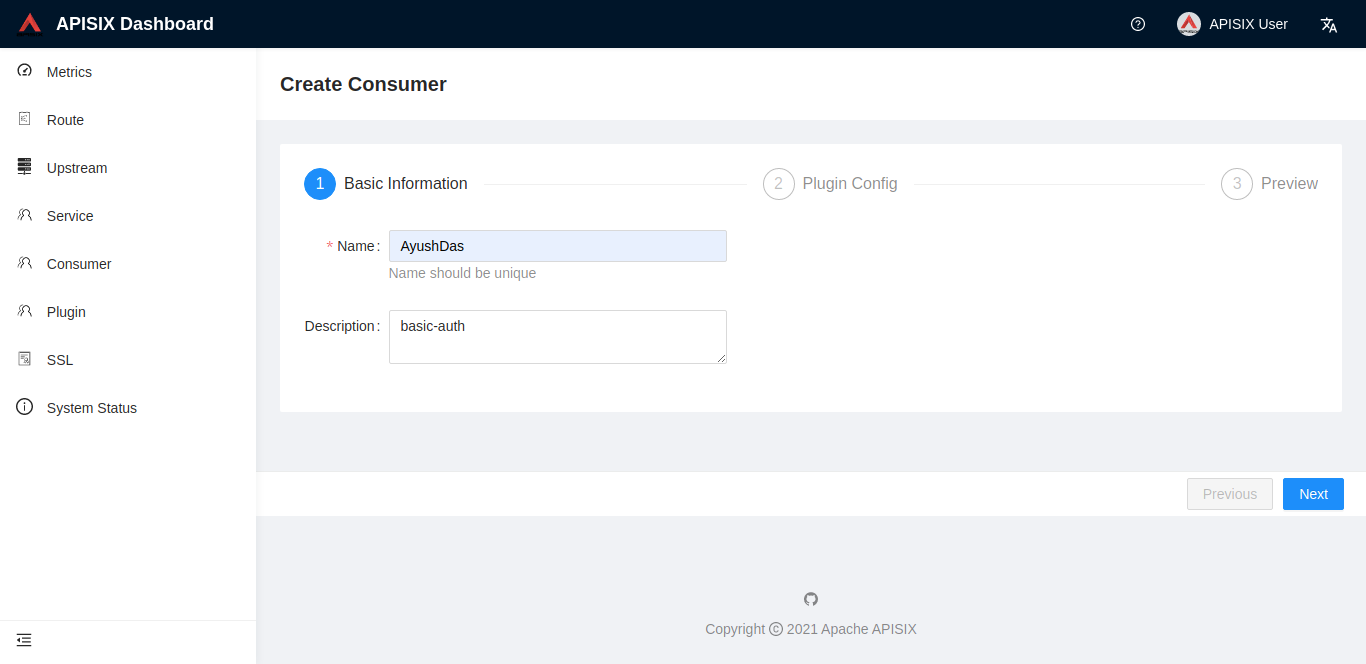
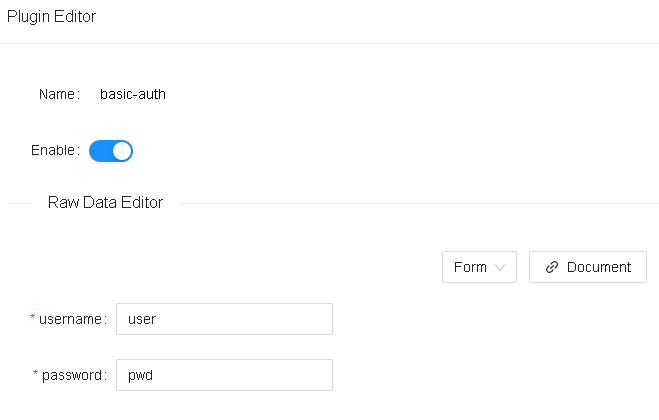
-You can also use the [APISIX Dashboard](/docs/dashboard/USER_GUIDE) to
complete the operation through a web UI.
+Create a Route with `basic-auth`:
-<!--
-
+```shell
+curl "http://127.0.0.1:9180/apisix/admin/routes"; -X PUT \
+ -H "X-API-KEY: ${admin_key}" \
+ -d '{
+ "id": "basic-auth-route",
+ "uri": "/anything",
+ "plugins": {
+ "basic-auth": {}
+ },
+ "upstream": {
+ "type": "roundrobin",
+ "nodes": {
+ "httpbin.org:80": 1
+ }
+ }
+ }'
+```
-
--->
+#### Verify with a Valid Key
-Once you have created a Consumer object, you can then configure a Route or a
Service to authenticate requests:
+Send a request to with the valid key:
```shell
-curl http://127.0.0.1:9180/apisix/admin/routes/1 -H "X-API-KEY: $admin_key" -X
PUT -d '
+curl -i "http://127.0.0.1:9080/anything"; -u johndoe:john-key
+```
+
+You should see an `HTTP/1.1 200 OK` response similar to the following:
+
+```json
{
- "methods": ["GET"],
- "uri": "/hello",
+ "args": {},
+ "headers": {
+ "Accept": "*/*",
+ "Apikey": "john-key",
+ "Authorization": "Basic am9obmRvZTpqb2huLWtleQ==",
+ "Host": "127.0.0.1",
+ "User-Agent": "curl/8.6.0",
+ "X-Amzn-Trace-Id": "Root=1-66e5107c-5bb3e24f2de5baf733aec1cc",
+ "X-Consumer-Username": "john",
+ "X-Credential-Indentifier": "cred-john-basic-auth",
+ "X-Forwarded-Host": "127.0.0.1"
+ },
+ "origin": "192.168.65.1, 205.198.122.37",
+ "url": "http://127.0.0.1/get";
+}
+```
+
+#### Verify with an Invalid Key
+
+Send a request with an invalid key:
+
+```shell
+curl -i "http://127.0.0.1:9080/anything"; -u johndoe:invalid-key
+```
+
+You should see an `HTTP/1.1 401 Unauthorized` response with the following:
+
+```text
+{"message":"Invalid user authorization"}
+```
+
+#### Verify without a Key
+
+Send a request to without a key:
+
+```shell
+curl -i "http://127.0.0.1:9080/anything";
+```
+
+You should see an `HTTP/1.1 401 Unauthorized` response with the following:
+
+```text
+{"message":"Missing authorization in request"}
+```
+
+### Hide Authentication Information From Upstream
+
+The following example demonstrates how to prevent the key from being sent to
the Upstream services by configuring `hide_credentials`. In APISIX, the
authentication key is forwarded to the Upstream services by default, which
might lead to security risks in some circumstances and you should consider
updating `hide_credentials`.
+
+Create a Consumer `johndoe`:
+
+```shell
+curl "http://127.0.0.1:9180/apisix/admin/consumers"; -X PUT \
+ -H "X-API-KEY: ${admin_key}" \
+ -d '{
+ "username": "johndoe"
+ }'
+```
+
+Create `basic-auth` Credential for the consumer:
+
+```shell
+curl "http://127.0.0.1:9180/apisix/admin/consumers/johndoe/credentials"; -X PUT
\
+ -H "X-API-KEY: ${admin_key}" \
+ -d '{
+ "id": "cred-john-basic-auth",
"plugins": {
- "basic-auth": {}
- },
- "upstream": {
- "type": "roundrobin",
- "nodes": {
- "127.0.0.1:1980": 1
- }
+ "basic-auth": {
+ "username": "johndoe",
+ "password": "john-key"
+ }
}
+ }'
+```
+
+#### Without Hiding Credentials
+
+Create a Route with `basic-auth` and configure `hide_credentials` to `false`,
which is the default configuration:
+
+```shell
+curl "http://127.0.0.1:9180/apisix/admin/routes"; -X PUT \
+-H "X-API-KEY: ${admin_key}" \
+-d '{
+ "id": "basic-auth-route",
+ "uri": "/anything",
+ "plugins": {
+ "basic-auth": {
+ "hide_credentials": false
+ }
+ },
+ "upstream": {
+ "type": "roundrobin",
+ "nodes": {
+ "httpbin.org:80": 1
+ }
+ }
}'
```
-## Example usage
+Send a request with the valid key:
-After you have configured the Plugin as mentioned above, you can make a
request to the Route as shown below:
+```shell
+curl -i "http://127.0.0.1:9080/anything"; -u johndoe:john-key
+```
+
+You should see an `HTTP/1.1 200 OK` response with the following:
+
+```json
+{
+ "args": {},
+ "data": "",
+ "files": {},
+ "form": {},
+ "headers": {
+ "Accept": "*/*",
+ "Authorization": "Basic am9obmRvZTpqb2huLWtleQ==",
+ "Host": "127.0.0.1",
+ "User-Agent": "curl/8.6.0",
+ "X-Amzn-Trace-Id": "Root=1-66cc2195-22bd5f401b13480e63c498c6",
+ "X-Consumer-Username": "john",
+ "X-Credential-Indentifier": "cred-john-basic-auth",
+ "X-Forwarded-Host": "127.0.0.1"
+ },
+ "json": null,
+ "method": "GET",
+ "origin": "192.168.65.1, 43.228.226.23",
+ "url": "http://127.0.0.1/anything";
+}
+```
+
+Note that the credentials are visible to the Upstream service in
base64-encoded format.
+
+:::tip
+
+You can also pass the base64-encoded credentials in the request using the
`Authorization` header as such:
```shell
-curl -i -ufoo:bar http://127.0.0.1:9080/hello
+curl -i "http://127.0.0.1:9080/anything"; -H "Authorization: Basic
am9obmRvZTpqb2huLWtleQ=="
```
+:::
+
+#### Hide Credentials
+
+Update the plugin's `hide_credentials` to `true`:
+
+```shell
+curl "http://127.0.0.1:9180/apisix/admin/routes/basic-auth-route"; -X PATCH \
+-H "X-API-KEY: ${admin_key}" \
+-d '{
+ "plugins": {
+ "basic-auth": {
+ "hide_credentials": true
+ }
+ }
+}'
```
-HTTP/1.1 200 OK
-...
-hello, world
+
+Send a request with the valid key:
+
+```shell
+curl -i "http://127.0.0.1:9080/anything"; -u johndoe:john-key
+```
+
+You should see an `HTTP/1.1 200 OK` response with the following:
+
+```json
+{
+ "args": {},
+ "data": "",
+ "files": {},
+ "form": {},
+ "headers": {
+ "Accept": "*/*",
+ "Host": "127.0.0.1",
+ "User-Agent": "curl/8.6.0",
+ "X-Amzn-Trace-Id": "Root=1-66cc21a7-4f6ac87946e25f325167d53a",
+ "X-Consumer-Username": "john",
+ "X-Credential-Indentifier": "cred-john-basic-auth",
+ "X-Forwarded-Host": "127.0.0.1"
+ },
+ "json": null,
+ "method": "GET",
+ "origin": "192.168.65.1, 43.228.226.23",
+ "url": "http://127.0.0.1/anything";
+}
```
-If the request is not authorized, an error will be thrown:
+Note that the credentials are no longer visible to the Upstream service.
+
+### Add Consumer Custom ID to Header
+
+The following example demonstrates how you can attach a Consumer custom ID to
authenticated request in the `Consumer-Custom-Id` header, which can be used to
implement additional logics as needed.
+
+Create a Consumer `johndoe` with a custom ID label:
```shell
-HTTP/1.1 401 Unauthorized
-...
-{"message":"Missing authorization in request"}
+curl "http://127.0.0.1:9180/apisix/admin/consumers"; -X PUT \
+ -H "X-API-KEY: ${admin_key}" \
+ -d '{
+ "username": "johndoe",
+ "labels": {
+ "custom_id": "495aec6a"
+ }
+ }'
```
-And if the user or password is not valid:
+Create `basic-auth` Credential for the consumer:
```shell
-HTTP/1.1 401 Unauthorized
-...
-{"message":"Invalid user authorization"}
+curl "http://127.0.0.1:9180/apisix/admin/consumers/johndoe/credentials"; -X PUT
\
+ -H "X-API-KEY: ${admin_key}" \
+ -d '{
+ "id": "cred-john-basic-auth",
+ "plugins": {
+ "basic-auth": {
+ "username": "johndoe",
+ "password": "john-key"
+ }
+ }
+ }'
```
-## Delete Plugin
+Create a Route with `basic-auth`:
-To remove the `basic-auth` Plugin, you can delete the corresponding JSON
configuration from the Plugin configuration. APISIX will automatically reload
and you do not have to restart for this to take effect.
+```shell
+curl "http://127.0.0.1:9180/apisix/admin/routes"; -X PUT \
+ -H "X-API-KEY: ${admin_key}" \
+ -d '{
+ "id": "basic-auth-route",
+ "uri": "/anything",
+ "plugins": {
+ "basic-auth": {}
+ },
+ "upstream": {
+ "type": "roundrobin",
+ "nodes": {
+ "httpbin.org:80": 1
+ }
+ }
+ }'
+```
+
+To verify, send a request to the Route with the valid key:
```shell
-curl http://127.0.0.1:9180/apisix/admin/routes/1 -H "X-API-KEY: $admin_key" -X
PUT -d '
+curl -i "http://127.0.0.1:9080/anything"; -u johndoe:john-key
+```
+
+You should see an `HTTP/1.1 200 OK` response with the `X-Consumer-Custom-Id`
similar to the following:
+
+```json
{
- "methods": ["GET"],
- "uri": "/hello",
- "plugins": {},
+ "args": {},
+ "data": "",
+ "files": {},
+ "form": {},
+ "headers": {
+ "Accept": "*/*",
+ "Authorization": "Basic am9obmRvZTpqb2huLWtleQ==",
+ "Host": "127.0.0.1",
+ "User-Agent": "curl/8.6.0",
+ "X-Amzn-Trace-Id": "Root=1-66ea8d64-33df89052ae198a706e18c2a",
+ "X-Consumer-Username": "johndoe",
+ "X-Credential-Identifier": "cred-john-basic-auth",
+ "X-Consumer-Custom-Id": "495aec6a",
+ "X-Forwarded-Host": "127.0.0.1"
+ },
+ "json": null,
+ "method": "GET",
+ "origin": "192.168.65.1, 205.198.122.37",
+ "url": "http://127.0.0.1/anything";
+}
+```
+
+### Rate Limit with Anonymous Consumer
+
+The following example demonstrates how you can configure different rate
limiting policies by regular and anonymous consumers, where the anonymous
Consumer does not need to authenticate and has less quotas.
+
+Create a regular Consumer `johndoe` and configure the `limit-count` Plugin to
allow for a quota of 3 within a 30-second window:
+
+```shell
+curl "http://127.0.0.1:9180/apisix/admin/consumers"; -X PUT \
+ -H "X-API-KEY: ${admin_key}" \
+ -d '{
+ "username": "johndoe",
+ "plugins": {
+ "limit-count": {
+ "count": 3,
+ "time_window": 30,
+ "rejected_code": 429
+ }
+ }
+ }'
+```
+
+Create the `basic-auth` Credential for the Consumer `johndoe`:
+
+```shell
+curl "http://127.0.0.1:9180/apisix/admin/consumers/johndoe/credentials"; -X PUT
\
+ -H "X-API-KEY: ${admin_key}" \
+ -d '{
+ "id": "cred-john-basic-auth",
+ "plugins": {
+ "basic-auth": {
+ "username": "johndoe",
+ "password": "john-key"
+ }
+ }
+ }'
+```
+
+Create an anonymous user `anonymous` and configure the `limit-count` Plugin to
allow for a quota of 1 within a 30-second window:
+
+```shell
+curl "http://127.0.0.1:9180/apisix/admin/consumers"; -X PUT \
+ -H "X-API-KEY: ${admin_key}" \
+ -d '{
+ "username": "anonymous",
+ "plugins": {
+ "limit-count": {
+ "count": 1,
+ "time_window": 30,
+ "rejected_code": 429
+ }
+ }
+ }'
+```
+
+Create a Route and configure the `basic-auth` Plugin to accept anonymous
Consumer `anonymous` from bypassing the authentication:
+
+```shell
+curl "http://127.0.0.1:9180/apisix/admin/routes"; -X PUT \
+ -H "X-API-KEY: ${admin_key}" \
+ -d '{
+ "id": "basic-auth-route",
+ "uri": "/anything",
+ "plugins": {
+ "basic-auth": {
+ "anonymous_consumer": "anonymous"
+ }
+ },
"upstream": {
- "type": "roundrobin",
- "nodes": {
- "127.0.0.1:1980": 1
- }
+ "type": "roundrobin",
+ "nodes": {
+ "httpbin.org:80": 1
+ }
}
-}'
+ }'
+```
+
+To verify, send five consecutive requests with `john`'s key:
+
+```shell
+resp=$(seq 5 | xargs -I{} curl "http://127.0.0.1:9080/anything"; -u
johndoe:john-key -o /dev/null -s -w "%{http_code}\n") && \
+ count_200=$(echo "$resp" | grep "200" | wc -l) && \
+ count_429=$(echo "$resp" | grep "429" | wc -l) && \
+ echo "200": $count_200, "429": $count_429
+```
+
+You should see the following response, showing that out of the 5 requests, 3
requests were successful (status code 200) while the others were rejected
(status code 429).
+
+```text
+200: 3, 429: 2
+```
+
+Send five anonymous requests:
+
+```shell
+resp=$(seq 5 | xargs -I{} curl "http://127.0.0.1:9080/anything"; -o /dev/null
-s -w "%{http_code}\n") && \
+ count_200=$(echo "$resp" | grep "200" | wc -l) && \
+ count_429=$(echo "$resp" | grep "429" | wc -l) && \
+ echo "200": $count_200, "429": $count_429
+```
+
+You should see the following response, showing that only one request was
successful:
+
+```text
+200: 1, 429: 4
```
diff --git a/docs/zh/latest/plugins/basic-auth.md
b/docs/zh/latest/plugins/basic-auth.md
index d0e212dcf..c445e45f3 100644
--- a/docs/zh/latest/plugins/basic-auth.md
+++ b/docs/zh/latest/plugins/basic-auth.md
@@ -6,7 +6,7 @@ keywords:
- Plugin
- Basic Auth
- basic-auth
-description: 本文介绍了关于 Apache APISIX `basic-auth` 插件的基本信息及使用方法。
+description: basic-auth 插件为消费者添加了基本访问身份验证,以便消费者在访问上游资源之前进行身份验证。
---
<!--
@@ -28,15 +28,19 @@ description: 本文介绍了关于 Apache APISIX `basic-auth` 插件的基本信
#
-->
+<head>
+ <link rel="canonical" href="https://docs.api7.ai/hub/basic-auth"; />
+</head>
+
## 描述
-使用 `basic-auth` 插件可以将
[Basic_access_authentication](https://en.wikipedia.org/wiki/Basic_access_authentication)
添加到 Route 或 Service 中。
+`basic-auth` 插件为 [消费者](../terminology/consumer.md) 添加了
[基本访问身份验证](https://en.wikipedia.org/wiki/Basic_access_authentication),以便消费者在访问上游资源之前进行身份验证。
-该插件需要与 [Consumer](../terminology/consumer.md) 一起使用。API
的消费者可以将它们的密钥添加到请求头中以验证其请求。
+当消费者成功通过身份验证后,APISIX 会在将请求代理到上游服务之前向请求添加其他标头,例如
`X-Consumer-Username`、`X-Credential-Indentifier`
和其他消费者自定义标头(如果已配置)。上游服务将能够区分消费者并根据需要实现其他逻辑。如果这些值中的任何一个不可用,则不会添加相应的标头。
## 属性
-Consumer 端:
+Consumer/Credentials 端:
| 名称 | 类型 | 必选项 | 描述
|
| -------- | ------ | -----|
-----------------------------------------------------------------------------------------------
|
@@ -50,10 +54,11 @@ Route 端:
| 名称 | 类型 | 必选项 | 默认值 | 描述
|
| ---------------- | ------- | ------ | ------ |
--------------------------------------------------------------- |
| hide_credentials | boolean | 否 | false | 该参数设置为 `true` 时,则不会将
Authorization 请求头传递给 Upstream。|
+| anonymous_consumer | boolean | 否 | false | 匿名消费者名称。如果已配置,则允许匿名用户绕过身份验证。 |
-## 启用插件
+## 示例
-如果需要启用插件,就必须创建一个具有身份验证配置的 Consumer:
+以下示例演示了如何在不同场景中使用 `basic-auth` 插件。
:::note
@@ -63,98 +68,445 @@ Route 端:
admin_key=$(yq '.deployment.admin.admin_key[0].key' conf/config.yaml | sed
's/"//g')
```
-:::
+### 在路由上实现基本身份验证
+
+以下示例演示如何在路由上实现基本身份验证。
+
+创建消费者 `johndoe`:
```shell
-curl http://127.0.0.1:9180/apisix/admin/consumers \
--H "X-API-KEY: $admin_key" -X PUT -d '
-{
- "username": "foo",
+curl "http://127.0.0.1:9180/apisix/admin/consumers"; -X PUT \
+ -H "X-API-KEY: ${admin_key}" \
+ -d '{
+ "username": "johndoe"
+ }'
+```
+
+为消费者创建 `basic-auth` 凭证:
+
+```shell
+curl "http://127.0.0.1:9180/apisix/admin/consumers/johndoe/credentials"; -X PUT
\
+ -H "X-API-KEY: ${admin_key}" \
+ -d '{
+ "id": "cred-john-basic-auth",
"plugins": {
- "basic-auth": {
- "username": "foo",
- "password": "bar"
- }
+ "basic-auth": {
+ "username": "johndoe",
+ "password": "john-key"
+ }
}
-}'
+ }'
```
-你也可以通过 [APISIX Dashboard](/docs/dashboard/USER_GUIDE) 完成上述操作。
+创建一个带有 `basic-auth` 的路由:
-<!--
-
+```shell
+curl "http://127.0.0.1:9180/apisix/admin/routes"; -X PUT \
+ -H "X-API-KEY: ${admin_key}" \
+ -d '{
+ "id": "basic-auth-route",
+ "uri": "/anything",
+ "plugins": {
+ "basic-auth": {}
+ },
+ "upstream": {
+ "type": "roundrobin",
+ "nodes": {
+ "httpbin.org:80": 1
+ }
+ }
+ }'
+```
-
--->
+#### 使用有效密钥进行验证
-创建 Consumer 后,就可以通过配置 Route 或 Service 来验证插件,以下是配置 Route 的命令:
+使用有效密钥发送请求至:
```shell
-curl http://127.0.0.1:9180/apisix/admin/routes/1 \
--H "X-API-KEY: $admin_key" -X PUT -d '
+curl -i "http://127.0.0.1:9080/anything"; -u johndoe:john-key
+```
+
+您应该会看到类似于以下内容的 `HTTP/1.1 200 OK` 响应:
+
+```json
{
- "methods": ["GET"],
- "uri": "/hello",
+ "args": {},
+ "headers": {
+ "Accept": "*/*",
+ "Apikey": "john-key",
+ "Authorization": "Basic am9obmRvZTpqb2huLWtleQ==",
+ "Host": "127.0.0.1",
+ "User-Agent": "curl/8.6.0",
+ "X-Amzn-Trace-Id": "Root=1-66e5107c-5bb3e24f2de5baf733aec1cc",
+ "X-Consumer-Username": "john",
+ "X-Credential-Indentifier": "cred-john-basic-auth",
+ "X-Forwarded-Host": "127.0.0.1"
+ },
+ "origin": "192.168.65.1, 205.198.122.37",
+ "url": "http://127.0.0.1/get";
+}
+```
+
+#### 使用无效密钥进行验证
+
+使用无效密钥发送请求:
+
+```shell
+curl -i "http://127.0.0.1:9080/anything"; -u johndoe:invalid-key
+```
+
+您应该看到以下 `HTTP/1.1 401 Unauthorized` 响应:
+
+```text
+{"message":"Invalid user authorization"}
+```
+
+#### 无需密钥即可验证
+
+无需密钥即可发送请求:
+
+```shell
+curl -i "http://127.0.0.1:9080/anything";
+```
+
+您应该看到以下 `HTTP/1.1 401 Unauthorized` 响应:
+
+```text
+{"message":"Missing authorization in request"}
+```
+
+### 隐藏上游的身份验证信息
+
+以下示例演示了如何通过配置 `hide_credentials` 来防止密钥被发送到上游服务。APISIX
默认情况下会将身份验证密钥转发到上游服务,这在某些情况下可能会导致安全风险,您应该考虑更新 `hide_credentials`。
+
+创建消费者 `johndoe` :
+
+```shell
+curl "http://127.0.0.1:9180/apisix/admin/consumers"; -X PUT \
+ -H "X-API-KEY: ${admin_key}" \
+ -d '{
+ "username": "johndoe"
+ }'
+```
+
+为消费者创建 `basic-auth` 凭证:
+
+```shell
+curl "http://127.0.0.1:9180/apisix/admin/consumers/johndoe/credentials"; -X PUT
\
+ -H "X-API-KEY: ${admin_key}" \
+ -d '{
+ "id": "cred-john-basic-auth",
"plugins": {
- "basic-auth": {}
- },
- "upstream": {
- "type": "roundrobin",
- "nodes": {
- "127.0.0.1:8080": 1
- }
+ "basic-auth": {
+ "username": "johndoe",
+ "password": "john-key"
+ }
}
+ }'
+```
+
+#### 不隐藏凭据
+
+使用 `basic-auth` 创建路由,并将 `hide_credentials` 配置为 `false`,这是默认配置:
+
+```shell
+curl "http://127.0.0.1:9180/apisix/admin/routes"; -X PUT \
+-H "X-API-KEY: ${admin_key}" \
+-d '{
+ "id": "basic-auth-route",
+ "uri": "/anything",
+ "plugins": {
+ "basic-auth": {
+ "hide_credentials": false
+ }
+ },
+ "upstream": {
+ "type": "roundrobin",
+ "nodes": {
+ "httpbin.org:80": 1
+ }
+ }
}'
```
-## 测试插件
+发送带有有效密钥的请求:
-通过上述命令启用插件后,可以通过以下方法测试插件。
+```shell
+curl -i "http://127.0.0.1:9080/anything"; -u johndoe:john-key
+```
+
+您应该看到以下 `HTTP/1.1 200 OK` 响应:
+
+```json
+{
+ "args": {},
+ "data": "",
+ "files": {},
+ "form": {},
+ "headers": {
+ "Accept": "*/*",
+ "Authorization": "Basic am9obmRvZTpqb2huLWtleQ==",
+ "Host": "127.0.0.1",
+ "User-Agent": "curl/8.6.0",
+ "X-Amzn-Trace-Id": "Root=1-66cc2195-22bd5f401b13480e63c498c6",
+ "X-Consumer-Username": "john",
+ "X-Credential-Indentifier": "cred-john-basic-auth",
+ "X-Forwarded-Host": "127.0.0.1"
+ },
+ "json": null,
+ "method": "GET",
+ "origin": "192.168.65.1, 43.228.226.23",
+ "url": "http://127.0.0.1/anything";
+}
+```
+
+请注意,凭证以 base64 编码格式对上游服务可见。
+
+:::tip
+
+您还可以使用 `Authorization` 标头在请求中传递 base64 编码的凭据,如下所示:
```shell
-curl -i -ufoo:bar http://127.0.0.1:9080/hello
+curl -i "http://127.0.0.1:9080/anything"; -H "Authorization: Basic
am9obmRvZTpqb2huLWtleQ=="
```
-如果配置成功则返回如下结果:
+:::
+
+#### 隐藏凭据
+
+将插件的 `hide_credentials` 更新为 `true`:
```shell
-HTTP/1.1 200 OK
-...
-hello, world
+curl "http://127.0.0.1:9180/apisix/admin/routes/basic-auth-route"; -X PATCH \
+-H "X-API-KEY: ${admin_key}" \
+-d '{
+ "plugins": {
+ "basic-auth": {
+ "hide_credentials": true
+ }
+ }
+}'
```
-如果请求未授权,则返回如下结果:
+发送带有有效密钥的请求:
```shell
-HTTP/1.1 401 Unauthorized
-...
-{"message":"Missing authorization in request"}
+curl -i "http://127.0.0.1:9080/anything"; -u johndoe:john-key
```
-如果用户名和密码错则返回如下结果:
+您应该看到以下 `HTTP/1.1 200 OK` 响应:
+
+```json
+{
+ "args": {},
+ "data": "",
+ "files": {},
+ "form": {},
+ "headers": {
+ "Accept": "*/*",
+ "Host": "127.0.0.1",
+ "User-Agent": "curl/8.6.0",
+ "X-Amzn-Trace-Id": "Root=1-66cc21a7-4f6ac87946e25f325167d53a",
+ "X-Consumer-Username": "john",
+ "X-Credential-Indentifier": "cred-john-basic-auth",
+ "X-Forwarded-Host": "127.0.0.1"
+ },
+ "json": null,
+ "method": "GET",
+ "origin": "192.168.65.1, 43.228.226.23",
+ "url": "http://127.0.0.1/anything";
+}
+```
+
+请注意,上游服务不再可见这些凭据。
+
+### 将消费者自定义 ID 添加到标头
+
+以下示例演示了如何在 `Consumer-Custom-Id` 标头中将消费者自定义 ID 附加到经过身份验证的请求,该 ID 可用于根据需要实现其他逻辑。
+
+创建带有自定义 ID 标签的消费者 `johndoe`:
```shell
-HTTP/1.1 401 Unauthorized
-...
-{"message":"Invalid user authorization"}
+curl "http://127.0.0.1:9180/apisix/admin/consumers"; -X PUT \
+ -H "X-API-KEY: ${admin_key}" \
+ -d '{
+ "username": "johndoe",
+ "labels": {
+ "custom_id": "495aec6a"
+ }
+ }'
```
-## 删除插件
+为消费者创建 `basic-auth` 凭证:
-当你需要禁用 `basic-auth` 插件时,可以通过以下命令删除相应的 JSON 配置,APISIX 将会自动重新加载相关配置,无需重启服务:
+```shell
+curl "http://127.0.0.1:9180/apisix/admin/consumers/johndoe/credentials"; -X PUT
\
+ -H "X-API-KEY: ${admin_key}" \
+ -d '{
+ "id": "cred-john-basic-auth",
+ "plugins": {
+ "basic-auth": {
+ "username": "johndoe",
+ "password": "john-key"
+ }
+ }
+ }'
+```
+
+创建一个带有 `basic-auth` 的路由:
```shell
-curl http://127.0.0.1:9180/apisix/admin/routes/1 \
--H "X-API-KEY: $admin_key" -X PUT -d '
+curl "http://127.0.0.1:9180/apisix/admin/routes"; -X PUT \
+ -H "X-API-KEY: ${admin_key}" \
+ -d '{
+ "id": "basic-auth-route",
+ "uri": "/anything",
+ "plugins": {
+ "basic-auth": {}
+ },
+ "upstream": {
+ "type": "roundrobin",
+ "nodes": {
+ "httpbin.org:80": 1
+ }
+ }
+ }'
+```
+
+使用有效密钥向路由发送请求:
+
+```shell
+curl -i "http://127.0.0.1:9080/anything"; -u johndoe:john-key
+```
+
+您应该看到一个带有 `X-Consumer-Custom-Id` 的 `HTTP/1.1 200 OK` 响应,类似于以下内容:
+
+```json
{
- "methods": ["GET"],
- "uri": "/hello",
- "plugins": {},
+ "args": {},
+ "data": "",
+ "files": {},
+ "form": {},
+ "headers": {
+ "Accept": "*/*",
+ "Authorization": "Basic am9obmRvZTpqb2huLWtleQ==",
+ "Host": "127.0.0.1",
+ "User-Agent": "curl/8.6.0",
+ "X-Amzn-Trace-Id": "Root=1-66ea8d64-33df89052ae198a706e18c2a",
+ "X-Consumer-Username": "johndoe",
+ "X-Credential-Identifier": "cred-john-basic-auth",
+ "X-Consumer-Custom-Id": "495aec6a",
+ "X-Forwarded-Host": "127.0.0.1"
+ },
+ "json": null,
+ "method": "GET",
+ "origin": "192.168.65.1, 205.198.122.37",
+ "url": "http://127.0.0.1/anything";
+}
+```
+
+### 匿名消费者的速率限制
+
+以下示例演示了如何为普通消费者和匿名消费者配置不同的速率限制策略,其中匿名消费者不需要进行身份验证,并且配额较少。
+
+创建普通消费者 `johndoe` 并配置 `limit-count` 插件以允许 30 秒内的配额为 3:
+
+```shell
+curl "http://127.0.0.1:9180/apisix/admin/consumers"; -X PUT \
+ -H "X-API-KEY: ${admin_key}" \
+ -d '{
+ "username": "johndoe",
+ "plugins": {
+ "limit-count": {
+ "count": 3,
+ "time_window": 30,
+ "rejected_code": 429
+ }
+ }
+ }'
+```
+
+为消费者 `johndoe` 创建 `basic-auth` 凭证:
+
+```shell
+curl "http://127.0.0.1:9180/apisix/admin/consumers/johndoe/credentials"; -X PUT
\
+ -H "X-API-KEY: ${admin_key}" \
+ -d '{
+ "id": "cred-john-basic-auth",
+ "plugins": {
+ "basic-auth": {
+ "username": "johndoe",
+ "password": "john-key"
+ }
+ }
+ }'
+```
+
+创建匿名用户 `anonymous`,并配置 `limit-count` 插件,以允许 30 秒内配额为 1:
+
+```shell
+curl "http://127.0.0.1:9180/apisix/admin/consumers"; -X PUT \
+ -H "X-API-KEY: ${admin_key}" \
+ -d '{
+ "username": "anonymous",
+ "plugins": {
+ "limit-count": {
+ "count": 1,
+ "time_window": 30,
+ "rejected_code": 429
+ }
+ }
+ }'
+```
+
+创建一个路由并配置 `basic-auth` 插件来接受匿名消费者 `anonymous` 绕过身份验证:
+
+```shell
+curl "http://127.0.0.1:9180/apisix/admin/routes"; -X PUT \
+ -H "X-API-KEY: ${admin_key}" \
+ -d '{
+ "id": "basic-auth-route",
+ "uri": "/anything",
+ "plugins": {
+ "basic-auth": {
+ "anonymous_consumer": "anonymous"
+ }
+ },
"upstream": {
- "type": "roundrobin",
- "nodes": {
- "127.0.0.1:8080": 1
- }
+ "type": "roundrobin",
+ "nodes": {
+ "httpbin.org:80": 1
+ }
}
-}'
+ }'
+```
+
+为了验证,请使用 `john` 的密钥发送五个连续的请求:
+
+```shell
+resp=$(seq 5 | xargs -I{} curl "http://127.0.0.1:9080/anything"; -u
johndoe:john-key -o /dev/null -s -w "%{http_code}\n") && \
+ count_200=$(echo "$resp" | grep "200" | wc -l) && \
+ count_429=$(echo "$resp" | grep "429" | wc -l) && \
+ echo "200": $count_200, "429": $count_429
+```
+
+您应该看到以下响应,显示在 5 个请求中,3 个请求成功(状态代码 200),而其他请求被拒绝(状态代码 429)。
+
+```text
+200: 3, 429: 2
+```
+
+发送五个匿名请求:
+
+```shell
+resp=$(seq 5 | xargs -I{} curl "http://127.0.0.1:9080/anything"; -o /dev/null
-s -w "%{http_code}\n") && \
+ count_200=$(echo "$resp" | grep "200" | wc -l) && \
+ count_429=$(echo "$resp" | grep "429" | wc -l) && \
+ echo "200": $count_200, "429": $count_429
+```
+
+您应该看到以下响应,表明只有一个请求成功:
+
+```text
+200: 1, 429: 4
```


