Yilialinn commented on code in PR #13247:
URL: https://github.com/apache/apisix/pull/13247#discussion_r3115665713
########## docs/zh/latest/plugins/openid-connect.md: ########## @@ -31,251 +31,411 @@ description: openid-connect 插件支持与 OpenID Connect (OIDC) 身份提供 <link rel="canonical" href="https://docs.api7.ai/hub/openid-connect"; /> </head> +import Tabs from '@theme/Tabs'; +import TabItem from '@theme/TabItem'; + ## 描述 -`openid-connect` 插件支持与 [OpenID Connect (OIDC)](https://openid.net/connect/) 身份提供商集成,例如 Keycloak、Auth0、Microsoft Entra ID、Google、Okta 等。它允许 APISIX 对客户端进行身份验证,并从身份提供商处获取其信息,然后允许或拒绝其访问上游受保护资源。 +`openid-connect` 插件支持与 [OpenID Connect (OIDC)](https://openid.net/connect/) 身份提供商集成,例如 Keycloak、Auth0、Microsoft Entra ID、Google、Okta 等。它允许 APISIX 在允许或拒绝客户端访问受保护的上游资源之前,先对客户端进行身份验证并从身份提供商获取相关信息。 ## 属性 -| 名称 | 类型 | 必选项 | 默认值 | 有效值 | 描述 | -| ------------------------------------ | ------- | ------ | --------------------- | ------------- | ------------------------------------------------------------------------------------------------ | -| client_id | string | 是 | | | OAuth 客户端 ID。 | -| client_secret | string | 是 | | | OAuth 客户端 secret。 | -| discovery | string | 是 | | | OpenID 提供商的知名发现文档的 URL,其中包含 OP API 端点列表。插件可以直接利用发现文档中的端点。您也可以单独配置这些端点,这优先于发现文档中提供的端点。 | -| scope | string | 否 | openid | | 与应返回的有关经过身份验证的用户的信息相对应的 OIDC 范围,也称为 [claim](https://openid.net/specs/openid-connect-core-1_0.html#StandardClaims)。这用于向用户授权适当的权限。默认值为 `openid`,这是 OIDC 返回唯一标识经过身份验证的用户的 `sub` 声明所需的范围。可以附加其他范围并用空格分隔,例如 `openid email profile`。 | -| required_scopes | array[string] | 否 | | | 访问令牌中必须存在的范围。当 `bearer_only` 为 `true` 时与自省端点结合使用。如果缺少任何必需的范围,插件将以 403 禁止错误拒绝请求。| -| realm | string | 否 | apisix | | 由于持有者令牌无效,[`WWW-Authenticate`](https://www.rfc-editor.org/rfc/rfc6750#section-3) 响应标头中的领域伴随 401 未经授权的请求。 | -| bearer_only | boolean | 否 | false | | 如果为 true,则严格要求在身份验证请求中使用持有者访问令牌。 | -| logout_path | string | 否 | /logout | | 激活注销的路径。 | -| post_logout_redirect_uri | string | 否 | | | `logout_path` 收到注销请求后将用户重定向到的 URL。| -| redirect_uri | string | 否 | | | 通过 OpenID 提供商进行身份验证后重定向到的 URI。请注意,重定向 URI 不应与请求 URI 相同,而应为请求 URI 的子路径。例如,如果路由的 `uri` 是 `/api/v1/*`,则 `redirect_uri` 可以配置为 `/api/v1/redirect`。如果未配置 `redirect_uri`,APISIX 将在请求 URI 后附加 `/.apisix/redirect` 以确定 `redirect_uri` 的值。| -| timeout | integer | 否 | 3 | [1,...] | 请求超时时间(秒)。| -| ssl_verify | boolean | 否 | true | | 如果为 true,则验证 OpenID 提供商的 SSL 证书。| -| introspection_endpoint | string | 否 | | |用于自检访问令牌的 OpenID 提供程序的 [令牌自检](https://datatracker.ietf.org/doc/html/rfc7662) 端点的 URL。如果未设置,则将使用众所周知的发现文档中提供的自检端点[作为后备](https://github.com/zmartzone/lua-resty-openidc/commit/cdaf824996d2b499de4c72852c91733872137c9c)。| -| introspection_endpoint_auth_method | string | 否 | client_secret_basic | | 令牌自检端点的身份验证方法。该值应为 `introspection_endpoint_auth_methods_supported` [授权服务器元数据](https://www.rfc-editor.org/rfc/rfc8414.html) 中指定的身份验证方法之一,如众所周知的发现文档中所示,例如 `client_secret_basic`、`client_secret_post`、`private_key_jwt` 和 `client_secret_jwt`。| -| token_endpoint_auth_method | string | 否 | client_secret_basic | | 令牌端点的身份验证方法。该值应为 `token_endpoint_auth_methods_supported` [授权服务器元数据](https://www.rfc-editor.org/rfc/rfc8414.html) 中指定的身份验证方法之一,如众所周知的发现文档中所示,例如 `client_secret_basic`、`client_secret_post`、`private_key_jwt` 和 `client_secret_jwt`。如果配置的方法不受支持,则回退到 `token_endpoint_auth_methods_supported` 数组中的第一个方法。| -| public_key | string | 否 | | | 用于验证 JWT 签名 id 的公钥使用非对称算法。提供此值来执行令牌验证将跳过客户端凭据流中的令牌自检。您可以以 `-----BEGIN PUBLIC KEY-----\\n……\\n-----END PUBLIC KEY-----` 格式传递公钥。| -| use_jwks | boolean | 否 | false | | 如果为 true 并且未设置 `public_key`,则使用 JWKS 验证 JWT 签名并跳过客户端凭据流中的令牌自检。JWKS 端点是从发现文档中解析出来的。| -| use_pkce | boolean | 否 | false | | 如果为 true,则使用 [RFC 7636](https://datatracker.ietf.org/doc/html/rfc7636) 中定义的授权码流的代码交换证明密钥 (PKCE)。| +| 名称 | 类型 | 必选项 | 默认值 | 有效值 | 描述 | +|------|------|--------|--------|--------|------| +| client_id | string | 是 | | | OAuth 客户端 ID。 | +| client_secret | string | 是 | | | OAuth 客户端密钥。 | +| discovery | string | 是 | | | OpenID 提供商的 well-known 发现文档 URL,包含 OP API 端点列表。插件可直接使用发现文档中的端点。您也可以单独配置这些端点,单独配置的值优先于发现文档中提供的端点。 | +| scope | string | 否 | openid | | 与认证用户相关信息对应的 OIDC 范围,也称为 [claims](https://openid.net/specs/openid-connect-core-1_0.html#StandardClaims)。用于授权具有适当权限的用户。默认值为 `openid`,这是 OIDC 返回唯一标识认证用户的 `sub` claim 所需的范围。可以附加额外的范围并以空格分隔,例如 `openid email profile`。 | +| required_scopes | array[string] | 否 | | | 访问令牌中必须存在的范围。在 `bearer_only` 为 `true` 时与 introspection 端点结合使用。如果缺少任何必需范围,插件将以 403 forbidden 错误拒绝请求。 | +| realm | string | 否 | apisix | | 由于无效 bearer token 导致 401 未授权请求时,[`WWW-Authenticate`](https://www.rfc-editor.org/rfc/rfc6750#section-3) 响应头中的 Realm 值。 | +| bearer_only | boolean | 否 | false | | 如果为 true,则严格要求请求中携带 bearer 访问令牌进行身份验证。 | +| logout_path | string | 否 | /logout | | 触发注销的路径。 | +| post_logout_redirect_uri | string | 否 | | | `logout_path` 收到注销请求后重定向用户的 URL。 | +| redirect_uri | string | 否 | | | 与 OpenID 提供商完成身份验证后的重定向 URI。注意,重定向 URI 不应与请求 URI 相同,而应为请求 URI 的子路径。例如,如果路由的 `uri` 为 `/api/v1/*`,则 `redirect_uri` 可配置为 `/api/v1/redirect`。如果未配置 `redirect_uri`,APISIX 将在请求 URI 后追加 `/.apisix/redirect` 作为 `redirect_uri` 的值。 | +| timeout | integer | 否 | 3 | [1,...] | 请求超时时间,单位为秒。 | +| ssl_verify | boolean | 否 | true | | 如果为 true,则验证 OpenID 提供商的 SSL 证书。注意:该属性的默认值在 APISIX 3.16.0 中从 `false` 更改为 `true`,这是一个破坏性变更。如果您从早期版本升级,请确保您的 OpenID 提供商 SSL 证书有效,或显式将其设置为 `false` 以保持之前的行为。 | +| introspection_endpoint | string | 否 | | | OpenID 提供商用于内省访问令牌的[令牌内省](https://datatracker.ietf.org/doc/html/rfc7662)端点 URL。如果未设置,则使用 well-known 发现文档中提供的内省端点作为[备选项](https://github.com/zmartzone/lua-resty-openidc/commit/cdaf824996d2b499de4c72852c91733872137c9c)。 | +| introspection_endpoint_auth_method | string | 否 | client_secret_basic | | 令牌内省端点的认证方法。值应为 well-known 发现文档中 `introspection_endpoint_auth_methods_supported` [授权服务器元数据](https://www.rfc-editor.org/rfc/rfc8414.html)指定的认证方法之一,例如 `client_secret_basic`、`client_secret_post`、`private_key_jwt` 和 `client_secret_jwt`。 | +| token_endpoint_auth_method | string | 否 | client_secret_basic | | 令牌端点的认证方法。值应为 well-known 发现文档中 `token_endpoint_auth_methods_supported` [授权服务器元数据](https://www.rfc-editor.org/rfc/rfc8414.html)指定的认证方法之一,例如 `client_secret_basic`、`client_secret_post`、`private_key_jwt` 和 `client_secret_jwt`。如果配置的方法不受支持,则回退到 `token_endpoint_auth_methods_supported` 数组中的第一个方法。 | +| public_key | string | 否 | | | 使用非对称算法时用于验证 JWT 签名的公钥。提供此值进行令牌验证将跳过客户端凭证流中的令牌内省。可以以 `-----BEGIN PUBLIC KEY-----\n……\n-----END PUBLIC KEY-----` 格式传递公钥。 | +| use_jwks | boolean | 否 | false | | 如果为 true 且未设置 `public_key`,则使用 JWKS 验证 JWT 签名并跳过客户端凭证流中的令牌内省。JWKS 端点从发现文档中解析。 | +| use_pkce | boolean | 否 | false | | 如果为 true,则按照 [RFC 7636](https://datatracker.ietf.org/doc/html/rfc7636) 定义,在授权码流程中使用 PKCE(Proof Key for Code Exchange)。 | | token_signing_alg_values_expected | string | 否 | | | 用于签署 JWT 的算法,例如 `RS256`。 | -| set_access_token_header | boolean | 否 | true | | 如果为 true,则在请求标头中设置访问令牌。默认情况下,使用 `X-Access-Token` 标头。| -| access_token_in_authorization_header | boolean | 否 | false | | 如果为 true 并且 `set_access_token_header` 也为 true,则在 `Authorization` 标头中设置访问令牌。 | -| set_id_token_header | boolean | 否 | true | | 如果为 true 并且 ID 令牌可用,则在 `X-ID-Token` 请求标头中设置值。 | -| set_userinfo_header | boolean | 否 | true | | 如果为 true 并且用户信息数据可用,则在 `X-Userinfo` 请求标头中设置值。 | -| set_refresh_token_header | boolean | 否 | false | | 如果为 true 并且刷新令牌可用,则在 `X-Refresh-Token` 请求标头中设置值。 | -| session | object | 否 | | | 当 `bearer_only` 为 `false` 且插件使用 Authorization Code 流程时使用的 Session 配置。 | -| session.secret | string | 是 | | 16 个字符以上 | 当 `bearer_only` 为 `false` 时,用于 session 加密和 HMAC 运算的密钥。| +| set_access_token_header | boolean | 否 | true | | 如果为 true,则在请求头中设置访问令牌。默认使用 `X-Access-Token` 头。 | +| access_token_in_authorization_header | boolean | 否 | false | | 如果为 true 且 `set_access_token_header` 也为 true,则在 `Authorization` 头中设置访问令牌。 | +| set_id_token_header | boolean | 否 | true | | 如果为 true 且 ID 令牌可用,则在 `X-ID-Token` 请求头中设置其值。 | +| set_userinfo_header | boolean | 否 | true | | 如果为 true 且用户信息数据可用,则在 `X-Userinfo` 请求头中设置其值。 | +| set_refresh_token_header | boolean | 否 | false | | 如果为 true 且刷新令牌可用,则在 `X-Refresh-Token` 请求头中设置其值。 | +| session | object | 否 | | | 当 `bearer_only` 为 `false` 且插件使用授权码流程时的会话配置。 | +| session.secret | string | 是 | | 16 个或更多字符 | `bearer_only` 为 `false` 时用于会话加密和 HMAC 操作的密钥。 | | session.cookie | object | 否 | | | Cookie 配置。 | -| session.cookie.lifetime | integer | 否 | 3600 | | Cookie 生存时间(秒)。| +| session.cookie.lifetime | integer | 否 | 3600 | | Cookie 生命周期,单位为秒。 | | session.storage | string | 否 | cookie | ["cookie", "redis"] | 会话存储方式。 | -| session.redis | object | 否 | | | 当 `storage` 为 `redis` 时的 Redis 配置。 | -| session.redis.host | string | 否 | 127.0.0.1 | | Redis 主机地址。 | +| session.redis | object | 否 | | | `storage` 为 `redis` 时的 Redis 配置。 | +| session.redis.host | string | 否 | 127.0.0.1 | | Redis 主机。 | | session.redis.port | integer | 否 | 6379 | | Redis 端口。 | -| session.redis.password | string | 否 | | | Redis 密码。 | | session.redis.username | string | 否 | | | Redis 用户名。 | +| session.redis.password | string | 否 | | | Redis 密码。 | | session.redis.database | integer | 否 | 0 | | Redis 数据库索引。 | | session.redis.prefix | string | 否 | sessions | | Redis 键前缀。 | -| session.redis.ssl | boolean | 否 | false | | 启用 Redis SSL 连接。 | -| session.redis.ssl_verify | boolean | 否 | true | | 验证 SSL 证书。 | -| session.redis.server_name | string | 否 | | | Redis SNI 服务器名称。 | -| session.redis.connect_timeout | integer | 否 | 1000 | | 连接超时时间(毫秒)。 | -| session.redis.send_timeout | integer | 否 | 1000 | | 发送超时时间(毫秒)。 | -| session.redis.read_timeout | integer | 否 | 1000 | | 读取超时时间(毫秒)。 | -| session.redis.keepalive_timeout | integer | 否 | 10000 | | Keepalive 超时时间(毫秒)。 | -| unauth_action | string | 否 | auth | ["auth","deny","pass"] | 未经身份验证的请求的操作。设置为 `auth` 时,重定向到 OpenID 提供程序的身份验证端点。设置为 `pass` 时,允许请求而无需身份验证。设置为 `deny` 时,返回 401 未经身份验证的响应,而不是启动授权代码授予流程。| -| session_contents | object | 否 | | | 会话内容配置。如果未配置,将把所有数据存储在会话中。 | -| session_contents.access_token | boolean | 否 | | | 若为 true,则将访问令牌存储在会话中。 | -| session_contents.id_token | boolean | 否 | | | 若为 true,则将 ID 令牌存储在会话中。 | -| session_contents.enc_id_token | boolean | 否 | | | 若为 true,则将加密的 ID 令牌存储在会话中。 | -| session_contents.user | boolean | 否 | | | 若为 true,则将用户信息存储在会话中。 | -| proxy_opts | object | 否 | | | OpenID 提供程序背后的代理服务器的配置。| -| proxy_opts.http_proxy | string | 否 | | | HTTP 请求的代理服务器地址,例如 `http://<proxy_host>:<proxy_port>`。| +| session.redis.ssl | boolean | 否 | false | | 为 Redis 连接启用 SSL。 | +| session.redis.ssl_verify | boolean | 是 | false | | 验证 Redis 连接的 SSL 证书。 | +| session.redis.server_name | string | 否 | | | 用于 SNI 的 Redis 服务器名称。 | +| session.redis.connect_timeout | integer | 否 | 1000 | | 连接超时时间,单位为毫秒。 | +| session.redis.send_timeout | integer | 否 | 1000 | | 发送超时时间,单位为毫秒。 | +| session.redis.read_timeout | integer | 否 | 1000 | | 读取超时时间,单位为毫秒。 | +| session.redis.keepalive_timeout | integer | 否 | 10000 | | 保活超时时间,单位为毫秒。 | +| session_contents | object | 否 | | | 会话内容配置。如果未配置,所有数据将存储在会话中。 | +| session_contents.access_token | boolean | 否 | | | 如果为 true,则在会话中存储访问令牌。 | +| session_contents.id_token | boolean | 否 | | | 如果为 true,则在会话中存储 ID 令牌。 | +| session_contents.enc_id_token | boolean | 否 | | | 如果为 true,则在会话中存储加密的 ID 令牌。 | +| session_contents.user | boolean | 否 | | | 如果为 true,则在会话中存储用户信息。 | +| unauth_action | string | 否 | auth | ["auth", "deny", "pass"] | 未认证请求的处理方式。设置为 `auth` 时,重定向到 OpenID 提供商的认证端点。设置为 `pass` 时,允许请求不经认证通过。设置为 `deny` 时,返回 401 未认证响应而不启动授权码授权流程。 | +| proxy_opts | object | 否 | | | OpenID 提供商所在代理服务器的配置。 | +| proxy_opts.http_proxy | string | 否 | | | HTTP 请求的代理服务器地址,例如 `http://<proxy_host>:<proxy_port>`。 | | proxy_opts.https_proxy | string | 否 | | | HTTPS 请求的代理服务器地址,例如 `http://<proxy_host>:<proxy_port>`。 | -| proxy_opts.http_proxy_authorization | string | 否 | | Basic [base64 用户名:密码] | 与 `http_proxy` 一起使用的默认 `Proxy-Authorization` 标头值。可以用自定义的 `Proxy-Authorization` 请求标头覆盖。 | -| proxy_opts.https_proxy_authorization | string | 否 | | Basic [base64 用户名:密码] | 与 `https_proxy` 一起使用的默认 `Proxy-Authorization` 标头值。不能用自定义的 `Proxy-Authorization` 请求标头覆盖,因为使用 HTTPS 时,授权在连接时完成。 | -| proxy_opts.no_proxy | string | 否 | | | 不应代理的主机的逗号分隔列表。| -| authorization_params | object | 否 | | | 在请求中发送到授权端点的附加参数。 | -| client_rsa_private_key | string | 否 | | | 用于签署 JWT 以向 OP 进行身份验证的客户端 RSA 私钥。当 `token_endpoint_auth_method` 为 `private_key_jwt` 时必需。 | -| client_rsa_private_key_id | string | 否 | | | 用于计算签名的 JWT 的客户端 RSA 私钥 ID。当 `token_endpoint_auth_method` 为 `private_key_jwt` 时可选。 | -| client_jwt_assertion_expires_in | integer | 否 | 60 | | 用于向 OP 进行身份验证的签名 JWT 的生命周期,以秒为单位。当 `token_endpoint_auth_method` 为 `private_key_jwt` 或 `client_secret_jwt` 时使用。 | -| renew_access_token_on_expiry | boolean | 否 | true | | 如果为 true,则在访问令牌过期或刷新令牌可用时尝试静默更新访问令牌。如果令牌无法更新,则重定向用户进行重新身份验证。| -| access_token_expires_in | integer | 否 | | | 如果令牌端点响应中不存在 `expires_in` 属性,则访问令牌的有效期(以秒为单位)。 | -| refresh_session_interval | integer | 否 | | | 刷新用户 ID 令牌而无需重新认证的时间间隔。如果未设置,则不会检查网关向客户端发出的会话的到期时间。如果设置为 900,则表示在 900 秒后刷新用户的 `id_token`(或浏览器中的会话),而无需重新认证。 | -| iat_slack | integer | 否 | 120 | | ID 令牌中 `iat` 声明的时钟偏差容忍度(以秒为单位)。 | -| accept_none_alg | boolean | 否 | false | | 如果 OpenID 提供程序未签署其 ID 令牌(例如当签名算法设置为`none` 时),则设置为 true。 | +| proxy_opts.http_proxy_authorization | string | 否 | | Basic [base64 username:password] | 与 `http_proxy` 一起使用的默认 `Proxy-Authorization` 头值。可以用自定义 `Proxy-Authorization` 请求头覆盖。 | +| proxy_opts.https_proxy_authorization | string | 否 | | Basic [base64 username:password] | 与 `https_proxy` 一起使用的默认 `Proxy-Authorization` 头值。由于 HTTPS 连接时已完成授权,不能用自定义 `Proxy-Authorization` 请求头覆盖。 | +| proxy_opts.no_proxy | string | 否 | | | 不需要代理的主机列表,以逗号分隔。 | +| authorization_params | object | 否 | | | 发送到授权端点请求中的额外参数。 | +| client_rsa_private_key | string | 否 | | | 用于向 OP 签署 JWT 进行身份验证的客户端 RSA 私钥。当 `token_endpoint_auth_method` 为 `private_key_jwt` 时必填。 | +| client_rsa_private_key_id | string | 否 | | | 用于计算已签名 JWT 的客户端 RSA 私钥 ID。当 `token_endpoint_auth_method` 为 `private_key_jwt` 时可选。 | +| client_jwt_assertion_expires_in | integer | 否 | 60 | | 向 OP 进行身份验证的已签名 JWT 的有效期,单位为秒。在 `token_endpoint_auth_method` 为 `private_key_jwt` 或 `client_secret_jwt` 时使用。 | +| renew_access_token_on_expiry | boolean | 否 | true | | 如果为 true,则在访问令牌过期或刷新令牌可用时尝试静默续期。如果令牌续期失败,则重定向用户重新认证。 | +| access_token_expires_in | integer | 否 | | | 当令牌端点响应中没有 `expires_in` 属性时,访问令牌的有效期,单位为秒。 | +| refresh_session_interval | integer | 否 | | | 无需重新认证即可刷新用户 ID 令牌的时间间隔,单位为秒。未设置时不检查网关向客户端签发的会话的过期时间。 | +| iat_slack | integer | 否 | 120 | | ID 令牌 `iat` claim 时钟偏差容忍度,单位为秒。 | +| accept_none_alg | boolean | 否 | false | | 如果 OpenID 提供商不对其 ID 令牌进行签名(例如签名算法设置为 `none`),则设置为 true。 | | accept_unsupported_alg | boolean | 否 | true | | 如果为 true,则忽略 ID 令牌签名以接受不支持的签名算法。 | -| access_token_expires_leeway | integer | 否 | 0 | | 访问令牌续订的过期余地(以秒为单位)。当设置为大于 0 的值时,令牌续订将在令牌过期前设定的时间内进行。这样可以避免访问令牌在到达资源服务器时刚好过期而导致的错误。| -| force_reauthorize | boolean | 否 | false | | 如果为 true,即使令牌已被缓存,也执行授权流程。 | -| use_nonce | boolean | 否 | false | | 如果为 true,在授权请求中启用 nonce 参数。 | -| revoke_tokens_on_logout | boolean | 否 | false | | 如果为 true,则通知授权服务器,撤销端点不再需要先前获得的刷新或访问令牌。 | -| jwk_expires_in | integer | 否 | 86400 | | JWK 缓存的过期时间(秒)。 | -| jwt_verification_cache_ignore | boolean | 否 | false | | 如果为 true,则强制重新验证承载令牌并忽略任何现有的缓存验证结果。 | -| cache_segment | string | 否 | | | 缓存段的可选名称,用于分隔和区分令牌自检或 JWT 验证使用的缓存。| -| introspection_interval | integer | 否 | 0 | | 缓存和自省访问令牌的 TTL(以秒为单位)。默认值为 0,这意味着不使用此选项,插件默认使用 `introspection_expiry_claim` 中定义的到期声明传递的 TTL。如果`introspection_interval` 大于 0 且小于 `introspection_expiry_claim` 中定义的到期声明传递的 TTL,则使用`introspection_interval`。| -| introspection_expiry_claim | string | 否 | exp | | 到期声明的名称,它控制缓存和自省访问令牌的 TTL。| -| introspection_addon_headers | array[string] | 否 | | | 用于将其他标头值附加到自省 HTTP 请求。如果原始请求中不存在指定的标头,则不会附加值。| -| claim_validator | object | 否 | | | JWT 声明(claim)验证的相关配置。 | -| claim_validator.issuer.valid_issuers | array[string] | 否 | | | 可信任的 JWT 发行者(issuer)列表。如果未配置,将使用发现端点返回的发行者;如果两者都不可用,将不会验证发行者。 | -| claim_validator.audience | object | 否 | | | [Audience 声明](https://openid.net/specs/openid-connect-core-1_0.html) 验证的相关配置。 | -| claim_validator.audience.claim | string | 否 | aud | | 包含受众(audience)的声明名称。 | -| claim_validator.audience.required | boolean | 否 | false | | 若为 `true`,则要求必须存在受众声明,其名称为 `claim` 中定义的值。 | -| claim_validator.audience.match_with_client_id | boolean | 否 | false | | 若为 `true`,则要求受众(audience)必须与客户端 ID 匹配。若受众为字符串,则必须与客户端 ID 完全一致;若受众为字符串数组,则至少有一个值需与客户端 ID 匹配。若未找到匹配项,将返回 `mismatched audience` 错误。此要求来自 OpenID Connect 规范,用于确保令牌仅用于指定的客户端。 | -| claim_schema | object | 否 | | | OIDC 响应 claim 的 JSON schema。示例:`{"type":"object","properties":{"access_token":{"type":"string"}},"required":["access_token"]}` - 验证响应中包含必需的字符串字段 `access_token`。 | - -注意:schema 中还定义了 `encrypt_fields = {"client_secret"}`,这意味着该字段将会被加密存储在 etcd 中。具体参考 [加密存储字段](../plugin-develop.md#加密存储字段)。 - -此外:你可以使用环境变量或者 APISIX secret 来存放和引用插件配置,APISIX 当前支持通过两种方式配置 secrets - [Environment Variables and HashiCorp Vault](../terminology/secret.md)。 - -例如:你可以使用以下方式来设置环境变量 -`export keycloak_secret=abc` - -并且像下面这样在插件里使用 - -`"client_secret": "$ENV://keycloak_secret"` +| access_token_expires_leeway | integer | 否 | 0 | | 访问令牌续期的过期宽限时间,单位为秒。当设置为大于 0 的值时,令牌续期将在令牌过期前该时间量时进行。这可避免在访问令牌刚到达资源服务器时过期的错误。 | +| force_reauthorize | boolean | 否 | false | | 如果为 true,即使令牌已缓存也执行授权流程。 | +| use_nonce | boolean | 否 | false | | 如果为 true,则在授权请求中启用 nonce 参数。 | +| revoke_tokens_on_logout | boolean | 否 | false | | 如果为 true,则在注销时通知授权服务器之前获取的刷新令牌或访问令牌不再需要。 | +| jwk_expires_in | integer | 否 | 86400 | | JWK 缓存的过期时间,单位为秒。 | +| jwt_verification_cache_ignore | boolean | 否 | false | | 如果为 true,则强制重新验证 bearer 令牌并忽略任何现有的缓存验证结果。 | +| cache_segment | string | 否 | | | 缓存段的可选名称,用于分离和区分令牌内省或 JWT 验证使用的缓存。 | +| introspection_interval | integer | 否 | 0 | | 缓存和内省的访问令牌的 TTL,单位为秒。默认值为 0,表示不使用此选项,插件默认使用 `introspection_expiry_claim` 定义的过期 claim 传递的 TTL。如果 `introspection_interval` 大于 0 且小于 `introspection_expiry_claim` 定义的过期 claim 传递的 TTL,则使用 `introspection_interval`。 | +| introspection_expiry_claim | string | 否 | exp | | 过期 claim 的名称,用于控制缓存和内省的访问令牌的 TTL。 | +| introspection_addon_headers | array[string] | 否 | | | 用于向内省 HTTP 请求追加额外头值。如果指定的头在原始请求中不存在,则不会追加该值。 | +| claim_validator | object | 否 | | | JWT claim 验证配置。 | +| claim_validator.issuer.valid_issuers | array[string] | 否 | | | 受信任的 JWT 颁发者数组。如果未配置,将使用发现端点返回的颁发者。如果两者均不可用,则不验证颁发者。 | +| claim_validator.audience | object | 否 | | | [受众 claim](https://openid.net/specs/openid-connect-core-1_0.html) 验证配置。 | +| claim_validator.audience.claim | string | 否 | aud | | 包含受众的 claim 名称。 | +| claim_validator.audience.required | boolean | 否 | false | | 如果为 true,则受众 claim 为必填项,claim 名称为 `claim` 中定义的名称。 | +| claim_validator.audience.match_with_client_id | boolean | 否 | false | | 如果为 true,则要求受众与客户端 ID 匹配。如果受众是字符串,则必须与客户端 ID 完全匹配。如果受众是字符串数组,则至少一个值必须与客户端 ID 匹配。如果未找到匹配,将收到 `mismatched audience` 错误。OpenID Connect 规范规定了此要求,以确保令牌是为特定客户端颁发的。 | +| claim_schema | object | 否 | | | OIDC 响应 claim 的 JSON schema。示例:`{"type":"object","properties":{"access_token":{"type":"string"}},"required":["access_token"]}` - 验证响应包含必填的字符串字段 `access_token`。 | + +注意:schema 中还定义了 `encrypt_fields = {"client_secret", "client_rsa_private_key"}`,这意味着这些字段将在 etcd 中加密存储。详见[加密存储字段](../plugin-develop.md#encrypted-storage-fields)。 + +此外,您可以使用环境变量或 APISIX Secret 来存储和引用插件属性。APISIX 目前支持两种存储密钥的方式——[环境变量和 HashiCorp Vault](../terminology/secret.md)。 + +例如,使用以下命令设置环境变量: + +```bash +export KEYCLOAK_CLIENT_SECRET=abc +``` + +并在插件配置中引用: + +```json +"client_secret": "$ENV://KEYCLOAK_CLIENT_SECRET" +``` ## 示例 -以下示例演示了如何针对不同场景配置 `openid-connect` 插件。 +以下示例展示了如何针对不同场景配置 `openid-connect` 插件。 :::note -您可以这样从 `config.yaml` 中获取 `admin_key` 并存入环境变量: +您可以使用以下命令从 `config.yaml` 中获取 `admin_key` 并保存到环境变量: ```bash -admin_key=$(yq '.deployment.admin.admin_key[0].key' conf/config.yaml | sed 's/"//g') +admin_key=$(yq '.deployment.admin.admin_key[0].key' /usr/local/apisix/conf/config.yaml | sed 's/"//g') Review Comment: 已修正。将路径从 `/usr/local/apisix/conf/config.yaml` 改为 `conf/config.yaml`,与仓库其他文档保持一致。 ########## docs/en/latest/plugins/openid-connect.md: ########## @@ -141,14 +150,14 @@ The examples below demonstrate how you can configure the `openid-connect` Plugin You can fetch the `admin_key` from `config.yaml` and save to an environment variable with the following command: ```bash -admin_key=$(yq '.deployment.admin.admin_key[0].key' conf/config.yaml | sed 's/"//g') +admin_key=$(yq '.deployment.admin.admin_key[0].key' /usr/local/apisix/conf/config.yaml | sed 's/"//g') Review Comment: Fixed. Changed the path from `/usr/local/apisix/conf/config.yaml` to `conf/config.yaml` to align with the rest of the docs in this repo. ########## docs/zh/latest/plugins/openid-connect.md: ########## @@ -31,251 +31,411 @@ description: openid-connect 插件支持与 OpenID Connect (OIDC) 身份提供 <link rel="canonical" href="https://docs.api7.ai/hub/openid-connect"; /> </head> +import Tabs from '@theme/Tabs'; +import TabItem from '@theme/TabItem'; + ## 描述 -`openid-connect` 插件支持与 [OpenID Connect (OIDC)](https://openid.net/connect/) 身份提供商集成,例如 Keycloak、Auth0、Microsoft Entra ID、Google、Okta 等。它允许 APISIX 对客户端进行身份验证,并从身份提供商处获取其信息,然后允许或拒绝其访问上游受保护资源。 +`openid-connect` 插件支持与 [OpenID Connect (OIDC)](https://openid.net/connect/) 身份提供商集成,例如 Keycloak、Auth0、Microsoft Entra ID、Google、Okta 等。它允许 APISIX 在允许或拒绝客户端访问受保护的上游资源之前,先对客户端进行身份验证并从身份提供商获取相关信息。 ## 属性 -| 名称 | 类型 | 必选项 | 默认值 | 有效值 | 描述 | -| ------------------------------------ | ------- | ------ | --------------------- | ------------- | ------------------------------------------------------------------------------------------------ | -| client_id | string | 是 | | | OAuth 客户端 ID。 | -| client_secret | string | 是 | | | OAuth 客户端 secret。 | -| discovery | string | 是 | | | OpenID 提供商的知名发现文档的 URL,其中包含 OP API 端点列表。插件可以直接利用发现文档中的端点。您也可以单独配置这些端点,这优先于发现文档中提供的端点。 | -| scope | string | 否 | openid | | 与应返回的有关经过身份验证的用户的信息相对应的 OIDC 范围,也称为 [claim](https://openid.net/specs/openid-connect-core-1_0.html#StandardClaims)。这用于向用户授权适当的权限。默认值为 `openid`,这是 OIDC 返回唯一标识经过身份验证的用户的 `sub` 声明所需的范围。可以附加其他范围并用空格分隔,例如 `openid email profile`。 | -| required_scopes | array[string] | 否 | | | 访问令牌中必须存在的范围。当 `bearer_only` 为 `true` 时与自省端点结合使用。如果缺少任何必需的范围,插件将以 403 禁止错误拒绝请求。| -| realm | string | 否 | apisix | | 由于持有者令牌无效,[`WWW-Authenticate`](https://www.rfc-editor.org/rfc/rfc6750#section-3) 响应标头中的领域伴随 401 未经授权的请求。 | -| bearer_only | boolean | 否 | false | | 如果为 true,则严格要求在身份验证请求中使用持有者访问令牌。 | -| logout_path | string | 否 | /logout | | 激活注销的路径。 | -| post_logout_redirect_uri | string | 否 | | | `logout_path` 收到注销请求后将用户重定向到的 URL。| -| redirect_uri | string | 否 | | | 通过 OpenID 提供商进行身份验证后重定向到的 URI。请注意,重定向 URI 不应与请求 URI 相同,而应为请求 URI 的子路径。例如,如果路由的 `uri` 是 `/api/v1/*`,则 `redirect_uri` 可以配置为 `/api/v1/redirect`。如果未配置 `redirect_uri`,APISIX 将在请求 URI 后附加 `/.apisix/redirect` 以确定 `redirect_uri` 的值。| -| timeout | integer | 否 | 3 | [1,...] | 请求超时时间(秒)。| -| ssl_verify | boolean | 否 | true | | 如果为 true,则验证 OpenID 提供商的 SSL 证书。| -| introspection_endpoint | string | 否 | | |用于自检访问令牌的 OpenID 提供程序的 [令牌自检](https://datatracker.ietf.org/doc/html/rfc7662) 端点的 URL。如果未设置,则将使用众所周知的发现文档中提供的自检端点[作为后备](https://github.com/zmartzone/lua-resty-openidc/commit/cdaf824996d2b499de4c72852c91733872137c9c)。| -| introspection_endpoint_auth_method | string | 否 | client_secret_basic | | 令牌自检端点的身份验证方法。该值应为 `introspection_endpoint_auth_methods_supported` [授权服务器元数据](https://www.rfc-editor.org/rfc/rfc8414.html) 中指定的身份验证方法之一,如众所周知的发现文档中所示,例如 `client_secret_basic`、`client_secret_post`、`private_key_jwt` 和 `client_secret_jwt`。| -| token_endpoint_auth_method | string | 否 | client_secret_basic | | 令牌端点的身份验证方法。该值应为 `token_endpoint_auth_methods_supported` [授权服务器元数据](https://www.rfc-editor.org/rfc/rfc8414.html) 中指定的身份验证方法之一,如众所周知的发现文档中所示,例如 `client_secret_basic`、`client_secret_post`、`private_key_jwt` 和 `client_secret_jwt`。如果配置的方法不受支持,则回退到 `token_endpoint_auth_methods_supported` 数组中的第一个方法。| -| public_key | string | 否 | | | 用于验证 JWT 签名 id 的公钥使用非对称算法。提供此值来执行令牌验证将跳过客户端凭据流中的令牌自检。您可以以 `-----BEGIN PUBLIC KEY-----\\n……\\n-----END PUBLIC KEY-----` 格式传递公钥。| -| use_jwks | boolean | 否 | false | | 如果为 true 并且未设置 `public_key`,则使用 JWKS 验证 JWT 签名并跳过客户端凭据流中的令牌自检。JWKS 端点是从发现文档中解析出来的。| -| use_pkce | boolean | 否 | false | | 如果为 true,则使用 [RFC 7636](https://datatracker.ietf.org/doc/html/rfc7636) 中定义的授权码流的代码交换证明密钥 (PKCE)。| +| 名称 | 类型 | 必选项 | 默认值 | 有效值 | 描述 | +|------|------|--------|--------|--------|------| +| client_id | string | 是 | | | OAuth 客户端 ID。 | +| client_secret | string | 是 | | | OAuth 客户端密钥。 | +| discovery | string | 是 | | | OpenID 提供商的 well-known 发现文档 URL,包含 OP API 端点列表。插件可直接使用发现文档中的端点。您也可以单独配置这些端点,单独配置的值优先于发现文档中提供的端点。 | +| scope | string | 否 | openid | | 与认证用户相关信息对应的 OIDC 范围,也称为 [claims](https://openid.net/specs/openid-connect-core-1_0.html#StandardClaims)。用于授权具有适当权限的用户。默认值为 `openid`,这是 OIDC 返回唯一标识认证用户的 `sub` claim 所需的范围。可以附加额外的范围并以空格分隔,例如 `openid email profile`。 | +| required_scopes | array[string] | 否 | | | 访问令牌中必须存在的范围。在 `bearer_only` 为 `true` 时与 introspection 端点结合使用。如果缺少任何必需范围,插件将以 403 forbidden 错误拒绝请求。 | +| realm | string | 否 | apisix | | 由于无效 bearer token 导致 401 未授权请求时,[`WWW-Authenticate`](https://www.rfc-editor.org/rfc/rfc6750#section-3) 响应头中的 Realm 值。 | +| bearer_only | boolean | 否 | false | | 如果为 true,则严格要求请求中携带 bearer 访问令牌进行身份验证。 | +| logout_path | string | 否 | /logout | | 触发注销的路径。 | +| post_logout_redirect_uri | string | 否 | | | `logout_path` 收到注销请求后重定向用户的 URL。 | +| redirect_uri | string | 否 | | | 与 OpenID 提供商完成身份验证后的重定向 URI。注意,重定向 URI 不应与请求 URI 相同,而应为请求 URI 的子路径。例如,如果路由的 `uri` 为 `/api/v1/*`,则 `redirect_uri` 可配置为 `/api/v1/redirect`。如果未配置 `redirect_uri`,APISIX 将在请求 URI 后追加 `/.apisix/redirect` 作为 `redirect_uri` 的值。 | +| timeout | integer | 否 | 3 | [1,...] | 请求超时时间,单位为秒。 | +| ssl_verify | boolean | 否 | true | | 如果为 true,则验证 OpenID 提供商的 SSL 证书。注意:该属性的默认值在 APISIX 3.16.0 中从 `false` 更改为 `true`,这是一个破坏性变更。如果您从早期版本升级,请确保您的 OpenID 提供商 SSL 证书有效,或显式将其设置为 `false` 以保持之前的行为。 | +| introspection_endpoint | string | 否 | | | OpenID 提供商用于内省访问令牌的[令牌内省](https://datatracker.ietf.org/doc/html/rfc7662)端点 URL。如果未设置,则使用 well-known 发现文档中提供的内省端点作为[备选项](https://github.com/zmartzone/lua-resty-openidc/commit/cdaf824996d2b499de4c72852c91733872137c9c)。 | +| introspection_endpoint_auth_method | string | 否 | client_secret_basic | | 令牌内省端点的认证方法。值应为 well-known 发现文档中 `introspection_endpoint_auth_methods_supported` [授权服务器元数据](https://www.rfc-editor.org/rfc/rfc8414.html)指定的认证方法之一,例如 `client_secret_basic`、`client_secret_post`、`private_key_jwt` 和 `client_secret_jwt`。 | +| token_endpoint_auth_method | string | 否 | client_secret_basic | | 令牌端点的认证方法。值应为 well-known 发现文档中 `token_endpoint_auth_methods_supported` [授权服务器元数据](https://www.rfc-editor.org/rfc/rfc8414.html)指定的认证方法之一,例如 `client_secret_basic`、`client_secret_post`、`private_key_jwt` 和 `client_secret_jwt`。如果配置的方法不受支持,则回退到 `token_endpoint_auth_methods_supported` 数组中的第一个方法。 | +| public_key | string | 否 | | | 使用非对称算法时用于验证 JWT 签名的公钥。提供此值进行令牌验证将跳过客户端凭证流中的令牌内省。可以以 `-----BEGIN PUBLIC KEY-----\n……\n-----END PUBLIC KEY-----` 格式传递公钥。 | +| use_jwks | boolean | 否 | false | | 如果为 true 且未设置 `public_key`,则使用 JWKS 验证 JWT 签名并跳过客户端凭证流中的令牌内省。JWKS 端点从发现文档中解析。 | +| use_pkce | boolean | 否 | false | | 如果为 true,则按照 [RFC 7636](https://datatracker.ietf.org/doc/html/rfc7636) 定义,在授权码流程中使用 PKCE(Proof Key for Code Exchange)。 | | token_signing_alg_values_expected | string | 否 | | | 用于签署 JWT 的算法,例如 `RS256`。 | -| set_access_token_header | boolean | 否 | true | | 如果为 true,则在请求标头中设置访问令牌。默认情况下,使用 `X-Access-Token` 标头。| -| access_token_in_authorization_header | boolean | 否 | false | | 如果为 true 并且 `set_access_token_header` 也为 true,则在 `Authorization` 标头中设置访问令牌。 | -| set_id_token_header | boolean | 否 | true | | 如果为 true 并且 ID 令牌可用,则在 `X-ID-Token` 请求标头中设置值。 | -| set_userinfo_header | boolean | 否 | true | | 如果为 true 并且用户信息数据可用,则在 `X-Userinfo` 请求标头中设置值。 | -| set_refresh_token_header | boolean | 否 | false | | 如果为 true 并且刷新令牌可用,则在 `X-Refresh-Token` 请求标头中设置值。 | -| session | object | 否 | | | 当 `bearer_only` 为 `false` 且插件使用 Authorization Code 流程时使用的 Session 配置。 | -| session.secret | string | 是 | | 16 个字符以上 | 当 `bearer_only` 为 `false` 时,用于 session 加密和 HMAC 运算的密钥。| +| set_access_token_header | boolean | 否 | true | | 如果为 true,则在请求头中设置访问令牌。默认使用 `X-Access-Token` 头。 | +| access_token_in_authorization_header | boolean | 否 | false | | 如果为 true 且 `set_access_token_header` 也为 true,则在 `Authorization` 头中设置访问令牌。 | +| set_id_token_header | boolean | 否 | true | | 如果为 true 且 ID 令牌可用,则在 `X-ID-Token` 请求头中设置其值。 | +| set_userinfo_header | boolean | 否 | true | | 如果为 true 且用户信息数据可用,则在 `X-Userinfo` 请求头中设置其值。 | +| set_refresh_token_header | boolean | 否 | false | | 如果为 true 且刷新令牌可用,则在 `X-Refresh-Token` 请求头中设置其值。 | +| session | object | 否 | | | 当 `bearer_only` 为 `false` 且插件使用授权码流程时的会话配置。 | +| session.secret | string | 是 | | 16 个或更多字符 | `bearer_only` 为 `false` 时用于会话加密和 HMAC 操作的密钥。 | | session.cookie | object | 否 | | | Cookie 配置。 | -| session.cookie.lifetime | integer | 否 | 3600 | | Cookie 生存时间(秒)。| +| session.cookie.lifetime | integer | 否 | 3600 | | Cookie 生命周期,单位为秒。 | | session.storage | string | 否 | cookie | ["cookie", "redis"] | 会话存储方式。 | -| session.redis | object | 否 | | | 当 `storage` 为 `redis` 时的 Redis 配置。 | -| session.redis.host | string | 否 | 127.0.0.1 | | Redis 主机地址。 | +| session.redis | object | 否 | | | `storage` 为 `redis` 时的 Redis 配置。 | +| session.redis.host | string | 否 | 127.0.0.1 | | Redis 主机。 | | session.redis.port | integer | 否 | 6379 | | Redis 端口。 | -| session.redis.password | string | 否 | | | Redis 密码。 | | session.redis.username | string | 否 | | | Redis 用户名。 | +| session.redis.password | string | 否 | | | Redis 密码。 | | session.redis.database | integer | 否 | 0 | | Redis 数据库索引。 | | session.redis.prefix | string | 否 | sessions | | Redis 键前缀。 | -| session.redis.ssl | boolean | 否 | false | | 启用 Redis SSL 连接。 | -| session.redis.ssl_verify | boolean | 否 | true | | 验证 SSL 证书。 | -| session.redis.server_name | string | 否 | | | Redis SNI 服务器名称。 | -| session.redis.connect_timeout | integer | 否 | 1000 | | 连接超时时间(毫秒)。 | -| session.redis.send_timeout | integer | 否 | 1000 | | 发送超时时间(毫秒)。 | -| session.redis.read_timeout | integer | 否 | 1000 | | 读取超时时间(毫秒)。 | -| session.redis.keepalive_timeout | integer | 否 | 10000 | | Keepalive 超时时间(毫秒)。 | -| unauth_action | string | 否 | auth | ["auth","deny","pass"] | 未经身份验证的请求的操作。设置为 `auth` 时,重定向到 OpenID 提供程序的身份验证端点。设置为 `pass` 时,允许请求而无需身份验证。设置为 `deny` 时,返回 401 未经身份验证的响应,而不是启动授权代码授予流程。| -| session_contents | object | 否 | | | 会话内容配置。如果未配置,将把所有数据存储在会话中。 | -| session_contents.access_token | boolean | 否 | | | 若为 true,则将访问令牌存储在会话中。 | -| session_contents.id_token | boolean | 否 | | | 若为 true,则将 ID 令牌存储在会话中。 | -| session_contents.enc_id_token | boolean | 否 | | | 若为 true,则将加密的 ID 令牌存储在会话中。 | -| session_contents.user | boolean | 否 | | | 若为 true,则将用户信息存储在会话中。 | -| proxy_opts | object | 否 | | | OpenID 提供程序背后的代理服务器的配置。| -| proxy_opts.http_proxy | string | 否 | | | HTTP 请求的代理服务器地址,例如 `http://<proxy_host>:<proxy_port>`。| +| session.redis.ssl | boolean | 否 | false | | 为 Redis 连接启用 SSL。 | +| session.redis.ssl_verify | boolean | 是 | false | | 验证 Redis 连接的 SSL 证书。 | +| session.redis.server_name | string | 否 | | | 用于 SNI 的 Redis 服务器名称。 | +| session.redis.connect_timeout | integer | 否 | 1000 | | 连接超时时间,单位为毫秒。 | +| session.redis.send_timeout | integer | 否 | 1000 | | 发送超时时间,单位为毫秒。 | +| session.redis.read_timeout | integer | 否 | 1000 | | 读取超时时间,单位为毫秒。 | +| session.redis.keepalive_timeout | integer | 否 | 10000 | | 保活超时时间,单位为毫秒。 | +| session_contents | object | 否 | | | 会话内容配置。如果未配置,所有数据将存储在会话中。 | +| session_contents.access_token | boolean | 否 | | | 如果为 true,则在会话中存储访问令牌。 | +| session_contents.id_token | boolean | 否 | | | 如果为 true,则在会话中存储 ID 令牌。 | +| session_contents.enc_id_token | boolean | 否 | | | 如果为 true,则在会话中存储加密的 ID 令牌。 | +| session_contents.user | boolean | 否 | | | 如果为 true,则在会话中存储用户信息。 | +| unauth_action | string | 否 | auth | ["auth", "deny", "pass"] | 未认证请求的处理方式。设置为 `auth` 时,重定向到 OpenID 提供商的认证端点。设置为 `pass` 时,允许请求不经认证通过。设置为 `deny` 时,返回 401 未认证响应而不启动授权码授权流程。 | +| proxy_opts | object | 否 | | | OpenID 提供商所在代理服务器的配置。 | +| proxy_opts.http_proxy | string | 否 | | | HTTP 请求的代理服务器地址,例如 `http://<proxy_host>:<proxy_port>`。 | | proxy_opts.https_proxy | string | 否 | | | HTTPS 请求的代理服务器地址,例如 `http://<proxy_host>:<proxy_port>`。 | -| proxy_opts.http_proxy_authorization | string | 否 | | Basic [base64 用户名:密码] | 与 `http_proxy` 一起使用的默认 `Proxy-Authorization` 标头值。可以用自定义的 `Proxy-Authorization` 请求标头覆盖。 | -| proxy_opts.https_proxy_authorization | string | 否 | | Basic [base64 用户名:密码] | 与 `https_proxy` 一起使用的默认 `Proxy-Authorization` 标头值。不能用自定义的 `Proxy-Authorization` 请求标头覆盖,因为使用 HTTPS 时,授权在连接时完成。 | -| proxy_opts.no_proxy | string | 否 | | | 不应代理的主机的逗号分隔列表。| -| authorization_params | object | 否 | | | 在请求中发送到授权端点的附加参数。 | -| client_rsa_private_key | string | 否 | | | 用于签署 JWT 以向 OP 进行身份验证的客户端 RSA 私钥。当 `token_endpoint_auth_method` 为 `private_key_jwt` 时必需。 | -| client_rsa_private_key_id | string | 否 | | | 用于计算签名的 JWT 的客户端 RSA 私钥 ID。当 `token_endpoint_auth_method` 为 `private_key_jwt` 时可选。 | -| client_jwt_assertion_expires_in | integer | 否 | 60 | | 用于向 OP 进行身份验证的签名 JWT 的生命周期,以秒为单位。当 `token_endpoint_auth_method` 为 `private_key_jwt` 或 `client_secret_jwt` 时使用。 | -| renew_access_token_on_expiry | boolean | 否 | true | | 如果为 true,则在访问令牌过期或刷新令牌可用时尝试静默更新访问令牌。如果令牌无法更新,则重定向用户进行重新身份验证。| -| access_token_expires_in | integer | 否 | | | 如果令牌端点响应中不存在 `expires_in` 属性,则访问令牌的有效期(以秒为单位)。 | -| refresh_session_interval | integer | 否 | | | 刷新用户 ID 令牌而无需重新认证的时间间隔。如果未设置,则不会检查网关向客户端发出的会话的到期时间。如果设置为 900,则表示在 900 秒后刷新用户的 `id_token`(或浏览器中的会话),而无需重新认证。 | -| iat_slack | integer | 否 | 120 | | ID 令牌中 `iat` 声明的时钟偏差容忍度(以秒为单位)。 | -| accept_none_alg | boolean | 否 | false | | 如果 OpenID 提供程序未签署其 ID 令牌(例如当签名算法设置为`none` 时),则设置为 true。 | +| proxy_opts.http_proxy_authorization | string | 否 | | Basic [base64 username:password] | 与 `http_proxy` 一起使用的默认 `Proxy-Authorization` 头值。可以用自定义 `Proxy-Authorization` 请求头覆盖。 | +| proxy_opts.https_proxy_authorization | string | 否 | | Basic [base64 username:password] | 与 `https_proxy` 一起使用的默认 `Proxy-Authorization` 头值。由于 HTTPS 连接时已完成授权,不能用自定义 `Proxy-Authorization` 请求头覆盖。 | +| proxy_opts.no_proxy | string | 否 | | | 不需要代理的主机列表,以逗号分隔。 | +| authorization_params | object | 否 | | | 发送到授权端点请求中的额外参数。 | +| client_rsa_private_key | string | 否 | | | 用于向 OP 签署 JWT 进行身份验证的客户端 RSA 私钥。当 `token_endpoint_auth_method` 为 `private_key_jwt` 时必填。 | +| client_rsa_private_key_id | string | 否 | | | 用于计算已签名 JWT 的客户端 RSA 私钥 ID。当 `token_endpoint_auth_method` 为 `private_key_jwt` 时可选。 | +| client_jwt_assertion_expires_in | integer | 否 | 60 | | 向 OP 进行身份验证的已签名 JWT 的有效期,单位为秒。在 `token_endpoint_auth_method` 为 `private_key_jwt` 或 `client_secret_jwt` 时使用。 | +| renew_access_token_on_expiry | boolean | 否 | true | | 如果为 true,则在访问令牌过期或刷新令牌可用时尝试静默续期。如果令牌续期失败,则重定向用户重新认证。 | +| access_token_expires_in | integer | 否 | | | 当令牌端点响应中没有 `expires_in` 属性时,访问令牌的有效期,单位为秒。 | +| refresh_session_interval | integer | 否 | | | 无需重新认证即可刷新用户 ID 令牌的时间间隔,单位为秒。未设置时不检查网关向客户端签发的会话的过期时间。 | +| iat_slack | integer | 否 | 120 | | ID 令牌 `iat` claim 时钟偏差容忍度,单位为秒。 | +| accept_none_alg | boolean | 否 | false | | 如果 OpenID 提供商不对其 ID 令牌进行签名(例如签名算法设置为 `none`),则设置为 true。 | | accept_unsupported_alg | boolean | 否 | true | | 如果为 true,则忽略 ID 令牌签名以接受不支持的签名算法。 | -| access_token_expires_leeway | integer | 否 | 0 | | 访问令牌续订的过期余地(以秒为单位)。当设置为大于 0 的值时,令牌续订将在令牌过期前设定的时间内进行。这样可以避免访问令牌在到达资源服务器时刚好过期而导致的错误。| -| force_reauthorize | boolean | 否 | false | | 如果为 true,即使令牌已被缓存,也执行授权流程。 | -| use_nonce | boolean | 否 | false | | 如果为 true,在授权请求中启用 nonce 参数。 | -| revoke_tokens_on_logout | boolean | 否 | false | | 如果为 true,则通知授权服务器,撤销端点不再需要先前获得的刷新或访问令牌。 | -| jwk_expires_in | integer | 否 | 86400 | | JWK 缓存的过期时间(秒)。 | -| jwt_verification_cache_ignore | boolean | 否 | false | | 如果为 true,则强制重新验证承载令牌并忽略任何现有的缓存验证结果。 | -| cache_segment | string | 否 | | | 缓存段的可选名称,用于分隔和区分令牌自检或 JWT 验证使用的缓存。| -| introspection_interval | integer | 否 | 0 | | 缓存和自省访问令牌的 TTL(以秒为单位)。默认值为 0,这意味着不使用此选项,插件默认使用 `introspection_expiry_claim` 中定义的到期声明传递的 TTL。如果`introspection_interval` 大于 0 且小于 `introspection_expiry_claim` 中定义的到期声明传递的 TTL,则使用`introspection_interval`。| -| introspection_expiry_claim | string | 否 | exp | | 到期声明的名称,它控制缓存和自省访问令牌的 TTL。| -| introspection_addon_headers | array[string] | 否 | | | 用于将其他标头值附加到自省 HTTP 请求。如果原始请求中不存在指定的标头,则不会附加值。| -| claim_validator | object | 否 | | | JWT 声明(claim)验证的相关配置。 | -| claim_validator.issuer.valid_issuers | array[string] | 否 | | | 可信任的 JWT 发行者(issuer)列表。如果未配置,将使用发现端点返回的发行者;如果两者都不可用,将不会验证发行者。 | -| claim_validator.audience | object | 否 | | | [Audience 声明](https://openid.net/specs/openid-connect-core-1_0.html) 验证的相关配置。 | -| claim_validator.audience.claim | string | 否 | aud | | 包含受众(audience)的声明名称。 | -| claim_validator.audience.required | boolean | 否 | false | | 若为 `true`,则要求必须存在受众声明,其名称为 `claim` 中定义的值。 | -| claim_validator.audience.match_with_client_id | boolean | 否 | false | | 若为 `true`,则要求受众(audience)必须与客户端 ID 匹配。若受众为字符串,则必须与客户端 ID 完全一致;若受众为字符串数组,则至少有一个值需与客户端 ID 匹配。若未找到匹配项,将返回 `mismatched audience` 错误。此要求来自 OpenID Connect 规范,用于确保令牌仅用于指定的客户端。 | -| claim_schema | object | 否 | | | OIDC 响应 claim 的 JSON schema。示例:`{"type":"object","properties":{"access_token":{"type":"string"}},"required":["access_token"]}` - 验证响应中包含必需的字符串字段 `access_token`。 | - -注意:schema 中还定义了 `encrypt_fields = {"client_secret"}`,这意味着该字段将会被加密存储在 etcd 中。具体参考 [加密存储字段](../plugin-develop.md#加密存储字段)。 - -此外:你可以使用环境变量或者 APISIX secret 来存放和引用插件配置,APISIX 当前支持通过两种方式配置 secrets - [Environment Variables and HashiCorp Vault](../terminology/secret.md)。 - -例如:你可以使用以下方式来设置环境变量 -`export keycloak_secret=abc` - -并且像下面这样在插件里使用 - -`"client_secret": "$ENV://keycloak_secret"` +| access_token_expires_leeway | integer | 否 | 0 | | 访问令牌续期的过期宽限时间,单位为秒。当设置为大于 0 的值时,令牌续期将在令牌过期前该时间量时进行。这可避免在访问令牌刚到达资源服务器时过期的错误。 | +| force_reauthorize | boolean | 否 | false | | 如果为 true,即使令牌已缓存也执行授权流程。 | +| use_nonce | boolean | 否 | false | | 如果为 true,则在授权请求中启用 nonce 参数。 | +| revoke_tokens_on_logout | boolean | 否 | false | | 如果为 true,则在注销时通知授权服务器之前获取的刷新令牌或访问令牌不再需要。 | +| jwk_expires_in | integer | 否 | 86400 | | JWK 缓存的过期时间,单位为秒。 | +| jwt_verification_cache_ignore | boolean | 否 | false | | 如果为 true,则强制重新验证 bearer 令牌并忽略任何现有的缓存验证结果。 | +| cache_segment | string | 否 | | | 缓存段的可选名称,用于分离和区分令牌内省或 JWT 验证使用的缓存。 | +| introspection_interval | integer | 否 | 0 | | 缓存和内省的访问令牌的 TTL,单位为秒。默认值为 0,表示不使用此选项,插件默认使用 `introspection_expiry_claim` 定义的过期 claim 传递的 TTL。如果 `introspection_interval` 大于 0 且小于 `introspection_expiry_claim` 定义的过期 claim 传递的 TTL,则使用 `introspection_interval`。 | +| introspection_expiry_claim | string | 否 | exp | | 过期 claim 的名称,用于控制缓存和内省的访问令牌的 TTL。 | +| introspection_addon_headers | array[string] | 否 | | | 用于向内省 HTTP 请求追加额外头值。如果指定的头在原始请求中不存在,则不会追加该值。 | +| claim_validator | object | 否 | | | JWT claim 验证配置。 | +| claim_validator.issuer.valid_issuers | array[string] | 否 | | | 受信任的 JWT 颁发者数组。如果未配置,将使用发现端点返回的颁发者。如果两者均不可用,则不验证颁发者。 | +| claim_validator.audience | object | 否 | | | [受众 claim](https://openid.net/specs/openid-connect-core-1_0.html) 验证配置。 | +| claim_validator.audience.claim | string | 否 | aud | | 包含受众的 claim 名称。 | +| claim_validator.audience.required | boolean | 否 | false | | 如果为 true,则受众 claim 为必填项,claim 名称为 `claim` 中定义的名称。 | +| claim_validator.audience.match_with_client_id | boolean | 否 | false | | 如果为 true,则要求受众与客户端 ID 匹配。如果受众是字符串,则必须与客户端 ID 完全匹配。如果受众是字符串数组,则至少一个值必须与客户端 ID 匹配。如果未找到匹配,将收到 `mismatched audience` 错误。OpenID Connect 规范规定了此要求,以确保令牌是为特定客户端颁发的。 | +| claim_schema | object | 否 | | | OIDC 响应 claim 的 JSON schema。示例:`{"type":"object","properties":{"access_token":{"type":"string"}},"required":["access_token"]}` - 验证响应包含必填的字符串字段 `access_token`。 | + +注意:schema 中还定义了 `encrypt_fields = {"client_secret", "client_rsa_private_key"}`,这意味着这些字段将在 etcd 中加密存储。详见[加密存储字段](../plugin-develop.md#encrypted-storage-fields)。 + +此外,您可以使用环境变量或 APISIX Secret 来存储和引用插件属性。APISIX 目前支持两种存储密钥的方式——[环境变量和 HashiCorp Vault](../terminology/secret.md)。 + +例如,使用以下命令设置环境变量: + +```bash +export KEYCLOAK_CLIENT_SECRET=abc +``` + +并在插件配置中引用: + +```json +"client_secret": "$ENV://KEYCLOAK_CLIENT_SECRET" +``` ## 示例 -以下示例演示了如何针对不同场景配置 `openid-connect` 插件。 +以下示例展示了如何针对不同场景配置 `openid-connect` 插件。 :::note -您可以这样从 `config.yaml` 中获取 `admin_key` 并存入环境变量: +您可以使用以下命令从 `config.yaml` 中获取 `admin_key` 并保存到环境变量: ```bash -admin_key=$(yq '.deployment.admin.admin_key[0].key' conf/config.yaml | sed 's/"//g') +admin_key=$(yq '.deployment.admin.admin_key[0].key' /usr/local/apisix/conf/config.yaml | sed 's/"//g') ``` ::: -### Authorization Code Flow +### 授权码流程 -Authorization Code Flow 在 [RFC 6749,第 4.1 节](https://datatracker.ietf.org/doc/html/rfc6749#section-4.1) 中定义。它涉及用临时授权码交换访问令牌,通常由机密和公共客户端使用。 +授权码流程在 [RFC 6749 第 4.1 节](https://datatracker.ietf.org/doc/html/rfc6749#section-4.1)中定义。它涉及将临时授权码换取访问令牌,通常由机密客户端和公共客户端使用。 -下图说明了实施 Authorization Code Flow 时不同实体之间的交互: +下图展示了实现授权码流程时不同实体之间的交互: 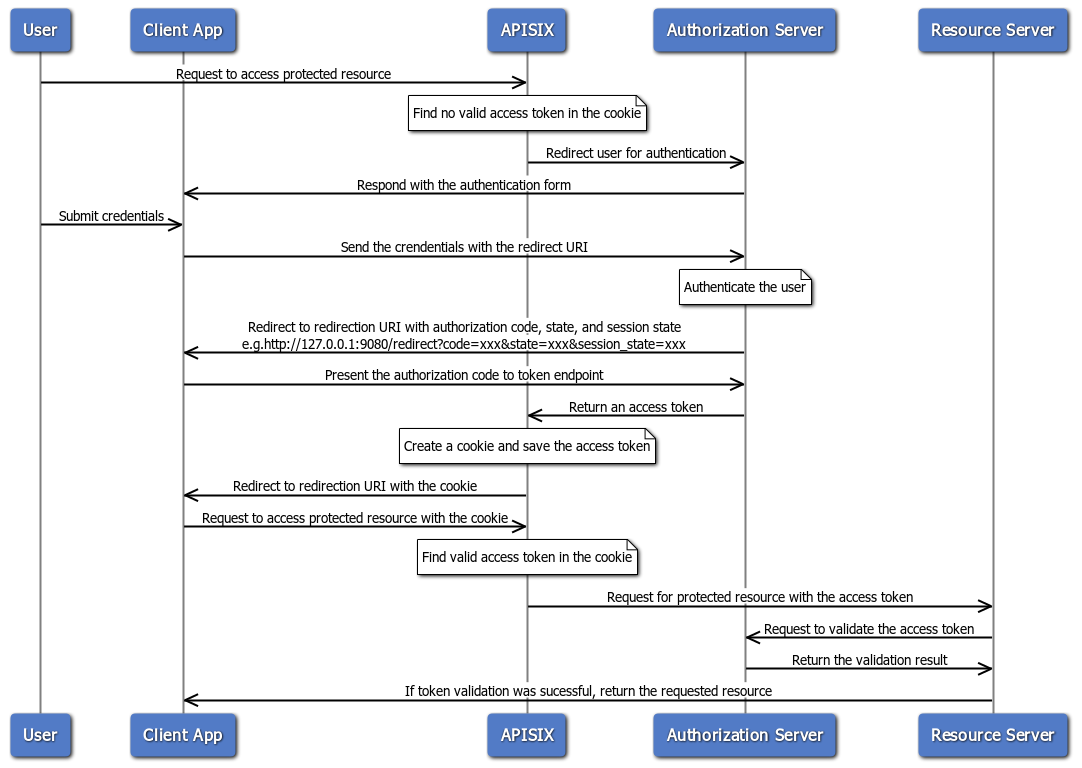 -当传入请求的标头中或适当的会话 cookie 中不包含访问令牌时,插件将充当依赖方并重定向到授权服务器以继续授权码流程。 +当传入请求的头中或合适的会话 Cookie 中不包含访问令牌时,插件作为依赖方重定向到授权服务器以继续授权码流程。 + +认证成功后,插件将令牌保存在会话 Cookie 中,后续请求将使用 Cookie 中存储的令牌。 + +以下示例创建一个路由,并配置 `openid-connect` 插件以使用 Keycloak 作为身份提供商的授权码流程: + +<Tabs groupId="api"> +<TabItem value="admin-api" label="Admin API"> + +```bash +curl "http://127.0.0.1:9180/apisix/admin/routes"; -X PUT \ + -H "X-API-KEY: ${admin_key}" \ + -d '{ + "id": "openid-connect-route", + "uri": "/api/v1/*", + "plugins": { + "openid-connect": { + "client_id": "apisix", + "client_secret": "your-client-secret", + "discovery": "http://keycloak:8080/realms/master/.well-known/openid-configuration";, + "scope": "openid email profile", + "redirect_uri": "http://127.0.0.1:9080/api/v1/redirect";, + "ssl_verify": false, + "session": { + "secret": "your-session-secret-min-16-chars" + } + } + }, + "upstream": { + "type": "roundrobin", + "nodes": { + "httpbin.org:80": 1 + } + } + }' +``` + +</TabItem> +<TabItem value="adc" label="ADC"> + +```yaml +routes: + - id: openid-connect-route + uri: /api/v1/* + plugins: + openid-connect: + client_id: apisix + client_secret: your-client-secret + discovery: http://keycloak:8080/realms/master/.well-known/openid-configuration + scope: openid email profile + redirect_uri: http://127.0.0.1:9080/api/v1/redirect + ssl_verify: false + session: + secret: your-session-secret-min-16-chars + upstream: + type: roundrobin + nodes: + httpbin.org:80: 1 +``` + +</TabItem> +<TabItem value="ingress" label="Ingress Controller"> + +<Tabs groupId="k8s-api"> +<TabItem value="gateway-api" label="Gateway API"> + +```yaml +apiVersion: gateway.networking.k8s.io/v1 +kind: HTTPRoute +metadata: + name: openid-connect-route + namespace: default + annotations: + konghq.com/plugins: openid-connect-plugin +spec: Review Comment: 已修正。将 Gateway API 示例从 `konghq.com/plugins` 注解改为 `PluginConfig` + `HTTPRoute.filters[].extensionRef`(group `apisix.apache.org`),与仓库其他文档一致。 ########## docs/en/latest/plugins/openid-connect.md: ########## @@ -158,7 +167,145 @@ When an incoming request does not contain an access token in its header nor in a After successful authentication, the Plugin keeps the token in the session cookie, and subsequent requests will use the token stored in the cookie. -See [Implement Authorization Code Grant](../tutorials/keycloak-oidc.md#implement-authorization-code-grant) for an example to use the `openid-connect` Plugin to integrate with Keycloak using the authorization code flow. +The following example creates a Route with the `openid-connect` Plugin configured to use the authorization code flow with Keycloak as the identity provider: + +<Tabs groupId="api"> +<TabItem value="admin-api" label="Admin API"> + +```bash +curl "http://127.0.0.1:9180/apisix/admin/routes"; -X PUT \ + -H "X-API-KEY: ${admin_key}" \ + -d '{ + "id": "openid-connect-route", + "uri": "/api/v1/*", + "plugins": { + "openid-connect": { + "client_id": "apisix", + "client_secret": "your-client-secret", + "discovery": "http://keycloak:8080/realms/master/.well-known/openid-configuration";, + "scope": "openid email profile", + "redirect_uri": "http://127.0.0.1:9080/api/v1/redirect";, + "ssl_verify": false, + "session": { + "secret": "your-session-secret-min-16-chars" + } + } + }, + "upstream": { + "type": "roundrobin", + "nodes": { + "httpbin.org:80": 1 + } + } + }' +``` + +</TabItem> +<TabItem value="adc" label="ADC"> + +```yaml +routes: + - id: openid-connect-route + uri: /api/v1/* + plugins: + openid-connect: + client_id: apisix + client_secret: your-client-secret + discovery: http://keycloak:8080/realms/master/.well-known/openid-configuration + scope: openid email profile + redirect_uri: http://127.0.0.1:9080/api/v1/redirect + ssl_verify: false + session: + secret: your-session-secret-min-16-chars + upstream: + type: roundrobin + nodes: + httpbin.org:80: 1 +``` + +</TabItem> +<TabItem value="ingress" label="Ingress Controller"> + +<Tabs groupId="k8s-api"> +<TabItem value="gateway-api" label="Gateway API"> + +```yaml +apiVersion: gateway.networking.k8s.io/v1 +kind: HTTPRoute +metadata: + name: openid-connect-route + namespace: default + annotations: + konghq.com/plugins: openid-connect-plugin +spec: Review Comment: Fixed. Replaced the `konghq.com/plugins` annotation with the `PluginConfig` + `HTTPRoute.filters[].extensionRef` (group `apisix.apache.org`) pattern, consistent with other Gateway API examples in this repo. ########## docs/en/latest/plugins/openid-connect.md: ########## @@ -227,11 +376,24 @@ The following diagram illustrates the interaction between different entities whe See [Refresh Token](../tutorials/keycloak-oidc.md#refresh-token) for an example to use the `openid-connect` Plugin to integrate with Keycloak using the password flow with token refreshes. +### User Info + +The UserInfo endpoint in OpenID Connect (OIDC) is defined in [OpenID Connect Core 1.0, Section 5.3](https://openid.net/specs/openid-connect-core-1_0.html#UserInfo). It enables clients to retrieve additional claims about an authenticated user by presenting a valid access token. This endpoint is particularly useful for obtaining user profile information, such as name, email, and other attributes, after the user has been authenticated. The data returned by the UserInfo endpoint depends on the scope of the access token and the claims configured by the authorization server. + +The following diagram illustrates the interaction between different entities when APISIX verifies the user info: + +<div style={{textAlign: 'center'}}> +<img src="https://static.api7.ai/uploads/2024/10/30/njkWZVgX_pass-grant.png"; alt="User info flow diagram" style={{width: '70%'}} /> +</div> +<br /> + Review Comment: Fixed. Removed the incorrect image (password grant flow diagram) from the User Info section. No correct UserInfo flow diagram is available, so the diagram reference was removed entirely. -- This is an automated message from the Apache Git Service. To respond to the message, please log on to GitHub and use the URL above to go to the specific comment. To unsubscribe, e-mail: [email protected] For queries about this service, please contact Infrastructure at: [email protected]


