This is an automated email from the ASF dual-hosted git repository.

Yilialinn pushed a commit to branch master
in repository https://gitbox.apache.org/repos/asf/apisix.git
The following commit(s) were added to refs/heads/master by this push:
new 39fa3902a docs: update zipkin plugin documentation (#13277)
39fa3902a is described below
commit 39fa3902ab23f9ee058c6be5aef59a8f7477c2c5
Author: Yilia Lin <[email protected]>
AuthorDate: Wed Apr 29 09:09:32 2026 +0800
docs: update zipkin plugin documentation (#13277)
---
docs/en/latest/plugins/zipkin.md | 22 ++++++++++++++++------
docs/zh/latest/plugins/zipkin.md | 16 +++++++++++++---
2 files changed, 29 insertions(+), 9 deletions(-)
diff --git a/docs/en/latest/plugins/zipkin.md b/docs/en/latest/plugins/zipkin.md
index 8ec64b052..78063a482 100644
--- a/docs/en/latest/plugins/zipkin.md
+++ b/docs/en/latest/plugins/zipkin.md
@@ -79,6 +79,16 @@ docker run -d --name zipkin -p 9411:9411 openzipkin/zipkin
Create a Route with `zipkin` and use the default span version 2. You should
adjust the IP address as needed for the Zipkin HTTP endpoint, and configure the
sample ratio to `1` to trace every request.
+:::note
+
+You can fetch the `admin_key` from `config.yaml` and save to an environment
variable with the following command:
+
+```bash
+admin_key=$(yq '.deployment.admin.admin_key[0].key' conf/config.yaml | sed
's/"//g')
+```
+
+:::
+
```shell
curl "http://127.0.0.1:9180/apisix/admin/routes"; -X PUT \
-H "X-API-KEY: ${admin_key}" \
@@ -202,10 +212,10 @@ Create a Route with `zipkin`. Please adjust the IP
address as needed for the Zip
curl "http://127.0.0.1:9180/apisix/admin/routes"; -X PUT \
-H "X-API-KEY: ${admin_key}" \
-d '{
- "id": "kin-tracing-route",
+ "id": "zipkin-tracing-route",
"uri": "/anything",
"plugins": {
- "kin": {
+ "zipkin": {
"endpoint": "http://127.0.0.1:9411/api/v2/spans";,
"sample_ratio": 1
}
@@ -237,11 +247,11 @@ Similarly, you should find more span details once you
click into a trace:
### Using Trace Variables in Logging
-The following example demonstrates how to configure the `kin` Plugin to set
the following built-in variables, which can be used in logger Plugins or access
logs:
+The following example demonstrates how to configure the `zipkin` Plugin to set
the following built-in variables, which can be used in logger Plugins or access
logs:
-- `kin_context_traceparent`: [trace
parent](https://www.w3.org/TR/trace-context/#trace-context-http-headers-format)
ID
-- `kin_trace_id`: trace ID of the current span
-- `kin_span_id`: span ID of the current span
+- `zipkin_context_traceparent`: [trace
parent](https://www.w3.org/TR/trace-context/#trace-context-http-headers-format)
ID
+- `zipkin_trace_id`: trace ID of the current span
+- `zipkin_span_id`: span ID of the current span
Update the configuration file as below. You can customize the access log
format to use the `zipkin` Plugin variables, and set `zipkin` variables in the
`set_ngx_var` field.
diff --git a/docs/zh/latest/plugins/zipkin.md b/docs/zh/latest/plugins/zipkin.md
index 5e6488eef..39110e36f 100644
--- a/docs/zh/latest/plugins/zipkin.md
+++ b/docs/zh/latest/plugins/zipkin.md
@@ -79,6 +79,16 @@ docker run -d --name zipkin -p 9411:9411 openzipkin/zipkin
创建一条路由,开启 `zipkin` 插件,并使用其默认的 `span_version`,即 `2`。同时请根据需要调整 Zipkin HTTP 端点的
IP 地址,将采样比率配置为 `1` 以追踪每个请求。
+:::note
+
+你可以这样从 `config.yaml` 中获取 `admin_key` 并存入环境变量:
+
+```bash
+admin_key=$(yq '.deployment.admin.admin_key[0].key' conf/config.yaml | sed
's/"//g')
+```
+
+:::
+
```shell
curl "http://127.0.0.1:9180/apisix/admin/routes"; -X PUT \
-H "X-API-KEY: ${admin_key}" \
@@ -227,7 +237,7 @@ curl "http://127.0.0.1:9080/anything";
你应该收到一个 `HTTP/1.1 200 OK` 响应。
-导航到 Jaeger Web UI [http://127.0.0.1:16686](http://127.0.0.1:16686),选择 APISIX
作为服务,并点击 __Find Traces__,您应该看到一个与请求对应的 trace:
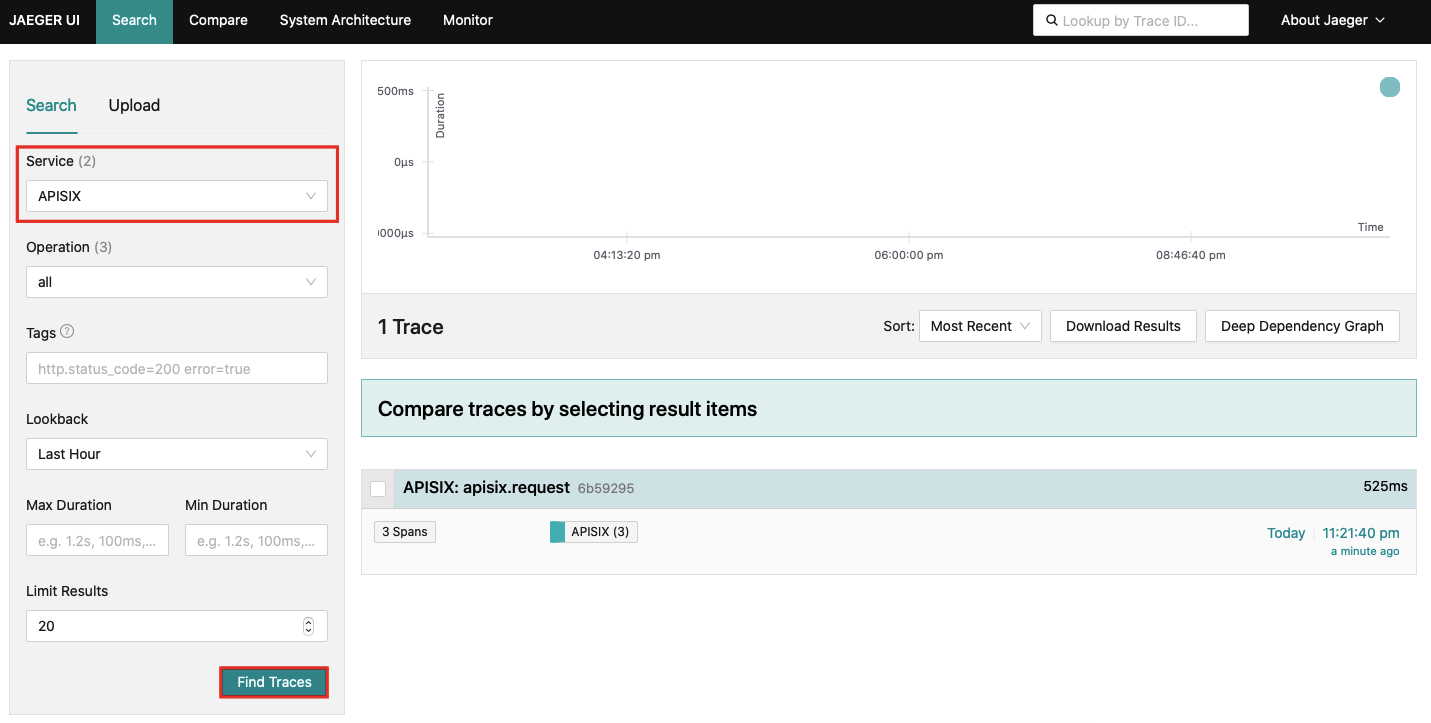
+导航到 Jaeger Web UI [http://127.0.0.1:16686](http://127.0.0.1:16686),选择 APISIX
作为服务,并点击 __Find Traces__,你应该看到一个与请求对应的 trace:
@@ -240,8 +250,8 @@ curl "http://127.0.0.1:9080/anything";
以下示例演示了如何配置 `zipkin` 插件以设置以下内置变量,这些变量可以在日志插件或访问日志中使用:
- `zipkin_context_traceparent`: [W3C trace
context](https://www.w3.org/TR/trace-context/#trace-context-http-headers-format)
-- `zipkin_trace_id`: 当前 span 的 trace_id
-- `zipkin_span_id`: 当前 span 的 span_id
+- `zipkin_trace_id`: 当前 span 的 trace ID
+- `zipkin_span_id`: 当前 span 的 span ID
按照以下方式更新配置文件。你可以自定义访问日志格式以使用 `zipkin` 插件变量,并在 `set_ngx_var` 字段中设置 `zipkin` 变量。

