This is an automated email from the ASF dual-hosted git repository.

Yilialinn pushed a commit to branch master
in repository https://gitbox.apache.org/repos/asf/apisix.git
The following commit(s) were added to refs/heads/master by this push:
new a3c4e8c2b docs(openid-connect): re-port with Admin API, ADC, and
Ingress Controller tabs (#13247)
a3c4e8c2b is described below
commit a3c4e8c2b45918389009e91bee5e3f0b7f33f6b9
Author: Yilia Lin <[email protected]>
AuthorDate: Thu Apr 30 11:23:39 2026 +0800
docs(openid-connect): re-port with Admin API, ADC, and Ingress Controller
tabs (#13247)
---
docs/en/latest/plugins/openid-connect.md | 435 ++++++++++++++++++---------
docs/zh/latest/plugins/openid-connect.md | 486 +++++++++++++++++++++----------
2 files changed, 633 insertions(+), 288 deletions(-)
diff --git a/docs/en/latest/plugins/openid-connect.md
b/docs/en/latest/plugins/openid-connect.md
index 38eb83603..1d317d630 100644
--- a/docs/en/latest/plugins/openid-connect.md
+++ b/docs/en/latest/plugins/openid-connect.md
@@ -31,106 +31,115 @@ description: The openid-connect Plugin supports the
integration with OpenID Conn
<link rel="canonical" href="https://docs.api7.ai/hub/openid-connect"; />
</head>
+import Tabs from '@theme/Tabs';
+import TabItem from '@theme/TabItem';
+
## Description
The `openid-connect` Plugin supports the integration with [OpenID Connect
(OIDC)](https://openid.net/connect/) identity providers, such as Keycloak,
Auth0, Microsoft Entra ID, Google, Okta, and more. It allows APISIX to
authenticate clients and obtain their information from the identity provider
before allowing or denying their access to upstream protected resources.
## Attributes
-| Name | Type | Required | Default | Valid
values | Description |
-|--------------------------------------|----------|----------|-----------------------|--------------|---------------------------------------------------------------------------------------------------------------------------------------------------------------------------------------------------------------------------------------|
-| client_id | string | True | | | OAuth client
ID. |
-| client_secret | string | True | | | OAuth client
secret. |
-| discovery | string | True | | | URL to the
well-known discovery document of the OpenID provider, which contains a list of
OP API endpoints. The Plugin can directly utilize the endpoints from the
discovery document. You can also configure these endpoints individually, which
takes precedence over the endpoints supplied in the discovery document. |
-| scope | string | False | openid |
| OIDC scope that corresponds to information that should be returned about the
authenticated user, also known as
[claims](https://openid.net/specs/openid-connect-core-1_0.html#StandardClaims).
This is used to authorize users with proper permission. The default value is
`openid`, the required scope for OIDC to return a `sub` claim that uniquely
identifies the authenticated user. Additional scopes can be append [...]
-| required_scopes | array[string] | False | | | Scopes
required to be present in the access token. Used in conjunction with the
introspection endpoint when `bearer_only` is `true`. If any required scope is
missing, the Plugin rejects the request with a 403 forbidden error. |
-| realm | string | False | apisix |
| Realm in
[`WWW-Authenticate`](https://www.rfc-editor.org/rfc/rfc6750#section-3) response
header accompanying a 401 unauthorized request due to invalid bearer token.
|
-| bearer_only | boolean | False | false |
| If true, strictly require bearer access token in requests for
authentication. |
-| logout_path | string | False | /logout |
| Path to activate the logout. |
-| post_logout_redirect_uri | string | False | |
| URL to redirect users to after the `logout_path` receive a request to log
out. |
-| redirect_uri | string | False | | | URI to
redirect to after authentication with the OpenID provider. Note that the
redirect URI should not be the same as the request URI, but a sub-path of the
request URI. For example, if the `uri` of the Route is `/api/v1/*`,
`redirect_uri` can be configured as `/api/v1/redirect`. If `redirect_uri` is
not configured, APISIX will append `/.apisix/redirect` to the request URI to
determine the value for `redirect_uri`. |
-| timeout | integer | False | 3 | [1,...] | Request
timeout time in seconds. |
-| ssl_verify | boolean | True | false |
| If true, verify the OpenID provider 's SSL certificates. |
-| introspection_endpoint | string | False | |
| URL of the [token
introspection](https://datatracker.ietf.org/doc/html/rfc7662) endpoint for the
OpenID provider used to introspect access tokens. If this is unset, the
introspection endpoint presented in the well-known discovery document is used
[as a
fallback](https://github.com/zmartzone/lua-resty-openidc/commit/cdaf824996d2b499de4c72852c91733872137c9c).
|
-| introspection_endpoint_auth_method | string | False |
client_secret_basic | | Authentication method for the token
introspection endpoint. The value should be one of the authentication methods
specified in the `introspection_endpoint_auth_methods_supported` [authorization
server metadata](https://www.rfc-editor.org/rfc/rfc8414.html) as seen in the
well-known discovery document, such as `client_secret_basic`,
`client_secret_post`, `private_key_jwt`, and `client_secret [...]
-| token_endpoint_auth_method | string | False |
client_secret_basic | | Authentication method for the token
endpoint. The value should be one of the authentication methods specified in
the `token_endpoint_auth_methods_supported` [authorization server
metadata](https://www.rfc-editor.org/rfc/rfc8414.html) as seen in the
well-known discovery document, such as `client_secret_basic`,
`client_secret_post`, `private_key_jwt`, and `client_secret_jwt`. If the c [...]
-| public_key | string | False | | | Public key
used to verify JWT signature id asymmetric algorithm is used. Providing this
value to perform token verification will skip token introspection in client
credentials flow. You can pass the public key in `-----BEGIN PUBLIC
KEY-----\\n……\\n-----END PUBLIC KEY-----` format. |
-| use_jwks | boolean | False | false |
| If true and if `public_key` is not set, use the JWKS to verify JWT
signature and skip token introspection in client credentials flow. The JWKS
endpoint is parsed from the discovery document. |
-| use_pkce | boolean | False | false |
| If true, use the Proof Key for Code Exchange (PKCE) for Authorization Code
Flow as defined in [RFC 7636](https://datatracker.ietf.org/doc/html/rfc7636). |
-| token_signing_alg_values_expected | string | False | |
| Algorithm used for signing JWT, such as `RS256`. |
-| set_access_token_header | boolean | False | true
| | If true, set the access token in a request header. By
default, the `X-Access-Token` header is used. |
-| access_token_in_authorization_header | boolean | False | false
| | If true and if `set_access_token_header` is also true,
set the access token in the `Authorization` header. |
-| set_id_token_header | boolean | False | true
| | If true and if the ID token is available, set the value
in the `X-ID-Token` request header. |
-| set_userinfo_header | boolean | False | true
| | If true and if user info data is available, set the
value in the `X-Userinfo` request header. |
-| set_refresh_token_header | boolean | False | false
| | If true and if the refresh token is available, set the
value in the `X-Refresh-Token` request header. |
-| session | object | False | | | Session
configuration used when `bearer_only` is `false` and the Plugin uses
Authorization Code flow. |
-| session.secret | string | True | | 16 or more characters | Key
used for session encryption and HMAC operation when `bearer_only` is `false`.
|
-| session.cookie | object | False | | | Cookie
configurations. |
-| session.cookie.lifetime | integer | False | 3600
| | Cookie lifetime in seconds. |
-| session.storage | string | False | cookie | ["cookie", "redis"] |
Session storage method. |
-| session.redis | object | False | | | Redis
configuration when `storage` is `redis`. |
-| session.redis.host | string | False | 127.0.0.1 | |
Redis host. |
-| session.redis.port | integer | False | 6379 | | Redis
port. |
-| session.redis.password | string | False | | | Redis
password. |
-| session.redis.username | string | False | | | Redis
username. |
-| session.redis.database | integer | False | 0 | | Redis
database index. |
-| session.redis.prefix | string | False | sessions | |
Redis key prefix. |
-| session.redis.ssl | boolean | False | false | | Enable
SSL for Redis connection. |
-| session.redis.ssl_verify | boolean | True | false | |
Verify SSL certificate. |
-| session.redis.server_name | string | False | | |
Redis server name for SNI. |
-| session.redis.connect_timeout | integer | False | 1000 | |
Connect timeout in milliseconds. |
-| session.redis.send_timeout | integer | False | 1000 | |
Send timeout in milliseconds. |
-| session.redis.read_timeout | integer | False | 1000 | |
Read timeout in milliseconds. |
-| session.redis.keepalive_timeout | integer | False | 10000 |
| Keepalive timeout in milliseconds. |
-| session_contents | object | False | | |
Session content configurations. If unconfigured, all data will be stored in the
session. |
-| session_contents.access_token | boolean | False | |
| If true, store the access token in the session. |
-| session_contents.id_token | boolean | False | |
| If true, store the ID token in the session. |
-| session_contents.enc_id_token | boolean | False | |
| If true, store the encrypted ID token in the session. |
-| session_contents.user | boolean | False | | | If
true, store the user info in the session. |
-| unauth_action | string | False | auth |
["auth","deny","pass"] | Action for unauthenticated requests. When
set to `auth`, redirect to the authentication endpoint of the OpenID provider.
When set to `pass`, allow the request without authentication. When set to
`deny`, return 401 unauthenticated responses rather than start the
authorization code grant flow. |
-| proxy_opts | object | False | | |
Configurations for the proxy server that the OpenID provider is behind.
|
-| proxy_opts.http_proxy | string | False | | | Proxy
server address for HTTP requests, such as `http://<proxy_host>:<proxy_port>`.
|
-| proxy_opts.https_proxy | string | False | | | Proxy
server address for HTTPS requests, such as `http://<proxy_host>:<proxy_port>`.
|
-| proxy_opts.http_proxy_authorization | string | False | | Basic
[base64 username:password] | Default `Proxy-Authorization` header value to be
used with `http_proxy`. Can be overridden with custom `Proxy-Authorization`
request header. |
-| proxy_opts.https_proxy_authorization | string | False | | Basic
[base64 username:password] | Default `Proxy-Authorization` header value to be
used with `https_proxy`. Cannot be overridden with custom `Proxy-Authorization`
request header since with HTTPS, the authorization is completed when
connecting. |
-| proxy_opts.no_proxy | string | False | |
| Comma separated list of hosts that should not be proxied. |
-| authorization_params | object | False | |
| Additional parameters to send in the request to the authorization
endpoint. |
-| client_rsa_private_key | string | False | | | Client RSA private key used
to sign JWT for authentication to the OP. Required when
`token_endpoint_auth_method` is `private_key_jwt`. |
-| client_rsa_private_key_id | string | False | | | Client RSA private key ID
used to compute a signed JWT. Optional when `token_endpoint_auth_method` is
`private_key_jwt`. |
-| client_jwt_assertion_expires_in | integer | False | 60 | | Life duration of
the signed JWT for authentication to the OP, in seconds. Used when
`token_endpoint_auth_method` is `private_key_jwt` or `client_secret_jwt`. |
-| renew_access_token_on_expiry | boolean | False | true | | If true, attempt
to silently renew the access token when it expires or if a refresh token is
available. If the token fails to renew, redirect user for re-authentication. |
-| access_token_expires_in | integer | False | | | Lifetime of the access
token in seconds if no `expires_in` attribute is present in the token endpoint
response. |
-| refresh_session_interval | integer | False | | | Time interval to refresh
user ID token without requiring re-authentication. When not set, it will not
check the expiration time of the session issued to the client by the gateway.
If set to 900, it means refreshing the user's id_token (or session in the
browser) after 900 seconds without requiring re-authentication. |
-| iat_slack | integer | False | 120 | | Tolerance of clock skew in seconds
with the `iat` claim in an ID token. |
-| accept_none_alg | boolean | False | false | | Set to true if the OpenID
provider does not sign its ID token, such as when the signature algorithm is
set to `none`. |
-| accept_unsupported_alg | boolean | False | true | | If true, ignore ID
token signature to accept unsupported signature algorithm. |
-| access_token_expires_leeway | integer | False | 0 | | Expiration leeway in
seconds for access token renewal. When set to a value greater than 0, token
renewal will take place the set amount of time before token expiration. This
avoids errors in case the access token just expires when arriving to the
resource server. |
-| force_reauthorize | boolean | False | false | | If true, execute the
authorization flow even when a token has been cached. |
-| use_nonce | boolean | False | false | | If true, enable nonce parameter in
authorization request. |
-| revoke_tokens_on_logout | boolean | False | false | | If true, notify the
authorization server a previously obtained refresh or access token is no longer
needed at the revocation endpoint. |
-| jwk_expires_in | integer | False | 86400 | | Expiration time for JWK cache
in seconds. |
-| jwt_verification_cache_ignore | boolean | False | false | | If true, force
re-verification for a bearer token and ignore any existing cached verification
results. |
-| cache_segment | string | False | | | Optional name of a cache segment,
used to separate and differentiate caches used by token introspection or JWT
verification. |
-| introspection_interval | integer | False | 0 | | TTL of the cached and
introspected access token in seconds. The default value is 0, which means this
option is not used and the Plugin defaults to use the TTL passed by expiry
claim defined in `introspection_expiry_claim`. If `introspection_interval` is
larger than 0 and less than the TTL passed by expiry claim defined in
`introspection_expiry_claim`, use `introspection_interval`. |
-| introspection_expiry_claim | string | False | exp | | Name of the expiry
claim, which controls the TTL of the cached and introspected access token. |
-| introspection_addon_headers | array[string] | False | | | Used to append
additional header values to the introspection HTTP request. If the specified
header does not exist in origin request, value will not be appended. |
-| claim_validator | object | False |
| | JWT claim validation configurations. |
-| claim_validator.issuer.valid_issuers | array[string] | False | | | An
array of trusted JWT issuers. If unconfigured, the issuer returned by discovery
endpoint will be used. If both are unavailable, the issuer will not be
validated. |
-| claim_validator.audience | object | False |
| | [Audience
claim](https://openid.net/specs/openid-connect-core-1_0.html) validation
configurations. |
-| claim_validator.audience.claim | string | False | aud
| | Name of the claim that contains the audience. |
-| claim_validator.audience.required | boolean | False | false
| | If true, audience claim is required and the name of the
claim will be the name defined in `claim`. |
-| claim_validator.audience.match_with_client_id | boolean | False | false
| | If true, require the audience to match the client ID. If
the audience is a string, it must exactly match the client ID. If the audience
is an array of strings, at least one of the values must match the client ID. If
no match is found, you will receive a `mismatched audience` error. This
requirement is stated in the OpenID Connect specification to ensure that the
token is intended for the [...]
-| claim_schema | object | False | | | JSON schema of OIDC response claim.
Example:
`{"type":"object","properties":{"access_token":{"type":"string"}},"required":["access_token"]}`
- validates that the response contains a required string field `access_token`.
|
-
-NOTE: `encrypt_fields = {"client_secret"}` is also defined in the schema,
which means that the field will be stored encrypted in etcd. See [encrypted
storage fields](../plugin-develop.md#encrypted-storage-fields).
-In addition, you can use Environment Variables or APISIX secret to store and
reference plugin attributes. APISIX currently supports storing secrets in two
ways - [Environment Variables and HashiCorp Vault](../terminology/secret.md).
-
-For example, use below command to set environment variable
-`export keycloak_secret=abc`
-
-and use it in plugin conf like below
-
-`"client_secret": "$ENV://keycloak_secret"`
+| Name | Type | Required | Default | Valid values | Description |
+|------|------|----------|---------|--------------|-------------|
+| client_id | string | True | | | OAuth client ID. |
+| client_secret | string | True | | | OAuth client secret. |
+| discovery | string | True | | | URL to the well-known discovery document of
the OpenID provider, which contains a list of OP API endpoints. The Plugin can
directly utilize the endpoints from the discovery document. You can also
configure these endpoints individually, which takes precedence over the
endpoints supplied in the discovery document. |
+| scope | string | False | openid | | OIDC scope that corresponds to
information that should be returned about the authenticated user, also known as
[claims](https://openid.net/specs/openid-connect-core-1_0.html#StandardClaims).
This is used to authorize users with proper permission. The default value is
`openid`, the required scope for OIDC to return a `sub` claim that uniquely
identifies the authenticated user. Additional scopes can be appended and
delimited by spaces, such as `openid [...]
+| required_scopes | array[string] | False | | | Scopes required to be present
in the access token. Used in conjunction with the introspection endpoint when
`bearer_only` is `true`. If any required scope is missing, the Plugin rejects
the request with a 403 forbidden error. |
+| realm | string | False | apisix | | Realm in
[`WWW-Authenticate`](https://www.rfc-editor.org/rfc/rfc6750#section-3) response
header accompanying a 401 unauthorized request due to invalid bearer token. |
+| bearer_only | boolean | False | false | | If true, strictly require bearer
access token in requests for authentication. |
+| logout_path | string | False | /logout | | Path to activate the logout. |
+| post_logout_redirect_uri | string | False | | | URL to redirect users to
after the `logout_path` receives a request to log out. |
+| redirect_uri | string | False | | | URI to redirect to after authentication
with the OpenID provider. Note that the redirect URI should not be the same as
the request URI, but a sub-path of the request URI. For example, if the `uri`
of the Route is `/api/v1/*`, `redirect_uri` can be configured as
`/api/v1/redirect`. If `redirect_uri` is not configured, APISIX will append
`/.apisix/redirect` to the request URI to determine the value for
`redirect_uri`. |
+| timeout | integer | False | 3 | [1,...] | Request timeout time in seconds. |
+| ssl_verify | boolean | False | true | | If true, verify the OpenID
provider's SSL certificates. Note: The default value was changed from `false`
to `true` in APISIX 3.16.0. This is a breaking change. If you are upgrading
from an earlier version, ensure your OpenID provider's SSL certificate is valid
or explicitly set this to `false` to preserve previous behavior. |
+| introspection_endpoint | string | False | | | URL of the [token
introspection](https://datatracker.ietf.org/doc/html/rfc7662) endpoint for the
OpenID provider used to introspect access tokens. If this is unset, the
introspection endpoint presented in the well-known discovery document is used
[as a
fallback](https://github.com/zmartzone/lua-resty-openidc/commit/cdaf824996d2b499de4c72852c91733872137c9c).
|
+| introspection_endpoint_auth_method | string | False | client_secret_basic |
| Authentication method for the token introspection endpoint. The value should
be one of the authentication methods specified in the
`introspection_endpoint_auth_methods_supported` [authorization server
metadata](https://www.rfc-editor.org/rfc/rfc8414.html) as seen in the
well-known discovery document, such as `client_secret_basic`,
`client_secret_post`, `private_key_jwt`, and `client_secret_jwt`. |
+| token_endpoint_auth_method | string | False | client_secret_basic | |
Authentication method for the token endpoint. The value should be one of the
authentication methods specified in the `token_endpoint_auth_methods_supported`
[authorization server metadata](https://www.rfc-editor.org/rfc/rfc8414.html) as
seen in the well-known discovery document, such as `client_secret_basic`,
`client_secret_post`, `private_key_jwt`, and `client_secret_jwt`. If the
configured method is not supported, [...]
+| public_key | string | False | | | Public key used to verify JWT signature if
asymmetric algorithm is used. Providing this value to perform token
verification will skip token introspection in client credentials flow. You can
pass the public key in `-----BEGIN PUBLIC KEY-----\n……\n-----END PUBLIC
KEY-----` format. |
+| use_jwks | boolean | False | false | | If true and if `public_key` is not
set, use the JWKS to verify JWT signature and skip token introspection in
client credentials flow. The JWKS endpoint is parsed from the discovery
document. |
+| use_pkce | boolean | False | false | | If true, use the Proof Key for Code
Exchange (PKCE) for Authorization Code Flow as defined in [RFC
7636](https://datatracker.ietf.org/doc/html/rfc7636). |
+| token_signing_alg_values_expected | string | False | | | Algorithm used for
signing JWT, such as `RS256`. |
+| set_access_token_header | boolean | False | true | | If true, set the access
token in a request header. By default, the `X-Access-Token` header is used. |
+| access_token_in_authorization_header | boolean | False | false | | If true
and if `set_access_token_header` is also true, set the access token in the
`Authorization` header. |
+| set_id_token_header | boolean | False | true | | If true and if the ID token
is available, set the value in the `X-ID-Token` request header. |
+| set_userinfo_header | boolean | False | true | | If true and if user info
data is available, set the value in the `X-Userinfo` request header. |
+| set_refresh_token_header | boolean | False | false | | If true and if the
refresh token is available, set the value in the `X-Refresh-Token` request
header. |
+| session | object | False | | | Session configuration used when `bearer_only`
is `false` and the Plugin uses Authorization Code flow. |
+| session.secret | string | True | | 16 or more characters | Key used for
session encryption and HMAC operation when `bearer_only` is `false`. |
+| session.cookie | object | False | | | Cookie configurations. |
+| session.cookie.lifetime | integer | False | 3600 | | Cookie lifetime in
seconds. |
+| session.storage | string | False | cookie | ["cookie", "redis"] | Session
storage method. |
+| session.redis | object | False | | | Redis configuration when `storage` is
`redis`. |
+| session.redis.host | string | False | 127.0.0.1 | | Redis host. |
+| session.redis.port | integer | False | 6379 | | Redis port. |
+| session.redis.username | string | False | | | Redis username. |
+| session.redis.password | string | False | | | Redis password. |
+| session.redis.database | integer | False | 0 | | Redis database index. |
+| session.redis.prefix | string | False | sessions | | Redis key prefix. |
+| session.redis.ssl | boolean | False | false | | Enable SSL for Redis
connection. |
+| session.redis.ssl_verify | boolean | False | true | | Verify SSL certificate
for Redis connection. |
+| session.redis.server_name | string | False | | | Redis server name for SNI. |
+| session.redis.connect_timeout | integer | False | 1000 | | Connect timeout
in milliseconds. |
+| session.redis.send_timeout | integer | False | 1000 | | Send timeout in
milliseconds. |
+| session.redis.read_timeout | integer | False | 1000 | | Read timeout in
milliseconds. |
+| session.redis.keepalive_timeout | integer | False | 10000 | | Keepalive
timeout in milliseconds. |
+| session_contents | object | False | | | Session content configurations. If
unconfigured, all data will be stored in the session. |
+| session_contents.access_token | boolean | False | | | If true, store the
access token in the session. |
+| session_contents.id_token | boolean | False | | | If true, store the ID
token in the session. |
+| session_contents.enc_id_token | boolean | False | | | If true, store the
encrypted ID token in the session. |
+| session_contents.user | boolean | False | | | If true, store the user info
in the session. |
+| unauth_action | string | False | auth | ["auth", "deny", "pass"] | Action
for unauthenticated requests. When set to `auth`, redirect to the
authentication endpoint of the OpenID provider. When set to `pass`, allow the
request without authentication. When set to `deny`, return 401 unauthenticated
responses rather than start the authorization code grant flow. |
+| proxy_opts | object | False | | | Configurations for the proxy server that
the OpenID provider is behind. |
+| proxy_opts.http_proxy | string | False | | | Proxy server address for HTTP
requests, such as `http://<proxy_host>:<proxy_port>`. |
+| proxy_opts.https_proxy | string | False | | | Proxy server address for HTTPS
requests, such as `http://<proxy_host>:<proxy_port>`. |
+| proxy_opts.http_proxy_authorization | string | False | | Basic [base64
username:password] | Default `Proxy-Authorization` header value to be used with
`http_proxy`. Can be overridden with custom `Proxy-Authorization` request
header. |
+| proxy_opts.https_proxy_authorization | string | False | | Basic [base64
username:password] | Default `Proxy-Authorization` header value to be used with
`https_proxy`. Cannot be overridden with custom `Proxy-Authorization` request
header since with HTTPS, the authorization is completed when connecting. |
+| proxy_opts.no_proxy | string | False | | | Comma-separated list of hosts
that should not be proxied. |
+| authorization_params | object | False | | | Additional parameters to send in
the request to the authorization endpoint. |
+| client_rsa_private_key | string | False | | | Client RSA private key used to
sign JWT for authentication to the OP. Required when
`token_endpoint_auth_method` is `private_key_jwt`. |
+| client_rsa_private_key_id | string | False | | | Client RSA private key ID
used to compute a signed JWT. Optional when `token_endpoint_auth_method` is
`private_key_jwt`. |
+| client_jwt_assertion_expires_in | integer | False | 60 | | Life duration of
the signed JWT for authentication to the OP, in seconds. Used when
`token_endpoint_auth_method` is `private_key_jwt` or `client_secret_jwt`. |
+| renew_access_token_on_expiry | boolean | False | true | | If true, attempt
to silently renew the access token when it expires or if a refresh token is
available. If the token fails to renew, redirect user for re-authentication. |
+| access_token_expires_in | integer | False | | | Lifetime of the access token
in seconds if no `expires_in` attribute is present in the token endpoint
response. |
+| refresh_session_interval | integer | False | | | Time interval in seconds to
refresh user ID token without requiring re-authentication. When not set, it
will not check the expiration time of the session issued to the client by the
gateway. |
+| iat_slack | integer | False | 120 | | Tolerance of clock skew in seconds
with the `iat` claim in an ID token. |
+| accept_none_alg | boolean | False | false | | Set to true if the OpenID
provider does not sign its ID token, such as when the signature algorithm is
set to `none`. |
+| accept_unsupported_alg | boolean | False | true | | If true, ignore ID token
signature to accept unsupported signature algorithm. |
+| access_token_expires_leeway | integer | False | 0 | | Expiration leeway in
seconds for access token renewal. When set to a value greater than 0, token
renewal will take place the set amount of time before token expiration. This
avoids errors in case the access token just expires when arriving to the
resource server. |
+| force_reauthorize | boolean | False | false | | If true, execute the
authorization flow even when a token has been cached. |
+| use_nonce | boolean | False | false | | If true, enable nonce parameter in
authorization request. |
+| revoke_tokens_on_logout | boolean | False | false | | If true, notify the
authorization server that a previously obtained refresh or access token is no
longer needed at the revocation endpoint. |
+| jwk_expires_in | integer | False | 86400 | | Expiration time for JWK cache
in seconds. |
+| jwt_verification_cache_ignore | boolean | False | false | | If true, force
re-verification for a bearer token and ignore any existing cached verification
results. |
+| cache_segment | string | False | | | Optional name of a cache segment, used
to separate and differentiate caches used by token introspection or JWT
verification. |
+| introspection_interval | integer | False | 0 | | TTL of the cached and
introspected access token in seconds. The default value is 0, which means this
option is not used and the Plugin defaults to use the TTL passed by expiry
claim defined in `introspection_expiry_claim`. If `introspection_interval` is
larger than 0 and less than the TTL passed by expiry claim defined in
`introspection_expiry_claim`, use `introspection_interval`. |
+| introspection_expiry_claim | string | False | exp | | Name of the expiry
claim, which controls the TTL of the cached and introspected access token. |
+| introspection_addon_headers | array[string] | False | | | Used to append
additional header values to the introspection HTTP request. If the specified
header does not exist in the origin request, the value will not be appended. |
+| claim_validator | object | False | | | JWT claim validation configurations. |
+| claim_validator.issuer.valid_issuers | array[string] | False | | | An array
of trusted JWT issuers. If unconfigured, the issuer returned by the discovery
endpoint will be used. If both are unavailable, the issuer will not be
validated. |
+| claim_validator.audience | object | False | | | [Audience
claim](https://openid.net/specs/openid-connect-core-1_0.html) validation
configurations. |
+| claim_validator.audience.claim | string | False | aud | | Name of the claim
that contains the audience. |
+| claim_validator.audience.required | boolean | False | false | | If true,
audience claim is required and the name of the claim will be the name defined
in `claim`. |
+| claim_validator.audience.match_with_client_id | boolean | False | false | |
If true, require the audience to match the client ID. If the audience is a
string, it must exactly match the client ID. If the audience is an array of
strings, at least one of the values must match the client ID. If no match is
found, you will receive a `mismatched audience` error. This requirement is
stated in the OpenID Connect specification to ensure that the token is intended
for the specific client. |
+| claim_schema | object | False | | | JSON schema of OIDC response claim.
Example:
`{"type":"object","properties":{"access_token":{"type":"string"}},"required":["access_token"]}`
- validates that the response contains a required string field `access_token`.
|
+
+NOTE: `encrypt_fields = {"client_secret", "client_rsa_private_key"}` is also
defined in the schema, which means that the fields will be stored encrypted in
etcd. See [encrypted storage
fields](../plugin-develop.md#encrypted-storage-fields).
+
+In addition, you can use Environment Variables or APISIX Secret to store and
reference Plugin attributes. APISIX currently supports storing secrets in two
ways — [Environment Variables and HashiCorp Vault](../terminology/secret.md).
+
+For example, use the following command to set an environment variable:
+
+```bash
+export KEYCLOAK_CLIENT_SECRET=abc
+```
+
+And reference it in the Plugin configuration:
+
+```json
+"client_secret": "$ENV://KEYCLOAK_CLIENT_SECRET"
+```
## Examples
@@ -148,17 +157,178 @@ admin_key=$(yq '.deployment.admin.admin_key[0].key'
conf/config.yaml | sed 's/"/
### Authorization Code Flow
-The authorization code flow is defined in [RFC 6749, Section
4.1](https://datatracker.ietf.org/doc/html/rfc6749#section-4.1). It involves
exchanging an temporary authorization code for an access token, and is
typically used by confidential and public clients.
+The authorization code flow is defined in [RFC 6749, Section
4.1](https://datatracker.ietf.org/doc/html/rfc6749#section-4.1). It involves
exchanging a temporary authorization code for an access token, and is typically
used by confidential and public clients.
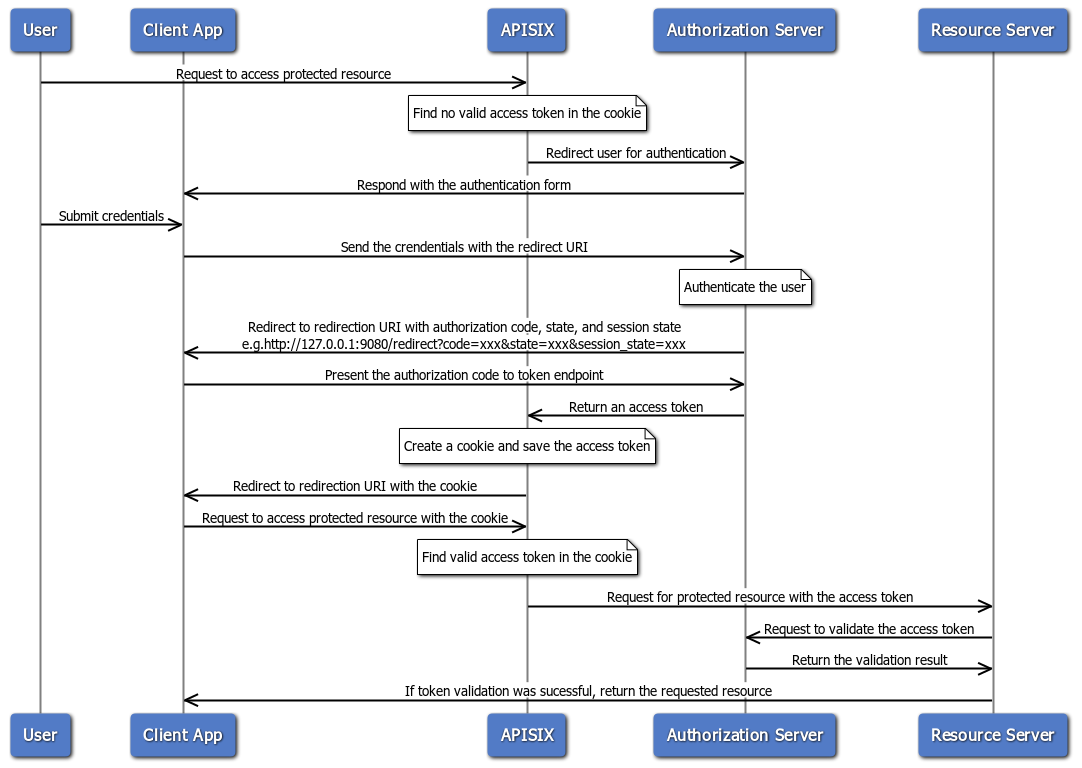
The following diagram illustrates the interaction between different entities
when you implement the authorization code flow:
-
+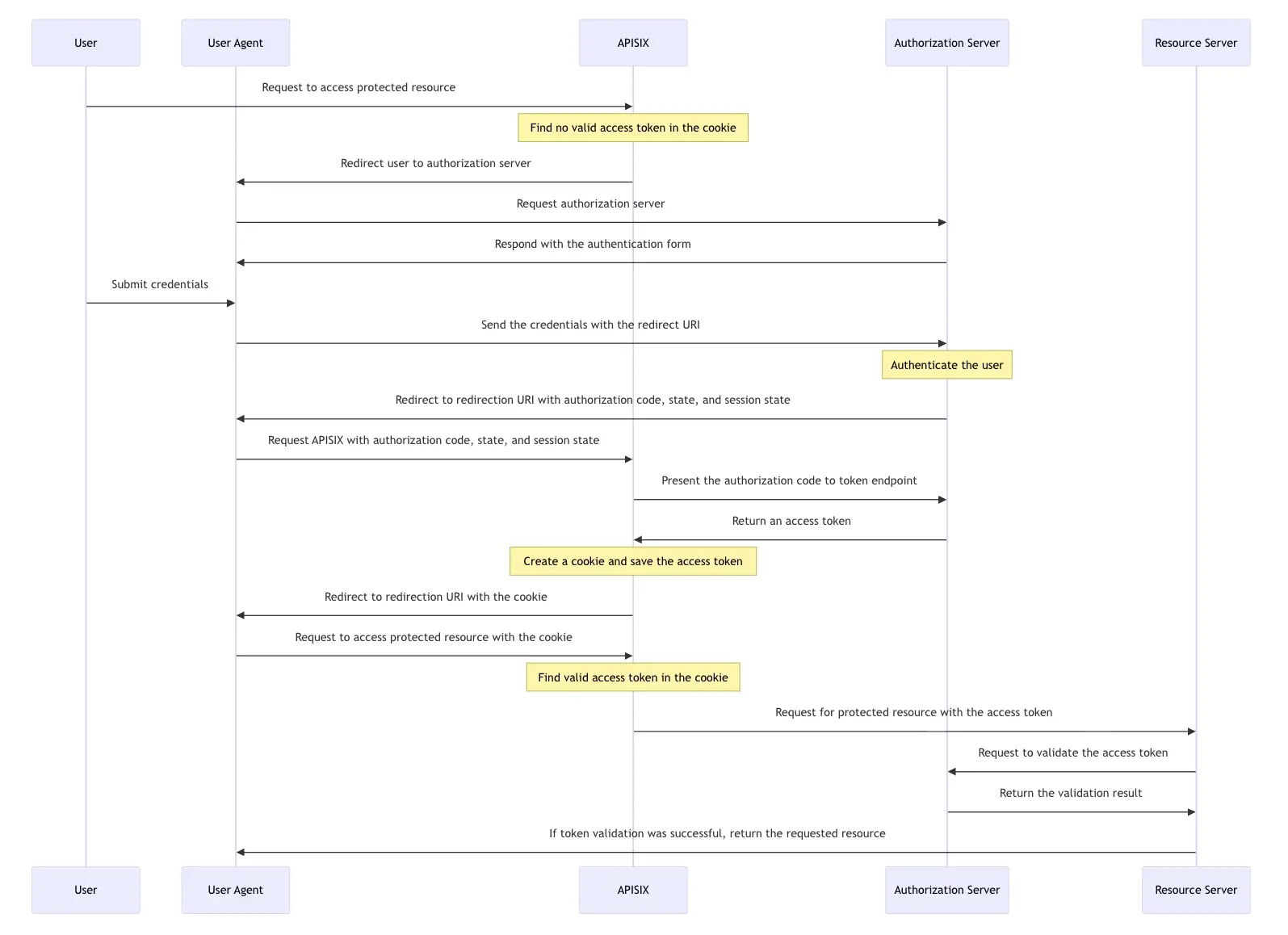
When an incoming request does not contain an access token in its header nor in
an appropriate session cookie, the Plugin acts as a relying party and redirects
to the authorization server to continue the authorization code flow.
After successful authentication, the Plugin keeps the token in the session
cookie, and subsequent requests will use the token stored in the cookie.
-See [Implement Authorization Code
Grant](../tutorials/keycloak-oidc.md#implement-authorization-code-grant) for an
example to use the `openid-connect` Plugin to integrate with Keycloak using the
authorization code flow.
+The following example creates a Route with the `openid-connect` Plugin
configured to use the authorization code flow with Keycloak as the identity
provider:
+
+<Tabs groupId="api">
+<TabItem value="admin-api" label="Admin API">
+
+```bash
+curl "http://127.0.0.1:9180/apisix/admin/routes"; -X PUT \
+ -H "X-API-KEY: ${admin_key}" \
+ -d '{
+ "id": "openid-connect-route",
+ "uri": "/api/v1/*",
+ "plugins": {
+ "openid-connect": {
+ "client_id": "apisix",
+ "client_secret": "your-client-secret",
+ "discovery":
"http://keycloak:8080/realms/master/.well-known/openid-configuration";,
+ "scope": "openid email profile",
+ "redirect_uri": "http://127.0.0.1:9080/api/v1/redirect";,
+ "ssl_verify": false,
+ "session": {
+ "secret": "your-session-secret-min-16-chars"
+ }
+ }
+ },
+ "upstream": {
+ "type": "roundrobin",
+ "nodes": {
+ "httpbin.org:80": 1
+ }
+ }
+ }'
+```
+
+</TabItem>
+<TabItem value="adc" label="ADC">
+
+```yaml
+routes:
+ - id: openid-connect-route
+ uri: /api/v1/*
+ plugins:
+ openid-connect:
+ client_id: apisix
+ client_secret: your-client-secret
+ discovery:
http://keycloak:8080/realms/master/.well-known/openid-configuration
+ scope: openid email profile
+ redirect_uri: http://127.0.0.1:9080/api/v1/redirect
+ ssl_verify: false
+ session:
+ secret: your-session-secret-min-16-chars
+ upstream:
+ type: roundrobin
+ nodes:
+ httpbin.org:80: 1
+```
+
+</TabItem>
+<TabItem value="ingress" label="Ingress Controller">
+
+<Tabs groupId="k8s-api">
+<TabItem value="gateway-api" label="Gateway API">
+
+```yaml
+apiVersion: v1
+kind: Service
+metadata:
+ name: httpbin
+ namespace: default
+spec:
+ type: ExternalName
+ externalName: httpbin.org
+---
+apiVersion: apisix.apache.org/v1alpha1
+kind: PluginConfig
+metadata:
+ name: openid-connect-plugin-config
+ namespace: default
+spec:
+ plugins:
+ - name: openid-connect
+ config:
+ client_id: apisix
+ client_secret: your-client-secret
+ discovery:
http://keycloak:8080/realms/master/.well-known/openid-configuration
+ scope: openid email profile
+ redirect_uri: http://127.0.0.1:9080/api/v1/redirect
+ ssl_verify: false
+ session:
+ secret: your-session-secret-min-16-chars
+---
+apiVersion: gateway.networking.k8s.io/v1
+kind: HTTPRoute
+metadata:
+ name: openid-connect-route
+ namespace: default
+spec:
+ parentRefs:
+ - name: apisix
+ rules:
+ - matches:
+ - path:
+ type: PathPrefix
+ value: /api/v1
+ backendRefs:
+ - name: httpbin
+ port: 80
+ filters:
+ - type: ExtensionRef
+ extensionRef:
+ group: apisix.apache.org
+ kind: PluginConfig
+ name: openid-connect-plugin-config
+```
+
+</TabItem>
+<TabItem value="apisix-ingress-controller" label="APISIX Ingress Controller">
+
+```yaml
+apiVersion: v1
+kind: Service
+metadata:
+ name: httpbin
+ namespace: default
+spec:
+ type: ExternalName
+ externalName: httpbin.org
+---
+apiVersion: apisix.apache.org/v2
+kind: ApisixRoute
+metadata:
+ name: openid-connect-route
+ namespace: default
+spec:
+ http:
+ - name: rule1
+ match:
+ paths:
+ - /api/v1/*
+ backends:
+ - serviceName: httpbin
+ servicePort: 80
+ plugins:
+ - name: openid-connect
+ enable: true
+ config:
+ client_id: apisix
+ client_secret: your-client-secret
+ discovery:
http://keycloak:8080/realms/master/.well-known/openid-configuration
+ scope: openid email profile
+ redirect_uri: http://127.0.0.1:9080/api/v1/redirect
+ ssl_verify: false
+ session:
+ secret: your-session-secret-min-16-chars
+```
+
+</TabItem>
+</Tabs>
+
+</TabItem>
+</Tabs>
+
+See [Implement Authorization Code
Grant](../tutorials/keycloak-oidc.md#implement-authorization-code-grant) for a
complete example to use the `openid-connect` Plugin to integrate with Keycloak
using the authorization code flow.
### Proof Key for Code Exchange (PKCE)
@@ -166,7 +336,9 @@ The Proof Key for Code Exchange (PKCE) is defined in [RFC
7636](https://datatrac
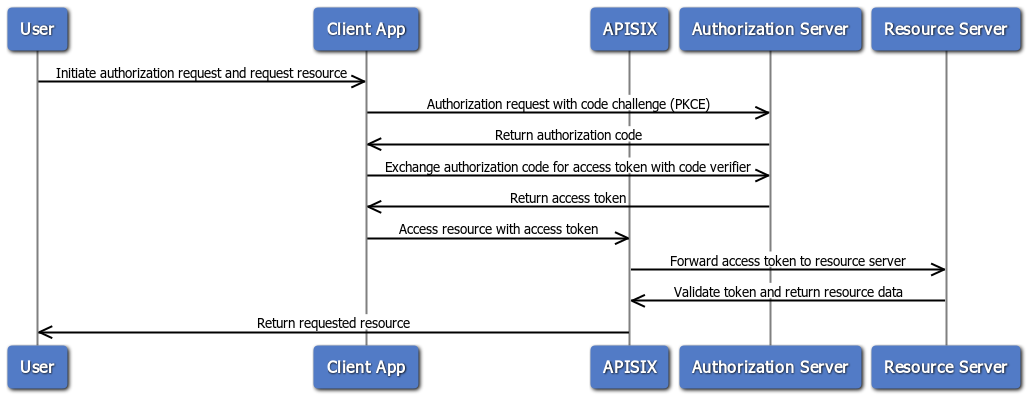
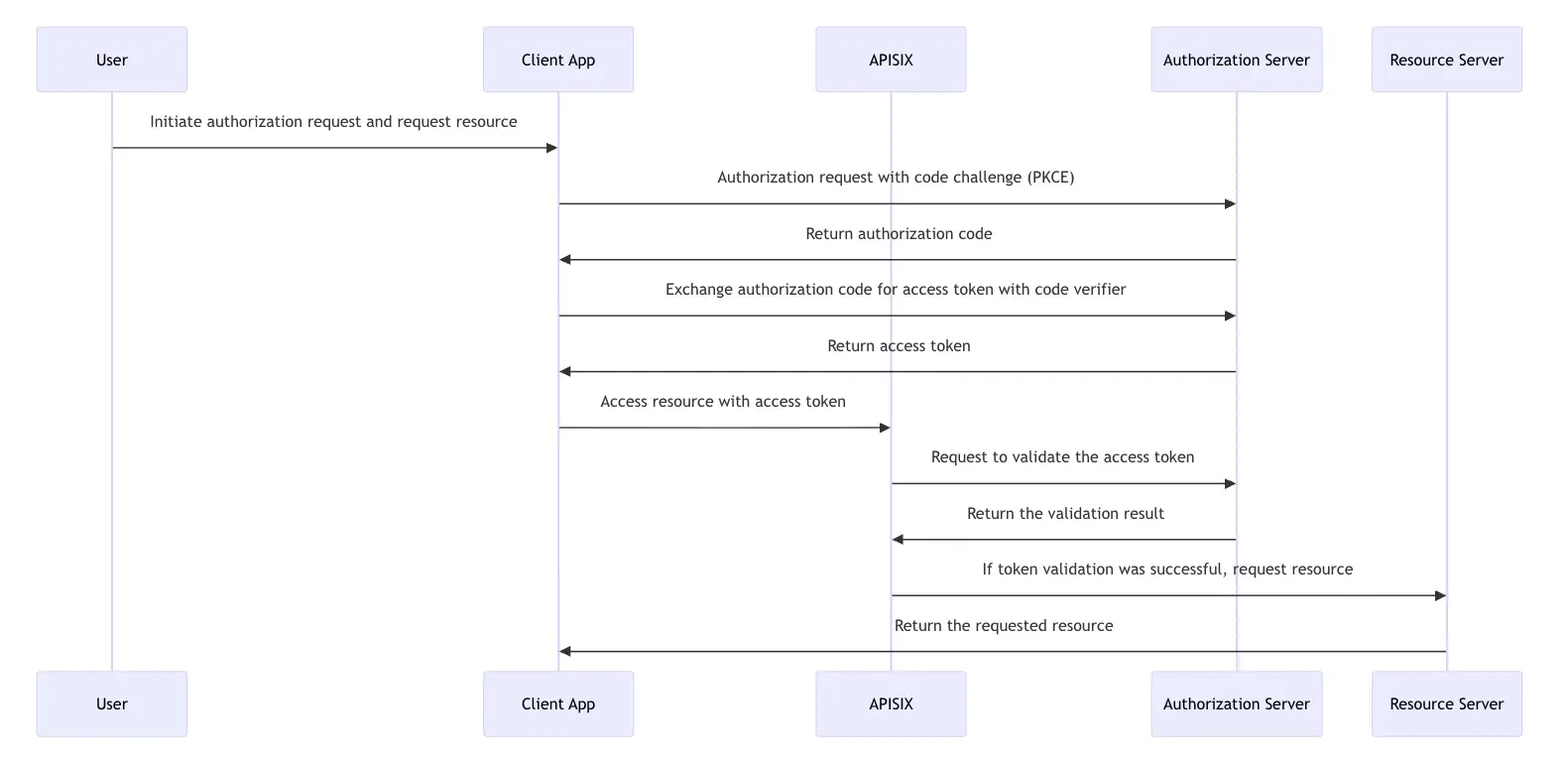
The following diagram illustrates the interaction between different entities
when you implement the authorization code flow with PKCE:
-
+
+
+To use PKCE, set `use_pkce` to `true` in the Plugin configuration. Make sure
you have also configured the IdP client to use PKCE.
See [Implement Authorization Code
Grant](../tutorials/keycloak-oidc.md#implement-authorization-code-grant) for an
example to use the `openid-connect` Plugin to integrate with Keycloak using the
authorization code flow with PKCE.
@@ -176,62 +348,59 @@ The client credential flow is defined in [RFC 6749,
Section 4.4](https://datatra
The following diagram illustrates the interaction between different entities
when you implement the client credential flow:
-<div style={{textAlign: 'center'}}>
-<img
src="https://static.api7.ai/uploads/2024/10/28/sbHxqnOz_client-credential-no-introspect.png";
alt="Client credential flow diagram" style={{width: '70%'}} />
-</div>
-<br />
+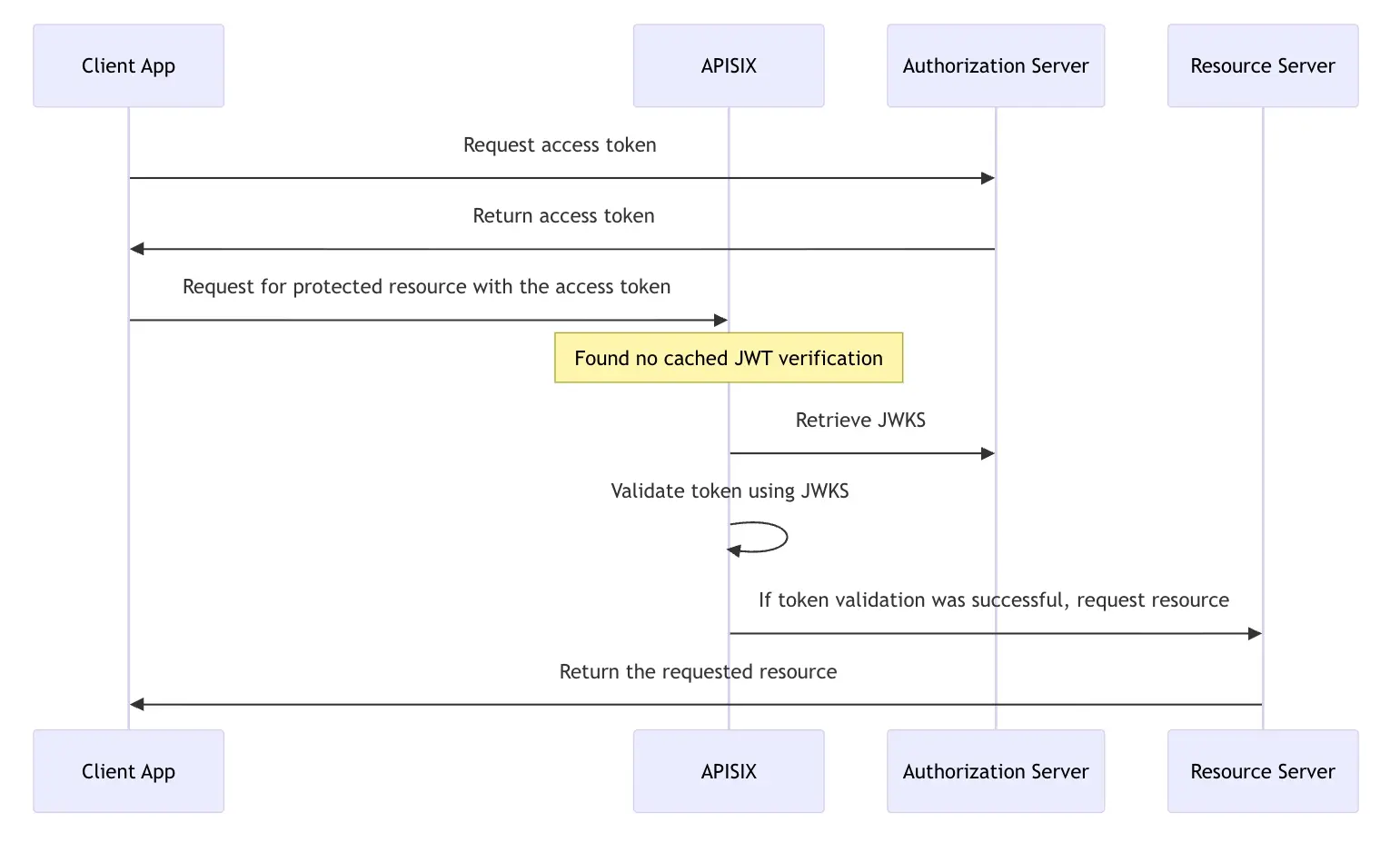
See [Implement Client Credentials
Grant](../tutorials/keycloak-oidc.md#implement-client-credentials-grant) for an
example to use the `openid-connect` Plugin to integrate with Keycloak using the
client credentials flow.
### Introspection Flow
-The introspection flow is defined in [RFC
7662](https://datatracker.ietf.org/doc/html/rfc7662). It involves verifying the
validity and details of an access token by querying an authorization server’s
introspection endpoint.
+The introspection flow is defined in [RFC
7662](https://datatracker.ietf.org/doc/html/rfc7662). It involves verifying the
validity and details of an access token by querying an authorization server's
introspection endpoint.
-In this flow, when a client presents an access token to the resource server,
the resource server sends a request to the authorization server’s introspection
endpoint, which responds with token details if the token is active, including
information like token expiration, associated scopes, and the user or client it
belongs to.
+In this flow, when a client presents an access token to the resource server,
the resource server sends a request to the authorization server's introspection
endpoint, which responds with token details if the token is active, including
information like token expiration, associated scopes, and the user or client it
belongs to.
The following diagram illustrates the interaction between different entities
when you implement the authorization code flow with token introspection:
-<br />
-<div style={{textAlign: 'center'}}>
-<img
src="https://static.api7.ai/uploads/2024/10/29/Y2RWIUV9_client-cred-flow-introspection.png";
alt="Client credential with introspection diagram" style={{width: '55%'}} />
-</div>
-<br />
+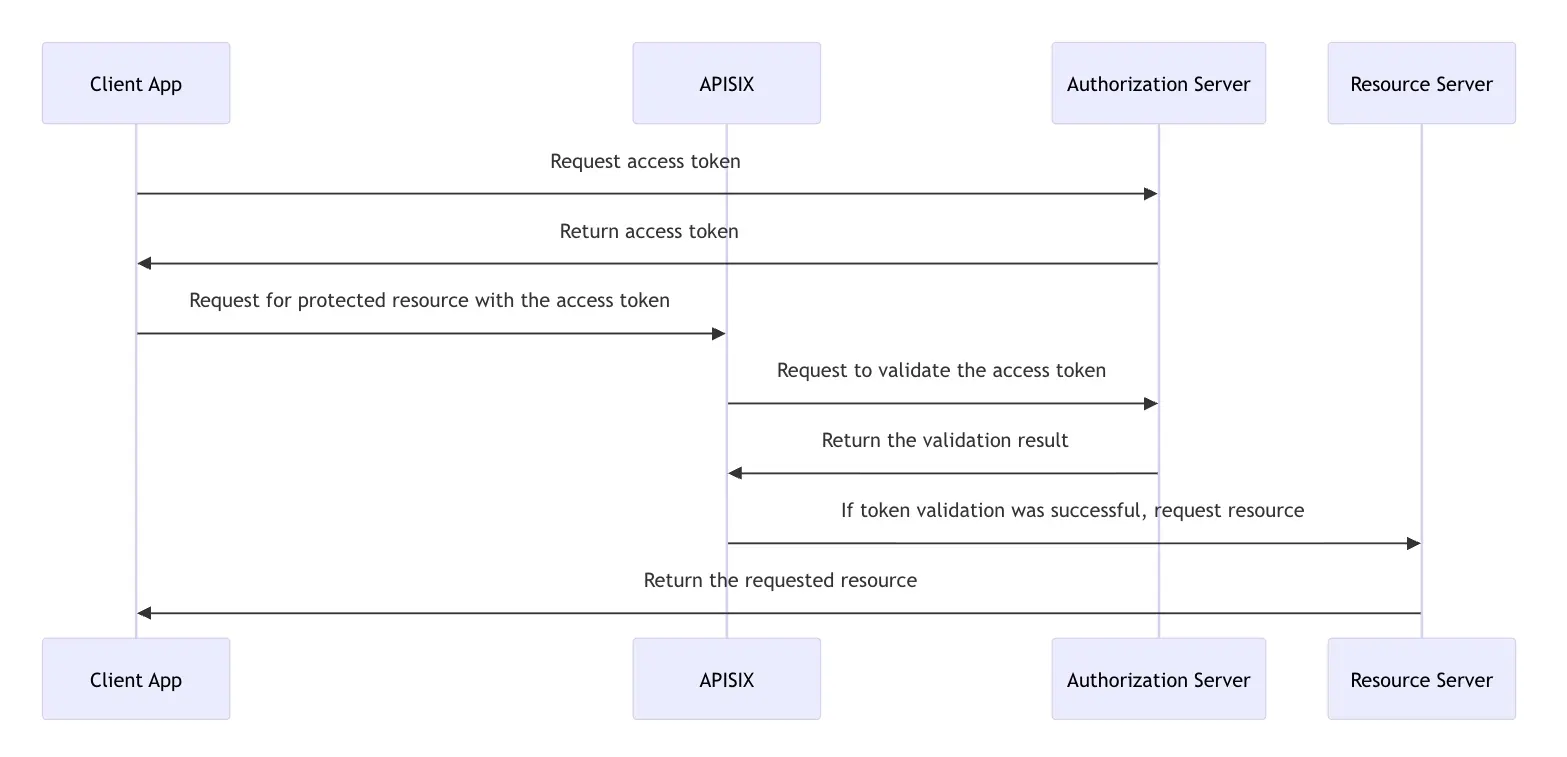
See [Implement Client Credentials
Grant](../tutorials/keycloak-oidc.md#implement-client-credentials-grant) for an
example to use the `openid-connect` Plugin to integrate with Keycloak using the
client credentials flow with token introspection.
### Password Flow
-The password flow is defined in [RFC 6749, Section
4.3](https://datatracker.ietf.org/doc/html/rfc6749#section-4.3). It is designed
for trusted applications, allowing them to obtain an access token directly
using a user’s username and password. In this grant type, the client app sends
the user’s credentials along with its own client ID and secret to the
authorization server, which then authenticates the user and, if valid, issues
an access token.
+The password flow is defined in [RFC 6749, Section
4.3](https://datatracker.ietf.org/doc/html/rfc6749#section-4.3). It is designed
for trusted applications, allowing them to obtain an access token directly
using a user's username and password. In this grant type, the client app sends
the user's credentials along with its own client ID and secret to the
authorization server, which then authenticates the user and, if valid, issues
an access token.
Though efficient, this flow is intended for highly trusted, first-party
applications only, as it requires the app to handle sensitive user credentials
directly, posing significant security risks if used in third-party contexts.
The following diagram illustrates the interaction between different entities
when you implement the password flow:
-<div style={{textAlign: 'center'}}>
-<img src="https://static.api7.ai/uploads/2024/10/30/njkWZVgX_pass-grant.png";
alt="Password flow diagram" style={{width: '70%'}} />
-</div>
-<br />
+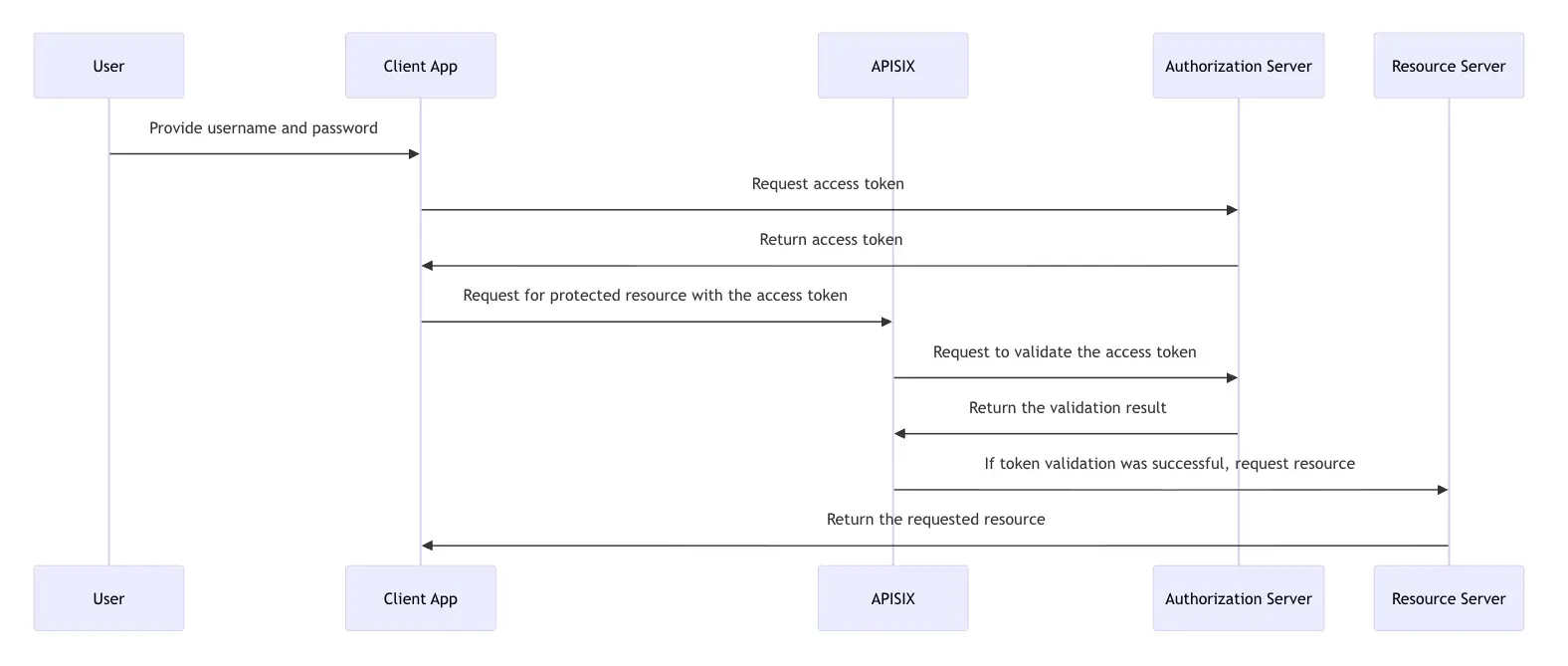
See [Implement Password
Grant](../tutorials/keycloak-oidc.md#implement-password-grant) for an example
to use the `openid-connect` Plugin to integrate with Keycloak using the
password flow.
### Refresh Token Grant
-The refresh token grant is defined in [RFC 6749, Section
6](https://datatracker.ietf.org/doc/html/rfc6749#section-6). It enables clients
to request a new access token without requiring the user to re-authenticate,
using a previously issued refresh token. This flow is typically used when an
access token expires, allowing the client to maintain continuous access to
resources without user intervention. Refresh tokens are issued along with
access tokens in certain OAuth flows and their lifes [...]
+The refresh token grant is defined in [RFC 6749, Section
6](https://datatracker.ietf.org/doc/html/rfc6749#section-6). It enables clients
to request a new access token without requiring the user to re-authenticate,
using a previously issued refresh token. This flow is typically used when an
access token expires, allowing the client to maintain continuous access to
resources without user intervention. Refresh tokens are issued along with
access tokens in certain OAuth flows and their lifes [...]
-The following diagram illustrates the interaction between different entities
when implementing password flow with refresh token flow:
+The following diagram illustrates the interaction between different entities
when implementing the password flow with refresh token flow:
-<div style={{textAlign: 'center'}}>
-<img
src="https://static.api7.ai/uploads/2024/10/30/YBF7rI6M_password-with-refresh-token.png";
alt="Password grant with refresh token flow diagram" style={{width: '100%'}} />
-</div>
-<br />
+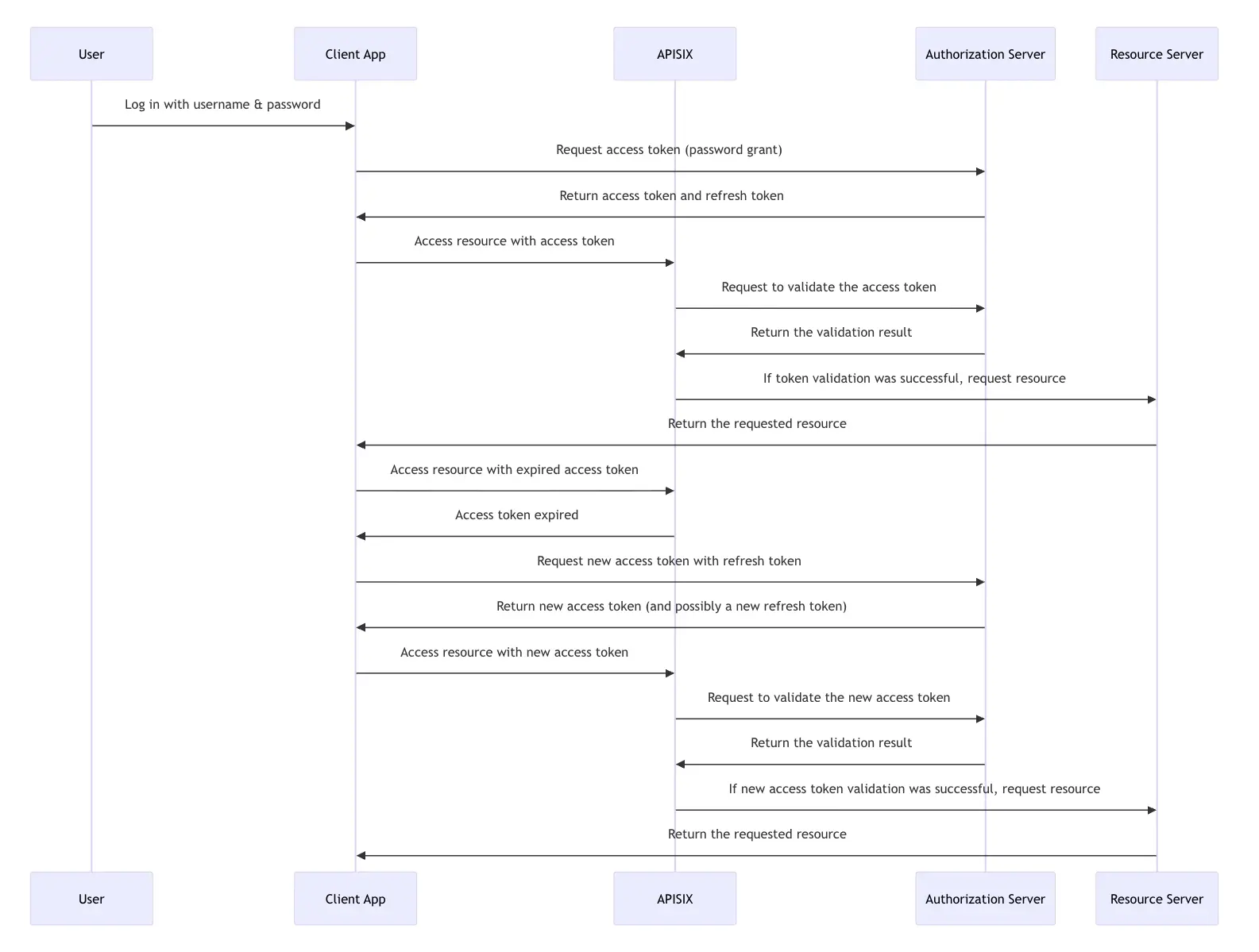
See [Refresh Token](../tutorials/keycloak-oidc.md#refresh-token) for an
example to use the `openid-connect` Plugin to integrate with Keycloak using the
password flow with token refreshes.
+### User Info
+
+The UserInfo endpoint in OpenID Connect (OIDC) is defined in [OpenID Connect
Core 1.0, Section
5.3](https://openid.net/specs/openid-connect-core-1_0.html#UserInfo). It
enables clients to retrieve additional claims about an authenticated user by
presenting a valid access token. This endpoint is particularly useful for
obtaining user profile information, such as name, email, and other attributes,
after the user has been authenticated. The data returned by the UserInfo
endpoint depends on t [...]
+
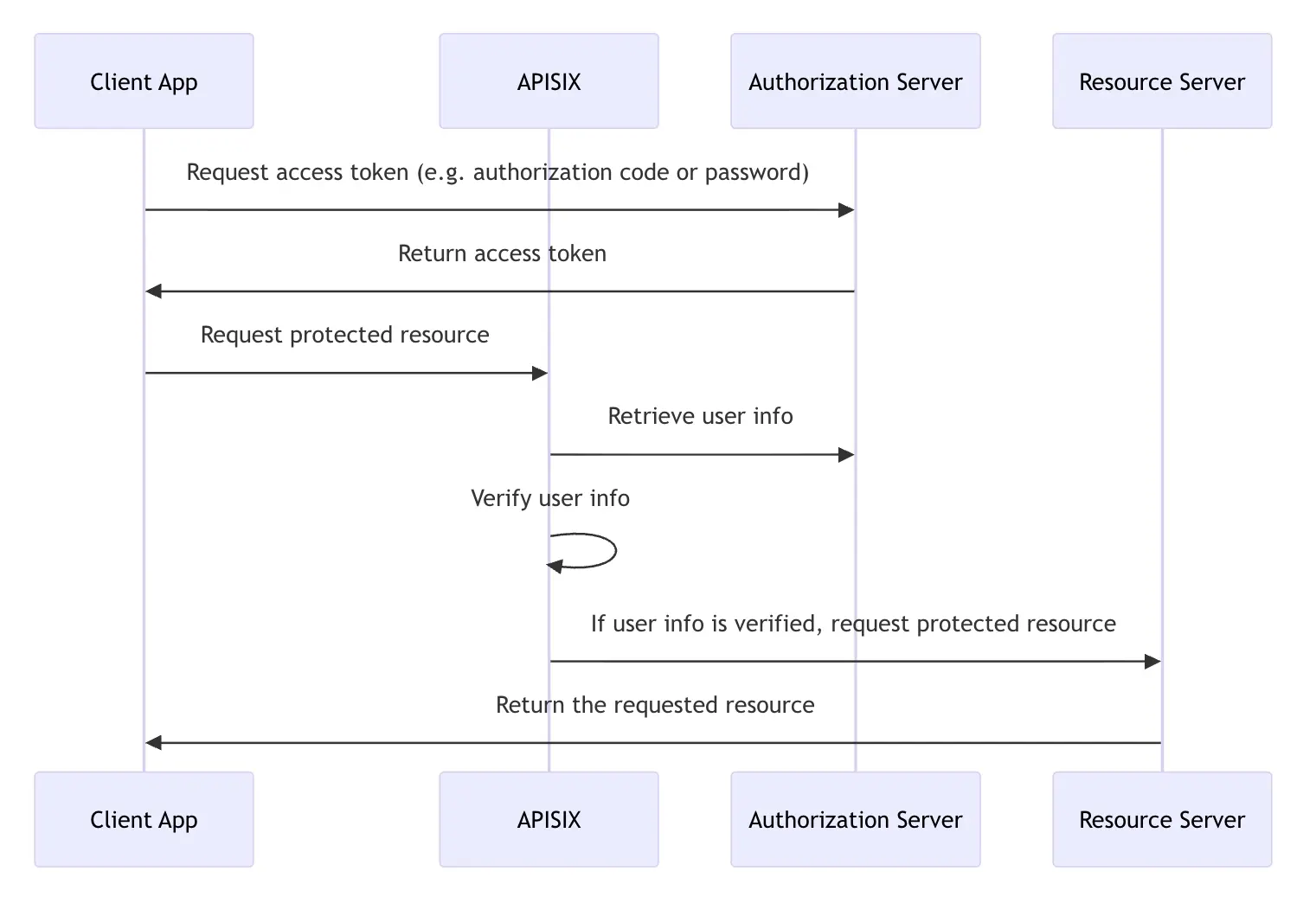
+The following diagram illustrates the interaction between different entities
when APISIX verifies the user info.
+
+
+
+When `set_userinfo_header` is `true` (the default), the Plugin sets user info
data in the `X-Userinfo` request header, which the Upstream can use for further
processing.
+
## Troubleshooting
This section covers a few commonly seen issues when working with this Plugin
to help you troubleshoot.
-### APISIX Cannot Connect to OpenID provider
+### APISIX Cannot Connect to OpenID Provider
If APISIX fails to resolve or cannot connect to the OpenID provider, double
check the DNS settings in your configuration file `config.yaml` and modify as
needed.
@@ -245,17 +414,23 @@ the error request to the redirect_uri path, but there's
no session state found
#### 1. Misconfigured Redirection URI
-A common misconfiguration is to configure the `redirect_uri` the same as the
URI of the route. When a user initiates a request to visit the protected
resource, the request directly hits the redirection URI with no session cookie
in the request, which leads to the no session state found error.
+A common misconfiguration is to configure the `redirect_uri` the same as the
URI of the Route. When a user initiates a request to visit the protected
resource, the request directly hits the redirection URI with no session cookie
in the request, which leads to the no session state found error.
To properly configure the redirection URI, make sure that the `redirect_uri`
matches the Route where the Plugin is configured, without being fully
identical. For instance, a correct configuration would be to configure `uri` of
the Route to `/api/v1/*` and the path portion of the `redirect_uri` to
`/api/v1/redirect`.
-You should also ensure that the `redirect_uri` include the scheme, such as
`http` or `https`.
+You should also ensure that the `redirect_uri` includes the scheme, such as
`http` or `https`.
+
+#### 2. Missing Session Secret
+
+If you deploy APISIX in the [standalone
mode](../deployment-modes.md#standalone-mode), make sure that `session.secret`
is configured.
+
+User sessions are stored in browser as cookies and encrypted with session
secret. The secret is automatically generated and saved to etcd if no secret is
configured through the `session.secret` attribute. However, in standalone mode,
etcd is no longer the configuration center. Therefore, you should explicitly
configure `session.secret` for this Plugin in the YAML configuration center
`apisix.yaml`.
-#### 2. Cookie Not Sent or Absent
+#### 3. Cookie Not Sent or Absent
Check if the
[`SameSite`](https://developer.mozilla.org/en-US/docs/Web/HTTP/Headers/Set-Cookie#samesitesamesite-value)
cookie attribute is properly set (i.e. if your application needs to send the
cookie cross sites) to see if this could be a factor that prevents the cookie
being saved to the browser's cookie jar or being sent from the browser.
-#### 3. Upstream Sent Too Big Header
+#### 4. Upstream Sent Too Big Header
If you have NGINX sitting in front of APISIX to proxy client traffic, see if
you observe the following error in NGINX's `error.log`:
@@ -265,16 +440,14 @@ upstream sent too big header while reading response
header from upstream
If so, try adjusting `proxy_buffers`, `proxy_buffer_size`, and
`proxy_busy_buffers_size` to larger values.
-Another option is to configure the `session_content` attribute to adjust which
data to store in session. For instance, you can set
`session_content.access_token` to `true`.
+Another option is to configure the `session_contents` attribute to adjust
which data to store in session. For instance, you can set
`session_contents.access_token` to `true`.
-#### 4. Invalid Client Secret
+#### 5. Invalid Client Secret
Verify if `client_secret` is valid and correct. An invalid `client_secret`
would lead to an authentication failure and no token shall be returned and
stored in session.
-#### 5. PKCE IdP Configuration
+#### 6. PKCE IdP Configuration
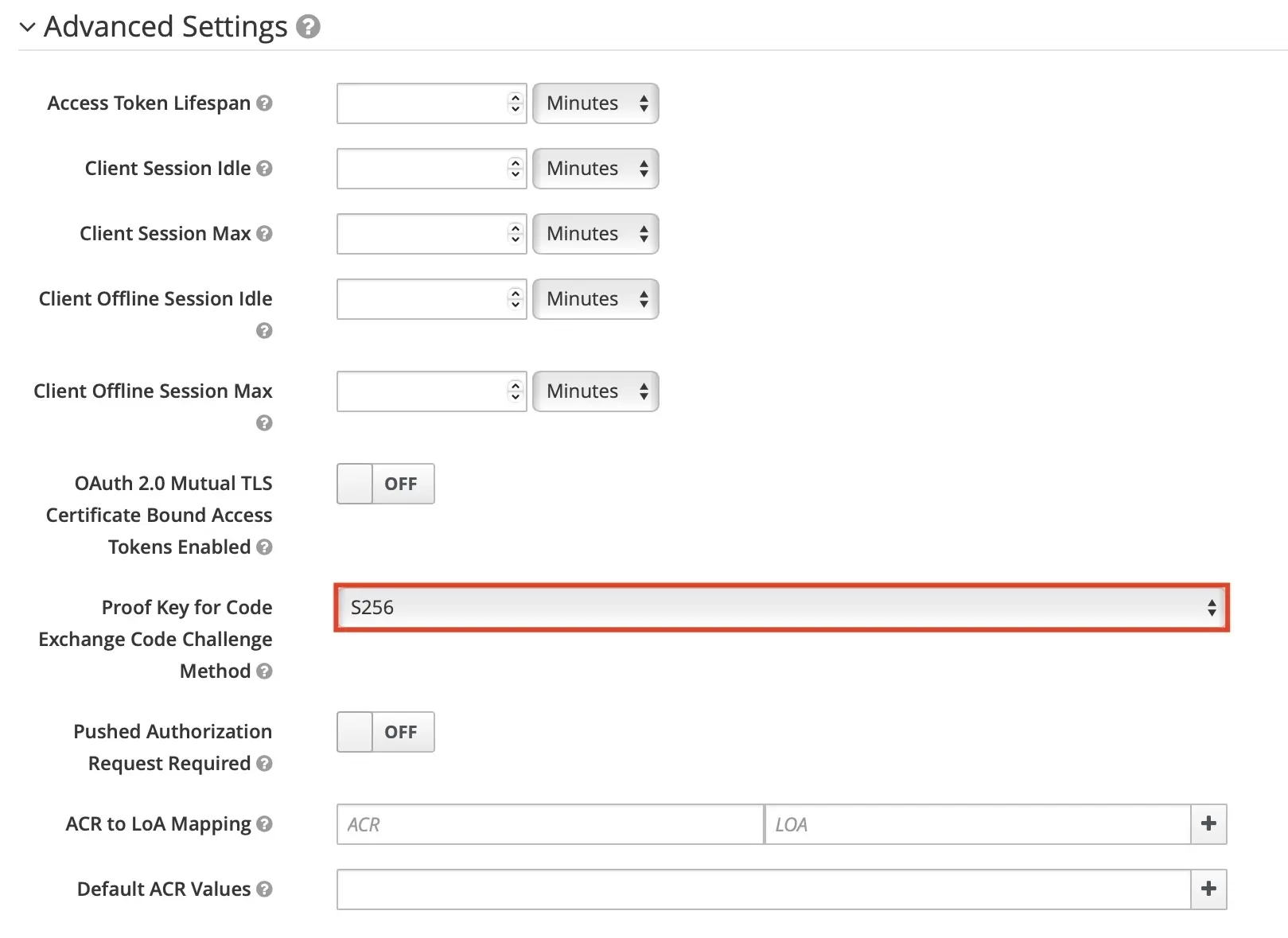
If you are enabling PKCE with the authorization code flow, make sure you have
configured the IdP client to use PKCE. For example, in Keycloak, you should
configure the PKCE challenge method in the client's advanced settings:
-<div style={{textAlign: 'center'}}>
-<img
src="https://static.api7.ai/uploads/2024/11/04/xvnCNb20_pkce-keycloak-revised.jpeg";
alt="PKCE keycloak configuration" style={{width: '70%'}} />
-</div>
+
diff --git a/docs/zh/latest/plugins/openid-connect.md
b/docs/zh/latest/plugins/openid-connect.md
index 8fff537fc..103631c53 100644
--- a/docs/zh/latest/plugins/openid-connect.md
+++ b/docs/zh/latest/plugins/openid-connect.md
@@ -5,7 +5,7 @@ keywords:
- API 网关
- OpenID Connect
- OIDC
-description: openid-connect 插件支持与 OpenID Connect (OIDC) 身份提供商集成,例如
Keycloak、Auth0、Microsoft Entra ID、Google、Okta 等。它允许 APISIX
对客户端进行身份验证并从身份提供商处获取其信息,然后允许或拒绝其访问上游受保护资源。
+description: openid-connect 插件支持与 OpenID Connect (OIDC) 身份提供商集成,例如
Keycloak、Auth0、Microsoft Entra ID、Google、Okta 等。它允许 APISIX
在允许或拒绝客户端访问受保护的上游资源之前,先对客户端进行身份验证并从身份提供商获取相关信息。
---
<!--
@@ -31,115 +31,123 @@ description: openid-connect 插件支持与 OpenID Connect (OIDC)
身份提供
<link rel="canonical" href="https://docs.api7.ai/hub/openid-connect"; />
</head>
+import Tabs from '@theme/Tabs';
+import TabItem from '@theme/TabItem';
+
## 描述
-`openid-connect` 插件支持与 [OpenID Connect (OIDC)](https://openid.net/connect/)
身份提供商集成,例如 Keycloak、Auth0、Microsoft Entra ID、Google、Okta 等。它允许 APISIX
对客户端进行身份验证,并从身份提供商处获取其信息,然后允许或拒绝其访问上游受保护资源。
+`openid-connect` 插件支持与 [OpenID Connect (OIDC)](https://openid.net/connect/)
身份提供商集成,例如 Keycloak、Auth0、Microsoft Entra ID、Google、Okta 等。它允许 APISIX
在允许或拒绝客户端访问受保护的上游资源之前,先对客户端进行身份验证并从身份提供商获取相关信息。
## 属性
-| 名称 | 类型 | 必选项 | 默认值 | 有效值
| 描述
|
-| ------------------------------------ | ------- | ------ |
--------------------- | ------------- |
------------------------------------------------------------------------------------------------
|
-| client_id | string | 是 |
| | OAuth 客户端 ID。
|
-| client_secret | string | 是 |
| | OAuth 客户端 secret。
|
-| discovery | string | 是 | | | OpenID 提供商的知名发现文档的 URL,其中包含 OP API
端点列表。插件可以直接利用发现文档中的端点。您也可以单独配置这些端点,这优先于发现文档中提供的端点。 |
-| scope | string | 否 | openid | | 与应返回的有关经过身份验证的用户的信息相对应的 OIDC 范围,也称为
[claim](https://openid.net/specs/openid-connect-core-1_0.html#StandardClaims)。这用于向用户授权适当的权限。默认值为
`openid`,这是 OIDC 返回唯一标识经过身份验证的用户的 `sub` 声明所需的范围。可以附加其他范围并用空格分隔,例如 `openid
email profile`。 |
-| required_scopes | array[string] | 否 | | | 访问令牌中必须存在的范围。当 `bearer_only` 为
`true` 时与自省端点结合使用。如果缺少任何必需的范围,插件将以 403 禁止错误拒绝请求。|
-| realm | string | 否 | apisix | |
由于持有者令牌无效,[`WWW-Authenticate`](https://www.rfc-editor.org/rfc/rfc6750#section-3)
响应标头中的领域伴随 401 未经授权的请求。 |
-| bearer_only | boolean | 否 | false | | 如果为 true,则严格要求在身份验证请求中使用持有者访问令牌。 |
-| logout_path | string | 否 | /logout | | 激活注销的路径。 |
-| post_logout_redirect_uri | string | 否 | | | `logout_path` 收到注销请求后将用户重定向到的
URL。|
-| redirect_uri | string | 否 | | | 通过 OpenID 提供商进行身份验证后重定向到的 URI。请注意,重定向 URI
不应与请求 URI 相同,而应为请求 URI 的子路径。例如,如果路由的 `uri` 是 `/api/v1/*`,则 `redirect_uri` 可以配置为
`/api/v1/redirect`。如果未配置 `redirect_uri`,APISIX 将在请求 URI 后附加 `/.apisix/redirect`
以确定 `redirect_uri` 的值。|
-| timeout | integer | 否 | 3 | [1,...] | 请求超时时间(秒)。|
-| ssl_verify | boolean | 否 | true | | 如果为 true,则验证 OpenID 提供商的 SSL 证书。|
-| introspection_endpoint | string | 否 | | |用于自检访问令牌的 OpenID 提供程序的
[令牌自检](https://datatracker.ietf.org/doc/html/rfc7662) 端点的
URL。如果未设置,则将使用众所周知的发现文档中提供的自检端点[作为后备](https://github.com/zmartzone/lua-resty-openidc/commit/cdaf824996d2b499de4c72852c91733872137c9c)。|
-| introspection_endpoint_auth_method | string | 否 | client_secret_basic | |
令牌自检端点的身份验证方法。该值应为 `introspection_endpoint_auth_methods_supported`
[授权服务器元数据](https://www.rfc-editor.org/rfc/rfc8414.html)
中指定的身份验证方法之一,如众所周知的发现文档中所示,例如
`client_secret_basic`、`client_secret_post`、`private_key_jwt` 和
`client_secret_jwt`。|
-| token_endpoint_auth_method | string | 否 | client_secret_basic | |
令牌端点的身份验证方法。该值应为 `token_endpoint_auth_methods_supported`
[授权服务器元数据](https://www.rfc-editor.org/rfc/rfc8414.html)
中指定的身份验证方法之一,如众所周知的发现文档中所示,例如
`client_secret_basic`、`client_secret_post`、`private_key_jwt` 和
`client_secret_jwt`。如果配置的方法不受支持,则回退到 `token_endpoint_auth_methods_supported`
数组中的第一个方法。|
-| public_key | string | 否 | | | 用于验证 JWT 签名 id
的公钥使用非对称算法。提供此值来执行令牌验证将跳过客户端凭据流中的令牌自检。您可以以 `-----BEGIN PUBLIC
KEY-----\\n……\\n-----END PUBLIC KEY-----` 格式传递公钥。|
-| use_jwks | boolean | 否 | false | | 如果为 true 并且未设置 `public_key`,则使用 JWKS 验证
JWT 签名并跳过客户端凭据流中的令牌自检。JWKS 端点是从发现文档中解析出来的。|
-| use_pkce | boolean | 否 | false | | 如果为 true,则使用 [RFC
7636](https://datatracker.ietf.org/doc/html/rfc7636) 中定义的授权码流的代码交换证明密钥 (PKCE)。|
+| 名称 | 类型 | 必选项 | 默认值 | 有效值 | 描述 |
+|------|------|--------|--------|--------|------|
+| client_id | string | 是 | | | OAuth 客户端 ID。 |
+| client_secret | string | 是 | | | OAuth 客户端密钥。 |
+| discovery | string | 是 | | | OpenID 提供商的 well-known 发现文档 URL,包含 OP API
端点列表。插件可直接使用发现文档中的端点。你也可以单独配置这些端点,单独配置的值优先于发现文档中提供的端点。 |
+| scope | string | 否 | openid | | 与认证用户相关信息对应的 OIDC 范围,也称为
[claims](https://openid.net/specs/openid-connect-core-1_0.html#StandardClaims)。用于授权具有适当权限的用户。默认值为
`openid`,这是 OIDC 返回唯一标识认证用户的 `sub` claim 所需的范围。可以附加额外的范围并以空格分隔,例如 `openid
email profile`。 |
+| required_scopes | array[string] | 否 | | | 访问令牌中必须存在的范围。在 `bearer_only` 为
`true` 时与 introspection 端点结合使用。如果缺少任何必需范围,插件将以 403 forbidden 错误拒绝请求。 |
+| realm | string | 否 | apisix | | 由于无效 bearer token 导致 401
未授权请求时,[`WWW-Authenticate`](https://www.rfc-editor.org/rfc/rfc6750#section-3)
响应头中的 Realm 值。 |
+| bearer_only | boolean | 否 | false | | 如果为 true,则严格要求请求中携带 bearer 访问令牌进行身份验证。
|
+| logout_path | string | 否 | /logout | | 触发注销的路径。 |
+| post_logout_redirect_uri | string | 否 | | | `logout_path` 收到注销请求后重定向用户的 URL。
|
+| redirect_uri | string | 否 | | | 与 OpenID 提供商完成身份验证后的重定向 URI。注意,重定向 URI 不应与请求
URI 相同,而应为请求 URI 的子路径。例如,如果路由的 `uri` 为 `/api/v1/*`,则 `redirect_uri` 可配置为
`/api/v1/redirect`。如果未配置 `redirect_uri`,APISIX 将在请求 URI 后追加 `/.apisix/redirect`
作为 `redirect_uri` 的值。 |
+| timeout | integer | 否 | 3 | [1,...] | 请求超时时间,单位为秒。 |
+| ssl_verify | boolean | 否 | true | | 如果为 true,则验证 OpenID 提供商的 SSL
证书。注意:该属性的默认值在 APISIX 3.16.0 中从 `false` 更改为 `true`,这是一个破坏性变更。如果你从早期版本升级,请确保你的
OpenID 提供商 SSL 证书有效,或显式将其设置为 `false` 以保持之前的行为。 |
+| introspection_endpoint | string | 否 | | | OpenID
提供商用于内省访问令牌的[令牌内省](https://datatracker.ietf.org/doc/html/rfc7662)端点
URL。如果未设置,则使用 well-known
发现文档中提供的内省端点作为[备选项](https://github.com/zmartzone/lua-resty-openidc/commit/cdaf824996d2b499de4c72852c91733872137c9c)。
|
+| introspection_endpoint_auth_method | string | 否 | client_secret_basic | |
令牌内省端点的认证方法。值应为 well-known 发现文档中
`introspection_endpoint_auth_methods_supported`
[授权服务器元数据](https://www.rfc-editor.org/rfc/rfc8414.html)指定的认证方法之一,例如
`client_secret_basic`、`client_secret_post`、`private_key_jwt` 和
`client_secret_jwt`。 |
+| token_endpoint_auth_method | string | 否 | client_secret_basic | |
令牌端点的认证方法。值应为 well-known 发现文档中 `token_endpoint_auth_methods_supported`
[授权服务器元数据](https://www.rfc-editor.org/rfc/rfc8414.html)指定的认证方法之一,例如
`client_secret_basic`、`client_secret_post`、`private_key_jwt` 和
`client_secret_jwt`。如果配置的方法不受支持,则回退到 `token_endpoint_auth_methods_supported`
数组中的第一个方法。 |
+| public_key | string | 否 | | | 使用非对称算法时用于验证 JWT
签名的公钥。提供此值进行令牌验证将跳过客户端凭证流中的令牌内省。可以以 `-----BEGIN PUBLIC KEY-----\n……\n-----END
PUBLIC KEY-----` 格式传递公钥。 |
+| use_jwks | boolean | 否 | false | | 如果为 true 且未设置 `public_key`,则使用 JWKS 验证
JWT 签名并跳过客户端凭证流中的令牌内省。JWKS 端点从发现文档中解析。 |
+| use_pkce | boolean | 否 | false | | 如果为 true,则按照 [RFC
7636](https://datatracker.ietf.org/doc/html/rfc7636) 定义,在授权码流程中使用 PKCE(Proof
Key for Code Exchange)。 |
| token_signing_alg_values_expected | string | 否 | | | 用于签署 JWT 的算法,例如
`RS256`。 |
-| set_access_token_header | boolean | 否 | true | | 如果为
true,则在请求标头中设置访问令牌。默认情况下,使用 `X-Access-Token` 标头。|
-| access_token_in_authorization_header | boolean | 否 | false | | 如果为 true 并且
`set_access_token_header` 也为 true,则在 `Authorization` 标头中设置访问令牌。 |
-| set_id_token_header | boolean | 否 | true | | 如果为 true 并且 ID 令牌可用,则在
`X-ID-Token` 请求标头中设置值。 |
-| set_userinfo_header | boolean | 否 | true | | 如果为 true 并且用户信息数据可用,则在
`X-Userinfo` 请求标头中设置值。 |
-| set_refresh_token_header | boolean | 否 | false | | 如果为 true 并且刷新令牌可用,则在
`X-Refresh-Token` 请求标头中设置值。 |
-| session | object | 否 | | | 当 `bearer_only` 为 `false` 且插件使用 Authorization
Code 流程时使用的 Session 配置。 |
-| session.secret | string | 是 | | 16 个字符以上 | 当 `bearer_only` 为 `false` 时,用于
session 加密和 HMAC 运算的密钥。|
+| set_access_token_header | boolean | 否 | true | | 如果为 true,则在请求头中设置访问令牌。默认使用
`X-Access-Token` 头。 |
+| access_token_in_authorization_header | boolean | 否 | false | | 如果为 true 且
`set_access_token_header` 也为 true,则在 `Authorization` 头中设置访问令牌。 |
+| set_id_token_header | boolean | 否 | true | | 如果为 true 且 ID 令牌可用,则在
`X-ID-Token` 请求头中设置其值。 |
+| set_userinfo_header | boolean | 否 | true | | 如果为 true 且用户信息数据可用,则在
`X-Userinfo` 请求头中设置其值。 |
+| set_refresh_token_header | boolean | 否 | false | | 如果为 true 且刷新令牌可用,则在
`X-Refresh-Token` 请求头中设置其值。 |
+| session | object | 否 | | | 当 `bearer_only` 为 `false` 且插件使用授权码流程时的会话配置。 |
+| session.secret | string | 是 | | 16 个或更多字符 | `bearer_only` 为 `false` 时用于会话加密和
HMAC 操作的密钥。 |
| session.cookie | object | 否 | | | Cookie 配置。 |
-| session.cookie.lifetime | integer | 否 | 3600 | | Cookie 生存时间(秒)。|
+| session.cookie.lifetime | integer | 否 | 3600 | | Cookie 生命周期,单位为秒。 |
| session.storage | string | 否 | cookie | ["cookie", "redis"] | 会话存储方式。 |
-| session.redis | object | 否 | | | 当 `storage` 为 `redis` 时的 Redis 配置。 |
-| session.redis.host | string | 否 | 127.0.0.1 | | Redis 主机地址。 |
+| session.redis | object | 否 | | | `storage` 为 `redis` 时的 Redis 配置。 |
+| session.redis.host | string | 否 | 127.0.0.1 | | Redis 主机。 |
| session.redis.port | integer | 否 | 6379 | | Redis 端口。 |
-| session.redis.password | string | 否 | | | Redis 密码。 |
| session.redis.username | string | 否 | | | Redis 用户名。 |
+| session.redis.password | string | 否 | | | Redis 密码。 |
| session.redis.database | integer | 否 | 0 | | Redis 数据库索引。 |
| session.redis.prefix | string | 否 | sessions | | Redis 键前缀。 |
-| session.redis.ssl | boolean | 否 | false | | 启用 Redis
SSL 连接。 |
-| session.redis.ssl_verify | boolean | 否 | true | | 验证 SSL
证书。 |
-| session.redis.server_name | string | 否 | | | Redis
SNI 服务器名称。 |
-| session.redis.connect_timeout | integer | 否 | 1000 | |
连接超时时间(毫秒)。 |
-| session.redis.send_timeout | integer | 否 | 1000 | |
发送超时时间(毫秒)。 |
-| session.redis.read_timeout | integer | 否 | 1000 | |
读取超时时间(毫秒)。 |
-| session.redis.keepalive_timeout | integer | 否 | 10000 | |
Keepalive 超时时间(毫秒)。 |
-| unauth_action | string | 否 | auth | ["auth","deny","pass"] |
未经身份验证的请求的操作。设置为 `auth` 时,重定向到 OpenID 提供程序的身份验证端点。设置为 `pass` 时,允许请求而无需身份验证。设置为
`deny` 时,返回 401 未经身份验证的响应,而不是启动授权代码授予流程。|
-| session_contents | object | 否 | | |
会话内容配置。如果未配置,将把所有数据存储在会话中。 |
-| session_contents.access_token | boolean | 否 | | | 若为
true,则将访问令牌存储在会话中。 |
-| session_contents.id_token | boolean | 否 | | | 若为
true,则将 ID 令牌存储在会话中。 |
-| session_contents.enc_id_token | boolean | 否 | | | 若为
true,则将加密的 ID 令牌存储在会话中。 |
-| session_contents.user | boolean | 否 | | | 若为
true,则将用户信息存储在会话中。 |
-| proxy_opts | object | 否 | | | OpenID 提供程序背后的代理服务器的配置。|
-| proxy_opts.http_proxy | string | 否 | | | HTTP 请求的代理服务器地址,例如
`http://<proxy_host>:<proxy_port>`。|
+| session.redis.ssl | boolean | 否 | false | | 为 Redis 连接启用 SSL。 |
+| session.redis.ssl_verify | boolean | 否 | true | | 验证 Redis 连接的 SSL 证书。 |
+| session.redis.server_name | string | 否 | | | 用于 SNI 的 Redis 服务器名称。 |
+| session.redis.connect_timeout | integer | 否 | 1000 | | 连接超时时间,单位为毫秒。 |
+| session.redis.send_timeout | integer | 否 | 1000 | | 发送超时时间,单位为毫秒。 |
+| session.redis.read_timeout | integer | 否 | 1000 | | 读取超时时间,单位为毫秒。 |
+| session.redis.keepalive_timeout | integer | 否 | 10000 | | 保活超时时间,单位为毫秒。 |
+| session_contents | object | 否 | | | 会话内容配置。如果未配置,所有数据将存储在会话中。 |
+| session_contents.access_token | boolean | 否 | | | 如果为 true,则在会话中存储访问令牌。 |
+| session_contents.id_token | boolean | 否 | | | 如果为 true,则在会话中存储 ID 令牌。 |
+| session_contents.enc_id_token | boolean | 否 | | | 如果为 true,则在会话中存储加密的 ID 令牌。
|
+| session_contents.user | boolean | 否 | | | 如果为 true,则在会话中存储用户信息。 |
+| unauth_action | string | 否 | auth | ["auth", "deny", "pass"] |
未认证请求的处理方式。设置为 `auth` 时,重定向到 OpenID 提供商的认证端点。设置为 `pass` 时,允许请求不经认证通过。设置为 `deny`
时,返回 401 未认证响应而不启动授权码授权流程。 |
+| proxy_opts | object | 否 | | | OpenID 提供商所在代理服务器的配置。 |
+| proxy_opts.http_proxy | string | 否 | | | HTTP 请求的代理服务器地址,例如
`http://<proxy_host>:<proxy_port>`。 |
| proxy_opts.https_proxy | string | 否 | | | HTTPS 请求的代理服务器地址,例如
`http://<proxy_host>:<proxy_port>`。 |
-| proxy_opts.http_proxy_authorization | string | 否 | | Basic [base64 用户名:密码] |
与 `http_proxy` 一起使用的默认 `Proxy-Authorization` 标头值。可以用自定义的 `Proxy-Authorization`
请求标头覆盖。 |
-| proxy_opts.https_proxy_authorization | string | 否 | | Basic [base64 用户名:密码]
| 与 `https_proxy` 一起使用的默认 `Proxy-Authorization` 标头值。不能用自定义的
`Proxy-Authorization` 请求标头覆盖,因为使用 HTTPS 时,授权在连接时完成。 |
-| proxy_opts.no_proxy | string | 否 | | | 不应代理的主机的逗号分隔列表。|
-| authorization_params | object | 否 | | | 在请求中发送到授权端点的附加参数。 |
-| client_rsa_private_key | string | 否 | | | 用于签署 JWT 以向 OP 进行身份验证的客户端 RSA 私钥。当
`token_endpoint_auth_method` 为 `private_key_jwt` 时必需。 |
-| client_rsa_private_key_id | string | 否 | | | 用于计算签名的 JWT 的客户端 RSA 私钥 ID。当
`token_endpoint_auth_method` 为 `private_key_jwt` 时可选。 |
-| client_jwt_assertion_expires_in | integer | 否 | 60 | | 用于向 OP 进行身份验证的签名 JWT
的生命周期,以秒为单位。当 `token_endpoint_auth_method` 为 `private_key_jwt` 或
`client_secret_jwt` 时使用。 |
-| renew_access_token_on_expiry | boolean | 否 | true | | 如果为
true,则在访问令牌过期或刷新令牌可用时尝试静默更新访问令牌。如果令牌无法更新,则重定向用户进行重新身份验证。|
-| access_token_expires_in | integer | 否 | | | 如果令牌端点响应中不存在 `expires_in`
属性,则访问令牌的有效期(以秒为单位)。 |
-| refresh_session_interval | integer | 否 | | | 刷新用户 ID
令牌而无需重新认证的时间间隔。如果未设置,则不会检查网关向客户端发出的会话的到期时间。如果设置为 900,则表示在 900 秒后刷新用户的
`id_token`(或浏览器中的会话),而无需重新认证。 |
-| iat_slack | integer | 否 | 120 | | ID 令牌中 `iat` 声明的时钟偏差容忍度(以秒为单位)。 |
-| accept_none_alg | boolean | 否 | false | | 如果 OpenID 提供程序未签署其 ID
令牌(例如当签名算法设置为`none` 时),则设置为 true。 |
+| proxy_opts.http_proxy_authorization | string | 否 | | Basic [base64
username:password] | 与 `http_proxy` 一起使用的默认 `Proxy-Authorization` 头值。可以用自定义
`Proxy-Authorization` 请求头覆盖。 |
+| proxy_opts.https_proxy_authorization | string | 否 | | Basic [base64
username:password] | 与 `https_proxy` 一起使用的默认 `Proxy-Authorization` 头值。由于 HTTPS
连接时已完成授权,不能用自定义 `Proxy-Authorization` 请求头覆盖。 |
+| proxy_opts.no_proxy | string | 否 | | | 不需要代理的主机列表,以逗号分隔。 |
+| authorization_params | object | 否 | | | 发送到授权端点请求中的额外参数。 |
+| client_rsa_private_key | string | 否 | | | 用于向 OP 签署 JWT 进行身份验证的客户端 RSA 私钥。当
`token_endpoint_auth_method` 为 `private_key_jwt` 时必填。 |
+| client_rsa_private_key_id | string | 否 | | | 用于计算已签名 JWT 的客户端 RSA 私钥 ID。当
`token_endpoint_auth_method` 为 `private_key_jwt` 时可选。 |
+| client_jwt_assertion_expires_in | integer | 否 | 60 | | 向 OP 进行身份验证的已签名 JWT
的有效期,单位为秒。在 `token_endpoint_auth_method` 为 `private_key_jwt` 或
`client_secret_jwt` 时使用。 |
+| renew_access_token_on_expiry | boolean | 否 | true | | 如果为
true,则在访问令牌过期或刷新令牌可用时尝试静默续期。如果令牌续期失败,则重定向用户重新认证。 |
+| access_token_expires_in | integer | 否 | | | 当令牌端点响应中没有 `expires_in`
属性时,访问令牌的有效期,单位为秒。 |
+| refresh_session_interval | integer | 否 | | | 无需重新认证即可刷新用户 ID
令牌的时间间隔,单位为秒。未设置时不检查网关向客户端签发的会话的过期时间。 |
+| iat_slack | integer | 否 | 120 | | ID 令牌 `iat` claim 时钟偏差容忍度,单位为秒。 |
+| accept_none_alg | boolean | 否 | false | | 如果 OpenID 提供商不对其 ID
令牌进行签名(例如签名算法设置为 `none`),则设置为 true。 |
| accept_unsupported_alg | boolean | 否 | true | | 如果为 true,则忽略 ID
令牌签名以接受不支持的签名算法。 |
-| access_token_expires_leeway | integer | 否 | 0 | | 访问令牌续订的过期余地(以秒为单位)。当设置为大于
0 的值时,令牌续订将在令牌过期前设定的时间内进行。这样可以避免访问令牌在到达资源服务器时刚好过期而导致的错误。|
-| force_reauthorize | boolean | 否 | false | | 如果为 true,即使令牌已被缓存,也执行授权流程。 |
-| use_nonce | boolean | 否 | false | | 如果为 true,在授权请求中启用 nonce 参数。 |
-| revoke_tokens_on_logout | boolean | 否 | false | | 如果为
true,则通知授权服务器,撤销端点不再需要先前获得的刷新或访问令牌。 |
-| jwk_expires_in | integer | 否 | 86400 | | JWK 缓存的过期时间(秒)。 |
-| jwt_verification_cache_ignore | boolean | 否 | false | | 如果为
true,则强制重新验证承载令牌并忽略任何现有的缓存验证结果。 |
-| cache_segment | string | 否 | | | 缓存段的可选名称,用于分隔和区分令牌自检或 JWT 验证使用的缓存。|
-| introspection_interval | integer | 否 | 0 | | 缓存和自省访问令牌的 TTL(以秒为单位)。默认值为
0,这意味着不使用此选项,插件默认使用 `introspection_expiry_claim` 中定义的到期声明传递的
TTL。如果`introspection_interval` 大于 0 且小于 `introspection_expiry_claim`
中定义的到期声明传递的 TTL,则使用`introspection_interval`。|
-| introspection_expiry_claim | string | 否 | exp | | 到期声明的名称,它控制缓存和自省访问令牌的 TTL。|
-| introspection_addon_headers | array[string] | 否 | | | 用于将其他标头值附加到自省 HTTP
请求。如果原始请求中不存在指定的标头,则不会附加值。|
-| claim_validator | object | 否 | | | JWT 声明(claim)验证的相关配置。 |
-| claim_validator.issuer.valid_issuers | array[string] | 否 | | | 可信任的 JWT
发行者(issuer)列表。如果未配置,将使用发现端点返回的发行者;如果两者都不可用,将不会验证发行者。 |
-| claim_validator.audience | object | 否 | | | [Audience
声明](https://openid.net/specs/openid-connect-core-1_0.html) 验证的相关配置。 |
-| claim_validator.audience.claim | string | 否 | aud | | 包含受众(audience)的声明名称。 |
-| claim_validator.audience.required | boolean | 否 | false | | 若为
`true`,则要求必须存在受众声明,其名称为 `claim` 中定义的值。 |
-| claim_validator.audience.match_with_client_id | boolean | 否 | false | | 若为
`true`,则要求受众(audience)必须与客户端 ID 匹配。若受众为字符串,则必须与客户端 ID
完全一致;若受众为字符串数组,则至少有一个值需与客户端 ID 匹配。若未找到匹配项,将返回 `mismatched audience` 错误。此要求来自
OpenID Connect 规范,用于确保令牌仅用于指定的客户端。 |
-| claim_schema | object | 否 | | | OIDC 响应 claim 的 JSON
schema。示例:`{"type":"object","properties":{"access_token":{"type":"string"}},"required":["access_token"]}`
- 验证响应中包含必需的字符串字段 `access_token`。 |
-
-注意:schema 中还定义了 `encrypt_fields = {"client_secret"}`,这意味着该字段将会被加密存储在 etcd
中。具体参考 [加密存储字段](../plugin-develop.md#加密存储字段)。
-
-此外:你可以使用环境变量或者 APISIX secret 来存放和引用插件配置,APISIX 当前支持通过两种方式配置 secrets -
[Environment Variables and HashiCorp Vault](../terminology/secret.md)。
-
-例如:你可以使用以下方式来设置环境变量
-`export keycloak_secret=abc`
-
-并且像下面这样在插件里使用
-
-`"client_secret": "$ENV://keycloak_secret"`
+| access_token_expires_leeway | integer | 否 | 0 | | 访问令牌续期的过期宽限时间,单位为秒。当设置为大于
0 的值时,令牌续期将在令牌过期前该时间量时进行。这可避免在访问令牌刚到达资源服务器时过期的错误。 |
+| force_reauthorize | boolean | 否 | false | | 如果为 true,即使令牌已缓存也执行授权流程。 |
+| use_nonce | boolean | 否 | false | | 如果为 true,则在授权请求中启用 nonce 参数。 |
+| revoke_tokens_on_logout | boolean | 否 | false | | 如果为
true,则在注销时通知授权服务器之前获取的刷新令牌或访问令牌不再需要。 |
+| jwk_expires_in | integer | 否 | 86400 | | JWK 缓存的过期时间,单位为秒。 |
+| jwt_verification_cache_ignore | boolean | 否 | false | | 如果为 true,则强制重新验证
bearer 令牌并忽略任何现有的缓存验证结果。 |
+| cache_segment | string | 否 | | | 缓存段的可选名称,用于分离和区分令牌内省或 JWT 验证使用的缓存。 |
+| introspection_interval | integer | 否 | 0 | | 缓存和内省的访问令牌的 TTL,单位为秒。默认值为
0,表示不使用此选项,插件默认使用 `introspection_expiry_claim` 定义的过期 claim 传递的 TTL。如果
`introspection_interval` 大于 0 且小于 `introspection_expiry_claim` 定义的过期 claim 传递的
TTL,则使用 `introspection_interval`。 |
+| introspection_expiry_claim | string | 否 | exp | | 过期 claim
的名称,用于控制缓存和内省的访问令牌的 TTL。 |
+| introspection_addon_headers | array[string] | 否 | | | 用于向内省 HTTP
请求追加额外头值。如果指定的头在原始请求中不存在,则不会追加该值。 |
+| claim_validator | object | 否 | | | JWT claim 验证配置。 |
+| claim_validator.issuer.valid_issuers | array[string] | 否 | | | 受信任的 JWT
颁发者数组。如果未配置,将使用发现端点返回的颁发者。如果两者均不可用,则不验证颁发者。 |
+| claim_validator.audience | object | 否 | | | [受众
claim](https://openid.net/specs/openid-connect-core-1_0.html) 验证配置。 |
+| claim_validator.audience.claim | string | 否 | aud | | 包含受众的 claim 名称。 |
+| claim_validator.audience.required | boolean | 否 | false | | 如果为 true,则受众
claim 为必填项,claim 名称为 `claim` 中定义的名称。 |
+| claim_validator.audience.match_with_client_id | boolean | 否 | false | | 如果为
true,则要求受众与客户端 ID 匹配。如果受众是字符串,则必须与客户端 ID 完全匹配。如果受众是字符串数组,则至少一个值必须与客户端 ID
匹配。如果未找到匹配,将收到 `mismatched audience` 错误。OpenID Connect
规范规定了此要求,以确保令牌是为特定客户端颁发的。 |
+| claim_schema | object | 否 | | | OIDC 响应 claim 的 JSON
schema。示例:`{"type":"object","properties":{"access_token":{"type":"string"}},"required":["access_token"]}`
- 验证响应包含必填的字符串字段 `access_token`。 |
+
+注意:schema 中还定义了 `encrypt_fields = {"client_secret",
"client_rsa_private_key"}`,这意味着这些字段将在 etcd
中加密存储。详见[加密存储字段](../plugin-develop.md#加密存储字段)。
+
+此外,你可以使用环境变量或 APISIX Secret 来存储和引用插件属性。APISIX 目前支持两种存储密钥的方式——[环境变量和 HashiCorp
Vault](../terminology/secret.md)。
+
+例如,使用以下命令设置环境变量:
+
+```bash
+export KEYCLOAK_CLIENT_SECRET=abc
+```
+
+并在插件配置中引用:
+
+```json
+"client_secret": "$ENV://KEYCLOAK_CLIENT_SECRET"
+```
## 示例
-以下示例演示了如何针对不同场景配置 `openid-connect` 插件。
+以下示例展示了如何针对不同场景配置 `openid-connect` 插件。
:::note
-您可以这样从 `config.yaml` 中获取 `admin_key` 并存入环境变量:
+你可以使用以下命令从 `config.yaml` 中获取 `admin_key` 并保存到环境变量:
```bash
admin_key=$(yq '.deployment.admin.admin_key[0].key' conf/config.yaml | sed
's/"//g')
@@ -147,98 +155,258 @@ admin_key=$(yq '.deployment.admin.admin_key[0].key'
conf/config.yaml | sed 's/"/
:::
-### Authorization Code Flow
+### 授权码流程
+
+授权码流程在 [RFC 6749 第 4.1
节](https://datatracker.ietf.org/doc/html/rfc6749#section-4.1)中定义。它涉及将临时授权码换取访问令牌,通常由机密客户端和公共客户端使用。
+
+下图展示了实现授权码流程时不同实体之间的交互:
+
+
+
+当传入请求的头中或合适的会话 Cookie 中不包含访问令牌时,插件作为依赖方重定向到授权服务器以继续授权码流程。
+
+认证成功后,插件将令牌保存在会话 Cookie 中,后续请求将使用 Cookie 中存储的令牌。
+
+以下示例创建一个路由,并配置 `openid-connect` 插件以使用 Keycloak 作为身份提供商的授权码流程:
+
+<Tabs groupId="api">
+<TabItem value="admin-api" label="Admin API">
+
+```bash
+curl "http://127.0.0.1:9180/apisix/admin/routes"; -X PUT \
+ -H "X-API-KEY: ${admin_key}" \
+ -d '{
+ "id": "openid-connect-route",
+ "uri": "/api/v1/*",
+ "plugins": {
+ "openid-connect": {
+ "client_id": "apisix",
+ "client_secret": "your-client-secret",
+ "discovery":
"http://keycloak:8080/realms/master/.well-known/openid-configuration";,
+ "scope": "openid email profile",
+ "redirect_uri": "http://127.0.0.1:9080/api/v1/redirect";,
+ "ssl_verify": false,
+ "session": {
+ "secret": "your-session-secret-min-16-chars"
+ }
+ }
+ },
+ "upstream": {
+ "type": "roundrobin",
+ "nodes": {
+ "httpbin.org:80": 1
+ }
+ }
+ }'
+```
-Authorization Code Flow 在 [RFC 6749,第 4.1
节](https://datatracker.ietf.org/doc/html/rfc6749#section-4.1)
中定义。它涉及用临时授权码交换访问令牌,通常由机密和公共客户端使用。
+</TabItem>
+<TabItem value="adc" label="ADC">
+
+```yaml
+routes:
+ - id: openid-connect-route
+ uri: /api/v1/*
+ plugins:
+ openid-connect:
+ client_id: apisix
+ client_secret: your-client-secret
+ discovery:
http://keycloak:8080/realms/master/.well-known/openid-configuration
+ scope: openid email profile
+ redirect_uri: http://127.0.0.1:9080/api/v1/redirect
+ ssl_verify: false
+ session:
+ secret: your-session-secret-min-16-chars
+ upstream:
+ type: roundrobin
+ nodes:
+ httpbin.org:80: 1
+```
-下图说明了实施 Authorization Code Flow 时不同实体之间的交互:
+</TabItem>
+<TabItem value="ingress" label="Ingress Controller">
+
+<Tabs groupId="k8s-api">
+<TabItem value="gateway-api" label="Gateway API">
+
+```yaml
+apiVersion: v1
+kind: Service
+metadata:
+ name: httpbin
+ namespace: default
+spec:
+ type: ExternalName
+ externalName: httpbin.org
+---
+apiVersion: apisix.apache.org/v1alpha1
+kind: PluginConfig
+metadata:
+ name: openid-connect-plugin-config
+ namespace: default
+spec:
+ plugins:
+ - name: openid-connect
+ config:
+ client_id: apisix
+ client_secret: your-client-secret
+ discovery:
http://keycloak:8080/realms/master/.well-known/openid-configuration
+ scope: openid email profile
+ redirect_uri: http://127.0.0.1:9080/api/v1/redirect
+ ssl_verify: false
+ session:
+ secret: your-session-secret-min-16-chars
+---
+apiVersion: gateway.networking.k8s.io/v1
+kind: HTTPRoute
+metadata:
+ name: openid-connect-route
+ namespace: default
+spec:
+ parentRefs:
+ - name: apisix
+ rules:
+ - matches:
+ - path:
+ type: PathPrefix
+ value: /api/v1
+ backendRefs:
+ - name: httpbin
+ port: 80
+ filters:
+ - type: ExtensionRef
+ extensionRef:
+ group: apisix.apache.org
+ kind: PluginConfig
+ name: openid-connect-plugin-config
+```
+
+</TabItem>
+<TabItem value="apisix-ingress-controller" label="APISIX Ingress Controller">
+
+```yaml
+apiVersion: v1
+kind: Service
+metadata:
+ name: httpbin
+ namespace: default
+spec:
+ type: ExternalName
+ externalName: httpbin.org
+---
+apiVersion: apisix.apache.org/v2
+kind: ApisixRoute
+metadata:
+ name: openid-connect-route
+ namespace: default
+spec:
+ http:
+ - name: rule1
+ match:
+ paths:
+ - /api/v1/*
+ backends:
+ - serviceName: httpbin
+ servicePort: 80
+ plugins:
+ - name: openid-connect
+ enable: true
+ config:
+ client_id: apisix
+ client_secret: your-client-secret
+ discovery:
http://keycloak:8080/realms/master/.well-known/openid-configuration
+ scope: openid email profile
+ redirect_uri: http://127.0.0.1:9080/api/v1/redirect
+ ssl_verify: false
+ session:
+ secret: your-session-secret-min-16-chars
+```
-
+</TabItem>
+</Tabs>
-当传入请求的标头中或适当的会话 cookie 中不包含访问令牌时,插件将充当依赖方并重定向到授权服务器以继续授权码流程。
+</TabItem>
+</Tabs>
-成功验证后,插件将令牌保留在会话 cookie 中,后续请求将使用存储在 cookie 中的令牌。
+详见[实现授权码授权](../tutorials/keycloak-oidc.md#实现-authorization-code-grant),获取使用
`openid-connect` 插件与 Keycloak 集成并使用授权码流程的完整示例。
-请参阅 [实现 Authorization Code
Flow](../tutorials/keycloak-oidc.md#实现-authorization-code-grant)以获取使用`openid-connect`插件通过授权码流与
Keycloak 集成的示例。
+### PKCE (Proof Key for Code Exchange)
-### Proof Key for Code Exchange (PKCE)
+PKCE 在 [RFC 7636](https://datatracker.ietf.org/doc/html/rfc7636) 中定义。PKCE
通过添加代码挑战和验证器来增强授权码流程,防止授权码截取攻击。
-Proof Key for Code Exchange (PKCE) 在 [RFC
7636](https://datatracker.ietf.org/doc/html/rfc7636) 中定义。PKCE
通过添加代码质询和验证器来增强授权码流程,以防止授权码拦截攻击。
+下图展示了实现带 PKCE 的授权码流程时不同实体之间的交互:
-下图说明了使用 PKCE 实现授权码流程时不同实体之间的交互:
+
-
+要使用 PKCE,在插件配置中将 `use_pkce` 设置为 `true`。同时确保已配置 IdP 客户端以使用 PKCE。
-请参阅 [实现 Authorization Code
Grant](../tutorials/keycloak-oidc.md#实现-authorization-code-grant),了解使用
`openid-connect` 插件通过 PKCE 授权码流程与 Keycloak 集成的示例。
+详见[实现授权码授权](../tutorials/keycloak-oidc.md#实现-authorization-code-grant),获取使用
`openid-connect` 插件与 Keycloak 集成并使用带 PKCE 的授权码流程的示例。
-### Client Credential Flow
+### 客户端凭证流程
-Client Credential Flow 在 [RFC 6749,第 4.4
节](https://datatracker.ietf.org/doc/html/rfc6749#section-4.4)
中定义。它涉及客户端使用自己的凭证请求访问令牌以访问受保护的资源,通常用于机器对机器身份验证,并不代表特定用户。
+客户端凭证流程在 [RFC 6749 第 4.4
节](https://datatracker.ietf.org/doc/html/rfc6749#section-4.4)中定义。它涉及客户端使用自身凭证请求访问令牌以访问受保护资源,通常用于机器间认证,不代表特定用户。
-下图说明了实施 Client Credential Flow 时不同实体之间的交互:
+下图展示了实现客户端凭证流程时不同实体之间的交互:
-<div style={{textAlign: 'center'}}>
-<img
src="https://static.api7.ai/uploads/2024/10/28/sbHxqnOz_client-credential-no-introspect.png";
alt="Client credential flow diagram" style={{width: '70%'}} />
-</div>
-<br />
+
-请参阅[实现 Client Credentials
Grant](../tutorials/keycloak-oidc.md#实现-client-credentials-grant) 获取使用
`openid-connect` 插件通过客户端凭证流与 Keycloak 集成的示例。
+详见[实现客户端凭证授权](../tutorials/keycloak-oidc.md#实现-client-credential-grant),获取使用
`openid-connect` 插件与 Keycloak 集成并使用客户端凭证流程的示例。
-### Introspection Flow
+### 内省流程
-Introspection Flow 在 [RFC 7662](https://datatracker.ietf.org/doc/html/rfc7662)
中定义。它涉及通过查询授权服务器的自省端点来验证访问令牌的有效性和详细信息。
+内省流程在 [RFC 7662](https://datatracker.ietf.org/doc/html/rfc7662)
中定义。它涉及通过查询授权服务器的内省端点来验证访问令牌的有效性和详细信息。
-在此流程中,当客户端向资源服务器出示访问令牌时,资源服务器会向授权服务器的自省端点发送请求,如果令牌处于活动状态,则该端点会响应令牌详细信息,包括令牌到期时间、相关范围以及它所属的用户或客户端等信息。
+在此流程中,当客户端向资源服务器提供访问令牌时,资源服务器向授权服务器的内省端点发送请求,如果令牌有效,端点将返回令牌详细信息,包括令牌过期时间、关联范围以及令牌所属的用户或客户端等信息。
-下图说明了使用令牌自省实现 Introspection Flow 时不同实体之间的交互:
+下图展示了实现带令牌内省的授权码流程时不同实体之间的交互:
-<br />
-<div style={{textAlign: 'center'}}>
-<img
src="https://static.api7.ai/uploads/2024/10/29/Y2RWIUV9_client-cred-flow-introspection.png";
alt="Client credential with introspection diagram" style={{width: '55%'}} />
-</div>
-<br />
+
-请参阅 [实现 Client Credentials
Grant](../tutorials/keycloak-oidc.md#实现-client-credentials-grant) 以获取使用
`openid-connect` 插件通过带有令牌自省的客户端凭据流与 Keycloak 集成的示例。
+详见[实现客户端凭证授权](../tutorials/keycloak-oidc.md#实现-client-credential-grant),获取使用
`openid-connect` 插件与 Keycloak 集成并使用带令牌内省的客户端凭证流程的示例。
-### Password Flow
+### 密码流程
-Password Flow 在 [RFC 6749,第 4.3
节](https://datatracker.ietf.org/doc/html/rfc6749#section-4.3)
中定义。它专为受信任的应用程序而设计,允许它们使用用户的用户名和密码直接获取访问令牌。在此授权类型中,客户端应用程序将用户的凭据连同其自己的客户端 ID
和密钥一起发送到授权服务器,然后授权服务器对用户进行身份验证,如果有效,则颁发访问令牌。
+密码流程在 [RFC 6749 第 4.3
节](https://datatracker.ietf.org/doc/html/rfc6749#section-4.3)中定义。它专为受信任的应用程序设计,允许它们直接使用用户的用户名和密码获取访问令牌。在此授权类型中,客户端应用程序将用户凭证连同其自身的客户端
ID 和密钥一起发送到授权服务器,授权服务器对用户进行身份验证,如果有效则颁发访问令牌。
-虽然高效,但此流程仅适用于高度受信任的第一方应用程序,因为它要求应用程序直接处理敏感的用户凭据,如果在第三方环境中使用,则会带来重大安全风险。
+尽管效率较高,但此流程仅适用于高度受信任的第一方应用程序,因为它要求应用程序直接处理敏感的用户凭证,如果在第三方场景中使用会带来重大安全风险。
-下图说明了实施 Password Flow 时不同实体之间的交互:
+下图展示了实现密码流程时不同实体之间的交互:
-<div style={{textAlign: 'center'}}>
-<img src="https://static.api7.ai/uploads/2024/10/30/njkWZVgX_pass-grant.png";
alt="Password flow diagram" style={{width: '70%'}} />
-</div>
-<br />
+
-请参阅 [实现 Password Grant](../tutorials/keycloak-oidc.md#实现-password-grant) 获取使用
`openid-connect` 插件通过密码流与 Keycloak 集成的示例。
+详见[实现密码授权](../tutorials/keycloak-oidc.md#实施-password-grant),获取使用
`openid-connect` 插件与 Keycloak 集成并使用密码流程的示例。
-### Refresh Token Grant
+### 刷新令牌授权
-Refresh Token Grant 在 [RFC 6749,第 6
节](https://datatracker.ietf.org/doc/html/rfc6749#section-6)
中定义。它允许客户端使用之前颁发的刷新令牌请求新的访问令牌,而无需用户重新进行身份验证。此流程通常在访问令牌过期时使用,允许客户端无需用户干预即可持续访问资源。刷新令牌与某些
OAuth 流程中的访问令牌一起颁发,其使用寿命和安全要求取决于授权服务器的配置。
+刷新令牌授权在 [RFC 6749 第 6
节](https://datatracker.ietf.org/doc/html/rfc6749#section-6)中定义。它使客户端无需用户重新认证,即可使用之前颁发的刷新令牌请求新的访问令牌。此流程通常在访问令牌过期时使用,允许客户端在无需用户干预的情况下保持对资源的持续访问。刷新令牌与访问令牌一起在某些
OAuth 流程中颁发,其生命周期和安全要求取决于授权服务器的配置。
-下图说明了在实施 Password Grant 和 Refresh Token Grant 时不同实体之间的交互:
+下图展示了实现带刷新令牌的密码流程时不同实体之间的交互:
-<div style={{textAlign: 'center'}}>
-<img
src="https://static.api7.ai/uploads/2024/10/30/YBF7rI6M_password-with-refresh-token.png";
alt="Password grant with refresh token flow diagram" style={{width: '100%'}} />
-</div>
-<br />
+
-请参阅 [Refresh Token](../tutorials/keycloak-oidc.md#refresh-token) 获取使用
`openid-connect` 插件通过带令牌刷新的密码流与 Keycloak 集成的示例。
+详见[刷新令牌](../tutorials/keycloak-oidc.md#refresh-token),获取使用 `openid-connect`
插件与 Keycloak 集成并使用带令牌刷新的密码流程的示例。
+
+### 用户信息
+
+OpenID Connect (OIDC) 中的 UserInfo 端点在 [OpenID Connect Core 1.0 第 5.3
节](https://openid.net/specs/openid-connect-core-1_0.html#UserInfo)中定义。它使客户端能够通过提供有效的访问令牌来检索已认证用户的额外
claim。此端点对于获取用户个人资料信息(如姓名、电子邮件和其他属性)特别有用,这些信息在用户认证后可通过该端点获取。UserInfo
端点返回的数据取决于访问令牌的范围以及授权服务器配置的 claim。
+
+下图展示了在 APISIX 验证用户信息时,不同实体之间的交互过程。
+
+
+
+当 `set_userinfo_header` 为 `true`(默认值)时,插件在 `X-Userinfo`
请求头中设置用户信息数据,上游服务可使用该数据进行进一步处理。
## 故障排除
-本节介绍使用此插件时的一些常见问题,以帮助您排除故障。
+本节涵盖使用此插件时常见的一些问题,以帮助你进行故障排查。
### APISIX 无法连接到 OpenID 提供商
-如果 APISIX 无法解析或无法连接到 OpenID 提供商,请仔细检查配置文件 `config.yaml` 中的 DNS 设置并根据需要进行修改。
+如果 APISIX 无法解析或连接到 OpenID 提供商,请检查配置文件 `config.yaml` 中的 DNS 设置并根据需要进行修改。
-### `No Session State Found`
+### 未找到会话状态
-如果您在使用[授权码流](#authorization-code-flow) 时遇到 500 内部服务器错误并在日志中显示以下消息,则可能有多种原因。
+如果在使用[授权码流程](#授权码流程)时,日志中出现 `500 internal server error` 和以下消息,可能有多种原因。
```text
the error request to the redirect_uri path, but there's no session state found
@@ -246,36 +414,40 @@ the error request to the redirect_uri path, but there's
no session state found
#### 1. 重定向 URI 配置错误
-一个常见的错误配置是将 `redirect_uri` 配置为与路由的 URI 相同。当用户发起访问受保护资源的请求时,请求直接命中重定向
URI,且请求中没有 session cookie,从而导致 no session state found 错误。
+一个常见的配置错误是将 `redirect_uri` 配置为与路由 URI 相同。当用户发起访问受保护资源的请求时,请求直接到达重定向
URI,但请求中没有会话 Cookie,导致未找到会话状态的错误。
+
+要正确配置重定向 URI,确保 `redirect_uri` 与配置了插件的路由匹配,但不完全相同。例如,正确的配置是将路由的 `uri` 配置为
`/api/v1/*`,将 `redirect_uri` 的路径部分配置为 `/api/v1/redirect`。
+
+同时确保 `redirect_uri` 包含协议,例如 `http` 或 `https`。
+
+#### 2. 缺少会话密钥
-要正确配置重定向 URI,请确保 `redirect_uri` 与配置插件的路由匹配,但不要完全相同。例如,正确的配置是将路由的 `uri` 配置为
`/api/v1/*`,并将 `redirect_uri` 的路径部分配置为 `/api/v1/redirect`。
+如果你以[独立模式](../../../en/latest/deployment-modes.md#standalone-mode)部署
APISIX,请确保配置了 `session.secret`。
-您还应该确保 `redirect_uri` 包含 scheme,例如 `http` 或 `https` 。
+用户会话以 Cookie 形式存储在浏览器中,并使用会话密钥加密。如果未通过 `session.secret` 属性配置密钥,则会自动生成密钥并保存到
etcd。但在独立模式下,etcd 不再是配置中心。因此,你应在 YAML 配置中心 `apisix.yaml` 中为此插件显式配置
`session.secret`。
-#### 2. Cookie 未发送或不存在
+#### 3. Cookie 未发送或缺失
-检查
[`SameSite`](https://developer.mozilla.org/en-US/docs/Web/HTTP/Headers/Set-Cookie#samesitesamesite-value)
cookie 属性是否已正确设置(即您的应用程序是否需要跨站点发送 cookie),看看这是否会成为阻止 cookie 保存到浏览器的 cookie jar
或从浏览器发送的因素。
+检查
[`SameSite`](https://developer.mozilla.org/en-US/docs/Web/HTTP/Headers/Set-Cookie#samesitesamesite-value)
Cookie 属性是否正确设置(即你的应用程序是否需要跨站发送 Cookie),以判断这是否是阻止 Cookie 保存到浏览器 Cookie
存储或从浏览器发送的因素。
-#### 3. 上游发送的标头太大
+#### 4. 上游发送的头太大
-如果您有 NGINX 位于 APISIX 前面来代理客户端流量,请查看 NGINX 的 `error.log` 中是否观察到以下错误:
+如果你在 APISIX 前面使用 NGINX 代理客户端流量,请检查 NGINX 的 `error.log` 中是否出现以下错误:
```text
upstream sent too big header while reading response header from upstream
```
-如果是这样,请尝试将 `proxy_buffers` 、 `proxy_buffer_size` 和 `proxy_busy_buffers_size`
调整为更大的值。
+如果是,请尝试将 `proxy_buffers`、`proxy_buffer_size` 和 `proxy_busy_buffers_size`
调整为更大的值。
-另一个选项是配置 `session_content` 属性来调整在会话中存储哪些数据。例如,你可以将
`session_content.access_token` 设置为 `true`。
+另一个选项是配置 `session_contents` 属性来调整存储在会话中的数据。例如,可以将
`session_contents.access_token` 设置为 `true`。
-#### 4. 无效的客户端密钥
+#### 5. 客户端密钥无效
-验证 `client_secret` 是否有效且正确。无效的 `client_secret` 将导致身份验证失败,并且不会返回任何令牌并将其存储在
session 中。
+验证 `client_secret` 是否有效且正确。无效的 `client_secret` 会导致认证失败,且不会返回令牌并存储在会话中。
-#### 5. PKCE IdP 配置
+#### 6. PKCE IdP 配置
-如果您使用授权码流程启用 PKCE,请确保您已将 IdP 客户端配置为使用 PKCE。例如,在 Keycloak 中,您应该在客户端的高级设置中配置
PKCE 质询方法:
+如果你在授权码流程中启用了 PKCE,请确保你已配置 IdP 客户端以使用 PKCE。例如,在 Keycloak 中,你应在客户端的高级设置中配置 PKCE
挑战方法:
-<div style={{textAlign: 'center'}}>
-<img
src="https://static.api7.ai/uploads/2024/11/04/xvnCNb20_pkce-keycloak-revised.jpeg";
alt="PKCE keycloak configuration" style={{width: '70%'}} />
-</div>
+















