Copilot commented on code in PR #13336:
URL: https://github.com/apache/apisix/pull/13336#discussion_r3212777606
##########
docs/en/latest/plugins/serverless.md:
##########
@@ -87,37 +83,877 @@ admin_key=$(yq '.deployment.admin.admin_key[0].key'
conf/config.yaml | sed 's/"/
:::
-The following example enables `serverless-pre-function` and
`serverless-post-function` Plugins on a Route:
+The examples below demonstrate how you can configure the
`serverless-pre-function` and `serverless-post-function` plugins for different
scenarios.
+
+### Log Information before and after a Phase
+
+The example below demonstrates how you can configure the serverless plugins to
execute custom logics to log information to error logs before and after the
`rewrite` [phase](../terminology/plugin.md#plugins-execution-lifecycle).
+
+Create a Route as such:
+
+<Tabs
+groupId="api"
+defaultValue="admin-api"
+values={[
+{label: 'Admin API', value: 'admin-api'},
+{label: 'ADC', value: 'adc'},
+{label: 'Ingress Controller', value: 'aic'}
+]}>
Review Comment:
`<Tabs>` / `<TabItem>` are used but this page does not import them, which
will cause MDX compilation errors in Docusaurus. Add the standard imports
(`Tabs` and `TabItem` from `@theme/*`) near the top of the file (typically
right after the `<head>` block), as done in other plugin docs (e.g.
`docs/en/latest/plugins/basic-auth.md`).
##########
docs/en/latest/plugins/aws-lambda.md:
##########
@@ -95,16 +95,31 @@ To create the Lambda function URL, go to the
**Configuration** tab of the Lambda
Finally, create a Route in APISIX with your function URL and IAM access keys:
+<Tabs
+groupId="api"
+defaultValue="admin-api"
+values={[
+{label: 'Admin API', value: 'admin-api'},
+{label: 'ADC', value: 'adc'},
+{label: 'Ingress Controller', value: 'aic'}
+]}>
Review Comment:
`<Tabs>` / `<TabItem>` are used but this page does not import them, which
will cause MDX compilation errors in Docusaurus. Add the standard imports near
the top of the file (right after the `<head>` block).
##########
docs/zh/latest/plugins/aws-lambda.md:
##########
@@ -89,26 +89,37 @@ admin_key=$(yq '.deployment.admin.admin_key[0].key'
conf/config.yaml | sed 's/"/
-要创建 Lambda 函数 URL,请前往 Lambda 函数的 **配置** 标签页,在 **函数 URL** 下创建函数 URL:
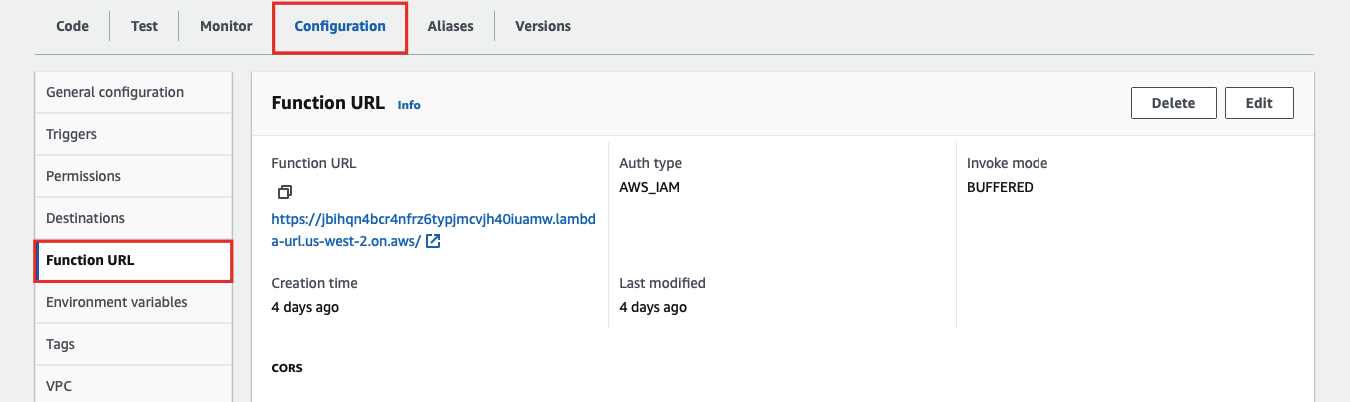
+要创建 Lambda 函数 URL,请前往 Lambda 函数的 **配置** 标签页,在 **函数 URL** 下创建函数 URL:
最后,在 APISIX 中使用函数 URL 和 IAM 访问密钥创建路由:
+<Tabs
+groupId="api"
+defaultValue="admin-api"
+values={[
+{label: 'Admin API', value: 'admin-api'},
+{label: 'ADC', value: 'adc'},
+{label: 'Ingress Controller', value: 'aic'}
+]}>
Review Comment:
`<Tabs>` / `<TabItem>` are used but this page does not import them, which
will cause MDX compilation errors in Docusaurus. Add the standard imports near
the top (right after the `<head>` block).
##########
docs/zh/latest/plugins/public-api.md:
##########
@@ -60,17 +70,28 @@ description: public-api 插件公开了一个内部 API 端点,使其可被公
在配置文件中禁用 Prometheus 导出服务器,并重新加载 APISIX 以使更改生效:
-```yaml
+```yaml title="conf/config.yaml"
plugin_attr:
prometheus:
enable_export_server: false
```
-接下来,创建一个带有 `public-api` 插件的路由,并为 APISIX 指标暴露一个公共 API 端点。你应将路由的 `uri`
设置为自定义端点路径,并将插件的 `uri` 设置为要暴露的内部端点。
+接下来,创建一个带有 `public-api` 插件的路由,并为 APISIX 指标暴露一个公共 API 端点:
+
+<Tabs
+groupId="api"
+defaultValue="admin-api"
+values={[
+{label: 'Admin API', value: 'admin-api'},
+{label: 'ADC', value: 'adc'},
+{label: 'Ingress Controller', value: 'aic'}
+]}>
Review Comment:
`<Tabs>` / `<TabItem>` are used but this page does not import them, which
will cause MDX compilation errors in Docusaurus. Add the standard imports near
the top (right after the `<head>` block).
##########
docs/en/latest/plugins/aws-lambda.md:
##########
@@ -95,16 +95,31 @@ To create the Lambda function URL, go to the
**Configuration** tab of the Lambda
Finally, create a Route in APISIX with your function URL and IAM access keys:
+<Tabs
+groupId="api"
+defaultValue="admin-api"
+values={[
+{label: 'Admin API', value: 'admin-api'},
+{label: 'ADC', value: 'adc'},
+{label: 'Ingress Controller', value: 'aic'}
+]}>
+
+<TabItem value="admin-api">
+
```shell
curl "http://127.0.0.1:9180/apisix/admin/routes"; -X PUT \
-H "X-API-KEY: ${admin_key}" \
-d '{
- "id": "aws-lambda-iam-route",
+ "id": "aws-lambda-route",
Review Comment:
All three scenarios on this page use the same Route id (`aws-lambda-route`).
If a user follows multiple examples, they will overwrite the same Route, which
is confusing and makes it hard to compare configurations. Use distinct Route
ids per scenario (e.g., `aws-lambda-iam-route`, `aws-lambda-apikey-route`,
`aws-lambda-subpath-route`) or explicitly call out that later examples
overwrite the earlier Route.
##########
docs/zh/latest/plugins/aws-lambda.md:
##########
@@ -89,26 +89,37 @@ admin_key=$(yq '.deployment.admin.admin_key[0].key'
conf/config.yaml | sed 's/"/

-要创建 Lambda 函数 URL,请前往 Lambda 函数的 **配置** 标签页,在 **函数 URL** 下创建函数 URL:
+要创建 Lambda 函数 URL,请前往 Lambda 函数的 **配置** 标签页,在 **函数 URL** 下创建函数 URL:

最后,在 APISIX 中使用函数 URL 和 IAM 访问密钥创建路由:
+<Tabs
+groupId="api"
+defaultValue="admin-api"
+values={[
+{label: 'Admin API', value: 'admin-api'},
+{label: 'ADC', value: 'adc'},
+{label: 'Ingress Controller', value: 'aic'}
+]}>
+
+<TabItem value="admin-api">
+
```shell
curl "http://127.0.0.1:9180/apisix/admin/routes"; -X PUT \
-H "X-API-KEY: ${admin_key}" \
-d '{
- "id": "aws-lambda-iam-route",
+ "id": "aws-lambda-route",
Review Comment:
本页面的多个示例都使用相同的路由
id(`aws-lambda-route`)。如果读者按顺序操作,不同场景会相互覆盖同一路由,容易造成困惑。建议为不同场景使用不同的路由
id,或在文中明确说明后续示例会覆盖前一个路由。
##########
docs/zh/latest/plugins/public-api.md:
##########
@@ -126,8 +265,132 @@ curl "http://127.0.0.1:9180/apisix/admin/routes"; -X PUT \
}'
```
+</TabItem>
+
+<TabItem value="adc">
+
+```yaml title="adc.yaml"
+services:
+ - name: httpbin
+ routes:
+ - name: httpbin-anything
+ uris:
+ - /anything
+ upstream:
+ type: roundrobin
+ nodes:
+ - host: httpbin.org
+ port: 80
+ weight: 1
+```
+
+同步配置到网关:
+
+```shell
+adc sync -f adc.yaml
+```
+
+</TabItem>
+
+<TabItem value="aic">
+
+<Tabs
+groupId="k8s-api"
+defaultValue="gateway-api"
+values={[
+{label: 'Gateway API', value: 'gateway-api'},
+{label: 'APISIX CRD', value: 'apisix-crd'}
+]}>
+
+<TabItem value="gateway-api">
+
+```yaml title="public-api-httpbin-ic.yaml"
+apiVersion: v1
+kind: Service
+metadata:
+ namespace: aic
+ name: httpbin-external-domain
+spec:
+ type: ExternalName
+ externalName: httpbin.org
+---
+apiVersion: gateway.networking.k8s.io/v1
+kind: HTTPRoute
+metadata:
+ namespace: aic
+ name: httpbin-anything
+spec:
+ parentRefs:
+ - name: apisix
+ rules:
+ - matches:
+ - path:
+ type: Exact
+ value: /anything
+ backendRefs:
+ - name: httpbin-external-domain
+ port: 80
+```
+
+</TabItem>
+
+<TabItem value="apisix-crd">
+
+```yaml title="public-api-httpbin-ic.yaml"
+apiVersion: apisix.apache.org/v2
+kind: ApisixUpstream
+metadata:
+ namespace: aic
+ name: httpbin-external-domain
+spec:
+ ingressClassName: apisix
+ externalNodes:
+ - type: Domain
+ name: httpbin.org
+---
+apiVersion: apisix.apache.org/v2
+kind: ApisixRoute
+metadata:
+ namespace: aic
+ name: httpbin-anything
+spec:
+ ingressClassName: apisix
+ http:
+ - name: httpbin-anything
+ match:
+ paths:
+ - /anything
+ upstreams:
+ - name: httpbin-external-domain
+```
+
+</TabItem>
+
+</Tabs>
+
+应用配置:
+
+```shell
+kubectl apply -f public-api-httpbin-ic.yaml
+```
+
+</TabItem>
+
+</Tabs>
+
创建一个带有 `public-api` 插件的路由,并将路由的 `uri` 设置为要暴露的内部端点:
Review Comment:
这句话表述有误:`public-api` 场景中,路由的 `uri` 应该是对外暴露的端点,而插件的 `uri`
才是被暴露的内部端点。建议调整措辞,避免让读者误以为需要把路由 `uri` 设置为内部端点。
##########
docs/zh/latest/plugins/aws-lambda.md:
##########
@@ -48,7 +48,7 @@ description: aws-lambda 插件支持 APISIX 与 AWS Lambda 和 Amazon API
Gatewa
| authorization.iam.accesskey | string | 否 | |
| IAM 用户访问密钥。当配置 `authorization.iam` 时必填。
|
| authorization.iam.secretkey | string | 否 | |
| IAM 用户秘密访问密钥。当配置 `authorization.iam` 时必填。
|
| authorization.iam.aws_region | string | 否 | "us-east-1" |
| 发送请求的 AWS 区域。
|
-| authorization.iam.service | string | 否 | "execute-api" |
| 接收请求的服务。与 AWS API Gateway 集成时设置为 `execute-api`,直接与 Lambda 函数集成时设置为 `lambda`。
|
+| authorization.iam.service | string | 否 | "execute-api" |
| 接收请求的服务。与 AWS API Gateway 集成时设置为 `execute-api`,直接与 Lambda 函数集成时设置为 `lambda`。
|
Review Comment:
这里中英文标点混用且逗号后缺少空格(``execute-api`,直接``)。建议统一为中文/英文标点并加空格,提升可读性。
##########
docs/en/latest/plugins/public-api.md:
##########
@@ -66,7 +76,18 @@ plugin_attr:
enable_export_server: false
```
-Next, create a Route with the `public-api` Plugin and expose a public API
endpoint for APISIX metrics. You should set the Route `uri` to the custom
endpoint path and set the Plugin `uri` to the internal endpoint to be exposed.
+Next, create a Route with `public-api` Plugin and expose a public API endpoint
for APISIX metrics:
+
+<Tabs
+groupId="api"
+defaultValue="admin-api"
+values={[
+{label: 'Admin API', value: 'admin-api'},
+{label: 'ADC', value: 'adc'},
+{label: 'Ingress Controller', value: 'aic'}
+]}>
Review Comment:
`<Tabs>` / `<TabItem>` are used but this page does not import them, which
will cause MDX compilation errors in Docusaurus. Add the standard `import Tabs
from '@theme/Tabs'` and `import TabItem from '@theme/TabItem'` near the top
(right after `<head>`).
##########
docs/en/latest/plugins/real-ip.md:
##########
@@ -69,9 +69,20 @@ admin_key=$(yq '.deployment.admin.admin_key[0].key'
conf/config.yaml | sed 's/"/
### Obtain Real Client Address From URI Parameter
-The following example demonstrates how to update the client IP address with a
URI parameter.
+The following example demonstrates how to update client IP address with a URI
parameter.
-Create a Route as follows. You should configure `source` to obtain value from
the URL parameter `realip` using [APISIX
variable](https://apisix.apache.org/docs/apisix/apisix-variable/) or [NGINX
variable](https://nginx.org/en/docs/varindex.html). Use the `response-rewrite`
Plugin to set response headers to verify if the client IP and port were
actually updated.
+Create a Route as follows:
+
+<Tabs
+groupId="api"
+defaultValue="admin-api"
+values={[
+{label: 'Admin API', value: 'admin-api'},
+{label: 'ADC', value: 'adc'},
+{label: 'Ingress Controller', value: 'aic'}
+]}>
Review Comment:
`<Tabs>` / `<TabItem>` are used but this page does not import them, which
will cause MDX compilation errors in Docusaurus. Add the standard imports
(`Tabs` and `TabItem` from `@theme/*`) near the top of the file (typically
right after the `<head>` block), consistent with other plugin docs.
##########
docs/zh/latest/plugins/real-ip.md:
##########
@@ -71,7 +71,18 @@ admin_key=$(yq '.deployment.admin.admin_key[0].key'
conf/config.yaml | sed 's/"/
以下示例演示了如何使用 URI 参数更新客户端 IP 地址。
-创建如下路由。您应配置 `source` 以使用 [APISIX
变量](https://apisix.apache.org/docs/apisix/apisix-variable/)或者 [NGINX
变量](https://nginx.org/en/docs/varindex.html)从 URL 参数 `realip` 获取值。使用
`response-rewrite` 插件设置响应头,以验证客户端 IP 和端口是否实际更新。
+创建如下路由:
+
+<Tabs
+groupId="api"
+defaultValue="admin-api"
+values={[
+{label: 'Admin API', value: 'admin-api'},
+{label: 'ADC', value: 'adc'},
+{label: 'Ingress Controller', value: 'aic'}
+]}>
Review Comment:
`<Tabs>` / `<TabItem>` are used but this page does not import them, which
will cause MDX compilation errors in Docusaurus. Add the standard imports near
the top (right after the `<head>` block).
##########
docs/zh/latest/plugins/authz-keycloak.md:
##########
@@ -156,7 +150,17 @@ admin_key=$(yq '.deployment.admin.admin_key[0].key'
conf/config.yaml | sed 's/"/
#### 启动 Keycloak
-在 Docker
中以[开发模式](https://www.keycloak.org/server/configuration#_starting_keycloak_in_development_mode)启动一个名为
`apisix-quickstart-keycloak` 的 Keycloak 实例,管理员用户名为 `quickstart-admin`,密码为
`quickstart-admin-pass`:
+<Tabs
+groupId="runtime"
+defaultValue="docker"
+values={[
+{label: 'Docker', value: 'docker'},
+{label: 'Kubernetes', value: 'k8s'}
+]}>
Review Comment:
`<Tabs>` / `<TabItem>` are used but this page does not import them, which
will cause MDX compilation errors in Docusaurus. Add the standard imports near
the top (right after the `<head>` block).
##########
docs/en/latest/plugins/authz-keycloak.md:
##########
@@ -156,7 +150,17 @@ admin_key=$(yq '.deployment.admin.admin_key[0].key'
conf/config.yaml | sed 's/"/
#### Start Keycloak
-Start a Keycloak instance named `apisix-quickstart-keycloak` with the
administrator name `quickstart-admin` and password `quickstart-admin-pass` in
[development
mode](https://www.keycloak.org/server/configuration#_starting_keycloak_in_development_mode)
in Docker:
+<Tabs
+groupId="runtime"
+defaultValue="docker"
+values={[
+{label: 'Docker', value: 'docker'},
+{label: 'Kubernetes', value: 'k8s'}
+]}>
Review Comment:
`<Tabs>` / `<TabItem>` are used but this page does not import them, which
will cause MDX compilation errors in Docusaurus. Add the standard imports near
the top of the file (right after the `<head>` block).
##########
docs/zh/latest/plugins/serverless.md:
##########
@@ -69,55 +71,252 @@ local count = 1
ngx.say(count)
```
-从 `v2.6` 版本开始,`conf` 和 `ctx` 作为前两个参数传递给 `serverless` 函数。
-
-在 `v2.12.0` 版本之前,`before_proxy` 阶段曾被称作 `balancer`。考虑到这一方法是在 `access`
阶段之后、请求到上游之前运行,并且与 `balancer` 没有关联,因此已经更新为 `before_proxy`。
-
-:::
-
## 示例
:::note
-您可以这样从 `config.yaml` 中获取 `admin_key` 并存入环境变量:
+你可以这样从 `config.yaml` 中获取 `admin_key` 并存入环境变量:
```bash
admin_key=$(yq '.deployment.admin.admin_key[0].key' conf/config.yaml | sed
's/"//g')
```
:::
-以下示例在路由上启用 `serverless-pre-function` 和 `serverless-post-function` 插件:
+以下示例演示如何在不同场景中配置 `serverless-pre-function` 和 `serverless-post-function` 插件。
+
+### 在阶段前后记录信息
+
+以下示例演示如何配置 serverless 插件,在 `rewrite`
[阶段](../terminology/plugin.md#plugins-execution-lifecycle)之前和之后执行自定义逻辑,将信息记录到错误日志中。
+
+创建如下路由:
+
+<Tabs
+groupId="api"
+defaultValue="admin-api"
+values={[
+{label: 'Admin API', value: 'admin-api'},
+{label: 'ADC', value: 'adc'},
+{label: 'Ingress Controller', value: 'aic'}
+]}>
Review Comment:
`<Tabs>` / `<TabItem>` are used but this page does not import them, which
will cause MDX compilation errors in Docusaurus. Add the standard
`Tabs`/`TabItem` imports near the top (right after `<head>`), consistent with
other Chinese plugin docs.
##########
docs/en/latest/plugins/serverless.md:
##########
@@ -87,37 +83,877 @@ admin_key=$(yq '.deployment.admin.admin_key[0].key'
conf/config.yaml | sed 's/"/
:::
-The following example enables `serverless-pre-function` and
`serverless-post-function` Plugins on a Route:
+The examples below demonstrate how you can configure the
`serverless-pre-function` and `serverless-post-function` plugins for different
scenarios.
+
+### Log Information before and after a Phase
+
+The example below demonstrates how you can configure the serverless plugins to
execute custom logics to log information to error logs before and after the
`rewrite` [phase](../terminology/plugin.md#plugins-execution-lifecycle).
+
+Create a Route as such:
+
+<Tabs
+groupId="api"
+defaultValue="admin-api"
+values={[
+{label: 'Admin API', value: 'admin-api'},
+{label: 'ADC', value: 'adc'},
+{label: 'Ingress Controller', value: 'aic'}
+]}>
+
+<TabItem value="admin-api">
```shell
curl "http://127.0.0.1:9180/apisix/admin/routes"; -X PUT \
-H "X-API-KEY: ${admin_key}" \
-d '{
- "id": "serverless-route",
- "uri": "/index.html",
+ "id": "serverless-pre-route",
+ "uri": "/anything",
"plugins": {
"serverless-pre-function": {
"phase": "rewrite",
- "functions": ["return function() ngx.log(ngx.ERR, \"serverless pre
function\"); end"]
+ "functions" : [
+ "return function() ngx.log(ngx.ERR, \"serverless pre function\");
end"
+ ]
},
"serverless-post-function": {
"phase": "rewrite",
- "functions": ["return function(conf, ctx) ngx.log(ngx.ERR, \"match uri
\", ctx.curr_req_matched and ctx.curr_req_matched._path); end"]
+ "functions" : [
+ "return function(conf, ctx) ngx.log(ngx.ERR, \"match uri \",
ctx.curr_req_matched and ctx.curr_req_matched._path); end"
+ ]
}
},
"upstream": {
"type": "roundrobin",
"nodes": {
- "127.0.0.1:1980": 1
+ "httpbin.org:80": 1
+ }
+ }
+ }'
+```
+
+</TabItem>
+
+<TabItem value="adc">
+
+```yaml title="adc.yaml"
+services:
+ - name: httpbin
+ routes:
+ - name: serverless-pre-route
+ uris:
+ - /anything
+ plugins:
+ serverless-pre-function:
+ phase: rewrite
+ functions:
+ - |
+ return function()
+ ngx.log(ngx.ERR, "serverless pre function")
+ end
+ serverless-post-function:
+ phase: rewrite
+ functions:
+ - |
+ return function(conf, ctx)
+ ngx.log(ngx.ERR, "match uri ", ctx.curr_req_matched and
ctx.curr_req_matched._path)
+ end
+ upstream:
+ type: roundrobin
+ nodes:
+ - host: httpbin.org
+ port: 80
+ weight: 1
+```
+
+Synchronize the configuration to the gateway:
+
+```shell
+adc sync -f adc.yaml
+```
+
+</TabItem>
+
+<TabItem value="aic">
+
+<Tabs
+groupId="k8s-api"
+defaultValue="gateway-api"
+values={[
+{label: 'Gateway API', value: 'gateway-api'},
+{label: 'APISIX CRD', value: 'apisix-crd'}
+]}>
+
+<TabItem value="gateway-api">
+
+```yaml title="serverless-functions-ic.yaml"
+apiVersion: v1
+kind: Service
+metadata:
+ namespace: aic
+ name: httpbin-external-domain
+spec:
+ type: ExternalName
+ externalName: httpbin.org
+---
+apiVersion: apisix.apache.org/v1alpha1
+kind: PluginConfig
+metadata:
+ namespace: aic
+ name: serverless-functions-plugin-config
+spec:
+ plugins:
+ - name: serverless-pre-function
+ config:
+ phase: rewrite
+ functions:
+ - |
+ return function()
+ ngx.log(ngx.ERR, "serverless pre function")
+ end
+ - name: serverless-post-function
+ config:
+ phase: rewrite
+ functions:
+ - |
+ return function(conf, ctx)
+ ngx.log(ngx.ERR, "match uri ", ctx.curr_req_matched and
ctx.curr_req_matched._path)
+ end
+---
+apiVersion: gateway.networking.k8s.io/v1
+kind: HTTPRoute
+metadata:
+ namespace: aic
+ name: serverless-pre-route
+spec:
+ parentRefs:
+ - name: apisix
+ rules:
+ - matches:
+ - path:
+ type: Exact
+ value: /anything
+ filters:
+ - type: ExtensionRef
+ extensionRef:
+ group: apisix.apache.org
+ kind: PluginConfig
+ name: serverless-functions-plugin-config
+ backendRefs:
+ - name: httpbin-external-domain
+ port: 80
+```
+
+</TabItem>
+
+<TabItem value="apisix-crd">
+
+```yaml title="serverless-functions-ic.yaml"
+apiVersion: apisix.apache.org/v2
+kind: ApisixUpstream
+metadata:
+ namespace: aic
+ name: httpbin-external-domain
+spec:
+ ingressClassName: apisix
+ externalNodes:
+ - type: Domain
+ name: httpbin.org
+---
+apiVersion: apisix.apache.org/v2
+kind: ApisixRoute
+metadata:
+ namespace: aic
+ name: serverless-pre-route
+spec:
+ ingressClassName: apisix
+ http:
+ - name: serverless-pre-route
+ match:
+ paths:
+ - /anything
+ upstreams:
+ - name: httpbin-external-domain
+ plugins:
+ - name: serverless-pre-function
+ config:
+ phase: rewrite
+ functions:
+ - |
+ return function()
+ ngx.log(ngx.ERR, "serverless pre function")
+ end
+ - name: serverless-post-function
+ config:
+ phase: rewrite
+ functions:
+ - |
+ return function(conf, ctx)
+ ngx.log(ngx.ERR, "match uri ", ctx.curr_req_matched and
ctx.curr_req_matched._path)
+ end
+```
+
+</TabItem>
+
+</Tabs>
+
+Apply the configuration:
+
+```shell
+kubectl apply -f serverless-functions-ic.yaml
+```
+
+</TabItem>
+
+</Tabs>
+
+Send the request to the Route:
+
+```shell
+curl -i "http://127.0.0.1:9080/anything";
+```
+
+You should receive an `HTTP/1.1 200 OK` response and see the following entries
in the error log:
+
+```text
+2024/05/09 15:07:09 [error] 51#51: *3963 [lua] [string "return function()
ngx.log(ngx.ERR, "serverles..."]:1: func(): serverless pre function, client:
172.21.0.1, server: _, request: "GET /anything HTTP/1.1", host: "127.0.0.1:9080"
+2024/05/09 15:16:58 [error] 50#50: *9343 [lua] [string "return function(conf,
ctx) ngx.log(ngx.ERR, "..."]:1: func(): match uri /anything, client:
172.21.0.1, server: _, request: "GET /anything HTTP/1.1", host: "127.0.0.1:9080"
+```
+
+The first entry is added by the pre-function and the second entry is added by
the post-function.
+
+### Register Custom Variables
+
+The example below demonstrates how you can register custom built-in variables
using the serverless plugins and use the newly created variable in logs.
+
+:::info
+
+This example cannot be completed with the Ingress Controller because it does
not support configuring Route labels.
+
+:::
+
+Start an example rsyslog server:
+
+```shell
+docker run -d -p 514:514 --name example-rsyslog-server
rsyslog/syslog_appliance_alpine
+```
+
+Create a [Service](../terminology/service.md) with a serverless function to
register a custom variable `a6_route_labels`, enable a logging plugin to later
log the custom variable, and configure an upstream:
+
+<Tabs
+groupId="api"
+defaultValue="admin-api"
+values={[
+{label: 'Admin API', value: 'admin-api'},
+{label: 'ADC', value: 'adc'}
+]}>
+
+<TabItem value="admin-api">
+
+```shell
+curl "http://127.0.0.1:9180/apisix/admin/services"; -X PUT \
+ -H "X-API-KEY: ${admin_key}" \
+ -d '{
+ "id":"srv_custom_var",
+ "plugins": {
+ "serverless-pre-function": {
+ "phase": "rewrite",
+ "functions": [
+ "return function() local core = require \"apisix.core\"
core.ctx.register_var(\"a6_route_labels\", function(ctx) local route =
ctx.matched_route and ctx.matched_route.value if route and route.labels then
return route.labels end return nil end); end"
+ ]
+ },
+ "syslog": {
+ "host" : "172.0.0.1",
+ "port" : 514,
+ "flush_limit" : 1
+ }
+ },
+ "upstream": {
+ "nodes": {
+ "httpbin.org:80": 1
+ }
+ }
+ }'
+```
+
+</TabItem>
+
+<TabItem value="adc">
+
+```yaml title="adc.yaml"
+services:
+ - name: srv-custom-var
+ plugins:
+ serverless-pre-function:
+ phase: rewrite
+ functions:
+ - |
+ return function()
+ local core = require("apisix.core")
+ core.ctx.register_var("a6_route_labels", function(ctx)
+ local route = ctx.matched_route and ctx.matched_route.value
+ if route and route.labels then
+ return route.labels
+ end
+ return nil
+ end)
+ end
+ syslog:
+ host: 172.0.0.1
+ port: 514
+ flush_limit: 1
+ upstream:
+ nodes:
+ - host: httpbin.org
+ port: 80
+ weight: 1
+```
+
+Synchronize the configuration to the gateway:
+
+```shell
+adc sync -f adc.yaml
+```
+
+</TabItem>
+
+</Tabs>
+
+Next, update the log format for all `syslog` instances with the new variable
by configuring the [Plugin metadata](../terminology/plugin.md#plugin-metadata):
+
+<Tabs
+groupId="api"
+defaultValue="admin-api"
+values={[
+{label: 'Admin API', value: 'admin-api'},
+{label: 'ADC', value: 'adc'}
+]}>
+
+<TabItem value="admin-api">
+
+```shell
+curl "http://127.0.0.1:9180/apisix/admin/plugin_metadata/syslog"; -X PUT \
+ -H "X-API-KEY: ${admin_key}" \
+ -d '{
+ "log_format": {
+ "host": "$host",
+ "client_ip": "$remote_addr",
+ "labels": "$a6_route_labels"
+ }
+ }'
+```
+
+</TabItem>
+
+<TabItem value="adc">
+
+```yaml title="adc.yaml"
+plugin_metadata:
+ syslog:
+ log_format:
+ host: "$host"
+ client_ip: "$remote_addr"
+ labels: "$a6_route_labels"
+```
+
+Synchronize the configuration to the gateway:
+
+```shell
+adc sync -f adc.yaml
+```
+
+</TabItem>
+
+</Tabs>
+
+Finally, create a Route:
+
+<Tabs
+groupId="api"
+defaultValue="admin-api"
+values={[
+{label: 'Admin API', value: 'admin-api'},
+{label: 'ADC', value: 'adc'}
+]}>
+
+<TabItem value="admin-api">
+
+```shell
+curl "http://127.0.0.1:9180/apisix/admin/routes"; -X PUT \
+ -H "X-API-KEY: ${admin_key}" \
+ -d '{
+ "id":"route_custom_var",
+ "uri":"/get",
+ "service_id": "srv_custom_var",
+ "labels": {
+ "key": "test_a6_route_labels"
+ }
+}'
+```
+
+</TabItem>
+
+<TabItem value="adc">
+
+```yaml title="adc.yaml"
+# Other Configs
+services:
+ - name: srv-custom-var
+ routes:
+ - name: route-custom-var
+ uris:
+ - /get
+ labels:
+ key: test_a6_route_labels
+```
+
+Synchronize the configuration to the gateway:
+
+```shell
+adc sync -f adc.yaml
+```
+
+</TabItem>
+
+</Tabs>
+
+To verify the variable registration, send a request to the Route:
+
+```shell
+curl "http://127.0.0.1:9080/get";
+```
+
+You should see a log entry in your syslog server similar to the following:
+
+```json
+{
+ "host":"127.0.0.1",
+ "route_id":"route_custom_var",
+ "client_ip":"172.19.0.1",
+ "labels":{
+ "key":"test_a6_route_labels"
+ },
+ "service_id":"srv_custom_var"
+}
+```
+
+This verifies the custom variable was registered and it logs the `labels`
information in a Route successfully.
+
+### Modify a Specific Field in Response Body
+
+The example below demonstrates how you can use the serverless plugins to
remove a specific field from a JSON response body.
+
+Before proceeding with the removal, first configure a Route as follows to see
the unmodified response:
+
+<Tabs
+groupId="api"
+defaultValue="admin-api"
+values={[
+{label: 'Admin API', value: 'admin-api'},
+{label: 'ADC', value: 'adc'},
+{label: 'Ingress Controller', value: 'aic'}
+]}>
+
+<TabItem value="admin-api">
+
+```shell
+curl "http://127.0.0.1:9180/apisix/admin/routes"; -X PUT \
+ -H "X-API-KEY: ${admin_key}" \
+ -d '{
+ "id":"serverless-remove-body-info",
+ "uri": "/get",
+ "upstream": {
+ "type": "roundrobin",
+ "nodes": {
+ "httpbin.org:80": 1
}
}
}'
```
+</TabItem>
+
+<TabItem value="adc">
+
+```yaml title="adc.yaml"
+services:
+ - name: httpbin
+ routes:
+ - name: serverless-remove-body-info
+ uris:
+ - /get
+ upstream:
+ type: roundrobin
+ nodes:
+ - host: httpbin.org
+ port: 80
+ weight: 1
+```
+
+Synchronize the configuration to the gateway:
+
+```shell
+adc sync -f adc.yaml
+```
+
+</TabItem>
+
+<TabItem value="aic">
+
+<Tabs
+groupId="k8s-api"
+defaultValue="gateway-api"
+values={[
+{label: 'Gateway API', value: 'gateway-api'},
+{label: 'APISIX CRD', value: 'apisix-crd'}
+]}>
+
+<TabItem value="gateway-api">
+
+```yaml title="serverless-remove-body-ic.yaml"
+apiVersion: v1
+kind: Service
+metadata:
+ namespace: aic
+ name: httpbin-external-domain
+spec:
+ type: ExternalName
+ externalName: httpbin.org
+---
+apiVersion: gateway.networking.k8s.io/v1
+kind: HTTPRoute
+metadata:
+ namespace: aic
+ name: serverless-remove-body-info
+spec:
+ parentRefs:
+ - name: apisix
+ rules:
+ - matches:
+ - path:
+ type: Exact
+ value: /get
+ backendRefs:
+ - name: httpbin-external-domain
+ port: 80
+```
+
+</TabItem>
+
+<TabItem value="apisix-crd">
+
+```yaml title="serverless-remove-body-ic.yaml"
+apiVersion: apisix.apache.org/v2
+kind: ApisixUpstream
+metadata:
+ namespace: aic
+ name: httpbin-external-domain
+spec:
+ ingressClassName: apisix
+ externalNodes:
+ - type: Domain
+ name: httpbin.org
+---
+apiVersion: apisix.apache.org/v2
+kind: ApisixRoute
+metadata:
+ namespace: aic
+ name: serverless-remove-body-info
+spec:
+ ingressClassName: apisix
+ http:
+ - name: serverless-remove-body-info
+ match:
+ paths:
+ - /get
+ upstreams:
+ - name: httpbin-external-domain
+```
+
+</TabItem>
+
+</Tabs>
+
+Apply the configuration:
+
+```shell
+kubectl apply -f serverless-remove-body-ic.yaml
+```
+
+</TabItem>
+
+</Tabs>
+
Send a request to the Route:
```shell
-curl -i "http://127.0.0.1:9080/index.html";
+curl "http://127.0.0.1:9080/get";
+```
+
+You should see a response similar to the following with your host and proxy's
IP information:
+
+```json
+{
+ "args": {},
+ "headers": {
+ "Accept": "*/*",
+ "Host": "127.0.0.1",
+ "User-Agent": "curl/8.4.0",
+ "X-Amzn-Trace-Id": "Root=1-663db30f-51448a1b635f2f4338a4fcfc",
+ "X-Forwarded-Host": "127.0.0.1"
+ },
+ "origin": "172.19.0.1, 43.252.208.84",
+ "url": "http://127.0.0.1/get";
+}
+```
+
+To remove the `origin` field from the response, update the Route with
serverless plugins:
+
+<Tabs
+groupId="api"
+defaultValue="admin-api"
+values={[
+{label: 'Admin API', value: 'admin-api'},
+{label: 'ADC', value: 'adc'},
+{label: 'Ingress Controller', value: 'aic'}
+]}>
+
+<TabItem value="admin-api">
+
+```shell
+curl "http://127.0.0.1:9180/apisix/admin/routes/serverless-remove-body-info";
-X PATCH \
+ -H "X-API-KEY: ${admin_key}" \
+ -d '{
+ "plugins": {
+ "serverless-pre-function": {
+ "phase": "header_filter",
+ "functions" : [
+ "return function(conf, ctx)
+ local core = require(\"apisix.core\")
+ core.response.clear_header_as_body_modified()
+ end"
Review Comment:
This curl example embeds a multi-line Lua function inside a JSON string
literal (the string contains raw newlines). JSON strings cannot contain
unescaped newlines, so the payload is invalid and the command won’t work as
written. Please rewrite the function as a single-line string, or escape
newlines (e.g., `\n`) so the JSON remains valid.
##########
docs/zh/latest/plugins/authz-keycloak.md:
##########
@@ -52,26 +46,26 @@ description: authz-keycloak 插件与 Keycloak 集成,用于用户认证和授
| token_endpoint | string | 否 |
|
https://host.domain/realms/foo/protocol/openid-connect/token | 支持
`urn:ietf:params:oauth:grant-type:uma-ticket` 授权类型的符合 OAuth2
规范的令牌端点。若设置,将覆盖从发现文档中获取的值。
|
| resource_registration_endpoint | string | 否 |
|
https://host.domain/realms/foo/authz/protection/resource_set | 符合 UMA
规范的资源注册端点。若设置,将覆盖从发现文档中获取的值。
|
| client_id | string | 是 |
|
| 客户端尝试访问的资源服务器的标识符。
|
-| client_secret | string | 否 |
|
| 客户端密钥(如需要)。可以使用 APISIX secret 存储和引用该值,APISIX
目前支持[环境变量和 HashiCorp Vault](../terminology/secret.md) 两种方式。
|
+| client_secret | string | 否 |
|
| 客户端密钥 (如需要)。可以使用 APISIX Secret 存储和引用该值。APISIX
目前支持通过两种方式存储 secret:[环境变量和 HashiCorp Vault](../terminology/secret.md)。
|
| grant_type | string | 否 |
"urn:ietf:params:oauth:grant-type:uma-ticket" |
["urn:ietf:params:oauth:grant-type:uma-ticket"] |
|
| policy_enforcement_mode | string | 否 |
"ENFORCING" | ["ENFORCING", "PERMISSIVE"]
|
|
| permissions | array[string] | 否 |
|
| 字符串数组,每个字符串代表客户端请求访问的一个或多个资源和作用域的集合。
|
| lazy_load_paths | boolean | 否 | false
|
| 设置为 `true` 时,使用资源注册端点将请求 URI 动态解析为资源,而非使用静态权限。
|
| http_method_as_scope | boolean | 否 | false
|
| 设置为 `true` 时,将 HTTP 请求方法映射为同名作用域,并添加到所有请求的权限中。
|
-| timeout | integer | 否 | 3000
| [1000, ...]
| 与 Identity Server 进行 HTTP 连接的超时时间(毫秒)。
|
-| access_token_expires_in | integer | 否 | 300
| [1, ...]
| 访问令牌的过期时间(秒)。
|
-| access_token_expires_leeway | integer | 否 | 0
| [0, ...]
| 访问令牌续期的宽限时间(秒)。设置后,将在令牌过期前
access_token_expires_leeway 秒进行续期,以避免访问令牌恰好在到达 OAuth 资源服务器时过期的错误。
|
-| refresh_token_expires_in | integer | 否 | 3600
| [1, ...]
| 刷新令牌的过期时间(秒)。
|
-| refresh_token_expires_leeway | integer | 否 | 0
| [0, ...]
| 刷新令牌续期的宽限时间(秒)。设置后,将在令牌过期前
refresh_token_expires_leeway 秒进行续期,以避免刷新令牌恰好在到达 OAuth 资源服务器时过期的错误。
|
+| timeout | integer | 否 | 3000
| [1000, ...]
| 与 Identity Server 进行 HTTP 连接的超时时间 (毫秒)。
|
+| access_token_expires_in | integer | 否 | 300
| [1, ...]
| 访问令牌的过期时间 (秒)。
|
+| access_token_expires_leeway | integer | 否 | 0
| [0, ...]
| 访问令牌续期的宽限时间 (秒)。设置后,将在令牌过期前
access_token_expires_leeway 秒进行续期,以避免访问令牌恰好在到达 OAuth 资源服务器时过期的错误。
|
+| refresh_token_expires_in | integer | 否 | 3600
| [1, ...]
| 刷新令牌的过期时间 (秒)。
|
+| refresh_token_expires_leeway | integer | 否 | 0
| [0, ...]
| 刷新令牌续期的宽限时间 (秒)。设置后,将在令牌过期前
refresh_token_expires_leeway 秒进行续期,以避免刷新令牌恰好在到达 OAuth 资源服务器时过期的错误。
|
| ssl_verify | boolean | 否 | true
|
| 设置为 `true` 时,验证 TLS 证书与主机名是否匹配。
|
-| cache_ttl_seconds | integer | 否 |
86400(相当于 24 小时) | 正整数 >= 1
| 插件缓存发现文档和用于向 Keycloak 认证的令牌的最长时间(秒)。
|
+| cache_ttl_seconds | integer | 否 |
86400(相当于 24 小时) | 正整数 >= 1
| 插件缓存发现文档和用于向 Keycloak 认证的令牌的最长时间 (秒)。
|
| keepalive | boolean | 否 | true
|
| 设置为 `true` 时,启用 HTTP
keep-alive,保持连接在使用后不关闭。如果预期有大量请求发往 Keycloak,建议设为 `true`。
|
| keepalive_timeout | integer | 否 | 60000
| 正整数 >= 1000
| 已建立的 HTTP 连接在空闲多久后关闭。
|
| keepalive_pool | integer | 否 | 5
| 正整数 >= 1
| 连接池中的最大连接数。
|
| access_denied_redirect_uri | string | 否 |
| [1, 2048]
| 用于替代返回 `"error_description":"not_authorized"`
错误信息而重定向用户的 URI。
|
| password_grant_token_generation_incoming_uri | string | 否 |
| /api/token
| 设置此项以使用密码授权类型生成令牌。插件会将传入请求的 URI 与此值进行比较。
|
-注意:schema 中还定义了 `encrypt_fields = {"client_secret"}`,这意味着该字段将以加密方式存储在 etcd
中。请参阅[加密存储字段](../../../en/latest/plugin-develop.md#encrypted-storage-fields)。
+注意:schema 中还定义了 `encrypt_fields = {"client_secret"}`,这意味着该字段将以加密方式存储在 etcd
中。请参阅[加密存储字段](../plugin-develop.md#加密存储字段)。
Review Comment:
这一行的中文标点和空格不规范(例如“注意:”及逗号后缺少空格),读起来比较别扭。建议改为中文全角标点并补齐空格(如“注意:schema 中还定义了
…”,并在逗号后加空格)。
##########
docs/en/latest/plugins/public-api.md:
##########
@@ -128,8 +267,132 @@ curl "http://127.0.0.1:9180/apisix/admin/routes"; -X PUT \
}'
```
+</TabItem>
+
+<TabItem value="adc">
+
+```yaml title="adc.yaml"
+services:
+ - name: httpbin
+ routes:
+ - name: httpbin-anything
+ uris:
+ - /anything
+ upstream:
+ type: roundrobin
+ nodes:
+ - host: httpbin.org
+ port: 80
+ weight: 1
+```
+
+Synchronize the configuration to the gateway:
+
+```shell
+adc sync -f adc.yaml
+```
+
+</TabItem>
+
+<TabItem value="aic">
+
+<Tabs
+groupId="k8s-api"
+defaultValue="gateway-api"
+values={[
+{label: 'Gateway API', value: 'gateway-api'},
+{label: 'APISIX CRD', value: 'apisix-crd'}
+]}>
+
+<TabItem value="gateway-api">
+
+```yaml title="public-api-httpbin-ic.yaml"
+apiVersion: v1
+kind: Service
+metadata:
+ namespace: aic
+ name: httpbin-external-domain
+spec:
+ type: ExternalName
+ externalName: httpbin.org
+---
+apiVersion: gateway.networking.k8s.io/v1
+kind: HTTPRoute
+metadata:
+ namespace: aic
+ name: httpbin-anything
+spec:
+ parentRefs:
+ - name: apisix
+ rules:
+ - matches:
+ - path:
+ type: Exact
+ value: /anything
+ backendRefs:
+ - name: httpbin-external-domain
+ port: 80
+```
+
+</TabItem>
+
+<TabItem value="apisix-crd">
+
+```yaml title="public-api-httpbin-ic.yaml"
+apiVersion: apisix.apache.org/v2
+kind: ApisixUpstream
+metadata:
+ namespace: aic
+ name: httpbin-external-domain
+spec:
+ ingressClassName: apisix
+ externalNodes:
+ - type: Domain
+ name: httpbin.org
+---
+apiVersion: apisix.apache.org/v2
+kind: ApisixRoute
+metadata:
+ namespace: aic
+ name: httpbin-anything
+spec:
+ ingressClassName: apisix
+ http:
+ - name: httpbin-anything
+ match:
+ paths:
+ - /anything
+ upstreams:
+ - name: httpbin-external-domain
+```
+
+</TabItem>
+
+</Tabs>
+
+Apply the configuration:
+
+```shell
+kubectl apply -f public-api-httpbin-ic.yaml
+```
+
+</TabItem>
+
+</Tabs>
+
Create a Route with `public-api` Plugin and set the Route `uri` to the
internal endpoint to be exposed:
Review Comment:
This sentence is backwards: for `public-api`, the Route `uri` is the
*public* endpoint, while the plugin’s `uri` is the *internal* endpoint being
exposed. Please reword to avoid suggesting users set the Route `uri` to the
internal endpoint (which would contradict the examples just above).
--
This is an automated message from the Apache Git Service.
To respond to the message, please log on to GitHub and use the
URL above to go to the specific comment.
To unsubscribe, e-mail: [email protected]
For queries about this service, please contact Infrastructure at:
[email protected]


