cpramirez opened a new issue #3756:
URL: https://github.com/apache/netbeans/issues/3756
### Apache NetBeans version Apache NetBeans 13 ### What happened The IDE does not bring the Jakarta Persistence libraries (Jakarta Persistence 2.2 and 3.0) by default and trying to add it manually fails. The use can be forced, as least when working with Maven where the dependencies are defined in the pom, but some functionalities do not work correctly as a result. As example: - The "New Entity Classes from Database" wizard and other persistence wizards define the new classes using javax.persistence instead of jakarta.persistence includes. - As it does not "understand" the jakarta.persistence.NamedQuery objects correctly, it does not validate the JPQL for them at all. ### How to reproduce To verify that the Persistence Provider library cannot be added: 1 - Download a Jakarta persistence library of choice (Info in https://jakarta.ee/specifications/persistence/3.0/) 2 - Create a Maven project. 3 - Add a persistence unit. 4 - Go to the Design tab in the persistence.xml file. 5 - In the Persistence Provider list, select the option "New Persistence Library". 6 - Browse to the location of the downloaded library, the following message appears: 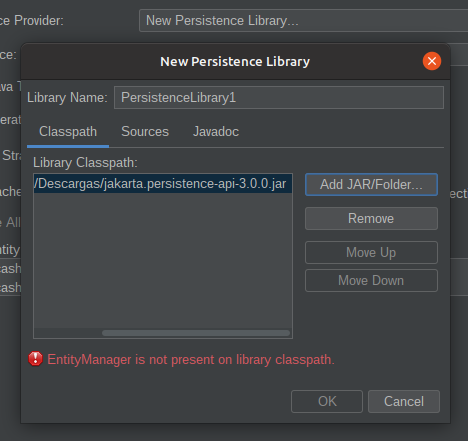 This example uses the API directly, but I have tried it with both Hibernate and Eclipselink implementation libraries too, the message is always the same. To verify the derived problems, it is necessary to have a project (any project) with entity classes and named queries. 1 - Define the persistence.xml as 3.0 manually by changing the definition on the XML: ` <persistence version="3.0" xmlns="https://jakarta.ee/xml/ns/persistence"; xmlns:xsi="http://www.w3.org/2001/XMLSchema-instance"; xsi:schemaLocation="https://jakarta.ee/xml/ns/persistence https://jakarta.ee/xml/ns/persistence/persistence_3_0.xsd";>` 2 - Set the project dependencies to use a library for that API version (see again the link given before). 3 - On one of the entity classes change all inserts to jakarta.persistence. 4 - On a Named query do a very evident mistake, like changing a FROM to a WHERE. No warning will appear on the line. 5 - Try to add a new entity class with the "New Entity Classes from Database" wizard, they will be created with javax imports instead of the jakarta ones, no matter the added dependency or persistence.xml file information. ### Did this work correctly in an earlier version? No ### Operating System Ubuntu 20.04 (tested on Windows 10 64bits too) ### JDK java 11 openjdk amd64 ### Apache NetBeans packaging Apache NetBeans provided installer ### Anything else Issue originally reported in Jira: https://issues.apache.org/jira/browse/NETBEANS-6030 I am not sure if the packaging I have chosen is the correct one, just in case, I have installed the latest version of Netbeans by Ubuntu Sofware Manager (snap). ### Are you willing to submit a pull request? No ### Code of Conduct Yes -- This is an automated message from the Apache Git Service. To respond to the message, please log on to GitHub and use the URL above to go to the specific comment. To unsubscribe, e-mail: [email protected] For queries about this service, please contact Infrastructure at: [email protected] --------------------------------------------------------------------- To unsubscribe, e-mail: [email protected] For additional commands, e-mail: [email protected] For further information about the NetBeans mailing lists, visit: https://cwiki.apache.org/confluence/display/NETBEANS/Mailing+lists

