jimmyduang opened a new issue #9302:
URL: https://github.com/apache/shardingsphere/issues/9302
i startup the sharding-proxy fallow [quick-start](https://shardingsphere.apache.org/document/current/en/quick-start/shardingsphere-proxy-quick-start/),and the logs shows is success ,as follows ``` [INFO ] 20:09:11.289 [main] o.apache.curator.utils.Compatibility - Using org.apache.zookeeper.server.quorum.MultipleAddresses [INFO ] 20:09:13.079 [main] ShardingSphere-metadata - Loading 0 tables' meta data for unconfigured tables. [INFO ] 20:09:13.080 [main] ShardingSphere-metadata - Loading 0 tables' meta data for unconfigured tables. [INFO ] 20:09:13.084 [main] ShardingSphere-metadata - Loading 0 tables' meta data for unconfigured tables. [INFO ] 20:09:13.085 [main] ShardingSphere-metadata - Loading 0 tables' meta data for unconfigured tables. [INFO ] 20:09:13.119 [main] o.a.s.i.c.s.SchemaContextsBuilder - Load meta data for schema sharding_db finished, cost 92 milliseconds. Thanks for using Atomikos! Evaluate http://www.atomikos.com/Main/ExtremeTransactions for advanced features and professional support or register at http://www.atomikos.com/Main/RegisterYourDownload to disable this message and receive FREE tips & advice [INFO ] 20:09:13.249 [main] o.a.s.p.i.i.AbstractBootstrapInitializer - Database name is `MySQL`, version is `5.7.32-log` [INFO ] 20:09:13.529 [main] o.a.s.p.frontend.ShardingSphereProxy - ShardingSphere-Proxy start success. ``` but when i try to connect the sharding-proxy server with navicat ,it's just alert a error `can not route tables for [schemata],please make sure the tables are in same scheam.` my sharding-proxy version is `apache-shardingsphere-5.0.0`,and i got it from [there](https://mirror.bit.edu.cn/apache/shardingsphere/5.0.0-alpha/apache-shardingsphere-5.0.0-alpha-shardingsphere-proxy-bin.tar.gz), and my server.yaml is ``` governance: name: governance_ds registryCenter: type: ZooKeeper serverLists: 192.168.3.40:2181,192.168.3.41:2181,192.168.3.42:2181 props: retryIntervalMilliseconds: 500 timeToLiveSeconds: 60 maxRetries: 3 operationTimeoutMilliseconds: 500 overwrite: false authentication: users: root: password: root sharding: password: sharding authorizedSchemas: sharding_db props: max-connections-size-per-query: 1 acceptor-size: 16 # The default value is available processors count * 2. executor-size: 16 # Infinite by default. proxy-frontend-flush-threshold: 128 # The default value is 128. # LOCAL: Proxy will run with LOCAL transaction. # XA: Proxy will run with XA transaction. # BASE: Proxy will run with B.A.S.E transaction. proxy-transaction-type: LOCAL proxy-opentracing-enabled: false proxy-hint-enabled: false query-with-cipher-column: true sql-show: false check-table-metadata-enabled: false ``` my config-sharding.yaml is ``` schemaName: sharding_db dataSourceCommon: username: root password: connectionTimeoutMilliseconds: 30000 idleTimeoutMilliseconds: 60000 maxLifetimeMilliseconds: 1800000 maxPoolSize: 50 minPoolSize: 1 maintenanceIntervalMilliseconds: 30000 dataSources: ds_0: url: jdbc:mysql://127.0.0.1:3306/ds_0?serverTimezone=UTC&useSSL=false username: root password: root connectionTimeoutMilliseconds: 30000 idleTimeoutMilliseconds: 60000 maxLifetimeMilliseconds: 1800000 maxPoolSize: 50 minPoolSize: 1 maintenanceIntervalMilliseconds: 30000 ds_1: url: jdbc:mysql://127.0.0.1:3306/ds_1?serverTimezone=UTC&useSSL=false username: root password: root connectionTimeoutMilliseconds: 30000 idleTimeoutMilliseconds: 60000 maxLifetimeMilliseconds: 1800000 maxPoolSize: 50 minPoolSize: 1 maintenanceIntervalMilliseconds: 30000 rules: - !SHARDING tables: t_order: actualDataNodes: ds_${0..1}.t_order_${0..1} tableStrategy: standard: shardingColumn: order_id shardingAlgorithmName: t_order_inline keyGenerateStrategy: column: order_id keyGeneratorName: snowflake t_order_item: actualDataNodes: ds_${0..1}.t_order_item_${0..1} tableStrategy: standard: shardingColumn: order_id shardingAlgorithmName: t_order_item_inline keyGenerateStrategy: column: order_item_id keyGeneratorName: snowflake bindingTables: - t_order,t_order_item defaultDatabaseStrategy: standard: shardingColumn: user_id shardingAlgorithmName: database_inline defaultTableStrategy: none: shardingAlgorithms: database_inline: type: INLINE props: algorithm-expression: ds_${user_id % 2} t_order_inline: type: INLINE props: algorithm-expression: t_order_${order_id % 2} t_order_item_inline: type: INLINE props: algorithm-expression: t_order_item_${order_id % 2} keyGenerators: snowflake: type: SNOWFLAKE props: worker-id: 123 ``` this is navicat show 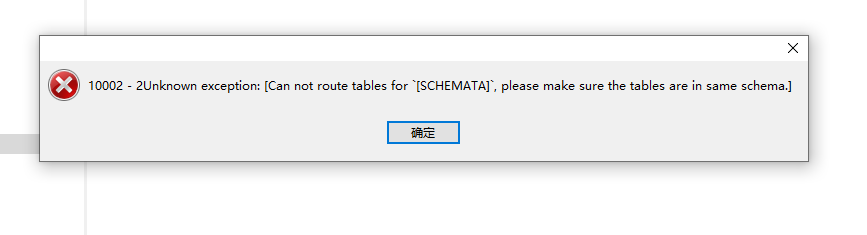 this problem have confuse me two days,anybody can help me, thanx ---------------------------------------------------------------- This is an automated message from the Apache Git Service. To respond to the message, please log on to GitHub and use the URL above to go to the specific comment. For queries about this service, please contact Infrastructure at: [email protected]

