corbinrobb commented on pull request #17638:
URL: https://github.com/apache/superset/pull/17638#issuecomment-988404019
### Another Update
Thank you everyone for all of the comments and help while looking at this
with me! Also thank you Michael for the very detailed explanation, it really
helped me out.
Alrighty, I reverted everything that I did within the Select component
because there was a simpler way that I did not notice. Sorry about this
ridiculous PR. I thought the solution would be simple but the component is
widely used and versatile so it took me a whole lot of searching, reading, and
manual testing.
### Problem
Mostly the same. There are Select components being made that are being
passed options from SelectControl and they are being constructed from arrays of
mostly static and mostly hardcoded data. From all of the ones that I have seen
the majority seem to expect that data to retain its order.
There are Select components not being made within SelectControl like
popovers, modals, and other things. From what I could see all of those had been
accounted for and are displayed in an appropriate order.
I have come to this conclusion after looking at the nearly 200 SelectControl
configuration objects/functions that are being used to make a lot Select
components in the explore dashboard. I began writing a list of them to share
where they are and where the data is created or exists, but it was incredibly
tedious and I gave up after about 80.
I will just tell you how to find them. All you need to do is do a
project-wide search for SearchControl, and then exclude the translation files
or just scroll past them. You should get a little more than 200 hits where you
will find objects that look something like this
```javascript
{
name: 'subdomain_granularity',
config: {
type: 'SelectControl',
label: t('Subdomain'),
default: 'day',
choices: formatSelectOptions([
'min',
'hour',
'day',
'week',
'month',
]),
description: t(
'The time unit for each block. Should be a smaller unit than
' +
'domain_granularity. Should be larger or equal to Time
Grain',
),
},
},
```
The data that will make up the Select options are in `choices`, `options`,
or in a `mapStateToProps`. A lot of them get formatted with a function like
the one above called `formatSelectOptions` This creates an array that is ready
to be passed to Select so it can make some options. Normally makes them look
like this `[value, String(value)]`.
Most of the data for these are hard-coded values like in the example above.
While the data is not all unique, there still are separate arrays being made
for most and this is especially true for legacy plugins. Some of the data is
unsorted datasource columns and those are the ones I felt needed
`sortComparators` added to them. Everything else appears in order or at least
in the intended order.
If you want to confirm how all of this looks you can do the search for
SelectControls and you will be able to see for yourself.
### New FIx
Okay. When the fix for the top options going back to their correct positions
after deselection was added, I saw that some objects were added an `order` key
with its array index as the value. If I am not mistaken, this was done to
preserve the order for these data arrays because there are values like
operators, dates, and other such values.
[example of data with order
keys](https://github.com/apache/superset/blob/9121e4555dd74915319de714536b053eb8d1f176/superset-frontend/src/explore/components/controls/ConditionalFormattingControl/FormattingPopoverContent.tsx#L46-L59)
These order indexes function the same way as the initial options index
hashmap that I was using in a previous attempt and I'm all for using them for
the data that gets passed into SelectControls when the plugins are made.
In SelectControl we have a method that iterates the formatted data array and
returns objects for the Select component to build options.
This is the place where the data I am concerned with pass through. `c` is an
item in a `choices` array
```javascript
if (Array.isArray(c)) {
const [value, label] = c.length > 1 ? c : [c[0], c[0]];
return {
value,
label,
};
}
```
Add `i` for index on the map function, check if there is not a
`sortComparator`(more on that in a moment) and if there is not then add an
order key to sort in order.
Since most of the chart/graph plugins are sending data that is either sorted
or being passed in its intended order, this fixes the out-of-order data for the
select dropdowns that are being made with SelectControl.
Now we can just add sortComparator where they make sense, like the columns
from a datasource. And those will be sorted as we would like.
I chose not to import the `propertyComparator` for these and just used anon
arrow functions. I did this because of the distance from the component and
because the other imports in those files were from short distances.
I do not have solid reasoning for doing it this way, it was just a gut
feeling that I should. If anybody disagrees with that I am happy to change it.
The last thing is setting a conditional in SelectControl that checks for a
`sortComparator` value and if one doesn't exist then sort by order using
`propertyComparator`
```javascript
sortComparator: this.props.sortComparator || propertyComparator('order')
```
That's the fix! There is not a whole lot going on and there are other ways
but I feel like this is quick and simple.
I did get the implementation that I was making earlier working and got it up
and going it working with the pagination and everything else but I abandoned it
last minute for this fix because it is simpler and requires fewer changes.
### Other little fixes done on my journey
### legacy heatmap chart
There was a bug with the legacy heatmap chart within two of the Select
components named `xscale_interval` and `yscale_interval`. This was from the
config passing a default value of `"1"` and the choices data object passed uses
numbers and start at `1`.
The Select component doesn't know where to put the one and will duplicate it
after clicking other options. Setting default to the number one instead of the
string fixes this.
**Before**
<img width="421" alt="Screen Shot 2021-12-07 at 4 03 48 PM"
src="https://user-images.githubusercontent.com/31329271/145119469-b550e1e1-aee8-4226-9132-de963ff2e35c.png";>
**After**
<img width="421" alt="Screen Shot 2021-12-07 at 4 08 03 PM"
src="https://user-images.githubusercontent.com/31329271/145119899-bfec4e86-da81-4ec5-85aa-e4c339ac4695.png";>
### AdhocFilterEditPopoverSimpleTabContent
The operators Select was not passed the order key or the sortComparator and
the options appeared out of order. Then the Select holding the column values
were being sorted by the label which worked when the values were string but
sorted them out of order on numbers.
I added an order key and comparator for the operators Select. Then for the
column values Select I added a condition that will sort by the values when they
are numbers and by label if not.
**Before**
<img width="421" alt="Screen Shot 2021-12-07 at 4 40 02 PM"
src="https://user-images.githubusercontent.com/31329271/145122740-872b755b-3015-4c8f-a0d7-3bd6cea76984.png";>
<img width="421" alt="Screen Shot 2021-12-07 at 4 35 37 PM"
src="https://user-images.githubusercontent.com/31329271/145122417-87b40352-3747-4796-a7df-5e05a91ab315.png";>
**After**
<img width="421" alt="Screen Shot 2021-12-07 at 4 41 45 PM"
src="https://user-images.githubusercontent.com/31329271/145122901-d07526b5-9f81-41d9-b8e5-dd1523ad91c3.png";>
<img width="421" alt="Screen Shot 2021-12-07 at 4 42 19 PM"
src="https://user-images.githubusercontent.com/31329271/145122957-a9de03af-955a-431b-844a-b224107d7231.png";>
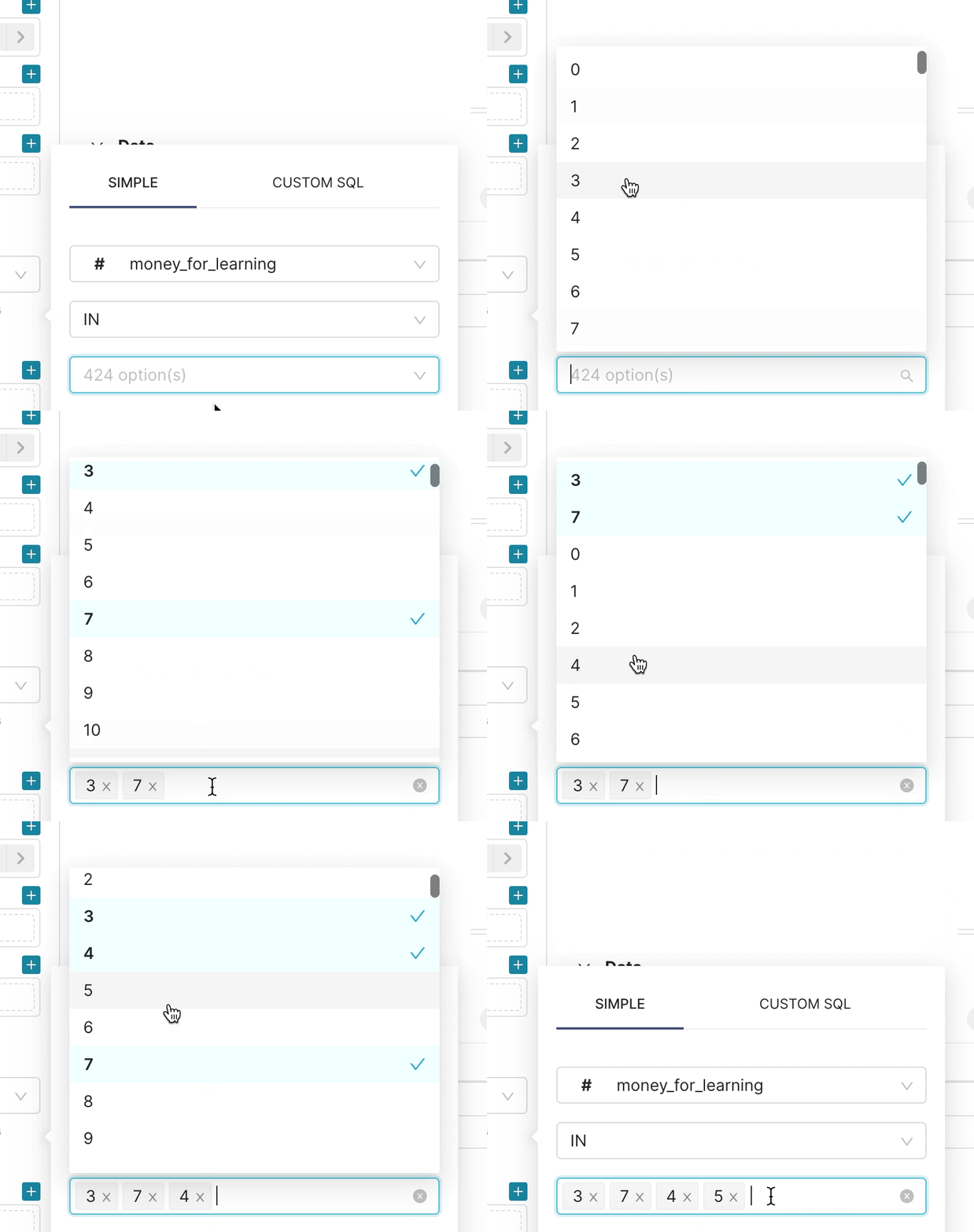
### Select sorting initial state
Caught this while writing this and I meant to have it in the last commit. I
will push right after this comment.
The initial options being passed directly into the state works fine for most
cases but when you can select multiple options it will do a jump while the
dropdown is open and it throws all the options back into what the state's
initial options were. I am not sure what is causing the jump and I couldn't get
it to stop.
Anyways, having it jump from ordered to unordered is confusing so I just
have the options sorted when they are initialized in the `selectOptions`
useState hook.
```javascript
const [selectOptions, setSelectOptions] = useState<OptionsType>(
initialOptions.sort(sortComparator),
);
```
Still jumps from the selected options being at the top to having them back
in order.
It isn't great but it is better than having it jump out of order.
**Before**

**After**
--
This is an automated message from the Apache Git Service.
To respond to the message, please log on to GitHub and use the
URL above to go to the specific comment.
To unsubscribe, e-mail: [email protected]
For queries about this service, please contact Infrastructure at:
[email protected]
---------------------------------------------------------------------
To unsubscribe, e-mail: [email protected]
For additional commands, e-mail: [email protected]



